"34c87454a3dee00f"{"id":"1001121","slug":"procedural-city-generator-omniscape","title":"Procedural City Generator – OmniScape","category":"Procedural Systems","engine":"5.7 - 5.8","assetVersion":"Asset Version: 2.0","engineVersion":"Engine Version: 5.7 - 5.8","tag":"Procedural Systems","accent":"blue","visual":"city","summary":"Generate cities, towns, and ruins from one Unreal Engine panel with OmniScape. Live preview, five layout patterns, road hierarchies, and production-ready preset","platform":"Unreal Engine","publishedAt":"2026-09-07T13:02:45.053Z","updatedAt":"2026-09-07T13:02:45.053Z","sourceNotes":[],"fileContents":[],"compatibility":["Unreal Engine","Asset Version: 2.0","Engine Version: 5.7 - 5.8"],"featuredImage":{"alt":"Procedural City Generator – OmniScape","src":"/wp-content/uploads/published/2026/09/ebdcb6552420-0ec43ed5-0d32-4263-921b-c32c52d60e76-ce214ea98e.webp"},"hasDownloadLink":true,"downloads":0,"terms":[{"taxonomy":"category","slug":"procedural-systems-tools-and-plugins","name":"Procedural Systems"}],"galleryImages":[{"src":"/wp-content/uploads/published/2026/09/1d00f0b7ef16-1a5054b0-338c-40fc-88de-94fbfdd20082-d9940ad5cb.webp","alt":"Procedural City Generator – OmniScape"},{"src":"/wp-content/uploads/published/2026/09/dba68fc6e717-bc0e2213-97cc-4a70-a17b-9c6f33ef984e-e8da87a0d2.webp","alt":"Procedural City Generator – OmniScape"},{"src":"/wp-content/uploads/published/2026/09/45b90c2f27fc-dd4f6c34-e916-40ec-be93-27a065ad7ca0-89ad0c086e.webp","alt":"Procedural City Generator – OmniScape"},{"src":"/wp-content/uploads/published/2026/09/aa73d609ab60-05c649ff-d9e1-4c22-934b-1ccdb9599417-f695e87238.webp","alt":"Procedural City Generator – OmniScape"},{"src":"/wp-content/uploads/published/2026/09/5d1d4a897967-35338e62-7f9c-4e0f-86f2-b3a02fcaf5d6-2cb2c1ce8f.webp","alt":"Procedural City Generator – OmniScape"},{"src":"/wp-content/uploads/published/2026/09/9e87e4af9138-8a3d6ecc-e011-415c-96d4-0ddc03fe0643-0bd4a238e9.webp","alt":"Procedural City Generator – OmniScape"},{"src":"/wp-content/uploads/published/2026/09/7fec6e96f534-7a9c2a10-46de-4a14-b57e-d965734b6f81-f62f7431fd.webp","alt":"Procedural City Generator – OmniScape"},{"src":"/wp-content/uploads/published/2026/09/560049f8dedd-a0c67e21-d4ee-4560-93b1-25d0a0cb4258-450a39ffe2.webp","alt":"Procedural City Generator – OmniScape"},{"src":"/wp-content/uploads/published/2026/09/cfcfe7395301-32912f10-bb5a-46cb-b333-140336f51927-be07564457.webp","alt":"Procedural City Generator – OmniScape"},{"src":"/wp-content/uploads/published/2026/09/7d77b06e2e98-0a46316d-dfa7-47df-a869-2bac04111d3b-108ec6650d.webp","alt":"Procedural City Generator – OmniScape"}],"accessPanel":{"kind":"resource","title":"Download this resource","eyebrow":"Free Download","message":"Log in or create a free account to start your download.","fileName":"Procedural City Generator – OmniScape.7z","safetyNote":"Resources are manually reviewed before listing to improve quality and reduce obvious risks.","actionLabel":"Download Free","resourceType":"Resource archive"},"contentHtml":"\u003cp\u003eSettlements used to mean hours of manual placement or a deep dive into PCG graphs. OmniScape operates on a different instinct: one panel with a live preview, where a cinematic look is built by tuning values rather than chasing nodes. Layout, buildings, roads, walls, and ambient detail all update as you work. When a composition reads the way the story needs it, \u003cstrong\u003eGenerate and Save to Level\u003c/strong\u003e Commits it to the scene.\u003c/p\u003e\u003ch2\u003eOne Panel, Live Preview, No Node-Graph Detour\u003c/h2\u003e\u003cp\u003eOmniScape is a procedural settlement generator built with cinematic artists, virtual production teams, and indie devs in mind. The entire shaping pipeline lives in a single panel. It\u0026#39;s editor-first: you generate, save, and cook, so shipped games carry zero runtime overhead. It is also deterministic: the same seed produces the same output on any machine, which gives virtual production crews a reliable environment to repeat across takes. For cinematographers, this turns a cityscape into something art-directable — adjust density, rotation, and edge fill, then simply generate when the silhouette is right.\u003c/p\u003e\u003cp\u003eThat preview is not cosmetic. The layout preview shows zone tags before generation commits, so buildings, flora, and ambient layers that follow those tags inherit the zones automatically. The decisions you make at the panel stay visible until the settlement is saved into the level.\u003c/p\u003e\u003ch2\u003eFive Layout Personalities That Change the Whole Settlement\u003c/h2\u003e\u003cp\u003eThe first choice in OmniScape is the pattern that will shape the settlement. Five named generation patterns each carry their own visual signature:\u003c/p\u003e\u003cul\u003e\u003cli\u003e\u003cstrong\u003eRadial\u003c/strong\u003e Creates concentric rings around a center, which suits capitals, temples, and fortified cores.\u003c/li\u003e\u003cli\u003e\u003cstrong\u003eVoronoi\u003c/strong\u003e Forms organic district shapes that naturally read as old-city neighbourhoods.\u003c/li\u003e\u003cli\u003e\u003cstrong\u003ePerlin\u003c/strong\u003e Uses soft, noise-driven sprawl for villages and frontier settlements.\u003c/li\u003e\u003cli\u003e\u003cstrong\u003eAxial\u003c/strong\u003e Generates grid-aligned blocks for modern or planned towns, with an optional parallel grid.\u003c/li\u003e\u003cli\u003e\u003cstrong\u003eOrganic\u003c/strong\u003e Produces irregular, hand-placed-looking groupings for ruins, hamlets, and camps.\u003c/li\u003e\u003c/ul\u003e\u003cp\u003eAbove the pattern level, macro districts and semantic zones give each area a role rather than leaving roads and houses as a uniform texture. Residential, market, sacred, and civic zones shape a coherent quarter, and the layout preview shows these tags before you commit. This is how a generated village can feel like it grew around a common, while a fortified core feels deliberately planned.\u003c/p\u003e\u003ch2\u003eStart With Atlas When the City Has a Reference\u003c/h2\u003e\u003cp\u003eNot every city needs to be invented. Atlas mode imports real places as the starting skeleton. You can search by name, load an offline.osm or.geojson file, or trace an existing screenshot into road geometry. That file becomes the base layout. Then three fidelity choices come into play: loose inspiration, guided blend, or faithful match. The generator can also scale the result to real-world size or fit it inside the settlement bounds you want to use.\u003c/p\u003e\u003cp\u003eThis bridge between existing geography and procedural generation helps when a project needs a believable street network without hand-modeling every block.\u003c/p\u003e\u003ch2\u003eRoad Hierarchies and Perimeter Walls With a Concave Hull\u003c/h2\u003e\u003cp\u003eRoads in OmniScape are generated, not painted. The system builds a hierarchical network with three tiers: arterial, collector, and local roads. Each tier has its own width, mesh, and terrain handling, with Level, Follow, and Contour as terrain options. The network also gets automatic intersections, junction cleanup, and clean alignment to building edges. Because the network is generated from the seed, a single seed change rebuilds the entire road structure in seconds, making experimentation cheap.\u003c/p\u003e\u003cp\u003eWalls follow the same logic of adapting to real geometry. A perimeter wall uses a concave hull to hug irregular site shapes instead of cutting a simple ring. Full or partial coverage is possible, and automatic gate placement, corner pillars, and optional towers at the sharpest bends are all driven by toggles. One toggle shifts the same system from a medieval keep to a ruined border outpost.\u003c/p\u003e\u003ch2\u003eBuildings, Edges, and the Ambient Story\u003c/h2\u003e\u003cp\u003eIndividual buildings are controlled through three size tiers: Small, Medium, and Large. Density, ratio, rotation, and footprint are all adjustable per tier. Placement splits into two modes. Cluster produces tight, district-like groupings, while Roadside aligns structures to the road network. Edge Density then fills gaps between clusters and streets so the sprawl feels believable, and mixing tiers inside one layout adds visual variety without any manual placement.\u003c/p\u003e\u003cp\u003eAround the built environment, flora layers scatter vegetation, rock, and debris based on density and proximity rules bound to the buildings and zones. Volumes and Anchors refine the composition further: they can carve out plazas, exclude specific zones, force a key structure, or pin a landmark exactly where the shot wants it. If the scene calls for a living world, optional ambient fauna, audio zones, landscape paint bake, and PCG hand-off export are all available from the same panel.\u003c/p\u003e\u003ch2\u003ePresets, Determinism, and the Production Backbone\u003c/h2\u003e\u003cp\u003eOmniScape\u0026#39;s presets are not one-click magic that replaces asset lists. Twelve built-in archetypes represent broad settlement types — citadels, walled towns, planned grids, hamlets, coastal villages, trading posts, ridge settlements, ruins, and more. You can save any configuration and reapply it across projects, with presets storing numbers and toggles rather than mesh lists. This keeps a look reusable even when the art assets change.\u003c/p\u003e\u003cp\u003eUnderneath, output auto-batches into Hierarchical Instanced Static Meshes (HISMs), so cinematic-scale scenes stay manageable. The generator is authority-aware for runtime generation, exposes a full Blueprint API for custom pipelines, and ships one codebase that supports UE 5.5, 5.6, 5.7, and 5.8.\u003c/p\u003e\u003ch2\u003eA Support Model That Understands Shot Deadlines\u003c/h2\u003e\u003cp\u003eThe developer behind OmniScape is a working cinematic artist, not a detached team. An active Discord, a searchable user guide, and fast responses on issues support the tool once it is in a project. For a cinematic artist who needs a settlement for a shot, that removes the six-week learning curve. For virtual production, it supplies reproducible, deterministic environments. For an indie studio or solo creator, it delivers the scale they need without enterprise complexity — and the first generated city already looks like it was meant to be in frame.\u003c/p\u003e\n\n\u003ch2\u003eRelated Resources Worth Checking\u003c/h2\u003e\n\u003cul\u003e\n\u003cli\u003e\u003ca href=\"https://3dcghub.com/crazy-ivy-realistic-ivy-generator-vine-plugin-grow-procedural-plants-in-editor/\" title=\"Crazy Ivy Realistic Ivy Generator Vine Plugin - Grow Procedural Plants in Editor\"\u003eCrazy Ivy Realistic Ivy Generator Vine Plugin - Grow Procedural Plants in Editor\u003c/a\u003e\u003c/li\u003e\n\u003cli\u003e\u003ca href=\"https://3dcghub.com/procedural-nature-generator/\" title=\"Procedural Nature Generator\"\u003eProcedural Nature Generator\u003c/a\u003e\u003c/li\u003e\n\u003cli\u003e\u003ca href=\"https://3dcghub.com/procedural-terrain-generator-v2/\" title=\"Procedural Terrain Generator v2\"\u003eProcedural Terrain Generator v2\u003c/a\u003e\u003c/li\u003e\n\u003cli\u003e\u003ca href=\"https://3dcghub.com/crossroad-generator/\" title=\"Crossroad Generator\"\u003eCrossroad Generator\u003c/a\u003e\u003c/li\u003e\n\u003cli\u003e\u003ca href=\"https://3dcghub.com/easy-flight-model/\" title=\"Easy Flight Model\"\u003eEasy Flight Model\u003c/a\u003e\u003c/li\u003e\n\u003c/ul\u003e","contentTextLength":6615,"navigation":{"current":11,"total":3073,"previous":{"id":"1001122","slug":"rocky-desert","title":"Rocky Desert","category":"Desert","platform":"Unreal Engine","updatedAt":"2026-09-07T13:05:56.081Z"},"next":{"id":"1001120","slug":"point-and-click-adventure-toolkit","title":"Point and Click Adventure Toolkit","category":"Action-Adventure","platform":"Unreal Engine","updatedAt":"2026-09-07T12:59:10.534Z"}},"relatedResources":[{"id":"15225","slug":"crazy-ivy-realistic-ivy-generator-vine-plugin-grow-procedural-plants-in-editor","title":"Crazy Ivy Realistic Ivy Generator Vine Plugin - Grow Procedural Plants in Editor","category":"Procedural Systems","engine":"5.0 - 5.4","assetVersion":"Engine version: 5.0 - 5.4","engineVersion":"4.27","tag":"Procedural Systems","accent":"blue","visual":"animation","summary":"Crazy Ivy is a powerful procedural tool designed to grow realistic ivy directly within your editor. By automatically detecting static meshes, this plugin allows for the creation of unique, optimized vegetation systems.","platform":"Unreal Engine","publishedAt":"2026-03-12T08:22:47.000Z","updatedAt":"2026-04-19T15:44:52.000Z","sourceNotes":[],"fileContents":[],"compatibility":["Unreal Engine","Engine version: 5.0 - 5.4"],"featuredImage":{"alt":"Crazy Ivy Realistic Ivy Generator Vine Plugin - Grow Procedural Plants in Editor","src":"https://3dcghub.com/wp-content/uploads/2026/03/82ad95ba-cc8c-422c-b4cc-dff51937564d.webp"},"hasDownloadLink":true,"downloads":0},{"id":"15315","slug":"procedural-nature-generator","title":"Procedural Nature Generator","category":"Procedural Systems","engine":"5.3","assetVersion":"Engine version: 5.3","engineVersion":"4.26","tag":"Procedural Systems","accent":"blue","visual":"character","summary":"The Procedural Nature Generator is a powerful editor plugin for creating dense natural environments. It allows developers to populate landscapes with thousands of actors in seconds using custom assets.","platform":"Unreal Engine","publishedAt":"2026-03-12T08:35:35.000Z","updatedAt":"2026-04-19T15:44:50.000Z","sourceNotes":[],"fileContents":[],"compatibility":["Unreal Engine","Engine version: 5.3"],"featuredImage":{"alt":"Procedural Nature Generator","src":"https://3dcghub.com/wp-content/uploads/2026/03/9983a12a-a0ea-4b90-aef5-8d43cf058002.webp"},"hasDownloadLink":true,"downloads":0},{"id":"15339","slug":"procedural-terrain-generator-v2","title":"Procedural Terrain Generator v2","category":"Procedural Systems","engine":"5.3","assetVersion":"Engine version: 5.3","engineVersion":"4.23","tag":"Procedural Systems","accent":"blue","visual":"city","summary":"The Procedural Terrain Generator v2 is a powerful editor code plugin designed to streamline the creation of diverse terrain shapes and automated asset placement.","platform":"Unreal Engine","publishedAt":"2026-03-12T08:39:51.000Z","updatedAt":"2026-04-19T15:44:49.000Z","sourceNotes":[],"fileContents":[],"compatibility":["Unreal Engine","Engine version: 5.3"],"featuredImage":{"alt":"Procedural Terrain Generator v2","src":"https://3dcghub.com/wp-content/uploads/2026/03/a5389939-d617-4bdf-90f5-16c080d32b2d.webp"},"hasDownloadLink":true,"downloads":0}]}
Procedural Systems
Procedural City Generator – OmniScape
Generate cities, towns, and ruins from one Unreal Engine panel with OmniScape. Live preview, five layout patterns, road hierarchies, and production-ready preset
Settlements used to mean hours of manual placement or a deep dive into PCG graphs. OmniScape operates on a different instinct: one panel with a live preview, where a cinematic look is built by tuning values rather than chasing nodes. Layout, buildings, roads, walls, and ambient detail all update as you work. When a composition reads the way the story needs it, Generate and Save to Level Commits it to the scene.
One Panel, Live Preview, No Node-Graph Detour
OmniScape is a procedural settlement generator built with cinematic artists, virtual production teams, and indie devs in mind. The entire shaping pipeline lives in a single panel. It's editor-first: you generate, save, and cook, so shipped games carry zero runtime overhead. It is also deterministic: the same seed produces the same output on any machine, which gives virtual production crews a reliable environment to repeat across takes. For cinematographers, this turns a cityscape into something art-directable — adjust density, rotation, and edge fill, then simply generate when the silhouette is right.
That preview is not cosmetic. The layout preview shows zone tags before generation commits, so buildings, flora, and ambient layers that follow those tags inherit the zones automatically. The decisions you make at the panel stay visible until the settlement is saved into the level.
Five Layout Personalities That Change the Whole Settlement
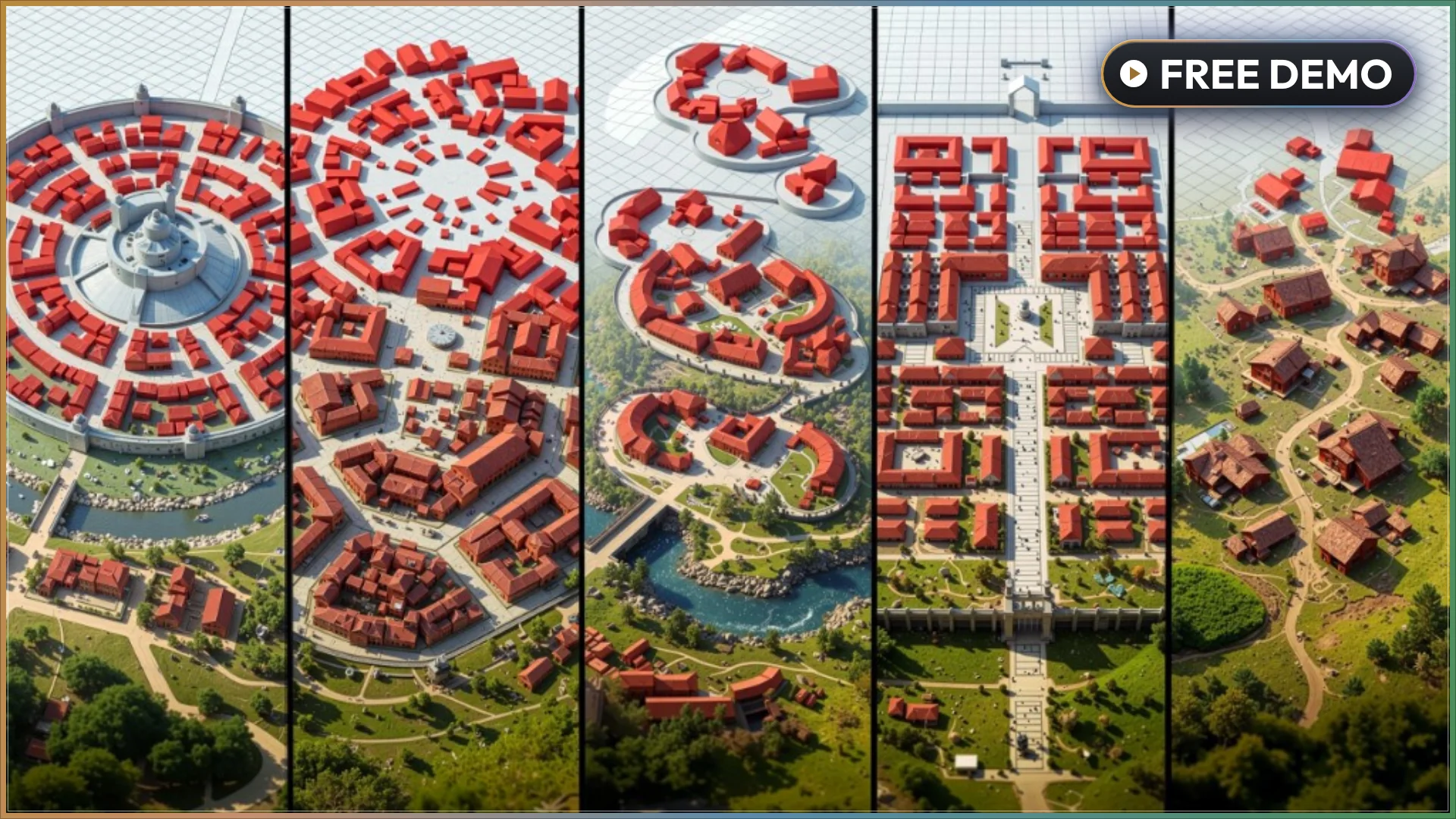
The first choice in OmniScape is the pattern that will shape the settlement. Five named generation patterns each carry their own visual signature:
Radial Creates concentric rings around a center, which suits capitals, temples, and fortified cores.
Voronoi Forms organic district shapes that naturally read as old-city neighbourhoods.
Perlin Uses soft, noise-driven sprawl for villages and frontier settlements.
Axial Generates grid-aligned blocks for modern or planned towns, with an optional parallel grid.
Organic Produces irregular, hand-placed-looking groupings for ruins, hamlets, and camps.
Above the pattern level, macro districts and semantic zones give each area a role rather than leaving roads and houses as a uniform texture. Residential, market, sacred, and civic zones shape a coherent quarter, and the layout preview shows these tags before you commit. This is how a generated village can feel like it grew around a common, while a fortified core feels deliberately planned.
Start With Atlas When the City Has a Reference
Not every city needs to be invented. Atlas mode imports real places as the starting skeleton. You can search by name, load an offline.osm or.geojson file, or trace an existing screenshot into road geometry. That file becomes the base layout. Then three fidelity choices come into play: loose inspiration, guided blend, or faithful match. The generator can also scale the result to real-world size or fit it inside the settlement bounds you want to use.
This bridge between existing geography and procedural generation helps when a project needs a believable street network without hand-modeling every block.
Road Hierarchies and Perimeter Walls With a Concave Hull
Roads in OmniScape are generated, not painted. The system builds a hierarchical network with three tiers: arterial, collector, and local roads. Each tier has its own width, mesh, and terrain handling, with Level, Follow, and Contour as terrain options. The network also gets automatic intersections, junction cleanup, and clean alignment to building edges. Because the network is generated from the seed, a single seed change rebuilds the entire road structure in seconds, making experimentation cheap.
Walls follow the same logic of adapting to real geometry. A perimeter wall uses a concave hull to hug irregular site shapes instead of cutting a simple ring. Full or partial coverage is possible, and automatic gate placement, corner pillars, and optional towers at the sharpest bends are all driven by toggles. One toggle shifts the same system from a medieval keep to a ruined border outpost.
Buildings, Edges, and the Ambient Story
Individual buildings are controlled through three size tiers: Small, Medium, and Large. Density, ratio, rotation, and footprint are all adjustable per tier. Placement splits into two modes. Cluster produces tight, district-like groupings, while Roadside aligns structures to the road network. Edge Density then fills gaps between clusters and streets so the sprawl feels believable, and mixing tiers inside one layout adds visual variety without any manual placement.
Around the built environment, flora layers scatter vegetation, rock, and debris based on density and proximity rules bound to the buildings and zones. Volumes and Anchors refine the composition further: they can carve out plazas, exclude specific zones, force a key structure, or pin a landmark exactly where the shot wants it. If the scene calls for a living world, optional ambient fauna, audio zones, landscape paint bake, and PCG hand-off export are all available from the same panel.
Presets, Determinism, and the Production Backbone
OmniScape's presets are not one-click magic that replaces asset lists. Twelve built-in archetypes represent broad settlement types — citadels, walled towns, planned grids, hamlets, coastal villages, trading posts, ridge settlements, ruins, and more. You can save any configuration and reapply it across projects, with presets storing numbers and toggles rather than mesh lists. This keeps a look reusable even when the art assets change.
Underneath, output auto-batches into Hierarchical Instanced Static Meshes (HISMs), so cinematic-scale scenes stay manageable. The generator is authority-aware for runtime generation, exposes a full Blueprint API for custom pipelines, and ships one codebase that supports UE 5.5, 5.6, 5.7, and 5.8.
A Support Model That Understands Shot Deadlines
The developer behind OmniScape is a working cinematic artist, not a detached team. An active Discord, a searchable user guide, and fast responses on issues support the tool once it is in a project. For a cinematic artist who needs a settlement for a shot, that removes the six-week learning curve. For virtual production, it supplies reproducible, deterministic environments. For an indie studio or solo creator, it delivers the scale they need without enterprise complexity — and the first generated city already looks like it was meant to be in frame.
 Procedural Systems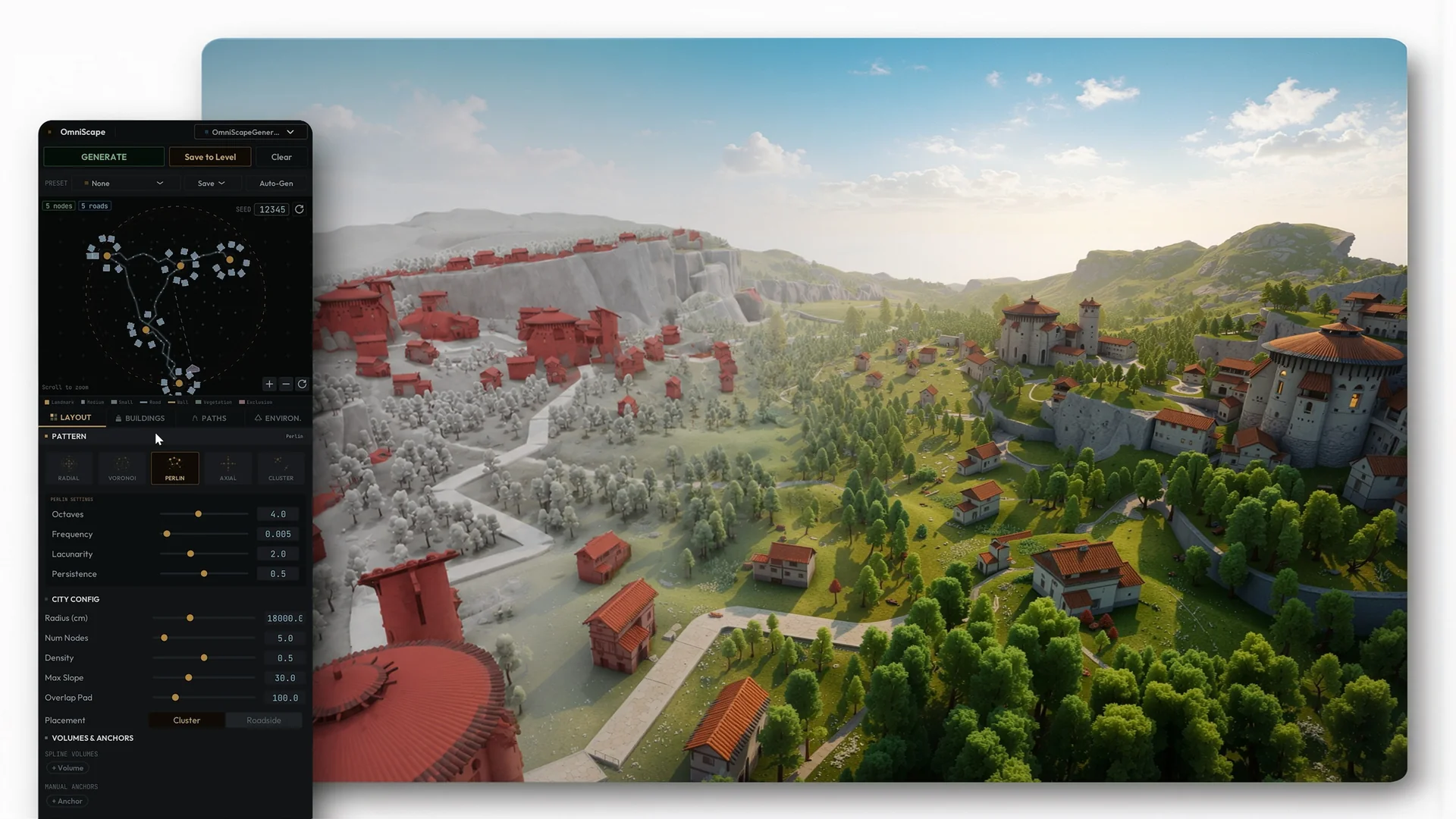
 Procedural Systems
 Procedural Systems
 Procedural Systems