"e2bfa951a54f5cbd"{"id":"1002151","slug":"post-process-toolkit","title":"Post Process Toolkit","category":"Art \u0026 Traditional","engine":"4.20+,5.0+","assetVersion":"","engineVersion":"Engine Version: 4.20+,5.0+","tag":"Art \u0026 Traditional","accent":"blue","visual":"mech","summary":"Post Process Toolkit delivers material functions to debug, adjust, and present post process screen effects, water shaders, and celshading in real-time.","platform":"Unreal Engine","publishedAt":"2026-10-29T09:55:20.482Z","updatedAt":"2026-10-29T09:55:20.482Z","sourceNotes":[],"fileContents":[],"compatibility":["Unreal Engine","Engine Version: 4.20+,5.0+"],"featuredImage":{"alt":"Post Process Toolkit","src":"/wp-content/uploads/published/2026/10/5967e5b73685-b3006a2b-78fa-4de3-98af-b168dfa1c1cb-e05e0ebd34.webp"},"hasDownloadLink":true,"downloads":0,"terms":[{"taxonomy":"category","slug":"art-and-traditional","name":"Art \u0026 Traditional"}],"galleryImages":[{"src":"/wp-content/uploads/published/2026/10/5519bbdaf1ae-83c25fe6-d4dc-41aa-b99c-31de620016e1-50e2553165.webp","alt":"Post Process Toolkit"},{"src":"/wp-content/uploads/published/2026/10/bce82c90a51e-d758608f-d1b7-4d56-9a8f-ae7e3e922933-57b710f555.webp","alt":"Post Process Toolkit"},{"src":"/wp-content/uploads/published/2026/10/1bc5d2959ea3-636626d4-d095-4873-81f4-1356e590889f-b9f9e81d5c.webp","alt":"Post Process Toolkit"},{"src":"/wp-content/uploads/published/2026/10/2d7f2622ddf3-11cee6cc-3769-47a2-88bb-ac9dff371596-dd2f2f661e.webp","alt":"Post Process Toolkit"},{"src":"/wp-content/uploads/published/2026/10/c0ce0cc5e671-8dde32d1-e6b4-45af-9019-40c9c500ad84-354570eca2.webp","alt":"Post Process Toolkit"},{"src":"/wp-content/uploads/published/2026/10/973cc0e0b6aa-545c025e-c5de-47a8-8bd5-d6f09685f35a-8ab80c1c0c.webp","alt":"Post Process Toolkit"}],"accessPanel":{"kind":"resource","title":"Download this resource","eyebrow":"Free Download","message":"Log in or create a free account to start your download.","fileName":"Content.7z","safetyNote":"Resources are manually reviewed before listing to improve quality and reduce obvious risks.","actionLabel":"Download Free","resourceType":"Resource archive"},"contentHtml":"\u003ch2\u003eLive Material Functions for Real-Time Post Process Debugging\u003c/h2\u003e\u003cp\u003eWorking on post-processing passes often creates friction when visual errors emerge deep inside an active render pipeline. Post Process Toolkit approaches this challenge through a collection of modular material functions built to assist with debugging, live parameter adjustments, and visual presentation directly in the viewport during development.\u003c/p\u003e\u003cp\u003eInstead of relying on static inspections or cumbersome material recompiles to diagnose visual artifacts, developers can isolate specific screen-space calculations in real time. Material functions serve as structured building blocks within shader networks, allowing users to tap into intermediate passes, verify math transforms, and inspect data flow across the final frame. This live feedback loop makes it significantly easier to diagnose where color shifts, depth masking, or screen coordinate discrepancies occur before passes get composited into the final scene output.\u003c/p\u003e\u003cp\u003eAdjusting values dynamically in an active scene allows technical artists to understand how post-processing behaves across fluctuating lighting conditions. Because the toolkit supports live tuning, developers can push and pull variables such as thresholds, edge densities, or color offsets while moving through the level, observing immediate updates without interrupting the editor workflow.\u003c/p\u003e\u003ch2\u003eBalancing Celshading, Outline Detection, and Realistic Screen Passes\u003c/h2\u003e\u003cp\u003ePost-processing requirements differ wildly depending on whether a project pursues photorealism or an expressive, non-photorealistic aesthetic. Post Process Toolkit accounts for both ends of the visual spectrum, incorporating material logic suited for realistic screen enhancements as well as stylization techniques such as celshading and edge outlines.\u003c/p\u003e\u003cp\u003eStylized pipelines frequently rely on post-process materials to handle color banding and structural ink lines. Implementing celshading through post-processing requires clean light extraction, quantization of surface luminance, and controlled ramp mapping across the rendered buffer. When paired with outline functions, the toolkit helps isolate geometry silhouettes, normal discontinuities, or depth splits on the screen. Being able to debug and fine-tune these line widths and edge sensitivities in real time prevents common celshading issues such as edge swimming, over-thick silhouettes on distant objects, or noisy internal outlines on dense geometry.\u003c/p\u003e\u003cp\u003eFor realistic productions, the focus shifts toward subtle screen treatments that do not break visual immersion. Material functions designed to adjust full-screen tone, depth perception, and spatial contrast allow artists to preserve fine lighting gradients. Tuning these screen shaders interactively ensures that realistic adjustments enhance the scene without crushing shadows or blowing out highlights across high dynamic range environments.\u003c/p\u003e\u003ch2\u003eWater, Underwater, and Atmospheric Mood Shader Applications\u003c/h2\u003e\u003cp\u003eSurface water and sub-surface immersion present distinct challenges for screen-space shaders. The toolkit addresses both water and underwater effects, giving creators the necessary material functions to handle distortion, absorption, and environmental color shifts at the camera level.\u003c/p\u003e\u003cp\u003eSimulating an underwater viewpoint requires real-time screen displacement, caustic balance, depth-based murkiness, and color fading that responds naturally to camera distance. Because these effects sit over the entire rendered frame, setting up appropriate masks and blending boundaries is critical. By tuning underwater material functions in real time, artists can calibrate refraction scale, light falloff, and particulate haziness to match the exact density needed for shallow pools or deep open water.\u003c/p\u003e\u003cp\u003eAtmospheric and seasonal aesthetics, such as dark or Halloween-themed sequences, similarly benefit from targeted post-process material control. Evoking suspense or heightened mood often involves deliberate saturation removal, targeted color tinting, vignetting, or high-contrast screen filtering. Post Process Toolkit provides the material infrastructure to test and balance these thematic looks on live scenes, ensuring that stylized horror moods or high-tension atmospheric effects remain readable during active gameplay.\u003c/p\u003e\u003ch2\u003eComponent Timeline Compatibility and Real-Time Presentation\u003c/h2\u003e\u003cp\u003eEvaluating visual fidelity is only half the battle; presenting post-process transitions clearly is equally vital during production reviews. Post Process Toolkit supports presentation workflows by making it straightforward to demonstrate looks, stage side-by-side visual comparisons, and showcase shader behaviors in real-time environments.\u003c/p\u003e\u003cp\u003eWith compatibility for Component Timeline setups, the toolkit integrates cleanly into animated or time-sequenced visual events. Driving post-process material functions through a timeline enables smooth transitions between disparate visual states, such as a player diving below a water line, entering a stylized cel-shaded zone, or walking into a high-contrast horror area. Timeline coordination allows properties to interpolate predictably, giving technical artists precise control over how rapidly screen outlines appear, how underwater distortion ramps up, or how ambient screen values morph during gameplay triggers.\u003c/p\u003e\u003cp\u003eThis structured relationship between material functions and timeline components eliminates the need for messy hard-coded transitions, keeping post-process presentation modular, clean, and easy to inspect across every phase of level and sequence development.\u003c/p\u003e\n\n\u003ch2\u003eRelated Resources Worth Checking\u003c/h2\u003e\n\u003cul\u003e\n\u003cli\u003e\u003ca href=\"https://3dcghub.com/cartoon-cel-shader/\" title=\"Cartoon Cel Shader\"\u003eCartoon Cel Shader\u003c/a\u003e\u003c/li\u003e\n\u003cli\u003e\u003ca href=\"https://3dcghub.com/shadersource-procedural-water-foliage-tool/\" title=\"SHADERSOURCE - Procedural Water Foliage Tool\"\u003eSHADERSOURCE - Procedural Water Foliage Tool\u003c/a\u003e\u003c/li\u003e\n\u003cli\u003e\u003ca href=\"https://3dcghub.com/postfx-globalscan/\" title=\"PostFX GlobalScan\"\u003ePostFX GlobalScan\u003c/a\u003e\u003c/li\u003e\n\u003cli\u003e\u003ca href=\"https://3dcghub.com/post-process-pro-pack/\" title=\"Post Process Pro Pack\"\u003ePost Process Pro Pack\u003c/a\u003e\u003c/li\u003e\n\u003cli\u003e\u003ca href=\"https://3dcghub.com/ascii-post-process-material/\" title=\"ASCII Post Process Material\"\u003eASCII Post Process Material\u003c/a\u003e\u003c/li\u003e\n\u003c/ul\u003e","contentTextLength":5715,"navigation":{"current":82,"total":4158,"previous":{"id":"1002152","slug":"post-soviet-pipes-and-vents","title":"Post Soviet Pipes and Vents","category":"Components","platform":"Unreal Engine","updatedAt":"2026-10-29T09:55:59.627Z"},"next":{"id":"1002150","slug":"post-apocalypse-girl","title":"Post Apocalypse Girl","category":"Characters \u0026 Creatures","platform":"Unreal Engine","updatedAt":"2026-10-29T09:54:41.031Z"}},"relatedResources":[{"id":"12238","slug":"cartoon-cel-shader","title":"Cartoon Cel Shader","category":"Art \u0026 Traditional","engine":"5.2+","assetVersion":"Engine version: 5.2+","engineVersion":"4.23","tag":"Art \u0026 Traditional","accent":"blue","visual":"luts","summary":"Enhance your project with the Cartoon Cel Shader, a unique material solution that avoids post-process overhead. This package includes mesh outlines and detailed environment assets like a forest and mermaid.","platform":"Unreal Engine","publishedAt":"2026-03-07T12:02:30.000Z","updatedAt":"2026-04-19T15:48:01.000Z","sourceNotes":[],"fileContents":[],"compatibility":["Unreal Engine","Engine version: 5.2+"],"featuredImage":{"alt":"Cartoon Cel Shader","src":"https://3dcghub.com/wp-content/uploads/2026/03/54ca1402-ef4f-4a96-a176-fe0373f0c0ae.webp"},"hasDownloadLink":true,"downloads":4},{"id":"11554","slug":"shadersource-procedural-water-foliage-tool","title":"SHADERSOURCE - Procedural Water Foliage Tool","category":"Procedural Systems","engine":"4.27,5.0+","assetVersion":"Engine version: 4.27,5.0+","engineVersion":"4.19","tag":"Procedural Systems","accent":"blue","visual":"character","summary":"Streamline your environment design with the SHADERSOURCE - Procedural Water Foliage Tool. This asset pack provides automated blueprints and PBR materials for realistic aquatic scenes.","platform":"Unreal Engine","publishedAt":"2026-03-05T17:47:13.000Z","updatedAt":"2026-04-19T15:48:10.000Z","sourceNotes":[],"fileContents":[],"compatibility":["Unreal Engine","Engine version: 4.27,5.0+"],"featuredImage":{"alt":"SHADERSOURCE - Procedural Water Foliage Tool","src":"https://3dcghub.com/wp-content/uploads/2026/03/942d40d2-4f9c-4d28-bb9a-6eca0ba332ae.webp"},"hasDownloadLink":true,"downloads":0},{"id":"1000660","slug":"postfx-globalscan","title":"PostFX GlobalScan","category":"Art \u0026 Traditional","engine":"4.26+,5.0+","assetVersion":"","engineVersion":"Engine Version: 4.26+,5.0+","tag":"Art \u0026 Traditional","accent":"blue","visual":"mech","summary":"PostFX GlobalScan is a post-process effect asset built around a glitch and TV scan aesthetic, supported by a demo walkthrough and tagged as a visual post effect","platform":"Unreal Engine","publishedAt":"2026-07-21T20:38:01.703Z","updatedAt":"2026-07-21T20:38:01.703Z","sourceNotes":[],"fileContents":[],"compatibility":["Unreal Engine","Engine Version: 4.26+,5.0+"],"featuredImage":{"alt":"PostFX GlobalScan","src":"/wp-content/uploads/published/2026/07/15072696fc3e-f7b91e8d-986b-4a4b-8d82-a9129b74fc43-fe30a4c72a.webp"},"hasDownloadLink":true,"downloads":0}]}
Art & Traditional
Post Process Toolkit
Post Process Toolkit delivers material functions to debug, adjust, and present post process screen effects, water shaders, and celshading in real-time.
Live Material Functions for Real-Time Post Process Debugging
Working on post-processing passes often creates friction when visual errors emerge deep inside an active render pipeline. Post Process Toolkit approaches this challenge through a collection of modular material functions built to assist with debugging, live parameter adjustments, and visual presentation directly in the viewport during development.
Instead of relying on static inspections or cumbersome material recompiles to diagnose visual artifacts, developers can isolate specific screen-space calculations in real time. Material functions serve as structured building blocks within shader networks, allowing users to tap into intermediate passes, verify math transforms, and inspect data flow across the final frame. This live feedback loop makes it significantly easier to diagnose where color shifts, depth masking, or screen coordinate discrepancies occur before passes get composited into the final scene output.
Adjusting values dynamically in an active scene allows technical artists to understand how post-processing behaves across fluctuating lighting conditions. Because the toolkit supports live tuning, developers can push and pull variables such as thresholds, edge densities, or color offsets while moving through the level, observing immediate updates without interrupting the editor workflow.
Balancing Celshading, Outline Detection, and Realistic Screen Passes
Post-processing requirements differ wildly depending on whether a project pursues photorealism or an expressive, non-photorealistic aesthetic. Post Process Toolkit accounts for both ends of the visual spectrum, incorporating material logic suited for realistic screen enhancements as well as stylization techniques such as celshading and edge outlines.
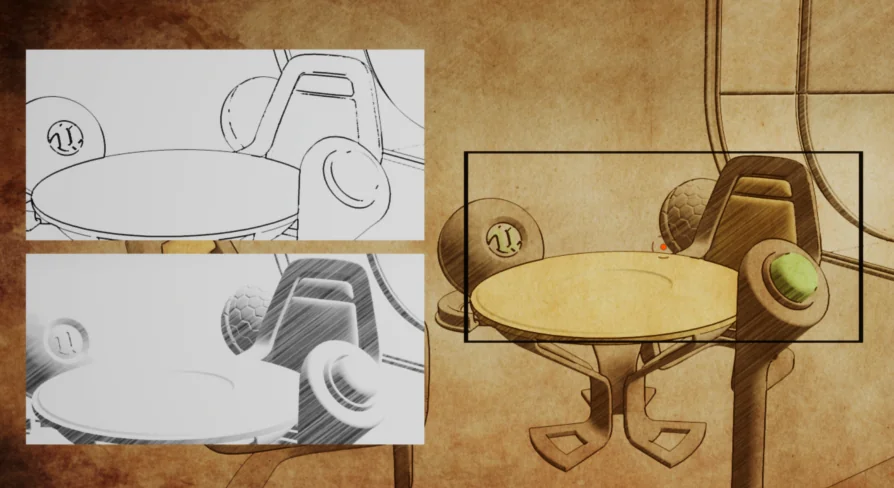
Stylized pipelines frequently rely on post-process materials to handle color banding and structural ink lines. Implementing celshading through post-processing requires clean light extraction, quantization of surface luminance, and controlled ramp mapping across the rendered buffer. When paired with outline functions, the toolkit helps isolate geometry silhouettes, normal discontinuities, or depth splits on the screen. Being able to debug and fine-tune these line widths and edge sensitivities in real time prevents common celshading issues such as edge swimming, over-thick silhouettes on distant objects, or noisy internal outlines on dense geometry.
For realistic productions, the focus shifts toward subtle screen treatments that do not break visual immersion. Material functions designed to adjust full-screen tone, depth perception, and spatial contrast allow artists to preserve fine lighting gradients. Tuning these screen shaders interactively ensures that realistic adjustments enhance the scene without crushing shadows or blowing out highlights across high dynamic range environments.
Water, Underwater, and Atmospheric Mood Shader Applications
Surface water and sub-surface immersion present distinct challenges for screen-space shaders. The toolkit addresses both water and underwater effects, giving creators the necessary material functions to handle distortion, absorption, and environmental color shifts at the camera level.
Simulating an underwater viewpoint requires real-time screen displacement, caustic balance, depth-based murkiness, and color fading that responds naturally to camera distance. Because these effects sit over the entire rendered frame, setting up appropriate masks and blending boundaries is critical. By tuning underwater material functions in real time, artists can calibrate refraction scale, light falloff, and particulate haziness to match the exact density needed for shallow pools or deep open water.
Atmospheric and seasonal aesthetics, such as dark or Halloween-themed sequences, similarly benefit from targeted post-process material control. Evoking suspense or heightened mood often involves deliberate saturation removal, targeted color tinting, vignetting, or high-contrast screen filtering. Post Process Toolkit provides the material infrastructure to test and balance these thematic looks on live scenes, ensuring that stylized horror moods or high-tension atmospheric effects remain readable during active gameplay.
Component Timeline Compatibility and Real-Time Presentation
Evaluating visual fidelity is only half the battle; presenting post-process transitions clearly is equally vital during production reviews. Post Process Toolkit supports presentation workflows by making it straightforward to demonstrate looks, stage side-by-side visual comparisons, and showcase shader behaviors in real-time environments.
With compatibility for Component Timeline setups, the toolkit integrates cleanly into animated or time-sequenced visual events. Driving post-process material functions through a timeline enables smooth transitions between disparate visual states, such as a player diving below a water line, entering a stylized cel-shaded zone, or walking into a high-contrast horror area. Timeline coordination allows properties to interpolate predictably, giving technical artists precise control over how rapidly screen outlines appear, how underwater distortion ramps up, or how ambient screen values morph during gameplay triggers.
This structured relationship between material functions and timeline components eliminates the need for messy hard-coded transitions, keeping post-process presentation modular, clean, and easy to inspect across every phase of level and sequence development.
 Art & Traditional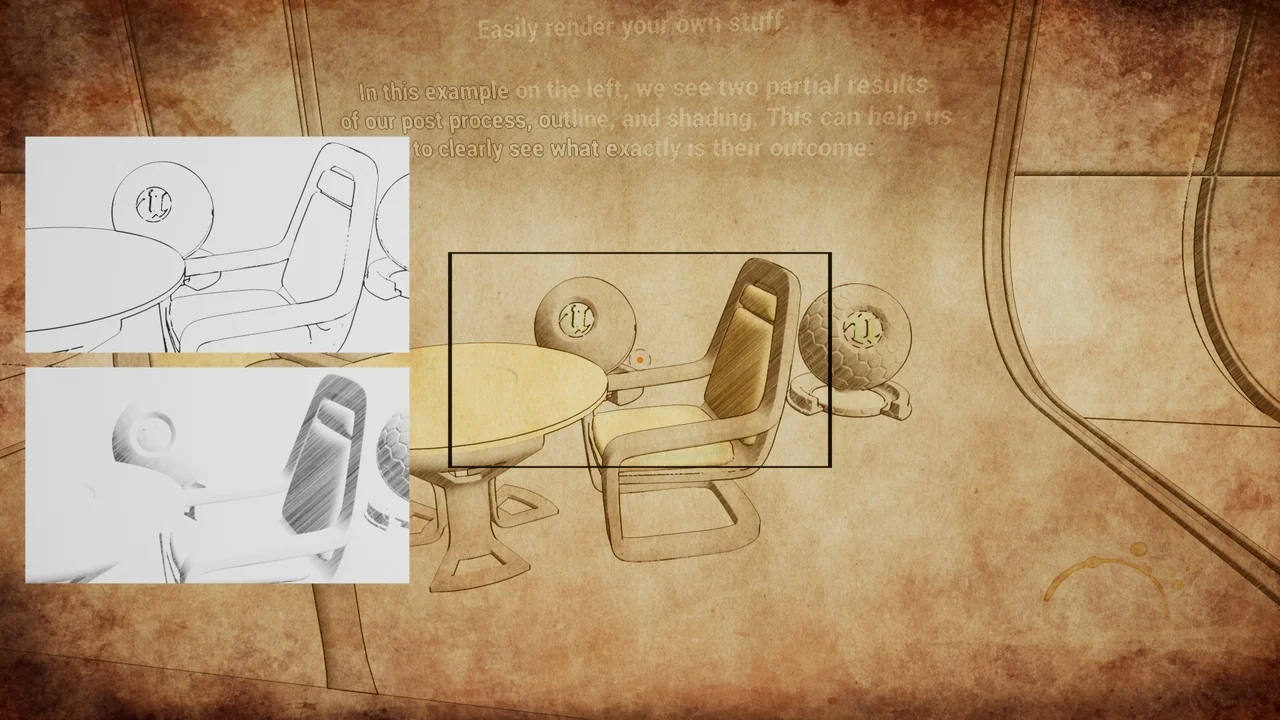
 Art & Traditional
 Procedural Systems
 Art & Traditional