"c14ff6bd758dadb1"{"id":"1000660","slug":"postfx-globalscan","title":"PostFX GlobalScan","category":"Art \u0026 Traditional","engine":"4.26+,5.0+","assetVersion":"","engineVersion":"Engine Version: 4.26+,5.0+","tag":"Art \u0026 Traditional","accent":"blue","visual":"mech","summary":"PostFX GlobalScan is a post-process effect asset built around a glitch and TV scan aesthetic, supported by a demo walkthrough and tagged as a visual post effect","platform":"Unreal Engine","publishedAt":"2026-07-21T20:38:01.703Z","updatedAt":"2026-07-21T20:38:01.703Z","sourceNotes":[],"fileContents":[],"compatibility":["Unreal Engine","Engine Version: 4.26+,5.0+"],"featuredImage":{"alt":"PostFX GlobalScan","src":"/wp-content/uploads/published/2026/07/15072696fc3e-f7b91e8d-986b-4a4b-8d82-a9129b74fc43-fe30a4c72a.webp"},"hasDownloadLink":true,"downloads":0,"terms":[{"taxonomy":"category","slug":"art-and-traditional","name":"Art \u0026 Traditional"}],"galleryImages":[{"src":"/wp-content/uploads/published/2026/07/3ea8d33e17fd-5f2f61a7-52d1-4516-84b6-3df1e065a307-44d94193b4.webp","alt":"PostFX GlobalScan"},{"src":"/wp-content/uploads/published/2026/07/6ea482030a97-ad46f26f-0128-4cf1-b92f-b9073d161d9e-9f7f1cf9b7.webp","alt":"PostFX GlobalScan"},{"src":"/wp-content/uploads/published/2026/07/49f9b64f74ed-abddb005-2b16-479b-83ce-29b5d5c8a39b-de2345c962.webp","alt":"PostFX GlobalScan"},{"src":"/wp-content/uploads/published/2026/07/1e0bb9413519-a309f859-2ae4-442c-adea-97bf7273ff5b-e7cf79dd65.webp","alt":"PostFX GlobalScan"},{"src":"/wp-content/uploads/published/2026/07/5ac85076c34c-5751f891-6010-4771-9c11-ac7d1dae271d-d440397666.webp","alt":"PostFX GlobalScan"},{"src":"/wp-content/uploads/published/2026/07/712957753801-906ffc15-1f2a-4d79-b132-65156be9c278-a90338ea31.webp","alt":"PostFX GlobalScan"},{"src":"/wp-content/uploads/published/2026/07/dd4d0bf9792d-c1eba91c-ca2d-4bed-a258-9970d246c21c-d0297025ad.webp","alt":"PostFX GlobalScan"},{"src":"/wp-content/uploads/published/2026/07/d6d1e88b5339-ea4b3990-e760-4ecd-b15d-27e4c843f5c8-e88e87607f.webp","alt":"PostFX GlobalScan"},{"src":"/wp-content/uploads/published/2026/07/0a4202fb4275-4f37d713-3a59-4868-8abf-835084ce6478-62299590f4.webp","alt":"PostFX GlobalScan"},{"src":"/wp-content/uploads/published/2026/07/350d160ed447-3cdf5208-ad5e-4c85-8358-3e3c83edb776-bf81241c62.webp","alt":"PostFX GlobalScan"}],"accessPanel":{"kind":"resource","title":"Download this resource","eyebrow":"Free Download","message":"Log in or create a free account to start your download.","fileName":"Content.7z","safetyNote":"Resources are manually reviewed before listing to improve quality and reduce obvious risks.","actionLabel":"Download Free","resourceType":"Resource archive"},"contentHtml":"\u003cp\u003eScenes that call for a distorted broadcast look, a glitching monitor, or a sweeping scan line overlay are the kind of projects where PostFX GlobalScan finds its natural fit. The package sits in the post-process layer of a render pipeline, which means the effect is applied after the core image is assembled rather than being baked into individual meshes or materials. That positioning makes it useful for situational moments, cutaway shots, camera feeds, or any visual sequence where the frame itself needs to feel unstable or electronically compromised.\u003c/p\u003e\n\n\u003ch2\u003eWhat PostFX GlobalScan Brings to a Scene\u003c/h2\u003e\n\u003cp\u003eThe core of the package is a post-process effect based on a TV glitch aesthetic. Rather than supplying standalone 3D models or surface textures, it operates on the final rendered image, modifying what the camera already sees. The name GlobalScan points to a screen-wide treatment, suggesting the effect covers the full frame rather than targeting isolated objects. Tags attached to the package, Process, Post, and Effect, reinforce that it lives in the post stage of the rendering workflow.\u003c/p\u003e\n\u003cp\u003eEditor notes tie the release to a TV Effect Glitch compatibility profile. That places it squarely in the territory of broadcast interference, scan distortion, and electronic breakage. A creator working on a surveillance sequence, a corrupted transmission cutscene, or a retro CRT display would find this kind of overlay directly applicable.\u003c/p\u003e\n\n\u003ch2\u003eDemonstrated Usage and Samplers\u003c/h2\u003e\n\u003cp\u003eA demo video accompanies the package and serves as the primary guide for how to apply and drive the effect. The walkthrough covers both the general approach and each individual sampler included in the release. Samplers here function as the tunable inputs that feed the post-process material, letting a developer adjust the look of the scan or glitch without rebuilding the effect from scratch.\u003c/p\u003e\n\n\u003ch3\u003eLearning the Workflow from the Demo\u003c/h3\u003e\n\u003cp\u003eBecause the demo explicitly demonstrates the workflow, a creator does not have to guess at the intended setup. Watching the video reveals how the effect is wired into a scene and how the included samplers are meant to be adjusted. For anyone unfamiliar with post-process pipelines or with this specific effect structure, that recorded demonstration lowers the barrier to getting a usable result quickly.\u003c/p\u003e\n\u003cp\u003eThe same video isolates and labels each sampler, which matters when the goal is precise control over the distortion. A creator can pause on the relevant segment, match the settings shown, and then push the values in a direction that fits the scene.\u003c/p\u003e\n\n\u003ch2\u003eBuilding Visually Attractive Results Without Complex Setup\u003c/h2\u003e\n\u003cp\u003eThe stated goal of the package is to provide an easy path to a visually attractive result. Ease of use is treated as a core attribute rather than an afterthought. The effect is intended to be straightforward to apply, and the visual payoff is meant to be immediate. That design intent suits projects where iteration speed matters, such as prototyping a visual sequence, testing how a glitch overlay reads against different lighting conditions, or rapidly producing a stylized broadcast feed for a narrative beat.\u003c/p\u003e\n\u003cp\u003eA compact, ready-to-deploy post effect is also useful when a project needs a consistent distortion language across multiple shots. Applying the same GlobalScan treatment to several camera angles keeps the glitch behavior uniform, which helps when the story calls for a stable, recognizable electronic fault rather than a one-off flourish.\u003c/p\u003e\n\n\u003ch2\u003eWhere PostFX GlobalScan Fits a Production Pipeline\u003c/h2\u003e\n\u003cp\u003eThe package is tailored for moments where the image itself needs to feel compromised. A security camera viewpoint that drops frames, a scene transition styled as a channel change, a sci-fi sequence where a monitor feed rolls and distorts, or a retro interface meant to evoke analog television, all align with what the effect is built to deliver.\u003c/p\u003e\n\u003cp\u003eBecause the treatment is global, it does not require per-object setup. A developer can apply it to a camera or post-process volume and let the full frame pick up the scan and glitch properties. That makes it practical for scenes where many elements on screen should all share the same compromised signal character.\u003c/p\u003e\n\n\u003ch2\u003eWho Benefits Most from This Package\u003c/h2\u003e\n\u003cp\u003eCreators who need a fast, demonstrated route to a TV glitch post-process will get the most out of PostFX GlobalScan. The included demo video, the exposed samplers, and the focus on ease of use mean the package is aimed at developers who want a controllable distortion overlay without constructing a post-process material from scratch. For anyone working on broadcast, surveillance, retro screen, or electronic-interference visuals, this effect provides a ready starting point that can be tuned to fit the specific tone of the scene.\u003c/p\u003e\n\n\u003ch2\u003eContinue Browsing Similar Packs\u003c/h2\u003e\n\u003cul\u003e\n\u003cli\u003e\u003ca href=\"https://3dcghub.com/speed-lines/\" title=\"Speed Lines\"\u003eSpeed Lines\u003c/a\u003e\u003c/li\u003e\n\u003cli\u003e\u003ca href=\"https://3dcghub.com/parallax-card-material/\" title=\"Parallax Card Material\"\u003eParallax Card Material\u003c/a\u003e\u003c/li\u003e\n\u003cli\u003e\u003ca href=\"https://3dcghub.com/cartoon-cel-shader/\" title=\"Cartoon Cel Shader\"\u003eCartoon Cel Shader\u003c/a\u003e\u003c/li\u003e\n\u003cli\u003e\u003ca href=\"https://3dcghub.com/modern-art-museum-environment-showroom-museum-art-exhibition-showroom/\" title=\"Modern Art Museum Environment ( Showroom Museum Art Exhibition Showroom )\"\u003eModern Art Museum Environment ( Showroom Museum Art Exhibition Showroom )\u003c/a\u003e\u003c/li\u003e\n\u003cli\u003e\u003ca href=\"https://3dcghub.com/2d-pixel-scene-3/\" title=\"2D Pixel Scene 3\"\u003e2D Pixel Scene 3\u003c/a\u003e\u003c/li\u003e\n\u003c/ul\u003e","contentTextLength":4911,"navigation":{"current":1200,"total":3719,"previous":{"id":"1000661","slug":"procedural-animation-framework","title":"Procedural Animation Framework","category":"Locomotion / Gaits","platform":"Unreal Engine","updatedAt":"2026-07-21T20:41:27.608Z"},"next":{"id":"1000633","slug":"medieval-furniture-props-gothic-props-victorian-props-medieval-furniture","title":"Medieval Furniture Props (Gothic Props, Victorian Props, Medieval, Furniture)","category":"Lighting","platform":"Unreal Engine","updatedAt":"2026-07-21T20:37:19.504Z"}},"relatedResources":[{"id":"12250","slug":"parallax-card-material","title":"Parallax Card Material","category":"Art \u0026 Traditional","engine":"4.26+,5.0+","assetVersion":"Engine version: 4.26+,5.0+","engineVersion":"4.25","tag":"Art \u0026 Traditional","accent":"blue","visual":"luts","summary":"Transform flat illustrations into dynamic 3D visuals using the Parallax Card Material. This project includes a master material, five illustrated Tarot cards, and an optimized pipeline for developers.","platform":"Unreal Engine","publishedAt":"2026-03-07T12:03:09.000Z","updatedAt":"2026-04-19T15:48:01.000Z","sourceNotes":[],"fileContents":[],"compatibility":["Unreal Engine","Engine version: 4.26+,5.0+"],"featuredImage":{"alt":"Parallax Card Material","src":"https://3dcghub.com/wp-content/uploads/2026/03/890102b7-18bc-4d80-8936-e17c07325c50.webp"},"hasDownloadLink":true,"downloads":1},{"id":"12262","slug":"speed-lines","title":"Speed Lines","category":"Art \u0026 Traditional","engine":"4.26+,5.0+","assetVersion":"Engine version: 4.26+,5.0+","engineVersion":"4.19","tag":"Art \u0026 Traditional","accent":"blue","visual":"luts","summary":"Enhance your project with dynamic Speed Lines designed for high-speed action and stylized visuals. These texture-free materials offer deep customization for racing games and character intros.","platform":"Unreal Engine","publishedAt":"2026-03-07T12:05:33.000Z","updatedAt":"2026-04-19T15:48:00.000Z","sourceNotes":[],"fileContents":[],"compatibility":["Unreal Engine","Engine version: 4.26+,5.0+"],"featuredImage":{"alt":"Speed Lines","src":"https://3dcghub.com/wp-content/uploads/2026/03/10ef6bab-a151-4db4-94b9-f03d0ce42ccc.webp"},"hasDownloadLink":true,"downloads":1},{"id":"1001202","slug":"kcisa-korean-traditional-smart-materials-vol-2","title":"KCISA -Korean Traditional Smart Materials Vol.2","category":"Art \u0026 Traditional","engine":"5.0+","assetVersion":"","engineVersion":"Engine Version: 5.0+","tag":"Art \u0026 Traditional","accent":"blue","visual":"luts","summary":"Explore KCISA -Korean Traditional Smart Materials Vol.2, featuring traditional bricks, stones, wood, grass, and metals for Korean historical settings.","platform":"Unreal Engine","publishedAt":"2026-09-19T08:19:34.190Z","updatedAt":"2026-09-19T08:19:34.190Z","sourceNotes":[],"fileContents":[],"compatibility":["Unreal Engine","Engine Version: 5.0+"],"featuredImage":{"alt":"KCISA -Korean Traditional Smart Materials Vol.2","src":"/wp-content/uploads/published/2026/09/2c95566da559-303bf72f-bdf6-4425-b9e1-4102c775e7fd-75f405a23b.webp"},"hasDownloadLink":true,"downloads":1}]}
Art & Traditional
PostFX GlobalScan
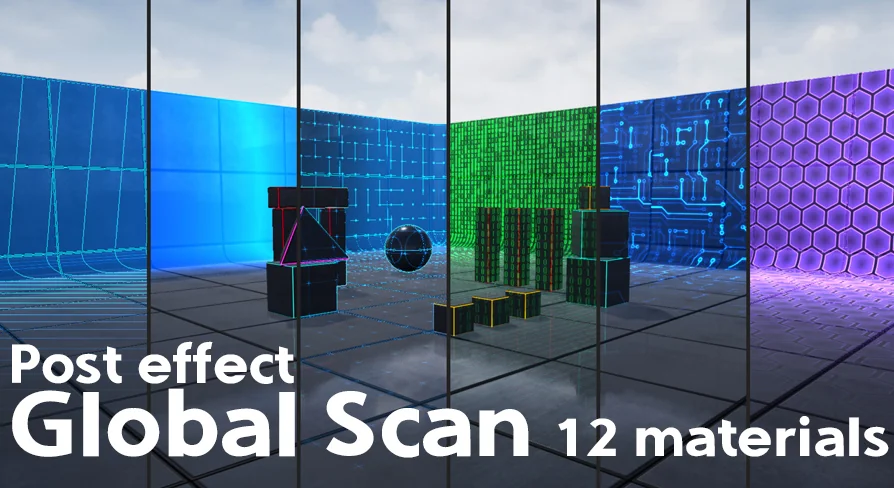
PostFX GlobalScan is a post-process effect asset built around a glitch and TV scan aesthetic, supported by a demo walkthrough and tagged as a visual post effect
Scenes that call for a distorted broadcast look, a glitching monitor, or a sweeping scan line overlay are the kind of projects where PostFX GlobalScan finds its natural fit. The package sits in the post-process layer of a render pipeline, which means the effect is applied after the core image is assembled rather than being baked into individual meshes or materials. That positioning makes it useful for situational moments, cutaway shots, camera feeds, or any visual sequence where the frame itself needs to feel unstable or electronically compromised.
What PostFX GlobalScan Brings to a Scene
The core of the package is a post-process effect based on a TV glitch aesthetic. Rather than supplying standalone 3D models or surface textures, it operates on the final rendered image, modifying what the camera already sees. The name GlobalScan points to a screen-wide treatment, suggesting the effect covers the full frame rather than targeting isolated objects. Tags attached to the package, Process, Post, and Effect, reinforce that it lives in the post stage of the rendering workflow.
Editor notes tie the release to a TV Effect Glitch compatibility profile. That places it squarely in the territory of broadcast interference, scan distortion, and electronic breakage. A creator working on a surveillance sequence, a corrupted transmission cutscene, or a retro CRT display would find this kind of overlay directly applicable.
Demonstrated Usage and Samplers
A demo video accompanies the package and serves as the primary guide for how to apply and drive the effect. The walkthrough covers both the general approach and each individual sampler included in the release. Samplers here function as the tunable inputs that feed the post-process material, letting a developer adjust the look of the scan or glitch without rebuilding the effect from scratch.
Learning the Workflow from the Demo
Because the demo explicitly demonstrates the workflow, a creator does not have to guess at the intended setup. Watching the video reveals how the effect is wired into a scene and how the included samplers are meant to be adjusted. For anyone unfamiliar with post-process pipelines or with this specific effect structure, that recorded demonstration lowers the barrier to getting a usable result quickly.
The same video isolates and labels each sampler, which matters when the goal is precise control over the distortion. A creator can pause on the relevant segment, match the settings shown, and then push the values in a direction that fits the scene.
Building Visually Attractive Results Without Complex Setup
The stated goal of the package is to provide an easy path to a visually attractive result. Ease of use is treated as a core attribute rather than an afterthought. The effect is intended to be straightforward to apply, and the visual payoff is meant to be immediate. That design intent suits projects where iteration speed matters, such as prototyping a visual sequence, testing how a glitch overlay reads against different lighting conditions, or rapidly producing a stylized broadcast feed for a narrative beat.
A compact, ready-to-deploy post effect is also useful when a project needs a consistent distortion language across multiple shots. Applying the same GlobalScan treatment to several camera angles keeps the glitch behavior uniform, which helps when the story calls for a stable, recognizable electronic fault rather than a one-off flourish.
Where PostFX GlobalScan Fits a Production Pipeline
The package is tailored for moments where the image itself needs to feel compromised. A security camera viewpoint that drops frames, a scene transition styled as a channel change, a sci-fi sequence where a monitor feed rolls and distorts, or a retro interface meant to evoke analog television, all align with what the effect is built to deliver.
Because the treatment is global, it does not require per-object setup. A developer can apply it to a camera or post-process volume and let the full frame pick up the scan and glitch properties. That makes it practical for scenes where many elements on screen should all share the same compromised signal character.
Who Benefits Most from This Package
Creators who need a fast, demonstrated route to a TV glitch post-process will get the most out of PostFX GlobalScan. The included demo video, the exposed samplers, and the focus on ease of use mean the package is aimed at developers who want a controllable distortion overlay without constructing a post-process material from scratch. For anyone working on broadcast, surveillance, retro screen, or electronic-interference visuals, this effect provides a ready starting point that can be tuned to fit the specific tone of the scene.
 Art & Traditional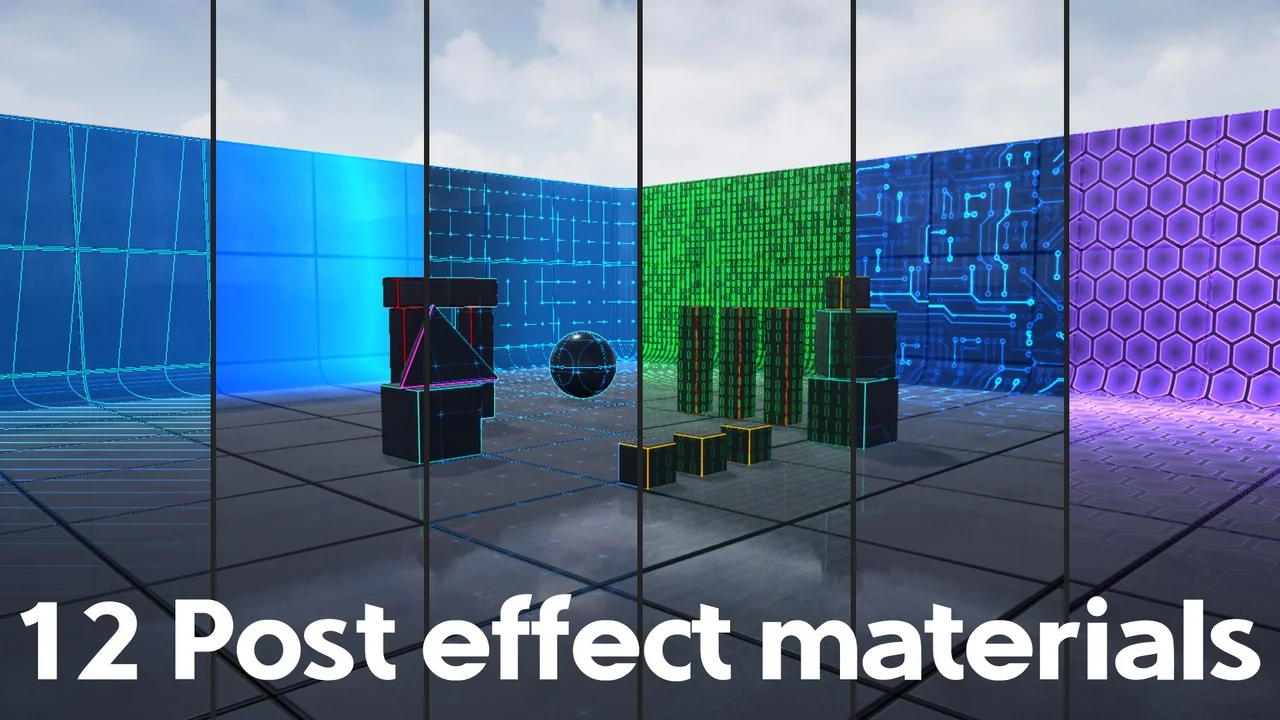
 Art & Traditional
 Art & Traditional
 Art & Traditional