"c14ff6bd758dadb1"{"id":"1000324","slug":"polyzones-plugin","title":"PolyZones Plugin","category":"Engine Tools","engine":"5.6 - 5.7","assetVersion":"Asset Version: 1.01","engineVersion":"Engine Version: 5.6 - 5.7","tag":"Engine Tools","accent":"blue","visual":"mech","summary":"The PolyZones Plugin for Unreal Engine 5 allows developers to create precise polygonal triggers and overlapping volumes for complex interior gameplay zones.","platform":"Unreal Engine","publishedAt":"2026-07-05T06:11:42.782Z","updatedAt":"2026-07-05T06:11:42.782Z","sourceNotes":[],"fileContents":[],"compatibility":["Unreal Engine","Asset Version: 1.01","Engine Version: 5.6 - 5.7"],"featuredImage":{"alt":"PolyZones Plugin","src":"/wp-content/uploads/published/2026/07/42b5b3aec4b1-a1e45126-9efe-4923-bd34-32ec2f28593c-7e3db62173.webp"},"hasDownloadLink":true,"downloads":0,"terms":[{"taxonomy":"category","slug":"engine-tools-tools-and-plugins","name":"Engine Tools"}],"galleryImages":[{"src":"/wp-content/uploads/published/2026/07/da48cfb70c80-61740044-03d6-4254-ad5a-e7b1e76a4b34-eb25a5caa1.webp","alt":"PolyZones Plugin"},{"src":"/wp-content/uploads/published/2026/07/ddc509f19d75-c58ab61f-dd12-424c-8581-968aa81fee26-29c2174ad9.webp","alt":"PolyZones Plugin"},{"src":"/wp-content/uploads/published/2026/07/1de0033fda47-0c5c65c6-737e-4780-a998-7c5c8cb19a7d-000e4c3bb3.webp","alt":"PolyZones Plugin"},{"src":"/wp-content/uploads/published/2026/07/296a61b1c973-1762f8ed-52e8-417e-9e28-f89ef0f81395-4b29a66c27.webp","alt":"PolyZones Plugin"}],"accessPanel":{"kind":"resource","title":"Download this resource","eyebrow":"Free Download","message":"Log in or create a free account to start your download.","fileName":"PolyZones Plugin.7z","safetyNote":"Resources are manually reviewed before listing to improve quality and reduce obvious risks.","actionLabel":"Download Free","resourceType":"Resource archive"},"contentHtml":"\u003ch2\u003eReplacing Primitive Volumes with Polygonal Triggers\u003c/h2\u003e\n\u003cp\u003eLevel design frequently demands spatial boundaries that conform to the exact architecture of a scene. While standard primitives like boxes, spheres, and capsules serve well for basic interactions, they often fail to capture the nuances of complex environments. The PolyZones Plugin addresses this structural gap within Unreal Engine 5 by allowing developers to construct triggers and overlapping volumes using complex polygonal shapes. Rather than relying on a rigid bounding box that might extend past a wall or fail to cover a tight corner, level designers can draw exact polygonal boundaries that match the specific contours of their terrain or architecture.\u003c/p\u003e\n\u003cp\u003eThe primary utility of these complex shapes emerges when developers need a traditional trigger or overlap event but require a significantly higher degree of precision. In standard workflow scenarios, attempting to map an irregularly shaped area using primitive volumes usually requires placing and scaling multiple rectangular triggers and grouping them together. This method fragments the overlapping logic across several different volumes. By utilizing a single polygonal zone instead, the environment retains a unified volume that accurately represents the intended interactive space.\u003c/p\u003e\n\u003ch2\u003eDefining Non-Rectangular Building Interiors\u003c/h2\u003e\n\u003cp\u003eA prominent application for this level of precision involves defining the interior spaces of non-rectangular buildings. Modern game environments are rarely confined to perfect grids. Structures often feature angled walls, curved facades, asymmetrical floor plans, and unique architectural extensions. When a building deviates from a standard rectangular footprint, mapping its interior with a standard box volume inevitably leads to overlap bleed. This bleed occurs when the trigger extends into the exterior street or misses a section of the room entirely.\u003c/p\u003e\n\u003cp\u003eBy implementing custom polygonal shapes, a developer can trace the exact interior perimeter of these complex structures. This setup ensures that the engine only registers an overlapping event when an entity physically crosses the actual threshold of the doorway or window, rather than an invisible, mathematically compromised boundary. Exact boundary control is critical for maintaining consistent gameplay states, ensuring that interior-specific logic only activates exactly where the designer intended.\u003c/p\u003e\n\u003ch3\u003ePrecision Overlapping for Custom Architecture\u003c/h3\u003e\n\u003cp\u003eIn the context of level design, a trigger acts as the unseen director of the player's experience. It dictates when events occur, relying entirely on the player's spatial relationship to the invisible volume. When a trigger is imprecise, the resulting gameplay event can feel disconnected from the environment. If an interior trigger extends too far outward, a player might prompt an indoor event while still standing outside. Utilizing polygonal shapes mitigates this issue by ensuring the trigger perfectly mirrors the environmental context, keeping interior and exterior gameplay zones strictly separated.\u003c/p\u003e\n\u003ch2\u003eBlueprint Integration and Custom Nodes\u003c/h2\u003e\n\u003cp\u003eTo bridge the gap between spatial design and gameplay logic, the system integrates directly into Unreal Engine 5’s visual scripting environment. Utilizing dedicated Blueprint functionality, the plugin provides custom nodes structured to process the specific calculations required for polygonal overlapping. Within the Blueprint editor, technical designers can route execution paths based on interactions with these unique shapes.\u003c/p\u003e\n\u003cp\u003eThe inclusion of custom nodes means that developers do not have to build complex mathematical workarounds to determine if an actor is inside a polygon. They can instead rely on the provided Blueprint framework to drive their logic. Whether a designer is setting up a trigger to spawn a group of adversaries, shift an environmental state, or update a quest objective, the custom nodes allow these events to be hooked seamlessly into the polygonal volumes.\u003c/p\u003e\n\u003ch2\u003eCollision Detection and Gameplay Zones\u003c/h2\u003e\n\u003cp\u003eBeyond static architectural definition, these precise volumes serve as foundational elements for dynamic gameplay zones. The mechanics associated with the plugin—handling gameplay, zones, volumes, and collision—highlight its role in managing how actors interact with the game world. A polygonal zone can define a specific capture area in a multiplayer match, a hazardous environmental region in a platformer, or an irregular detection radius for a stealth game. Because the volume conforms to a custom polygonal footprint, the gameplay mechanics tied to that area behave predictably, regardless of how complex the level geometry becomes.\u003c/p\u003e\n\u003cp\u003eAt its core, the plugin operates as a specialized tool for managing collision and overlapping detection. Processing collision for non-standard, custom shapes requires specific handling within the engine to ensure accuracy. The PolyZones system manages these overlapping calculations so that when a character or object enters the defined polygonal space, the engine registers the intersection reliably. Precision in collision detection ensures that overlapping events do not misfire due to the complex nature of the boundary, maintaining the integrity of the game's interactive systems.\u003c/p\u003e\n\u003ch3\u003eEvaluating the Demo Project Files\u003c/h3\u003e\n\u003cp\u003eFor teams looking to integrate this system into their pipelines, the developer has structured several avenues for evaluation and learning. Users can access a fully playable demo to experience how the polygonal triggers behave in a live environment. This hands-on evaluation allows designers to observe the precision of the overlapping mechanics in real-time.\u003c/p\u003e\n\u003cp\u003eThe availability of demo project files provides direct insight into how the volumes, custom nodes, and Blueprint logic are constructed under the hood. Technical artists can dissect the provided examples to understand best practices for shaping and scripting these zones within Unreal Engine 5. Supported by official documentation and an active Discord community, developers have access to the necessary resources to master the implementation of custom polygonal shapes for precise gameplay triggers.\u003c/p\u003e\n\n\u003ch2\u003eMore From The Same Workflow\u003c/h2\u003e\n\u003cul\u003e\n\u003cli\u003e\u003ca href=\"https://3dcghub.com/ultimate-level-art-tool-ulat-tools-plugin-plugins/\" title=\"Ultimate Level Art Tool - ULAT ( Tools / Plugin / Plugins )\"\u003eUltimate Level Art Tool - ULAT ( Tools / Plugin / Plugins )\u003c/a\u003e\u003c/li\u003e\n\u003cli\u003e\u003ca href=\"https://3dcghub.com/able-ability-system/\" title=\"Able Ability System\"\u003eAble Ability System\u003c/a\u003e\u003c/li\u003e\n\u003cli\u003e\u003ca href=\"https://3dcghub.com/uasset-browser/\" title=\"UAsset Browser\"\u003eUAsset Browser\u003c/a\u003e\u003c/li\u003e\n\u003cli\u003e\u003ca href=\"https://3dcghub.com/web-browser-for-video/\" title=\"Web Browser For Video\"\u003eWeb Browser For Video\u003c/a\u003e\u003c/li\u003e\n\u003cli\u003e\u003ca href=\"https://3dcghub.com/voxel-weaver-advanced-voxel-plugin/\" title=\"Voxel Weaver | Advanced Voxel Plugin\"\u003eVoxel Weaver | Advanced Voxel Plugin\u003c/a\u003e\u003c/li\u003e\n\u003c/ul\u003e","contentTextLength":6324,"navigation":{"current":1542,"total":3719,"previous":{"id":"15301","slug":"procedural-fps-recoil-system","title":"Procedural FPS Recoil System","category":"Procedural Systems","platform":"Unreal Engine","updatedAt":"2026-07-05T06:16:23.079Z"},"next":{"id":"1000323","slug":"poison-magic-niagara","title":"Poison Magic Niagara","category":"Spells \u0026 Combat","platform":"Unreal Engine","updatedAt":"2026-07-05T06:06:50.287Z"}},"relatedResources":[{"id":"1000883","slug":"skmodular-plugin-blueprint","title":"SKModular Plugin [Blueprint]","category":"Engine Tools","engine":"5.7","assetVersion":"Asset Version:1.1.0","engineVersion":"Engine Version: 5.7","tag":"Engine Tools","accent":"blue","visual":"mech","summary":"Blueprint plugin that merges modular skeletal meshes into a single mesh, reducing drawcalls and boosting GPU performance in Unreal Engine projects.","platform":"Unreal Engine","publishedAt":"2026-08-05T16:17:14.210Z","updatedAt":"2026-08-05T16:17:14.210Z","sourceNotes":[],"fileContents":[],"compatibility":["Unreal Engine","Asset Version:1.1.0","Engine Version: 5.7"],"featuredImage":{"alt":"SKModular Plugin [Blueprint]","src":"/wp-content/uploads/published/2026/08/cc5057bed94d-9d0b791d-8f34-4202-bd64-b7e021485f20-2f33dab909.webp"},"hasDownloadLink":true,"downloads":3},{"id":"14738","slug":"ultimate-level-art-tool-ulat-tools-plugin-plugins","title":"Ultimate Level Art Tool - ULAT ( Tools / Plugin / Plugins )","category":"Engine Tools","engine":"5.0 - 5.7","assetVersion":"Engine version: 5.0 - 5.7","engineVersion":"Asset Version:1.3 - 1.3.1","tag":"Engine Tools","accent":"blue","visual":"character","summary":"Optimize your environment design workflow with the Ultimate Level Art Tool. This Unreal Engine plugin offers modular building features, one-click automation, and advanced mesh management.","platform":"Unreal Engine","publishedAt":"2026-03-11T19:16:44.000Z","updatedAt":"2026-05-31T13:00:16.112Z","sourceNotes":[],"fileContents":[],"compatibility":["Unreal Engine","Engine version: 5.0 - 5.7","Asset Version: 1.3 - 1.3.1"],"featuredImage":{"alt":"Ultimate Level Art Tool - ULAT ( Tools / Plugin / Plugins )","src":"https://3dcghub.com/wp-content/uploads/2026/03/06dfb4ec-9574-4b27-8363-21090a467eb4.webp"},"hasDownloadLink":true,"downloads":1},{"id":"1000758","slug":"voxy-a-voxel-plugin","title":"Voxy - A Voxel Plugin","category":"Engine Tools","engine":"5.6","assetVersion":"Asset Version: 0.9.2","engineVersion":"Engine Version: 5.6","tag":"Engine Tools","accent":"blue","visual":"mech","summary":"Voxy is an Unreal Engine voxel toolkit for building characters and environments using brushes, mesh and image voxelization, frame animation, and Nanite conversi","platform":"Unreal Engine","publishedAt":"2026-07-27T15:51:03.349Z","updatedAt":"2026-07-27T15:51:03.349Z","sourceNotes":[],"fileContents":[],"compatibility":["Unreal Engine","Asset Version: 0.9.2","Engine Version: 5.6"],"featuredImage":{"alt":"Voxy - A Voxel Plugin","src":"/wp-content/uploads/published/2026/07/b33530580b25-5d0478a3-464e-4b26-aaaa-a74f31ee6e17-230df632d6.webp"},"hasDownloadLink":true,"downloads":0}]}
Engine Tools
PolyZones Plugin
The PolyZones Plugin for Unreal Engine 5 allows developers to create precise polygonal triggers and overlapping volumes for complex interior gameplay zones.
Replacing Primitive Volumes with Polygonal Triggers
Level design frequently demands spatial boundaries that conform to the exact architecture of a scene. While standard primitives like boxes, spheres, and capsules serve well for basic interactions, they often fail to capture the nuances of complex environments. The PolyZones Plugin addresses this structural gap within Unreal Engine 5 by allowing developers to construct triggers and overlapping volumes using complex polygonal shapes. Rather than relying on a rigid bounding box that might extend past a wall or fail to cover a tight corner, level designers can draw exact polygonal boundaries that match the specific contours of their terrain or architecture.
The primary utility of these complex shapes emerges when developers need a traditional trigger or overlap event but require a significantly higher degree of precision. In standard workflow scenarios, attempting to map an irregularly shaped area using primitive volumes usually requires placing and scaling multiple rectangular triggers and grouping them together. This method fragments the overlapping logic across several different volumes. By utilizing a single polygonal zone instead, the environment retains a unified volume that accurately represents the intended interactive space.
Defining Non-Rectangular Building Interiors
A prominent application for this level of precision involves defining the interior spaces of non-rectangular buildings. Modern game environments are rarely confined to perfect grids. Structures often feature angled walls, curved facades, asymmetrical floor plans, and unique architectural extensions. When a building deviates from a standard rectangular footprint, mapping its interior with a standard box volume inevitably leads to overlap bleed. This bleed occurs when the trigger extends into the exterior street or misses a section of the room entirely.
By implementing custom polygonal shapes, a developer can trace the exact interior perimeter of these complex structures. This setup ensures that the engine only registers an overlapping event when an entity physically crosses the actual threshold of the doorway or window, rather than an invisible, mathematically compromised boundary. Exact boundary control is critical for maintaining consistent gameplay states, ensuring that interior-specific logic only activates exactly where the designer intended.
Precision Overlapping for Custom Architecture
In the context of level design, a trigger acts as the unseen director of the player's experience. It dictates when events occur, relying entirely on the player's spatial relationship to the invisible volume. When a trigger is imprecise, the resulting gameplay event can feel disconnected from the environment. If an interior trigger extends too far outward, a player might prompt an indoor event while still standing outside. Utilizing polygonal shapes mitigates this issue by ensuring the trigger perfectly mirrors the environmental context, keeping interior and exterior gameplay zones strictly separated.
Blueprint Integration and Custom Nodes
To bridge the gap between spatial design and gameplay logic, the system integrates directly into Unreal Engine 5’s visual scripting environment. Utilizing dedicated Blueprint functionality, the plugin provides custom nodes structured to process the specific calculations required for polygonal overlapping. Within the Blueprint editor, technical designers can route execution paths based on interactions with these unique shapes.
The inclusion of custom nodes means that developers do not have to build complex mathematical workarounds to determine if an actor is inside a polygon. They can instead rely on the provided Blueprint framework to drive their logic. Whether a designer is setting up a trigger to spawn a group of adversaries, shift an environmental state, or update a quest objective, the custom nodes allow these events to be hooked seamlessly into the polygonal volumes.
Collision Detection and Gameplay Zones
Beyond static architectural definition, these precise volumes serve as foundational elements for dynamic gameplay zones. The mechanics associated with the plugin—handling gameplay, zones, volumes, and collision—highlight its role in managing how actors interact with the game world. A polygonal zone can define a specific capture area in a multiplayer match, a hazardous environmental region in a platformer, or an irregular detection radius for a stealth game. Because the volume conforms to a custom polygonal footprint, the gameplay mechanics tied to that area behave predictably, regardless of how complex the level geometry becomes.
At its core, the plugin operates as a specialized tool for managing collision and overlapping detection. Processing collision for non-standard, custom shapes requires specific handling within the engine to ensure accuracy. The PolyZones system manages these overlapping calculations so that when a character or object enters the defined polygonal space, the engine registers the intersection reliably. Precision in collision detection ensures that overlapping events do not misfire due to the complex nature of the boundary, maintaining the integrity of the game's interactive systems.
Evaluating the Demo Project Files
For teams looking to integrate this system into their pipelines, the developer has structured several avenues for evaluation and learning. Users can access a fully playable demo to experience how the polygonal triggers behave in a live environment. This hands-on evaluation allows designers to observe the precision of the overlapping mechanics in real-time.
The availability of demo project files provides direct insight into how the volumes, custom nodes, and Blueprint logic are constructed under the hood. Technical artists can dissect the provided examples to understand best practices for shaping and scripting these zones within Unreal Engine 5. Supported by official documentation and an active Discord community, developers have access to the necessary resources to master the implementation of custom polygonal shapes for precise gameplay triggers.
 Engine Tools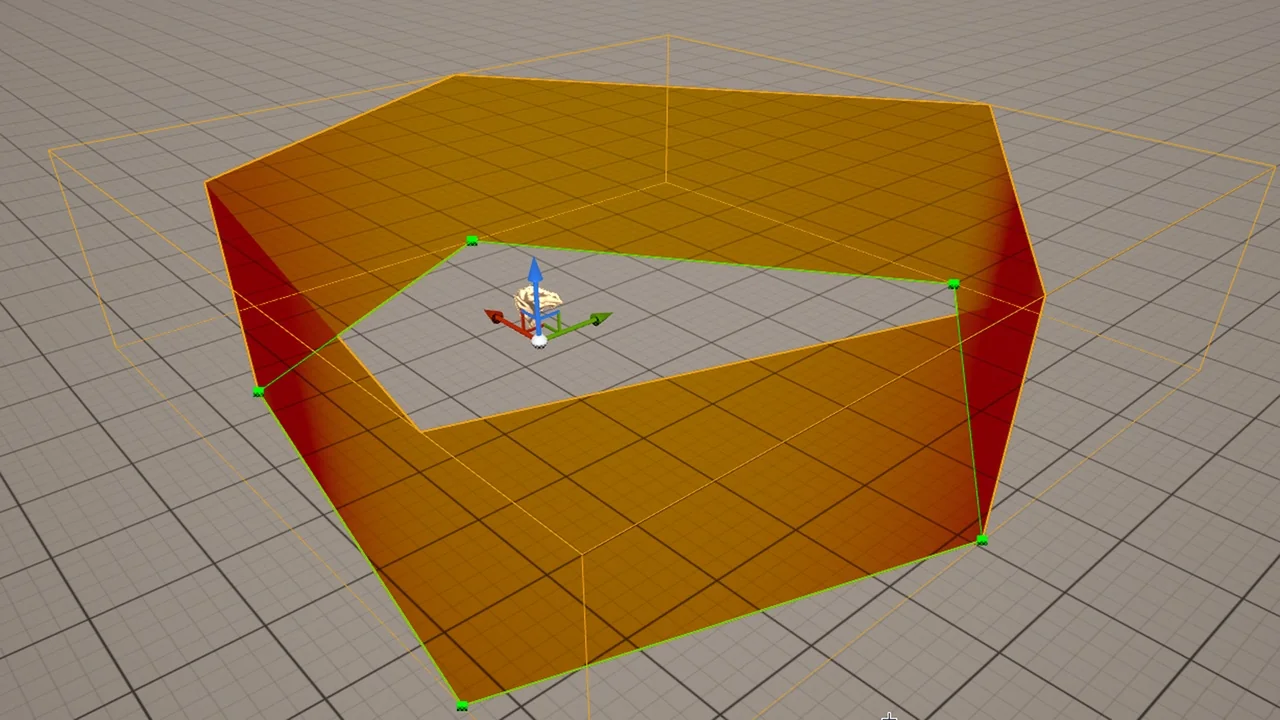
![SKModular Plugin [Blueprint]](/_img/360/wp-content/uploads/published/2026/08/cc5057bed94d-9d0b791d-8f34-4202-bd64-b7e021485f20-2f33dab909.webp) Engine Tools
Engine Tools Engine Tools
 Engine Tools