"82ee98b2ee2793f1"{"id":"1002443","slug":"poly-art-tiger","title":"Poly Art Tiger","category":"Characters \u0026 Creatures","engine":"4.26+,5.0+","assetVersion":"","engineVersion":"Engine Version: 4.26+,5.0+","tag":"Characters","accent":"blue","visual":"character","summary":"Explore technical setup, animation pipelines, and integration strategies for the Poly Art Tiger asset, featuring custom locomotion and forest styling.","platform":"Unreal Engine","indexPolicy":"index","publishedAt":"2026-11-10T18:40:16.839Z","updatedAt":"2026-11-10T18:40:16.839Z","sourceNotes":[],"fileContents":[],"compatibility":["Unreal Engine","Engine Version: 4.26+,5.0+"],"featuredImage":{"alt":"Poly Art Tiger","src":"/wp-content/uploads/published/2026/11/7e64ec46a324-2464de9e-6ef8-4031-acfb-3b526669425e-c00f85e812.webp"},"hasDownloadLink":true,"downloads":0,"terms":[{"taxonomy":"category","slug":"characters-and-creatures","name":"Characters \u0026 Creatures"}],"galleryImages":[{"src":"/wp-content/uploads/published/2026/11/deb0e40e676d-26f2912b-b686-4f9a-9e38-1f30848ada0c-2f836c621c.webp","alt":"Poly Art Tiger"},{"src":"/wp-content/uploads/published/2026/11/17473c4e4c17-5ccc4c4d-8654-4b81-8e1a-66b74732a6e3-56db2b1f02.webp","alt":"Poly Art Tiger"},{"src":"/wp-content/uploads/published/2026/11/dae2f84ce574-39e63edd-f142-4faa-92c6-80fc2ec4a287-47cbaa5b38.webp","alt":"Poly Art Tiger"},{"src":"/wp-content/uploads/published/2026/11/859fc97c058e-43feeaad-1986-4032-8b4e-3e4369f47a05-ec91d7ecaf.webp","alt":"Poly Art Tiger"},{"src":"/wp-content/uploads/published/2026/11/54cd41b35688-6627f1ea-d3a5-49c7-bb47-e917d51d6c6a-210a8e79b2.webp","alt":"Poly Art Tiger"},{"src":"/wp-content/uploads/published/2026/11/ca6921843ea3-354f7ab8-249e-49aa-9cee-16d8ae7b04ad-4199681bda.webp","alt":"Poly Art Tiger"},{"src":"/wp-content/uploads/published/2026/11/8671dedd26d7-ceb323ed-0a2b-470b-95ef-9c3bb6c0b0ce-2afe673a95.webp","alt":"Poly Art Tiger"},{"src":"/wp-content/uploads/published/2026/11/a63cf94c19a4-0dd6e1b9-2b2b-4235-ba1f-0618a3181d99-ae4159b83d.webp","alt":"Poly Art Tiger"},{"src":"/wp-content/uploads/published/2026/11/d666461dd495-c61000f7-b9fe-4461-8022-1a42b239e0ec-a16a056059.webp","alt":"Poly Art Tiger"},{"src":"/wp-content/uploads/published/2026/11/149299bf8ef6-c82c1d9b-17d1-4e23-9005-32d24238f663-403a27e2a6.webp","alt":"Poly Art Tiger"}],"accessPanel":{"kind":"resource","title":"Get this resource","eyebrow":"Free resource","message":"Download this resource in your browser.","fileName":"Content.7z","safetyNote":"Resources are manually reviewed before listing to improve quality and reduce obvious risks.","actionLabel":"Get this resource","resourceType":"Resource archive","versions":[]},"contentHtml":"\u003ch2\u003eRigging and Motion Integration for the Poly Art Tiger\u003c/h2\u003e\n\u003cp\u003eIntegrating a stylized creature into an active interactive project begins with its underlying structural assets. The Poly Art Tiger package arrives with the essential components required to establish a visual presence: the character mesh, the assigned textures, and a set of motion sequences. Because the asset maintains compatibility with the Horse Animset and supports Animation Blueprint workflows, technical artists can immediately review the skeletal framework and assess how quadruped movement translates to the tiger's stylized frame.\u003c/p\u003e\n\u003cp\u003eQuadruped locomotion introduces specific mechanical demands that differ significantly from bipedal character setups. Weight distribution shifts dynamically across four limbs during idles, walks, trots, and sprints. By utilizing motion data compatible with standard quadruped conventions like the Horse Animset, developers can align the tiger's bone hierarchy with existing animation graphs. Setting up transitions within an Animation Blueprint involves linking state machines to speed, acceleration, and directional variables calculated by the parent character actor. Evaluating these animations in motion ensures that the stylized facets of the low poly geometry deform smoothly across joints without breaking the visual aesthetic.\u003c/p\u003e \u003ch2\u003eBuilding Custom Locomotion Without Bundled Character Controllers\u003c/h2\u003e\n\u003cp\u003eA defining technical aspect of the Poly Art Tiger is the intentional exclusion of Blueprints and pre-configured character controllers. The delivery contains exclusively the models, textures, and animations. While turnkey character controllers offer rapid drag-and-drop prototyping, they often impose rigid movement logic, camera configurations, and input architectures that must be dismantled to fit established production pipelines. The absence of pre-built controller logic grants developers total freedom to build movement mechanics from the ground up.\u003c/p\u003e\n\u003cp\u003eImplementing the tiger requires authoring dedicated pawn classes and navigation scripts. For developers building artificial intelligence for open landscapes, this means constructing behavior trees or state-driven utility systems tailored directly to creature routines. A wandering predator AI might cycle between roaming waypoints, resting behaviors, stalking stances, and chase sequences. Because no controller blueprint is bundled, developers bind movement components directly to their own custom scripts, driving the tiger's Animation Blueprint through raw velocity vectors and behavioral flags without having to clean up unwanted template code.\u003c/p\u003e\n\u003cp\u003eIf the creature is intended for direct player control rather than ambient wildlife routines, the scripting process focuses on camera mounting, smooth rotational steering, and responsive acceleration curves. Quadruped controllers generally require nuanced turning mechanics where the mesh banks slightly into turns or pivots in place when idle. Feeding these custom locomotion values into blend spaces allows the provided animation clips to interpolate cleanly, giving the low poly predator believable physical responsiveness under player input.\u003c/p\u003e \u003ch2\u003eIncorporating the Poly Art Tiger into Stylized Forest Ecosystems\u003c/h2\u003e\n\u003cp\u003eMany low poly wilderness environments feel noticeably static when rendered without living inhabitants. Vast stretches of stylized pine trees, faceted rock formations, and rolling terrain require fauna to establish a sense of scale and life. The Poly Art Tiger serves as an apex presence within such environments, injecting predatory dynamism into polygonal outdoor spaces.\u003c/p\u003e\n\u003cp\u003eThis character exists as part of the broader Poly Art Forest Set, which encompasses a wide variety of wildlife designed in the same visual language. That collection includes herbivores, scavengers, and carnivores such as foxes, wolves, bears, rabbits, raccoons, moose, deer, boars, and cats. In an integrated wilderness ecosystem, the tiger functions as a formidable contrast to smaller forest creatures. Developers constructing survival mechanics, hunting loops, or ambient simulation systems can use the tiger alongside these companion species to populate distinct ecological zones across an expansive map.\u003c/p\u003e\n\u003cp\u003eSince the package does not include any environment geometry, staging the creature relies entirely on third-party or custom-built terrain. The low poly aesthetic relies heavily on clean silhouettes, distinct edge angles, and crisp polygonal lighting. Dropping the tiger into a forest level requires aligning scene lighting with the faceted surfaces of the mesh, ensuring that ambient shadows accentuate its muscular form while matching the stylized foliage and landscape surrounding it.\u003c/p\u003e \u003ch2\u003eTexture Mapping and Faceted Low Poly Visuals\u003c/h2\u003e\n\u003cp\u003eThe visual identity of the tiger relies on faceted geometry rather than smoothed, high-density surface sculpting. In poly art workflows, each polygon contributes directly to the creature's silhouette and surface readability. The tiger's anatomy—from its broad feline shoulders and elongated torso down to its paw structure and tail—is defined by calculated edge placement that catches light in distinct, planar increments.\u003c/p\u003e\n\u003cp\u003eThe included textures are tailored specifically to this geometric layout, providing color variation across the tiger's coat, stripes, underbelly, and facial features without muddying the crisp facets. Because the package focuses purely on the model and texture data, performance overhead remains minimal. Low poly meshes paired with targeted textures present an exceptionally light footprint, making the asset well-suited for projects that require numerous animated creatures roaming the screen simultaneously, such as dense forest simulations or mobile titles with strict hardware constraints.\u003c/p\u003e \u003ch2\u003eProduction Readiness Across Technical Pipelines\u003c/h2\u003e\n\u003cp\u003eSelecting assets for long-term production hinges on how predictably they integrate into existing engineering frameworks. The Poly Art Tiger maintains clear boundaries: it supplies the art assets and motion clips, leaving game logic, behavioral scripting, and level design completely open. The compatibility with established quadruped animation conventions provides a recognizable technical anchor for animators, while the tagged support for Animation Blueprints gives technical artists a proven pathway to assemble responsive state machines.\u003c/p\u003e\n\u003cp\u003eWhether utilized as a roaming ambient creature in an expansive low poly wilderness, a central combat adversary in a survival title, or an interactive companion within a broader wildlife pack, the asset fulfills its specific role efficiently. By supplying focused models, textures, and animations without superfluous environmental props or rigid movement controllers, it fits directly into custom development workflows where architectural control remains paramount.\u003c/p\u003e\n\n\u003ch2\u003eRelated Resources Worth Checking\u003c/h2\u003e\n\u003cul\u003e\n\u003cli\u003e\u003ca href=\"https://3dcghub.com/poly-art-deer/\" rel=\"noopener noreferrer\"\u003ePoly Art Deer\u003c/a\u003e\u003c/li\u003e\n\u003cli\u003e\u003ca href=\"https://3dcghub.com/poly-art-boar/\" rel=\"noopener noreferrer\"\u003ePoly Art Boar\u003c/a\u003e\u003c/li\u003e\n\u003cli\u003e\u003ca href=\"https://3dcghub.com/poly-art-raccoons/\" rel=\"noopener noreferrer\"\u003ePoly Art Raccoons\u003c/a\u003e\u003c/li\u003e\n\u003cli\u003e\u003ca href=\"https://3dcghub.com/poly-art-rabbits/\" rel=\"noopener noreferrer\"\u003ePoly Art Rabbits\u003c/a\u003e\u003c/li\u003e\n\u003cli\u003e\u003ca href=\"https://3dcghub.com/poly-art-cougars-and-panthers/\" rel=\"noopener noreferrer\"\u003ePoly Art Cougars and Panthers\u003c/a\u003e\u003c/li\u003e\n\u003c/ul\u003e","contentTextLength":6920,"navigation":{"current":7,"total":4372,"previous":{"id":"1002444","slug":"poly-art-wolf","title":"Poly Art Wolf","category":"Characters \u0026 Creatures","platform":"Unreal Engine","updatedAt":"2026-11-10T18:41:27.353Z"},"next":{"id":"1002442","slug":"poly-art-raccoons","title":"Poly Art Raccoons","category":"Characters \u0026 Creatures","platform":"Unreal Engine","updatedAt":"2026-11-10T18:39:06.961Z"}},"relatedResources":[{"id":"1002440","slug":"poly-art-deer","title":"Poly Art Deer","category":"Characters \u0026 Creatures","engine":"4.20+,5.0+","assetVersion":"","engineVersion":"Engine Version: 4.20+,5.0+","tag":"Characters","accent":"blue","visual":"character","summary":"Examine the technical integration of Poly Art Deer, covering custom controller setups, animation blueprints, Horse Animset compatibility, and stylized forest AI","platform":"Unreal Engine","indexPolicy":"index","publishedAt":"2026-11-10T18:37:17.336Z","updatedAt":"2026-11-10T18:37:17.336Z","sourceNotes":[],"fileContents":[],"compatibility":["Unreal Engine","Engine Version: 4.20+,5.0+"],"featuredImage":{"alt":"Poly Art Deer","src":"/wp-content/uploads/published/2026/11/bb5f01c92b40-d5eb45d6-9e32-4dd6-b032-159aeddb0aa1-a03b30083d.webp"},"hasDownloadLink":true,"downloads":0},{"id":"1002438","slug":"poly-art-boar","title":"Poly Art Boar","category":"Characters \u0026 Creatures","engine":"4.26+,5.0+","assetVersion":"","engineVersion":"Engine Version: 4.26+,5.0+","tag":"Characters","accent":"blue","visual":"character","summary":"The Poly Art Boar supplies low poly boar models, textures, and in-motion animations for forest scenes, without an environment or character controller.","platform":"Unreal Engine","indexPolicy":"index","publishedAt":"2026-11-10T18:34:27.984Z","updatedAt":"2026-11-10T18:34:27.984Z","sourceNotes":[],"fileContents":[],"compatibility":["Unreal Engine","Engine Version: 4.26+,5.0+"],"featuredImage":{"alt":"Poly Art Boar","src":"/wp-content/uploads/published/2026/11/86edbb72e455-423fed1c-70eb-4e0c-b525-c55cdb49c579-6a5e3f2cc8.webp"},"hasDownloadLink":true,"downloads":0},{"id":"1002444","slug":"poly-art-wolf","title":"Poly Art Wolf","category":"Characters \u0026 Creatures","engine":"4.26+,5.0+","assetVersion":"","engineVersion":"Engine Version: 4.26+,5.0+","tag":"Characters","accent":"blue","visual":"character","summary":"Explore the Poly Art Wolf asset package, featuring low-poly animal models, textures, animations, and compatibility with the Horse Animset pipeline.","platform":"Unreal Engine","indexPolicy":"index","publishedAt":"2026-11-10T18:41:27.353Z","updatedAt":"2026-11-10T18:41:27.353Z","sourceNotes":[],"fileContents":[],"compatibility":["Unreal Engine","Engine Version: 4.26+,5.0+"],"featuredImage":{"alt":"Poly Art Wolf","src":"/wp-content/uploads/published/2026/11/8982d6af3886-f8d2f00b-53a6-4387-97e9-d89f139adfed-49b4d1b9c5.webp"},"hasDownloadLink":true,"downloads":0}]}
Characters
Poly Art Tiger
Explore technical setup, animation pipelines, and integration strategies for the Poly Art Tiger asset, featuring custom locomotion and forest styling.
Rigging and Motion Integration for the Poly Art Tiger
Integrating a stylized creature into an active interactive project begins with its underlying structural assets. The Poly Art Tiger package arrives with the essential components required to establish a visual presence: the character mesh, the assigned textures, and a set of motion sequences. Because the asset maintains compatibility with the Horse Animset and supports Animation Blueprint workflows, technical artists can immediately review the skeletal framework and assess how quadruped movement translates to the tiger's stylized frame.
Quadruped locomotion introduces specific mechanical demands that differ significantly from bipedal character setups. Weight distribution shifts dynamically across four limbs during idles, walks, trots, and sprints. By utilizing motion data compatible with standard quadruped conventions like the Horse Animset, developers can align the tiger's bone hierarchy with existing animation graphs. Setting up transitions within an Animation Blueprint involves linking state machines to speed, acceleration, and directional variables calculated by the parent character actor. Evaluating these animations in motion ensures that the stylized facets of the low poly geometry deform smoothly across joints without breaking the visual aesthetic.
Building Custom Locomotion Without Bundled Character Controllers
A defining technical aspect of the Poly Art Tiger is the intentional exclusion of Blueprints and pre-configured character controllers. The delivery contains exclusively the models, textures, and animations. While turnkey character controllers offer rapid drag-and-drop prototyping, they often impose rigid movement logic, camera configurations, and input architectures that must be dismantled to fit established production pipelines. The absence of pre-built controller logic grants developers total freedom to build movement mechanics from the ground up.
Implementing the tiger requires authoring dedicated pawn classes and navigation scripts. For developers building artificial intelligence for open landscapes, this means constructing behavior trees or state-driven utility systems tailored directly to creature routines. A wandering predator AI might cycle between roaming waypoints, resting behaviors, stalking stances, and chase sequences. Because no controller blueprint is bundled, developers bind movement components directly to their own custom scripts, driving the tiger's Animation Blueprint through raw velocity vectors and behavioral flags without having to clean up unwanted template code.
If the creature is intended for direct player control rather than ambient wildlife routines, the scripting process focuses on camera mounting, smooth rotational steering, and responsive acceleration curves. Quadruped controllers generally require nuanced turning mechanics where the mesh banks slightly into turns or pivots in place when idle. Feeding these custom locomotion values into blend spaces allows the provided animation clips to interpolate cleanly, giving the low poly predator believable physical responsiveness under player input.
Incorporating the Poly Art Tiger into Stylized Forest Ecosystems
Many low poly wilderness environments feel noticeably static when rendered without living inhabitants. Vast stretches of stylized pine trees, faceted rock formations, and rolling terrain require fauna to establish a sense of scale and life. The Poly Art Tiger serves as an apex presence within such environments, injecting predatory dynamism into polygonal outdoor spaces.
This character exists as part of the broader Poly Art Forest Set, which encompasses a wide variety of wildlife designed in the same visual language. That collection includes herbivores, scavengers, and carnivores such as foxes, wolves, bears, rabbits, raccoons, moose, deer, boars, and cats. In an integrated wilderness ecosystem, the tiger functions as a formidable contrast to smaller forest creatures. Developers constructing survival mechanics, hunting loops, or ambient simulation systems can use the tiger alongside these companion species to populate distinct ecological zones across an expansive map.
Since the package does not include any environment geometry, staging the creature relies entirely on third-party or custom-built terrain. The low poly aesthetic relies heavily on clean silhouettes, distinct edge angles, and crisp polygonal lighting. Dropping the tiger into a forest level requires aligning scene lighting with the faceted surfaces of the mesh, ensuring that ambient shadows accentuate its muscular form while matching the stylized foliage and landscape surrounding it.
Texture Mapping and Faceted Low Poly Visuals
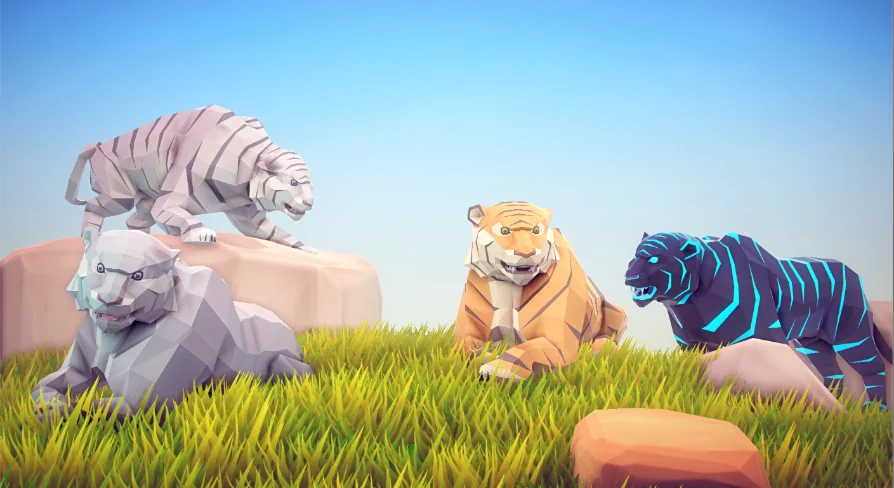
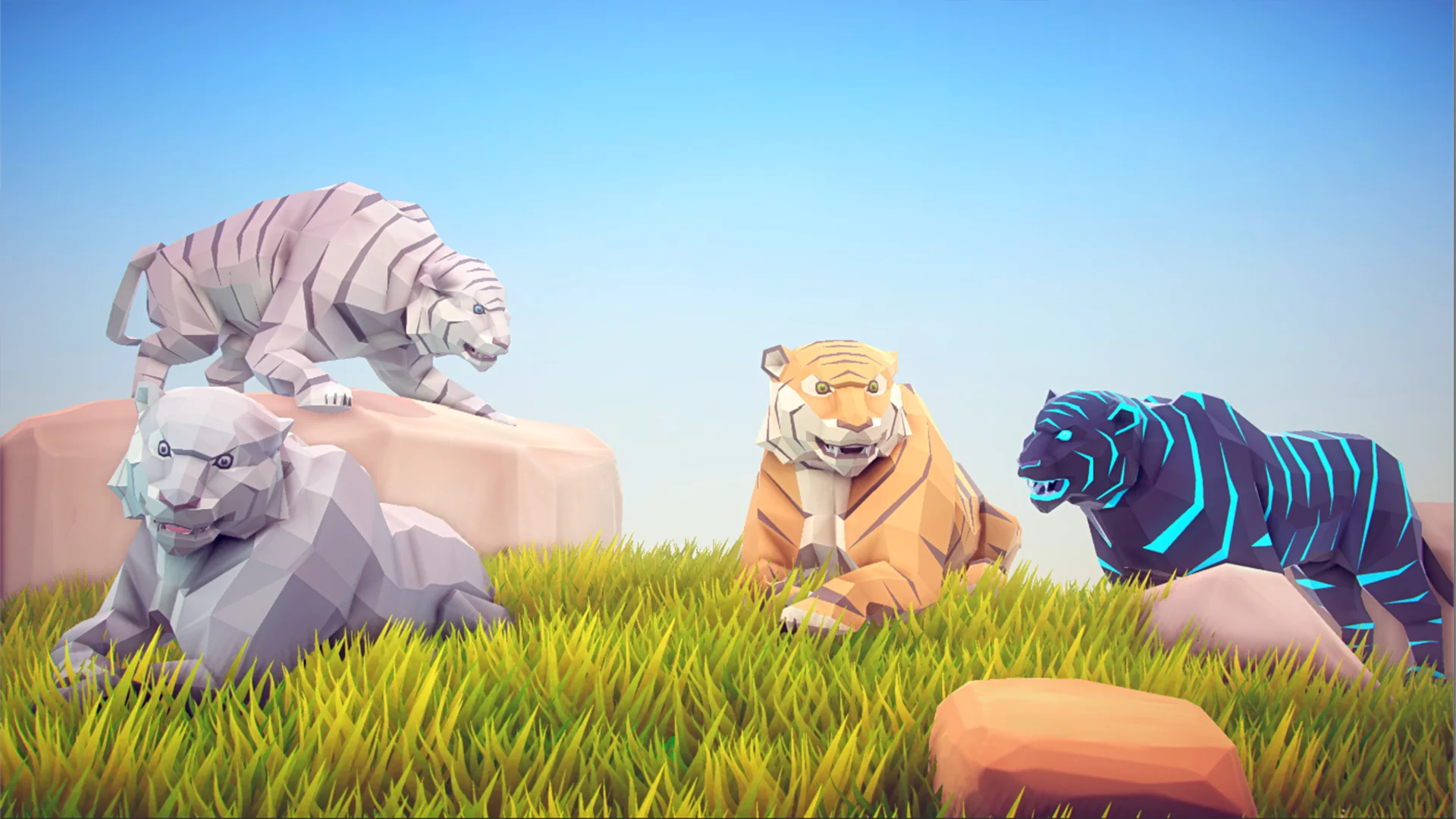
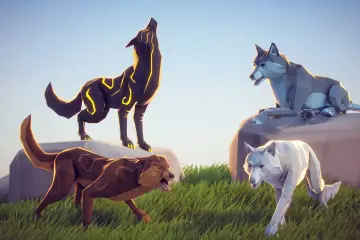
The visual identity of the tiger relies on faceted geometry rather than smoothed, high-density surface sculpting. In poly art workflows, each polygon contributes directly to the creature's silhouette and surface readability. The tiger's anatomy—from its broad feline shoulders and elongated torso down to its paw structure and tail—is defined by calculated edge placement that catches light in distinct, planar increments.
The included textures are tailored specifically to this geometric layout, providing color variation across the tiger's coat, stripes, underbelly, and facial features without muddying the crisp facets. Because the package focuses purely on the model and texture data, performance overhead remains minimal. Low poly meshes paired with targeted textures present an exceptionally light footprint, making the asset well-suited for projects that require numerous animated creatures roaming the screen simultaneously, such as dense forest simulations or mobile titles with strict hardware constraints.
Production Readiness Across Technical Pipelines
Selecting assets for long-term production hinges on how predictably they integrate into existing engineering frameworks. The Poly Art Tiger maintains clear boundaries: it supplies the art assets and motion clips, leaving game logic, behavioral scripting, and level design completely open. The compatibility with established quadruped animation conventions provides a recognizable technical anchor for animators, while the tagged support for Animation Blueprints gives technical artists a proven pathway to assemble responsive state machines.
Whether utilized as a roaming ambient creature in an expansive low poly wilderness, a central combat adversary in a survival title, or an interactive companion within a broader wildlife pack, the asset fulfills its specific role efficiently. By supplying focused models, textures, and animations without superfluous environmental props or rigid movement controllers, it fits directly into custom development workflows where architectural control remains paramount.
 Characters
 Characters
 Characters
 Characters