"82ee98b2ee2793f1"{"id":"1002440","slug":"poly-art-deer","title":"Poly Art Deer","category":"Characters \u0026 Creatures","engine":"4.20+,5.0+","assetVersion":"","engineVersion":"Engine Version: 4.20+,5.0+","tag":"Characters","accent":"blue","visual":"character","summary":"Examine the technical integration of Poly Art Deer, covering custom controller setups, animation blueprints, Horse Animset compatibility, and stylized forest AI","platform":"Unreal Engine","indexPolicy":"index","publishedAt":"2026-11-10T18:37:17.336Z","updatedAt":"2026-11-10T18:37:17.336Z","sourceNotes":[],"fileContents":[],"compatibility":["Unreal Engine","Engine Version: 4.20+,5.0+"],"featuredImage":{"alt":"Poly Art Deer","src":"/wp-content/uploads/published/2026/11/bb5f01c92b40-d5eb45d6-9e32-4dd6-b032-159aeddb0aa1-a03b30083d.webp"},"hasDownloadLink":true,"downloads":0,"terms":[{"taxonomy":"category","slug":"characters-and-creatures","name":"Characters \u0026 Creatures"}],"galleryImages":[{"src":"/wp-content/uploads/published/2026/11/36a6f0ba6779-7f7f40fb-661d-4819-908c-2f00a18866e3-85c40cf39a.webp","alt":"Poly Art Deer"},{"src":"/wp-content/uploads/published/2026/11/f7573f6b7657-b3e579b4-8485-4580-a3b1-973f46976bda-eb2eae0711.webp","alt":"Poly Art Deer"},{"src":"/wp-content/uploads/published/2026/11/a1316416cc63-86a76cbd-c099-4603-81ac-7406153618ec-dfc99a1f80.webp","alt":"Poly Art Deer"},{"src":"/wp-content/uploads/published/2026/11/746a3d958549-d84aaadd-2473-47ee-85eb-790be5273022-ea2aea9bc8.webp","alt":"Poly Art Deer"},{"src":"/wp-content/uploads/published/2026/11/f33be710a02b-dfeb629a-9c66-42e6-9d24-9f111ddce4eb-376d81c77f.webp","alt":"Poly Art Deer"},{"src":"/wp-content/uploads/published/2026/11/ea4bfd52092d-1cac4e24-b816-4c74-9290-6c70b1708c73-23a97bcb13.webp","alt":"Poly Art Deer"},{"src":"/wp-content/uploads/published/2026/11/a0baba73bec5-4a3bc9f3-f6f6-4a3e-90aa-eb7c807126a2-e07356942c.webp","alt":"Poly Art Deer"},{"src":"/wp-content/uploads/published/2026/11/f8a9b4faa56e-d74ab77a-9fdd-4f3c-90d7-309c47d9d80a-c0c0c89d10.webp","alt":"Poly Art Deer"},{"src":"/wp-content/uploads/published/2026/11/381a17f9cc62-01235777-b0ef-4d7b-aaf2-415a6b0864c8-ce9dcf604c.webp","alt":"Poly Art Deer"},{"src":"/wp-content/uploads/published/2026/11/97d8c6fd70d6-1c511180-d320-4854-9221-78b6cd7dbbf3-256c31e0c0.webp","alt":"Poly Art Deer"}],"accessPanel":{"kind":"resource","title":"Get this resource","eyebrow":"Free resource","message":"Download this resource in your browser.","fileName":"Content.7z","safetyNote":"Resources are manually reviewed before listing to improve quality and reduce obvious risks.","actionLabel":"Get this resource","resourceType":"Resource archive","versions":[]},"contentHtml":"\u003ch2\u003eIntegrating Poly Art Deer into Custom Character Controllers\u003c/h2\u003e\n\u003cp\u003eImplementing stylized fauna begins with establishing a dedicated pawn architecture rather than untangling a monolithic character blueprint. Poly Art Deer supplies the core asset foundation—the mesh, textures, and animation files—while deliberately leaving the character controller unbundled. This architecture requires you to build or connect your own movement and control systems, which prevents the bloat and structural conflicts often found in assets tied to predefined player templates.\u003c/p\u003e\n\u003cp\u003eTo integrate the deer into an active scene, start by establishing a new base character or pawn class. Assign the skeletal mesh to the character hierarchy, then create an instance of the animal's material using the provided texture set. Because no controller logic is supplied, setting up locomotion means mapping user input axes or autonomous artificial intelligence movement components directly to the root of the character capsule. This gives programmers total freedom to determine collision cylinder dimensions, movement speeds, acceleration curves, and ground-following parameters that match the scale of the low-poly world.\u003c/p\u003e\n\u003cp\u003eDecoupling movement mechanics from the raw visual data also ensures that you are not forced to strip away unnecessary player-centric logic when all you need is an ambient herbivore roaming a landscape. Whether the target implementation is a controllable mount, an interactive creature, or a passive creature driven by an artificial intelligence navigation grid, the initial setup process remains direct: assemble the visual hierarchy, apply the stylized textures, and bridge the skeleton to an animation driver.\u003c/p\u003e \u003ch2\u003ePoly Art Deer Assets and Environment Separation\u003c/h2\u003e\n\u003cp\u003eA frequent hurdle when building low-poly nature scenes is finding organic characters that seamlessly align with stylized art styles. Vast stylized environments frequently feature dense forests, rolling hills, and stylized vegetation, yet remain devoid of fauna to make the world feel alive. Poly Art Deer focuses exclusively on bridging this gap by delivering the stag and deer characters as dedicated visual elements.\u003c/p\u003e\n\u003cp\u003eCrucially, the package isolates the creatures completely from environmental assets. There are no proprietary terrain meshes, foliage clusters, or exterior props included in the setup. This strict separation keeps asset dependencies clean. Projects that already feature mature terrain shaders, rock formations, and tree models can import the deer assets without dealing with redundant materials, conflicting landscape settings, or unwanted clutter in the project directory.\u003c/p\u003e\n\u003cp\u003eVisually, the deer and stag models rely on faceted, stylized polygonal surfaces designed to catch directional lighting across their planar faces. The textures complement this geometric look, defining the markings of the stag and deer while preserving the clean, read-at-a-distance quality necessary for low-poly aesthetics. This visual clarity ensures that the animals integrate naturally into both vibrant fantasy forests and minimalist, modern low-poly wilderness environments.\u003c/p\u003e \u003ch2\u003eAnimation Blueprint Architecture and Horse Animset Compatibility\u003c/h2\u003e\n\u003cp\u003eBringing the stag into motion requires configuring an Animation Blueprint capable of translating raw animation sequences into dynamic movement. Because the asset includes the models, textures, and animated motions, you must assemble the state machine that governs transitions between resting states and locomotion.\u003c/p\u003e\n\u003cp\u003eA notable technical dimension of this asset is its compatibility with the Horse Animset. Quadruped movement pipelines often share bone structures and joint orientations, and establishing compatibility with an established quadruped animation set drastically broadens the movement palette. You can retarget or directly map motion clips across compatible rigs, unlocking additional gaits, turns, transitions, and environmental reactions that complement the pack's included motion sets.\u003c/p\u003e\n\u003cp\u003eWithin the Animation Blueprint, configure an essential state machine with transitions driven by parameters like movement speed, ground contact flags, and directional velocity. The included motion animations cover foundational requirements, allowing you to blend smoothly from an idle stance into walking and running states:\u003c/p\u003e\n\u003cul\u003e \u003cli\u003e\u003cstrong\u003eIdle States:\u003c/strong\u003e Static standing, alert poses, and subtle weight-shifting clips that give the stag presence while stationary.\u003c/li\u003e \u003cli\u003e\u003cstrong\u003eLocomotion States:\u003c/strong\u003e Rhythmic walk and run sequences configured inside blend spaces to match varying velocity values.\u003c/li\u003e \u003cli\u003e\u003cstrong\u003eAction Triggers:\u003c/strong\u003e Transitions handled via animation notifies or Boolean checks to trigger reactive movements smoothly.\u003c/li\u003e\n\u003c/ul\u003e\n\u003cp\u003eBy relying on standard Animation Blueprint state logic, you can incorporate inverse kinematics for foot placement on uneven terrain or add procedural lean angles when the deer turns at high speeds.\u003c/p\u003e \u003ch2\u003eScripting Forest Wildlife and Ambient Behaviors\u003c/h2\u003e\n\u003cp\u003eBecause character controllers are not bundled, breathing life into a stylized forest requires custom scripting to govern animal decision-making. The combination of standalone models, animations, and compatibility tags positions the asset as an ideal target for lightweight artificial intelligence frameworks.\u003c/p\u003e\n\u003cp\u003eBuilding an ambient wildlife script typically involves three functional states: grazing, alertness, and fleeing. In the wandering phase, simple navigation queries identify random reachable points within an area, instructing the deer to walk smoothly while cycling locomotion animations. Sensory triggers—such as player proximity, noise radiuses, or line-of-sight checks—can shift the AI state into an alert posture, pausing movement and playing an attentive idle sequence.\u003c/p\u003e\n\u003cp\u003eIf the disturbance persists, the script overrides wandering logic with an evasive sprint. At this point, the controller queries navigation points away from the threat, sets the character movement component to its maximum speed, and lets the Animation Blueprint blend directly from alert to full run. Because you control the scripting layer entirely, you can keep the logic as performant as necessary, making it feasible to spawn herds across expansive low-poly woodlands without suffering the performance penalties of complex, player-focused controller classes.\u003c/p\u003e \u003ch2\u003eLong-Term Pipeline Value for Stylized Projects\u003c/h2\u003e\n\u003cp\u003eRelying on modular assets that omit prescriptive logic simplifies long-term maintenance across complex production environments. When an asset bundle tries to supply everything—from proprietary terrain tools to bloated player controllers—it often causes integration conflicts, broken input mappings, and redundant codebases. Poly Art Deer avoids these hurdles by strictly packaging the essential artistic components: meshes, textures, animations, and established quadruped rig compatibility.\u003c/p\u003e\n\u003cp\u003eThis lean structure ensures that as your engine updates or your internal architecture evolves, the core assets remain functional. You are free to adapt the Animation Blueprint, refine your behavior scripts, or retarget the motions using the Horse Animset without having to untangle hardcoded references. For developers actively constructing low-poly ecosystems, the package provides a direct, unencumbered path toward populating quiet wilderness scenes with dynamic, stylized wildlife.\u003c/p\u003e\n\n\u003ch2\u003eExplore Similar Assets\u003c/h2\u003e\n\u003cul\u003e\n\u003cli\u003e\u003ca href=\"https://3dcghub.com/poly-art-boar/\" rel=\"noopener noreferrer\"\u003ePoly Art Boar\u003c/a\u003e\u003c/li\u003e\n\u003cli\u003e\u003ca href=\"https://3dcghub.com/poly-art-cougars-and-panthers/\" rel=\"noopener noreferrer\"\u003ePoly Art Cougars and Panthers\u003c/a\u003e\u003c/li\u003e\n\u003cli\u003e\u003ca href=\"https://3dcghub.com/poly-art-bear/\" rel=\"noopener noreferrer\"\u003ePoly Art Bear\u003c/a\u003e\u003c/li\u003e\n\u003cli\u003e\u003ca href=\"https://3dcghub.com/forest-golems/\" rel=\"noopener noreferrer\"\u003eForest Golems\u003c/a\u003e\u003c/li\u003e\n\u003cli\u003e\u003ca href=\"https://3dcghub.com/deer-family/\" rel=\"noopener noreferrer\"\u003eDeer Family\u003c/a\u003e\u003c/li\u003e\n\u003c/ul\u003e","contentTextLength":7375,"navigation":{"current":10,"total":4372,"previous":{"id":"1002441","slug":"poly-art-rabbits","title":"Poly Art Rabbits","category":"Characters \u0026 Creatures","platform":"Unreal Engine","updatedAt":"2026-11-10T18:38:18.662Z"},"next":{"id":"1002439","slug":"poly-art-cougars-and-panthers","title":"Poly Art Cougars and Panthers","category":"Characters \u0026 Creatures","platform":"Unreal Engine","updatedAt":"2026-11-10T18:35:31.546Z"}},"relatedResources":[{"id":"1002443","slug":"poly-art-tiger","title":"Poly Art Tiger","category":"Characters \u0026 Creatures","engine":"4.26+,5.0+","assetVersion":"","engineVersion":"Engine Version: 4.26+,5.0+","tag":"Characters","accent":"blue","visual":"character","summary":"Explore technical setup, animation pipelines, and integration strategies for the Poly Art Tiger asset, featuring custom locomotion and forest styling.","platform":"Unreal Engine","indexPolicy":"index","publishedAt":"2026-11-10T18:40:16.839Z","updatedAt":"2026-11-10T18:40:16.839Z","sourceNotes":[],"fileContents":[],"compatibility":["Unreal Engine","Engine Version: 4.26+,5.0+"],"featuredImage":{"alt":"Poly Art Tiger","src":"/wp-content/uploads/published/2026/11/7e64ec46a324-2464de9e-6ef8-4031-acfb-3b526669425e-c00f85e812.webp"},"hasDownloadLink":true,"downloads":0},{"id":"1002438","slug":"poly-art-boar","title":"Poly Art Boar","category":"Characters \u0026 Creatures","engine":"4.26+,5.0+","assetVersion":"","engineVersion":"Engine Version: 4.26+,5.0+","tag":"Characters","accent":"blue","visual":"character","summary":"The Poly Art Boar supplies low poly boar models, textures, and in-motion animations for forest scenes, without an environment or character controller.","platform":"Unreal Engine","indexPolicy":"index","publishedAt":"2026-11-10T18:34:27.984Z","updatedAt":"2026-11-10T18:34:27.984Z","sourceNotes":[],"fileContents":[],"compatibility":["Unreal Engine","Engine Version: 4.26+,5.0+"],"featuredImage":{"alt":"Poly Art Boar","src":"/wp-content/uploads/published/2026/11/86edbb72e455-423fed1c-70eb-4e0c-b525-c55cdb49c579-6a5e3f2cc8.webp"},"hasDownloadLink":true,"downloads":0},{"id":"1002444","slug":"poly-art-wolf","title":"Poly Art Wolf","category":"Characters \u0026 Creatures","engine":"4.26+,5.0+","assetVersion":"","engineVersion":"Engine Version: 4.26+,5.0+","tag":"Characters","accent":"blue","visual":"character","summary":"Explore the Poly Art Wolf asset package, featuring low-poly animal models, textures, animations, and compatibility with the Horse Animset pipeline.","platform":"Unreal Engine","indexPolicy":"index","publishedAt":"2026-11-10T18:41:27.353Z","updatedAt":"2026-11-10T18:41:27.353Z","sourceNotes":[],"fileContents":[],"compatibility":["Unreal Engine","Engine Version: 4.26+,5.0+"],"featuredImage":{"alt":"Poly Art Wolf","src":"/wp-content/uploads/published/2026/11/8982d6af3886-f8d2f00b-53a6-4387-97e9-d89f139adfed-49b4d1b9c5.webp"},"hasDownloadLink":true,"downloads":0}]}
Characters
Poly Art Deer
Examine the technical integration of Poly Art Deer, covering custom controller setups, animation blueprints, Horse Animset compatibility, and stylized forest AI
Integrating Poly Art Deer into Custom Character Controllers
Implementing stylized fauna begins with establishing a dedicated pawn architecture rather than untangling a monolithic character blueprint. Poly Art Deer supplies the core asset foundation—the mesh, textures, and animation files—while deliberately leaving the character controller unbundled. This architecture requires you to build or connect your own movement and control systems, which prevents the bloat and structural conflicts often found in assets tied to predefined player templates.
To integrate the deer into an active scene, start by establishing a new base character or pawn class. Assign the skeletal mesh to the character hierarchy, then create an instance of the animal's material using the provided texture set. Because no controller logic is supplied, setting up locomotion means mapping user input axes or autonomous artificial intelligence movement components directly to the root of the character capsule. This gives programmers total freedom to determine collision cylinder dimensions, movement speeds, acceleration curves, and ground-following parameters that match the scale of the low-poly world.
Decoupling movement mechanics from the raw visual data also ensures that you are not forced to strip away unnecessary player-centric logic when all you need is an ambient herbivore roaming a landscape. Whether the target implementation is a controllable mount, an interactive creature, or a passive creature driven by an artificial intelligence navigation grid, the initial setup process remains direct: assemble the visual hierarchy, apply the stylized textures, and bridge the skeleton to an animation driver.
Poly Art Deer Assets and Environment Separation
A frequent hurdle when building low-poly nature scenes is finding organic characters that seamlessly align with stylized art styles. Vast stylized environments frequently feature dense forests, rolling hills, and stylized vegetation, yet remain devoid of fauna to make the world feel alive. Poly Art Deer focuses exclusively on bridging this gap by delivering the stag and deer characters as dedicated visual elements.
Crucially, the package isolates the creatures completely from environmental assets. There are no proprietary terrain meshes, foliage clusters, or exterior props included in the setup. This strict separation keeps asset dependencies clean. Projects that already feature mature terrain shaders, rock formations, and tree models can import the deer assets without dealing with redundant materials, conflicting landscape settings, or unwanted clutter in the project directory.
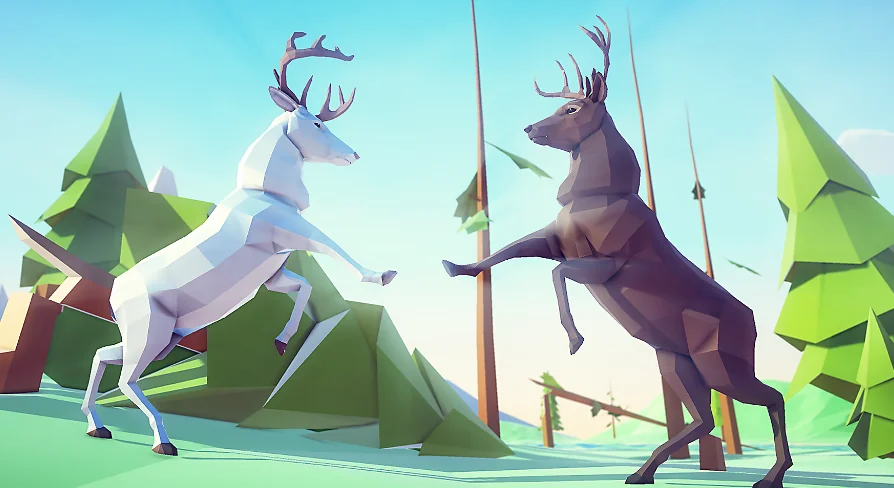
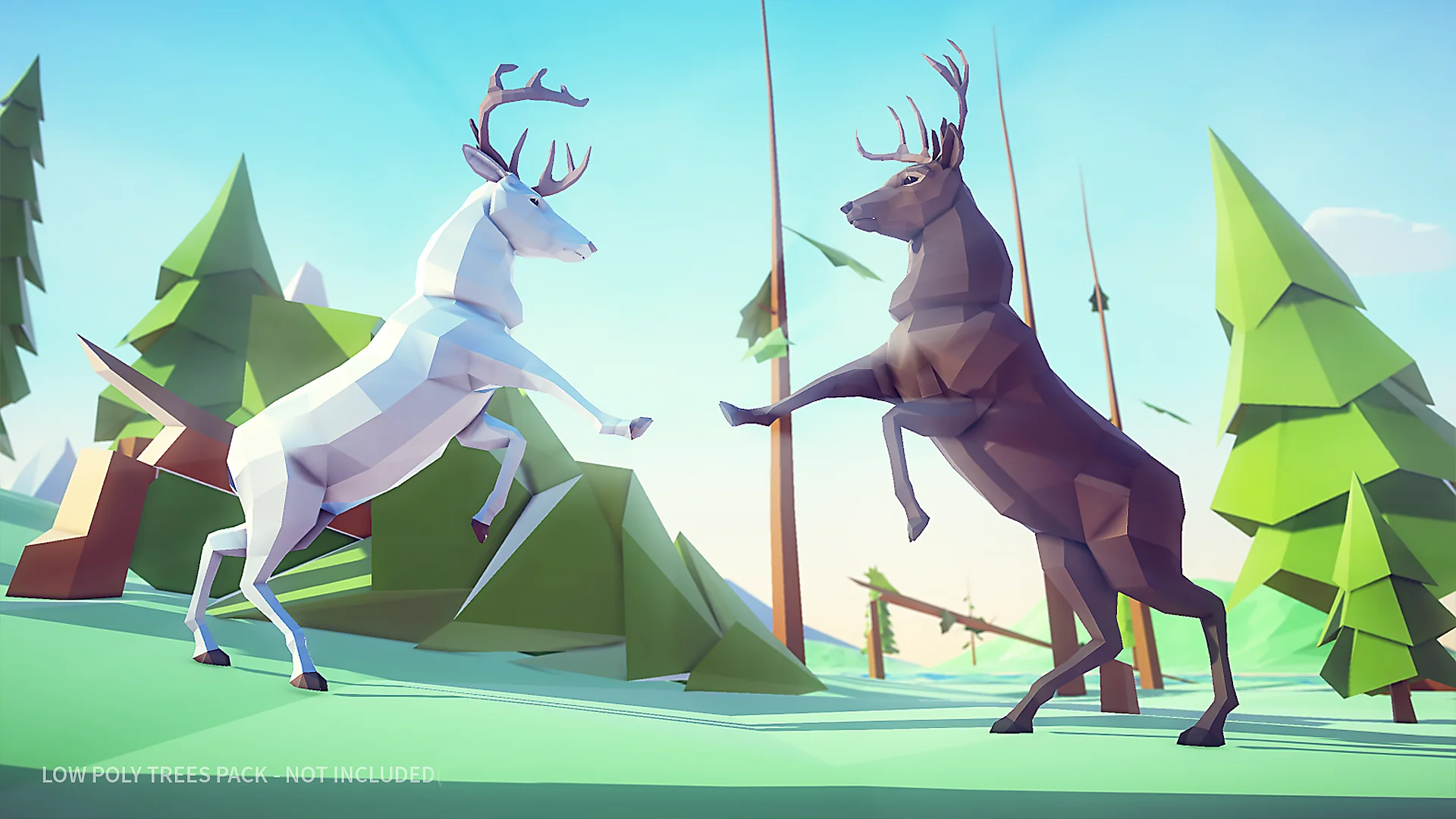
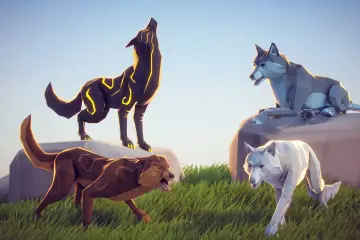
Visually, the deer and stag models rely on faceted, stylized polygonal surfaces designed to catch directional lighting across their planar faces. The textures complement this geometric look, defining the markings of the stag and deer while preserving the clean, read-at-a-distance quality necessary for low-poly aesthetics. This visual clarity ensures that the animals integrate naturally into both vibrant fantasy forests and minimalist, modern low-poly wilderness environments.
Animation Blueprint Architecture and Horse Animset Compatibility
Bringing the stag into motion requires configuring an Animation Blueprint capable of translating raw animation sequences into dynamic movement. Because the asset includes the models, textures, and animated motions, you must assemble the state machine that governs transitions between resting states and locomotion.
A notable technical dimension of this asset is its compatibility with the Horse Animset. Quadruped movement pipelines often share bone structures and joint orientations, and establishing compatibility with an established quadruped animation set drastically broadens the movement palette. You can retarget or directly map motion clips across compatible rigs, unlocking additional gaits, turns, transitions, and environmental reactions that complement the pack's included motion sets.
Within the Animation Blueprint, configure an essential state machine with transitions driven by parameters like movement speed, ground contact flags, and directional velocity. The included motion animations cover foundational requirements, allowing you to blend smoothly from an idle stance into walking and running states:
Idle States: Static standing, alert poses, and subtle weight-shifting clips that give the stag presence while stationary.
Locomotion States: Rhythmic walk and run sequences configured inside blend spaces to match varying velocity values.
Action Triggers: Transitions handled via animation notifies or Boolean checks to trigger reactive movements smoothly.
By relying on standard Animation Blueprint state logic, you can incorporate inverse kinematics for foot placement on uneven terrain or add procedural lean angles when the deer turns at high speeds.
Scripting Forest Wildlife and Ambient Behaviors
Because character controllers are not bundled, breathing life into a stylized forest requires custom scripting to govern animal decision-making. The combination of standalone models, animations, and compatibility tags positions the asset as an ideal target for lightweight artificial intelligence frameworks.
Building an ambient wildlife script typically involves three functional states: grazing, alertness, and fleeing. In the wandering phase, simple navigation queries identify random reachable points within an area, instructing the deer to walk smoothly while cycling locomotion animations. Sensory triggers—such as player proximity, noise radiuses, or line-of-sight checks—can shift the AI state into an alert posture, pausing movement and playing an attentive idle sequence.
If the disturbance persists, the script overrides wandering logic with an evasive sprint. At this point, the controller queries navigation points away from the threat, sets the character movement component to its maximum speed, and lets the Animation Blueprint blend directly from alert to full run. Because you control the scripting layer entirely, you can keep the logic as performant as necessary, making it feasible to spawn herds across expansive low-poly woodlands without suffering the performance penalties of complex, player-focused controller classes.
Long-Term Pipeline Value for Stylized Projects
Relying on modular assets that omit prescriptive logic simplifies long-term maintenance across complex production environments. When an asset bundle tries to supply everything—from proprietary terrain tools to bloated player controllers—it often causes integration conflicts, broken input mappings, and redundant codebases. Poly Art Deer avoids these hurdles by strictly packaging the essential artistic components: meshes, textures, animations, and established quadruped rig compatibility.
This lean structure ensures that as your engine updates or your internal architecture evolves, the core assets remain functional. You are free to adapt the Animation Blueprint, refine your behavior scripts, or retarget the motions using the Horse Animset without having to untangle hardcoded references. For developers actively constructing low-poly ecosystems, the package provides a direct, unencumbered path toward populating quiet wilderness scenes with dynamic, stylized wildlife.
 Characters
 Characters
 Characters
 Characters