Introduction to the Pak Creator Plugin
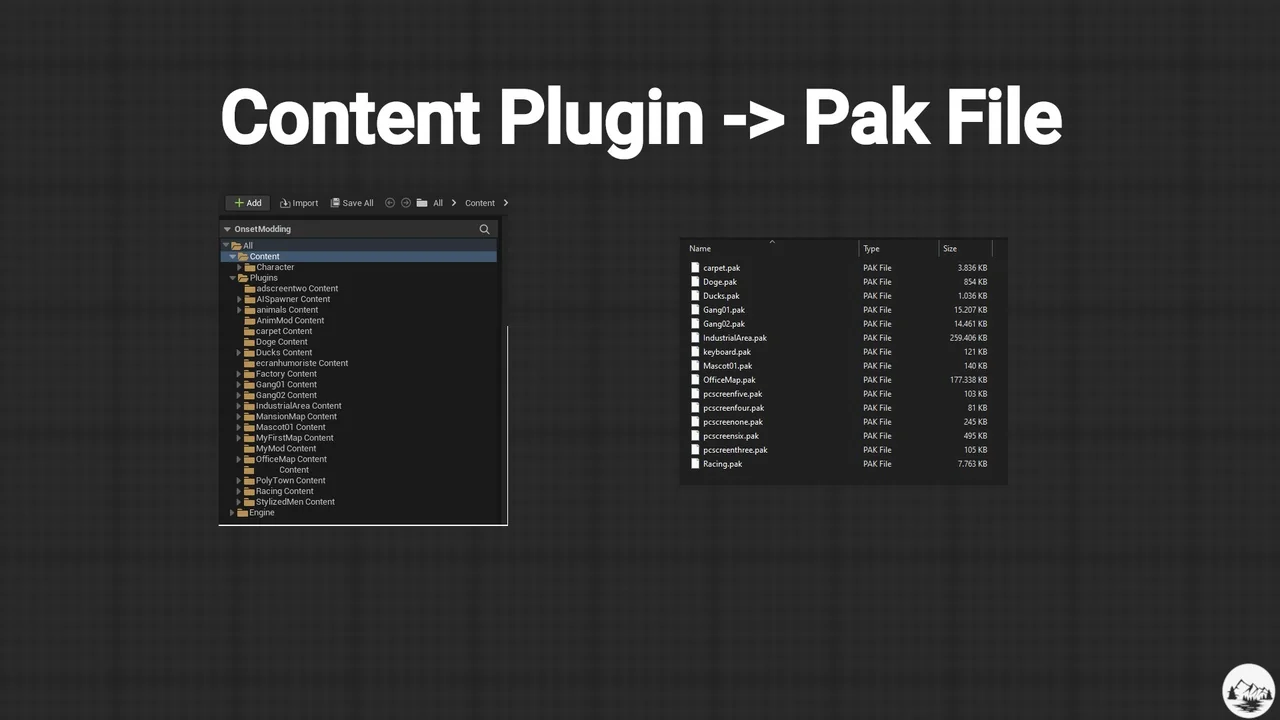
The Pak Creator Plugin is a specialized utility designed for use within the Unreal Editor to facilitate the creation of .pak files. This tool specifically generates independent .pak files from content plugins, which are plugins that exclusively contain assets. Consequently, this plugin serves as a valuable resource for developers who need an efficient way to package and distribute content to their users.
Moreover, the Pak Creator Plugin acts as a convenience tool for those who prefer to bypass the standard Unreal project launcher. By integrating directly into the editor workflow, it provides a more direct path for asset packaging. This streamlined approach is particularly beneficial for professionals working in the architectural industry or those developing game modding capabilities.
Key Features and Platform Support
One of the primary advantages of the Pak Creator Plugin is its user-friendly interface. It allows users to create .pak files from content plugins with just a single click. Furthermore, the tool supports the selection of multiple content plugins simultaneously, allowing for efficient batch processing of assets.
The plugin supports several major target platforms, ensuring broad compatibility for distributed content. These platforms include:
- Windows
- Mac
- Linux
- Android
However, users must ensure that the specific target platform is already installed in their engine via the Epic Games launcher options. Therefore, the availability of these platforms within the plugin depends on the current engine installation settings.
Technical Requirements and Setup
To ensure the Pak Creator Plugin functions correctly, certain project settings must be adjusted. Specifically, developers must disable the “Use Io Store” setting in their project settings to utilize traditional .pak files. Additionally, it is important to understand that this tool is strictly for the creation of files. To load and utilize the resulting .pak files, developers must use the engine’s native pak functions or the PakLoader plugin.
Furthermore, the creator highlights an important technical requirement regarding the Unreal packaging process. If a generated .pak file appears unusually small or lacks assets, you should verify the presence of a map file. At least one map must exist within the /Game folder for Unreal to successfully create the .pak file. Even an empty map is sufficient to satisfy this requirement.
Conclusion
The Pak Creator Plugin offers a simplified workflow for Unreal Engine developers focusing on asset distribution. By focusing on content plugins, it provides a clear path for sharing resources in modding and professional visualization contexts. Consequently, it remains a practical utility for those seeking an alternative to the traditional project launcher workflow. Detailed documentation is provided via Google Drive to assist users with implementation and troubleshooting.
Screenshots & Gallery