"95fdaf16012263fa"{"id":"1002333","slug":"noir-mafia-characters","title":"Noir/Mafia Characters","category":"Characters \u0026 Creatures","engine":"4.19+,5.0+","assetVersion":"","engineVersion":"Engine Version: 4.19+,5.0+","tag":"Characters","accent":"blue","visual":"character","summary":"Noir/Mafia Characters pairs separately tweakable body and armor materials with APEX cloth, UE mannequin compatibility, and two weapon assets.","platform":"Unreal Engine","indexPolicy":"index","publishedAt":"2026-11-06T06:38:12.794Z","updatedAt":"2026-11-06T06:38:12.794Z","sourceNotes":[],"fileContents":[],"compatibility":["Unreal Engine","Engine Version: 4.19+,5.0+"],"featuredImage":{"alt":"Noir/Mafia Characters","src":"/wp-content/uploads/published/2026/11/2f9e745b6058-c07ed2cc-cae6-4720-a20e-8c5587b11cbd-e058a6ef7b.webp"},"hasDownloadLink":true,"downloads":0,"terms":[{"taxonomy":"category","slug":"characters-and-creatures","name":"Characters \u0026 Creatures"}],"galleryImages":[{"src":"/wp-content/uploads/published/2026/11/1c13ddc7deba-c020c9cd-cc25-4dd3-b7a5-5c3132d01ef4-eda3047713.webp","alt":"Noir/Mafia Characters"},{"src":"/wp-content/uploads/published/2026/11/174e4840c584-1d963a11-0abe-44d8-865e-651c37d24fea-80bff116c4.webp","alt":"Noir/Mafia Characters"},{"src":"/wp-content/uploads/published/2026/11/850c1fd9da47-22ba14d9-b7c5-4478-999d-25495f910f50-d61274b14d.webp","alt":"Noir/Mafia Characters"},{"src":"/wp-content/uploads/published/2026/11/6879251db0bc-3018c79f-a897-4df9-952b-75450ee248b0-fd37adf586.webp","alt":"Noir/Mafia Characters"},{"src":"/wp-content/uploads/published/2026/11/e97ad404824d-6362dc1b-204b-417b-8f53-6446f30379b8-8c897f5cbe.webp","alt":"Noir/Mafia Characters"},{"src":"/wp-content/uploads/published/2026/11/cfaa8fcbea5f-9ccf0558-0445-40b9-9cdf-72b7be915e8b-8a355162fb.webp","alt":"Noir/Mafia Characters"},{"src":"/wp-content/uploads/published/2026/11/9c4589c6f776-c0c4b82a-8899-435d-a408-69c50626e4c0-8e4c272451.webp","alt":"Noir/Mafia Characters"},{"src":"/wp-content/uploads/published/2026/11/8753dd48b07a-43572ca3-83da-4692-a3ac-a5d3dcf233a5-92b830eb19.webp","alt":"Noir/Mafia Characters"},{"src":"/wp-content/uploads/published/2026/11/a92790efe1fe-16da6239-b70a-4de3-99bd-d58af73abc2d-863e1e5991.webp","alt":"Noir/Mafia Characters"},{"src":"/wp-content/uploads/published/2026/11/714259a11d05-1f99a20c-f79c-4873-a20e-d25175e2945c-851660656b.webp","alt":"Noir/Mafia Characters"}],"accessPanel":{"kind":"resource","title":"Get this resource","eyebrow":"Free resource","message":"3DCGHUB is the service provider for this listing. Access is fulfilled through the official publisher channel.","fileName":"Content.7z","safetyNote":"Resources are manually reviewed before listing to improve quality and reduce obvious risks.","actionLabel":"Get this resource","resourceType":"Resource archive","versions":[]},"contentHtml":"\u003cp\u003eNoir/Mafia Characters consists of a material-driven customization layer, APEX cloth sections that are fully rigged, UE mannequin compatibility, and two weapon assets. A short video demonstration shows an example of how the characters can be integrated into Character Interaction. The package carries Mafia, Noir, Customizable, Script, Character, and Animation Blueprint tags, which outline the character work it is set up for.\u003c/p\u003e \u003ch2\u003eBody and Armor Materials Tweak Each Part Separately\u003c/h2\u003e\n\u003cp\u003eThe advanced Material system is the central customization tool. It gives the characters a way to be customized and made to look unique, and it does so at the level of individual body and armor parts. Each body or armor part can be tweaked separately. That part-by-part control is the useful detail: a developer can adjust one section without treating the whole character as a single material block. A body part can be handled on its own, and an armor part can be handled on its own, which opens up variation across a character set.\u003c/p\u003e\n\u003cp\u003eFor a cast of characters, that means the same base can support different visual treatments through material changes. Armor can be adjusted separately from the body, and individual body sections can be adjusted separately from one another. The system supports uniqueness through those separate tweaks rather than through a single global look. The material layer is not just a cosmetic extra; it is the mechanism that lets the characters be customized while the body and armor parts remain distinct pieces.\u003c/p\u003e \u003ch2\u003eAPEX Cloth Parts Arrive Fully Rigged\u003c/h2\u003e\n\u003cp\u003eThe characters have cloth parts based on the APEX cloth system. Those cloth parts are fully rigged and ready to go. Cloth can be one of the more fragile parts of a character setup, so having it arrive rigged is a concrete advantage. The cloth is not left as an unrigged add-on; it is prepared as part of the character. Because the cloth is based on APEX, it follows that cloth workflow, and the rigging is already in place.\u003c/p\u003e\n\u003cp\u003eThe practical effect is that the character can be brought into a project with its cloth sections ready. Scenes that depend on rigged cloth have a more complete starting point. The material customization still applies to the body and armor parts, while the cloth remains a rigged component of the character. Those two layers can be considered separately: materials for look variation, APEX cloth for the rigged clothing element.\u003c/p\u003e \u003ch2\u003eUE Mannequin Compatibility and Fast Integration\u003c/h2\u003e\n\u003cp\u003eThe characters are fully compatible with the UE mannequin. Integration into a project can happen in just a few seconds. That combination is the core pipeline detail: the set is aligned with a mannequin-based workflow rather than a separate character rig. A mannequin-compatible character can slot into an existing mannequin-based project quickly. The Animation Blueprint tag fits the same context, pointing to animation-driven character use.\u003c/p\u003e\n\u003cp\u003eFor a team already working with the UE mannequin, the character side is prepared for fast integration. The short video demonstration shows an example of the characters being integrated into Character Interaction. That demonstration is useful because it connects the mannequin compatibility to an actual character interaction scenario. The set is not only a collection of bodies and materials; it is set up to move into a project and take part in character interaction without a long setup phase.\u003c/p\u003e \u003ch2\u003eTwo Weapon Assets for Character Interaction Scenes\u003c/h2\u003e\n\u003cp\u003eTwo weapon assets are included in the package. That is a small but concrete addition to the character set, and it supports scenes where characters need to appear with weapons. The weapon assets can be part of the same character interaction setup shown in the video demonstration. Since the characters are customizable through materials and the cloth is rigged, the weapons add another layer to the character presentation without changing the core setup.\u003c/p\u003e\n\u003cp\u003eThe weapons are included alongside the characters. For a project that needs characters to carry weapons in interaction scenes, those assets are part of the package. The relevant point is the inclusion of two weapon assets and their place in the character interaction context. They extend the character set beyond the body, armor, and cloth pieces.\u003c/p\u003e \u003ch2\u003eNoir and Mafia Character Work in Practice\u003c/h2\u003e\n\u003cp\u003eThe Mafia and Noir tags place the set in a specific character theme. Mafia points to organized-crime character roles, and Noir points to noir character work. Those are thematic directions rather than genre locks. The Customizable tag aligns with the material system, and the Character tag confirms the focus is on characters rather than environments or props. The Script tag and Animation Blueprint tag point to interactive, animation-driven use.\u003c/p\u003e\n\u003cp\u003eIn practice, the set fits character lineups, interaction scenes, and projects that need a cast with a mafia or noir theme. Because body and armor parts can be tweaked separately, a developer can build variation within that theme instead of using every character as a fixed look. The two weapon assets extend the same character focus into scenes where weapons are part of the action. The cloth being fully rigged means those scenes do not have to pause for a cloth rigging pass.\u003c/p\u003e\n\u003cp\u003eCompatibility with Gothic Knight is also noted, which is a relevant detail for projects already using that asset. The package handles the character-side pieces: separate body and armor material tweaks, rigged APEX cloth, mannequin compatibility, two weapon assets, and a demonstrated Character Interaction path. That makes the set most useful for developers who need a noir or mafia character base in a UE mannequin project and want to vary the look through materials.\u003c/p\u003e\n\n\u003ch2\u003eContinue Browsing Similar Packs\u003c/h2\u003e\n\u003cul\u003e\n\u003cli\u003e\u003ca href=\"https://3dcghub.com/light-warrior/\" rel=\"noopener noreferrer\"\u003eLight Warrior\u003c/a\u003e\u003c/li\u003e\n\u003cli\u003e\u003ca href=\"https://3dcghub.com/viking-warriors/\" rel=\"noopener noreferrer\"\u003eViking Warriors\u003c/a\u003e\u003c/li\u003e\n\u003cli\u003e\u003ca href=\"https://3dcghub.com/samurai-warriors/\" rel=\"noopener noreferrer\"\u003eSamurai Warriors\u003c/a\u003e\u003c/li\u003e\n\u003cli\u003e\u003ca href=\"https://3dcghub.com/robot-bee/\" rel=\"noopener noreferrer\"\u003eRobot Bee\u003c/a\u003e\u003c/li\u003e\n\u003cli\u003e\u003ca href=\"https://3dcghub.com/robot-spider/\" rel=\"noopener noreferrer\"\u003eRobot Spider\u003c/a\u003e\u003c/li\u003e\n\u003c/ul\u003e","contentTextLength":5781,"navigation":{"current":35,"total":4291,"previous":{"id":"1002334","slug":"nordic-tales-the-north","title":"Nordic Tales - The North","category":"Music","platform":"Unreal Engine","updatedAt":"2026-11-06T06:38:40.028Z"},"next":{"id":"1002332","slug":"niagara-constellations","title":"Niagara Constellations","category":"Variety","platform":"Unreal Engine","updatedAt":"2026-11-06T06:37:04.151Z"}},"relatedResources":[{"id":"1001642","slug":"light-warrior","title":"Light Warrior","category":"Characters \u0026 Creatures","engine":"4.19+,5.0+","assetVersion":"","engineVersion":"Engine Version: 4.19+,5.0+","tag":"Characters","accent":"blue","visual":"character","summary":"Explore the Light Warrior character asset for Unreal Engine, featuring APEX cloth dynamics, advanced material customization, UE mannequin rigging, and weapons.","platform":"Unreal Engine","indexPolicy":"index","publishedAt":"2026-10-13T02:26:09.285Z","updatedAt":"2026-10-13T02:26:09.285Z","sourceNotes":[],"fileContents":[],"compatibility":["Unreal Engine","Engine Version: 4.19+,5.0+"],"featuredImage":{"alt":"Light Warrior","src":"/wp-content/uploads/published/2026/10/1961ac8c32cb-1891ca23-2a17-4068-81af-80cf504d4ba6-7b198e2c02.webp"},"hasDownloadLink":true,"downloads":0},{"id":"1001674","slug":"viking-warriors","title":"Viking Warriors","category":"Characters \u0026 Creatures","engine":"4.19+,5.0+","assetVersion":"","engineVersion":"Engine Version: 4.19+,5.0+","tag":"Characters","accent":"blue","visual":"character","summary":"Viking Warriors brings modular material customization, APEX cloth physics, combat weapons, and seamless Unreal Engine mannequin compatibility into real-time pro","platform":"Unreal Engine","indexPolicy":"index","publishedAt":"2026-10-13T15:22:48.715Z","updatedAt":"2026-10-13T15:22:48.715Z","sourceNotes":[],"fileContents":[],"compatibility":["Unreal Engine","Engine Version: 4.19+,5.0+"],"featuredImage":{"alt":"Viking Warriors","src":"/wp-content/uploads/published/2026/10/42eef3ea8f03-e62a40b7-e5d1-408b-80e1-bfb7b5904e73-740805dff2.webp"},"hasDownloadLink":true,"downloads":1},{"id":"1001658","slug":"samurai-warriors","title":"Samurai Warriors","category":"Characters \u0026 Creatures","engine":"4.19+,5.0+","assetVersion":"","engineVersion":"Engine Version: 4.19+,5.0+","tag":"Characters","accent":"blue","visual":"character","summary":"Integrate Samurai Warriors with UE mannequin compatibility, NvCloth solver cloth dynamics, and modular material controls for medieval combat projects.","platform":"Unreal Engine","indexPolicy":"index","publishedAt":"2026-10-13T08:34:57.969Z","updatedAt":"2026-10-13T08:34:57.969Z","sourceNotes":[],"fileContents":[],"compatibility":["Unreal Engine","Engine Version: 4.19+,5.0+"],"featuredImage":{"alt":"Samurai Warriors","src":"/wp-content/uploads/published/2026/10/86ea906ffa4f-d5fb222a-187f-4a65-9e5f-6bf524e306b5-605f393566.webp"},"hasDownloadLink":true,"downloads":0}]}
Characters
Noir/Mafia Characters
Noir/Mafia Characters pairs separately tweakable body and armor materials with APEX cloth, UE mannequin compatibility, and two weapon assets.
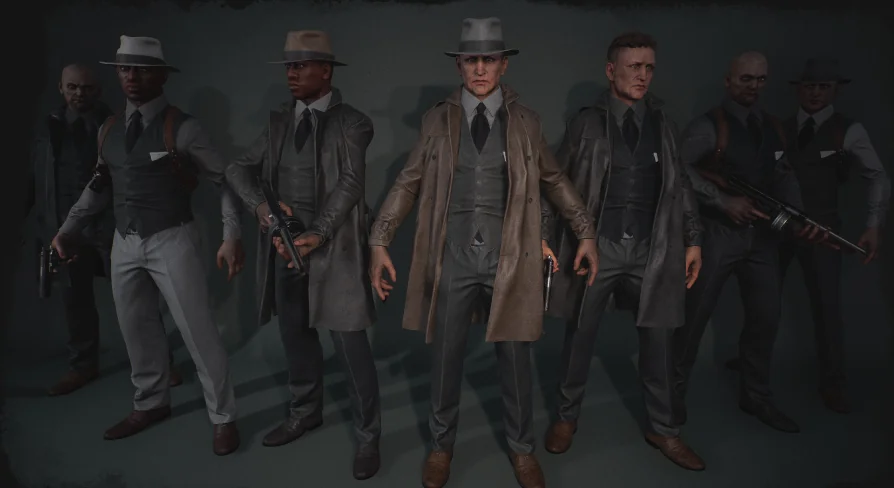
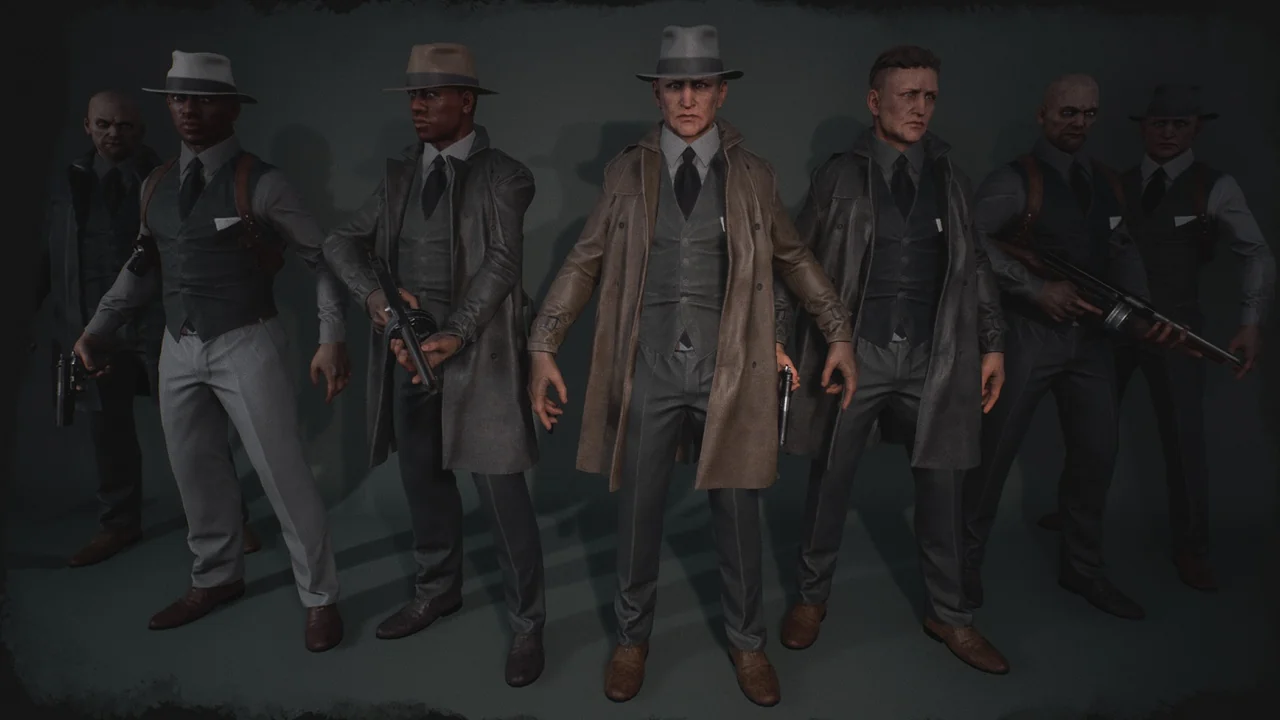
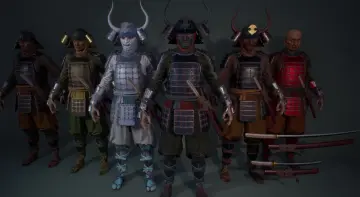
Noir/Mafia Characters consists of a material-driven customization layer, APEX cloth sections that are fully rigged, UE mannequin compatibility, and two weapon assets. A short video demonstration shows an example of how the characters can be integrated into Character Interaction. The package carries Mafia, Noir, Customizable, Script, Character, and Animation Blueprint tags, which outline the character work it is set up for.
Body and Armor Materials Tweak Each Part Separately
The advanced Material system is the central customization tool. It gives the characters a way to be customized and made to look unique, and it does so at the level of individual body and armor parts. Each body or armor part can be tweaked separately. That part-by-part control is the useful detail: a developer can adjust one section without treating the whole character as a single material block. A body part can be handled on its own, and an armor part can be handled on its own, which opens up variation across a character set.
For a cast of characters, that means the same base can support different visual treatments through material changes. Armor can be adjusted separately from the body, and individual body sections can be adjusted separately from one another. The system supports uniqueness through those separate tweaks rather than through a single global look. The material layer is not just a cosmetic extra; it is the mechanism that lets the characters be customized while the body and armor parts remain distinct pieces.
APEX Cloth Parts Arrive Fully Rigged
The characters have cloth parts based on the APEX cloth system. Those cloth parts are fully rigged and ready to go. Cloth can be one of the more fragile parts of a character setup, so having it arrive rigged is a concrete advantage. The cloth is not left as an unrigged add-on; it is prepared as part of the character. Because the cloth is based on APEX, it follows that cloth workflow, and the rigging is already in place.
The practical effect is that the character can be brought into a project with its cloth sections ready. Scenes that depend on rigged cloth have a more complete starting point. The material customization still applies to the body and armor parts, while the cloth remains a rigged component of the character. Those two layers can be considered separately: materials for look variation, APEX cloth for the rigged clothing element.
UE Mannequin Compatibility and Fast Integration
The characters are fully compatible with the UE mannequin. Integration into a project can happen in just a few seconds. That combination is the core pipeline detail: the set is aligned with a mannequin-based workflow rather than a separate character rig. A mannequin-compatible character can slot into an existing mannequin-based project quickly. The Animation Blueprint tag fits the same context, pointing to animation-driven character use.
For a team already working with the UE mannequin, the character side is prepared for fast integration. The short video demonstration shows an example of the characters being integrated into Character Interaction. That demonstration is useful because it connects the mannequin compatibility to an actual character interaction scenario. The set is not only a collection of bodies and materials; it is set up to move into a project and take part in character interaction without a long setup phase.
Two Weapon Assets for Character Interaction Scenes
Two weapon assets are included in the package. That is a small but concrete addition to the character set, and it supports scenes where characters need to appear with weapons. The weapon assets can be part of the same character interaction setup shown in the video demonstration. Since the characters are customizable through materials and the cloth is rigged, the weapons add another layer to the character presentation without changing the core setup.
The weapons are included alongside the characters. For a project that needs characters to carry weapons in interaction scenes, those assets are part of the package. The relevant point is the inclusion of two weapon assets and their place in the character interaction context. They extend the character set beyond the body, armor, and cloth pieces.
Noir and Mafia Character Work in Practice
The Mafia and Noir tags place the set in a specific character theme. Mafia points to organized-crime character roles, and Noir points to noir character work. Those are thematic directions rather than genre locks. The Customizable tag aligns with the material system, and the Character tag confirms the focus is on characters rather than environments or props. The Script tag and Animation Blueprint tag point to interactive, animation-driven use.
In practice, the set fits character lineups, interaction scenes, and projects that need a cast with a mafia or noir theme. Because body and armor parts can be tweaked separately, a developer can build variation within that theme instead of using every character as a fixed look. The two weapon assets extend the same character focus into scenes where weapons are part of the action. The cloth being fully rigged means those scenes do not have to pause for a cloth rigging pass.
Compatibility with Gothic Knight is also noted, which is a relevant detail for projects already using that asset. The package handles the character-side pieces: separate body and armor material tweaks, rigged APEX cloth, mannequin compatibility, two weapon assets, and a demonstrated Character Interaction path. That makes the set most useful for developers who need a noir or mafia character base in a UE mannequin project and want to vary the look through materials.
 Characters
 Characters
 Characters
 Characters