"c14ff6bd758dadb1"{"id":"1000081","slug":"multiplayer-horror-bodycam","title":"Multiplayer Horror Bodycam","category":"Network \u0026 Multiplayer","engine":"Engine Version: 5.1+","assetVersion":"Engine Version: 5.1+","engineVersion":"","tag":"Network","accent":"blue","visual":"mech","summary":"A Unreal Engine bodycam controller for multiplayer horror scenes with adjustable shake, distortion, noise, flashlight tracking, movement effects, and door inter","platform":"Unreal Engine","publishedAt":"2026-06-05T15:48:54.954Z","updatedAt":"2026-06-05T15:48:54.954Z","sourceNotes":[],"fileContents":[],"compatibility":["Unreal Engine","Engine Version: 5.1+"],"featuredImage":{"alt":"Multiplayer Horror Bodycam","src":"/wp-content/uploads/published/2026/06/49b498aa19b2-169cce40-68a2-470f-ac69-7e62cb174c46-e7c5afb997.webp"},"hasDownloadLink":true,"downloads":1,"terms":[{"taxonomy":"category","slug":"network-and-multiplayer","name":"Network \u0026 Multiplayer"}],"galleryImages":[{"src":"/wp-content/uploads/published/2026/06/c42c872f85ca-642fb4b0-8e54-4fc6-a04b-17a1028e0ed3-4d7a557ce6.webp","alt":"Multiplayer Horror Bodycam"},{"src":"/wp-content/uploads/published/2026/06/00caeec5ef04-63b00e3f-8dbc-4915-aa6e-63b607346d10-dfe97d8273.webp","alt":"Multiplayer Horror Bodycam"},{"src":"/wp-content/uploads/published/2026/06/928fd288a75e-974cef6a-54dc-4914-9f3c-868badf2ec17-e1f9ffff18.webp","alt":"Multiplayer Horror Bodycam"},{"src":"/wp-content/uploads/published/2026/06/b7cf490ad3c3-4aed3e9d-6e34-46ec-be5a-03adbe6e3152-59723c6592.webp","alt":"Multiplayer Horror Bodycam"},{"src":"/wp-content/uploads/published/2026/06/699cff9dbafd-041a15d5-40ad-4047-bdb1-c2e5b853121e-ed5505afeb.webp","alt":"Multiplayer Horror Bodycam"},{"src":"/wp-content/uploads/published/2026/06/4b79a08f4a1c-caa5f3a7-bf09-4fa7-a9fe-34ef2fa431f3-2e0c9f4509.webp","alt":"Multiplayer Horror Bodycam"}],"accessPanel":{"kind":"resource","title":"Access this resource","eyebrow":"Free Download","message":"Log in or create a free account to start your download.","fileName":"Content.7z","safetyNote":"Resources are manually reviewed before listing to improve quality and reduce obvious risks.","actionLabel":"Download Free","resourceType":"Resource archive"},"contentHtml":"\u003cp\u003eDark hallways, unstable lighting, nervous movement, and a camera that never feels fully steady are at the center of what \u003cstrong\u003eMultiplayer Horror Bodycam\u003c/strong\u003e Brings to an Unreal Engine project. The package is focused on a realistic bodycam view for multiplayer horror, giving developers a ready-made way to push scenes toward a more tense and immediate first-person presentation. Instead of treating the camera as a clean gameplay view, it leans into fear through instability, visual interference, and motion that feels tied to the character’s physical presence.\u003c/p\u003e\n\u003cp\u003eThe core idea is straightforward: this is a bodycam controller that aims to make horror more immersive. Adjustable shake, distortion, and noise are part of that setup, allowing the camera image to feel stressed, degraded, or unsettled. That combination is what shapes the tone. A scene that might otherwise read as a standard first-person corridor can take on a harsher, more anxious quality when the image flickers with bodycam-style imperfections and movement never feels perfectly controlled.\u003c/p\u003e \u003ch2\u003eMultiplayer Horror Bodycam and the feel of fear\u003c/h2\u003e\n\u003cp\u003eThe most concrete strength here is how many small presentation cues are directed toward one outcome: a terrifying environment for players. The bodycam perspective is not only about changing where the camera sits. It is about layering in the visual and movement behavior that helps sell the idea that the player is seeing events through a device attached to a character rather than through a neutral game camera.\u003c/p\u003e\n\u003cp\u003eAdjustable shake gives control over how unstable that recording feels. Distortion can push the image further away from a polished digital look. Noise adds another layer of degradation that suits horror spaces, especially environments where visibility and comfort are meant to be limited. These are simple details on paper, but together they define the atmosphere this controller is trying to create.\u003c/p\u003e\n\u003cp\u003eThat makes the resource especially useful in scenes where fear depends on uncertainty rather than spectacle. Walking through cramped interiors, searching dark rooms, reacting to movement at the edge of visibility, or entering spaces where the player should feel exposed all fit naturally with a bodycam presentation. The controller is not described as a broad general-purpose first-person framework. Its identity stays closely tied to horror immersion.\u003c/p\u003e \u003ch2\u003eFlashlight tracking, headbobbing, and movement that supports the illusion\u003c/h2\u003e\n\u003cp\u003eThe package goes beyond image effects and includes a fuller bodycam system. One of the more distinctive pieces is the immersive flashlight behavior, where the camera rotates after the flashlight. That detail changes how the player’s view responds to light and direction, reinforcing the sense that the camera is following physical motion rather than snapping independently around the scene.\u003c/p\u003e\n\u003cp\u003eMovement states are also part of the package. Running, walking, and headbobbing are explicitly included, which matters because bodycam horror depends heavily on how motion is perceived. A bodycam effect without convincing movement can feel like a filter placed over a standard controller. By tying the view to common locomotion states, the asset pushes the perspective closer to something that feels recorded and embodied.\u003c/p\u003e\n\u003cp\u003eHeadbobbing in particular helps bridge character movement and camera behavior. In horror, even ordinary traversal can become part of the tension if every step affects the way the image lands. Running can sharpen panic. Walking can slow the player into a more cautious rhythm. When paired with shake, distortion, and noise, those movement systems support the broader aim of making the player feel vulnerable inside the environment.\u003c/p\u003e \u003ch2\u003eDoor interaction and adaptability to environmental conditions\u003c/h2\u003e\n\u003cp\u003eMultiplayer Horror Bodycam also includes realistic door interaction, which is a practical addition for horror design. Doors often carry a lot of dramatic weight in this kind of project: opening them slowly, pushing into a new room, or hesitating before crossing a threshold can all become memorable moments. A bodycam presentation benefits from interactions that feel grounded in the space, and realistic door behavior fits that direction.\u003c/p\u003e\n\u003cp\u003eThe package is also described as adaptable to various environmental conditions. While that description does not break the feature into specific technical cases, it does indicate that the controller is intended to function across different scene contexts rather than only inside one narrow setup. That broadens its usefulness for horror projects that move between interior and exterior spaces, tighter and more open areas, or changing visual conditions where the atmosphere needs to stay convincing.\u003c/p\u003e\n\u003cp\u003eWhat stands out is how these parts work in support of the same idea. Door interaction, flashlight-led camera rotation, movement states, shake, and image noise are not separate gimmicks competing for attention. They all serve the bodycam illusion. For developers trying to create a coherent horror point of view, that consistency is more useful than a disconnected collection of effects.\u003c/p\u003e \u003ch2\u003e100% blueprint, documented, and meant to be expanded\u003c/h2\u003e\n\u003cp\u003eThe controller is entirely blueprint-based. For Unreal Engine users, that makes its workflow emphasis clear. It is presented as easy to understand, well documented, and suitable for expansion. That combination suggests a resource that is not only meant to be dropped into a project, but also read, learned from, and adjusted as needed.\u003c/p\u003e\n\u003cp\u003eThere is a practical development angle to that. The package is positioned as a way to skip the effort of building complex systems from scratch, giving developers more time to focus on creating the rest of the game. In this case, the saved effort comes from having a comprehensive horror bodycam system already assembled around a specific gameplay and presentation goal.\u003c/p\u003e\n\u003cp\u003eThat matters most for teams or solo creators who already know they want a bodycam horror look and do not want to spend early production time solving every camera behavior, movement response, and interaction link on their own. Because the controller is described as understandable and expandable, it also fits projects where the starting system may need to be reshaped rather than used in a fixed state.\u003c/p\u003e \u003ch2\u003eThe VHS Overlay inside Multiplayer Horror Bodycam\u003c/h2\u003e\n\u003cp\u003eA VHS overlay is part of the presentation layer associated with this resource. The overlay is credited as \u003cem\u003eBlank VHS Tape with Play Overlay - ANFX\u003c/em\u003e, and it is licensed under CC4. This is a small but notable detail because it aligns closely with the same visual direction as the bodycam effects. Noise and distortion already push the image away from clarity, and a VHS-styled overlay continues that degraded recording aesthetic.\u003c/p\u003e\n\u003cp\u003eFor horror scenes, that kind of screen treatment can change the emotional tone of otherwise familiar spaces. A plain room may feel observational. The same room viewed through a rougher recorded look can feel more unstable, more archival, or more threatening. In a resource focused on fear and immersion, the overlay supports the same visual language rather than introducing a separate style.\u003c/p\u003e \u003ch2\u003eWhere this fits best\u003c/h2\u003e\n\u003cp\u003eMultiplayer Horror Bodycam is best suited to Unreal Engine projects that want horror to come through the camera itself, not just through level art or enemy design. Its strengths are clearest in games or sequences where a realistic bodycam view is central to the experience: tense exploration, flashlight-led searching, movement through dark or hostile spaces, and interactions that benefit from a grounded first-person feel.\u003c/p\u003e\n\u003cp\u003eDevelopers who want a 100% blueprint setup, need a system they can understand and build on, and prefer to avoid constructing complex bodycam behavior from the ground up are the clearest match. The package stays focused on that purpose, combining camera effects, locomotion-linked motion, flashlight response, realistic door interaction, and a VHS-style visual layer into a horror-oriented controller rather than a general first-person template.\u003c/p\u003e\n\n\u003ch2\u003eExplore Similar Assets\u003c/h2\u003e\n\u003cul\u003e\n\u003cli\u003e\u003ca href=\"https://3dcghub.com/multiplayer-tps-basic/\" title=\"Multiplayer TPS Basic\"\u003eMultiplayer TPS Basic\u003c/a\u003e\u003c/li\u003e\n\u003cli\u003e\u003ca href=\"https://3dcghub.com/fps-multiplayer-template-3-5/\" title=\"FPS Multiplayer Template 3.5\"\u003eFPS Multiplayer Template 3.5\u003c/a\u003e\u003c/li\u003e\n\u003cli\u003e\u003ca href=\"https://3dcghub.com/multiplayer-bodycam/\" title=\"MULTIPLAYER BODYCAM\"\u003eMULTIPLAYER BODYCAM\u003c/a\u003e\u003c/li\u003e\n\u003cli\u003e\u003ca href=\"https://3dcghub.com/host-migration-system-v2/\" title=\"Host Migration System V2\"\u003eHost Migration System V2\u003c/a\u003e\u003c/li\u003e\n\u003cli\u003e\u003ca href=\"https://3dcghub.com/mysql-and-mariadb-integration/\" title=\"MySQL and MariaDB Integration\"\u003eMySQL and MariaDB Integration\u003c/a\u003e\u003c/li\u003e\n\u003c/ul\u003e","contentTextLength":8139,"navigation":{"current":1781,"total":3719,"previous":{"id":"1000082","slug":"music-star-studio","title":"Music Star Studio","category":"Interior","platform":"Unreal Engine","updatedAt":"2026-06-05T15:54:44.401Z"},"next":{"id":"1000080","slug":"prison","title":"Prison","category":"Interior","platform":"Unreal Engine","updatedAt":"2026-06-05T15:42:35.929Z"}},"relatedResources":[{"id":"1000977","slug":"asymmetric-multiplayer-horror","title":"Asymmetric Multiplayer Horror","category":"Action-Adventure","engine":"5.0+","assetVersion":"","engineVersion":"Engine Version: 5.0+","tag":"Action-Adventure","accent":"blue","visual":"mech","summary":"Blueprint template for asymmetric multiplayer horror with 4 vs 1 play, AI or player monsters, first/third person views, and a Cursed Forest demo.","platform":"Unreal Engine","publishedAt":"2026-08-17T17:19:51.833Z","updatedAt":"2026-08-17T17:19:51.833Z","sourceNotes":[],"fileContents":[],"compatibility":["Unreal Engine","Engine Version: 5.0+"],"featuredImage":{"alt":"Asymmetric Multiplayer Horror","src":"/wp-content/uploads/published/2026/08/d3e8d4559426-f968b340-50b9-4a59-9fa7-7cdea14f055c-e0904bd06f.webp"},"hasDownloadLink":true,"downloads":1},{"id":"1000657","slug":"multiplayer-blueprint-lobby-solution-template-by-kekdot","title":"Multiplayer Blueprint Lobby Solution - Template - By Kekdot","category":"Network \u0026 Multiplayer","engine":"5.3+","assetVersion":"","engineVersion":"Engine Version: 5.3+","tag":"Network","accent":"blue","visual":"luts","summary":"The MBLS template is a 100% Blueprint multiplayer lobby foundation for Unreal Engine, with server browser, chat, settings, character customization, and data-dri","platform":"Unreal Engine","publishedAt":"2026-07-21T20:17:43.082Z","updatedAt":"2026-07-21T20:17:43.082Z","sourceNotes":[],"fileContents":[],"compatibility":["Unreal Engine","Engine Version: 5.3+"],"featuredImage":{"alt":"Multiplayer Blueprint Lobby Solution - Template - By Kekdot","src":"/wp-content/uploads/published/2026/07/2aaa9d7b3fdd-d9a2d1e1-e1ad-4f4b-96a9-4c0245b7e2ed-5a79d3f3f4.webp"},"hasDownloadLink":true,"downloads":1},{"id":"11239","slug":"multiplayer-tps-basic","title":"Multiplayer TPS Basic","category":"Network \u0026 Multiplayer","engine":"5.0+","assetVersion":"Engine version: 5.0+","engineVersion":"4.15","tag":"Network","accent":"blue","visual":"animation","summary":"Multiplayer TPS Basic provides a foundational kit for creating online cooperative third-person shooters. It features intelligent AI that shares player weaponry and interactive crates for loadout management.","platform":"Unreal Engine","publishedAt":"2026-03-04T17:13:23.000Z","updatedAt":"2026-04-19T15:48:14.000Z","sourceNotes":[],"fileContents":[],"compatibility":["Unreal Engine","Engine version: 5.0+"],"featuredImage":{"alt":"Multiplayer TPS Basic","src":"https://3dcghub.com/wp-content/uploads/2026/03/856e363a-e9e8-470e-b806-9a65acd66ce4.webp"},"hasDownloadLink":true,"downloads":1}]}
Network
Multiplayer Horror Bodycam
A Unreal Engine bodycam controller for multiplayer horror scenes with adjustable shake, distortion, noise, flashlight tracking, movement effects, and door inter
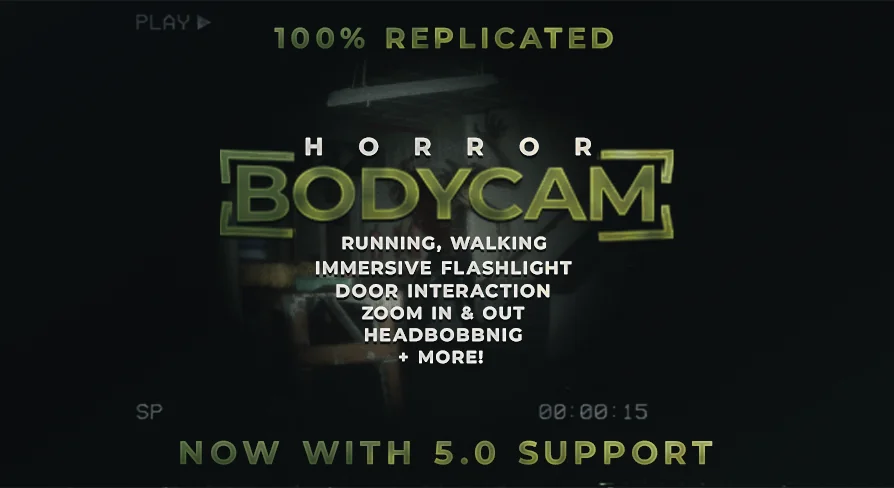
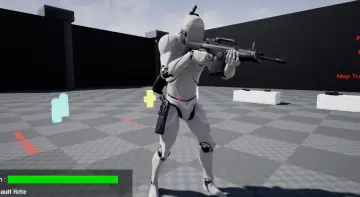
Dark hallways, unstable lighting, nervous movement, and a camera that never feels fully steady are at the center of what Multiplayer Horror Bodycam Brings to an Unreal Engine project. The package is focused on a realistic bodycam view for multiplayer horror, giving developers a ready-made way to push scenes toward a more tense and immediate first-person presentation. Instead of treating the camera as a clean gameplay view, it leans into fear through instability, visual interference, and motion that feels tied to the character’s physical presence.
The core idea is straightforward: this is a bodycam controller that aims to make horror more immersive. Adjustable shake, distortion, and noise are part of that setup, allowing the camera image to feel stressed, degraded, or unsettled. That combination is what shapes the tone. A scene that might otherwise read as a standard first-person corridor can take on a harsher, more anxious quality when the image flickers with bodycam-style imperfections and movement never feels perfectly controlled.
Multiplayer Horror Bodycam and the feel of fear
The most concrete strength here is how many small presentation cues are directed toward one outcome: a terrifying environment for players. The bodycam perspective is not only about changing where the camera sits. It is about layering in the visual and movement behavior that helps sell the idea that the player is seeing events through a device attached to a character rather than through a neutral game camera.
Adjustable shake gives control over how unstable that recording feels. Distortion can push the image further away from a polished digital look. Noise adds another layer of degradation that suits horror spaces, especially environments where visibility and comfort are meant to be limited. These are simple details on paper, but together they define the atmosphere this controller is trying to create.
That makes the resource especially useful in scenes where fear depends on uncertainty rather than spectacle. Walking through cramped interiors, searching dark rooms, reacting to movement at the edge of visibility, or entering spaces where the player should feel exposed all fit naturally with a bodycam presentation. The controller is not described as a broad general-purpose first-person framework. Its identity stays closely tied to horror immersion.
Flashlight tracking, headbobbing, and movement that supports the illusion
The package goes beyond image effects and includes a fuller bodycam system. One of the more distinctive pieces is the immersive flashlight behavior, where the camera rotates after the flashlight. That detail changes how the player’s view responds to light and direction, reinforcing the sense that the camera is following physical motion rather than snapping independently around the scene.
Movement states are also part of the package. Running, walking, and headbobbing are explicitly included, which matters because bodycam horror depends heavily on how motion is perceived. A bodycam effect without convincing movement can feel like a filter placed over a standard controller. By tying the view to common locomotion states, the asset pushes the perspective closer to something that feels recorded and embodied.
Headbobbing in particular helps bridge character movement and camera behavior. In horror, even ordinary traversal can become part of the tension if every step affects the way the image lands. Running can sharpen panic. Walking can slow the player into a more cautious rhythm. When paired with shake, distortion, and noise, those movement systems support the broader aim of making the player feel vulnerable inside the environment.
Door interaction and adaptability to environmental conditions
Multiplayer Horror Bodycam also includes realistic door interaction, which is a practical addition for horror design. Doors often carry a lot of dramatic weight in this kind of project: opening them slowly, pushing into a new room, or hesitating before crossing a threshold can all become memorable moments. A bodycam presentation benefits from interactions that feel grounded in the space, and realistic door behavior fits that direction.
The package is also described as adaptable to various environmental conditions. While that description does not break the feature into specific technical cases, it does indicate that the controller is intended to function across different scene contexts rather than only inside one narrow setup. That broadens its usefulness for horror projects that move between interior and exterior spaces, tighter and more open areas, or changing visual conditions where the atmosphere needs to stay convincing.
What stands out is how these parts work in support of the same idea. Door interaction, flashlight-led camera rotation, movement states, shake, and image noise are not separate gimmicks competing for attention. They all serve the bodycam illusion. For developers trying to create a coherent horror point of view, that consistency is more useful than a disconnected collection of effects.
100% blueprint, documented, and meant to be expanded
The controller is entirely blueprint-based. For Unreal Engine users, that makes its workflow emphasis clear. It is presented as easy to understand, well documented, and suitable for expansion. That combination suggests a resource that is not only meant to be dropped into a project, but also read, learned from, and adjusted as needed.
There is a practical development angle to that. The package is positioned as a way to skip the effort of building complex systems from scratch, giving developers more time to focus on creating the rest of the game. In this case, the saved effort comes from having a comprehensive horror bodycam system already assembled around a specific gameplay and presentation goal.
That matters most for teams or solo creators who already know they want a bodycam horror look and do not want to spend early production time solving every camera behavior, movement response, and interaction link on their own. Because the controller is described as understandable and expandable, it also fits projects where the starting system may need to be reshaped rather than used in a fixed state.
The VHS Overlay inside Multiplayer Horror Bodycam
A VHS overlay is part of the presentation layer associated with this resource. The overlay is credited as Blank VHS Tape with Play Overlay - ANFX, and it is licensed under CC4. This is a small but notable detail because it aligns closely with the same visual direction as the bodycam effects. Noise and distortion already push the image away from clarity, and a VHS-styled overlay continues that degraded recording aesthetic.
For horror scenes, that kind of screen treatment can change the emotional tone of otherwise familiar spaces. A plain room may feel observational. The same room viewed through a rougher recorded look can feel more unstable, more archival, or more threatening. In a resource focused on fear and immersion, the overlay supports the same visual language rather than introducing a separate style.
Where this fits best
Multiplayer Horror Bodycam is best suited to Unreal Engine projects that want horror to come through the camera itself, not just through level art or enemy design. Its strengths are clearest in games or sequences where a realistic bodycam view is central to the experience: tense exploration, flashlight-led searching, movement through dark or hostile spaces, and interactions that benefit from a grounded first-person feel.
Developers who want a 100% blueprint setup, need a system they can understand and build on, and prefer to avoid constructing complex bodycam behavior from the ground up are the clearest match. The package stays focused on that purpose, combining camera effects, locomotion-linked motion, flashlight response, realistic door interaction, and a VHS-style visual layer into a horror-oriented controller rather than a general first-person template.
 Network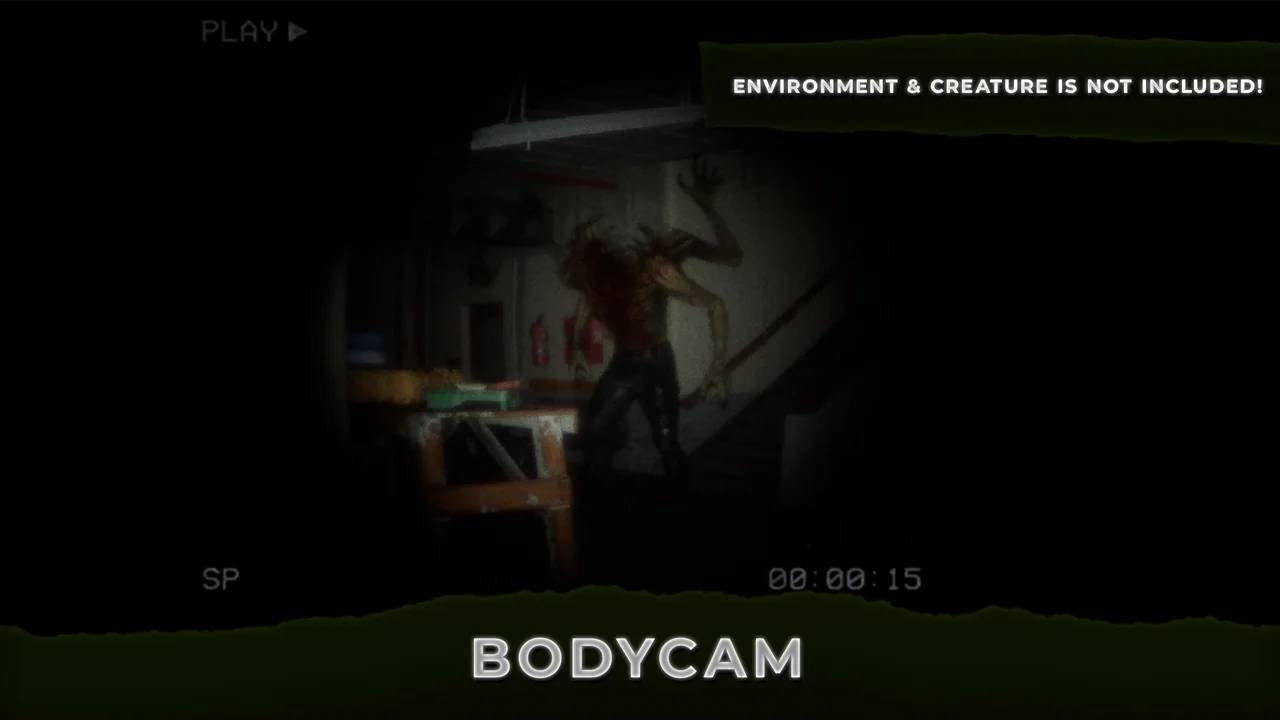
 Action-Adventure
 Network
 Network