"7066dd76da796369"{"id":"1000740","slug":"modular-warehouse-warehouse-industrial-warehouse-hangar-factory-warehouse","title":"Modular Warehouse (Warehouse, Industrial Warehouse, Hangar, Factory, Warehouse)","category":"Industrial","engine":"5.5+","assetVersion":"","engineVersion":"Engine Version: 5.5+","tag":"Industrial","accent":"cyan","visual":"mech","summary":"A fully modular UE5 warehouse, hangar, and factory construction kit featuring spline cable tools, functional doors, decals, props, Lumen, and Nanite support.","platform":"Unity","publishedAt":"2026-07-27T08:45:52.949Z","updatedAt":"2026-07-27T08:45:52.949Z","sourceNotes":[],"fileContents":[],"compatibility":["Unreal Engine","Engine Version: 5.5+"],"featuredImage":{"alt":"Modular Warehouse (Warehouse, Industrial Warehouse, Hangar, Factory, Warehouse)","src":"/wp-content/uploads/published/2026/07/d54aa0962d9c-46ce60b9-4893-430a-a802-017e66669ea6-b637cffc5f.webp"},"hasDownloadLink":true,"downloads":4,"terms":[{"taxonomy":"category","slug":"unity-3d-environments-industrial","name":"Industrial"}],"galleryImages":[{"src":"/wp-content/uploads/published/2026/07/cbbaeb518cb2-910c1f24-21bf-40b2-923c-b8aa3d565e51-41b43aa471.webp","alt":"Modular Warehouse (Warehouse, Industrial Warehouse, Hangar, Factory, Warehouse)"},{"src":"/wp-content/uploads/published/2026/07/56a3149f0ccb-6a9c7b1e-fdff-4df4-b5d5-e7f44e6ea888-afc4ee423e.webp","alt":"Modular Warehouse (Warehouse, Industrial Warehouse, Hangar, Factory, Warehouse)"},{"src":"/wp-content/uploads/published/2026/07/5044476779dd-8ab22596-dc0d-4c56-8d79-1c8fc6865c26-941275ad8c.webp","alt":"Modular Warehouse (Warehouse, Industrial Warehouse, Hangar, Factory, Warehouse)"},{"src":"/wp-content/uploads/published/2026/07/6c0fe8db6716-248d6677-845b-408a-812e-a1fc99899a4b-f4bfb4e715.webp","alt":"Modular Warehouse (Warehouse, Industrial Warehouse, Hangar, Factory, Warehouse)"},{"src":"/wp-content/uploads/published/2026/07/b1b113c757e7-62ca6ab5-03a3-4061-9748-fa6dbcade757-4ca93f3c52.webp","alt":"Modular Warehouse (Warehouse, Industrial Warehouse, Hangar, Factory, Warehouse)"},{"src":"/wp-content/uploads/published/2026/07/7b74ded74743-f38179af-ad54-4614-b5fa-64c9315410e6-381262d12f.webp","alt":"Modular Warehouse (Warehouse, Industrial Warehouse, Hangar, Factory, Warehouse)"},{"src":"/wp-content/uploads/published/2026/07/a585a0031512-b2bd8819-8b9d-4ab6-aa1b-741658a55a08-d0a79048ca.webp","alt":"Modular Warehouse (Warehouse, Industrial Warehouse, Hangar, Factory, Warehouse)"},{"src":"/wp-content/uploads/published/2026/07/178df777f01d-5a68163b-f10e-4499-808a-c07b606cda01-9a2b543641.webp","alt":"Modular Warehouse (Warehouse, Industrial Warehouse, Hangar, Factory, Warehouse)"},{"src":"/wp-content/uploads/published/2026/07/8b09c86669ab-ec8f82cd-a19a-4acb-8fcd-2d29e6c00d79-854155fb87.webp","alt":"Modular Warehouse (Warehouse, Industrial Warehouse, Hangar, Factory, Warehouse)"},{"src":"/wp-content/uploads/published/2026/07/096aa4078b3c-82ac96c3-c2af-49f6-9dab-93417a155b19-a9ae85bc56.webp","alt":"Modular Warehouse (Warehouse, Industrial Warehouse, Hangar, Factory, Warehouse)"}],"accessPanel":{"kind":"resource","title":"Download this resource","eyebrow":"Free Download","message":"Log in or create a free account to start your download.","fileName":"Content.7z","safetyNote":"Resources are manually reviewed before listing to improve quality and reduce obvious risks.","actionLabel":"Download Free","resourceType":"Resource archive"},"contentHtml":"\u003cp\u003eBuilding a believable industrial facility in Unreal Engine usually means assembling it from repeatable parts rather than sculpting a single static mesh. That working method is exactly what Modular Warehouse targets. The package provides wall, roof, beam, and floor pieces constructed to snap together into warehouses, hangars, factories, and large-scale industrial facilities, with the stated goal of allowing unlimited layouts without visible repetition.\u003c/p\u003e\n\n\u003cp\u003eWhat makes the set practical for production is that it does not stop at walls. It bundles cable and pipe spline tooling, surface decals, props such as cranes and containers, and interactive doors. It is also shaped by Unreal Engine 5 features—Lumen for lighting and Nanite for geometry detail—which places it in the workflow of teams targeting modern rendering rather than last-generation pipelines.\u003c/p\u003e\n\n\u003ch2\u003eDesigning Warehouses, Hangars, and Factories from Modular Pieces\u003c/h2\u003e\n\u003cp\u003eThe core of the package is fully modular construction. Every wall, roof, beam, and floor piece is modular, which means a level designer can assemble structures piece by piece instead of placing prefabricated buildings. The intent is to support not only standard warehouses but also large-scale industrial facilities, hangars, and factories.\u003c/p\u003e\n\n\u003cp\u003eThis approach matters because industrial environments tend to share structural language—steel framing, corrugated panels, exposed trusses—while differing in footprint and internal division. By making the structural elements modular, the kit can cover a shipping depot, a manufacturing floor, or an aircraft hangar from overlapping parts, reducing asset duplication across a project.\u003c/p\u003e\n\n\u003ch2\u003eAdding Cables, Pipes, and Wires with the Spline Tool\u003c/h2\u003e\n\u003cp\u003eIndustrial scenes live or die by secondary detail. A warehouse shell without conduit, cable trays, or pipe runs tends to read as sterile. Modular Warehouse addresses this with a cable spline tool described as a powerful system for quickly placing cables, pipes, and wires across a scene.\u003c/p\u003e\n\n\u003cp\u003eUsing a spline-based approach rather than static curve meshes means routing can follow beams, walls, and ceilings without manual vertex placement. The tool is positioned as a way to add authenticity and detail to any environment, and because it works on splines, the same tool can fill multiple roles: overhead power runs, wall-mounted conduit, ground-level pipe, and loose wiring.\u003c/p\u003e\n\n\u003ch2\u003eInterior and Exterior Readiness Without Cheats\u003c/h2\u003e\n\u003cp\u003eMany environment kits cheat interior/exterior transitions by culling faces the camera cannot see. This set takes the opposite route: all meshes are double-sided and built with real geometry. The goal is that assets function seamlessly from both inside and outside.\u003c/p\u003e\n\n\u003cp\u003eThat choice has direct implications for how the kit is used. In a first-person shooter, a player can move from an exterior yard into a warehouse interior without the building shell revealing missing backfaces. In a third-person game, orbiting camera angles around structures will not break geometry. For cinematic work, the same building can be shot from outside and inside without rebuilding. The double-sided construction means there is no fallback to planar interiors or imposter geometry when the camera crosses a threshold.\u003c/p\u003e\n\n\u003ch2\u003eTelling the Environment's Story with Decals\u003c/h2\u003e\n\u003cp\u003eThe package includes a large decal library aimed at realism. The decals cover dirt, scratches, painted lines, hazard signs, and general industrial wear. These are surface-level additions, but they do a lot of the heavy lifting in making a space feel occupied rather than freshly manufactured.\u003c/p\u003e\n\n\u003cp\u003ePainted floor lines can define forklift lanes and loading zones. Hazard signs mark restricted areas or chemical storage. Scratches and grime accumulate around doorframes, dock edges, and high-traffic zones. Because the decals are independent of the base materials, they can be layered onto surfaces without altering the underlying shader setup.\u003c/p\u003e\n\n\u003ch2\u003eFilling Out Scenes with Cranes, Containers, and Industrial Props\u003c/h2\u003e\n\u003cp\u003eBeyond structural pieces, Modular Warehouse ships with a large prop collection. The included props are cranes, containers, pallets, tools, machinery, and industrial clutter. These are the objects that turn a floor plan into a working facility.\u003c/p\u003e\n\n\u003cp\u003eSeveral of these props have reach beyond the immediate warehouse context. Containers and pallets are reusable in shipping yards, logistics hubs, and post-apocalyptic settings. Cranes and machinery suit construction sites and factory floors. The props are described as versatile and reusable across multiple projects, which makes them less single-purpose than the building pieces and more like a general industrial dressing kit.\u003c/p\u003e\n\n\u003ch2\u003eFunctional Doors, Gates, and Warehouse Shutters\u003c/h2\u003e\n\u003cp\u003eThe kit is built with gameplay in mind. Rather than supplying static door meshes, the creator has made the operational elements functional. Doors, gates, and massive warehouse shutters are designed to open and operate in interactive scenarios.\u003c/p\u003e\n\n\u003cp\u003eThis is a meaningful distinction for game projects. A loading dock shutter that can animate open supports a delivery sequence. A gate that operates can block or grant access during a mission. Because these pieces are functional at the asset level, a gameplay programmer or level designer does not need to rebuild the door logic from scratch—the geometry and behavior are part of the pack.\u003c/p\u003e\n\n\u003ch2\u003eUnreal Engine 5 Rendering Pipeline: Lumen and Nanite Considerations\u003c/h2\u003e\n\u003cp\u003eModular Warehouse is suited to Unreal Engine 5's modern rendering pipeline. The assets are built to drop directly into a project and deliver professional-quality results while staying performance-optimized.\u003c/p\u003e\n\n\u003cp\u003eTwo Unreal Engine 5 features are explicitly flagged. The product supports Lumen for Unreal Engine 5.0 and above, which means the materials and light bounce behavior are set up to work with the global illumination system. The product also uses Nanite, with a note to enable \u003ccode\u003eSM6\u003c/code\u003e (Shader Model 6), the shader model required for Nanite rendering.\u003c/p\u003e\n\n\u003cp\u003eThis shapes where the kit fits technically. It is intended for projects running Unreal Engine 5 with Lumen and Nanite active. Older or mobile-targeted pipelines that cannot use Nanite would not benefit from the geometry density the system enables, and Lumen-only projects would still gain from the lighting setup but not from the virtualized geometry side.\u003c/p\u003e\n\n\u003ch2\u003eWhere This Kit Fits in Production\u003c/h2\u003e\n\u003cp\u003eModular Warehouse sits in the layer of environment production where structure, dressing, and interactivity overlap. It is not a single building to place; it is a construction system. A level designer can block out a warehouse layout, route pipes and cables along the framing, dirt up the floors with decals, populate the space with containers and machinery, and hand a playable space to the gameplay team with doors and shutters that already function.\u003c/p\u003e\n\n\u003cp\u003eTeams building first-person shooters, third-person action games, or cinematic sequences set in industrial locations would benefit most. The functional doors and double-sided geometry make it suitable for player-traversable spaces, while the decal and prop libraries reduce the need to source secondary assets from elsewhere.\u003c/p\u003e\n\n\u003cp\u003eThe practical takeaway is straightforward: if a production needs an Unreal Engine 5-native industrial kit that combines modular structural pieces, spline-based cable routing, gameplay-ready doors, surface decals, and reusable props into one package, Modular Warehouse covers that scope without requiring external add-ons.\u003c/p\u003e\n\n\u003ch2\u003eExplore Similar Assets\u003c/h2\u003e\n\u003cul\u003e\n\u003cli\u003e\u003ca href=\"https://3dcghub.com/hawknest-an-aircraft-factory-hangar-modular/\" title=\"HAWKNEST An Aircraft Factory Hangar (Modular)\"\u003eHAWKNEST An Aircraft Factory Hangar (Modular)\u003c/a\u003e\u003c/li\u003e\n\u003cli\u003e\u003ca href=\"https://3dcghub.com/factory/\" title=\"Factory\"\u003eFactory\u003c/a\u003e\u003c/li\u003e\n\u003cli\u003e\u003ca href=\"https://3dcghub.com/abandoned-factory-factory-warehouse-industrial-factory-industrial-warehouse/\" title=\"Abandoned Factory (Factory, Warehouse, Industrial Factory, Industrial Warehouse)\"\u003eAbandoned Factory (Factory, Warehouse, Industrial Factory, Industrial Warehouse)\u003c/a\u003e\u003c/li\u003e\n\u003cli\u003e\u003ca href=\"https://3dcghub.com/hangar-warehouse-in-the-tropics/\" title=\"Hangar warehouse in the tropics\"\u003eHangar warehouse in the tropics\u003c/a\u003e\u003c/li\u003e\n\u003cli\u003e\u003ca href=\"https://3dcghub.com/modular-target-practice-hangar/\" title=\"Modular Target Practice Hangar\"\u003eModular Target Practice Hangar\u003c/a\u003e\u003c/li\u003e\n\u003c/ul\u003e","contentTextLength":7637,"navigation":{"current":1424,"total":4016,"previous":{"id":"1000741","slug":"real-time-automotive-rendering-1001","title":"Real-Time Automotive Rendering 1001","category":"Unreal Engine","platform":"Unreal Engine","updatedAt":"2026-07-27T11:52:00.768Z"},"next":{"id":"1000739","slug":"modular-battlefield-warzone-battlefield-warzone-desert-desert-town","title":"Modular Battlefield / Warzone (Battlefield, Warzone, Desert, Desert Town)","category":"Desert","platform":"Unreal Engine","updatedAt":"2026-07-27T08:32:11.840Z"}},"relatedResources":[{"id":"1000400","slug":"scifi-railroad-terminal-facility-nanite","title":"Scifi Railroad Terminal Facility (Nanite)","category":"Industrial","engine":"5.0+","assetVersion":"","engineVersion":"Engine Version: 5.0+","tag":"Industrial","accent":"cyan","visual":"mech","summary":"A comprehensive Unreal Engine 5 environment package featuring 383 modular meshes, Nanite geometry, and Lumen lighting for high-end sci-fi transit hubs.","platform":"Unity","publishedAt":"2026-07-07T18:47:57.483Z","updatedAt":"2026-07-07T18:47:57.483Z","sourceNotes":[],"fileContents":[],"compatibility":["Unreal Engine","Engine Version: 5.0+"],"featuredImage":{"alt":"Scifi Railroad Terminal Facility (Nanite)","src":"/wp-content/uploads/published/2026/07/6493e7358832-d461389d-18c9-4920-93cf-6c39d3705eb2-601a9c1318.webp"},"hasDownloadLink":true,"downloads":2},{"id":"21102","slug":"industrial-zone-mobile-optimized","title":"Industrial Zone - Mobile optimized","category":"Industrial","engine":"Original Unity version: 2018.4.20","assetVersion":"Original Unity version: 2018.4.20","engineVersion":"Asset Version:1.0","tag":"Industrial","accent":"cyan","visual":"city","summary":"This package offers a modern industrial theme focused on performance efficiency, utilizing low draw calls and a low triangle count suitable for mobile hardware.","platform":"Unity","publishedAt":"2026-03-26T10:36:28.000Z","updatedAt":"2026-04-19T15:42:49.000Z","sourceNotes":[],"fileContents":[],"compatibility":["Unity","Original Unity version: 2018.4.20","Asset Version: 1.0"],"featuredImage":{"alt":"Industrial Zone - Mobile optimized","src":"https://3dcghub.com/wp-content/uploads/2026/03/e4d1948be3ea_70bfadda-81ef-41e1-bfc7-e665426204d0_1280x720_stretch.webp"},"hasDownloadLink":true,"downloads":0},{"id":"1000109","slug":"undercity-wonderland-bundle","title":"UnderCity + WonderLand Bundle","category":"Industrial","engine":"Engine Version: 5.0+","assetVersion":"Engine Version: 5.0+","engineVersion":"","tag":"Industrial","accent":"cyan","visual":"city","summary":"UnderCity + WonderLand Bundle combines two named environment themes into one Unreal Engine Marketplace package for scene building across contrasting settings.","platform":"Unity","publishedAt":"2026-06-07T23:00:26.456Z","updatedAt":"2026-06-07T23:00:26.456Z","sourceNotes":[],"fileContents":[],"compatibility":["Unreal Engine","Engine Version: 5.0+"],"featuredImage":{"alt":"UnderCity + WonderLand Bundle","src":"/wp-content/uploads/published/2026/06/beb3c1d06099-1-1920x1080-ee5aee727e38e8b48c0464fffac89b43-65c0a35645.webp"},"hasDownloadLink":true,"downloads":2}]}
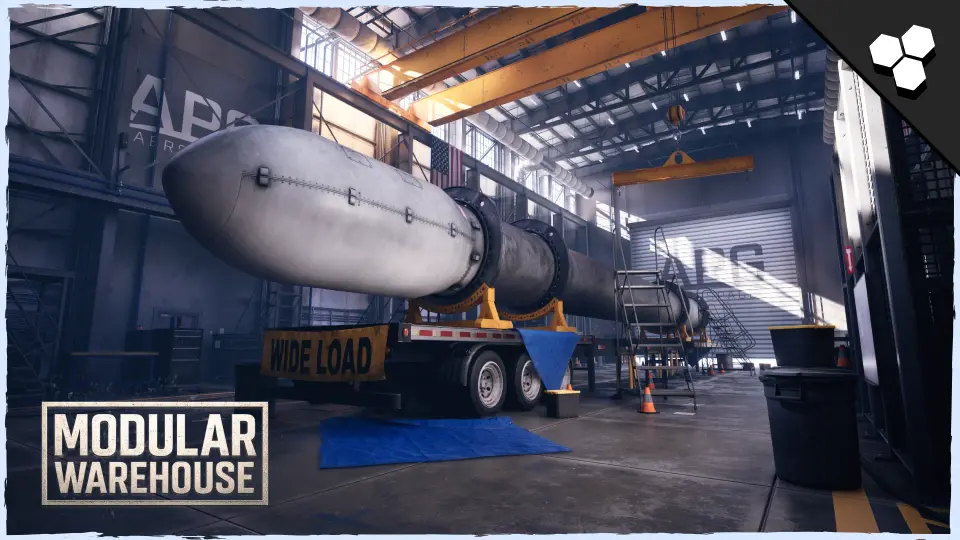
Building a believable industrial facility in Unreal Engine usually means assembling it from repeatable parts rather than sculpting a single static mesh. That working method is exactly what Modular Warehouse targets. The package provides wall, roof, beam, and floor pieces constructed to snap together into warehouses, hangars, factories, and large-scale industrial facilities, with the stated goal of allowing unlimited layouts without visible repetition.
What makes the set practical for production is that it does not stop at walls. It bundles cable and pipe spline tooling, surface decals, props such as cranes and containers, and interactive doors. It is also shaped by Unreal Engine 5 features—Lumen for lighting and Nanite for geometry detail—which places it in the workflow of teams targeting modern rendering rather than last-generation pipelines.
Designing Warehouses, Hangars, and Factories from Modular Pieces
The core of the package is fully modular construction. Every wall, roof, beam, and floor piece is modular, which means a level designer can assemble structures piece by piece instead of placing prefabricated buildings. The intent is to support not only standard warehouses but also large-scale industrial facilities, hangars, and factories.
This approach matters because industrial environments tend to share structural language—steel framing, corrugated panels, exposed trusses—while differing in footprint and internal division. By making the structural elements modular, the kit can cover a shipping depot, a manufacturing floor, or an aircraft hangar from overlapping parts, reducing asset duplication across a project.
Adding Cables, Pipes, and Wires with the Spline Tool
Industrial scenes live or die by secondary detail. A warehouse shell without conduit, cable trays, or pipe runs tends to read as sterile. Modular Warehouse addresses this with a cable spline tool described as a powerful system for quickly placing cables, pipes, and wires across a scene.
Using a spline-based approach rather than static curve meshes means routing can follow beams, walls, and ceilings without manual vertex placement. The tool is positioned as a way to add authenticity and detail to any environment, and because it works on splines, the same tool can fill multiple roles: overhead power runs, wall-mounted conduit, ground-level pipe, and loose wiring.
Interior and Exterior Readiness Without Cheats
Many environment kits cheat interior/exterior transitions by culling faces the camera cannot see. This set takes the opposite route: all meshes are double-sided and built with real geometry. The goal is that assets function seamlessly from both inside and outside.
That choice has direct implications for how the kit is used. In a first-person shooter, a player can move from an exterior yard into a warehouse interior without the building shell revealing missing backfaces. In a third-person game, orbiting camera angles around structures will not break geometry. For cinematic work, the same building can be shot from outside and inside without rebuilding. The double-sided construction means there is no fallback to planar interiors or imposter geometry when the camera crosses a threshold.
Telling the Environment's Story with Decals
The package includes a large decal library aimed at realism. The decals cover dirt, scratches, painted lines, hazard signs, and general industrial wear. These are surface-level additions, but they do a lot of the heavy lifting in making a space feel occupied rather than freshly manufactured.
Painted floor lines can define forklift lanes and loading zones. Hazard signs mark restricted areas or chemical storage. Scratches and grime accumulate around doorframes, dock edges, and high-traffic zones. Because the decals are independent of the base materials, they can be layered onto surfaces without altering the underlying shader setup.
Filling Out Scenes with Cranes, Containers, and Industrial Props
Beyond structural pieces, Modular Warehouse ships with a large prop collection. The included props are cranes, containers, pallets, tools, machinery, and industrial clutter. These are the objects that turn a floor plan into a working facility.
Several of these props have reach beyond the immediate warehouse context. Containers and pallets are reusable in shipping yards, logistics hubs, and post-apocalyptic settings. Cranes and machinery suit construction sites and factory floors. The props are described as versatile and reusable across multiple projects, which makes them less single-purpose than the building pieces and more like a general industrial dressing kit.
Functional Doors, Gates, and Warehouse Shutters
The kit is built with gameplay in mind. Rather than supplying static door meshes, the creator has made the operational elements functional. Doors, gates, and massive warehouse shutters are designed to open and operate in interactive scenarios.
This is a meaningful distinction for game projects. A loading dock shutter that can animate open supports a delivery sequence. A gate that operates can block or grant access during a mission. Because these pieces are functional at the asset level, a gameplay programmer or level designer does not need to rebuild the door logic from scratch—the geometry and behavior are part of the pack.
Unreal Engine 5 Rendering Pipeline: Lumen and Nanite Considerations
Modular Warehouse is suited to Unreal Engine 5's modern rendering pipeline. The assets are built to drop directly into a project and deliver professional-quality results while staying performance-optimized.
Two Unreal Engine 5 features are explicitly flagged. The product supports Lumen for Unreal Engine 5.0 and above, which means the materials and light bounce behavior are set up to work with the global illumination system. The product also uses Nanite, with a note to enable SM6 (Shader Model 6), the shader model required for Nanite rendering.
This shapes where the kit fits technically. It is intended for projects running Unreal Engine 5 with Lumen and Nanite active. Older or mobile-targeted pipelines that cannot use Nanite would not benefit from the geometry density the system enables, and Lumen-only projects would still gain from the lighting setup but not from the virtualized geometry side.
Where This Kit Fits in Production
Modular Warehouse sits in the layer of environment production where structure, dressing, and interactivity overlap. It is not a single building to place; it is a construction system. A level designer can block out a warehouse layout, route pipes and cables along the framing, dirt up the floors with decals, populate the space with containers and machinery, and hand a playable space to the gameplay team with doors and shutters that already function.
Teams building first-person shooters, third-person action games, or cinematic sequences set in industrial locations would benefit most. The functional doors and double-sided geometry make it suitable for player-traversable spaces, while the decal and prop libraries reduce the need to source secondary assets from elsewhere.
The practical takeaway is straightforward: if a production needs an Unreal Engine 5-native industrial kit that combines modular structural pieces, spline-based cable routing, gameplay-ready doors, surface decals, and reusable props into one package, Modular Warehouse covers that scope without requiring external add-ons.
 Industrial
 Industrial
 Industrial
 Industrial