"0148f1904a9b0d16"{"id":"1002590","slug":"modular-japanese-architecture-pack","title":"Modular Japanese Architecture Pack","category":"Buildings \u0026 Architecture","engine":"5.0+","assetVersion":"","engineVersion":"Engine Version: 5.0+","tag":"Buildings","accent":"blue","visual":"mech","summary":"Build custom Japanese interiors and exteriors with the Modular Japanese Architecture Pack, featuring multi-floor layouts, LODs, and UE5 setup guidance.","platform":"Unreal Engine","indexPolicy":"index","publishedAt":"2026-11-14T05:34:06.312Z","updatedAt":"2026-11-14T05:34:06.312Z","sourceNotes":[],"fileContents":[],"compatibility":["Unreal Engine","Engine Version: 5.0+"],"featuredImage":{"alt":"Modular Japanese Architecture Pack","src":"/wp-content/uploads/published/2026/11/9f409c2c6f2c-23c8684f-6c01-4340-94d3-8289d2afd546-56bfe16390.webp"},"hasDownloadLink":true,"downloads":0,"terms":[{"taxonomy":"category","slug":"buildings-and-architecture","name":"Buildings \u0026 Architecture"}],"galleryImages":[{"src":"/wp-content/uploads/published/2026/11/9e783a1b7855-c846d76c-c608-4855-a97a-6a1a90522f6d-3042bcc5c1.webp","alt":"Modular Japanese Architecture Pack"},{"src":"/wp-content/uploads/published/2026/11/c5853112bf42-c2e3577d-1ce5-467e-8d2c-96d0952b3d02-a2e3eea247.webp","alt":"Modular Japanese Architecture Pack"},{"src":"/wp-content/uploads/published/2026/11/56d12f5a56ca-cda43922-957e-4619-a8e4-e27d00e5b3bc-535e8d9efc.webp","alt":"Modular Japanese Architecture Pack"},{"src":"/wp-content/uploads/published/2026/11/c9354523e73e-f7314e78-632c-4809-9ee5-180cbfd9daa2-da3116cf4e.webp","alt":"Modular Japanese Architecture Pack"},{"src":"/wp-content/uploads/published/2026/11/5e365a7ef641-bca434b3-14b7-4d36-ae06-7ba5a844a973-9246c358f8.webp","alt":"Modular Japanese Architecture Pack"},{"src":"/wp-content/uploads/published/2026/11/cb294e022950-145714d6-f366-4854-9c4d-2baab1cb228e-790349b1d3.webp","alt":"Modular Japanese Architecture Pack"},{"src":"/wp-content/uploads/published/2026/11/21130963861c-ac8fead6-cc45-49dc-97be-cb0b851fca3f-455256a630.webp","alt":"Modular Japanese Architecture Pack"},{"src":"/wp-content/uploads/published/2026/11/1744cbc1c2be-e93a6a1a-775d-41e8-90e2-085c42bb555b-feb88e1afc.webp","alt":"Modular Japanese Architecture Pack"},{"src":"/wp-content/uploads/published/2026/11/2dcdd9a4f5ae-356a5faa-2f66-428e-9d68-f2179d47c82b-cf075eb860.webp","alt":"Modular Japanese Architecture Pack"},{"src":"/wp-content/uploads/published/2026/11/60db23440cb1-cf12dd23-a2d4-47cc-ad53-1a3171ea33ae-148c45f26c.webp","alt":"Modular Japanese Architecture Pack"}],"accessPanel":{"kind":"resource","title":"Get this resource","eyebrow":"Free resource","message":"Download this resource in your browser.","fileName":"Content.7z","safetyNote":"Resources are manually reviewed before listing to improve quality and reduce obvious risks.","actionLabel":"Get this resource","resourceType":"Resource archive","versions":[]},"contentHtml":"\u003ch2\u003eConstructing Medieval Japanese Environments and Dojos\u003c/h2\u003e\u003cp\u003eHistorical East Asian game environments require clean structural rhythms, authentic proportions, and spaces that function convincingly from both the street and the tatami mat. Building a sprawling countryside temple compound or a compact training dojo demands modular assets that do not break visual coherence when viewed up close. Whether staging a fast-paced sword fight in a spacious hall or orchestrating tense stealth navigation across wooden rafters, structural flexibility dictates how smoothly level design can proceed.\u003c/p\u003e\u003cp\u003eThe Modular Japanese Architecture Pack addresses these demands by supplying components engineered for both exterior facades and fully traversable interiors. In projects targeting first-person exploration, close spatial tolerances matter immensely: ceiling clearances, entryway widths, and door thresholds must accommodate camera collision without clipping. Third-person action titles present an inverted challenge, demanding wide sightlines and vertical room clearance so follow-cameras do not choke against wall frames. Because the kit supports both perspectives, artists can assemble authentic dojos, residences, and perimeter structures while maintaining smooth camera tracking through doorways and across connected chambers.\u003c/p\u003e\u003ch2\u003eModular Systems for Stacking Multi-Floor Japanese Architecture\u003c/h2\u003e\u003cp\u003eTrue architectural modularity requires more than snapping uniform boxes together along a single plane. Traditional vernacular architecture in Japan relies on post-and-beam construction, allowing rooms of radically varying dimensions to coexist under expansive, interlocking rooflines. Replicating this spatial language requires pieces that combine seamlessly across horizontal footprints and vertical elevations.\u003c/p\u003e\u003cp\u003eWith this modular architecture system, you can assemble custom floor plans featuring as many distinct room dimensions as your project requires. Rooms can expand laterally to form broad training halls or constrict into narrow, intimate living quarters. Stacking these spaces vertically is equally direct: builders can construct multi-story complexes by layering structured floor tiers, establishing balconies, and topping the entire assembly with traditional roof geometry. Because interior walls and external perimeter assemblies match cleanly, you are free to design floor plans that vary from level to level rather than being locked into repetitive, uniform towers.\u003c/p\u003e\u003ch2\u003eSurface Customization and Shoji Paper Transparency\u003c/h2\u003e\u003cp\u003eAtmosphere in classical Japanese structures hinges on the interplay of timber framing and delicate partition screens. Lighting plays a defining role in defining the boundary between privacy and exposure within traditional residences. The pack provides extensive customization options across its asset library, giving environment artists control over how individual spaces feel and function.\u003c/p\u003e\u003cp\u003eCentral to this flexibility is the treatment of partition screens. The pack supplies both transparent and opaque variations for shoji paper elements. Opaque shoji panels create solid visual barriers, shielding inner quarters from external daylight and blocking character vision cones during stealth gameplay. Transparent shoji paper variants allow soft light transmission, casting diffused illumination across interior floorboards and revealing silhouettes from adjacent corridors. Combining these material treatments across moving or static screens allows level artists to subtly guide player attention, illuminate interior pathways with filtered natural light, and establish diverse architectural moods across different sections of a compound.\u003c/p\u003e\u003ch2\u003eMesh Performance, PBR Materials, and Static Mesh LODs\u003c/h2\u003e\u003cp\u003eProduction performance hinges on how efficiently an asset collection handles mesh complexity and real-time rendering demands. While modern workflows frequently lean on automated virtualization systems, standard production pipelines across many engines still rely on deterministic, predictable mesh optimization.\u003c/p\u003e\u003cp\u003eAll meshes included in the pack are built as traditional, low-poly static meshes utilizing explicit Level of Detail (LOD) setups rather than relying on Nanite conversion. This technical choice keeps the polycount lean and predictable, making the assets well suited for low-overhead rendering, multiplayer environments, or projects targeting hardware configurations where manual LOD control is preferred. Paired with physically based rendering (PBR) materials, the wood grains, plaster textures, and structural elements react accurately to direct and indirect lighting while keeping memory footprints restrained. For projects maintaining stylistic or technical continuity across historical themes, the pack also demonstrates direct compatibility with Elite Modular Buildings - Medieval Europe, simplifying cross-regional worldbuilding within shared engine environments.\u003c/p\u003e\u003ch2\u003eConfiguring Unreal Engine 5 Lighting on Demonstration Maps\u003c/h2\u003e\u003cp\u003eMigrating projects between engine iterations frequently introduces subtle shifts in how scene illumination is evaluated. Unreal Engine 5 introduces major rendering changes, notably Lumen global illumination, which can alter how pre-configured demonstration lighting presents itself straight out of the box.\u003c/p\u003e\u003cp\u003eWhen opening the included demonstration map inside Unreal Engine 5, interior spaces may initially appear unusually dark. This occurs because Lumen dynamically overrides the simulated global illumination that the demonstration level's skylight relies upon to fill interior spaces. Resolving this discrepancy does not require rebuilding lightmaps or reconfiguring custom assets. Navigate to the Outliner, select the PostProcessVolume present in the level, and locate the Global Illumination category. Within that tab, tick the Method override checkbox and change the dropdown selection from Lumen to None. Disabling Lumen within the volume immediately restores the intended skylight-driven interior illumination across the demo space. In your own project maps, custom lighting rigs—whether utilizing full Lumen bounces, baked static lightmaps, or custom skylight settings—will function normally according to your specific lighting architecture.\u003c/p\u003e\u003ch2\u003eProject Ingestion Safeguards for Engine 4.20 and Newer\u003c/h2\u003e\u003cp\u003eIntegrating imported content libraries into an ongoing project requires clean file recognition without triggering unwanted asset rebuilds or reference overwrites. Engine builds spanning from version 4.20 through the latest Unreal Engine 5 releases feature strict import detection heuristics that require deliberate user input upon first launch.\u003c/p\u003e\u003cp\u003eWhen adding the pack into projects running version 4.20 or newer, opening the editor may prompt an automated dialog window requesting permission to reimport all newly introduced mesh files. If this warning appears, always select \"DONT IMPORT\". Bypassing the reimport prompt preserves the internal mesh data, retains correct relative transformations, and keeps the asset library ready for immediate placement within your levels. Following this precaution ensures that modular snapping points, collision profiles, and assigned PBR materials stay intact from the moment the collection is added to your project.\u003c/p\u003e\u003ch2\u003eBuilding for Historical, Combat, and Exploration Roles\u003c/h2\u003e\u003cp\u003eEnvironment artists assembling sprawling historic settlements, martial arts academies, or stealth-oriented feudal compounds gain a focused, modular toolset with this pack. The freedom to generate custom room volumes, stack distinct multi-tier floors, switch between translucent and solid shoji barriers, and manage mesh performance via conventional LODs provides a reliable foundation across diverse gameplay genres. Teams prioritizing low-poly efficiency and fully traversable interior-exterior spaces can rapidly prototype and detail convincing Japanese architecture while retaining full control over scene optimization and level layout.\u003c/p\u003e\n\n\u003ch2\u003eMore From The Same Workflow\u003c/h2\u003e\n\u003cul\u003e\n\u003cli\u003e\u003ca href=\"https://3dcghub.com/japanese-street/\" rel=\"noopener noreferrer\"\u003eJapanese Street\u003c/a\u003e\u003c/li\u003e\n\u003cli\u003e\u003ca href=\"https://3dcghub.com/apocalyptic-office-props-vol1/\" rel=\"noopener noreferrer\"\u003eApocalyptic Office Props Vol1\u003c/a\u003e\u003c/li\u003e\n\u003cli\u003e\u003ca href=\"https://3dcghub.com/modular-container-houses-survival-base-pack/\" rel=\"noopener noreferrer\"\u003eModular Container Houses - Survival Base Pack\u003c/a\u003e\u003c/li\u003e\n\u003cli\u003e\u003ca href=\"https://3dcghub.com/modern-bridges/\" rel=\"noopener noreferrer\"\u003eModern Bridges\u003c/a\u003e\u003c/li\u003e\n\u003cli\u003e\u003ca href=\"https://3dcghub.com/medieval-modular-wall-pack-kitbash-collection/\" rel=\"noopener noreferrer\"\u003eMedieval Modular Wall Pack - Kitbash Collection\u003c/a\u003e\u003c/li\u003e\n\u003c/ul\u003e","contentTextLength":8072,"navigation":{"current":59,"total":4543,"previous":{"id":"1002591","slug":"pack-of-tree-ents","title":"Pack of tree ents","category":"Creatures \u0026 Monsters","platform":"Unreal Engine","updatedAt":"2026-11-14T05:35:27.957Z"},"next":{"id":"1002589","slug":"modular-container-houses-survival-base-pack","title":"Modular Container Houses - Survival Base Pack","category":"Buildings \u0026 Architecture","platform":"Unreal Engine","updatedAt":"2026-11-14T05:33:05.397Z"}},"relatedResources":[{"id":"1000228","slug":"japanese-street","title":"Japanese Street","category":"Buildings \u0026 Architecture","engine":"4.26+,5.0+","assetVersion":"","engineVersion":"Engine Version: 4.26+,5.0+","tag":"Buildings","accent":"blue","visual":"mech","summary":"Construct dense urban layouts with the Japanese Street asset, featuring modular cozy houses, material swapping, and functional interior door systems.","platform":"Unreal Engine","indexPolicy":"index","publishedAt":"2026-06-27T18:42:28.315Z","updatedAt":"2026-06-27T18:42:28.315Z","sourceNotes":[],"fileContents":[],"compatibility":["Unreal Engine","Engine Version: 4.26+,5.0+"],"featuredImage":{"alt":"Japanese Street","src":"/wp-content/uploads/published/2026/06/3de2d3bd432a-b89297f6-a639-4d09-9015-f7c5f39252c0-ee5d879f21.webp"},"hasDownloadLink":true,"downloads":9},{"id":"1001790","slug":"apocalyptic-office-props-vol1","title":"Apocalyptic Office Props Vol1","category":"Buildings \u0026 Architecture","engine":"5.3+","assetVersion":"","engineVersion":"Engine Version: 5.3+","tag":"Buildings","accent":"blue","visual":"mech","summary":"Apocalyptic Office Props Vol1 brings realistic hospital and office assets into Unreal Engine 5.4 for post-apocalyptic and abandoned interior environments.","platform":"Unreal Engine","indexPolicy":"index","publishedAt":"2026-10-21T07:42:48.211Z","updatedAt":"2026-10-21T07:42:48.211Z","sourceNotes":[],"fileContents":[],"compatibility":["Unreal Engine","Engine Version: 5.3+"],"featuredImage":{"alt":"Apocalyptic Office Props Vol1","src":"/wp-content/uploads/published/2026/10/9319306b06ba-7da03850-c648-4a18-b50f-ddfdaa2f7a9a-82644ff2d2.webp"},"hasDownloadLink":true,"downloads":2},{"id":"1331","slug":"landscaping-vines-1","title":"Livingroom Vol. 1 by Unimodels","category":"Buildings \u0026 Architecture","engine":"5.1+","assetVersion":"Engine version: 5.1+","engineVersion":"5.1","tag":"Buildings","accent":"blue","visual":"city","summary":"Enhance your architectural projects with realistic landscaping vines. Features Pivot Painter 2.0 and Nanite support for lifelike movement and performance.","platform":"Unreal Engine","indexPolicy":"noindex","publishedAt":"2026-02-06T17:52:33.000Z","updatedAt":"2026-11-14T10:16:36.025Z","sourceNotes":[],"fileContents":[],"compatibility":["Unreal Engine","Engine version: 5.1+"],"featuredImage":{"alt":"Livingroom Vol. 1 by Unimodels","src":"https://3dcghub.com/wp-content/uploads/2026/02/0cc2c22c-2820-4719-a7f9-fc8bf151a5e9.png"},"hasDownloadLink":true,"downloads":0}]}
Buildings
Modular Japanese Architecture Pack
Build custom Japanese interiors and exteriors with the Modular Japanese Architecture Pack, featuring multi-floor layouts, LODs, and UE5 setup guidance.
Constructing Medieval Japanese Environments and Dojos
Historical East Asian game environments require clean structural rhythms, authentic proportions, and spaces that function convincingly from both the street and the tatami mat. Building a sprawling countryside temple compound or a compact training dojo demands modular assets that do not break visual coherence when viewed up close. Whether staging a fast-paced sword fight in a spacious hall or orchestrating tense stealth navigation across wooden rafters, structural flexibility dictates how smoothly level design can proceed.
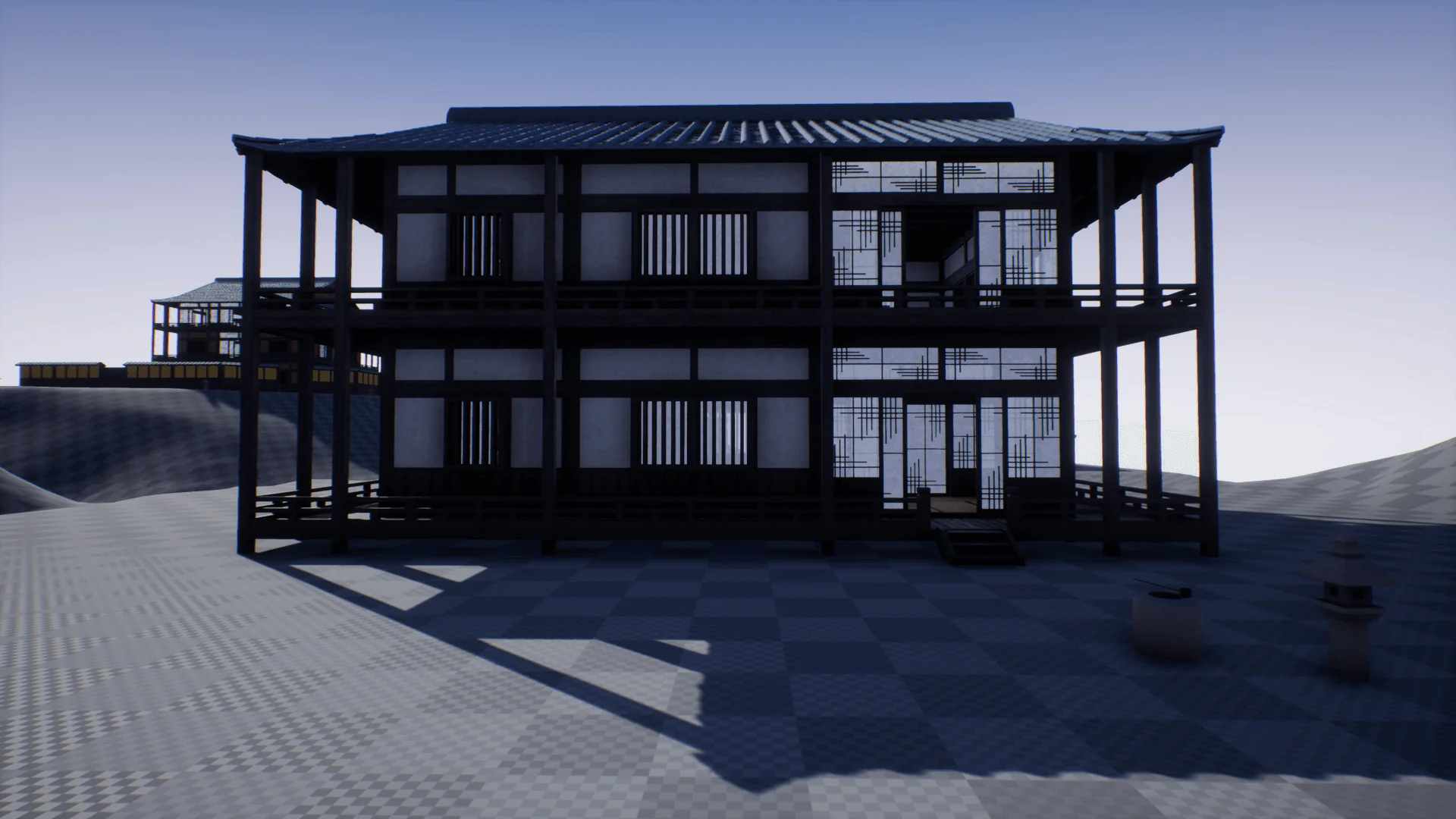
The Modular Japanese Architecture Pack addresses these demands by supplying components engineered for both exterior facades and fully traversable interiors. In projects targeting first-person exploration, close spatial tolerances matter immensely: ceiling clearances, entryway widths, and door thresholds must accommodate camera collision without clipping. Third-person action titles present an inverted challenge, demanding wide sightlines and vertical room clearance so follow-cameras do not choke against wall frames. Because the kit supports both perspectives, artists can assemble authentic dojos, residences, and perimeter structures while maintaining smooth camera tracking through doorways and across connected chambers.
Modular Systems for Stacking Multi-Floor Japanese Architecture
True architectural modularity requires more than snapping uniform boxes together along a single plane. Traditional vernacular architecture in Japan relies on post-and-beam construction, allowing rooms of radically varying dimensions to coexist under expansive, interlocking rooflines. Replicating this spatial language requires pieces that combine seamlessly across horizontal footprints and vertical elevations.
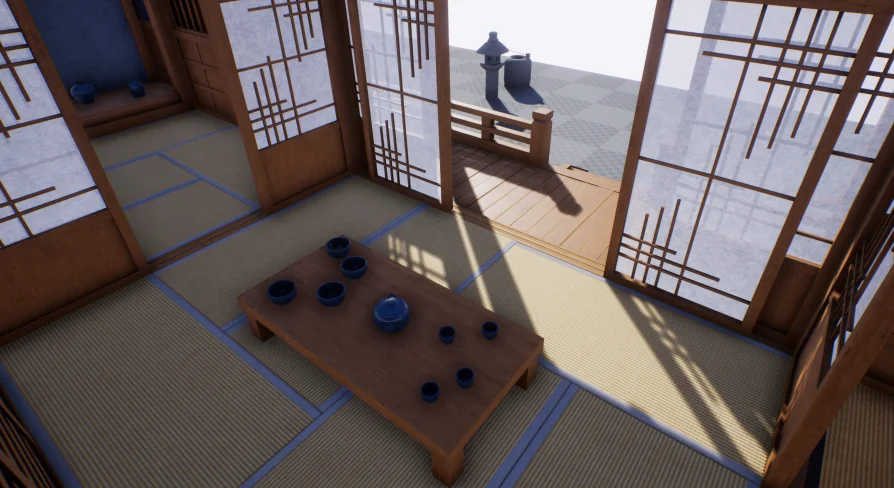
With this modular architecture system, you can assemble custom floor plans featuring as many distinct room dimensions as your project requires. Rooms can expand laterally to form broad training halls or constrict into narrow, intimate living quarters. Stacking these spaces vertically is equally direct: builders can construct multi-story complexes by layering structured floor tiers, establishing balconies, and topping the entire assembly with traditional roof geometry. Because interior walls and external perimeter assemblies match cleanly, you are free to design floor plans that vary from level to level rather than being locked into repetitive, uniform towers.
Surface Customization and Shoji Paper Transparency
Atmosphere in classical Japanese structures hinges on the interplay of timber framing and delicate partition screens. Lighting plays a defining role in defining the boundary between privacy and exposure within traditional residences. The pack provides extensive customization options across its asset library, giving environment artists control over how individual spaces feel and function.
Central to this flexibility is the treatment of partition screens. The pack supplies both transparent and opaque variations for shoji paper elements. Opaque shoji panels create solid visual barriers, shielding inner quarters from external daylight and blocking character vision cones during stealth gameplay. Transparent shoji paper variants allow soft light transmission, casting diffused illumination across interior floorboards and revealing silhouettes from adjacent corridors. Combining these material treatments across moving or static screens allows level artists to subtly guide player attention, illuminate interior pathways with filtered natural light, and establish diverse architectural moods across different sections of a compound.
Mesh Performance, PBR Materials, and Static Mesh LODs
Production performance hinges on how efficiently an asset collection handles mesh complexity and real-time rendering demands. While modern workflows frequently lean on automated virtualization systems, standard production pipelines across many engines still rely on deterministic, predictable mesh optimization.
All meshes included in the pack are built as traditional, low-poly static meshes utilizing explicit Level of Detail (LOD) setups rather than relying on Nanite conversion. This technical choice keeps the polycount lean and predictable, making the assets well suited for low-overhead rendering, multiplayer environments, or projects targeting hardware configurations where manual LOD control is preferred. Paired with physically based rendering (PBR) materials, the wood grains, plaster textures, and structural elements react accurately to direct and indirect lighting while keeping memory footprints restrained. For projects maintaining stylistic or technical continuity across historical themes, the pack also demonstrates direct compatibility with Elite Modular Buildings - Medieval Europe, simplifying cross-regional worldbuilding within shared engine environments.
Configuring Unreal Engine 5 Lighting on Demonstration Maps
Migrating projects between engine iterations frequently introduces subtle shifts in how scene illumination is evaluated. Unreal Engine 5 introduces major rendering changes, notably Lumen global illumination, which can alter how pre-configured demonstration lighting presents itself straight out of the box.
When opening the included demonstration map inside Unreal Engine 5, interior spaces may initially appear unusually dark. This occurs because Lumen dynamically overrides the simulated global illumination that the demonstration level's skylight relies upon to fill interior spaces. Resolving this discrepancy does not require rebuilding lightmaps or reconfiguring custom assets. Navigate to the Outliner, select the PostProcessVolume present in the level, and locate the Global Illumination category. Within that tab, tick the Method override checkbox and change the dropdown selection from Lumen to None. Disabling Lumen within the volume immediately restores the intended skylight-driven interior illumination across the demo space. In your own project maps, custom lighting rigs—whether utilizing full Lumen bounces, baked static lightmaps, or custom skylight settings—will function normally according to your specific lighting architecture.
Project Ingestion Safeguards for Engine 4.20 and Newer
Integrating imported content libraries into an ongoing project requires clean file recognition without triggering unwanted asset rebuilds or reference overwrites. Engine builds spanning from version 4.20 through the latest Unreal Engine 5 releases feature strict import detection heuristics that require deliberate user input upon first launch.
When adding the pack into projects running version 4.20 or newer, opening the editor may prompt an automated dialog window requesting permission to reimport all newly introduced mesh files. If this warning appears, always select "DONT IMPORT". Bypassing the reimport prompt preserves the internal mesh data, retains correct relative transformations, and keeps the asset library ready for immediate placement within your levels. Following this precaution ensures that modular snapping points, collision profiles, and assigned PBR materials stay intact from the moment the collection is added to your project.
Building for Historical, Combat, and Exploration Roles
Environment artists assembling sprawling historic settlements, martial arts academies, or stealth-oriented feudal compounds gain a focused, modular toolset with this pack. The freedom to generate custom room volumes, stack distinct multi-tier floors, switch between translucent and solid shoji barriers, and manage mesh performance via conventional LODs provides a reliable foundation across diverse gameplay genres. Teams prioritizing low-poly efficiency and fully traversable interior-exterior spaces can rapidly prototype and detail convincing Japanese architecture while retaining full control over scene optimization and level layout.
 Buildings
 Buildings
 Buildings
 Buildings