"fa182e0cd0a6ea73"{"id":"1000646","slug":"meta-foam","title":"Meta Foam","category":"Procedural Systems","engine":"5.3+","assetVersion":"","engineVersion":"Engine Version: 5.3+","tag":"Procedural Systems","accent":"blue","visual":"mech","summary":"Meta Foam is a Blueprint-driven Unreal Engine system for realistic foam and bubble rendering using thin and thick modes, six presets, and a procedural Cinematic","platform":"Unreal Engine","publishedAt":"2026-07-21T17:47:33.872Z","updatedAt":"2026-07-21T17:47:33.872Z","sourceNotes":[],"fileContents":[],"compatibility":["Unreal Engine","Engine Version: 5.3+"],"featuredImage":{"alt":"Meta Foam","src":"/wp-content/uploads/published/2026/07/fd75f8ec081d-2c352051-58b7-4686-b860-9f0a68a13346-a27ba9c117.webp"},"hasDownloadLink":true,"downloads":1,"terms":[{"taxonomy":"category","slug":"procedural-systems","name":"Procedural Systems"}],"galleryImages":[{"src":"/wp-content/uploads/published/2026/07/05ba9056f30d-9f18b420-07f7-4159-baec-4faa9d8cb1aa-723e745ff1.webp","alt":"Meta Foam"},{"src":"/wp-content/uploads/published/2026/07/ce1d9d9cf698-df4b140d-734f-48fd-9e26-86eabc3fd9a0-9ac20ae9e5.webp","alt":"Meta Foam"},{"src":"/wp-content/uploads/published/2026/07/a3287e2a2ab0-a94407cd-1c8f-43c3-b3cc-fa323f863b38-64a2f9fe85.webp","alt":"Meta Foam"},{"src":"/wp-content/uploads/published/2026/07/94c5c7bdab3e-36faf49e-b156-4f32-869e-a26128fd2226-c243d57d87.webp","alt":"Meta Foam"},{"src":"/wp-content/uploads/published/2026/07/b25052d12be8-81ac425e-81f3-4eeb-b6fa-be9dabd31668-314d7c1773.webp","alt":"Meta Foam"},{"src":"/wp-content/uploads/published/2026/07/e024551884d8-b8d458c6-176f-41da-b629-a629bc90a548-06fbe2214b.webp","alt":"Meta Foam"},{"src":"/wp-content/uploads/published/2026/07/34089b8f8456-41a94a4a-008b-4786-bdfb-830164833b96-50cc3d7320.webp","alt":"Meta Foam"}],"accessPanel":{"kind":"resource","title":"Download this resource","eyebrow":"Free Download","message":"Log in or create a free account to start your download.","fileName":"Content.7z","safetyNote":"Resources are manually reviewed before listing to improve quality and reduce obvious risks.","actionLabel":"Download Free","resourceType":"Resource archive"},"contentHtml":"\u003cp\u003eMeta Foam is a Blueprint-driven system for rendering foam and bubbles in Unreal Engine. Foam actors are placed and shaped interactively in the editor using static meshes, which seamlessly merge together to form continuous surfaces. The system ships with multiple presets that allow plausible foam results straight out of the box, and each preset serves as a starting point that can be refined by adjusting foam properties and bubble layers. The recent v1.2 update introduced a new cream foam preset to this collection, and the tool now supports Unreal Engine 5.6.\u003c/p\u003e\u003ch2\u003eSix Foam Presets and Customization\u003c/h2\u003e\u003cp\u003eThe system includes six built-in presets covering common foam scenarios:\u003c/p\u003e\u003cul\u003e\u003cli\u003eSoap foam\u003c/li\u003e\u003cli\u003eCream foam — added in the v1.2 update\u003c/li\u003e\u003cli\u003eCoffee foam\u003c/li\u003e\u003cli\u003eCola foam\u003c/li\u003e\u003cli\u003eMilk foam\u003c/li\u003e\u003cli\u003eTea foam\u003c/li\u003e\u003c/ul\u003e\u003cp\u003eEach preset functions as a ready-made configuration for a specific type of foam or beverage surface. Creators can treat any preset as a foundation and then adjust individual foam properties and bubble layers to produce custom foam presets. This means the six presets are not fixed endpoints but rather reference states from which further variation can be developed within the system.\u003c/p\u003e\u003ch2\u003eThin Mode and Thick Mode Workflow\u003c/h2\u003e\u003cp\u003eMeta Foam operates in two distinct rendering modes, each suited to a different type of foam application:\u003c/p\u003e\u003cp\u003eThe first is Thin mode, a 2D approach intended for placing thin layers of foam on objects and liquids. This covers scenarios where foam sits as a surface coating—a layer atop a liquid or spread across an object—and the mode is structured around producing that flat, contained layer without adding volumetric depth where it is not needed.\u003c/p\u003e\u003cp\u003eThe second is Thick mode, a 3D approach made for turning entire meshes into foam. Unlike the thin layer application, Thick mode converts the full geometry into a foam volume. A key technical characteristic of Thick mode is that it works in world space. Because the calculation is handled in world coordinates rather than relying on per-vertex UV data, no UVs are necessary. This eliminates visible seams and tiling artifacts that often appear when texture-based foam techniques are applied to complex or irregular geometry. The foam fills the mesh volume without texture-coordinate dependency, producing a continuous surface.\u003c/p\u003e\u003ch2\u003eMulti-Pass Rendering for Offline-Quality Foam\u003c/h2\u003e\u003cp\u003eMeta Foam is described as more than a transparent material. It brings offline rendered foam quality to Unreal Engine by rendering foam in multiple passes. This multi-pass approach is the core of how the system achieves its visual fidelity—rather than approximating foam with a single shading or opacity technique, it layers rendering passes to build the appearance of foam and bubbles in a structured way.\u003c/p\u003e\u003cp\u003eThe system applies a reasoned approximation to balance quality and performance. It places emphasis on the realistic rendering of larger bubbles while simplifying the rendering of smaller bubbles. This selective level of detail is what makes the tool suitable for hero assets in games and for use in cutscenes, where close-up scrutiny of foam is expected. By prioritizing the bubbles that are most visible and most defining of the foam's character, the system maintains real-time viability without sacrificing the plausibility of the surface.\u003c/p\u003e\u003ch2\u003eTarget Platforms and Production Fit\u003c/h2\u003e\u003cp\u003eBecause of the multi-pass rendering approach and the emphasis on fidelity, the tool currently targets high-end platforms and cinematics. It is not suitable for mobile platforms. The rendering cost and quality expectations align with desktop and console targets, or with pre-rendered and real-time cinematic sequences, rather than with the performance constraints of mobile devices.\u003c/p\u003e\u003cp\u003eIn a game production context, the system positions itself for hero assets and cutscene use. Hero assets are the prominent, player-facing objects that receive close attention and demand higher visual fidelity, and foam rendered through the multi-pass approach holds up under that scrutiny. In cutscenes, where camera framing and lighting are controlled, the system's emphasis on larger-bubble realism and its multi-pass shading produce results that read as convincing foam under directed viewing conditions.\u003c/p\u003e\u003ch2\u003eCinematics Mode and Texture-Resolution Independence\u003c/h2\u003e\u003cp\u003eMeta Foam also offers a completely procedural Cinematics mode for visualization and product shots. This mode removes texture resolution constraints, meaning the foam is not bound by the resolution of a specific texture map and can be framed at varying distances without losing fidelity or encountering pixelation tied to a fixed texture. For product visualization, where a camera might capture extreme close-ups of foam on a beverage or a cream layer on a dessert, the procedural approach ensures the surface detail holds regardless of how closely it is viewed.\u003c/p\u003e\u003cp\u003eThe combination of the procedural Cinematics mode and the thick-foam world-space approach gives the system applicability across both real-time interactive scenes and pre-rendered or carefully staged shots. The tag set associated with the system reflects this range: PBR, Porous, Drink, Milk, Foam, Realistic, Soda, Ocean, Cream, Bubble, Blueprint, Whippedcream, Milkshake, Cola. These tags map to the intended use cases—from beverage renders to ocean surfaces to whipped cream and milkshake visuals—and to the technical characteristics of the system, including its Blueprint-driven architecture and its focus on porous, bubble-based surfaces.\u003c/p\u003e\u003cp\u003eFor production teams working in Unreal Engine on high-end platforms, the package is set up to handle foam and bubble rendering through interactive Blueprint-driven actor placement, six configurable presets, and a multi-pass rendering pipeline that scales from hero game assets to procedural cinematics without mobile constraints.\u003c/p\u003e\n\n\u003ch2\u003eContinue Browsing Similar Packs\u003c/h2\u003e\n\u003cul\u003e\n\u003cli\u003e\u003ca href=\"https://3dcghub.com/cloud-forge-vdb-cloud-pack-volume-2/\" title=\"Cloud Forge - VDB Cloud Pack Volume 2\"\u003eCloud Forge - VDB Cloud Pack Volume 2\u003c/a\u003e\u003c/li\u003e\n\u003cli\u003e\u003ca href=\"https://3dcghub.com/lightgrid/\" title=\"LIGHTGRID\"\u003eLIGHTGRID\u003c/a\u003e\u003c/li\u003e\n\u003cli\u003e\u003ca href=\"https://3dcghub.com/calysto-village-procedural-villages-farms-with-pcg/\" title=\"Calysto Village Procedural villages, farms with PCG\"\u003eCalysto Village Procedural villages, farms with PCG\u003c/a\u003e\u003c/li\u003e\n\u003cli\u003e\u003ca href=\"https://3dcghub.com/cloud-forge-complete-vdb-clouds-1-4-3/\" title=\"Cloud Forge Complete - VDB Clouds 1.4.3\"\u003eCloud Forge Complete - VDB Clouds 1.4.3\u003c/a\u003e\u003c/li\u003e\n\u003cli\u003e\u003ca href=\"https://3dcghub.com/procedural-mesh-blueprint/\" title=\"Procedural Mesh Blueprint\"\u003eProcedural Mesh Blueprint\u003c/a\u003e\u003c/li\u003e\n\u003c/ul\u003e","contentTextLength":5951,"navigation":{"current":1289,"total":3789,"previous":{"id":"1000647","slug":"modern-art-museum-environment-showroom-museum-art-exhibition-showroom","title":"Modern Art Museum Environment ( Showroom Museum Art Exhibition Showroom )","category":"Interior","platform":"Unreal Engine","updatedAt":"2026-07-21T18:05:19.328Z"},"next":{"id":"1000645","slug":"medieval-watchtowers-and-platforms-v1","title":"Medieval Watchtowers and Platforms - v1","category":"Buildings \u0026 Architecture","platform":"Unreal Engine","updatedAt":"2026-07-21T17:44:36.382Z"}},"relatedResources":[{"id":"1001597","slug":"easy-snow","title":"Easy Snow","category":"Procedural Systems","engine":"5.3+","assetVersion":"","engineVersion":"Engine Version: 5.3+","tag":"Procedural Systems","accent":"blue","visual":"mech","summary":"Create realistic winter weather in Unreal Engine with Easy Snow, featuring 3D clump Niagara particles, Nanite displacement, and Lumen support.","platform":"Unreal Engine","publishedAt":"2026-10-10T16:19:16.737Z","updatedAt":"2026-10-10T16:19:16.737Z","sourceNotes":[],"fileContents":[],"compatibility":["Unreal Engine","Engine Version: 5.3+"],"featuredImage":{"alt":"Easy Snow","src":"/wp-content/uploads/published/2026/10/b08d96305363-aae1b995-0b59-46a0-9190-f6355cfb4919-d9b474f25a.webp"},"hasDownloadLink":true,"downloads":0},{"id":"1001080","slug":"blowing-landscape-sands-effect-v1-1","title":"Blowing Landscape Sands Effect v1.1","category":"Procedural Systems","engine":"5.0+","assetVersion":"Asset Version: 1.1","engineVersion":"Engine Version: 5.0+","tag":"Procedural Systems","accent":"blue","visual":"city","summary":"Unreal Engine blueprint for realistic blowing desert sand. Covers angle-based masking, six presets, and normal-mapped depth across UE 5.0 to 5.8.","platform":"Unreal Engine","publishedAt":"2026-09-04T16:03:46.298Z","updatedAt":"2026-09-04T16:03:46.298Z","sourceNotes":[],"fileContents":[],"compatibility":["Unreal Engine","Asset Version: 1.1","Engine Version: 5.0+"],"featuredImage":{"alt":"Blowing Landscape Sands Effect v1.1","src":"/wp-content/uploads/published/2026/09/b47537c102da-353bee59-fdfd-4a82-a93c-00cdf7f456cb-29f80ad218.webp"},"hasDownloadLink":true,"downloads":1},{"id":"1000572","slug":"cloud-forge-vdb-cloud-pack-volume-2","title":"Cloud Forge - VDB Cloud Pack Volume 2","category":"Procedural Systems","engine":"5.3+","assetVersion":"","engineVersion":"Engine Version: 5.3+","tag":"Procedural Systems","accent":"blue","visual":"mech","summary":"A pack of 39 optimized VDB clouds for Unreal Engine 5.3-5.8 featuring blueprints for atmospheric lighting, animated spawning, and volumetric shadows.","platform":"Unreal Engine","publishedAt":"2026-07-16T22:15:54.739Z","updatedAt":"2026-07-16T22:15:54.739Z","sourceNotes":[],"fileContents":[],"compatibility":["Unreal Engine","Engine Version: 5.3+"],"featuredImage":{"alt":"Cloud Forge - VDB Cloud Pack Volume 2","src":"/wp-content/uploads/published/2026/07/7b00cfbe84b2-7eb9f541-f0af-4c14-8a8f-3192e273831b-6e97906dc4.webp"},"hasDownloadLink":true,"downloads":0}]}
Procedural Systems
Meta Foam
Meta Foam is a Blueprint-driven Unreal Engine system for realistic foam and bubble rendering using thin and thick modes, six presets, and a procedural Cinematic
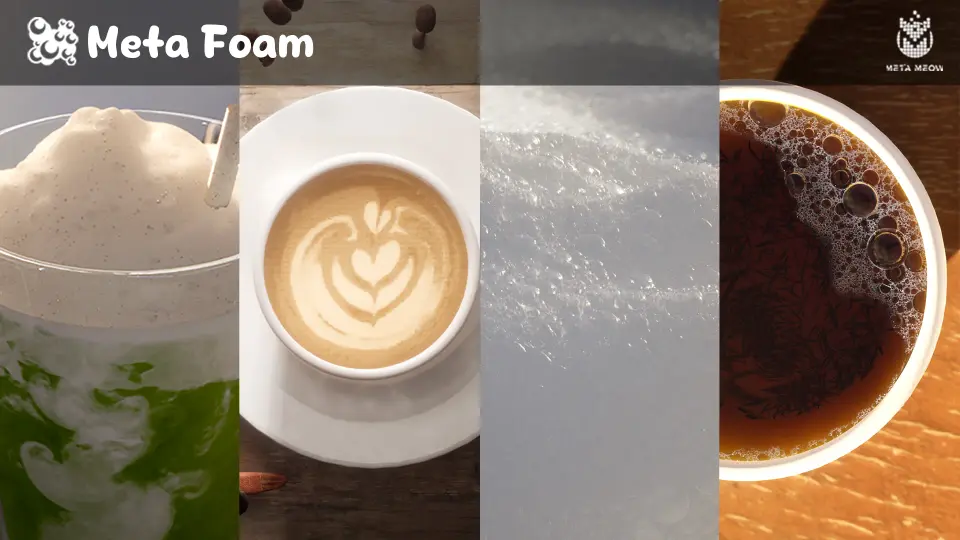
Meta Foam is a Blueprint-driven system for rendering foam and bubbles in Unreal Engine. Foam actors are placed and shaped interactively in the editor using static meshes, which seamlessly merge together to form continuous surfaces. The system ships with multiple presets that allow plausible foam results straight out of the box, and each preset serves as a starting point that can be refined by adjusting foam properties and bubble layers. The recent v1.2 update introduced a new cream foam preset to this collection, and the tool now supports Unreal Engine 5.6.
Six Foam Presets and Customization
The system includes six built-in presets covering common foam scenarios:
Soap foam
Cream foam — added in the v1.2 update
Coffee foam
Cola foam
Milk foam
Tea foam
Each preset functions as a ready-made configuration for a specific type of foam or beverage surface. Creators can treat any preset as a foundation and then adjust individual foam properties and bubble layers to produce custom foam presets. This means the six presets are not fixed endpoints but rather reference states from which further variation can be developed within the system.
Thin Mode and Thick Mode Workflow
Meta Foam operates in two distinct rendering modes, each suited to a different type of foam application:
The first is Thin mode, a 2D approach intended for placing thin layers of foam on objects and liquids. This covers scenarios where foam sits as a surface coating—a layer atop a liquid or spread across an object—and the mode is structured around producing that flat, contained layer without adding volumetric depth where it is not needed.
The second is Thick mode, a 3D approach made for turning entire meshes into foam. Unlike the thin layer application, Thick mode converts the full geometry into a foam volume. A key technical characteristic of Thick mode is that it works in world space. Because the calculation is handled in world coordinates rather than relying on per-vertex UV data, no UVs are necessary. This eliminates visible seams and tiling artifacts that often appear when texture-based foam techniques are applied to complex or irregular geometry. The foam fills the mesh volume without texture-coordinate dependency, producing a continuous surface.
Multi-Pass Rendering for Offline-Quality Foam
Meta Foam is described as more than a transparent material. It brings offline rendered foam quality to Unreal Engine by rendering foam in multiple passes. This multi-pass approach is the core of how the system achieves its visual fidelity—rather than approximating foam with a single shading or opacity technique, it layers rendering passes to build the appearance of foam and bubbles in a structured way.
The system applies a reasoned approximation to balance quality and performance. It places emphasis on the realistic rendering of larger bubbles while simplifying the rendering of smaller bubbles. This selective level of detail is what makes the tool suitable for hero assets in games and for use in cutscenes, where close-up scrutiny of foam is expected. By prioritizing the bubbles that are most visible and most defining of the foam's character, the system maintains real-time viability without sacrificing the plausibility of the surface.
Target Platforms and Production Fit
Because of the multi-pass rendering approach and the emphasis on fidelity, the tool currently targets high-end platforms and cinematics. It is not suitable for mobile platforms. The rendering cost and quality expectations align with desktop and console targets, or with pre-rendered and real-time cinematic sequences, rather than with the performance constraints of mobile devices.
In a game production context, the system positions itself for hero assets and cutscene use. Hero assets are the prominent, player-facing objects that receive close attention and demand higher visual fidelity, and foam rendered through the multi-pass approach holds up under that scrutiny. In cutscenes, where camera framing and lighting are controlled, the system's emphasis on larger-bubble realism and its multi-pass shading produce results that read as convincing foam under directed viewing conditions.
Cinematics Mode and Texture-Resolution Independence
Meta Foam also offers a completely procedural Cinematics mode for visualization and product shots. This mode removes texture resolution constraints, meaning the foam is not bound by the resolution of a specific texture map and can be framed at varying distances without losing fidelity or encountering pixelation tied to a fixed texture. For product visualization, where a camera might capture extreme close-ups of foam on a beverage or a cream layer on a dessert, the procedural approach ensures the surface detail holds regardless of how closely it is viewed.
The combination of the procedural Cinematics mode and the thick-foam world-space approach gives the system applicability across both real-time interactive scenes and pre-rendered or carefully staged shots. The tag set associated with the system reflects this range: PBR, Porous, Drink, Milk, Foam, Realistic, Soda, Ocean, Cream, Bubble, Blueprint, Whippedcream, Milkshake, Cola. These tags map to the intended use cases—from beverage renders to ocean surfaces to whipped cream and milkshake visuals—and to the technical characteristics of the system, including its Blueprint-driven architecture and its focus on porous, bubble-based surfaces.
For production teams working in Unreal Engine on high-end platforms, the package is set up to handle foam and bubble rendering through interactive Blueprint-driven actor placement, six configurable presets, and a multi-pass rendering pipeline that scales from hero game assets to procedural cinematics without mobile constraints.
 Procedural Systems
 Procedural Systems
 Procedural Systems
 Procedural Systems