"c14ff6bd758dadb1"{"id":"1001080","slug":"blowing-landscape-sands-effect-v1-1","title":"Blowing Landscape Sands Effect v1.1","category":"Procedural Systems","engine":"5.0+","assetVersion":"Asset Version: 1.1","engineVersion":"Engine Version: 5.0+","tag":"Procedural Systems","accent":"blue","visual":"city","summary":"Unreal Engine blueprint for realistic blowing desert sand. Covers angle-based masking, six presets, and normal-mapped depth across UE 5.0 to 5.8.","platform":"Unreal Engine","publishedAt":"2026-09-04T16:03:46.298Z","updatedAt":"2026-09-04T16:03:46.298Z","sourceNotes":[],"fileContents":[],"compatibility":["Unreal Engine","Asset Version: 1.1","Engine Version: 5.0+"],"featuredImage":{"alt":"Blowing Landscape Sands Effect v1.1","src":"/wp-content/uploads/published/2026/09/b47537c102da-353bee59-fdfd-4a82-a93c-00cdf7f456cb-29f80ad218.webp"},"hasDownloadLink":true,"downloads":1,"terms":[{"taxonomy":"category","slug":"procedural-systems","name":"Procedural Systems"}],"galleryImages":[{"src":"/wp-content/uploads/published/2026/09/4db9adb2410b-77c09339-1a4f-4ea0-ae8e-dcd0c568015e-05995dcb32.webp","alt":"Blowing Landscape Sands Effect v1.1"},{"src":"/wp-content/uploads/published/2026/09/bb59ee2f5bef-4dd94b20-4ef0-482c-9d91-bdcafc303b0c-3136423fcd.webp","alt":"Blowing Landscape Sands Effect v1.1"},{"src":"/wp-content/uploads/published/2026/09/a6e6c7a0b83e-8b053c65-fff5-402d-a01f-c0bac36c89da-e2a72f248c.webp","alt":"Blowing Landscape Sands Effect v1.1"},{"src":"/wp-content/uploads/published/2026/09/9ed401bf78bf-bcdebc01-893e-4106-9fa4-52ce62867bc0-b7032613b6.webp","alt":"Blowing Landscape Sands Effect v1.1"},{"src":"/wp-content/uploads/published/2026/09/7f953782e90f-24894f89-9ee0-4f6d-89a6-9731bace2f39-603695d5e5.webp","alt":"Blowing Landscape Sands Effect v1.1"}],"accessPanel":{"kind":"resource","title":"Download this resource","eyebrow":"Free Download","message":"Log in or create a free account to start your download.","fileName":"Content.7z","safetyNote":"Resources are manually reviewed before listing to improve quality and reduce obvious risks.","actionLabel":"Download Free","resourceType":"Resource archive"},"contentHtml":"\u003cp\u003eDesert environments in games often lean on textures, meshes, and lighting. What they can miss is motion—sand that lifts off the surface, streams across open ground, and banks against terrain changes. Blowing Landscape Sand Effect v1.1 is an Unreal Engine blueprint created specifically for that in-scene motion. The full effect is added to a project through a drag-and-drop action, and from there the look is shaped through a range of parameters rather than hand-placed particles.\u003c/p\u003e \u003cp\u003eThe June 25, 2026 update gives the asset two distinct levels of capability. Every supported Unreal Engine version, from 5.0 up through 5.8, receives angle-based masking. Versions 5.5 through 5.8 get a heavier revision with six built-in presets and a more complex multi-layer simulation.\u003c/p\u003e \u003ch2\u003eSand That Settles Flat and Fades on Slopes\u003c/h2\u003e \u003cp\u003eThe core update across all supported engine versions is angle-based masking. The sand respects the surface angle instead of lying uniformly over every polygon. On flat ground, it settles naturally and keeps its presence; on slopes, it fades out. An adjustable angle threshold gives the artist direct control over the transition line, so the same effect can cover a flat basin, hug the base of a dune, and disappear where the terrain tilts upward.\u003c/p\u003e \u003cp\u003eThat behavior solves a common problem with landscape effects: a material that sits too literally over geometry can betray the fact that it is an added layer. Because the sand reacts to the shape underneath it, the effect reads as part of the ground. The threshold also lets a level designer push the fade line around until it matches the specific silhouette of the scene rather than forcing a one-size-fits-all mask.\u003c/p\u003e \u003ch2\u003eSix Presets for Instant Visual Variety\u003c/h2\u003e \u003cp\u003eFor Unreal Engine 5.5 through 5.8, the update introduces six built-in presets. They are drag-and-drop ready, meaning a team can place the blueprint once, cycle through the presets, and immediately compare different atmospheric or wind-driven looks. The presets remove the need to start from neutral values whenever the effect moves to a new area of the level.\u003c/p\u003e \u003cp\u003eBecause every parameter is exposed from the Blueprint, the presets act as structured starting points rather than fixed final looks. An art lead can use one preset as the baseline, refine the motion, and then store that work as the setting for a particular desert stretch. This keeps the effect adaptable across multiple shots with distinct wind behavior.\u003c/p\u003e \u003ch2\u003eMulti-Layer Simulation with Normal-Mapped Depth\u003c/h2\u003e \u003cp\u003eThe same engine version range also receives a richer simulation. Instead of a single sheet of moving color, the updated effect uses multiple layers to build the sand cloud and its interaction with the ground. Added surface relief comes through normal mapping, which gives the layer visible variation and depth. Each preset carries its own Normal Strength control, so the intensity of that relief can be tuned per preset rather than through a single global value.\u003c/p\u003e \u003cp\u003eThat leaves a higher-complexity effect that stays fully parameter-driven from the Blueprint. An artist does not need to open a material graph or rearrange nodes to change the result. Adjusting the parameters covers the behavior, the masking, and the strength of the surface detail. That matters on a team where environment artists want visual polish without pulling in a dedicated VFX specialist for every tweak.\u003c/p\u003e \u003ch2\u003eTwo Upgrade Tiers Across UE 5.0 to 5.8\u003c/h2\u003e \u003cp\u003eVersion compatibility splits into two groups. All versions from Unreal Engine 5.0 through 5.8 get the angle-based masking update, so teams on older releases still receive the improved slope behavior. The major upgrade—six presets, multi-layer simulation, normal mapping, per-preset Normal Strength, and full parameter-driven control—is limited to Unreal Engine 5.5 through 5.8. The effect also now supports up to Unreal Engine 5.8.\u003c/p\u003e \u003cp\u003eThe split is useful for studios managing multiple projects on different engine versions. A project still running on UE 5.0 can integrate the sand and immediately get the angle-aware motion. A project on UE 5.5 or newer can take advantage of the heavier remake. The drag-and-drop placement remains the same across both, so the initial workflow does not change when a team upgrades engines.\u003c/p\u003e \u003ch2\u003ePlacing It in a Desert Scene\u003c/h2\u003e \u003cp\u003eWhen the blueprint is dropped onto an open landscape, the angle-based masking keeps the sand where it reads naturally. Flat ground between dune ridges can collect a steady moving layer, while the sides of those dunes remain clean. That selective fade is what makes the effect feel tied to the terrain instead of floating above it.\u003c/p\u003e \u003cp\u003eBecause it is a Blueprint rather than a bespoke material for a single scene, it can be copied into multiple areas and adjusted independently. The parameter set makes each copy feel like part of its own local environment. The same project can have a light drift near a settlement, a stronger stream in an exposed corridor, and a subtle haze over a wide plain without changing the underlying setup.\u003c/p\u003e \u003cp\u003eThe asset's own tag set points to the contexts it was built for: dune landscapes, lowpoly scenes, handpainted materials, decal-friendly workflows, and realistic environments. Those tags suggest it is flexible enough to sit in stylized projects or more visual-fidelity-oriented setups. The common thread is a sand effect that can be dragged into a scene and tuned to fit the art direction rather than remaining a fixed pre-baked effect.\u003c/p\u003e \u003ch2\u003eA Practical Fit for Developers and Designers\u003c/h2\u003e \u003cp\u003eFor game developers and level designers who want a moving, realistic sand layer without building a custom VFX stack, this blueprint hits a narrow niche. It supplies the simulation logic, the presets, and the masking behavior inside a package that can be dropped directly into a scene. The adjustable angle threshold and normal strength controls give enough range to handle several different desert conditions.\u003c/p\u003e \u003cp\u003eThe strongest takeaway is the combination of terrain-aware masking and preset-based tuning. A sand effect that knows when to disappear on slopes can be placed broadly and still look intentional. On UE 5.5 and newer, the multi-layer simulation and six drag-and-drop presets close the gap between quick placeholder work and a polished, landscape-scale effect.\u003c/p\u003e\n\n\u003ch2\u003eContinue Browsing Similar Packs\u003c/h2\u003e\n\u003cul\u003e\n\u003cli\u003e\u003ca href=\"https://3dcghub.com/snow-blowing-landscape-effect/\" title=\"Snow Blowing Landscape Effect\"\u003eSnow Blowing Landscape Effect\u003c/a\u003e\u003c/li\u003e\n\u003cli\u003e\u003ca href=\"https://3dcghub.com/water-interact-system/\" title=\"Water Interact System\"\u003eWater Interact System\u003c/a\u003e\u003c/li\u003e\n\u003cli\u003e\u003ca href=\"https://3dcghub.com/autoenv-procedural-rock-cliffs/\" title=\"AutoEnv Procedural Rock Cliffs\"\u003eAutoEnv Procedural Rock Cliffs\u003c/a\u003e\u003c/li\u003e\n\u003cli\u003e\u003ca href=\"https://3dcghub.com/holo-gen-hologram-creator-system/\" title=\"Holo-Gen Hologram Creator System\"\u003eHolo-Gen Hologram Creator System\u003c/a\u003e\u003c/li\u003e\n\u003cli\u003e\u003ca href=\"https://3dcghub.com/sand-vfx/\" title=\"Sand VFX\"\u003eSand VFX\u003c/a\u003e\u003c/li\u003e\n\u003c/ul\u003e","contentTextLength":6375,"navigation":{"current":749,"total":3719,"previous":{"id":"1001081","slug":"burnt-forest-aftermath-environment","title":"Burnt Forest Aftermath Environment","category":"Forest \u0026 Jungle","platform":"Unreal Engine","updatedAt":"2026-09-04T16:18:47.027Z"},"next":{"id":"1001079","slug":"big-zombie-animation-pack","title":"Big Zombie Animation Pack","category":"Combat","platform":"Unreal Engine","updatedAt":"2026-09-04T16:00:53.995Z"}},"relatedResources":[{"id":"11573","slug":"snow-blowing-landscape-effect","title":"Snow Blowing Landscape Effect","category":"Procedural Systems","engine":"5.4+","assetVersion":"Engine version: 5.4+","engineVersion":"5.3","tag":"Procedural Systems","accent":"blue","visual":"city","summary":"Enhance your digital environments with the Snow Blowing Landscape Effect. This user-friendly Blueprint offers six customizable presets and a simple drag-and-drop workflow for high-impact results.","platform":"Unreal Engine","publishedAt":"2026-03-05T17:50:21.000Z","updatedAt":"2026-04-19T15:48:10.000Z","sourceNotes":[],"fileContents":[],"compatibility":["Unreal Engine","Engine version: 5.4+"],"featuredImage":{"alt":"Snow Blowing Landscape Effect","src":"https://3dcghub.com/wp-content/uploads/2026/03/2492e059-5d92-49c7-94c8-4b848d873d01.webp"},"hasDownloadLink":true,"downloads":0},{"id":"1001695","slug":"sand-waterfall-3d-vdb-pack","title":"Sand Waterfall 3D VDB Pack","category":"Smoke","engine":"5.3+","assetVersion":"","engineVersion":"Engine Version: 5.3+","tag":"Smoke","accent":"blue","visual":"mech","summary":"Add realistic granular cascades to Unreal Engine with the Sand Waterfall 3D VDB Pack, featuring 10 effects, parameter controls, and path tracing support.","platform":"Unreal Engine","publishedAt":"2026-10-14T09:14:31.813Z","updatedAt":"2026-10-14T09:14:31.813Z","sourceNotes":[],"fileContents":[],"compatibility":["Unreal Engine","Engine Version: 5.3+"],"featuredImage":{"alt":"Sand Waterfall 3D VDB Pack","src":"https://media.fab.com/image_previews/gallery_images/3e760aa5-0a19-40d3-beee-b9ede1630a89/f3a5d634-6446-4a13-b15b-f911604933bf.jpg"},"hasDownloadLink":true,"downloads":0},{"id":"11632","slug":"water-interact-system","title":"Water Interact System","category":"Procedural Systems","engine":"5.5+","assetVersion":"Engine version: 5.5+","engineVersion":"4.27","tag":"Procedural Systems","accent":"blue","visual":"luts","summary":"Enhance your game environments with the Water Interact System, featuring three unique lakes and dynamic interactions for characters, boats, and rain.","platform":"Unreal Engine","publishedAt":"2026-03-05T18:04:35.000Z","updatedAt":"2026-04-19T15:48:09.000Z","sourceNotes":[],"fileContents":[],"compatibility":["Unreal Engine","Engine version: 5.5+"],"featuredImage":{"alt":"Water Interact System","src":"https://3dcghub.com/wp-content/uploads/2026/03/d2961b0e-ba1f-47b9-9345-b2b0cf2e681e.webp"},"hasDownloadLink":true,"downloads":2}]}
Procedural Systems
Blowing Landscape Sands Effect v1.1
Unreal Engine blueprint for realistic blowing desert sand. Covers angle-based masking, six presets, and normal-mapped depth across UE 5.0 to 5.8.
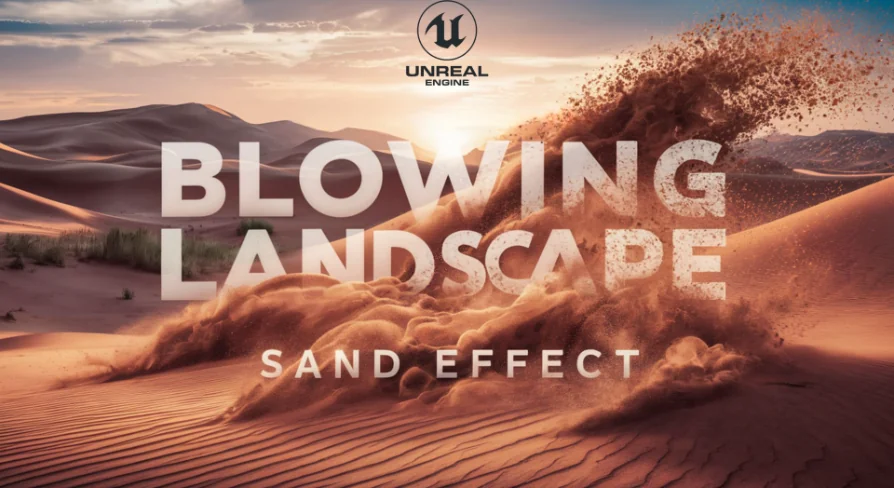
Desert environments in games often lean on textures, meshes, and lighting. What they can miss is motion—sand that lifts off the surface, streams across open ground, and banks against terrain changes. Blowing Landscape Sand Effect v1.1 is an Unreal Engine blueprint created specifically for that in-scene motion. The full effect is added to a project through a drag-and-drop action, and from there the look is shaped through a range of parameters rather than hand-placed particles.
The June 25, 2026 update gives the asset two distinct levels of capability. Every supported Unreal Engine version, from 5.0 up through 5.8, receives angle-based masking. Versions 5.5 through 5.8 get a heavier revision with six built-in presets and a more complex multi-layer simulation.
Sand That Settles Flat and Fades on Slopes
The core update across all supported engine versions is angle-based masking. The sand respects the surface angle instead of lying uniformly over every polygon. On flat ground, it settles naturally and keeps its presence; on slopes, it fades out. An adjustable angle threshold gives the artist direct control over the transition line, so the same effect can cover a flat basin, hug the base of a dune, and disappear where the terrain tilts upward.
That behavior solves a common problem with landscape effects: a material that sits too literally over geometry can betray the fact that it is an added layer. Because the sand reacts to the shape underneath it, the effect reads as part of the ground. The threshold also lets a level designer push the fade line around until it matches the specific silhouette of the scene rather than forcing a one-size-fits-all mask.
Six Presets for Instant Visual Variety
For Unreal Engine 5.5 through 5.8, the update introduces six built-in presets. They are drag-and-drop ready, meaning a team can place the blueprint once, cycle through the presets, and immediately compare different atmospheric or wind-driven looks. The presets remove the need to start from neutral values whenever the effect moves to a new area of the level.
Because every parameter is exposed from the Blueprint, the presets act as structured starting points rather than fixed final looks. An art lead can use one preset as the baseline, refine the motion, and then store that work as the setting for a particular desert stretch. This keeps the effect adaptable across multiple shots with distinct wind behavior.
Multi-Layer Simulation with Normal-Mapped Depth
The same engine version range also receives a richer simulation. Instead of a single sheet of moving color, the updated effect uses multiple layers to build the sand cloud and its interaction with the ground. Added surface relief comes through normal mapping, which gives the layer visible variation and depth. Each preset carries its own Normal Strength control, so the intensity of that relief can be tuned per preset rather than through a single global value.
That leaves a higher-complexity effect that stays fully parameter-driven from the Blueprint. An artist does not need to open a material graph or rearrange nodes to change the result. Adjusting the parameters covers the behavior, the masking, and the strength of the surface detail. That matters on a team where environment artists want visual polish without pulling in a dedicated VFX specialist for every tweak.
Two Upgrade Tiers Across UE 5.0 to 5.8
Version compatibility splits into two groups. All versions from Unreal Engine 5.0 through 5.8 get the angle-based masking update, so teams on older releases still receive the improved slope behavior. The major upgrade—six presets, multi-layer simulation, normal mapping, per-preset Normal Strength, and full parameter-driven control—is limited to Unreal Engine 5.5 through 5.8. The effect also now supports up to Unreal Engine 5.8.
The split is useful for studios managing multiple projects on different engine versions. A project still running on UE 5.0 can integrate the sand and immediately get the angle-aware motion. A project on UE 5.5 or newer can take advantage of the heavier remake. The drag-and-drop placement remains the same across both, so the initial workflow does not change when a team upgrades engines.
Placing It in a Desert Scene
When the blueprint is dropped onto an open landscape, the angle-based masking keeps the sand where it reads naturally. Flat ground between dune ridges can collect a steady moving layer, while the sides of those dunes remain clean. That selective fade is what makes the effect feel tied to the terrain instead of floating above it.
Because it is a Blueprint rather than a bespoke material for a single scene, it can be copied into multiple areas and adjusted independently. The parameter set makes each copy feel like part of its own local environment. The same project can have a light drift near a settlement, a stronger stream in an exposed corridor, and a subtle haze over a wide plain without changing the underlying setup.
The asset's own tag set points to the contexts it was built for: dune landscapes, lowpoly scenes, handpainted materials, decal-friendly workflows, and realistic environments. Those tags suggest it is flexible enough to sit in stylized projects or more visual-fidelity-oriented setups. The common thread is a sand effect that can be dragged into a scene and tuned to fit the art direction rather than remaining a fixed pre-baked effect.
A Practical Fit for Developers and Designers
For game developers and level designers who want a moving, realistic sand layer without building a custom VFX stack, this blueprint hits a narrow niche. It supplies the simulation logic, the presets, and the masking behavior inside a package that can be dropped directly into a scene. The adjustable angle threshold and normal strength controls give enough range to handle several different desert conditions.
The strongest takeaway is the combination of terrain-aware masking and preset-based tuning. A sand effect that knows when to disappear on slopes can be placed broadly and still look intentional. On UE 5.5 and newer, the multi-layer simulation and six drag-and-drop presets close the gap between quick placeholder work and a polished, landscape-scale effect.
 Procedural Systems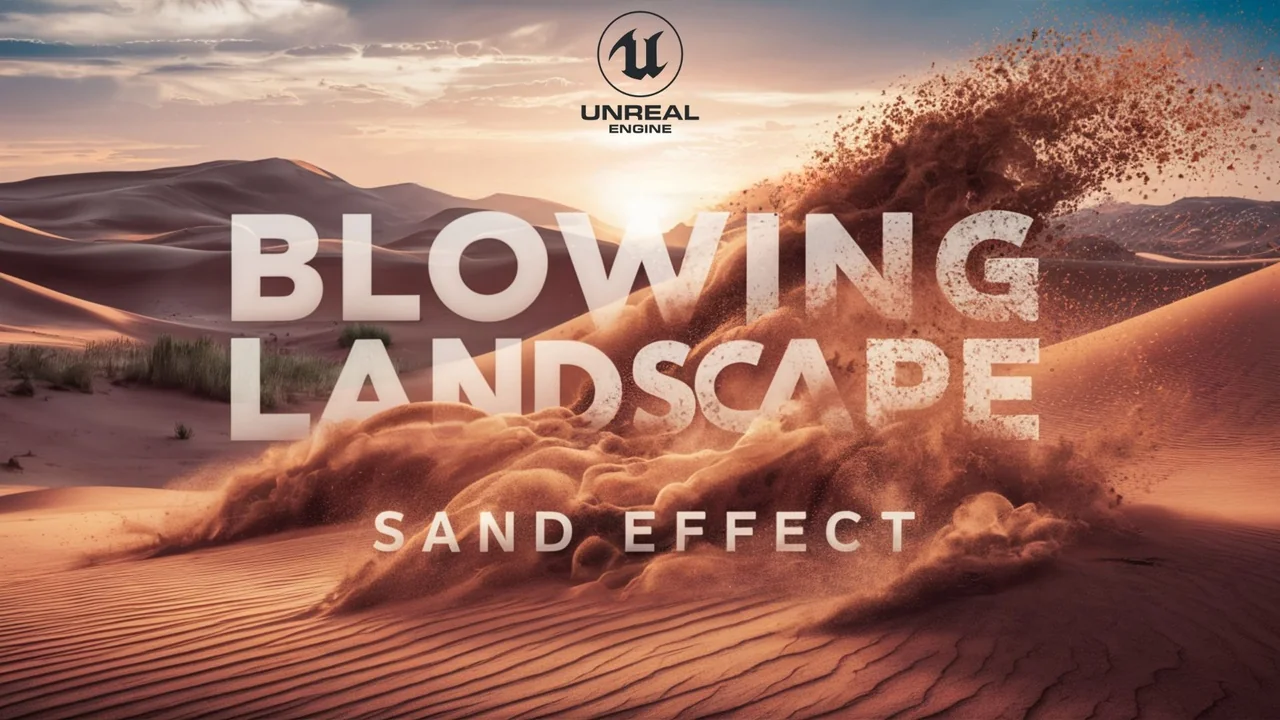
 Procedural Systems
 Smoke
Smoke Procedural Systems