"c68a05d5e51405b3"{"id":"22756","slug":"lighting-box-2-next-gen-lighting-solution","title":"Lighting Box 2 Next-Gen Lighting Solution","category":"Game Toolkits","engine":"Original Unity version: 2022.3.59","assetVersion":"Original Unity version: 2022.3.59","engineVersion":"Asset Version:2.9.9.3","tag":"Game Toolkits","accent":"cyan","visual":"luts","summary":"Lighting Box 2 offers a streamlined approach to Unity's lighting setup, bringing a workflow inspired by Unreal and Frostbite to the Built-in Rendering Pipeline. It includes high-performance shaders and a profile-based system to reduce technical overhead.","platform":"Unity","publishedAt":"2026-04-06T13:59:55.000Z","updatedAt":"2026-04-19T15:37:03.000Z","sourceNotes":[],"fileContents":[],"compatibility":["Unity","Original Unity version: 2022.3.59","Asset Version: 2.9.9.3"],"featuredImage":{"alt":"Lighting Box 2 Next-Gen Lighting Solution","src":"https://3dcghub.com/wp-content/uploads/2026/04/b359fb63c1c2_9ac7fb93-4a4e-4035-82e5-9f84a82b398b_1280x720_stretch.webp"},"hasDownloadLink":true,"downloads":0,"terms":[{"taxonomy":"category","slug":"game-toolkits","name":"Game Toolkits"},{"taxonomy":"post_tag","slug":"materials","name":"Materials"},{"taxonomy":"post_tag","slug":"unity","name":"Unity"},{"taxonomy":"post_tag","slug":"unreal-engine-5","name":"Unreal Engine 5"}],"galleryImages":[{"src":"https://3dcghub.com/wp-content/uploads/2026/04/9ddbdb064e46_fb1099a1-a617-4499-a0bb-58f39613c5b8_scaled.webp","alt":"Lighting Box 2 Next-Gen Lighting Solution"},{"src":"https://3dcghub.com/wp-content/uploads/2026/04/cb8fdc52df34_b9048a23-443c-4e01-ba34-331041c06a81_scaled.webp","alt":"Lighting Box 2 Next-Gen Lighting Solution"},{"src":"https://3dcghub.com/wp-content/uploads/2026/04/f58756afb2c0_fa83fdd5-6058-4e82-8225-ba0d75ea8940_scaled.webp","alt":"Lighting Box 2 Next-Gen Lighting Solution"},{"src":"https://3dcghub.com/wp-content/uploads/2026/04/0ffdddb2bdcb_c6899761-dd6a-47b5-904d-a5644e56e8c3_scaled.webp","alt":"Lighting Box 2 Next-Gen Lighting Solution"},{"src":"https://3dcghub.com/wp-content/uploads/2026/04/c8a0f2956a7b_55341f82-011e-42c0-80f9-e792962f6e0b_scaled.webp","alt":"Lighting Box 2 Next-Gen Lighting Solution"},{"src":"https://3dcghub.com/wp-content/uploads/2026/04/7675bf9d82a6_cd032760-f1e4-4e78-ba4e-1ae5913baa3e_scaled.webp","alt":"Lighting Box 2 Next-Gen Lighting Solution"},{"src":"https://3dcghub.com/wp-content/uploads/2026/04/9f1818099fbc_dd0aa124-d2fe-49db-a35c-1eec13ccc711_scaled.webp","alt":"Lighting Box 2 Next-Gen Lighting Solution"},{"src":"https://3dcghub.com/wp-content/uploads/2026/04/ada8226027ee_cef71acd-39db-47f0-b147-ebc6a9890a5d_scaled.webp","alt":"Lighting Box 2 Next-Gen Lighting Solution"},{"src":"https://3dcghub.com/wp-content/uploads/2026/04/b73180d99ebc_68e9c3a4-593a-42a0-b570-b6ca4aad2230_scaled.webp","alt":"Lighting Box 2 Next-Gen Lighting Solution"},{"src":"https://3dcghub.com/wp-content/uploads/2026/04/cddf1b15614b_a828e45e-dcb4-441a-91c8-1c004350b1f0_scaled.webp","alt":"Lighting Box 2 Next-Gen Lighting Solution"}],"accessPanel":{"kind":"resource","title":"Access this resource","eyebrow":"Free Download","message":"Log in or create a free account to start your download.","fileName":"Lighting Box 2 Next-Gen Lighting Solution v2.9.9.3.7z","safetyNote":"All resources are 100% manually reviewed to eliminate all risks.","actionLabel":"Download Free","resourceType":"Resource archive"},"contentHtml":"\u003ch2\u003eManaging Built-in Pipeline Lighting\u003c/h2\u003e\n\u003cp\u003eLighting Box 2 is a dedicated utility for developers working within Unity's Built-in Rendering Pipeline. Its primary function is to simplify the often complex process of configuring lighting parameters to achieve a high-end visual style. Rather than manually adjusting individual light settings across multiple panels, the tool consolidates these controls into a more centralized interface. The system is designed to provide a workflow that mirrors those found in the Unreal Engine or Frostbite, allowing users to spend less time on technical parameter hunting and more time on the artistic design of their scenes.\u003c/p\u003e\n\u003cp\u003eThe tool is built to handle both interior and outdoor environments. By providing a structured way to manage lighting, it addresses the common bottleneck where developers spend hours finding the right balance between various parameters. The solution aims to reduce this timeframe to minutes, making it accessible even to those with limited experience in lighting technicalities.\u003c/p\u003e\n\n\u003ch2\u003eWorkflow Efficiency and Profile Management\u003c/h2\u003e\n\u003cp\u003eOne of the core features of Lighting Box 2 is the ability to save and load settings through lighting profiles. This capability is significant for productions that require consistency across multiple levels or scenes. Instead of recreating lighting setups from scratch, developers can export their configurations and apply them elsewhere, ensuring a unified visual identity throughout a project.\u003c/p\u003e\n\u003cp\u003eThe user interface includes a drag-and-drop settings menu that provides immediate access to quality, display, and effects settings. This menu can also be utilized as an in-game feature, allowing for real-time adjustments to visual quality during development or as part of a game's options menu. By streamlining the interaction with Unity's native lighting systems, the developer focuses on the high-level look of the project rather than the underlying data fields.\u003c/p\u003e\n\n\u003ch2\u003eSpecialized Shaders and Environmental Controls\u003c/h2\u003e\n\u003cp\u003eBeyond simple light management, Lighting Box 2 includes a variety of specialized shaders and components designed for environmental rendering. A highlight of the package is the high-quality tessellated terrain shader. This shader is built for performance and includes the Amplify Shader Editor source code, giving technical artists the ability to modify or extend the shader's logic as needed. The inclusion of a dedicated terrain controller component further simplifies the management of these surfaces.\u003c/p\u003e\n\u003cp\u003eFor winter or alpine environments, the package introduces a snow controller and a corresponding snow shader. These tools allow for quick implementation of cold-weather effects without requiring custom code. Additionally, the asset features various tessellation shaders and a high-performance sun lens flare system, which is designed to provide a cinematic aesthetic without the heavy performance cost often associated with high-end flares.\u003c/p\u003e\n\n\u003ch2\u003eAtmospheric Effects and Post-Processing Integration\u003c/h2\u003e\n\u003cp\u003eThe solution provides full support for atmospheric effects, including True Volumetric Light and Global fog. It specifically utilizes fake volumetric fog particles, a technique similar to that used in the Frostbite engine, to create depth and atmosphere without the overhead of fully simulated volumetric systems. This approach is particularly useful for maintaining high frame rates in complex scenes.\u003c/p\u003e\n\u003cp\u003ePost-processing is a major component of the Lighting Box 2 workflow. It fully supports Post Processing Stack 3, allowing developers to leverage advanced image effects to polish their scenes. Users are required to import the Post Processing package from the Unity Registry via the Package Manager to utilize these features. By basing its internal logic on optimized post-effect settings, the tool ensures that the final image remains crisp while adhering to modern visual standards.\u003c/p\u003e\n\n\u003ch2\u003eCompatibility and Platform Support\u003c/h2\u003e\n\u003cp\u003eLighting Box 2 is strictly built for the Unity Built-in Rendering Pipeline and does not support the Universal Render Pipeline (URP) or High Definition Render Pipeline (HDRP). However, it is optimized for a wide range of platforms, including Mobile and WebGL 2.0. This makes it a versatile choice for developers targeting web-based platforms or mobile hardware where performance budgets are tight but visual quality remains a priority.\u003c/p\u003e\n\u003cp\u003eThe asset has been updated to maintain compatibility with Unity 6, ensuring it remains viable for projects using the latest versions of the engine. With a total asset count of 256 items and a file size of approximately 221 MB, the package provides a substantial library of sample projects, shaders, and video tutorials to help developers integrate the tool into their existing production pipelines.\u003c/p\u003e\n\n\u003cp\u003eWhen implementing Lighting Box 2, ensure that the Post Processing package is correctly installed from the Unity Registry first, as the tool's visual output relies heavily on this stack to achieve its intended results.\u003c/p\u003e\n\n\u003ch2\u003eMore From The Same Workflow\u003c/h2\u003e\n\u003cul\u003e\n\u003cli\u003e\u003ca href=\"https://3dcghub.com/dialogue-system-for-unity/\" title=\"Dialogue System for Unity\"\u003eDialogue System for Unity\u003c/a\u003e\u003c/li\u003e\n\u003cli\u003e\u003ca href=\"https://3dcghub.com/ambient-sounds-interactive-soundscapes-for-unity-6/\" title=\"Ambient Sounds – Interactive Soundscapes for Unity 6\"\u003eAmbient Sounds – Interactive Soundscapes for Unity 6\u003c/a\u003e\u003c/li\u003e\n\u003cli\u003e\u003ca href=\"https://3dcghub.com/pegasus-flythroughs-for-unity-6/\" title=\"Pegasus – Flythroughs for Unity 6\"\u003ePegasus – Flythroughs for Unity 6\u003c/a\u003e\u003c/li\u003e\n\u003cli\u003e\u003ca href=\"https://3dcghub.com/motion-matching-for-unity/\" title=\"Motion Matching for Unity\"\u003eMotion Matching for Unity\u003c/a\u003e\u003c/li\u003e\n\u003cli\u003e\u003ca href=\"https://3dcghub.com/intrigues/\" title=\"Intrigues\"\u003eIntrigues\u003c/a\u003e\u003c/li\u003e\n\u003c/ul\u003e","contentTextLength":5161,"navigation":{"current":3708,"total":3860,"previous":{"id":"22694","slug":"transitions-plus","title":"Transitions Plus","category":"Camera","platform":"Unity","updatedAt":"2026-04-19T15:37:04.000Z"},"next":{"id":"22743","slug":"intrigues","title":"Intrigues","category":"Game Toolkits","platform":"Unity","updatedAt":"2026-04-19T15:37:03.000Z"}},"relatedResources":[{"id":"22743","slug":"intrigues","title":"Intrigues","category":"Game Toolkits","engine":"Original Unity version: 2021.3.35","assetVersion":"Original Unity version: 2021.3.35","engineVersion":"Asset Version:1.0.62","tag":"Game Toolkits","accent":"cyan","visual":"audio","summary":"Intrigues provides a robust solution for managing complex branching narratives and social hierarchies in Unity, featuring a visual node-based editor and comprehensive clan and family systems.","platform":"Unity","publishedAt":"2026-04-06T13:56:11.000Z","updatedAt":"2026-04-19T15:37:03.000Z","sourceNotes":[],"fileContents":[],"compatibility":["Unity","Original Unity version: 2021.3.35","Asset Version: 1.0.62"],"featuredImage":{"alt":"Intrigues","src":"https://3dcghub.com/wp-content/uploads/2026/04/0c323bd08c9e_067e90a9-f639-4424-b9a2-42c5c188cf1f_1280x720_stretch.webp"},"hasDownloadLink":true,"downloads":0},{"id":"1001004","slug":"next-gen-destruction-toolkit","title":"Next Gen Destruction Toolkit","category":"Gameplay Features","engine":"5.3+","assetVersion":"","engineVersion":"Engine Version: 5.3+","tag":"Gameplay Features","accent":"blue","visual":"mech","summary":"A UE5 Chaos Destruction framework using data assets, surface-driven VFX and sound, with 15 Blueprints and 14 Niagara systems. Built for Nanite/Lumen.","platform":"Unreal Engine","publishedAt":"2026-08-22T10:54:47.045Z","updatedAt":"2026-08-22T10:54:47.045Z","sourceNotes":[],"fileContents":[],"compatibility":["Unreal Engine","Engine Version: 5.3+"],"featuredImage":{"alt":"Next Gen Destruction Toolkit","src":"/wp-content/uploads/published/2026/08/ae98b282cc03-ed3bc7a2-1533-4764-9cea-bf9d64a790d8-8eb923473f.webp"},"hasDownloadLink":true,"downloads":5},{"id":"20951","slug":"dreamscape-village-stylized-fantasy-open-world","title":"Dreamscape Village - Stylized Fantasy Open World","category":"Fantasy","engine":"Original Unity version: 2021.3.16","assetVersion":"Original Unity version: 2021.3.16","engineVersion":"Asset Version:1.0","tag":"Fantasy","accent":"cyan","visual":"city","summary":"Dreamscape Village provides a comprehensive collection of over 400 stylized assets for Unity, designed to facilitate the creation of next-gen medieval landscapes and villages. The kit features modular building components with full interiors and high-perform...","platform":"Unity","publishedAt":"2026-03-26T10:13:05.000Z","updatedAt":"2026-04-19T15:42:51.000Z","sourceNotes":[],"fileContents":[],"compatibility":["Unity","Original Unity version: 2021.3.16","Asset Version: 1.0"],"featuredImage":{"alt":"Dreamscape Village - Stylized Fantasy Open World","src":"https://3dcghub.com/wp-content/uploads/2026/03/8c98b9d35e4c_30c95d41-280b-49ec-9e3f-1f2df7fa67ce_1280x720_stretch.webp"},"hasDownloadLink":true,"downloads":2}]}
Game Toolkits
Lighting Box 2 Next-Gen Lighting Solution
Lighting Box 2 offers a streamlined approach to Unity's lighting setup, bringing a workflow inspired by Unreal and Frostbite to the Built-in Rendering Pipeline. It includes high-performance shaders and a profile-based system to reduce technical overhead.
Lighting Box 2 is a dedicated utility for developers working within Unity's Built-in Rendering Pipeline. Its primary function is to simplify the often complex process of configuring lighting parameters to achieve a high-end visual style. Rather than manually adjusting individual light settings across multiple panels, the tool consolidates these controls into a more centralized interface. The system is designed to provide a workflow that mirrors those found in the Unreal Engine or Frostbite, allowing users to spend less time on technical parameter hunting and more time on the artistic design of their scenes.
The tool is built to handle both interior and outdoor environments. By providing a structured way to manage lighting, it addresses the common bottleneck where developers spend hours finding the right balance between various parameters. The solution aims to reduce this timeframe to minutes, making it accessible even to those with limited experience in lighting technicalities.
Workflow Efficiency and Profile Management
One of the core features of Lighting Box 2 is the ability to save and load settings through lighting profiles. This capability is significant for productions that require consistency across multiple levels or scenes. Instead of recreating lighting setups from scratch, developers can export their configurations and apply them elsewhere, ensuring a unified visual identity throughout a project.
The user interface includes a drag-and-drop settings menu that provides immediate access to quality, display, and effects settings. This menu can also be utilized as an in-game feature, allowing for real-time adjustments to visual quality during development or as part of a game's options menu. By streamlining the interaction with Unity's native lighting systems, the developer focuses on the high-level look of the project rather than the underlying data fields.
Specialized Shaders and Environmental Controls
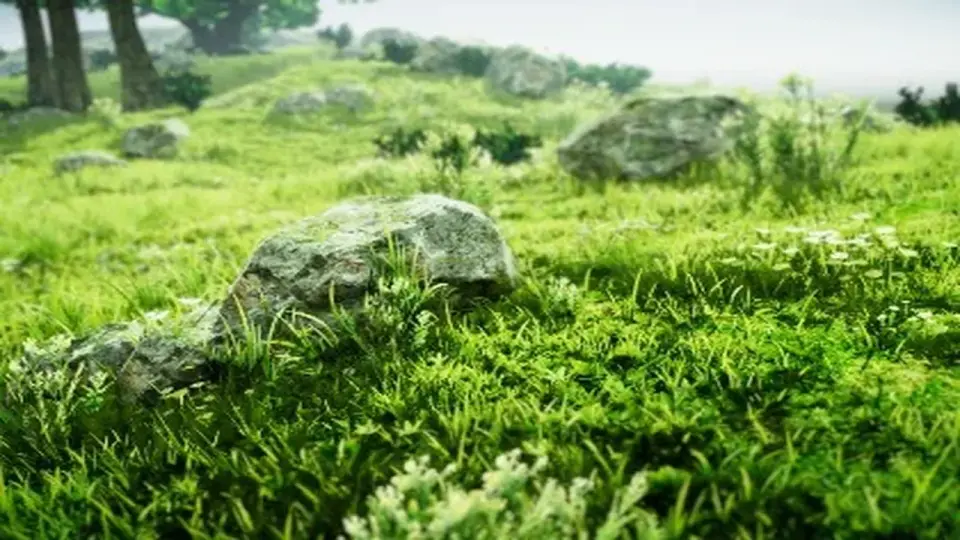
Beyond simple light management, Lighting Box 2 includes a variety of specialized shaders and components designed for environmental rendering. A highlight of the package is the high-quality tessellated terrain shader. This shader is built for performance and includes the Amplify Shader Editor source code, giving technical artists the ability to modify or extend the shader's logic as needed. The inclusion of a dedicated terrain controller component further simplifies the management of these surfaces.
For winter or alpine environments, the package introduces a snow controller and a corresponding snow shader. These tools allow for quick implementation of cold-weather effects without requiring custom code. Additionally, the asset features various tessellation shaders and a high-performance sun lens flare system, which is designed to provide a cinematic aesthetic without the heavy performance cost often associated with high-end flares.
Atmospheric Effects and Post-Processing Integration
The solution provides full support for atmospheric effects, including True Volumetric Light and Global fog. It specifically utilizes fake volumetric fog particles, a technique similar to that used in the Frostbite engine, to create depth and atmosphere without the overhead of fully simulated volumetric systems. This approach is particularly useful for maintaining high frame rates in complex scenes.
Post-processing is a major component of the Lighting Box 2 workflow. It fully supports Post Processing Stack 3, allowing developers to leverage advanced image effects to polish their scenes. Users are required to import the Post Processing package from the Unity Registry via the Package Manager to utilize these features. By basing its internal logic on optimized post-effect settings, the tool ensures that the final image remains crisp while adhering to modern visual standards.
Compatibility and Platform Support
Lighting Box 2 is strictly built for the Unity Built-in Rendering Pipeline and does not support the Universal Render Pipeline (URP) or High Definition Render Pipeline (HDRP). However, it is optimized for a wide range of platforms, including Mobile and WebGL 2.0. This makes it a versatile choice for developers targeting web-based platforms or mobile hardware where performance budgets are tight but visual quality remains a priority.
The asset has been updated to maintain compatibility with Unity 6, ensuring it remains viable for projects using the latest versions of the engine. With a total asset count of 256 items and a file size of approximately 221 MB, the package provides a substantial library of sample projects, shaders, and video tutorials to help developers integrate the tool into their existing production pipelines.
When implementing Lighting Box 2, ensure that the Post Processing package is correctly installed from the Unity Registry first, as the tool's visual output relies heavily on this stack to achieve its intended results.
 Game Toolkits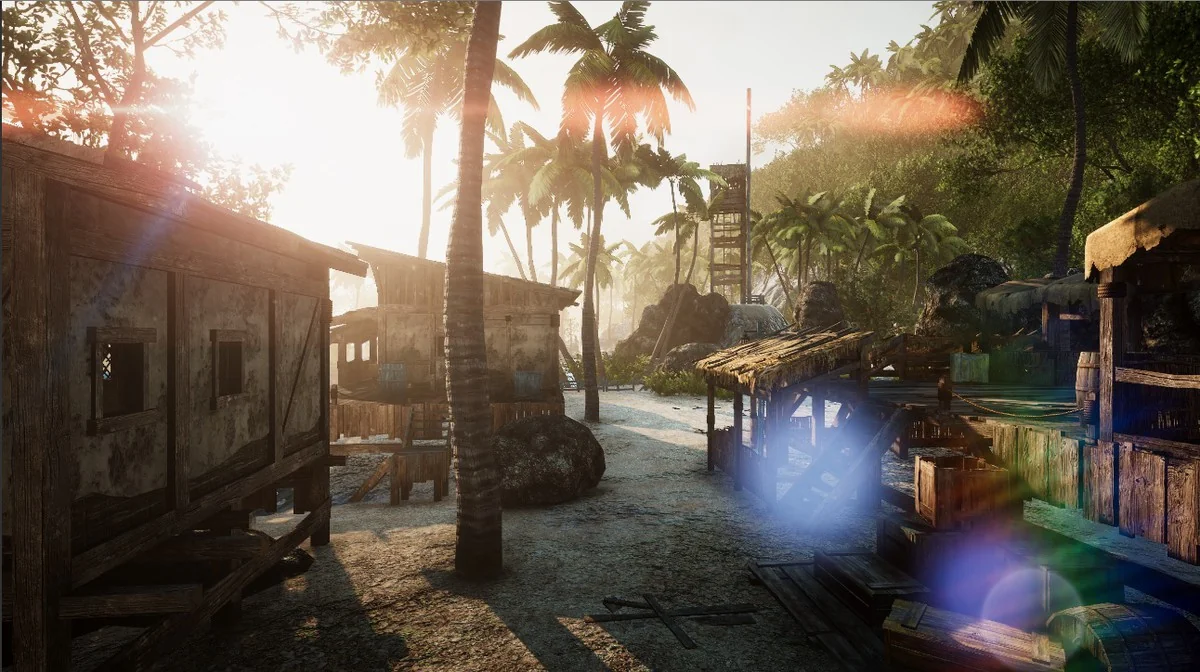
 Game Toolkits
 Gameplay Features
 Fantasy