"a19e0535960bd083"{"id":"1002075","slug":"led-pixel-bar-and-animation-preset","title":"LED Pixel Bar and Animation Preset","category":"Gameplay Features","engine":"5.0+","assetVersion":"","engineVersion":"Engine Version: 5.0+","tag":"Gameplay Features","accent":"blue","visual":"animation","summary":"A technical look at LED Pixel Bar and Animation Preset, covering DMX control, Pixel Mapping workflows, Sequencer presets, and universe performance scaling.","platform":"Unreal Engine","publishedAt":"2026-10-26T15:42:46.851Z","updatedAt":"2026-10-26T15:42:46.851Z","sourceNotes":[],"fileContents":[],"compatibility":["Unreal Engine","Engine Version: 5.0+"],"featuredImage":{"alt":"LED Pixel Bar and Animation Preset","src":"/wp-content/uploads/published/2026/10/9de0599372b8-16998160-2a66-48b5-9e3c-c824aacb4d3c-f7ac5f7ce9.webp"},"hasDownloadLink":true,"downloads":0,"terms":[{"taxonomy":"category","slug":"gameplay-features","name":"Gameplay Features"}],"galleryImages":[{"src":"/wp-content/uploads/published/2026/10/96a764af6e2d-8a46e6cf-11cc-4dff-942e-5cfbec7b794c-70cee7e40c.webp","alt":"LED Pixel Bar and Animation Preset"},{"src":"/wp-content/uploads/published/2026/10/916d3e57392c-09026f03-f604-4933-9795-c78aced86da7-b3a5733b4b.webp","alt":"LED Pixel Bar and Animation Preset"},{"src":"/wp-content/uploads/published/2026/10/0fccfea5a775-ad06f54e-fa47-4044-8579-53f3946cece4-9d948d5738.webp","alt":"LED Pixel Bar and Animation Preset"},{"src":"/wp-content/uploads/published/2026/10/5752a666e1a8-a29f51e0-ba02-48bc-9011-2a52ede34fbc-827daea04c.webp","alt":"LED Pixel Bar and Animation Preset"},{"src":"/wp-content/uploads/published/2026/10/2f418d0fbba4-3e3eb9d6-e9ae-4a83-bced-b3bd88bd6cf8-b5a518341f.webp","alt":"LED Pixel Bar and Animation Preset"},{"src":"/wp-content/uploads/published/2026/10/bc4b0d78fac6-a8a3df6a-8ad7-451c-a5ef-663673d4d80c-f485ffe105.webp","alt":"LED Pixel Bar and Animation Preset"},{"src":"/wp-content/uploads/published/2026/10/99087cce5629-b1192123-70fb-476d-bd56-1e2d5a7a0d90-5f0f1e2f44.webp","alt":"LED Pixel Bar and Animation Preset"},{"src":"/wp-content/uploads/published/2026/10/b22a1702b8c5-2383269c-049d-412a-9ca8-92f9a46d3310-41f9b304e1.webp","alt":"LED Pixel Bar and Animation Preset"},{"src":"/wp-content/uploads/published/2026/10/5c80f829b146-dfee71b4-a09c-4d6f-a928-6e2f2a3326c5-219aacbf14.webp","alt":"LED Pixel Bar and Animation Preset"}],"accessPanel":{"kind":"resource","title":"Download this resource","eyebrow":"Free Download","message":"Log in or create a free account to start your download.","fileName":"Content.7z","safetyNote":"Resources are manually reviewed before listing to improve quality and reduce obvious risks.","actionLabel":"Download Free","resourceType":"Resource archive"},"contentHtml":"\u003ch2\u003eSimulating Live Stage LED Pixel Bars in Real-Time Environments\u003c/h2\u003e\n\u003cp\u003eStaging realistic concert rigs, electronic music venues, and club dance floors in digital environments demands fixture arrays that react like physical light strips. LED Pixel Bar and Animation Preset delivers an interactive simulation of linear LED stage fixtures, translating color information into individual lighting nodes across custom stage constructions. Based on the physical requirements of live performance designs, the setup serves projects ranging from virtual live concerts and nightclub visualizations to disco installations and laser show system environments.\u003c/p\u003e\n\u003cp\u003eInstead of forcing users to rely on manually animated emissive meshes, the system models the data pipeline of real entertainment technology equipment. The fixtures can operate via two primary pathways: external DMX transmission from physical or virtual lighting consoles, and internal DMX driven directly inside the engine through Sequencer and pixel mapping assets.\u003c/p\u003e \u003ch2\u003eInternal DMX Architecture and Animated Material Sampling\u003c/h2\u003e\n\u003cp\u003eOperating internal DMX enables self-contained scene construction without running external lighting software in the background. The core of this workflow is Unreal Engine DMX Pixel Mapping, which extracts real-time color values directly from an animated available details and translates those RGB values into fixture channel data.\u003c/p\u003e\n\u003cp\u003eTo establish a functional playback scene using internal DMX, preconfigured sublevel presets are dragged directly into Sequencer. This modular drag-and-drop hierarchy lets designers assemble complex multi-bar shows resembling the included demo maps without wiring custom dispatchers from scratch. The animation driving the pixels originates as a dynamic material graph, allowing procedural patterns, gradient sweeps, and shifting video-style graphics to wash across the physical layout of the pixel bars.\u003c/p\u003e \u003ch2\u003eEngine Technicalities: Material Parameter Collections and Layout Limits\u003c/h2\u003e\n\u003cp\u003eWorking with DMX Pixel Mapping inside Unreal Engine 4 imposes distinct technical constraints that dictate how assets must be authored. A key platform rule prevents DMX Pixel Mapping from directly controlling Material Instances inside Sequencer tracks. To circumvent this native engine constraint, the fixture system links its animated source materials to a Material Parameter Collection. By driving scalar and vector values through a parameter collection, the material graph updates reliably during Sequencer playback while remaining accessible to the DMX Pixel Mapping canvas.\u003c/p\u003e\n\u003cp\u003eAnother structural factor involves fixture orientation inside the mapping interface. In the UE4 engine architecture, layouts configured within DMX Pixel Mapping cannot be angled or rotated off the grid axis. Every fixture must be plotted orthogonally within the pixel-mapping canvas, even when the simulated geometry in the 3D viewport is placed at complex angles on stage trusses. Lighting designers moving into this toolset benefit heavily from prior familiarity with the core concepts of the DMX Fixture workflow and Pixel Mapping matrices before setting up elaborate custom channel layouts.\u003c/p\u003e \u003ch2\u003eExternal DMX Console Integration and MA Workflows\u003c/h2\u003e\n\u003cp\u003eBeyond self-contained timeline animations, the fixtures accept incoming control data from external control sources. Standard network-based DMX protocols can stream channel data straight to the fixture blueprints, allowing lighting programmers to patch the virtual bars into physical lighting desks or software visualizers such as grandMA onPC. When interfacing with MA hardware or software solutions, operator configuration, network node settings, and fixture patching rely on native protocol setup documented by MA Lighting.\u003c/p\u003e\n\u003cp\u003eThis dual control model makes the asset adaptable: teams can pre-program cues inside Sequencer for linear media projects, or link real-time external controllers for live broadcast broadcasts, interactive club simulations, or stage previz sessions.\u003c/p\u003e \u003ch2\u003eUniverse Scaling and Hardware Performance Benchmarks\u003c/h2\u003e\n\u003cp\u003eSimulating dense LED nodes introduces heavy CPU and GPU demands as the universe count multiplies. To quantify how fixture counts impact performance, verified benchmark tests run on an AMD Ryzen 9 5900X processor and an NVIDIA RTX 3070 graphics card, with Engine Scalability Settings locked to Cinematic, establish clear hardware limits:\u003c/p\u003e\n\u003cul\u003e \u003cli\u003e\u003cstrong\u003e1 Universe (170 LEDs):\u003c/strong\u003e Runs consistently at 120 fps.\u003c/li\u003e \u003cli\u003e\u003cstrong\u003e2 Universes (320 LEDs):\u003c/strong\u003e Operates between 90 fps and 120 fps.\u003c/li\u003e \u003cli\u003e\u003cstrong\u003e4 Universes (680 LEDs):\u003c/strong\u003e Produces framerates ranging from 65 fps to 105 fps.\u003c/li\u003e \u003cli\u003e\u003cstrong\u003e8 Universes (1,360 LEDs):\u003c/strong\u003e Drops to a range between 40 fps and 80 fps.\u003c/li\u003e \u003cli\u003e\u003cstrong\u003e10 Universes (1,700 LEDs):\u003c/strong\u003e Achieves performance between 35 fps and 70 fps.\u003c/li\u003e\n\u003c/ul\u003e\n\u003cp\u003eBecause framerates fluctuate significantly as LED counts climb from single-universe setups to large-scale arena walls of ten or more universes, project teams can validate their specific hardware targets in advance using the dedicated performance test file packaged with the asset.\u003c/p\u003e \u003ch2\u003eAsset Contents and Unreal Engine 5 Compatibility Notes\u003c/h2\u003e\n\u003cp\u003eThe package ships with dedicated demonstration environments and reference files, including 01_Demo.umap, Gallary1, Gallary2, a guided tutorial map, and the standalone performance evaluation map. These assets provide immediate templates for testing blueprint logic, blueprint fixtures, and sequencer integration.\u003c/p\u003e\n\u003cp\u003eTesting on Unreal Engine 5 Preview 1 confirms that the core fixture mechanics, blueprints, and pixel mapping pipelines function properly. However, an engine-level quirk exists regarding audio tracks: the Sound Cue component in 01_Demo.umap does not play back at the correct timeline position when opened under UE5 Preview 1. While this sound displacement disrupts synchronized audio playback in that specific demonstration map, it represents an isolated playback issue and does not alter or impair the operational performance of the LED pixel bar assets themselves.\u003c/p\u003e\n\n\u003ch2\u003eMore From The Same Workflow\u003c/h2\u003e\n\u003cul\u003e\n\u003cli\u003e\u003ca href=\"https://3dcghub.com/premium-configurator/\" title=\"Premium Configurator\"\u003ePremium Configurator\u003c/a\u003e\u003c/li\u003e\n\u003cli\u003e\u003ca href=\"https://3dcghub.com/ultimate-hit-reaction-system/\" title=\"Ultimate Hit Reaction System\"\u003eUltimate Hit Reaction System\u003c/a\u003e\u003c/li\u003e\n\u003cli\u003e\u003ca href=\"https://3dcghub.com/action-adventure-movement-system/\" title=\"Action-Adventure Movement System\"\u003eAction-Adventure Movement System\u003c/a\u003e\u003c/li\u003e\n\u003cli\u003e\u003ca href=\"https://3dcghub.com/advanced-locomotion-component-v2-4/\" title=\"Advanced Locomotion Component v2.4\"\u003eAdvanced Locomotion Component v2.4\u003c/a\u003e\u003c/li\u003e\n\u003cli\u003e\u003ca href=\"https://3dcghub.com/voyager-cover-system/\" title=\"Voyager: Cover System\"\u003eVoyager: Cover System\u003c/a\u003e\u003c/li\u003e\n\u003c/ul\u003e","contentTextLength":6070,"navigation":{"current":16,"total":4026,"previous":{"id":"1002076","slug":"liquidator-russian-soldier","title":"LIQUIDATOR RUSSIAN SOLDIER","category":"Characters \u0026 Creatures","platform":"Unreal Engine","updatedAt":"2026-10-26T15:44:04.991Z"},"next":{"id":"1002074","slug":"l-base-model","title":"L: Base Model","category":"Characters \u0026 Creatures","platform":"Unreal Engine","updatedAt":"2026-10-26T15:38:30.411Z"}},"relatedResources":[{"id":"1001445","slug":"premium-configurator","title":"Premium Configurator","category":"Gameplay Features","engine":"5.5+","assetVersion":"","engineVersion":"Engine Version: 5.5+","tag":"Gameplay Features","accent":"blue","visual":"mech","summary":"A deep dive into Premium Configurator for Unreal Engine, highlighting its database architecture, UI and animation presets, and version compatibility.","platform":"Unreal Engine","publishedAt":"2026-10-08T00:45:43.674Z","updatedAt":"2026-10-08T00:45:43.674Z","sourceNotes":[],"fileContents":[],"compatibility":["Unreal Engine","Engine Version: 5.5+"],"featuredImage":{"alt":"Premium Configurator","src":"/wp-content/uploads/published/2026/10/0c8160709c66-75dc1845-dc6d-4bb4-9175-da64145fc57f-8dd68ec1a3.webp"},"hasDownloadLink":true,"downloads":0},{"id":"1001475","slug":"ultimate-hit-reaction-system","title":"Ultimate Hit Reaction System","category":"Gameplay Features","engine":"5.6+","assetVersion":"","engineVersion":"Engine Version: 5.6+","tag":"Gameplay Features","accent":"blue","visual":"mech","summary":"A deep dive into the Ultimate Hit Reaction System for Unreal Engine, covering its 168 mocap animations, Chooser Tables, Motion Warping, and IK integration.","platform":"Unreal Engine","publishedAt":"2026-10-08T08:28:50.048Z","updatedAt":"2026-10-08T08:28:50.048Z","sourceNotes":[],"fileContents":[],"compatibility":["Unreal Engine","Engine Version: 5.6+"],"featuredImage":{"alt":"Ultimate Hit Reaction System","src":"/wp-content/uploads/published/2026/10/8833d5e34c3d-c4d6cc46-3a57-4651-a1d2-e8585976b5ea-a14898b9cd.webp"},"hasDownloadLink":true,"downloads":2},{"id":"1001032","slug":"action-adventure-movement-system","title":"Action-Adventure Movement System","category":"Gameplay Features","engine":"5.3+","assetVersion":"Asset Version: 1.3.3","engineVersion":"Engine Version: 5.3+","tag":"Gameplay Features","accent":"blue","visual":"mech","summary":"A 100% Blueprint Unreal Engine framework with 475+ animations covering parkour, climbing, swimming, grappling, ropes, rail grinding, interactions, and multiplay","platform":"Unreal Engine","publishedAt":"2026-08-23T13:56:31.671Z","updatedAt":"2026-08-23T13:56:31.671Z","sourceNotes":[],"fileContents":[],"compatibility":["Unreal Engine","Asset Version: 1.3.3","Engine Version: 5.3+"],"featuredImage":{"alt":"Action-Adventure Movement System","src":"/wp-content/uploads/published/2026/08/f6ca4747d539-f55a9c3a-5939-4fc7-b9c9-20258a3197bf-86a0ba7a37.webp"},"hasDownloadLink":true,"downloads":13}]}
Gameplay Features
LED Pixel Bar and Animation Preset
A technical look at LED Pixel Bar and Animation Preset, covering DMX control, Pixel Mapping workflows, Sequencer presets, and universe performance scaling.
Simulating Live Stage LED Pixel Bars in Real-Time Environments
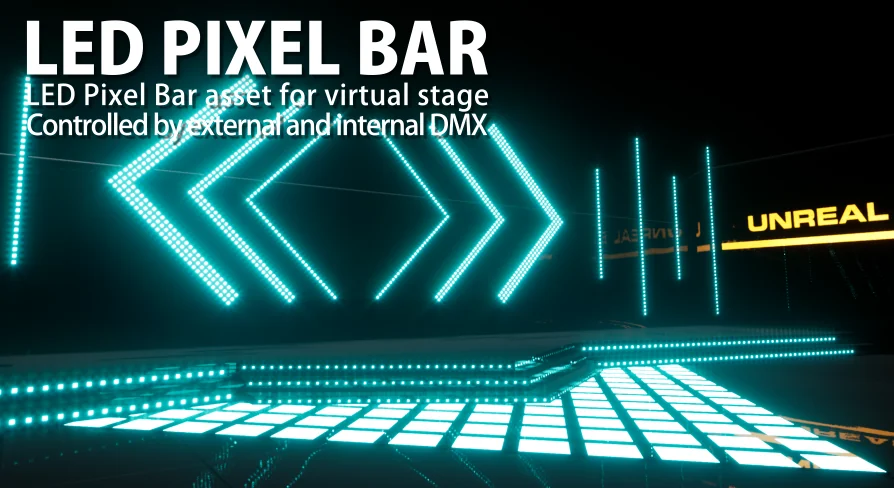
Staging realistic concert rigs, electronic music venues, and club dance floors in digital environments demands fixture arrays that react like physical light strips. LED Pixel Bar and Animation Preset delivers an interactive simulation of linear LED stage fixtures, translating color information into individual lighting nodes across custom stage constructions. Based on the physical requirements of live performance designs, the setup serves projects ranging from virtual live concerts and nightclub visualizations to disco installations and laser show system environments.
Instead of forcing users to rely on manually animated emissive meshes, the system models the data pipeline of real entertainment technology equipment. The fixtures can operate via two primary pathways: external DMX transmission from physical or virtual lighting consoles, and internal DMX driven directly inside the engine through Sequencer and pixel mapping assets.
Internal DMX Architecture and Animated Material Sampling
Operating internal DMX enables self-contained scene construction without running external lighting software in the background. The core of this workflow is Unreal Engine DMX Pixel Mapping, which extracts real-time color values directly from an animated available details and translates those RGB values into fixture channel data.
To establish a functional playback scene using internal DMX, preconfigured sublevel presets are dragged directly into Sequencer. This modular drag-and-drop hierarchy lets designers assemble complex multi-bar shows resembling the included demo maps without wiring custom dispatchers from scratch. The animation driving the pixels originates as a dynamic material graph, allowing procedural patterns, gradient sweeps, and shifting video-style graphics to wash across the physical layout of the pixel bars.
Engine Technicalities: Material Parameter Collections and Layout Limits
Working with DMX Pixel Mapping inside Unreal Engine 4 imposes distinct technical constraints that dictate how assets must be authored. A key platform rule prevents DMX Pixel Mapping from directly controlling Material Instances inside Sequencer tracks. To circumvent this native engine constraint, the fixture system links its animated source materials to a Material Parameter Collection. By driving scalar and vector values through a parameter collection, the material graph updates reliably during Sequencer playback while remaining accessible to the DMX Pixel Mapping canvas.
Another structural factor involves fixture orientation inside the mapping interface. In the UE4 engine architecture, layouts configured within DMX Pixel Mapping cannot be angled or rotated off the grid axis. Every fixture must be plotted orthogonally within the pixel-mapping canvas, even when the simulated geometry in the 3D viewport is placed at complex angles on stage trusses. Lighting designers moving into this toolset benefit heavily from prior familiarity with the core concepts of the DMX Fixture workflow and Pixel Mapping matrices before setting up elaborate custom channel layouts.
External DMX Console Integration and MA Workflows
Beyond self-contained timeline animations, the fixtures accept incoming control data from external control sources. Standard network-based DMX protocols can stream channel data straight to the fixture blueprints, allowing lighting programmers to patch the virtual bars into physical lighting desks or software visualizers such as grandMA onPC. When interfacing with MA hardware or software solutions, operator configuration, network node settings, and fixture patching rely on native protocol setup documented by MA Lighting.
This dual control model makes the asset adaptable: teams can pre-program cues inside Sequencer for linear media projects, or link real-time external controllers for live broadcast broadcasts, interactive club simulations, or stage previz sessions.
Universe Scaling and Hardware Performance Benchmarks
Simulating dense LED nodes introduces heavy CPU and GPU demands as the universe count multiplies. To quantify how fixture counts impact performance, verified benchmark tests run on an AMD Ryzen 9 5900X processor and an NVIDIA RTX 3070 graphics card, with Engine Scalability Settings locked to Cinematic, establish clear hardware limits:
1 Universe (170 LEDs): Runs consistently at 120 fps.
2 Universes (320 LEDs): Operates between 90 fps and 120 fps.
4 Universes (680 LEDs): Produces framerates ranging from 65 fps to 105 fps.
8 Universes (1,360 LEDs): Drops to a range between 40 fps and 80 fps.
10 Universes (1,700 LEDs): Achieves performance between 35 fps and 70 fps.
Because framerates fluctuate significantly as LED counts climb from single-universe setups to large-scale arena walls of ten or more universes, project teams can validate their specific hardware targets in advance using the dedicated performance test file packaged with the asset.
Asset Contents and Unreal Engine 5 Compatibility Notes
The package ships with dedicated demonstration environments and reference files, including 01_Demo.umap, Gallary1, Gallary2, a guided tutorial map, and the standalone performance evaluation map. These assets provide immediate templates for testing blueprint logic, blueprint fixtures, and sequencer integration.
Testing on Unreal Engine 5 Preview 1 confirms that the core fixture mechanics, blueprints, and pixel mapping pipelines function properly. However, an engine-level quirk exists regarding audio tracks: the Sound Cue component in 01_Demo.umap does not play back at the correct timeline position when opened under UE5 Preview 1. While this sound displacement disrupts synchronized audio playback in that specific demonstration map, it represents an isolated playback issue and does not alter or impair the operational performance of the LED pixel bar assets themselves.
 Gameplay Features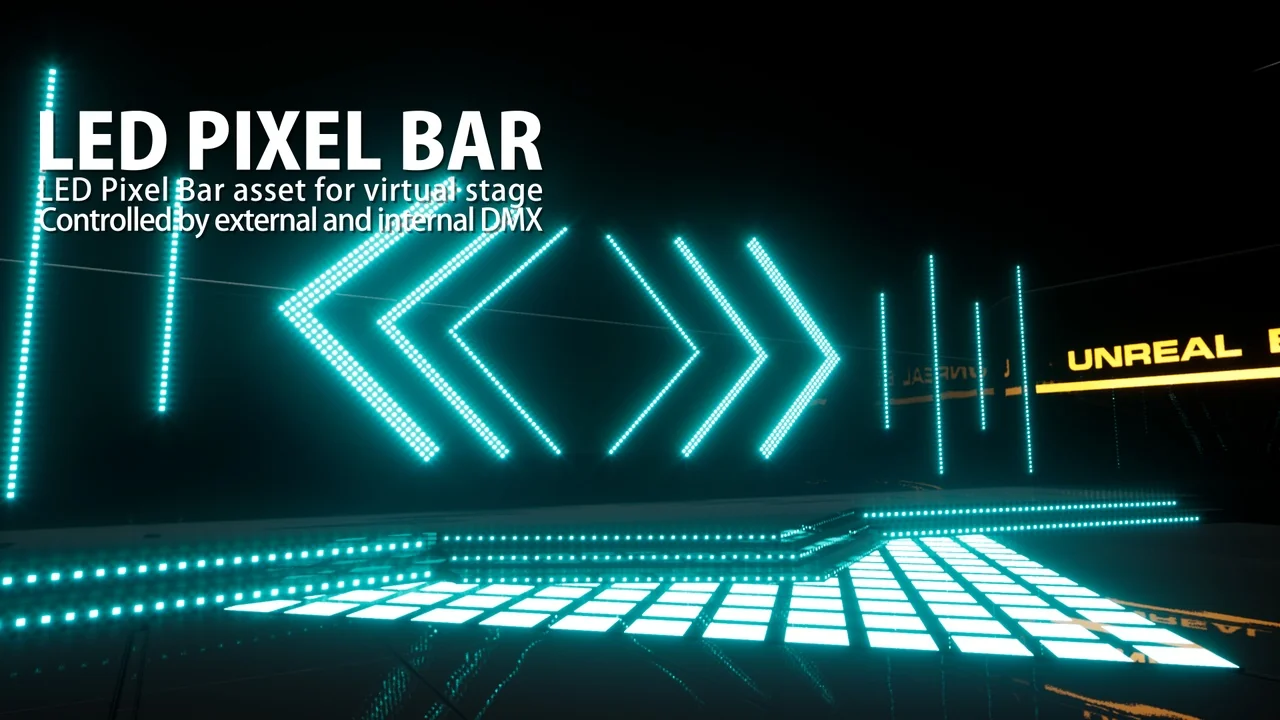
 Gameplay Features
 Gameplay Features
 Gameplay Features