"95fdaf16012263fa"{"id":"1002322","slug":"layer-based-neural-network","title":"Layer-Based Neural Network","category":"Procedural Systems","engine":"4.26","assetVersion":"Asset Version: 1.0","engineVersion":"Engine Version: 4.26","tag":"Procedural Systems","accent":"blue","visual":"mech","summary":"A Blueprint plugin for stacking eight layer classes into NglSimpleLayerStackNN, with training, inference, JSON save/load, and no GPU acceleration.","platform":"Unreal Engine","indexPolicy":"index","publishedAt":"2026-11-06T06:23:23.848Z","updatedAt":"2026-11-06T06:23:23.848Z","sourceNotes":[],"fileContents":[],"compatibility":["Unreal Engine","Asset Version: 1.0","Engine Version: 4.26"],"featuredImage":{"alt":"Layer-Based Neural Network","src":"/wp-content/uploads/published/2026/11/146b672ef936-95bbd94b-0b4b-4e22-8dc8-6972eb6f5e62-b46cd470a8.webp"},"hasDownloadLink":true,"downloads":0,"terms":[{"taxonomy":"category","slug":"procedural-systems-tools-and-plugins","name":"Procedural Systems"}],"galleryImages":[{"src":"/wp-content/uploads/published/2026/11/57423aed7571-8f3c5e60-0ca7-4a74-b09b-b3483f0e2a54-7fcbb43178.webp","alt":"Layer-Based Neural Network"},{"src":"/wp-content/uploads/published/2026/11/bbf5a8311ce0-28e1b4aa-8701-4c47-a4d3-896bc9f289d1-2c1abc14f6.webp","alt":"Layer-Based Neural Network"},{"src":"/wp-content/uploads/published/2026/11/0fac97e434b2-ceaf4482-55c1-4901-b62c-048d4dfeeb30-43716068a3.webp","alt":"Layer-Based Neural Network"},{"src":"/wp-content/uploads/published/2026/11/39c608eb7f84-ca143c0f-59f3-4304-a324-8ec608819b25-c2322ae222.webp","alt":"Layer-Based Neural Network"}],"accessPanel":{"kind":"resource","title":"Get this resource","eyebrow":"Free resource","message":"3DCGHUB is the service provider for this listing. Access is fulfilled through the official publisher channel.","fileName":"Layer-Based Neural Network.7z","safetyNote":"Resources are manually reviewed before listing to improve quality and reduce obvious risks.","actionLabel":"Get this resource","resourceType":"Resource archive","versions":[]},"contentHtml":"\u003cp\u003eLayer-Based Neural Network is a Blueprint plugin for assembling a neural network from individual layer classes. Its central class, \u003cstrong\u003eNglSimpleLayerStackNN\u003c/strong\u003e, is not a fixed model; it is a container that becomes a network as layers are added.\u003c/p\u003e\u003cp\u003eThat structure puts the emphasis on composition. A developer chooses layer classes, adds them to the stack, and then uses the same class for construction, training, inference, and JSON-based save and load. The stack is processed from the input side to the output side.\u003c/p\u003e\u003ch2\u003eNglSimpleLayerStackNN and the AddLayer method\u003c/h2\u003e\u003cp\u003eNglSimpleLayerStackNN is the main class of the plugin, and the layer class is part of it. Construct Network creates a layer class and adds it to the network by the AddLayer method. That makes AddLayer the assembly point. Each call adds another layer class. Because the stack is processed in order from the input side to the output side, the sequence in which layers are added defines the path data travels through the network.\u003c/p\u003e\u003cp\u003eThis is a layer-stack model instead of one monolithic network object. The central class holds the layers; the individual layer class supplies the pieces. Using the plugin means working with both levels: the stack that coordinates the flow and the layers that occupy positions in that flow.\u003c/p\u003e\u003ch2\u003eEight layer classes in the stack\u003c/h2\u003e\u003cp\u003eThe plugin contains eight different layer classes: Affine, Convolutional, GRU (Gated Recurrent Unit), Softmax, Sigmoid, ReLU, Softplus, and Tanh. These are the available building blocks for a network. No other layer types are listed. Each belongs to the layer class structure used by NglSimpleLayerStackNN.\u003c/p\u003e\u003cp\u003eFor a developer, the layer list is the vocabulary of the network. A stack can combine these classes, and the order matters because processing proceeds from input to output. The stack does not treat layers as an unordered collection; it processes them sequentially.\u003c/p\u003e\u003ch2\u003eConstruct Network, Train, and Forward\u003c/h2\u003e\u003cp\u003eThe plugin exposes separate methods for the three main stages. Construct Network creates a layer class and adds it to the network using AddLayer. Train is called with Input-Data and Teach-Data. Inference is handled by calling Forward with Input-Data to calculate output.\u003c/p\u003e\u003cp\u003eThe three calls map to distinct moments in a game AI workflow. Construction defines the network's shape. Training supplies both the input and the teaching data. Inference supplies only the input and returns the calculated output. Keeping these as separate methods means a network can be assembled, trained, and then used for inference through the same NglSimpleLayerStackNN class.\u003c/p\u003e\u003cp\u003eGame AI is the stated training target: the plugin allows a game AI to be trained through this process. The teaching data is passed into Train alongside the input data. The Forward method then calculates output from input data during inference.\u003c/p\u003e\u003ch3\u003eNo GPU acceleration\u003c/h3\u003e\u003cp\u003eGPU acceleration is not supported. The plugin's training and inference methods operate without GPU acceleration. That is a plain constraint to account for when deciding how the network will be used. The layer classes and the NglSimpleLayerStackNN methods remain the same; the note simply rules out GPU acceleration as part of the plugin's capabilities.\u003c/p\u003e\u003ch2\u003eSaveJson and LoadJson preserve structure and parameters\u003c/h2\u003e\u003cp\u003eSaveJson writes two things to JSON: the network parameters and the network structure. LoadJson goes the other way. It constructs the network structure and reads the parameters from JSON. This is more than a weight dump; the structure is part of what is saved. A saved network is therefore represented by both its layer arrangement and its parameters.\u003c/p\u003e\u003cp\u003eFor project work, that pairing matters because NglSimpleLayerStackNN is assembled from layers. The saved JSON carries the structure needed to reconstruct the stack, and LoadJson uses it to construct that structure again before reading the parameters. The methods are named SaveJson and LoadJson and belong to the central class's save/load path.\u003c/p\u003e\u003ch2\u003eWhat the layer stack is set up to handle\u003c/h2\u003e\u003cp\u003eLayer-Based Neural Network provides a Blueprint-accessible way to build a neural network out of eight layer classes, train it with input and teach data, run inference with the Forward method, and preserve both structure and parameters in JSON. The central NglSimpleLayerStackNN class is the place where construction, training, inference, saving, and loading meet.\u003c/p\u003e\u003cp\u003eIts scope is specific. Layers are added through AddLayer, processed from input to output, and selected from Affine, Convolutional, GRU, Softmax, Sigmoid, ReLU, Softplus, and Tanh. Training uses Input-Data and Teach-Data; inference uses Input-Data and calculates output. SaveJson and LoadJson handle the JSON side. GPU acceleration is not part of the package. Those are the boundaries within which the plugin works.\u003c/p\u003e\n\n\u003ch2\u003eExplore Similar Assets\u003c/h2\u003e\n\u003cul\u003e\n\u003cli\u003e\u003ca href=\"https://3dcghub.com/multiplayer-fps-procedural-animation-toolkit/\" rel=\"noopener noreferrer\"\u003eMultiplayer FPS Procedural Animation Toolkit\u003c/a\u003e\u003c/li\u003e\n\u003cli\u003e\u003ca href=\"https://3dcghub.com/simple-capture-the-flag/\" rel=\"noopener noreferrer\"\u003eSimple Capture The Flag\u003c/a\u003e\u003c/li\u003e\n\u003cli\u003e\u003ca href=\"https://3dcghub.com/fps-first-person-shooter-framework-skg-shooter-framework-v2/\" rel=\"noopener noreferrer\"\u003eFPS First Person Shooter Framework (SKG Shooter Framework V2)\u003c/a\u003e\u003c/li\u003e\n\u003cli\u003e\u003ca href=\"https://3dcghub.com/kronos-matchmaking/\" rel=\"noopener noreferrer\"\u003eKronos Matchmaking\u003c/a\u003e\u003c/li\u003e\n\u003cli\u003e\u003ca href=\"https://3dcghub.com/skills-indicators-customizable/\" rel=\"noopener noreferrer\"\u003eSkills Indicators (Customizable)\u003c/a\u003e\u003c/li\u003e\n\u003c/ul\u003e","contentTextLength":4960,"navigation":{"current":46,"total":4291,"previous":{"id":"1002323","slug":"maz537-battle-truck-6-versions","title":"MAZ537 / Battle Truck / 6 Versions","category":"Vehicles \u0026 Transportation","platform":"Unreal Engine","updatedAt":"2026-11-06T06:24:58.002Z"},"next":{"id":"1002321","slug":"idle-animset-pack","title":"Idle Animset Pack","category":"Variety","platform":"Unreal Engine","updatedAt":"2026-11-06T06:22:51.144Z"}},"relatedResources":[{"id":"1002124","slug":"multiplayer-fps-procedural-animation-toolkit","title":"Multiplayer FPS Procedural Animation Toolkit","category":"Network \u0026 Multiplayer","engine":"5.0","assetVersion":"Asset Version: 1.0","engineVersion":"Engine Version: 5.0","tag":"Network","accent":"blue","visual":"animation","summary":"Examine the Multiplayer FPS Procedural Animation Toolkit, covering C++ procedural recoil, socket-based aiming, character component setup, and multiplayer replic","platform":"Unreal Engine","indexPolicy":"index","publishedAt":"2026-10-29T09:04:51.154Z","updatedAt":"2026-10-29T09:04:51.154Z","sourceNotes":[],"fileContents":[],"compatibility":["Unreal Engine","Asset Version: 1.0","Engine Version: 5.0"],"featuredImage":{"alt":"Multiplayer FPS Procedural Animation Toolkit","src":"/wp-content/uploads/published/2026/10/2fcdafd7f87f-817ca7b9-9cb8-4982-9a44-338089bb88d1-a98b77170d.webp"},"hasDownloadLink":true,"downloads":0},{"id":"1002200","slug":"simple-capture-the-flag","title":"Simple Capture The Flag","category":"Network \u0026 Multiplayer","engine":"4.26+,5.0+","assetVersion":"","engineVersion":"Engine Version: 4.26+,5.0+","tag":"Network","accent":"blue","visual":"mech","summary":"A Blueprint-based multiplayer capture the flag game mode designed without a combat system, featuring Steam support and Multiplayer FPS Basic compatibility.","platform":"Unreal Engine","indexPolicy":"index","publishedAt":"2026-10-29T14:44:10.264Z","updatedAt":"2026-10-29T14:44:10.264Z","sourceNotes":[],"fileContents":[],"compatibility":["Unreal Engine","Engine Version: 4.26+,5.0+"],"featuredImage":{"alt":"Simple Capture The Flag","src":"/wp-content/uploads/published/2026/10/7c26ab1b77bb-09cd285d-35c9-4bde-a0ce-614e225d2e86-ed3c8f8489.webp"},"hasDownloadLink":true,"downloads":0},{"id":"15136","slug":"fps-first-person-shooter-framework-skg-shooter-framework-v2","title":"FPS First Person Shooter Framework (SKG Shooter Framework V2)","category":"Network \u0026 Multiplayer","engine":"5.5 - 5.7","assetVersion":"Engine version: 5.5 - 5.7","engineVersion":"Asset Version:1.4.1 - 1.4.3","tag":"Network","accent":"blue","visual":"city","summary":"The SKG Shooter Framework V2 is a performant, modular, component-based solution for building realistic first-person shooters in Unreal Engine 5.3 and beyond.","platform":"Unreal Engine","indexPolicy":"index","publishedAt":"2026-03-12T08:01:31.000Z","updatedAt":"2026-04-19T15:44:53.000Z","sourceNotes":[],"fileContents":[],"compatibility":["Unreal Engine","Engine version: 5.5 - 5.7","Asset Version: 1.4.1 - 1.4.3"],"featuredImage":{"alt":"FPS First Person Shooter Framework (SKG Shooter Framework V2)","src":"https://3dcghub.com/wp-content/uploads/2026/03/1ef8f873-5cad-4190-b092-53ba5e385464.webp"},"hasDownloadLink":true,"downloads":15}]}
Procedural Systems
Layer-Based Neural Network
A Blueprint plugin for stacking eight layer classes into NglSimpleLayerStackNN, with training, inference, JSON save/load, and no GPU acceleration.
Layer-Based Neural Network is a Blueprint plugin for assembling a neural network from individual layer classes. Its central class, NglSimpleLayerStackNN, is not a fixed model; it is a container that becomes a network as layers are added.
That structure puts the emphasis on composition. A developer chooses layer classes, adds them to the stack, and then uses the same class for construction, training, inference, and JSON-based save and load. The stack is processed from the input side to the output side.
NglSimpleLayerStackNN and the AddLayer method
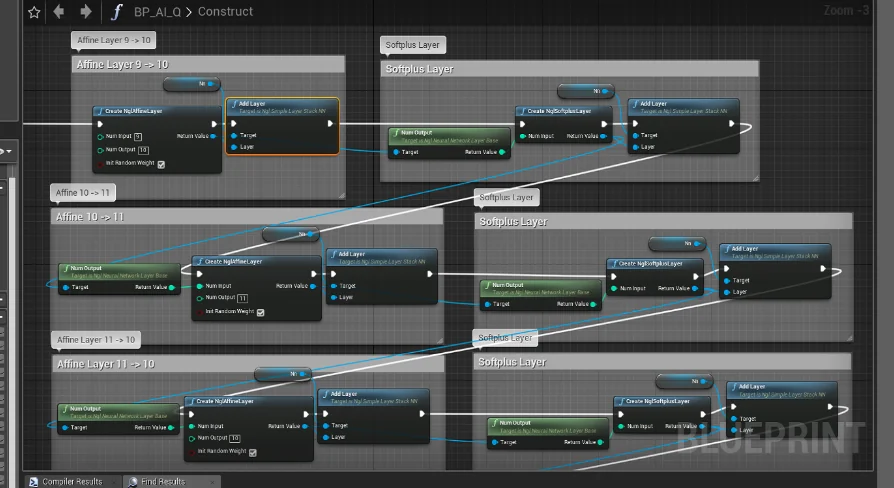
NglSimpleLayerStackNN is the main class of the plugin, and the layer class is part of it. Construct Network creates a layer class and adds it to the network by the AddLayer method. That makes AddLayer the assembly point. Each call adds another layer class. Because the stack is processed in order from the input side to the output side, the sequence in which layers are added defines the path data travels through the network.
This is a layer-stack model instead of one monolithic network object. The central class holds the layers; the individual layer class supplies the pieces. Using the plugin means working with both levels: the stack that coordinates the flow and the layers that occupy positions in that flow.
Eight layer classes in the stack
The plugin contains eight different layer classes: Affine, Convolutional, GRU (Gated Recurrent Unit), Softmax, Sigmoid, ReLU, Softplus, and Tanh. These are the available building blocks for a network. No other layer types are listed. Each belongs to the layer class structure used by NglSimpleLayerStackNN.
For a developer, the layer list is the vocabulary of the network. A stack can combine these classes, and the order matters because processing proceeds from input to output. The stack does not treat layers as an unordered collection; it processes them sequentially.
Construct Network, Train, and Forward
The plugin exposes separate methods for the three main stages. Construct Network creates a layer class and adds it to the network using AddLayer. Train is called with Input-Data and Teach-Data. Inference is handled by calling Forward with Input-Data to calculate output.
The three calls map to distinct moments in a game AI workflow. Construction defines the network's shape. Training supplies both the input and the teaching data. Inference supplies only the input and returns the calculated output. Keeping these as separate methods means a network can be assembled, trained, and then used for inference through the same NglSimpleLayerStackNN class.
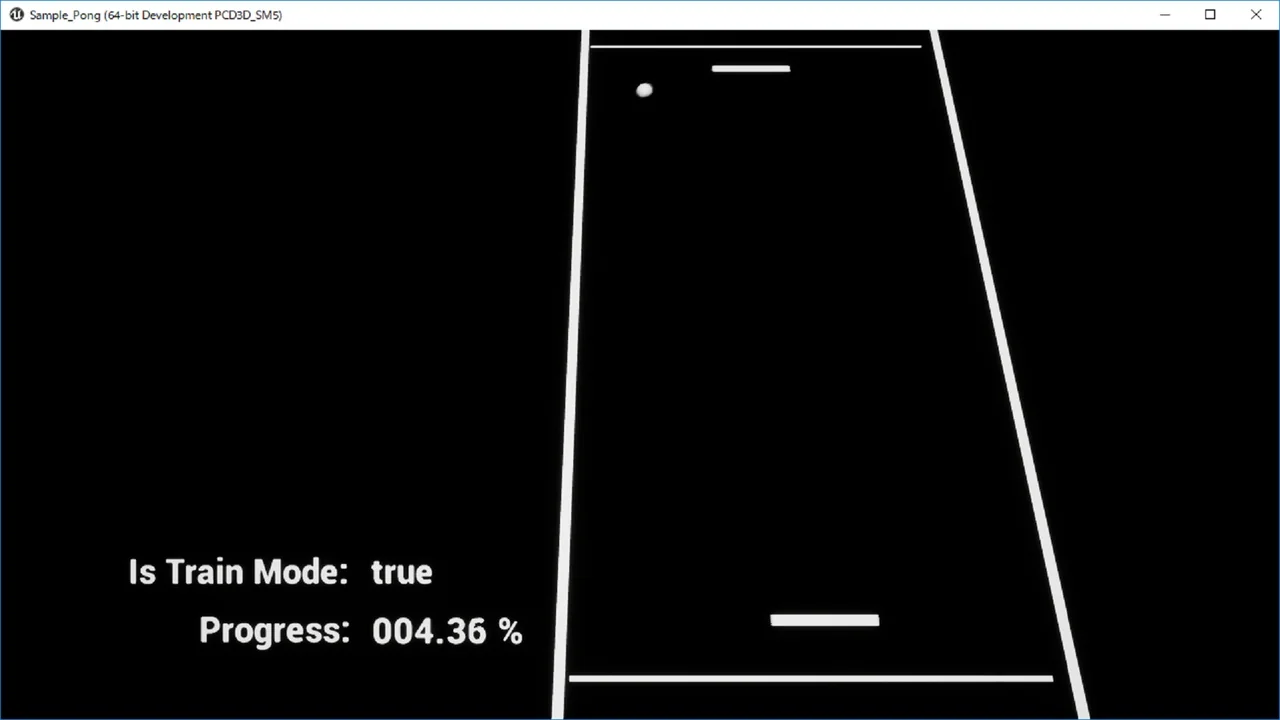
Game AI is the stated training target: the plugin allows a game AI to be trained through this process. The teaching data is passed into Train alongside the input data. The Forward method then calculates output from input data during inference.
No GPU acceleration
GPU acceleration is not supported. The plugin's training and inference methods operate without GPU acceleration. That is a plain constraint to account for when deciding how the network will be used. The layer classes and the NglSimpleLayerStackNN methods remain the same; the note simply rules out GPU acceleration as part of the plugin's capabilities.
SaveJson and LoadJson preserve structure and parameters
SaveJson writes two things to JSON: the network parameters and the network structure. LoadJson goes the other way. It constructs the network structure and reads the parameters from JSON. This is more than a weight dump; the structure is part of what is saved. A saved network is therefore represented by both its layer arrangement and its parameters.
For project work, that pairing matters because NglSimpleLayerStackNN is assembled from layers. The saved JSON carries the structure needed to reconstruct the stack, and LoadJson uses it to construct that structure again before reading the parameters. The methods are named SaveJson and LoadJson and belong to the central class's save/load path.
What the layer stack is set up to handle
Layer-Based Neural Network provides a Blueprint-accessible way to build a neural network out of eight layer classes, train it with input and teach data, run inference with the Forward method, and preserve both structure and parameters in JSON. The central NglSimpleLayerStackNN class is the place where construction, training, inference, saving, and loading meet.
Its scope is specific. Layers are added through AddLayer, processed from input to output, and selected from Affine, Convolutional, GRU, Softmax, Sigmoid, ReLU, Softplus, and Tanh. Training uses Input-Data and Teach-Data; inference uses Input-Data and calculates output. SaveJson and LoadJson handle the JSON side. GPU acceleration is not part of the package. Those are the boundaries within which the plugin works.
 Procedural Systems
 Network
 Network
 Network