"7b9cb5d0825894fa"{"id":"1001130","slug":"incredible-earth-80k-photorealistic-planet","title":"Incredible Earth 80K - Photorealistic Planet","category":"Sky \u0026 Space","engine":"5.1+","assetVersion":"","engineVersion":"Engine Version: 5.1+","tag":"Sky \u0026 Space","accent":"blue","visual":"mech","summary":"A realistic Earth asset for Unreal Engine with 80K NASA-based textures, shader-driven clouds, night lights, and cinematic orbit tools. Covers setup, controls, a","platform":"Unreal Engine","publishedAt":"2026-09-09T01:54:42.653Z","updatedAt":"2026-09-09T01:54:42.653Z","sourceNotes":[],"fileContents":[],"compatibility":["Unreal Engine","Engine Version: 5.1+"],"featuredImage":{"alt":"Incredible Earth 80K - Photorealistic Planet","src":"/wp-content/uploads/published/2026/09/78c40b0d4a02-02693118-f950-478d-b12d-fe025eaa2c27-2359b964b1.webp"},"hasDownloadLink":true,"downloads":1,"terms":[{"taxonomy":"category","slug":"sky-and-space","name":"Sky \u0026 Space"}],"galleryImages":[{"src":"/wp-content/uploads/published/2026/09/7850da47340f-3cb8e6a5-49fc-41bb-b117-08ab346ae611-a2cf7e0e48.webp","alt":"Incredible Earth 80K - Photorealistic Planet"},{"src":"/wp-content/uploads/published/2026/09/7889da184bd7-62fd6d43-d1a8-43fd-9471-4341324c2228-52ac48115a.webp","alt":"Incredible Earth 80K - Photorealistic Planet"},{"src":"/wp-content/uploads/published/2026/09/be5881f8168f-04b6ae9d-8e59-4f56-b237-b3ba97be8e6b-6f7e937e6b.webp","alt":"Incredible Earth 80K - Photorealistic Planet"},{"src":"/wp-content/uploads/published/2026/09/278d5dbfb899-6ec2fcfe-8a72-42c2-b55c-d9e4e9234510-5a7311f525.webp","alt":"Incredible Earth 80K - Photorealistic Planet"},{"src":"/wp-content/uploads/published/2026/09/e5489c2e2ecb-284d446c-fd86-45a0-adf6-c868b33bb091-458ed0c59c.webp","alt":"Incredible Earth 80K - Photorealistic Planet"},{"src":"/wp-content/uploads/published/2026/09/752dadb89d17-f2499632-ecd1-4229-b026-f8ba7876e65f-666667e6b6.webp","alt":"Incredible Earth 80K - Photorealistic Planet"},{"src":"/wp-content/uploads/published/2026/09/662ddf33cdf6-7936e98e-359c-4dab-8da9-fd34d5937ff0-0729e855d8.webp","alt":"Incredible Earth 80K - Photorealistic Planet"},{"src":"/wp-content/uploads/published/2026/09/78484b7a06a3-6be2227e-72eb-400b-b630-91d2a425117e-cbfae14160.webp","alt":"Incredible Earth 80K - Photorealistic Planet"},{"src":"/wp-content/uploads/published/2026/09/83d60ff9d7b3-00abbc1b-5c44-4e95-bdc5-ecc1b2206ff8-caa4531b84.webp","alt":"Incredible Earth 80K - Photorealistic Planet"},{"src":"/wp-content/uploads/published/2026/09/98a5e9c56560-1798dedb-1bab-4a97-8c70-cf22ef07ba85-97a008a506.webp","alt":"Incredible Earth 80K - Photorealistic Planet"}],"accessPanel":{"kind":"resource","title":"Download this resource","eyebrow":"Free Download","message":"Log in or create a free account to start your download.","fileName":"IncredibleEarth80K.7z","safetyNote":"Resources are manually reviewed before listing to improve quality and reduce obvious risks.","actionLabel":"Download Free","resourceType":"Resource archive"},"contentHtml":"\u003ch2\u003eOpening the Project and What to Expect\u003c/h2\u003e\u003cp\u003eBefore you even get to spin the planet, the first thing you will notice is the weight of the texture data. The color, water mask, and normal maps are true 80K+ NASA sources with no upscaling, and some support textures are 16K. The developer recommends setting \u003ccode\u003eR.Streaming.Poolsize 10000\u003c/code\u003e To work comfortably. If you plan to switch between resolutions, the guidance is specific: 64K works with 9000, 32K with 4000, and 80K VT with 3000. For a GPU, the baseline is at least an RTX 3080 with 12GB VRAM just to open the project without other assets loaded. VRAM needs climb quickly once you raise the render resolution. You will also want at least 32GB RAM and 250GB of free space on the system drive for memory swapping.\u003c/p\u003e\u003cp\u003eThe first time the Earth blueprint or its materials are opened, the editor can hang for a while because of the number and size of the textures being referenced. If the system runs out of memory, opening each texture file individually first helps. Virtual Textures must be enabled, and on UE 5.1–5.4, the Oodle Textures plugin needs to be disabled unless you resize the 16K normal maps and glow mask to 8K first. 5.4 and 5.5 work with Oodle enabled.\u003c/p\u003e\u003ch2\u003eThe Blueprint as the Control Center\u003c/h2\u003e\u003cp\u003eEverything is arranged into a blueprint. You can reach every major parameter from the details panel, but the more interesting route is the cinematic exposure. Parameters are pushed into cinematics, which means a single click can start keyframing values without hunting through nested actor settings. The shader automation handles the day-night cycle in the background, while the range of adjustable values covers ground look and detail, clouds, sunset, night scenes, and even thunder and aurora. In other words, you are not locked into a single Earth look; you can push the planet into stylized, dramatic orbital moods.\u003c/p\u003e\u003cp\u003eClouds are texture-based, but the shader gives you multiple individually tileable layers. Each layer has its own scale, offset, speed, formation, and noise modifiers. This is not just for tweaking coverage. By animating several layers with slight differences, you get a parallax illusion that adds depth to the cloud deck from orbit. You can also generate new cloud combinations or gradual animated changes that feel alive over a shot.\u003c/p\u003e\u003ch2\u003eOrbital Control Without Moving the Camera\u003c/h2\u003e\u003cp\u003eThe level itself includes a spinner structure. You can rotate the Earth, sun, moon, and the entire universe independently or all together relative to world zero. The intention is to let you produce perfect orbits around the Earth without repositioning the camera or the actors. This becomes a practical approach for keeping your main actors near coordinates like 0.0.0, which avoids common issues with Unreal's large world coordinates. If you need a local action—say a spacecraft rendezvous or a weather event—it is easier to rotate everything around a small controlled region than to move the actors around the world. That is the logic baked into the scene.\u003c/p\u003e\u003cp\u003eThe asset uses UE's own atmosphere system, so you do not need to bring an external atmospheric scattering solution. The moon is present in the scene layout but is not to scale, and neither are the distances between bodies. The atmosphere ground radius is 1080 km, roughly one-sixth of the real Earth, which is worth remembering if you start to measure distances on the surface.\u003c/p\u003e\u003ch2\u003eTexture Work Beyond the Resolution Number\u003c/h2\u003e\u003cp\u003eWhat separates this asset from marketing-heavy planet packs is the amount of cleanup applied to the source data. The color is a custom composite of multiple Blue Marble passes to minimize errors, and some obscured areas near the equator were recreated. The height data feeds a normal map, but the original height source is not even—regions such as northern Siberia and Canada show increasing scanlines. While the new normal map has smoothed scanlines, many remaining artifacts fade into the environment during actual renders. If you need to focus on a specific area of the planet, the developer suggests asking before purchase to confirm the quality of that particular region.\u003c/p\u003e\u003cp\u003eThe cloud texture was rearranged to be tileable, and hundreds or even thousands of dead pixels and scanlines were fixed. A separate pole-optimized regular texture handles the area near the poles, and the shader can also project clouds onto the poles to avoid stretching or compression altogether. The night side uses Black Marble data, which is then processed through customizable procedural city detail in the shader. This gives night scenes a crisper, less uniform look. Additional height and mask textures are included as assistive maps for blending and masking operations.\u003c/p\u003e\u003ch2\u003eRendering Reality Check: What This Asset Is Not\u003c/h2\u003e\u003cp\u003eThe product page is unusually honest about the limitations. This is not an “Earth Zoom Kit.” The texture resolution may be 80K, but at that scale each pixel represents a 500 by 500 meter area. There is basic displacement for flatness control, but in practice 80K is not enough to show individual mountain altitudes. The Earth mesh is therefore just a sphere. To get distinct mountain geometry you would need something on the order of 256K or 512K textures. Perceived clarity depends on both the color and the normal detail—flat ground with little normal variation can feel softer than mountainous regions. Texture quality also varies from region to region because of source data limits.\u003c/p\u003e\u003cp\u003eVirtual texture users should understand that VT tiles may appear blurry for a frame as they stream in, and popping depends on how fast the camera moves relative to the system's available resources. The non-VT 32K/64K versions do not have this behavior. If you move to a new project, review the VT tile, border, and feedback settings. When rendering, TAA and TSR will not match the results of the video demos, which were rendered with Movie Render Queue using 80K with Temporal Sampling. The included sequences show exactly how those settings work together, and they are part of the project. Aurora and thunder are tied to game time, so you may need to preroll renders to hit the desired effect.\u003c/p\u003e\u003ch2\u003eProduction Path and Target User\u003c/h2\u003e\u003cp\u003eFor someone building a cinematic orbital shot—whether it is a sci-fi opening, a global weather visualization, or a title sequence that needs a convincing Earth—the blueprint structure and exposed parameters reduce the amount of custom shader work. The presence of render sequences in the project is a direct asset for learning how to animate atmosphere and cloud behavior in Movie Render Queue. The developer states that 5.4 and 5.5 versions have Oodle enabled, while earlier versions need that plugin disabled, which is important if you are working across engine branches.\u003c/p\u003e\u003cp\u003eThis Earth is for teams that already understand Unreal's streaming and memory quirks. A 250GB system-drive reservation and a 12GB VRAM GPU are not casual requirements. The asset demands a workstation-class setup to reach the advertised cinematic results. In exchange, you get an Earth asset where the shader handles day-night cycling automatically and the texture data has been corrected far beyond a simple satellite download. If your work involves long orbital takes, lens-worthy close-ups of continents, or weather and night-light detail, the setup time is spent once in the blueprint and then leveraged repeatedly across shots.\u003c/p\u003e\n\n\u003ch2\u003eMore From The Same Workflow\u003c/h2\u003e\n\u003cul\u003e\n\u003cli\u003e\u003ca href=\"https://3dcghub.com/moon-landscape/\" title=\"Moon Landscape\"\u003eMoon Landscape\u003c/a\u003e\u003c/li\u003e\n\u003cli\u003e\u003ca href=\"https://3dcghub.com/blue-gem-earth-80k/\" title=\"Blue Gem Earth 80k\"\u003eBlue Gem Earth 80k\u003c/a\u003e\u003c/li\u003e\n\u003cli\u003e\u003ca href=\"https://3dcghub.com/space-creator/\" title=\"Space Creator\"\u003eSpace Creator\u003c/a\u003e\u003c/li\u003e\n\u003cli\u003e\u003ca href=\"https://3dcghub.com/planetarium-planet-blueprint/\" title=\"Planetarium Planet Blueprint\"\u003ePlanetarium Planet Blueprint\u003c/a\u003e\u003c/li\u003e\n\u003cli\u003e\u003ca href=\"https://3dcghub.com/earth-simulator/\" title=\"Earth Simulator\"\u003eEarth Simulator\u003c/a\u003e\u003c/li\u003e\n\u003c/ul\u003e","contentTextLength":7460,"navigation":{"current":898,"total":3912,"previous":{"id":"1001131","slug":"big-office","title":"Big Office","category":"Interior","platform":"Unreal Engine","updatedAt":"2026-09-09T02:07:18.459Z"},"next":{"id":"1001129","slug":"post-apocalyptic-mansion-albert-manor-day-and-night-lighting","title":"Post Apocalyptic Mansion Albert Manor (Day and Night Lighting)","category":"Horror","platform":"Unreal Engine","updatedAt":"2026-09-07T18:33:34.153Z"}},"relatedResources":[{"id":"9747","slug":"moon-landscape","title":"Moon Landscape","category":"Sky \u0026 Space","engine":"4.26+,5.0+","assetVersion":"Engine version: 4.26+,5.0+","engineVersion":"5.0","tag":"Sky \u0026 Space","accent":"blue","visual":"city","summary":"Enhance your cosmic scenes with this detailed Moon Landscape. It features a massive 8129x8129 surface, unique material layers, and realistic background assets like planet Earth and a starry sky.","platform":"Unreal Engine","publishedAt":"2026-03-01T17:43:23.000Z","updatedAt":"2026-04-19T15:51:01.000Z","sourceNotes":[],"fileContents":[],"compatibility":["Unreal Engine","Engine version: 4.26+,5.0+"],"featuredImage":{"alt":"Moon Landscape","src":"https://3dcghub.com/wp-content/uploads/2026/03/0c3bb51b-8fd3-4b08-93a2-b69c5d7ee79a.webp"},"hasDownloadLink":true,"downloads":1},{"id":"1000448","slug":"blue-gem-earth-80k","title":"Blue Gem Earth 80k","category":"Sky \u0026 Space","engine":"5.0+","assetVersion":"Video Language: English","engineVersion":"Engine Version: 5.0+","tag":"Sky \u0026 Space","accent":"blue","visual":"mech","summary":"Nanite-powered Earth planet with hand-painted 80k color and normal maps, exaggerated or realistic topography, bathymetry, dynamic city lights, and blueprint spa","platform":"Unreal Engine","publishedAt":"2026-07-11T00:53:53.737Z","updatedAt":"2026-07-11T00:53:53.737Z","sourceNotes":[],"fileContents":[],"compatibility":["Unreal Engine","Video Language: English","Engine Version: 5.0+"],"featuredImage":{"alt":"Blue Gem Earth 80k","src":"/wp-content/uploads/published/2026/07/52cacd4f10c8-796f82f8-3ae4-4b41-b7af-b2a7425aceaf-72955625df.webp"},"hasDownloadLink":true,"downloads":0},{"id":"1001719","slug":"asteroids-planet","title":"Asteroids Planet","category":"Sky \u0026 Space","engine":"4.26+,5.0+","assetVersion":"","engineVersion":"Engine Version: 4.26+,5.0+","tag":"Sky \u0026 Space","accent":"blue","visual":"mech","summary":"Build realistic space levels with Asteroids Planet, featuring 10 asteroid models, 12 planet materials, 10 space skydomes, a sky blueprint, and demo maps.","platform":"Unreal Engine","publishedAt":"2026-10-19T15:51:58.447Z","updatedAt":"2026-10-19T15:51:58.447Z","sourceNotes":[],"fileContents":[],"compatibility":["Unreal Engine","Engine Version: 4.26+,5.0+"],"featuredImage":{"alt":"Asteroids Planet","src":"/wp-content/uploads/published/2026/10/ff7f46fe3020-495a5e6b-259c-4e33-939e-4d0300a39135-6fce006d05.webp"},"hasDownloadLink":true,"downloads":0}]}
Sky & Space
Incredible Earth 80K - Photorealistic Planet
A realistic Earth asset for Unreal Engine with 80K NASA-based textures, shader-driven clouds, night lights, and cinematic orbit tools. Covers setup, controls, a
Before you even get to spin the planet, the first thing you will notice is the weight of the texture data. The color, water mask, and normal maps are true 80K+ NASA sources with no upscaling, and some support textures are 16K. The developer recommends setting R.Streaming.Poolsize 10000 To work comfortably. If you plan to switch between resolutions, the guidance is specific: 64K works with 9000, 32K with 4000, and 80K VT with 3000. For a GPU, the baseline is at least an RTX 3080 with 12GB VRAM just to open the project without other assets loaded. VRAM needs climb quickly once you raise the render resolution. You will also want at least 32GB RAM and 250GB of free space on the system drive for memory swapping.
The first time the Earth blueprint or its materials are opened, the editor can hang for a while because of the number and size of the textures being referenced. If the system runs out of memory, opening each texture file individually first helps. Virtual Textures must be enabled, and on UE 5.1–5.4, the Oodle Textures plugin needs to be disabled unless you resize the 16K normal maps and glow mask to 8K first. 5.4 and 5.5 work with Oodle enabled.
The Blueprint as the Control Center
Everything is arranged into a blueprint. You can reach every major parameter from the details panel, but the more interesting route is the cinematic exposure. Parameters are pushed into cinematics, which means a single click can start keyframing values without hunting through nested actor settings. The shader automation handles the day-night cycle in the background, while the range of adjustable values covers ground look and detail, clouds, sunset, night scenes, and even thunder and aurora. In other words, you are not locked into a single Earth look; you can push the planet into stylized, dramatic orbital moods.
Clouds are texture-based, but the shader gives you multiple individually tileable layers. Each layer has its own scale, offset, speed, formation, and noise modifiers. This is not just for tweaking coverage. By animating several layers with slight differences, you get a parallax illusion that adds depth to the cloud deck from orbit. You can also generate new cloud combinations or gradual animated changes that feel alive over a shot.
Orbital Control Without Moving the Camera
The level itself includes a spinner structure. You can rotate the Earth, sun, moon, and the entire universe independently or all together relative to world zero. The intention is to let you produce perfect orbits around the Earth without repositioning the camera or the actors. This becomes a practical approach for keeping your main actors near coordinates like 0.0.0, which avoids common issues with Unreal's large world coordinates. If you need a local action—say a spacecraft rendezvous or a weather event—it is easier to rotate everything around a small controlled region than to move the actors around the world. That is the logic baked into the scene.
The asset uses UE's own atmosphere system, so you do not need to bring an external atmospheric scattering solution. The moon is present in the scene layout but is not to scale, and neither are the distances between bodies. The atmosphere ground radius is 1080 km, roughly one-sixth of the real Earth, which is worth remembering if you start to measure distances on the surface.
Texture Work Beyond the Resolution Number
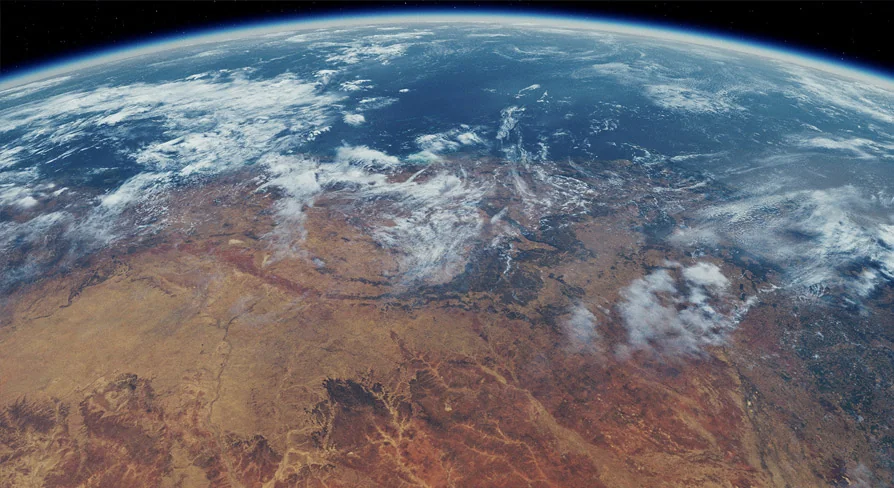
What separates this asset from marketing-heavy planet packs is the amount of cleanup applied to the source data. The color is a custom composite of multiple Blue Marble passes to minimize errors, and some obscured areas near the equator were recreated. The height data feeds a normal map, but the original height source is not even—regions such as northern Siberia and Canada show increasing scanlines. While the new normal map has smoothed scanlines, many remaining artifacts fade into the environment during actual renders. If you need to focus on a specific area of the planet, the developer suggests asking before purchase to confirm the quality of that particular region.
The cloud texture was rearranged to be tileable, and hundreds or even thousands of dead pixels and scanlines were fixed. A separate pole-optimized regular texture handles the area near the poles, and the shader can also project clouds onto the poles to avoid stretching or compression altogether. The night side uses Black Marble data, which is then processed through customizable procedural city detail in the shader. This gives night scenes a crisper, less uniform look. Additional height and mask textures are included as assistive maps for blending and masking operations.
Rendering Reality Check: What This Asset Is Not
The product page is unusually honest about the limitations. This is not an “Earth Zoom Kit.” The texture resolution may be 80K, but at that scale each pixel represents a 500 by 500 meter area. There is basic displacement for flatness control, but in practice 80K is not enough to show individual mountain altitudes. The Earth mesh is therefore just a sphere. To get distinct mountain geometry you would need something on the order of 256K or 512K textures. Perceived clarity depends on both the color and the normal detail—flat ground with little normal variation can feel softer than mountainous regions. Texture quality also varies from region to region because of source data limits.
Virtual texture users should understand that VT tiles may appear blurry for a frame as they stream in, and popping depends on how fast the camera moves relative to the system's available resources. The non-VT 32K/64K versions do not have this behavior. If you move to a new project, review the VT tile, border, and feedback settings. When rendering, TAA and TSR will not match the results of the video demos, which were rendered with Movie Render Queue using 80K with Temporal Sampling. The included sequences show exactly how those settings work together, and they are part of the project. Aurora and thunder are tied to game time, so you may need to preroll renders to hit the desired effect.
Production Path and Target User
For someone building a cinematic orbital shot—whether it is a sci-fi opening, a global weather visualization, or a title sequence that needs a convincing Earth—the blueprint structure and exposed parameters reduce the amount of custom shader work. The presence of render sequences in the project is a direct asset for learning how to animate atmosphere and cloud behavior in Movie Render Queue. The developer states that 5.4 and 5.5 versions have Oodle enabled, while earlier versions need that plugin disabled, which is important if you are working across engine branches.
This Earth is for teams that already understand Unreal's streaming and memory quirks. A 250GB system-drive reservation and a 12GB VRAM GPU are not casual requirements. The asset demands a workstation-class setup to reach the advertised cinematic results. In exchange, you get an Earth asset where the shader handles day-night cycling automatically and the texture data has been corrected far beyond a simple satellite download. If your work involves long orbital takes, lens-worthy close-ups of continents, or weather and night-light detail, the setup time is spent once in the blueprint and then leveraged repeatedly across shots.
 Sky & Space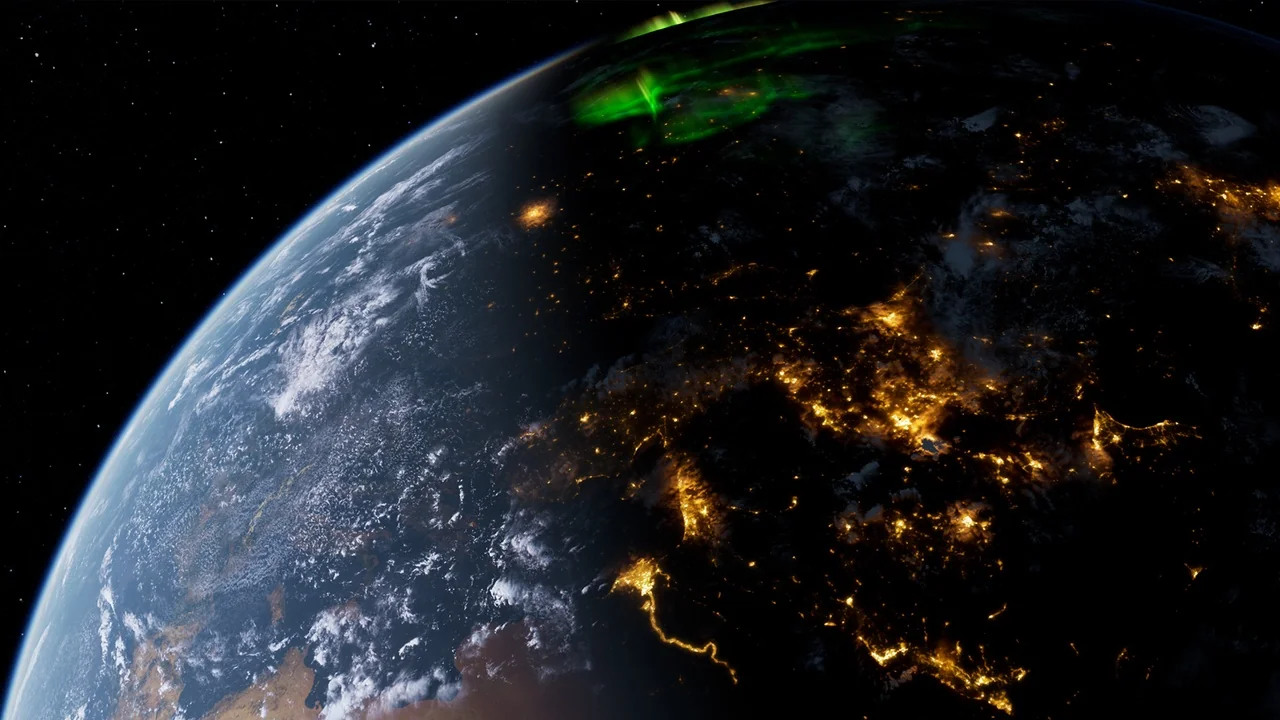
 Sky & Space
 Sky & Space
 Sky & Space