"f813c18d2170b1f6"{"id":"1000062","slug":"fun-obstacle-course-vol-1","title":"Fun Obstacle Course Vol 1","category":"Abandoned","engine":"4.26+,5.0+","assetVersion":"","engineVersion":"4.26+,5.0+","tag":"Abandoned","accent":"blue","visual":"mech","summary":"Fun Obstacle Course Vol 1 brings over 25 unique Unreal Engine 4.20+ obstacle assets, color-adjustable prefabs, expansions, and an example level.","platform":"Unreal Engine","publishedAt":"2026-05-28T12:16:28.094Z","updatedAt":"2026-05-28T12:16:28.094Z","sourceNotes":[],"fileContents":[],"compatibility":["Unreal Engine","Engine version: 4.26+,5.0+"],"featuredImage":{"alt":"Fun Obstacle Course Vol 1","src":"/wp-content/uploads/published/2026/05/d5a469d0a956-f69167b5-1d63-45d8-b9b5-0dd0ec96b737-650c0670b9.webp"},"hasDownloadLink":true,"downloads":0,"terms":[{"taxonomy":"category","slug":"abandoned","name":"Abandoned"}],"galleryImages":[{"src":"/wp-content/uploads/published/2026/05/bfd34ad3347a-f4cec622-7edd-44ca-b02e-b34d9654b09b-25219a320a.webp","alt":"Fun Obstacle Course Vol 1"},{"src":"/wp-content/uploads/published/2026/05/0d60848f582e-db78515a-31df-44ee-9701-2cb22e9f8e3a-99dcc6f944.webp","alt":"Fun Obstacle Course Vol 1"},{"src":"/wp-content/uploads/published/2026/05/5e0e7b8cc919-7e32f901-e919-4d74-9e48-e01ee08af776-8014095f7b.webp","alt":"Fun Obstacle Course Vol 1"},{"src":"/wp-content/uploads/published/2026/05/32cd81416b17-f3faf459-5681-48ca-a098-9c92dbcba53e-2b534366c6.webp","alt":"Fun Obstacle Course Vol 1"},{"src":"/wp-content/uploads/published/2026/05/fc0d54f1b37c-f184a7db-d3d9-4edb-af36-09a3f0954c1f-0ef9917f30.webp","alt":"Fun Obstacle Course Vol 1"},{"src":"/wp-content/uploads/published/2026/05/46a6e84766ab-2393d419-a179-4a58-ab41-7c702f5f5a36-4f0c4b705d.webp","alt":"Fun Obstacle Course Vol 1"},{"src":"/wp-content/uploads/published/2026/05/ce5f4b154ed0-44f2abb6-f5c2-4f02-982b-6505952bf769-fb9a62e185.webp","alt":"Fun Obstacle Course Vol 1"},{"src":"/wp-content/uploads/published/2026/05/1731375935b3-68327975-cbbf-4a12-a06b-2a82dab86487-acac4b5d09.webp","alt":"Fun Obstacle Course Vol 1"},{"src":"/wp-content/uploads/published/2026/05/83974b54e5dd-54c2bf10-9c2c-4fb7-884f-bda2a9741135-ba2771cc6a.webp","alt":"Fun Obstacle Course Vol 1"},{"src":"/wp-content/uploads/published/2026/05/a27e9eeebe74-ed380358-c40e-4395-b9cb-d3fa950a4dd6-d5572802ce.webp","alt":"Fun Obstacle Course Vol 1"}],"accessPanel":{"kind":"resource","title":"Access this resource","eyebrow":"Free Download","message":"Log in or create a free account to start your download.","fileName":"Content.7z","safetyNote":"Resources are manually reviewed before listing to improve quality and reduce obvious risks.","actionLabel":"Download Free","resourceType":"Resource archive"},"contentHtml":"\u003cp\u003eProjects that need a bright, playful obstacle setup often live or die by how quickly separate pieces can turn into a readable challenge course. \u003cstrong\u003eFun Obstacle Course Vol 1\u003c/strong\u003e Leans directly into that need with more than 25 unique assets for Unreal Engine 4.20+, giving developers a set of parts that can be arranged into active spaces rather than static decoration.\u003c/p\u003e\u003cp\u003eThe pack centers on fun obstacle-course elements and is supported by Expansion 1 and Expansion 2. It also includes prefabs that show how individual pieces can be combined into more complex assets, which shifts the package from a simple collection of objects into something more immediately useful for scene assembly and gameplay blockout.\u003c/p\u003e\u003ch2\u003eWhere Fun Obstacle Course Vol 1 fits best\u003c/h2\u003e\u003cp\u003eThis kind of asset set is most useful when a level needs obvious interaction points and a visual tone that feels light rather than severe. The tags attached to the pack point toward that identity clearly: pillar, fun, obstacle, leather, spinner, and blueprint. That combination suggests an environment made from recognizable challenge components, with moving or visually distinct parts that can help a player read the space quickly.\u003c/p\u003e\u003cp\u003eFor artists, that means the set can help establish an obstacle-course look without relying on a single repeated object. For developers, the value comes from variety across the included pieces and from the prefabs that demonstrate how those pieces work together. Instead of treating every asset as a standalone prop, the pack already pushes toward assembled gameplay structures.\u003c/p\u003e\u003cp\u003eThat matters most in projects where the course itself is the visual centerpiece. A run of pillars, spinners, and other challenge elements can define the character of a level. With over 25 unique assets, the set has enough breadth to support layouts that feel staged and intentional instead of copied from one repeated module.\u003c/p\u003e\u003ch2\u003eOver 25 unique assets and what that changes in a course layout\u003c/h2\u003e\u003cp\u003eThe pack includes over 25 unique assets, which gives level builders a decent spread of parts to work with inside a single obstacle theme. For production work, uniqueness matters because obstacle spaces depend on rhythm. Repeating one or two pieces too often can make a course predictable both visually and functionally, while a larger pool of assets supports more variation in silhouettes, spacing, and challenge beats.\u003c/p\u003e\u003cp\u003eEven without turning to anything outside the pack, a builder can approach the course as a sequence of moments rather than a flat line of hazards. A pillar can anchor a section. A spinner can create a focal challenge. Additional pieces can connect those moments into a larger route. Since the package is explicitly presented as an obstacle course rather than a general environment set, the included asset variety serves that specific style of construction.\u003c/p\u003e\u003cp\u003eThe presence of Expansion 1 and Expansion 2 also signals that the core set is not isolated. The package is framed as part of a broader obstacle-course offering, which can help keep the theme consistent across a larger playable area. Even when working only within Vol 1, that expanded context reinforces the idea of the course as something modular and extendable.\u003c/p\u003e\u003ch2\u003ePrefabs that show how individual pieces become more complex assets\u003c/h2\u003e\u003cp\u003eOne of the most practical inclusions here is the prefab selection. The pack does not leave the user to guess how the separate objects should come together. It includes prefabs specifically to give examples of how individual pieces can be used together to create more complex assets.\u003c/p\u003e\u003cp\u003eThat makes the set more approachable from two directions at once. A developer can use the prefabs as a starting point for quick assembly, especially when testing a playable route or building out an early version of a level. An artist can also study those prefab combinations to understand the intended visual language of the set: how spacing works, how pieces stack, and how a simple obstacle element can become part of a larger challenge structure.\u003c/p\u003e\u003cp\u003eExample-based assembly is especially useful in obstacle content because flow is hard to judge from isolated meshes alone. A single obstacle part might look clear in the viewport but still feel awkward when placed into a sequence. Prefabs help bridge that gap by presenting grouped arrangements that already read as larger constructions. They are not just convenience items; they communicate the design logic of the pack.\u003c/p\u003e\u003cp\u003eThe blueprint tag reinforces that implementation-friendly angle. While no extra technical claims should be assumed beyond the tag itself, it does place the resource within an Unreal workflow where reusable setups and assembled logic-friendly pieces can matter just as much as the raw assets.\u003c/p\u003e\u003ch2\u003eColor changes across nearly all prefabs\u003c/h2\u003e\u003cp\u003eNearly all prefabs in the pack can have their colors changed. That single detail adds a lot of flexibility to how the obstacle course can sit inside different scenes. Instead of locking the course into one fixed palette, the package allows builders to shift the look of most prefab arrangements to better match a level’s surrounding art direction.\u003c/p\u003e\u003cp\u003eIn an obstacle space, color is not only decorative. It can help separate route segments, mark hazard intensity, distinguish one gameplay zone from another, or simply stop repeated structures from blending together. Since the color adjustment applies to nearly all prefabs, the feature works at the assembled-object level rather than only on isolated pieces. That is a meaningful distinction because it lets users vary larger course elements without having to rebuild them from scratch.\u003c/p\u003e\u003cp\u003eThis flexibility also supports iteration. A layout can stay structurally the same while its visual identity changes from one section to the next. For teams trying different scene moods or readability approaches, that can save time and keep the package useful across more than one obstacle arrangement.\u003c/p\u003e\u003ch2\u003eThe included example level and the practical value of a fly-through\u003c/h2\u003e\u003cp\u003eAn example level is included, matching the level shown in the fly-through video. That gives the pack a concrete reference scene rather than only a set of disconnected assets and prefabs. Example levels are often where a resource becomes easier to judge in context: spacing, pacing, repetition, and visual balance are all clearer when the pieces are placed into a complete environment.\u003c/p\u003e\u003cp\u003eFor this obstacle course set, the example level can help users understand how the creator expects the assets to interact inside a finished layout. It is one thing to know that there are over 25 assets and a selection of prefabs; it is another to see how those parts support a navigable course. A fly-through reinforces the spatial side of the package by presenting the level as an experience instead of a checklist of components.\u003c/p\u003e\u003cp\u003eThat is particularly relevant for obstacle-focused work, where traversal and sightlines are central to the result. A finished example can guide decisions on segment length, visual contrast, and how to combine challenge pieces without overcrowding the path.\u003c/p\u003e\u003ch2\u003eUnreal Engine 4.20+ and the UE 4.25+ lighting note\u003c/h2\u003e\u003cp\u003eFun Obstacle Course Vol 1 is for Unreal Engine 4.20+, which places it clearly inside an Unreal pipeline. There is also one specific update note for users working in UE 4.25 and above: the lighting can appear bright.\u003c/p\u003e\u003cp\u003eThe provided fix is straightforward. In Project Settings, untick \u003cstrong\u003eAuto Exposure\u003c/strong\u003e And set \u003cstrong\u003eAuto Exposure Bias\u003c/strong\u003e To \u003cstrong\u003e0\u003c/strong\u003e. That is the only technical adjustment explicitly called out, and it is useful because it addresses a visible issue that could affect how the course reads in-scene. Obstacle layouts rely heavily on visual clarity, so brightness problems can quickly change the feel of the environment.\u003c/p\u003e\u003cp\u003eAlongside that, help files are included as documentation. Support is also available through direct questions, which is relevant for users who want clarification while implementing the pack or working through setup issues. Between the documentation, the example level, and the prefab demonstrations, the package offers multiple ways to understand how its parts are meant to function together.\u003c/p\u003e\u003cp\u003eFor developers and artists who need a playful Unreal obstacle setup rather than a general-purpose environment collection, this pack is strongest when used as a modular course-building kit. The over-25-asset range, prefab examples, color-adjustable prefab setups, and included example level make it most useful for teams that want to build readable challenge spaces quickly while keeping room to vary the final look.\u003c/p\u003e\n\n\u003ch2\u003eExplore Similar Assets\u003c/h2\u003e\n\u003cul\u003e\n\u003cli\u003e\u003ca href=\"https://3dcghub.com/apartment-complex/\" title=\"Apartment Complex\"\u003eApartment Complex\u003c/a\u003e\u003c/li\u003e\n\u003cli\u003e\u003ca href=\"https://3dcghub.com/abandoned-russian-building/\" title=\"Abandoned Russian Building\"\u003eAbandoned Russian Building\u003c/a\u003e\u003c/li\u003e\n\u003cli\u003e\u003ca href=\"https://3dcghub.com/highschool-restroom/\" title=\"HighSchool Restroom\"\u003eHighSchool Restroom\u003c/a\u003e\u003c/li\u003e\n\u003cli\u003e\u003ca href=\"https://3dcghub.com/abandoned-mansion-_-fully-modular-asset-pack/\" title=\"Abandoned Mansion _ Fully Modular Asset Pack\"\u003eAbandoned Mansion _ Fully Modular Asset Pack\u003c/a\u003e\u003c/li\u003e\n\u003cli\u003e\u003ca href=\"https://3dcghub.com/1940s-abandoned-office-modular/\" title=\"1940\u0026#039;s Abandoned Office (Modular)\"\u003e1940\u0026#039;s Abandoned Office (Modular)\u003c/a\u003e\u003c/li\u003e\n\u003c/ul\u003e","contentTextLength":8653,"navigation":{"current":1733,"total":3651,"previous":{"id":"1000063","slug":"great-war-trenches","title":"Great War Trenches","category":"Military / Warzone","platform":"Unreal Engine","updatedAt":"2026-05-28T12:31:30.089Z"},"next":{"id":"1000061","slug":"fullstag-quest-system","title":"Fullstag Quest System","category":"Dialog Systems","platform":"Unreal Engine","updatedAt":"2026-05-28T12:09:46.608Z"}},"relatedResources":[{"id":"1001038","slug":"abandoned-factory-industrial-railway-zone-update-v-2","title":"ABANDONED FACTORY / Industrial railway zone (Update V.2)","category":"Abandoned","engine":"4.27,5.0+","assetVersion":"","engineVersion":"Engine Version: 4.27,5.0+","tag":"Abandoned","accent":"blue","visual":"mech","summary":"The V.2 update brings two pre-assembled levels, modular enterable factory buildings, vertex-painted ground materials, and a LOD-to-Nanite workflow.","platform":"Unreal Engine","publishedAt":"2026-08-27T10:13:05.620Z","updatedAt":"2026-08-27T10:13:05.620Z","sourceNotes":[],"fileContents":[],"compatibility":["Unreal Engine","Engine Version: 4.27,5.0+"],"featuredImage":{"alt":"ABANDONED FACTORY / Industrial railway zone (Update V.2)","src":"/wp-content/uploads/published/2026/08/4a5ab4769ce7-cb2ebff5-ca80-4b1b-bd0b-146d6ce653c8-80d800d987.webp"},"hasDownloadLink":true,"downloads":4},{"id":"1001618","slug":"abandoned-place","title":"Abandoned Place","category":"Abandoned","engine":"4.26+,5.0+","assetVersion":"","engineVersion":"Engine Version: 4.26+,5.0+","tag":"Abandoned","accent":"blue","visual":"mech","summary":"Examine Abandoned Place, focusing on modular level construction, spline tools, grass dressing, and realistic abandoned environment workflows.","platform":"Unreal Engine","publishedAt":"2026-10-13T01:48:05.949Z","updatedAt":"2026-10-13T01:48:05.949Z","sourceNotes":[],"fileContents":[],"compatibility":["Unreal Engine","Engine Version: 4.26+,5.0+"],"featuredImage":{"alt":"Abandoned Place","src":"https://media.fab.com/image_previews/gallery_images/ac8a5c1f-0a03-49ff-b0f1-2924c0a4a796/3a224317-4f79-4a05-bd8d-2a4836d25f51.png"},"hasDownloadLink":true,"downloads":0},{"id":"1001655","slug":"root-cellar","title":"Root Cellar","category":"Abandoned","engine":"4.15+,5.0+","assetVersion":"","engineVersion":"Engine Version: 4.15+,5.0+","tag":"Abandoned","accent":"blue","visual":"mech","summary":"Explore the Root Cellar modular environment, featuring baked lighting setups, Epic player scale doors and stairs, and damp underground level design.","platform":"Unreal Engine","publishedAt":"2026-10-13T08:30:37.312Z","updatedAt":"2026-10-13T08:30:37.312Z","sourceNotes":[],"fileContents":[],"compatibility":["Unreal Engine","Engine Version: 4.15+,5.0+"],"featuredImage":{"alt":"Root Cellar","src":"/wp-content/uploads/published/2026/10/76e357fcc542-2a46e10b-ae42-4ffd-858c-a28ad160d2b5-5338175153.webp"},"hasDownloadLink":true,"downloads":0}]}
Abandoned
Fun Obstacle Course Vol 1
Fun Obstacle Course Vol 1 brings over 25 unique Unreal Engine 4.20+ obstacle assets, color-adjustable prefabs, expansions, and an example level.
Category:Unreal Engine,AbandonedPlatform: Unreal EngineEngine version: 4.26+,5.0+Published: May 28, 2026
Abandoned
Resource overview
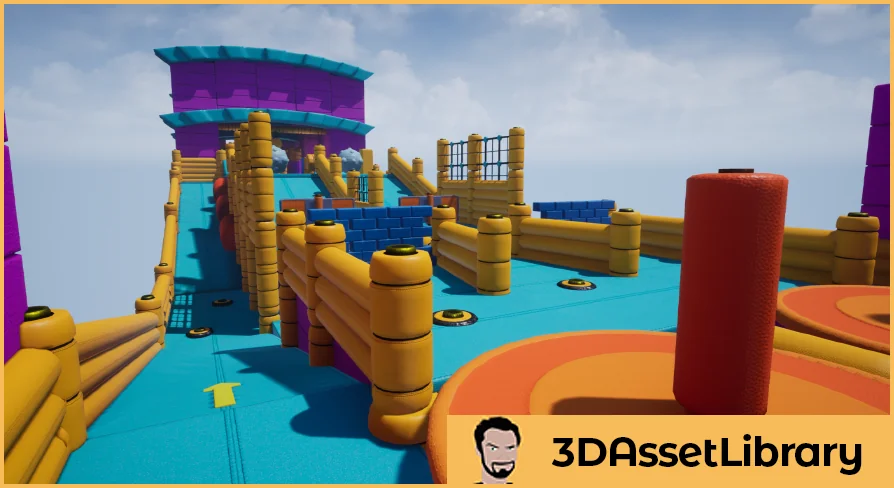
Projects that need a bright, playful obstacle setup often live or die by how quickly separate pieces can turn into a readable challenge course. Fun Obstacle Course Vol 1 Leans directly into that need with more than 25 unique assets for Unreal Engine 4.20+, giving developers a set of parts that can be arranged into active spaces rather than static decoration.
The pack centers on fun obstacle-course elements and is supported by Expansion 1 and Expansion 2. It also includes prefabs that show how individual pieces can be combined into more complex assets, which shifts the package from a simple collection of objects into something more immediately useful for scene assembly and gameplay blockout.
Where Fun Obstacle Course Vol 1 fits best
This kind of asset set is most useful when a level needs obvious interaction points and a visual tone that feels light rather than severe. The tags attached to the pack point toward that identity clearly: pillar, fun, obstacle, leather, spinner, and blueprint. That combination suggests an environment made from recognizable challenge components, with moving or visually distinct parts that can help a player read the space quickly.
For artists, that means the set can help establish an obstacle-course look without relying on a single repeated object. For developers, the value comes from variety across the included pieces and from the prefabs that demonstrate how those pieces work together. Instead of treating every asset as a standalone prop, the pack already pushes toward assembled gameplay structures.
That matters most in projects where the course itself is the visual centerpiece. A run of pillars, spinners, and other challenge elements can define the character of a level. With over 25 unique assets, the set has enough breadth to support layouts that feel staged and intentional instead of copied from one repeated module.
Over 25 unique assets and what that changes in a course layout
The pack includes over 25 unique assets, which gives level builders a decent spread of parts to work with inside a single obstacle theme. For production work, uniqueness matters because obstacle spaces depend on rhythm. Repeating one or two pieces too often can make a course predictable both visually and functionally, while a larger pool of assets supports more variation in silhouettes, spacing, and challenge beats.
Even without turning to anything outside the pack, a builder can approach the course as a sequence of moments rather than a flat line of hazards. A pillar can anchor a section. A spinner can create a focal challenge. Additional pieces can connect those moments into a larger route. Since the package is explicitly presented as an obstacle course rather than a general environment set, the included asset variety serves that specific style of construction.
The presence of Expansion 1 and Expansion 2 also signals that the core set is not isolated. The package is framed as part of a broader obstacle-course offering, which can help keep the theme consistent across a larger playable area. Even when working only within Vol 1, that expanded context reinforces the idea of the course as something modular and extendable.
Prefabs that show how individual pieces become more complex assets
One of the most practical inclusions here is the prefab selection. The pack does not leave the user to guess how the separate objects should come together. It includes prefabs specifically to give examples of how individual pieces can be used together to create more complex assets.
That makes the set more approachable from two directions at once. A developer can use the prefabs as a starting point for quick assembly, especially when testing a playable route or building out an early version of a level. An artist can also study those prefab combinations to understand the intended visual language of the set: how spacing works, how pieces stack, and how a simple obstacle element can become part of a larger challenge structure.
Example-based assembly is especially useful in obstacle content because flow is hard to judge from isolated meshes alone. A single obstacle part might look clear in the viewport but still feel awkward when placed into a sequence. Prefabs help bridge that gap by presenting grouped arrangements that already read as larger constructions. They are not just convenience items; they communicate the design logic of the pack.
The blueprint tag reinforces that implementation-friendly angle. While no extra technical claims should be assumed beyond the tag itself, it does place the resource within an Unreal workflow where reusable setups and assembled logic-friendly pieces can matter just as much as the raw assets.
Color changes across nearly all prefabs
Nearly all prefabs in the pack can have their colors changed. That single detail adds a lot of flexibility to how the obstacle course can sit inside different scenes. Instead of locking the course into one fixed palette, the package allows builders to shift the look of most prefab arrangements to better match a level’s surrounding art direction.
In an obstacle space, color is not only decorative. It can help separate route segments, mark hazard intensity, distinguish one gameplay zone from another, or simply stop repeated structures from blending together. Since the color adjustment applies to nearly all prefabs, the feature works at the assembled-object level rather than only on isolated pieces. That is a meaningful distinction because it lets users vary larger course elements without having to rebuild them from scratch.
This flexibility also supports iteration. A layout can stay structurally the same while its visual identity changes from one section to the next. For teams trying different scene moods or readability approaches, that can save time and keep the package useful across more than one obstacle arrangement.
The included example level and the practical value of a fly-through
An example level is included, matching the level shown in the fly-through video. That gives the pack a concrete reference scene rather than only a set of disconnected assets and prefabs. Example levels are often where a resource becomes easier to judge in context: spacing, pacing, repetition, and visual balance are all clearer when the pieces are placed into a complete environment.
For this obstacle course set, the example level can help users understand how the creator expects the assets to interact inside a finished layout. It is one thing to know that there are over 25 assets and a selection of prefabs; it is another to see how those parts support a navigable course. A fly-through reinforces the spatial side of the package by presenting the level as an experience instead of a checklist of components.
That is particularly relevant for obstacle-focused work, where traversal and sightlines are central to the result. A finished example can guide decisions on segment length, visual contrast, and how to combine challenge pieces without overcrowding the path.
Unreal Engine 4.20+ and the UE 4.25+ lighting note
Fun Obstacle Course Vol 1 is for Unreal Engine 4.20+, which places it clearly inside an Unreal pipeline. There is also one specific update note for users working in UE 4.25 and above: the lighting can appear bright.
The provided fix is straightforward. In Project Settings, untick Auto Exposure And set Auto Exposure Bias To 0. That is the only technical adjustment explicitly called out, and it is useful because it addresses a visible issue that could affect how the course reads in-scene. Obstacle layouts rely heavily on visual clarity, so brightness problems can quickly change the feel of the environment.
Alongside that, help files are included as documentation. Support is also available through direct questions, which is relevant for users who want clarification while implementing the pack or working through setup issues. Between the documentation, the example level, and the prefab demonstrations, the package offers multiple ways to understand how its parts are meant to function together.
For developers and artists who need a playful Unreal obstacle setup rather than a general-purpose environment collection, this pack is strongest when used as a modular course-building kit. The over-25-asset range, prefab examples, color-adjustable prefab setups, and included example level make it most useful for teams that want to build readable challenge spaces quickly while keeping room to vary the final look.
 Abandoned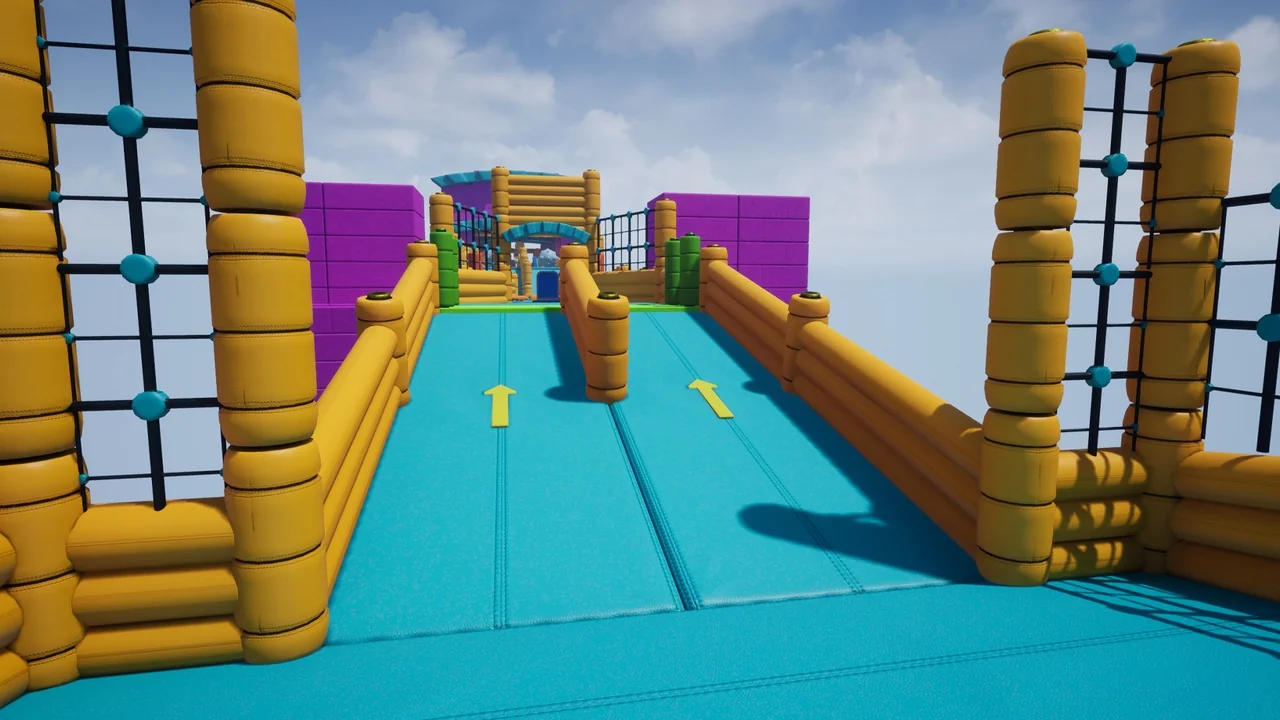
 Abandoned
 Abandoned
 Abandoned