"fa182e0cd0a6ea73"{"id":"1001092","slug":"fruit-tree-v1","title":"fruit tree V1","category":"Nature \u0026 Plants","engine":"4.26+,5.0+","assetVersion":"","engineVersion":"Engine Version: 4.26+,5.0+","tag":"Nature \u0026 Plants","accent":"blue","visual":"mech","summary":"A look at fruit tree V1, a UE4 pack with five high-precision fruit trees—pomegranate, peach, fig, cherry, persimmon—each in six immature-to-mature mesh variants","platform":"Unreal Engine","publishedAt":"2026-09-05T18:16:54.177Z","updatedAt":"2026-09-05T18:16:54.177Z","sourceNotes":[],"fileContents":[],"compatibility":["Unreal Engine","Engine Version: 4.26+,5.0+"],"featuredImage":{"alt":"fruit tree V1","src":"/wp-content/uploads/published/2026/09/932275ac7b40-33df8cb7-f483-4907-84e5-2f6957fdc44d-83ea0af954.webp"},"hasDownloadLink":true,"downloads":1,"terms":[{"taxonomy":"category","slug":"nature-and-plants","name":"Nature \u0026 Plants"}],"galleryImages":[{"src":"/wp-content/uploads/published/2026/09/0a2bf561c1a8-06ea1875-efd6-4603-a538-d8ca13e54bd7-d8a5fcda1b.webp","alt":"fruit tree V1"},{"src":"/wp-content/uploads/published/2026/09/a1f36732cb83-16a27e59-c0b4-4301-8864-8a2f48bdea00-94d5cda203.webp","alt":"fruit tree V1"},{"src":"/wp-content/uploads/published/2026/09/30acbfe9e2dc-aa51e4b7-dc09-4170-bed3-e86f5d2a9b98-7ec12719f6.webp","alt":"fruit tree V1"},{"src":"/wp-content/uploads/published/2026/09/f3fb0dce736f-a7bb3197-d802-4098-aa59-76c6eebe832b-c231c98b93.webp","alt":"fruit tree V1"},{"src":"/wp-content/uploads/published/2026/09/06fced1123bb-e90f3643-c474-4114-9376-2c0ccc9414c3-c5edfe61a3.webp","alt":"fruit tree V1"},{"src":"/wp-content/uploads/published/2026/09/f054116403a8-b2edbba7-18f7-4ef3-b245-487ef8b97acc-1a1b6b3773.webp","alt":"fruit tree V1"},{"src":"/wp-content/uploads/published/2026/09/33a0d3ceadc1-431a41fc-893a-40c5-82a1-83c63e1a8963-dbafd1c300.webp","alt":"fruit tree V1"},{"src":"/wp-content/uploads/published/2026/09/d9d838882b30-c724111c-d652-48cb-b418-65595ab1ec6a-8f66dde6be.webp","alt":"fruit tree V1"},{"src":"/wp-content/uploads/published/2026/09/dbade56852f7-25abc24d-7bfe-4e52-aeb1-3e22254899ae-d93d1e6001.webp","alt":"fruit tree V1"},{"src":"/wp-content/uploads/published/2026/09/cfe6ccf1a06b-53fdfdbf-dceb-4720-855e-141c3d152932-99a1f37d85.webp","alt":"fruit tree V1"}],"accessPanel":{"kind":"resource","title":"Download this resource","eyebrow":"Free Download","message":"Log in or create a free account to start your download.","fileName":"Content.7z","safetyNote":"Resources are manually reviewed before listing to improve quality and reduce obvious risks.","actionLabel":"Download Free","resourceType":"Resource archive"},"contentHtml":"\u003cp\u003eAn orchard is rarely one tree repeated. It is a spread of pomegranate, peach, fig, cherry, and persimmon, and each one of those trees changes its whole silhouette between its first season and its peak. Fruit tree V1 packs that range into a set of five high-precision fruit trees, each with six different shapes that go from immature to mature. Multiply the five species by the six stages and you get the stated total: 30 mesh bodies, ready for environments where a single static model is not enough.\u003c/p\u003e \u003ch2\u003eFive species, six mesh bodies each\u003c/h2\u003e\n\u003cp\u003eThe organization is straightforward when you first open the pack. Each fruit tree is its own group with six grid bodies attached. A pomegranate tree has six mesh bodies. A peach tree has six. A fig tree, a cherry tree, and a persimmon tree each bring the same count. The package then offers a predictable structure for level designers: if you need a whole orchard, you already know that any one species can occupy six different spots without looking like a clone army.\u003c/p\u003e\n\u003cp\u003eSeparating the trees by species is more than a file-organization convenience. It changes the texture of a scene. A line of cherry trees reads differently from a row of fig trees, even when all of them share a similar growth stage. The pack does not ask you to accept a generic fruit tree and pretend it is whatever the story requires. It hands you five easily identifiable orchard residents and then gives each one a subtle range of its own.\u003c/p\u003e \u003ch2\u003eFrom immature to mature: a stage-based shape set\u003c/h2\u003e\n\u003cp\u003eThe six shapes per species are described as running from immature to mature. Those are not just decorative variations; they are separate mesh bodies, which opens up direct production tricks. In a game or cinematic scene, you can show a single tree aging by swapping the mesh at key moments. An establishing shot of a newly planted farm could use the youngest pomegranate mesh, while a present-day scene in the same spot would use the mature one. The object that the player sees stays the same species the entire time, so the visual continuity remains intact.\u003c/p\u003e\n\u003cp\u003eThis is also a strong setup for reusing an environment across different time periods. A flashback in a character-driven story could show the peach tree when it was barely more than a young shoot, while the main timeline shows the same spot filled by its full crown. Because the pack includes all the between steps, a level artist can place several stages side by side and build a time-lapse without importing an entirely different tree family.\u003c/p\u003e \u003ch2\u003eA predictable 30-mesh total for UE4 staging\u003c/h2\u003e\n\u003cp\u003eKnowing the pack contains 30 mesh bodies is useful from the first planning pass. The number is split cleanly: six pomegranate bodies, six peach bodies, six fig bodies, six cherry bodies, six persimmon bodies. That keeps the math simple when you want to populate an entire valley with different ages of the same species. It also helps with performance considerations. A vegetation pack that gives you a few enormous, feature-heavy meshes is difficult to budget around. This one states its count clearly, so you can anticipate draw calls and memory use before your first test level.\u003c/p\u003e\n\u003cp\u003eRendering was carried out in UE4, material. That points toward an Unreal Engine 4 workflow, and it aligns with the PBR tag attached to the asset. PBR—physically based rendering—means the tree surfaces are equipped to react consistently to UE4 lighting, whether the scene is overcast, golden-hour, or night-lit by magical spells. The high-precision label reinforces the idea that these are not just placeholder silhouettes; they are meant to hold up when the camera moves in close.\u003c/p\u003e \u003ch2\u003eFantasy and character staging go beyond a farm aesthetic\u003c/h2\u003e\n\u003cp\u003eThe keyword list on the asset includes not just PBR but also fantasy and character. Those two additions matter because they suggest the tree pack is not locked into a realism-only farming simulator role. A persimmon tree in a fantasy clearing can look like it belongs to a forest spirit, especially when you place the immature and mature forms near a path or a dialogue spot. The 'character' tag does not mean the trees speak or animate; it points toward scenes where a tree can support a character moment. A lone mature fig tree at the edge of a village gives a ready-made hangout spot for a game NPC, while a younger version in the same setting reads as a newer planting.\u003c/p\u003e\n\u003cp\u003eIn more stylized or fantastical scenes, the silhouette variety becomes an asset. Instead of returning to the same generic round canopy, you can use the branching structure of a cherry tree to frame an entrance, or dot an elven orchard with pomegranate forms whose mature shapes have a denser, more weighty look than their immature counterparts. The work is already split into stages, so you can decide how wild or cultivated each corner of the environment feels.\u003c/p\u003e \u003ch2\u003eSitting beside vegetables and other edible plants\u003c/h2\u003e\n\u003cp\u003eThe compatibility note for this release places it with plant, fruit, and vegetable content. That is a practical hint for anyone building a mixed edible garden, a homestead, or a settlement that grows its own food. Fruit trees are usually part of a larger system—they cast shade on vegetable beds, stand near berry patches, and define the border of a farm. Because fruit tree V1 covers an even spread of species, it can anchor different sections of that system. Peach and cherry trees can line a sunnier edge, while fig and pomegranate take a warmer protected spot, and persimmon adds a later-season presence in the same shared space.\u003c/p\u003e\n\u003cp\u003eFor a game where gathering or harvesting is part of the loop, having multiple stages of the same fruit tree gives you a simple visual language for progress. A tree at the immature stage might indicate a crop that has not come in yet. The mature stage can be reserved for one that is ready. With pomegranate, peach, fig, cherry, and persimmon all following that rule, a player can quickly learn to read the orchard before they ever reach it.\u003c/p\u003e \u003ch3\u003eEnough variety to shape a whole season\u003c/h3\u003e\n\u003cp\u003eFruit tree V1 stands out because it starts with useful structure and then supplies the specific forms to support it. Five species is enough to create a believable orchard rather than a monoculture stand, and six shapes per species lets that orchard move through its own lifetime. The 30 mesh bodies are easy to budget around, the UE4 rendering direction fits a common engine pipeline, and the PBR materials only make it easier to keep every tree consistent with the lighting of a scene. For any project that needs fruit trees to feel alive across time, the pack delivers the foundational pieces directly.\u003c/p\u003e\n\n\u003ch2\u003eRelated Resources Worth Checking\u003c/h2\u003e\n\u003cul\u003e\n\u003cli\u003e\u003ca href=\"https://3dcghub.com/anime-skybox-v1/\" title=\"ANIME SKYBOX V1\"\u003eANIME SKYBOX V1\u003c/a\u003e\u003c/li\u003e\n\u003cli\u003e\u003ca href=\"https://3dcghub.com/nature-set/\" title=\"Nature Set\"\u003eNature Set\u003c/a\u003e\u003c/li\u003e\n\u003cli\u003e\u003ca href=\"https://3dcghub.com/realistic-pine-treesv3/\" title=\"Realistic pine treesV3\"\u003eRealistic pine treesV3\u003c/a\u003e\u003c/li\u003e\n\u003cli\u003e\u003ca href=\"https://3dcghub.com/xbh-tree-vol-1/\" title=\"XBH TREE Vol. 1\"\u003eXBH TREE Vol. 1\u003c/a\u003e\u003c/li\u003e\n\u003cli\u003e\u003ca href=\"https://3dcghub.com/foliage-vol-26-dead-birch-trees-nanite-low-poly/\" title=\"Foliage VOL.26 - Dead Birch Trees (Nanite + Low Poly)\"\u003eFoliage VOL.26 - Dead Birch Trees (Nanite + Low Poly)\u003c/a\u003e\u003c/li\u003e\n\u003c/ul\u003e","contentTextLength":6719,"navigation":{"current":812,"total":3789,"previous":{"id":"1001093","slug":"giant-scorpion","title":"Giant Scorpion","category":"Characters \u0026 Creatures","platform":"Unreal Engine","updatedAt":"2026-09-06T01:44:11.719Z"},"next":{"id":"1001091","slug":"fps-multiplayer-shooter-v3","title":"FPS Multiplayer shooter v3","category":"Shooter","platform":"Unreal Engine","updatedAt":"2026-09-05T18:08:15.901Z"}},"relatedResources":[{"id":"1001139","slug":"fruit-tree-v2","title":"Fruit Tree V2","category":"Nature \u0026 Plants","engine":"4.26+,5.0+","assetVersion":"","engineVersion":"Engine Version: 4.26+,5.0+","tag":"Nature \u0026 Plants","accent":"blue","visual":"mech","summary":"Fruit Tree V2 delivers 30 high-precision mesh bodies across five fruit tree species with six immature to mature growth stages for UE4 PBR fantasy scenes.","platform":"Unreal Engine","publishedAt":"2026-09-09T04:49:23.716Z","updatedAt":"2026-09-09T04:49:23.716Z","sourceNotes":[],"fileContents":[],"compatibility":["Unreal Engine","Engine Version: 4.26+,5.0+"],"featuredImage":{"alt":"Fruit Tree V2","src":"/wp-content/uploads/published/2026/09/209064fa00e9-ecbc433e-6e6d-4c74-9696-eeea50ff0412-b204aee103.webp"},"hasDownloadLink":true,"downloads":1},{"id":"1001119","slug":"plant-fruits-and-vegetables","title":"plant Fruits and vegetables","category":"Nature \u0026 Plants","engine":"4.26+,5.0+","assetVersion":"","engineVersion":"Engine Version: 4.26+,5.0+","tag":"Nature \u0026 Plants","accent":"blue","visual":"mech","summary":"Nine high-precision plants with multiple models each, previewed in UE4, covering coffee, spinach, wheat, strawberry, raspberry, tomato, garlic, and more.","platform":"Unreal Engine","publishedAt":"2026-09-07T12:55:52.646Z","updatedAt":"2026-09-07T12:55:52.646Z","sourceNotes":[],"fileContents":[],"compatibility":["Unreal Engine","Engine Version: 4.26+,5.0+"],"featuredImage":{"alt":"plant Fruits and vegetables","src":"/wp-content/uploads/published/2026/09/43038826c872-8220691f-86a4-437c-a121-220d40179627-8de6da649a.webp"},"hasDownloadLink":true,"downloads":0},{"id":"1000274","slug":"anime-skybox-v1","title":"ANIME SKYBOX V1","category":"Nature \u0026 Plants","engine":"4.26+,5.0+","assetVersion":"","engineVersion":"Engine Version: 4.26+,5.0+","tag":"Nature \u0026 Plants","accent":"blue","visual":"mech","summary":"Discover ANIME SKYBOX V1, a collection of 16 optimized sky domes featuring day, night, and space variations with HDR support and customizable material instances","platform":"Unreal Engine","publishedAt":"2026-07-02T17:08:45.348Z","updatedAt":"2026-07-02T17:08:45.348Z","sourceNotes":[],"fileContents":[],"compatibility":["Unreal Engine","Engine Version: 4.26+,5.0+"],"featuredImage":{"alt":"ANIME SKYBOX V1","src":"/wp-content/uploads/published/2026/07/3253a1f4a879-f4c54b09-f7bd-4fce-a5f4-e4da053bffa3-fb8429106f.webp"},"hasDownloadLink":true,"downloads":0}]}
Nature & Plants
fruit tree V1
A look at fruit tree V1, a UE4 pack with five high-precision fruit trees—pomegranate, peach, fig, cherry, persimmon—each in six immature-to-mature mesh variants
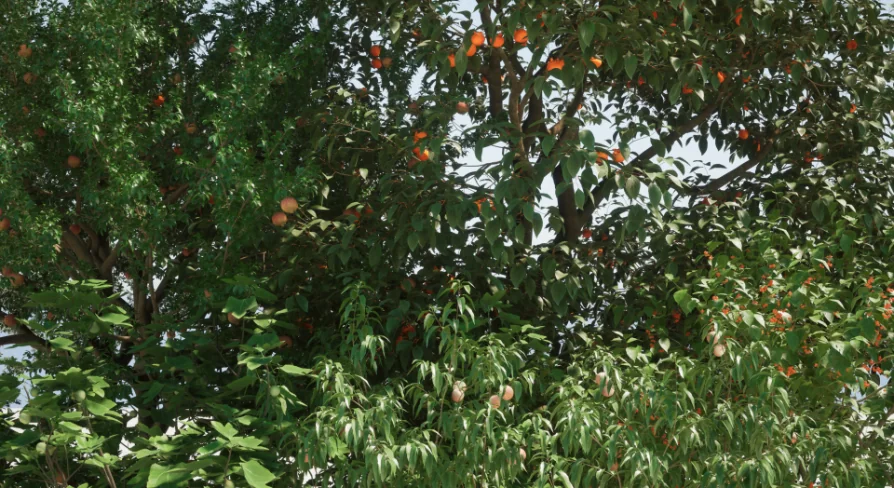
An orchard is rarely one tree repeated. It is a spread of pomegranate, peach, fig, cherry, and persimmon, and each one of those trees changes its whole silhouette between its first season and its peak. Fruit tree V1 packs that range into a set of five high-precision fruit trees, each with six different shapes that go from immature to mature. Multiply the five species by the six stages and you get the stated total: 30 mesh bodies, ready for environments where a single static model is not enough.
Five species, six mesh bodies each
The organization is straightforward when you first open the pack. Each fruit tree is its own group with six grid bodies attached. A pomegranate tree has six mesh bodies. A peach tree has six. A fig tree, a cherry tree, and a persimmon tree each bring the same count. The package then offers a predictable structure for level designers: if you need a whole orchard, you already know that any one species can occupy six different spots without looking like a clone army.
Separating the trees by species is more than a file-organization convenience. It changes the texture of a scene. A line of cherry trees reads differently from a row of fig trees, even when all of them share a similar growth stage. The pack does not ask you to accept a generic fruit tree and pretend it is whatever the story requires. It hands you five easily identifiable orchard residents and then gives each one a subtle range of its own.
From immature to mature: a stage-based shape set
The six shapes per species are described as running from immature to mature. Those are not just decorative variations; they are separate mesh bodies, which opens up direct production tricks. In a game or cinematic scene, you can show a single tree aging by swapping the mesh at key moments. An establishing shot of a newly planted farm could use the youngest pomegranate mesh, while a present-day scene in the same spot would use the mature one. The object that the player sees stays the same species the entire time, so the visual continuity remains intact.
This is also a strong setup for reusing an environment across different time periods. A flashback in a character-driven story could show the peach tree when it was barely more than a young shoot, while the main timeline shows the same spot filled by its full crown. Because the pack includes all the between steps, a level artist can place several stages side by side and build a time-lapse without importing an entirely different tree family.
A predictable 30-mesh total for UE4 staging
Knowing the pack contains 30 mesh bodies is useful from the first planning pass. The number is split cleanly: six pomegranate bodies, six peach bodies, six fig bodies, six cherry bodies, six persimmon bodies. That keeps the math simple when you want to populate an entire valley with different ages of the same species. It also helps with performance considerations. A vegetation pack that gives you a few enormous, feature-heavy meshes is difficult to budget around. This one states its count clearly, so you can anticipate draw calls and memory use before your first test level.
Rendering was carried out in UE4, material. That points toward an Unreal Engine 4 workflow, and it aligns with the PBR tag attached to the asset. PBR—physically based rendering—means the tree surfaces are equipped to react consistently to UE4 lighting, whether the scene is overcast, golden-hour, or night-lit by magical spells. The high-precision label reinforces the idea that these are not just placeholder silhouettes; they are meant to hold up when the camera moves in close.
Fantasy and character staging go beyond a farm aesthetic
The keyword list on the asset includes not just PBR but also fantasy and character. Those two additions matter because they suggest the tree pack is not locked into a realism-only farming simulator role. A persimmon tree in a fantasy clearing can look like it belongs to a forest spirit, especially when you place the immature and mature forms near a path or a dialogue spot. The 'character' tag does not mean the trees speak or animate; it points toward scenes where a tree can support a character moment. A lone mature fig tree at the edge of a village gives a ready-made hangout spot for a game NPC, while a younger version in the same setting reads as a newer planting.
In more stylized or fantastical scenes, the silhouette variety becomes an asset. Instead of returning to the same generic round canopy, you can use the branching structure of a cherry tree to frame an entrance, or dot an elven orchard with pomegranate forms whose mature shapes have a denser, more weighty look than their immature counterparts. The work is already split into stages, so you can decide how wild or cultivated each corner of the environment feels.
Sitting beside vegetables and other edible plants
The compatibility note for this release places it with plant, fruit, and vegetable content. That is a practical hint for anyone building a mixed edible garden, a homestead, or a settlement that grows its own food. Fruit trees are usually part of a larger system—they cast shade on vegetable beds, stand near berry patches, and define the border of a farm. Because fruit tree V1 covers an even spread of species, it can anchor different sections of that system. Peach and cherry trees can line a sunnier edge, while fig and pomegranate take a warmer protected spot, and persimmon adds a later-season presence in the same shared space.
For a game where gathering or harvesting is part of the loop, having multiple stages of the same fruit tree gives you a simple visual language for progress. A tree at the immature stage might indicate a crop that has not come in yet. The mature stage can be reserved for one that is ready. With pomegranate, peach, fig, cherry, and persimmon all following that rule, a player can quickly learn to read the orchard before they ever reach it.
Enough variety to shape a whole season
Fruit tree V1 stands out because it starts with useful structure and then supplies the specific forms to support it. Five species is enough to create a believable orchard rather than a monoculture stand, and six shapes per species lets that orchard move through its own lifetime. The 30 mesh bodies are easy to budget around, the UE4 rendering direction fits a common engine pipeline, and the PBR materials only make it easier to keep every tree consistent with the lighting of a scene. For any project that needs fruit trees to feel alive across time, the pack delivers the foundational pieces directly.
 Nature & Plants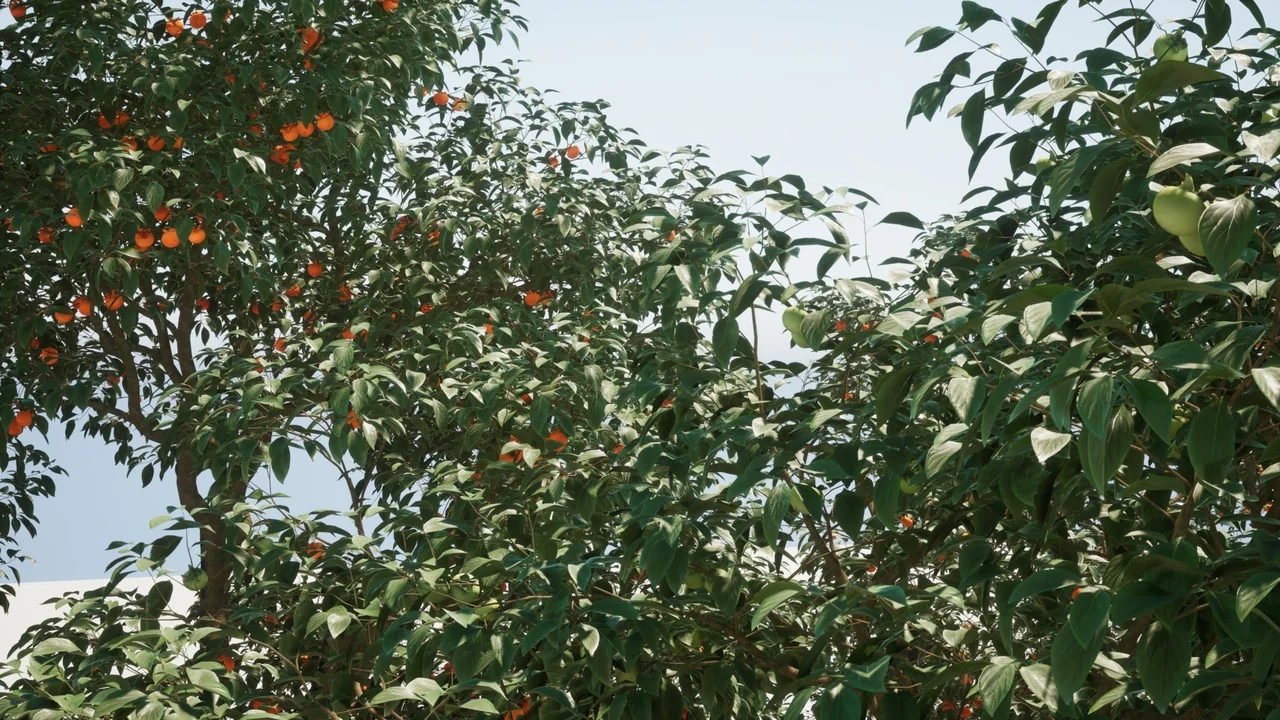
 Nature & Plants
 Nature & Plants
 Nature & Plants