"1c2c8b66743036b4"{"id":"1001052","slug":"fps-animation-blueprint-v2","title":"FPS Animation Blueprint v2","category":"Shooter","engine":"5.1+","assetVersion":"","engineVersion":"Engine Version: 5.1+","tag":"Shooter","accent":"blue","visual":"animation","summary":"A fully featured True First Person Shooter template for Unreal Engine 4 and 5, with weapon systems, dynamic IK ADS, attachments, interaction, and Loot Gen \u0026 Inv","platform":"Unreal Engine","publishedAt":"2026-08-30T13:38:17.417Z","updatedAt":"2026-08-30T13:38:17.417Z","sourceNotes":[],"fileContents":[],"compatibility":["Unreal Engine","Engine Version: 5.1+"],"featuredImage":{"alt":"FPS Animation Blueprint v2","src":"/wp-content/uploads/published/2026/08/1d9d235ebdbf-3ff057b4-a3fa-4e27-b978-ec724cc4ca1c-f81194a5de.webp"},"hasDownloadLink":true,"downloads":2,"terms":[{"taxonomy":"category","slug":"shooter","name":"Shooter"}],"galleryImages":[{"src":"/wp-content/uploads/published/2026/08/adf20f3b3a94-e469261d-f13d-4487-ba67-410a5ee609e3-a3c71dbe4a.webp","alt":"FPS Animation Blueprint v2"},{"src":"/wp-content/uploads/published/2026/08/5f39dd74c368-94c64a6d-9658-4aa3-8f05-a15b2d5791aa-0aed14492e.webp","alt":"FPS Animation Blueprint v2"},{"src":"/wp-content/uploads/published/2026/08/6f55e90bd5fb-c9bc8edd-e65f-4cf0-ae2d-8b567a7bc69f-9df82065fe.webp","alt":"FPS Animation Blueprint v2"},{"src":"/wp-content/uploads/published/2026/08/038a959f8a92-12abe2c0-c957-4719-ac0f-21cba889b01b-4716c8aa4e.webp","alt":"FPS Animation Blueprint v2"},{"src":"/wp-content/uploads/published/2026/08/e46e7b32ed3a-468f8d8c-2354-4507-8b2b-5c715cda3c86-d2cc4b6871.webp","alt":"FPS Animation Blueprint v2"},{"src":"/wp-content/uploads/published/2026/08/eea5ecd81ddc-b0cb6669-08dc-4970-b71a-7c07bbd084dd-f44b342513.webp","alt":"FPS Animation Blueprint v2"},{"src":"/wp-content/uploads/published/2026/08/e97c3cbab62f-0ce0fe0e-a39f-4810-9972-173c0add965d-e51147eeaa.webp","alt":"FPS Animation Blueprint v2"},{"src":"/wp-content/uploads/published/2026/08/384a8f029a3a-21c8a0cc-c281-42c0-a563-2ed8b67808c8-a739089dca.webp","alt":"FPS Animation Blueprint v2"},{"src":"/wp-content/uploads/published/2026/08/fb91f452dc30-126154e2-fdb5-4adb-b2a9-e7608786812b-5c7d846126.webp","alt":"FPS Animation Blueprint v2"},{"src":"/wp-content/uploads/published/2026/08/cbf7addb72c8-e833a2cb-a2dc-4be5-98f9-9a5786d260c0-c411175dfc.webp","alt":"FPS Animation Blueprint v2"}],"accessPanel":{"kind":"resource","title":"Download this resource","eyebrow":"Free Download","message":"Log in or create a free account to start your download.","fileName":"FPSAnimationBlueprintv2.7z","safetyNote":"Resources are manually reviewed before listing to improve quality and reduce obvious risks.","actionLabel":"Download Free","resourceType":"Resource archive"},"contentHtml":"\u003cp\u003eFirst-person shooters live on responsiveness. A prototype that feels stiff can derail the entire concept, while fluid animation buys time for everything else to come together. FPS Animation Blueprint v2 is a fully featured True First Person Shooter template for Unreal Engine, built so that movement and aiming feel right from the first test. Instead of shipping a locked framework, it is intentionally flexible and easy to customise, making it a practical starting point for prototyping FPS gameplay quickly.\u003c/p\u003e\u003ch2\u003eTrue First-Person Feel Without Manual Aim Tuning\u003c/h2\u003e\u003cp\u003eThe template's animation setup is the core of its out-of-the-box fluidity. In many shooters, aligning the viewmodel while aiming down sights requires painstaking manual adjustment. Here, a dynamic IK ADS system takes care of automatic crosshair alignment. That means when you transition into aim-down-sights, the weapon and hands adapt so the crosshair stays on target without hours of per-weapon tuning. The first-person view is shaped by a consistent sense of presence, which makes playtesting player feedback directly useful.\u003c/p\u003e\u003cp\u003eDevelopers who need a fast start notice this immediately. Instead of wrestling with animation graphs and bone transforms, they can drop into a scene, equip a weapon, and feel how the character handles. The template is designed to be the kind of foundation that encourages iteration: change a pose, adjust an animation, and retest without losing the core motion quality.\u003c/p\u003e\u003ch2\u003eWeapons, Attachments, and Modular Customisation\u003c/h2\u003e\u003cp\u003eMechanically, the template includes a weapons system and a companion attachment system. This pairing allows weapon variants to be assembled from interchangeable parts, which is a natural fit for games that feature multiple guns or upgrades. Because the template is meant to be easy to use, the structure is open to being rearranged. Attachments can be swapped in and out, and the animation blueprint responds to what is equipped, keeping the visual and mechanical state in sync.\u003c/p\u003e\u003cp\u003eThe customisation path is not hidden behind layers of obscure logic. It is a Blueprint template, so everything is accessible in the Unreal Editor's visual scripting environment. You can inspect how weapons behave, adjust variables, and wire in your own gameplay events without diving into C++.\u003c/p\u003e\u003ch2\u003eInteraction System and Loot Gen Inventory Compatibility\u003c/h2\u003e\u003cp\u003eShooters are not only about shooting. The template also includes an interaction system, which can drive doors, pickups, switches, or contextual prompts. That is a flexible hook for putting scripted gameplay into a scene. The compatibility with Loot Gen \u0026amp; Inventory opens a direct path to looting and inventory management. Pairing the two lets you prototype a loop where players defeat enemies, gather items, and manage their inventory between firefights. For projects that want a complete first-person gameplay loop without stitching together separate systems, this combination removes a significant chunk of setup work.\u003c/p\u003e\u003cp\u003eInteraction also helps make environments feel reactive. A door that slides open, a weapon that can be picked up, a panel that triggers an event — these are the small touches that separate a static demo from a playable level. The template's interaction support gives you a head start on those systems.\u003c/p\u003e\u003ch2\u003eUE4 and UE5 Versions, Demos, and Patch Notes\u003c/h2\u003e\u003cp\u003eThe template is offered in optimised versions for both Unreal Engine 4 and Unreal Engine 5. When you create a project, you pick the engine version you need, so there is no forced migration. Playable demos are available for both engines at v2.1.1, and a showcase video demonstrates the template in action at v2.0. For developers who like to track changes, full patch notes are posted online, along with a website containing information and tutorials and a Discord channel for support.\u003c/p\u003e\u003cp\u003eHaving both engine options means a team can standardise on their preferred workflow. If you are maintaining a UE4 project or moving to UE5, the template adapts to that choice rather than locking you into one version. The availability of demos also gives you a chance to test the feel before integrating it into your own project.\u003c/p\u003e\u003ch2\u003eBlueprint-First Tuning and Community Support\u003c/h2\u003e\u003cp\u003eBecause the template is Blueprint-based, it fits into a visual scripting workflow. Developers who prefer to work in the Unreal Editor can inspect and adjust behaviour without dropping into C++ code. The tag list calls out terms like customizable, weaponry, gameplay, and firstperson, which reinforces that the asset is meant to be shaped to a project's needs. The available support resources, including tutorials and Discord, make it easier to get unblocked when you are customising deeper mechanics.\u003c/p\u003e\u003cp\u003eThe template bridges the gap between concept and playable prototype. Whether the goal is a quick shooter test, a clone-and-tweak project, or a larger game shaped by loot and inventory, FPS Animation Blueprint v2 provides a solid first-person base with the flexibility to evolve. It is a starting point that already feels like a game, so the remaining work goes into making that game your own.\u003c/p\u003e\n\n\u003ch2\u003eContinue Browsing Similar Packs\u003c/h2\u003e\n\u003cul\u003e\n\u003cli\u003e\u003ca href=\"https://3dcghub.com/third-person-shooter-kit-v2-2/\" title=\"Third Person Shooter Kit v2.2\"\u003eThird Person Shooter Kit v2.2\u003c/a\u003e\u003c/li\u003e\n\u003cli\u003e\u003ca href=\"https://3dcghub.com/bodycam-fps-kit/\" title=\"BODYCAM FPS KIT\"\u003eBODYCAM FPS KIT\u003c/a\u003e\u003c/li\u003e\n\u003cli\u003e\u003ca href=\"https://3dcghub.com/definitive-fps-kit/\" title=\"DEFINITIVE FPS KIT\"\u003eDEFINITIVE FPS KIT\u003c/a\u003e\u003c/li\u003e\n\u003cli\u003e\u003ca href=\"https://3dcghub.com/fps-multiplayer-template-6/\" title=\"FPS Multiplayer Template 6\"\u003eFPS Multiplayer Template 6\u003c/a\u003e\u003c/li\u003e\n\u003cli\u003e\u003ca href=\"https://3dcghub.com/realistic-assault-rifle-fps-template/\" title=\"Realistic Assault Rifle FPS Template\"\u003eRealistic Assault Rifle FPS Template\u003c/a\u003e\u003c/li\u003e\n\u003c/ul\u003e","contentTextLength":5218,"navigation":{"current":708,"total":3651,"previous":{"id":"1001053","slug":"general-ai-framework","title":"General AI Framework","category":"Gameplay Features","platform":"Unreal Engine","updatedAt":"2026-08-30T13:43:01.611Z"},"next":{"id":"1001051","slug":"downtown-city-pack","title":"Downtown - City Pack","category":"Cities","platform":"Unreal Engine","updatedAt":"2026-08-30T13:33:33.587Z"}},"relatedResources":[{"id":"1001097","slug":"zombie-shooter-kit-v2-12-unreal-engine-5-starter-pack","title":"Zombie Shooter Kit v2.12 - UNREAL ENGINE 5 Starter Pack","category":"Shooter","engine":"5.7+","assetVersion":"Asset Version: 2.11","engineVersion":"Engine Version: 5.7+","tag":"Shooter","accent":"blue","visual":"mech","summary":"Blueprint-based UE5 starter for survival shooters: replicated multiplayer, zombies and human AI, jigsaw inventory, crafting, vehicles, weather, and G.A.S.P. Loc","platform":"Unreal Engine","publishedAt":"2026-09-06T02:45:34.766Z","updatedAt":"2026-09-06T02:45:34.766Z","sourceNotes":[],"fileContents":[],"compatibility":["Unreal Engine","Asset Version: 2.11","Engine Version: 5.7+"],"featuredImage":{"alt":"Zombie Shooter Kit v2.12 - UNREAL ENGINE 5 Starter Pack","src":"/wp-content/uploads/published/2026/09/1d7d8e00baab-vqwonz-9f5e01b28f.webp"},"hasDownloadLink":true,"downloads":10},{"id":"1001436","slug":"fps-multiplayer-controller","title":"FPS Multiplayer Controller","category":"Shooter","engine":"5.4+","assetVersion":"","engineVersion":"Engine Version: 5.4+","tag":"Shooter","accent":"blue","visual":"mech","summary":"Build networked first-person shooters in Unreal Engine 5 with replicated weapons, MetaHuman animation support, dynamic gun handling, and loadout benches.","platform":"Unreal Engine","publishedAt":"2026-10-07T08:29:53.920Z","updatedAt":"2026-10-07T08:29:53.920Z","sourceNotes":[],"fileContents":[],"compatibility":["Unreal Engine","Engine Version: 5.4+"],"featuredImage":{"alt":"FPS Multiplayer Controller","src":"/wp-content/uploads/published/2026/10/541757ac162a-b8b106b4-85dc-43f2-b340-a4517862fe57-13e6e45d73.webp"},"hasDownloadLink":true,"downloads":1},{"id":"1001091","slug":"fps-multiplayer-shooter-v3","title":"FPS Multiplayer shooter v3","category":"Shooter","engine":"5.1+","assetVersion":"Asset Version: v2","engineVersion":"Engine Version: 5.1+","tag":"Shooter","accent":"blue","visual":"mech","summary":"Restore missing plugin folders first, then v3 adds an assault rifle, shotgun, sniper, prone, team chat, and a LAN/Steam team deathmatch loop.","platform":"Unreal Engine","publishedAt":"2026-09-05T18:08:15.901Z","updatedAt":"2026-09-05T18:08:15.901Z","sourceNotes":[],"fileContents":[],"compatibility":["Unreal Engine","Asset Version: v2","Engine Version: 5.1+"],"featuredImage":{"alt":"FPS Multiplayer shooter v3","src":"/wp-content/uploads/published/2026/09/f2dcbef3e7d9-5605e15c-6edf-460f-a056-8f457e7fd1a3-a371fb4696.webp"},"hasDownloadLink":true,"downloads":3}]}
Shooter
FPS Animation Blueprint v2
A fully featured True First Person Shooter template for Unreal Engine 4 and 5, with weapon systems, dynamic IK ADS, attachments, interaction, and Loot Gen & Inv
Category:Unreal Engine,ShooterPlatform: Unreal EngineEngine Version: 5.1+Published: Aug 30, 2026
Shooter
Resource overview
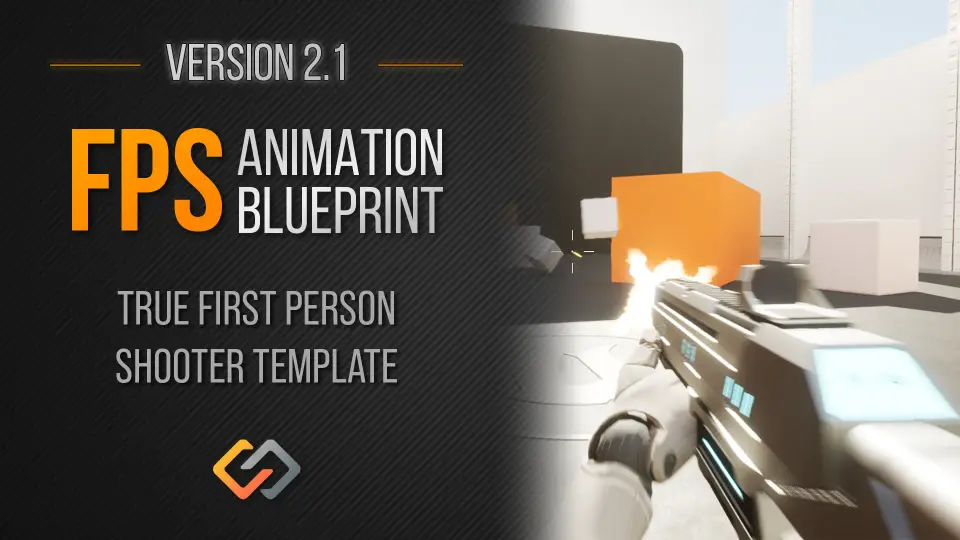
First-person shooters live on responsiveness. A prototype that feels stiff can derail the entire concept, while fluid animation buys time for everything else to come together. FPS Animation Blueprint v2 is a fully featured True First Person Shooter template for Unreal Engine, built so that movement and aiming feel right from the first test. Instead of shipping a locked framework, it is intentionally flexible and easy to customise, making it a practical starting point for prototyping FPS gameplay quickly.
True First-Person Feel Without Manual Aim Tuning
The template's animation setup is the core of its out-of-the-box fluidity. In many shooters, aligning the viewmodel while aiming down sights requires painstaking manual adjustment. Here, a dynamic IK ADS system takes care of automatic crosshair alignment. That means when you transition into aim-down-sights, the weapon and hands adapt so the crosshair stays on target without hours of per-weapon tuning. The first-person view is shaped by a consistent sense of presence, which makes playtesting player feedback directly useful.
Developers who need a fast start notice this immediately. Instead of wrestling with animation graphs and bone transforms, they can drop into a scene, equip a weapon, and feel how the character handles. The template is designed to be the kind of foundation that encourages iteration: change a pose, adjust an animation, and retest without losing the core motion quality.
Weapons, Attachments, and Modular Customisation
Mechanically, the template includes a weapons system and a companion attachment system. This pairing allows weapon variants to be assembled from interchangeable parts, which is a natural fit for games that feature multiple guns or upgrades. Because the template is meant to be easy to use, the structure is open to being rearranged. Attachments can be swapped in and out, and the animation blueprint responds to what is equipped, keeping the visual and mechanical state in sync.
The customisation path is not hidden behind layers of obscure logic. It is a Blueprint template, so everything is accessible in the Unreal Editor's visual scripting environment. You can inspect how weapons behave, adjust variables, and wire in your own gameplay events without diving into C++.
Interaction System and Loot Gen Inventory Compatibility
Shooters are not only about shooting. The template also includes an interaction system, which can drive doors, pickups, switches, or contextual prompts. That is a flexible hook for putting scripted gameplay into a scene. The compatibility with Loot Gen & Inventory opens a direct path to looting and inventory management. Pairing the two lets you prototype a loop where players defeat enemies, gather items, and manage their inventory between firefights. For projects that want a complete first-person gameplay loop without stitching together separate systems, this combination removes a significant chunk of setup work.
Interaction also helps make environments feel reactive. A door that slides open, a weapon that can be picked up, a panel that triggers an event — these are the small touches that separate a static demo from a playable level. The template's interaction support gives you a head start on those systems.
UE4 and UE5 Versions, Demos, and Patch Notes
The template is offered in optimised versions for both Unreal Engine 4 and Unreal Engine 5. When you create a project, you pick the engine version you need, so there is no forced migration. Playable demos are available for both engines at v2.1.1, and a showcase video demonstrates the template in action at v2.0. For developers who like to track changes, full patch notes are posted online, along with a website containing information and tutorials and a Discord channel for support.
Having both engine options means a team can standardise on their preferred workflow. If you are maintaining a UE4 project or moving to UE5, the template adapts to that choice rather than locking you into one version. The availability of demos also gives you a chance to test the feel before integrating it into your own project.
Blueprint-First Tuning and Community Support
Because the template is Blueprint-based, it fits into a visual scripting workflow. Developers who prefer to work in the Unreal Editor can inspect and adjust behaviour without dropping into C++ code. The tag list calls out terms like customizable, weaponry, gameplay, and firstperson, which reinforces that the asset is meant to be shaped to a project's needs. The available support resources, including tutorials and Discord, make it easier to get unblocked when you are customising deeper mechanics.
The template bridges the gap between concept and playable prototype. Whether the goal is a quick shooter test, a clone-and-tweak project, or a larger game shaped by loot and inventory, FPS Animation Blueprint v2 provides a solid first-person base with the flexibility to evolve. It is a starting point that already feels like a game, so the remaining work goes into making that game your own.
 Shooter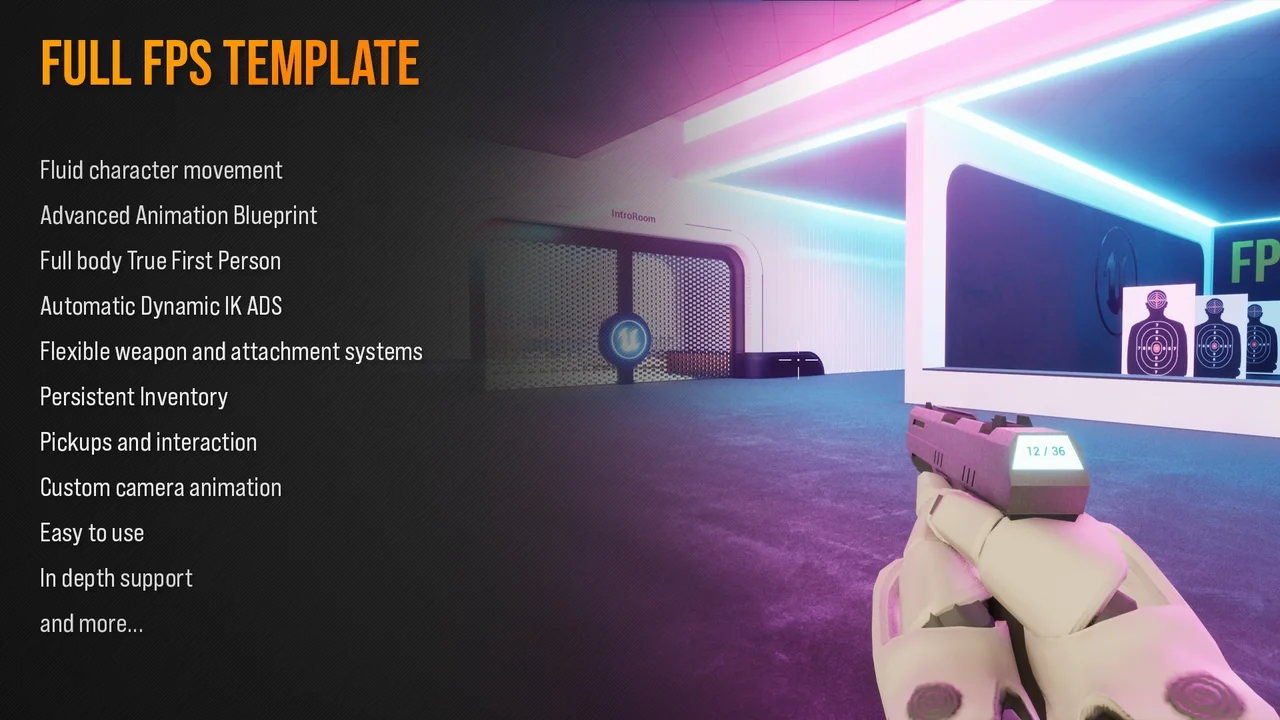
 Shooter
 Shooter
 Shooter