"1c2c8b66743036b4"{"id":"1001051","slug":"downtown-city-pack","title":"Downtown - City Pack","category":"Cities","engine":"5.0+","assetVersion":"","engineVersion":"Engine Version: 5.0+","tag":"Cities","accent":"blue","visual":"city","summary":"A New York-inspired downtown city pack for Unreal Engine with procedural blueprints, modular buildings, and full material control. Build large realistic city ar","platform":"Unreal Engine","publishedAt":"2026-08-30T13:33:33.587Z","updatedAt":"2026-08-30T13:33:33.587Z","sourceNotes":[],"fileContents":[],"compatibility":["Unreal Engine","Engine Version: 5.0+"],"featuredImage":{"alt":"Downtown - City Pack","src":"/wp-content/uploads/published/2026/08/685353b03547-dc374a9e-8c93-4d7a-918e-65ffdf2e8558-22b7bd467c.webp"},"hasDownloadLink":true,"downloads":0,"terms":[{"taxonomy":"category","slug":"cities","name":"Cities"}],"galleryImages":[{"src":"/wp-content/uploads/published/2026/08/5ee2df7d492d-6c30e0fc-6c33-4f56-9f29-6336eb6ea4a1-98640800a3.webp","alt":"Downtown - City Pack"},{"src":"/wp-content/uploads/published/2026/08/5d6de55c4e70-26312b46-f091-447f-bb48-58893a684944-fb224f679c.webp","alt":"Downtown - City Pack"},{"src":"/wp-content/uploads/published/2026/08/85eed8a84842-f7a4a955-893b-4d45-9a9c-96881934139f-dbe8f5ec84.webp","alt":"Downtown - City Pack"},{"src":"/wp-content/uploads/published/2026/08/c8a2aefc1454-9c338ae4-7d76-4847-8353-cef936914ab8-f7f39a0b8f.webp","alt":"Downtown - City Pack"},{"src":"/wp-content/uploads/published/2026/08/aa639eeadf2d-099cfb15-dd0c-4d22-a01a-fdf04b4eff8b-33dc6955e1.webp","alt":"Downtown - City Pack"},{"src":"/wp-content/uploads/published/2026/08/ce30d58431fb-1a2abfd4-8b42-415e-b9bd-21e444642950-694cea4b23.webp","alt":"Downtown - City Pack"},{"src":"/wp-content/uploads/published/2026/08/f2c3b9fb7ed2-505373e1-603b-4885-9cf7-39c324167c5b-ad99187b8f.webp","alt":"Downtown - City Pack"},{"src":"/wp-content/uploads/published/2026/08/665443deb8b0-9e5c313d-257a-455b-91e0-97dc471d5bb5-7058050def.webp","alt":"Downtown - City Pack"},{"src":"/wp-content/uploads/published/2026/08/73599280f82f-ea7a1c47-345f-4bd1-833c-9ef276d00714-e61415eb68.webp","alt":"Downtown - City Pack"},{"src":"/wp-content/uploads/published/2026/08/4f3165aac878-5b2f2207-e3bb-4b6a-ba9f-f3d0ca266541-8b4bd5a559.webp","alt":"Downtown - City Pack"}],"accessPanel":{"kind":"resource","title":"Download this resource","eyebrow":"Free Download","message":"Log in or create a free account to start your download.","fileName":"Content.7z","safetyNote":"Resources are manually reviewed before listing to improve quality and reduce obvious risks.","actionLabel":"Download Free","resourceType":"Resource archive"},"contentHtml":"\u003cp\u003eDowntown - City Pack is structured through a clear goal: help artists and developers fill a scene with a dense, realistic downtown area without placing every curb, window, and banner by hand. The pack takes visual cues from New York City's Manhattan Midtown, so the streets, building proportions, and general street-level energy lean into that familiar grid. Instead of delivering a single static environment, it ships a collection of blueprints and tools designed to generate large, unique areas in a few hours rather than weeks.\u003c/p\u003e \u003ch2\u003eA New York Downtown That Comes Together in Hours\u003c/h2\u003e\n\u003cp\u003eCreating a big city scene for a game can mean manually placing every object, which is exactly the kind of work this pack tries to remove. The included blueprints target the repetitive parts of city building: roads, sidewalks, roofs and floors, traffic lights, decals, banners, background buildings, and modular buildings. Each tool is meant to be easy to use, flexible, and adjustable after generation, so you are not locked into whatever the first pass produces. The interface is designed to be intuitive, the documentation is detailed, and almost every material can be customized without digging into complex shader graphs.\u003c/p\u003e\n\u003cp\u003eBecause the blueprints handle the heavy lifting, you can spend the saved time on making the area feel like your own. The pack also lets you modify individual buildings or modular pieces after the tool finishes, which helps when a generated block needs a slight tweak to fit the surrounding layout. The tools run in the Unreal Editor rather than at runtime, so they are a production-side aid for level construction, not a gameplay mechanic.\u003c/p\u003e \u003ch2\u003eFrom Roads to Banners: The Blueprint Toolkit\u003c/h2\u003e\n\u003cp\u003eThe blueprint lineup covers more than just buildings. There are dedicated tools for roads and sidewalks, which form the foundation of any downtown layout. For vertical details, roofs and floors can be generated to cap off buildings quickly. Street-level props like traffic lights, decals, and banners give the environment the lived-in look that separates a generic city from a specific place. Background buildings round out the skyline without requiring the same level of detail as foreground structures, keeping the scene efficient.\u003c/p\u003e\n\u003cp\u003eTwo of the blueprints, Background Procedural Building and Roof, generate procedural mesh on the fly. The rest of the blueprints use the 3D models included in the pack, which keeps a consistent visual style while still giving you control over placement and variation. Since the generation happens in the Editor, you can iterate on the result without entering play mode.\u003c/p\u003e \u003ch2\u003eModular Buildings Without the Manual Grind\u003c/h2\u003e\n\u003cp\u003eModular buildings are where the pack’s flexibility really shows. Instead of assembling floors one by one, you set parameters—like the number of floors, shape, style, and materials—then press a button and the tool generates the building for you. The variety is large enough to avoid the repetitive look that plagues many city packs, so you can create a block of structures that all read as unique.\u003c/p\u003e\n\u003cp\u003eThe customization does not stop at the provided pieces. You can add your own 3D models to the blueprints or replace the existing meshes with something like Quixel Megascans assets. The same applies to materials. This makes the pack a starting point rather than a closed system, which is useful if your project has a specific art direction or needs to match other content already in production.\u003c/p\u003e \u003ch2\u003eUnreal 5.1, Nanite, Lumen, and Editor-Only Generation\u003c/h2\u003e\n\u003cp\u003eThe latest updates for Downtown - City Pack, released in June 2023, target Unreal Engine 5.1 or higher. These versions are optimized for Nanite and Lumen, so the pack takes advantage of UE5’s geometry and lighting systems. The updates also introduced new or improved content such as trees and trash, adding a bit more organic street-level detail to the otherwise architectural set.\u003c/p\u003e\n\u003cp\u003eOne setup note: the Editor Scripting Plugin needs to be enabled in your project. In Unreal Engine 5 and newer, that plugin is enabled by default, so most users will not need to touch anything. The blueprints themselves work only in the Editor, which reinforces their role as scene-construction tools rather than runtime components.\u003c/p\u003e \u003ch2\u003eThe FBX and 3ds Max Side of the Pack\u003c/h2\u003e\n\u003cp\u003eBeyond the Unreal workflow, the pack includes 3D formats for pipelines that use FBX or 3ds Max. The full collection comes to roughly 11.3 million polygons and about 12 million vertices, with models built at real-world scale. Textures use meaningful names, have stripped texture path names, and are delivered as PNGs with resolutions ranging from 1024x1024 to 4096x4096. For physical materials, you get the standard base color, metallic, roughness, and normal maps.\u003c/p\u003e\n\u003cp\u003eThe presentation renders were done in both Unreal Engine and 3ds Max with Arnold. The 3ds Max scene closely mirrors the Unreal one, though it is not an exact match. If your team works in a DCC tool and then brings assets into the engine, the FBX and Max formats give you a solid starting point, with one caveat: decals like graffiti and dirt are not included in the 3D format versions. Also, if you see clipping artifacts in your viewport, increasing the minimum clipping value is the recommended fix.\u003c/p\u003e \u003ch2\u003eWhere the Pack Fits in a Production Pipeline\u003c/h2\u003e\n\u003cp\u003eDowntown - City Pack is best suited for teams that need to build a large city area quickly and want to keep artistic control over the final look. The blueprint-driven generation handles the tedious placement work, while the modular building tools let you create distinct structures without custom modeling. Since the pack is inspired by Manhattan Midtown, it fits games and visualizations that call for a North American city center feel. For projects that need surrounding suburban or industrial zones, the same studio offers related packs, and the bundle option can cover a wider urban footprint.\u003c/p\u003e\n\u003cp\u003eThe combination of procedural generation, custom mesh support, and UE5-friendly optimization makes this a practical addition to a city-building workflow. Whether you are blocking out a playable level or dressing a high-fidelity environment, the pack is designed to turn a blank map into a believable downtown with less manual effort.\u003c/p\u003e\n\n\u003ch2\u003eContinue Browsing Similar Packs\u003c/h2\u003e\n\u003cul\u003e\n\u003cli\u003e\u003ca href=\"https://3dcghub.com/american-city-packs-bundle/\" title=\"American City Packs (Bundle)\"\u003eAmerican City Packs (Bundle)\u003c/a\u003e\u003c/li\u003e\n\u003cli\u003e\u003ca href=\"https://3dcghub.com/modern-city-downtown-megapack-modern-city-downtown-building-usa-town-street/\" title=\"Modern City Downtown Megapack ( Modern City Downtown Building USA Town Street )\"\u003eModern City Downtown Megapack ( Modern City Downtown Building USA Town Street )\u003c/a\u003e\u003c/li\u003e\n\u003cli\u003e\u003ca href=\"https://3dcghub.com/signage-vol-2-town-and-city-nanite-and-low-poly/\" title=\"Signage VOL.2 - Town and City (Nanite and Low Poly)\"\u003eSignage VOL.2 - Town and City (Nanite and Low Poly)\u003c/a\u003e\u003c/li\u003e\n\u003cli\u003e\u003ca href=\"https://3dcghub.com/dynamic-city-creator-sample/\" title=\"Dynamic City Creator Sample\"\u003eDynamic City Creator Sample\u003c/a\u003e\u003c/li\u003e\n\u003cli\u003e\u003ca href=\"https://3dcghub.com/a-futuristic-city-lake-town/\" title=\"A Futuristic City - LAKE TOWN\"\u003eA Futuristic City - LAKE TOWN\u003c/a\u003e\u003c/li\u003e\n\u003c/ul\u003e","contentTextLength":6427,"navigation":{"current":709,"total":3651,"previous":{"id":"1001052","slug":"fps-animation-blueprint-v2","title":"FPS Animation Blueprint v2","category":"Shooter","platform":"Unreal Engine","updatedAt":"2026-08-30T13:38:17.417Z"},"next":{"id":"1001050","slug":"balance-component-53-animations-blueprints","title":"Balance Component : 53 Animations + Blueprints","category":"Locomotion / Gaits","platform":"Unreal Engine","updatedAt":"2026-08-30T13:06:44.987Z"}},"relatedResources":[{"id":"27322","slug":"american-city-packs-bundle","title":"American City Packs (Bundle)","category":"Cities","engine":"5.0+","assetVersion":"Engine version: 5.0+","engineVersion":"","tag":"Cities","accent":"blue","visual":"city","summary":"American City Packs (Bundle) brings downtown, suburbs, and industrial content together in a single city-building workflow. It focuses on editor-based generation, modular control, and the kind of assets that let large urban scenes come together quickly.","platform":"Unreal Engine","publishedAt":"2026-04-24T05:51:42.000Z","updatedAt":"2026-04-24T05:51:43.000Z","sourceNotes":[],"fileContents":[],"compatibility":["Unreal Engine","Engine version: 5.0+"],"featuredImage":{"alt":"American City Packs (Bundle)","src":"https://3dcghub.com/wp-content/uploads/2026/04/e249548065ab_189ac72c-3333-403f-a2e2-9bd95e2a751d.webp"},"hasDownloadLink":true,"downloads":1},{"id":"1001701","slug":"modular-amsterdam-city-street-with-canal","title":"Modular Amsterdam City Street with Canal","category":"Cities","engine":"5.4+","assetVersion":"","engineVersion":"Engine Version: 5.4+","tag":"Cities","accent":"blue","visual":"city","summary":"Build authentic Dutch urban scenes with modular canal-side architecture, street props, Nanite-ready meshes, and 4K PBR textures in Unreal Engine.","platform":"Unreal Engine","publishedAt":"2026-10-14T13:30:10.202Z","updatedAt":"2026-10-14T13:30:10.202Z","sourceNotes":[],"fileContents":[],"compatibility":["Unreal Engine","Engine Version: 5.4+"],"featuredImage":{"alt":"Modular Amsterdam City Street with Canal","src":"/wp-content/uploads/published/2026/10/23e966ee0759-1a53411b-9b5a-4e48-86dc-fc10e925d417-6eb4ff8a13.webp"},"hasDownloadLink":true,"downloads":0},{"id":"1001561","slug":"synthwave-city-kit","title":"Synthwave City Kit","category":"Cities","engine":"5.1+","assetVersion":"","engineVersion":"Engine Version: 5.1+","tag":"Cities","accent":"blue","visual":"city","summary":"Build neon retro-futuristic urban scenes with the Synthwave City Kit, featuring modular road and building elements, Niagara flying cars, and Lumen lighting.","platform":"Unreal Engine","publishedAt":"2026-10-10T03:52:24.147Z","updatedAt":"2026-10-10T03:52:24.147Z","sourceNotes":[],"fileContents":[],"compatibility":["Unreal Engine","Engine Version: 5.1+"],"featuredImage":{"alt":"Synthwave City Kit","src":"/wp-content/uploads/published/2026/10/7de076b7c637-e659a330-0eae-4936-8d4c-421ee00d2b2a-29a67792cc.webp"},"hasDownloadLink":true,"downloads":0}]}
Cities
Downtown - City Pack
A New York-inspired downtown city pack for Unreal Engine with procedural blueprints, modular buildings, and full material control. Build large realistic city ar
Category:Unreal Engine,CitiesPlatform: Unreal EngineEngine Version: 5.0+Published: Aug 30, 2026
Cities
Resource overview
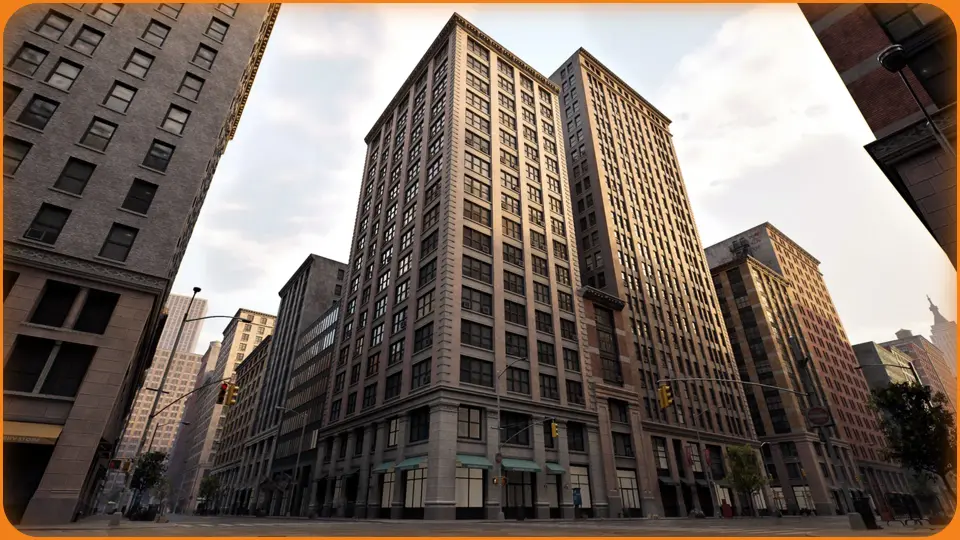
Downtown - City Pack is structured through a clear goal: help artists and developers fill a scene with a dense, realistic downtown area without placing every curb, window, and banner by hand. The pack takes visual cues from New York City's Manhattan Midtown, so the streets, building proportions, and general street-level energy lean into that familiar grid. Instead of delivering a single static environment, it ships a collection of blueprints and tools designed to generate large, unique areas in a few hours rather than weeks.
A New York Downtown That Comes Together in Hours
Creating a big city scene for a game can mean manually placing every object, which is exactly the kind of work this pack tries to remove. The included blueprints target the repetitive parts of city building: roads, sidewalks, roofs and floors, traffic lights, decals, banners, background buildings, and modular buildings. Each tool is meant to be easy to use, flexible, and adjustable after generation, so you are not locked into whatever the first pass produces. The interface is designed to be intuitive, the documentation is detailed, and almost every material can be customized without digging into complex shader graphs.
Because the blueprints handle the heavy lifting, you can spend the saved time on making the area feel like your own. The pack also lets you modify individual buildings or modular pieces after the tool finishes, which helps when a generated block needs a slight tweak to fit the surrounding layout. The tools run in the Unreal Editor rather than at runtime, so they are a production-side aid for level construction, not a gameplay mechanic.
From Roads to Banners: The Blueprint Toolkit
The blueprint lineup covers more than just buildings. There are dedicated tools for roads and sidewalks, which form the foundation of any downtown layout. For vertical details, roofs and floors can be generated to cap off buildings quickly. Street-level props like traffic lights, decals, and banners give the environment the lived-in look that separates a generic city from a specific place. Background buildings round out the skyline without requiring the same level of detail as foreground structures, keeping the scene efficient.
Two of the blueprints, Background Procedural Building and Roof, generate procedural mesh on the fly. The rest of the blueprints use the 3D models included in the pack, which keeps a consistent visual style while still giving you control over placement and variation. Since the generation happens in the Editor, you can iterate on the result without entering play mode.
Modular Buildings Without the Manual Grind
Modular buildings are where the pack’s flexibility really shows. Instead of assembling floors one by one, you set parameters—like the number of floors, shape, style, and materials—then press a button and the tool generates the building for you. The variety is large enough to avoid the repetitive look that plagues many city packs, so you can create a block of structures that all read as unique.
The customization does not stop at the provided pieces. You can add your own 3D models to the blueprints or replace the existing meshes with something like Quixel Megascans assets. The same applies to materials. This makes the pack a starting point rather than a closed system, which is useful if your project has a specific art direction or needs to match other content already in production.
Unreal 5.1, Nanite, Lumen, and Editor-Only Generation
The latest updates for Downtown - City Pack, released in June 2023, target Unreal Engine 5.1 or higher. These versions are optimized for Nanite and Lumen, so the pack takes advantage of UE5’s geometry and lighting systems. The updates also introduced new or improved content such as trees and trash, adding a bit more organic street-level detail to the otherwise architectural set.
One setup note: the Editor Scripting Plugin needs to be enabled in your project. In Unreal Engine 5 and newer, that plugin is enabled by default, so most users will not need to touch anything. The blueprints themselves work only in the Editor, which reinforces their role as scene-construction tools rather than runtime components.
The FBX and 3ds Max Side of the Pack
Beyond the Unreal workflow, the pack includes 3D formats for pipelines that use FBX or 3ds Max. The full collection comes to roughly 11.3 million polygons and about 12 million vertices, with models built at real-world scale. Textures use meaningful names, have stripped texture path names, and are delivered as PNGs with resolutions ranging from 1024x1024 to 4096x4096. For physical materials, you get the standard base color, metallic, roughness, and normal maps.
The presentation renders were done in both Unreal Engine and 3ds Max with Arnold. The 3ds Max scene closely mirrors the Unreal one, though it is not an exact match. If your team works in a DCC tool and then brings assets into the engine, the FBX and Max formats give you a solid starting point, with one caveat: decals like graffiti and dirt are not included in the 3D format versions. Also, if you see clipping artifacts in your viewport, increasing the minimum clipping value is the recommended fix.
Where the Pack Fits in a Production Pipeline
Downtown - City Pack is best suited for teams that need to build a large city area quickly and want to keep artistic control over the final look. The blueprint-driven generation handles the tedious placement work, while the modular building tools let you create distinct structures without custom modeling. Since the pack is inspired by Manhattan Midtown, it fits games and visualizations that call for a North American city center feel. For projects that need surrounding suburban or industrial zones, the same studio offers related packs, and the bundle option can cover a wider urban footprint.
The combination of procedural generation, custom mesh support, and UE5-friendly optimization makes this a practical addition to a city-building workflow. Whether you are blocking out a playable level or dressing a high-fidelity environment, the pack is designed to turn a blank map into a believable downtown with less manual effort.
 Cities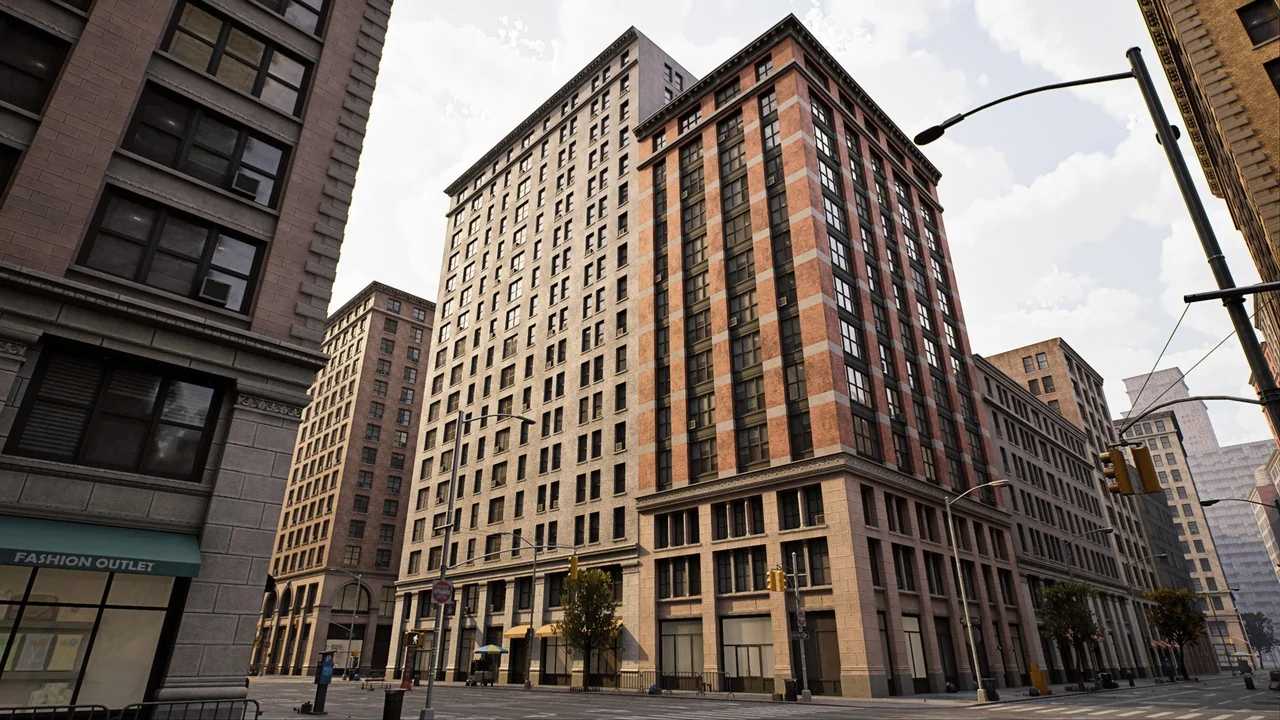
 Cities
 Cities
 Cities