"7e6fc58c410f2894"{"id":"1000459","slug":"fighter-drone","title":"Fighter Drone","category":"Characters \u0026 Creatures","engine":"4.26+,5.0+","assetVersion":"","engineVersion":"Engine Version: 4.26+,5.0+","tag":"Characters","accent":"blue","visual":"character","summary":"A sci-fi Fighter Drone rigged with 8 bones, 10 animations, 6 PBR textures, and an Unreal animation blueprint with adjustable eye emissive and arm rotation contr","platform":"Unreal Engine","publishedAt":"2026-07-11T04:47:57.511Z","updatedAt":"2026-07-11T04:47:57.511Z","sourceNotes":[],"fileContents":[],"compatibility":["Unreal Engine","Engine Version: 4.26+,5.0+"],"featuredImage":{"alt":"Fighter Drone","src":"https://media.fab.com/image_previews/gallery_images/e475dcdf-7b02-48f4-ae3b-046a18e33f20/12988c09-627d-4315-96ce-2b3f3eb407a0.png"},"hasDownloadLink":true,"downloads":0,"terms":[{"taxonomy":"category","slug":"characters-and-creatures","name":"Characters \u0026 Creatures"}],"galleryImages":[],"accessPanel":{"kind":"resource","title":"Download this resource","eyebrow":"Free Download","message":"Log in or create a free account to start your download.","fileName":"Content.7z","safetyNote":"Resources are manually reviewed before listing to improve quality and reduce obvious risks.","actionLabel":"Download Free","resourceType":"Resource archive"},"contentHtml":"\u003ch2\u003eFighter Drone: Core Components and Model Build\u003c/h2\u003e\u003cp\u003eAt its centre, Fighter Drone is a robotic sci-fi character rigged with an 8-bone skeleton and armed with a built-in firearm. The mesh carries 7,733 vertices, 15,390 triangles, and 6,269 faces, placing it in a lightweight bracket that can be dropped into real-time scenes without becoming a bottleneck. Six realistic PBR textures at 2048×2048 resolution handle the surface detail, giving the mechanical hull, plate work, and eye驭 distinctive material reads under varied lighting.\u003c/p\u003e\u003cp\u003eBecause the topology stays compact, the same mesh can be used in a gameplay context where many instances may appear on screen, or in a closer cinematic shot where the PBR textures still hold up. The low bone count keeps the rig approachable for retargeting work and for quick adjustments inside an engine without wrestling a sprawling control hierarchy.\u003c/p\u003e\u003ch2\u003eAnimation Set: From Takeoff to Damage Reactions\u003c/h2\u003e\u003cp\u003eThe package includes ten animations that cover the character's behavioural range. Idle and Idle2 provide two resting states, giving artists a choice between a neutral hover and a slightly varied idle for staging variety. Fire, die, land, and takeoff cover the main action beats, while Hit1 through Hit4deliver four distinct damage reactions.\u003c/p\u003e\u003cp\u003eThe four hit animations are flagged as in-place, meaning they apply only rotation with no root movement. This matters for gameplay integration because the reactions can play while the drone maintains its current position, letting movement logic stay on the gameplay side rather than fighting the animation clip. For cinematic staging, the same in-place nature means each hit reaction can be layered or timed against effects without the drone drifting out of frame.\u003c/p\u003e\u003ch3\u003eBehavioural Range and Gameplay Staging\u003c/h3\u003e\u003cp\u003eTaken together, the animation set outlines a full combat lifecycle: takeoff, idle holding patterns, firing, taking damage through four escalating or variant reactions, and finally death. This gives developers a ready sequence for an enemy or miniboss-style encounter without needing to author additional clips. The two idle options also help avoid visual repetition when multiple drones are on screen at the same time, since alternating between them can break up sync patterns in a swarm.\u003c/p\u003e\u003ch2\u003ePBR Textures and Material Read\u003c/h2\u003e\u003cp\u003eThe six 2048×2048 PBR textures supply the realistic surface treatment expected for a sci-fi drone operating in lit environments. The resolution is enough to read panel separation, wear, and material variation on a character of this scale, while the PBR workflow means the drone will respond correctly to scene lighting, reflections, and emissive contributions from surrounding effects or muzzle flashes.\u003c/p\u003e\u003cp\u003eFor artists adjusting the look, the PBR base gives a solid foundation to modify in a material editor. Tinting the metal, pushing the roughness for a battle-worn variant, or layering dirt and scorch marks over the existing maps are all practical routes to differentiate multiple units from the same asset.\u003c/p\u003e\u003ch2\u003eAnimation Blueprint and Eye Customization\u003c/h2\u003e\u003cp\u003eFighter Drone ships with a demo scene that includes an animation blueprint configured to cycle through each of the ten animations. This setup gives an immediate preview of the full motion set inside the engine, but it also serves as a working reference for how to structure playback and state transitions for the character.\u003c/p\u003e\u003cp\u003eBeyond previewing, the blueprint exposes direct controls for the drone's eye. Users can change the eye colour and adjust its emissive strength, which is the main visual identifier for a robotic character. Pushing the emissive intensity can make the drone read as alerted or hostile in a dark scene, while pulling it down or shifting toward a cooler colour can suggest a powered-down or scanning state. These options give artists a quick route to dramatic re-staging without touching the textures or material graphs.\u003c/p\u003e\u003ch2\u003eIndependent Arm Rotation Outside of Animation\u003c/h2\u003e\u003cp\u003eThe blueprint also allows the rotation of each arm to be changed independently of the running animation. This is a notable workflow detail because it separates mechanical posing from clip playback. A developer can keep an idle or hit animation playing while manually aiming or orienting the drone's arms toward a target, a damage source, or a cinematic marker.\u003c/p\u003e\u003cp\u003eIn practice, this opens the door to aiming and tracking setups where the arms follow a look-at target while the body retains its animated state. It also means the four in-place hit reactions can play while the arms are held in a custom orientation, which is useful for hit feedback that needs to respect weapon aim rather than snapping to a canned pose. The documentation covers the specifics of these blueprint controls, so artists and developers can refer there for the exact parameter names and setup steps.\u003c/p\u003e\u003ch2\u003eFitting the Drone into a Project\u003c/h2\u003e\u003cp\u003eFighter Drone is structured for direct use in real-time projects, whether as an individual enemy unit, a scripted encounter piece, or a background element in a larger sci-fi scene. The compact mesh, PBR textures, and focused animation set form a complete package, while the exposed blueprint controls for eye emissive and arm rotation give artists room to adapt the character without modifying source files.\u003c/p\u003e\u003cp\u003eWith its combat lifecycle, damage reactions, and customizable eye and arm behaviour, the asset is set up to function both as a ready-to-place enemy and as a base for further gameplay and cinematic refinement.\u003c/p\u003e\n\n\u003ch2\u003eContinue Browsing Similar Packs\u003c/h2\u003e\n\u003cul\u003e\n\u003cli\u003e\u003ca href=\"https://3dcghub.com/drone/\" title=\"Drone\"\u003eDrone\u003c/a\u003e\u003c/li\u003e\n\u003cli\u003e\u003ca href=\"https://3dcghub.com/droid-outlander/\" title=\"Droid Outlander\"\u003eDroid Outlander\u003c/a\u003e\u003c/li\u003e\n\u003cli\u003e\u003ca href=\"https://3dcghub.com/enforcer-rig/\" title=\"Enforcer Rig\"\u003eEnforcer Rig\u003c/a\u003e\u003c/li\u003e\n\u003cli\u003e\u003ca href=\"https://3dcghub.com/sci-fi-survey-drones/\" title=\"Sci-fi Survey Drones\"\u003eSci-fi Survey Drones\u003c/a\u003e\u003c/li\u003e\n\u003cli\u003e\u003ca href=\"https://3dcghub.com/military-drones/\" title=\"Military Drones\"\u003eMilitary Drones\u003c/a\u003e\u003c/li\u003e\n\u003c/ul\u003e","contentTextLength":5556,"navigation":{"current":1300,"total":3618,"previous":{"id":"1000460","slug":"gbwflowmove-high-speed-movement-system-multiplayer-ready","title":"GBWFlowMove - High-speed Movement system, Multiplayer Ready!","category":"Gameplay Features","platform":"Unreal Engine","updatedAt":"2026-07-11T04:57:21.385Z"},"next":{"id":"1000458","slug":"feudal-japan-megapack","title":"Feudal Japan Megapack","category":"Historical","platform":"Unreal Engine","updatedAt":"2026-07-11T04:29:03.740Z"}},"relatedResources":[{"id":"1000954","slug":"military-drone","title":"Military Drone","category":"Characters \u0026 Creatures","engine":"4.26+,5.0+","assetVersion":"","engineVersion":"Engine Version: 4.26+,5.0+","tag":"Characters","accent":"blue","visual":"character","summary":"A rigged military drone with 4096px PBR material and six basic animations for sci-fi and near-future scenes. Seen in Aliens: Dark Descent and more.","platform":"Unreal Engine","publishedAt":"2026-08-14T05:42:15.189Z","updatedAt":"2026-08-14T05:42:15.189Z","sourceNotes":[],"fileContents":[],"compatibility":["Unreal Engine","Engine Version: 4.26+,5.0+"],"featuredImage":{"alt":"Military Drone","src":"/wp-content/uploads/published/2026/08/977e0c2a89c8-f992d788-b6ce-4f82-bf59-1a8a840f75a9-1005abbefc.webp"},"hasDownloadLink":true,"downloads":0},{"id":"1000365","slug":"drone","title":"Drone","category":"Characters \u0026 Creatures","engine":"4.26+,5.0+","assetVersion":"","engineVersion":"Engine Version: 4.26+,5.0+","tag":"Characters","accent":"blue","visual":"character","summary":"A detailed look at the Smart Drone asset, featuring its fully playable 3rd person Pawn Blueprint, velocity-driven animations, and customizable color masks.","platform":"Unreal Engine","publishedAt":"2026-07-06T08:11:05.295Z","updatedAt":"2026-07-06T08:11:05.295Z","sourceNotes":[],"fileContents":[],"compatibility":["Unreal Engine","Engine Version: 4.26+,5.0+"],"featuredImage":{"alt":"Drone","src":"/wp-content/uploads/published/2026/07/7a3d1ec6a70a-eb121064-1bc6-464f-865b-af90274c4569-9250215e81.webp"},"hasDownloadLink":true,"downloads":0},{"id":"2242","slug":"droid-outlander","title":"Droid Outlander","category":"Characters \u0026 Creatures","engine":"4.27,5.0+","assetVersion":"Engine version: 4.27,5.0+","engineVersion":"4.27","tag":"Characters","accent":"blue","visual":"character","summary":"Enhance your project with the Droid Outlander Unit 05. This game-ready PBR 3D model features custom rigging and optimized low-poly geometry for sci-fi games.","platform":"Unreal Engine","publishedAt":"2026-02-07T08:37:46.000Z","updatedAt":"2026-04-19T15:58:04.000Z","sourceNotes":[],"fileContents":[],"compatibility":["Unreal Engine","Engine version: 4.27,5.0+"],"featuredImage":{"alt":"Droid Outlander","src":"https://3dcghub.com/wp-content/uploads/2026/02/30a2fac3-1b41-4bff-af0d-434ca392e6df.webp"},"hasDownloadLink":true,"downloads":1}]}
Characters
Fighter Drone
A sci-fi Fighter Drone rigged with 8 bones, 10 animations, 6 PBR textures, and an Unreal animation blueprint with adjustable eye emissive and arm rotation contr
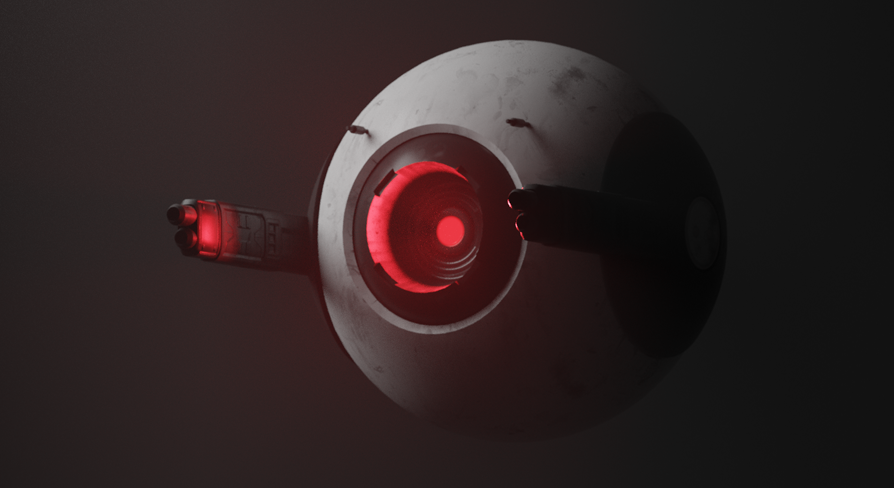
At its centre, Fighter Drone is a robotic sci-fi character rigged with an 8-bone skeleton and armed with a built-in firearm. The mesh carries 7,733 vertices, 15,390 triangles, and 6,269 faces, placing it in a lightweight bracket that can be dropped into real-time scenes without becoming a bottleneck. Six realistic PBR textures at 2048×2048 resolution handle the surface detail, giving the mechanical hull, plate work, and eye驭 distinctive material reads under varied lighting.
Because the topology stays compact, the same mesh can be used in a gameplay context where many instances may appear on screen, or in a closer cinematic shot where the PBR textures still hold up. The low bone count keeps the rig approachable for retargeting work and for quick adjustments inside an engine without wrestling a sprawling control hierarchy.
Animation Set: From Takeoff to Damage Reactions
The package includes ten animations that cover the character's behavioural range. Idle and Idle2 provide two resting states, giving artists a choice between a neutral hover and a slightly varied idle for staging variety. Fire, die, land, and takeoff cover the main action beats, while Hit1 through Hit4deliver four distinct damage reactions.
The four hit animations are flagged as in-place, meaning they apply only rotation with no root movement. This matters for gameplay integration because the reactions can play while the drone maintains its current position, letting movement logic stay on the gameplay side rather than fighting the animation clip. For cinematic staging, the same in-place nature means each hit reaction can be layered or timed against effects without the drone drifting out of frame.
Behavioural Range and Gameplay Staging
Taken together, the animation set outlines a full combat lifecycle: takeoff, idle holding patterns, firing, taking damage through four escalating or variant reactions, and finally death. This gives developers a ready sequence for an enemy or miniboss-style encounter without needing to author additional clips. The two idle options also help avoid visual repetition when multiple drones are on screen at the same time, since alternating between them can break up sync patterns in a swarm.
PBR Textures and Material Read
The six 2048×2048 PBR textures supply the realistic surface treatment expected for a sci-fi drone operating in lit environments. The resolution is enough to read panel separation, wear, and material variation on a character of this scale, while the PBR workflow means the drone will respond correctly to scene lighting, reflections, and emissive contributions from surrounding effects or muzzle flashes.
For artists adjusting the look, the PBR base gives a solid foundation to modify in a material editor. Tinting the metal, pushing the roughness for a battle-worn variant, or layering dirt and scorch marks over the existing maps are all practical routes to differentiate multiple units from the same asset.
Animation Blueprint and Eye Customization
Fighter Drone ships with a demo scene that includes an animation blueprint configured to cycle through each of the ten animations. This setup gives an immediate preview of the full motion set inside the engine, but it also serves as a working reference for how to structure playback and state transitions for the character.
Beyond previewing, the blueprint exposes direct controls for the drone's eye. Users can change the eye colour and adjust its emissive strength, which is the main visual identifier for a robotic character. Pushing the emissive intensity can make the drone read as alerted or hostile in a dark scene, while pulling it down or shifting toward a cooler colour can suggest a powered-down or scanning state. These options give artists a quick route to dramatic re-staging without touching the textures or material graphs.
Independent Arm Rotation Outside of Animation
The blueprint also allows the rotation of each arm to be changed independently of the running animation. This is a notable workflow detail because it separates mechanical posing from clip playback. A developer can keep an idle or hit animation playing while manually aiming or orienting the drone's arms toward a target, a damage source, or a cinematic marker.
In practice, this opens the door to aiming and tracking setups where the arms follow a look-at target while the body retains its animated state. It also means the four in-place hit reactions can play while the arms are held in a custom orientation, which is useful for hit feedback that needs to respect weapon aim rather than snapping to a canned pose. The documentation covers the specifics of these blueprint controls, so artists and developers can refer there for the exact parameter names and setup steps.
Fitting the Drone into a Project
Fighter Drone is structured for direct use in real-time projects, whether as an individual enemy unit, a scripted encounter piece, or a background element in a larger sci-fi scene. The compact mesh, PBR textures, and focused animation set form a complete package, while the exposed blueprint controls for eye emissive and arm rotation give artists room to adapt the character without modifying source files.
With its combat lifecycle, damage reactions, and customizable eye and arm behaviour, the asset is set up to function both as a ready-to-place enemy and as a base for further gameplay and cinematic refinement.
 Characters
 Characters
 Characters
 Characters