"fa182e0cd0a6ea73"{"id":"1001802","slug":"easy-atmos","title":"Easy Atmos","category":"Variety","engine":"5.4+","assetVersion":"","engineVersion":"Engine Version: 5.4+","tag":"Variety","accent":"blue","visual":"mech","summary":"Easy Atmos consolidates volumetric fog, falling leaves, bug swarms, sparks, and debris into a single blueprint for Unreal Engine real-time and cinematic scenes.","platform":"Unreal Engine","publishedAt":"2026-10-21T07:54:07.654Z","updatedAt":"2026-10-21T07:54:07.654Z","sourceNotes":[],"fileContents":[],"compatibility":["Unreal Engine","Engine Version: 5.4+"],"featuredImage":{"alt":"Easy Atmos","src":"/wp-content/uploads/published/2026/10/f204b3b7e0b8-bf9d532f-3684-4920-9848-aa40b7aadd69-9516ffc51e.webp"},"hasDownloadLink":true,"downloads":1,"terms":[{"taxonomy":"category","slug":"variety-vfx","name":"Variety"}],"galleryImages":[{"src":"/wp-content/uploads/published/2026/10/1b41874b2937-7ba2bd0c-00a5-4312-8dd5-0e9918b01ad7-8ffe58032b.webp","alt":"Easy Atmos"},{"src":"/wp-content/uploads/published/2026/10/ea304abedfe5-5b564a28-0719-4071-98fc-5472d309bfde-86237e36cf.webp","alt":"Easy Atmos"},{"src":"/wp-content/uploads/published/2026/10/da60b04fdfe3-354acf56-43ad-4505-aa1d-e26efcd0a9bb-29bbd0ed5d.webp","alt":"Easy Atmos"},{"src":"/wp-content/uploads/published/2026/10/ccc0e7639b08-a88f7c73-eb59-4639-a924-bc199e6e0e9e-e6e587e837.webp","alt":"Easy Atmos"},{"src":"/wp-content/uploads/published/2026/10/14b16c463f3c-e88496c9-bb2a-4d08-8ab2-07fcf1cda249-2e34bccdd5.webp","alt":"Easy Atmos"},{"src":"/wp-content/uploads/published/2026/10/9d5de99d4877-16403c83-c428-4be5-92cc-f344def03940-ed36db5f27.webp","alt":"Easy Atmos"},{"src":"/wp-content/uploads/published/2026/10/233868070fe2-09b6dc29-0794-41c8-8d4f-a01f9a8c5503-05a6eb852a.webp","alt":"Easy Atmos"},{"src":"/wp-content/uploads/published/2026/10/0ce9c56ccab3-99b5b6ee-b9c5-4194-9bc7-2f5a0f5ccedb-110fae35fd.webp","alt":"Easy Atmos"},{"src":"/wp-content/uploads/published/2026/10/4990d7cf9af1-119a1d0e-257b-47b3-b77e-154052b66e28-574db8a27f.webp","alt":"Easy Atmos"},{"src":"/wp-content/uploads/published/2026/10/7138f0f1f618-e20da05d-ff95-4cfd-a23b-5078ffabed12-efa5d62e23.webp","alt":"Easy Atmos"}],"accessPanel":{"kind":"resource","title":"Download this resource","eyebrow":"Free Download","message":"Log in or create a free account to start your download.","fileName":"Content.7z","safetyNote":"Resources are manually reviewed before listing to improve quality and reduce obvious risks.","actionLabel":"Download Free","resourceType":"Resource archive"},"contentHtml":"\u003cp\u003eDeepening the sense of space in a virtual scene usually relies on the subtle elements floating between the camera and the backdrop. Sunlit dust motes drifting across an abandoned interior, insects fluttering near ground cover, smoke hanging in damp air, or leaves swirling past a lens give virtual environments weight and movement. Easy Atmos addresses this atmospheric layer in Unreal Engine, supplying an integrated suite of environmental particle and volumetric systems managed from a centralized control point.\u003c/p\u003e\u003ch2\u003eAtmospheric Staging and Environmental Life\u003c/h2\u003e\u003cp\u003ePopulating a level with ambient effects often introduces unwanted friction into the set-dressing workflow. Dropping independent emitters across a map leads to disorganized outliners, disjointed parameter values, and messy iteration loops when lighting conditions or scene moods shift. Easy Atmos consolidates these environmental phenomena into a unified framework. Rather than forcing creators to juggle disparate particle setups or fill the content browser with one-off duplicate variations, the tool gathers multiple atmospheric behaviors into an artist-friendly blueprint.\u003c/p\u003e\u003cp\u003eThis approach allows environmental artists to establish believable ambience without manually configuring separate systems for every pocket of the scene. Forest clearings can receive tumbling leaves and hovering insect clouds simultaneously, while industrial ruins or combat arenas can be outfitted with lingering smoke plumes and drifting embers. Because the system accommodates both wide ambient sweeps and tightly bounded local effects, scenes can transition from clear exterior expanses to dense, moody corridors without breaking visual cohesion.\u003c/p\u003e\u003ch2\u003eThe Multi-System Toolkit: From Dust Motes to Custom Mesh Debris\u003c/h2\u003e\u003cp\u003eEasy Atmos packages several foundational atmospheric effects directly into its architecture, giving artists direct artistic direction over diverse physical phenomena:\u003c/p\u003e\u003cul\u003e\u003cli\u003e\u003cstrong\u003eFalling Leaves:\u003c/strong\u003e Simulates foliage drifting through air currents to establish seasonal shifts, windy conditions, or natural decay in outdoor levels.\u003c/li\u003e\u003cli\u003e\u003cstrong\u003eDust Motes:\u003c/strong\u003e Generates fine, slow-moving particles that catch direct light shafts, immediately grounding interior architectural spaces and cavernous ruins.\u003c/li\u003e\u003cli\u003e\u003cstrong\u003eBug Swarms:\u003c/strong\u003e Introduces erratic, clustered insect movement to humid swamps, summer fields, damp basements, or stagnant outdoor pools.\u003c/li\u003e\u003cli\u003e\u003cstrong\u003eSparks:\u003c/strong\u003e Emits small glowing embers suitable for industrial machinery, damaged electrical fixtures, burning wreckage, or open campfires.\u003c/li\u003e\u003cli\u003e\u003cstrong\u003eSmoke:\u003c/strong\u003e Creates soft, drifting columns and dispersed haze for smoldering debris, exhaust points, and atmospheric layering.\u003c/li\u003e\u003cli\u003e\u003cstrong\u003eLocal Volumetric Fog:\u003c/strong\u003e Deploys localized pockets of dense mist and fog to sculpt lighting, hide background boundaries, or build eerie, low-visibility zones.\u003c/li\u003e\u003cli\u003e\u003cstrong\u003eCustom Meshes:\u003c/strong\u003e Enables the simulation of unique physical elements—such as crumbling rock formations and fractured debris—by feeding user-provided static meshes directly into the effect framework.\u003c/li\u003e\u003c/ul\u003e\u003cp\u003eThe ability to integrate custom meshes extends the utility of the system far beyond basic planar sprites or simple point particles. When a sequence demands environmental instability, such as a collapsing cave ceiling or fractured masonry falling from damaged architecture, users can route their own geometry through the blueprint. This bridges the gap between pure atmospheric haze and tangible, physical clutter scattering across the ground.\u003c/p\u003e\u003ch2\u003eKeyframing and Animation Across Cinematics and Real-Time Play\u003c/h2\u003e\u003cp\u003eProduction environments frequently fluctuate between real-time game performance needs and high-fidelity cinematic requirements. Easy Atmos is optimized to function in both contexts, balancing runtime efficiency during interactive gameplay with the precision required for recorded camera sequences.\u003c/p\u003e\u003cp\u003eEvery atmospheric effect inside the blueprint can be keyframed and animated over time. For cinematic artists, this level of control is essential when choreographing shots where the environmental intensity must shift in sync with dramatic beats. A gentle gust of wind can be animated to whip up a violent storm of leaves, sparks from an unstable reactor can surge as a character approaches, or a pocket of dense local volumetric fog can roll smoothly across a lens during a timed camera track. Because the parameters accept direct animation tracks, cinematics teams avoid the need to spawn and destroy secondary actors on set just to alter particle density or motion velocity.\u003c/p\u003e\u003cp\u003eIn active game levels, having centralized parameters guarantees that visual effects scale correctly with the environment. Instead of hunting through separate particle assets to balance performance or tone down an overly bright spark, developers can calibrate the entire atmospheric footprint directly inside the scene instance.\u003c/p\u003e\u003ch2\u003eMesh Distance Fields and Project Integration\u003c/h2\u003e\u003cp\u003eTo take full advantage of how these atmospheric elements interact with scene surfaces, Easy Atmos relies on Unreal Engine's Mesh Distance Fields. This architectural foundation enables particles and localized volumes to recognize nearby geometry, land on collision planes, or interact convincingly with scene depth.\u003c/p\u003e\u003cp\u003eEnabling Generate Mesh Distance Fields within project settings is a mandatory prerequisite for the package. If the system is placed into a level and no visual effects appear in the viewport, the absence of active Mesh Distance Fields is the root cause. Ensuring this setting is active allows the blueprint to trace scene geometry accurately, facilitating realistic collision for debris, natural dispersion for rising smoke, and clean ground-level accumulation for localized fog.\u003c/p\u003e\u003cp\u003eTo assist with immediate implementation and study, the asset includes dedicated demonstration levels with explanations, specifically the \u003ccode\u003eL_Showcase_Demo\u003c/code\u003e Map. Exploring this showcase level provides a clear reference for how individual atmospheric elements are balanced, how density values interact with scene lighting, and how custom meshes can be introduced into the particle stream.\u003c/p\u003e\u003ch2\u003eFitting Easy Atmos into the Scene-Building Pipeline\u003c/h2\u003e\u003cp\u003eAs part of the Easy Suite ecosystem of weather, atmosphere, and workflow tools, Easy Atmos functions as an artistic finishing layer. It is built to complement existing level geometry rather than replace it; backdrop environments and background assets seen in promotional material serve solely as context and are not bundled with the utility.\u003c/p\u003e\u003cp\u003eFor solo developers, technical artists, and cinematographers, the tool eliminates repetitive technical setup. By unifying smoke, dust, sparks, wildlife, foliage, and structural debris inside a single configurable blueprint actor, Easy Atmos provides a streamlined path toward rich, photorealistic scene depth without the operational drag of fractured particle management.\u003c/p\u003e\n\n\u003ch2\u003eContinue Browsing Similar Packs\u003c/h2\u003e\n\u003cul\u003e\n\u003cli\u003e\u003ca href=\"https://3dcghub.com/fluid-ninja-live/\" title=\"Fluid Ninja LIVE\"\u003eFluid Ninja LIVE\u003c/a\u003e\u003c/li\u003e\n\u003cli\u003e\u003ca href=\"https://3dcghub.com/swarms-vfx/\" title=\"Swarms VFX\"\u003eSwarms VFX\u003c/a\u003e\u003c/li\u003e\n\u003cli\u003e\u003ca href=\"https://3dcghub.com/love-fx/\" title=\"Love FX\"\u003eLove FX\u003c/a\u003e\u003c/li\u003e\n\u003cli\u003e\u003ca href=\"https://3dcghub.com/vfx-bundle-2/\" title=\"VFX Bundle 2\"\u003eVFX Bundle 2\u003c/a\u003e\u003c/li\u003e\n\u003cli\u003e\u003ca href=\"https://3dcghub.com/army-vfx/\" title=\"Army VFX\"\u003eArmy VFX\u003c/a\u003e\u003c/li\u003e\n\u003c/ul\u003e","contentTextLength":6846,"navigation":{"current":54,"total":3789,"previous":{"id":"1001803","slug":"endless-runner-mega-template","title":"Endless Runner Mega Template","category":"Platformer","platform":"Unreal Engine","updatedAt":"2026-10-21T07:54:58.391Z"},"next":{"id":"1001801","slug":"cyberpunk-runner","title":"Cyberpunk Runner","category":"Characters \u0026 Creatures","platform":"Unreal Engine","updatedAt":"2026-10-21T07:53:08.792Z"}},"relatedResources":[{"id":"17158","slug":"fluid-ninja-live","title":"Fluid Ninja LIVE","category":"Variety","engine":"5.4+","assetVersion":"Engine version: 5.4+","engineVersion":"Asset Version:1.9.54.4","tag":"Variety","accent":"blue","visual":"character","summary":"Fluid Ninja LIVE is a robust toolset for creating dynamic, responsive fluid simulations in real-time. It supports everything from Metahuman tracking to large-scale environmental effects like fog and sand.","platform":"Unreal Engine","publishedAt":"2026-03-13T13:52:32.000Z","updatedAt":"2026-04-19T15:43:36.000Z","sourceNotes":[],"fileContents":[],"compatibility":["Unreal Engine","Engine version: 5.4+","Asset Version: 1.9.54.4"],"featuredImage":{"alt":"Fluid Ninja LIVE","src":"https://3dcghub.com/wp-content/uploads/2026/03/48b74bb6-c70d-408a-8f29-27d49a842381.webp"},"hasDownloadLink":true,"downloads":8},{"id":"27854","slug":"swarms-vfx","title":"Swarms VFX","category":"Variety","engine":"5.0+","assetVersion":"Engine version: 5.0+","engineVersion":"","tag":"Variety","accent":"blue","visual":"audio","summary":"Swarms VFX focuses on moving creature and ambient swarm effects that can quickly change how a scene feels. Its set ranges from crawling insects to underwater motion, with Niagara, cinematic, and game-ready tags pointing to real production use.","platform":"Unreal Engine","publishedAt":"2026-04-29T13:14:54.000Z","updatedAt":"2026-04-29T13:14:55.000Z","sourceNotes":[],"fileContents":[],"compatibility":["Unreal Engine","Engine version: 5.0+"],"featuredImage":{"alt":"Swarms VFX","src":"https://3dcghub.com/wp-content/uploads/2026/04/aa036f2095bb_3b092990-826f-4897-8ed9-08421ad9cd85.webp"},"hasDownloadLink":true,"downloads":1},{"id":"1000637","slug":"love-fx","title":"Love FX","category":"Variety","engine":"5.0+","assetVersion":"","engineVersion":"Engine Version: 5.0+","tag":"Variety","accent":"blue","visual":"mech","summary":"30 love and heart Niagara particle effects with 10 distinct designs and 3 variations each, optimized for real-time scenes with single-instance setups.","platform":"Unreal Engine","publishedAt":"2026-07-21T17:06:02.994Z","updatedAt":"2026-07-21T17:06:02.994Z","sourceNotes":[],"fileContents":[],"compatibility":["Unreal Engine","Engine Version: 5.0+"],"featuredImage":{"alt":"Love FX","src":"/wp-content/uploads/published/2026/07/596fed410573-64cd0588-7541-4ad7-9c65-10778a940f29-91909a52e4.webp"},"hasDownloadLink":true,"downloads":0}]}
Variety
Easy Atmos
Easy Atmos consolidates volumetric fog, falling leaves, bug swarms, sparks, and debris into a single blueprint for Unreal Engine real-time and cinematic scenes.
Category:Unreal Engine,VarietyPlatform: Unreal EngineEngine Version: 5.4+Published: Oct 21, 2026
Variety
Resource overview
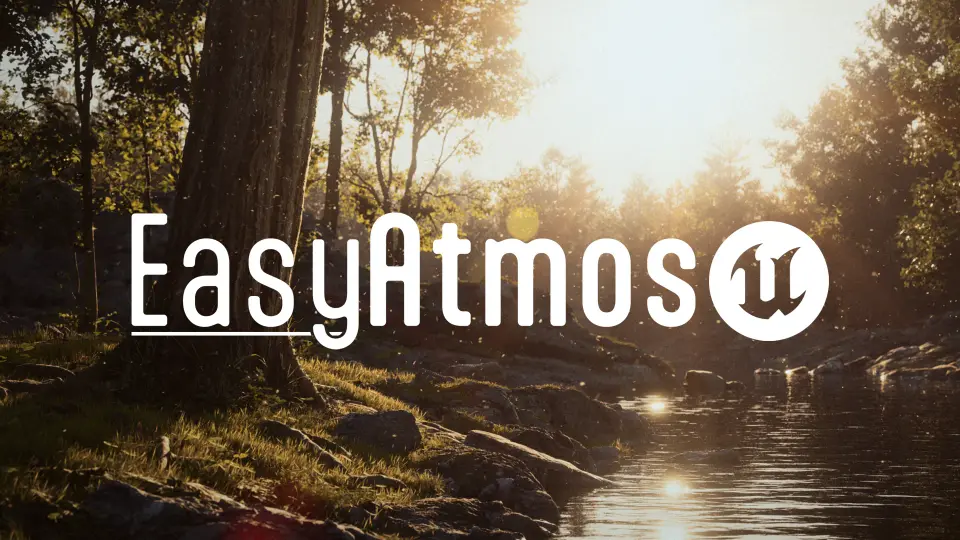
Deepening the sense of space in a virtual scene usually relies on the subtle elements floating between the camera and the backdrop. Sunlit dust motes drifting across an abandoned interior, insects fluttering near ground cover, smoke hanging in damp air, or leaves swirling past a lens give virtual environments weight and movement. Easy Atmos addresses this atmospheric layer in Unreal Engine, supplying an integrated suite of environmental particle and volumetric systems managed from a centralized control point.
Atmospheric Staging and Environmental Life
Populating a level with ambient effects often introduces unwanted friction into the set-dressing workflow. Dropping independent emitters across a map leads to disorganized outliners, disjointed parameter values, and messy iteration loops when lighting conditions or scene moods shift. Easy Atmos consolidates these environmental phenomena into a unified framework. Rather than forcing creators to juggle disparate particle setups or fill the content browser with one-off duplicate variations, the tool gathers multiple atmospheric behaviors into an artist-friendly blueprint.
This approach allows environmental artists to establish believable ambience without manually configuring separate systems for every pocket of the scene. Forest clearings can receive tumbling leaves and hovering insect clouds simultaneously, while industrial ruins or combat arenas can be outfitted with lingering smoke plumes and drifting embers. Because the system accommodates both wide ambient sweeps and tightly bounded local effects, scenes can transition from clear exterior expanses to dense, moody corridors without breaking visual cohesion.
The Multi-System Toolkit: From Dust Motes to Custom Mesh Debris
Easy Atmos packages several foundational atmospheric effects directly into its architecture, giving artists direct artistic direction over diverse physical phenomena:
Falling Leaves: Simulates foliage drifting through air currents to establish seasonal shifts, windy conditions, or natural decay in outdoor levels.
Dust Motes: Generates fine, slow-moving particles that catch direct light shafts, immediately grounding interior architectural spaces and cavernous ruins.
Bug Swarms: Introduces erratic, clustered insect movement to humid swamps, summer fields, damp basements, or stagnant outdoor pools.
Sparks: Emits small glowing embers suitable for industrial machinery, damaged electrical fixtures, burning wreckage, or open campfires.
Smoke: Creates soft, drifting columns and dispersed haze for smoldering debris, exhaust points, and atmospheric layering.
Local Volumetric Fog: Deploys localized pockets of dense mist and fog to sculpt lighting, hide background boundaries, or build eerie, low-visibility zones.
Custom Meshes: Enables the simulation of unique physical elements—such as crumbling rock formations and fractured debris—by feeding user-provided static meshes directly into the effect framework.
The ability to integrate custom meshes extends the utility of the system far beyond basic planar sprites or simple point particles. When a sequence demands environmental instability, such as a collapsing cave ceiling or fractured masonry falling from damaged architecture, users can route their own geometry through the blueprint. This bridges the gap between pure atmospheric haze and tangible, physical clutter scattering across the ground.
Keyframing and Animation Across Cinematics and Real-Time Play
Production environments frequently fluctuate between real-time game performance needs and high-fidelity cinematic requirements. Easy Atmos is optimized to function in both contexts, balancing runtime efficiency during interactive gameplay with the precision required for recorded camera sequences.
Every atmospheric effect inside the blueprint can be keyframed and animated over time. For cinematic artists, this level of control is essential when choreographing shots where the environmental intensity must shift in sync with dramatic beats. A gentle gust of wind can be animated to whip up a violent storm of leaves, sparks from an unstable reactor can surge as a character approaches, or a pocket of dense local volumetric fog can roll smoothly across a lens during a timed camera track. Because the parameters accept direct animation tracks, cinematics teams avoid the need to spawn and destroy secondary actors on set just to alter particle density or motion velocity.
In active game levels, having centralized parameters guarantees that visual effects scale correctly with the environment. Instead of hunting through separate particle assets to balance performance or tone down an overly bright spark, developers can calibrate the entire atmospheric footprint directly inside the scene instance.
Mesh Distance Fields and Project Integration
To take full advantage of how these atmospheric elements interact with scene surfaces, Easy Atmos relies on Unreal Engine's Mesh Distance Fields. This architectural foundation enables particles and localized volumes to recognize nearby geometry, land on collision planes, or interact convincingly with scene depth.
Enabling Generate Mesh Distance Fields within project settings is a mandatory prerequisite for the package. If the system is placed into a level and no visual effects appear in the viewport, the absence of active Mesh Distance Fields is the root cause. Ensuring this setting is active allows the blueprint to trace scene geometry accurately, facilitating realistic collision for debris, natural dispersion for rising smoke, and clean ground-level accumulation for localized fog.
To assist with immediate implementation and study, the asset includes dedicated demonstration levels with explanations, specifically the L_Showcase_Demo Map. Exploring this showcase level provides a clear reference for how individual atmospheric elements are balanced, how density values interact with scene lighting, and how custom meshes can be introduced into the particle stream.
Fitting Easy Atmos into the Scene-Building Pipeline
As part of the Easy Suite ecosystem of weather, atmosphere, and workflow tools, Easy Atmos functions as an artistic finishing layer. It is built to complement existing level geometry rather than replace it; backdrop environments and background assets seen in promotional material serve solely as context and are not bundled with the utility.
For solo developers, technical artists, and cinematographers, the tool eliminates repetitive technical setup. By unifying smoke, dust, sparks, wildlife, foliage, and structural debris inside a single configurable blueprint actor, Easy Atmos provides a streamlined path toward rich, photorealistic scene depth without the operational drag of fractured particle management.
 Variety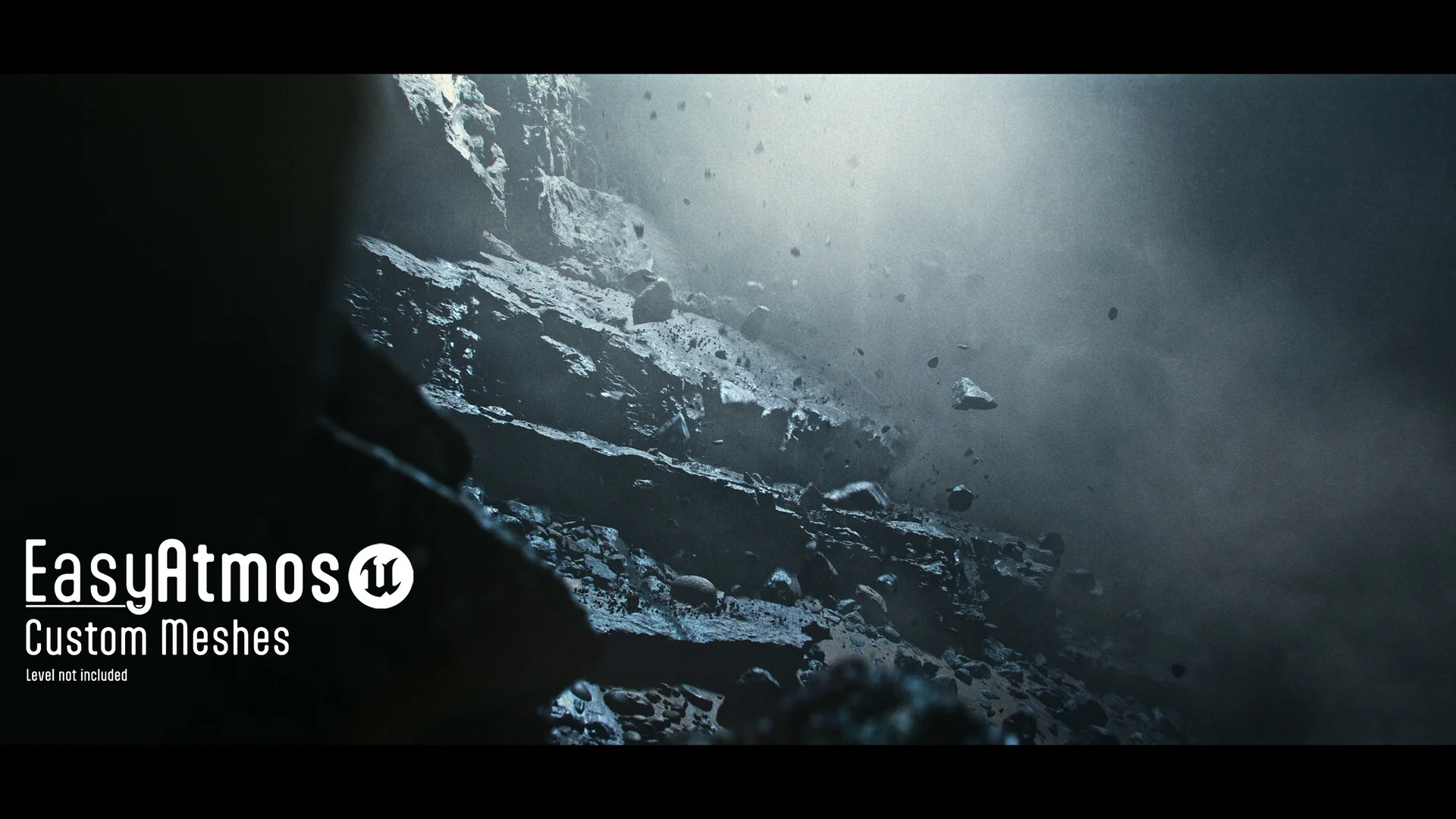
 Variety
 Variety
 Variety