"7e6fc58c410f2894"{"id":"1001630","slug":"dissolve-teleport-effect","title":"Dissolve Teleport Effect","category":"Transition","engine":"4.23+,5.0+","assetVersion":"","engineVersion":"Engine Version: 4.23+,5.0+","tag":"Transition","accent":"blue","visual":"mech","summary":"Explore the Dissolve Teleport Effect material system, featuring axis-based transitions, noise customization, timeline integration, and mesh versatility.","platform":"Unreal Engine","publishedAt":"2026-10-13T02:07:01.646Z","updatedAt":"2026-10-13T02:07:01.646Z","sourceNotes":[],"fileContents":[],"compatibility":["Unreal Engine","Engine Version: 4.23+,5.0+"],"featuredImage":{"alt":"Dissolve Teleport Effect","src":"/wp-content/uploads/published/2026/10/1903a76aa4c3-7277d92c-74ba-46af-a3ec-7f2685bd7107-3a2421f3c4.webp"},"hasDownloadLink":true,"downloads":0,"terms":[{"taxonomy":"category","slug":"transition","name":"Transition"}],"galleryImages":[{"src":"/wp-content/uploads/published/2026/10/0cd39a16881c-4b260a8f-5960-4a5a-941c-1223a92c1822-0c2d1e1842.webp","alt":"Dissolve Teleport Effect"},{"src":"/wp-content/uploads/published/2026/10/3b97c0b1bb6d-b6a4aad8-ea54-4e07-b794-46bcc27a9143-c4c7bba0b5.webp","alt":"Dissolve Teleport Effect"},{"src":"/wp-content/uploads/published/2026/10/e224d9284a0c-b43f9c6f-6bcc-4d6a-8699-fe2b6ae2f229-56bee1cc55.webp","alt":"Dissolve Teleport Effect"},{"src":"/wp-content/uploads/published/2026/10/c7b5dc868122-2339779f-d24a-45d3-82bc-f112f8b16f6f-29ed9ac31d.webp","alt":"Dissolve Teleport Effect"},{"src":"/wp-content/uploads/published/2026/10/1040f088377e-95a05e6a-be80-455d-b599-bd5a70fb079f-eb703e9b59.webp","alt":"Dissolve Teleport Effect"},{"src":"/wp-content/uploads/published/2026/10/a024034f805d-2c1a609d-cde9-4aa2-a787-8ee7eafb1d4c-190e8f2c4f.webp","alt":"Dissolve Teleport Effect"},{"src":"/wp-content/uploads/published/2026/10/9bc4d4c7d826-eaaa6ceb-8d07-4d1a-9dc3-627e8a64b9d7-2117cf6038.webp","alt":"Dissolve Teleport Effect"},{"src":"/wp-content/uploads/published/2026/10/8c1cc4382464-f6126794-f232-4536-acd4-01627dbda3c0-091b7fad40.webp","alt":"Dissolve Teleport Effect"},{"src":"/wp-content/uploads/published/2026/10/23c967bdf003-0e464458-4b36-4248-882a-0331dc957cdc-d204bf4f16.webp","alt":"Dissolve Teleport Effect"},{"src":"/wp-content/uploads/published/2026/10/45221cd9e5bd-a4d0c830-3340-4e64-8bf7-f8f77c72ac1b-b5f76bdac2.webp","alt":"Dissolve Teleport Effect"}],"accessPanel":{"kind":"resource","title":"Download this resource","eyebrow":"Free Download","message":"Log in or create a free account to start your download.","fileName":"Dissolve Teleport Effect.7z","safetyNote":"Resources are manually reviewed before listing to improve quality and reduce obvious risks.","actionLabel":"Download Free","resourceType":"Resource archive"},"contentHtml":"\u003ch2\u003eFour Material Functions and Packaged Example Assets\u003c/h2\u003e\u003cp\u003eFour dedicated material functions form the technical core of the Dissolve Teleport Effect, accompanied by four example materials and fourteen example material instances. These components provide an immediately inspectable framework for building vanishing and reappearing shaders across game environments. The package is structured around direct migration, allowing developers to transfer the material functions into an existing project folder and incorporate them directly into their existing shading networks.\u003c/p\u003e\u003cp\u003eThe included example materials and pre-configured instances demonstrate how the underlying math translates into visible transitions. By exposing key parameters within the instances, the system allows rapid testing of varied transition looks without requiring new shader graphs to be built from scratch each time an object needs to dematerialize. This setup bridges the gap between raw mathematical node logic and ready-to-use instance variations.\u003c/p\u003e\u003ch2\u003eAxis Direction, Pivot Offsets, and Spatial Orientation\u003c/h2\u003e\u003cp\u003eLinear dissolves require accurate orientation to match the geometry of the target asset. The Dissolve Teleport Effect allows users to select whether the dissolve progresses along the X, Y, or Z axis, giving direct control over the orientation of the transition wavefront. Shifting the dissolve axis allows an object to break apart vertically from bottom to top, horizontally from side to side, or along its depth profile depending on the dramatic needs of the scene.\u003c/p\u003e\u003cp\u003eIn tandem with axis selection, dissolve direction control determines the specific forward or reverse path the effect follows across the mesh bounds. Because coordinate systems and origin points differ between art assets, the system includes pivot offset customization. Adjusting the pivot offset ensures that the dissolve sweep begins and concludes at the true edges of the object rather than being clipped or offset by an irregular origin point, making it adaptable to oddly proportioned assets.\u003c/p\u003e\u003ch2\u003eDisplacement, Noise Pattern Customization, and Glow Elements\u003c/h2\u003e\u003cp\u003eVisual variety in a dissolve transition depends heavily on the surface break-up and boundary definition. This system incorporates noise pattern customization, allowing developers to alter the textural breakdown of the vanishing boundary. Rather than a flat, uniform cut-off edge, different noise configurations yield distinct erosion patterns, ranging from fine particulate breakdown to broad, irregular patches.\u003c/p\u003e\u003cp\u003eAlongside the noise controls, fine-tuning options exist for both displacement and dissolve quantity. Displacement pushes vertices along mesh normals or designated vectors as the effect intensifies, giving physical dimension to the surface disruption before the geometry completely clears. To accentuate the edge where geometry is actively deconstructing, a switchable glow effect option can be enabled or disabled, introducing bright emissive energy across the transition boundary when higher visual impact is desired.\u003c/p\u003e\u003ch2\u003eDriving the Dissolve Teleport Effect with Timelines and Scalar Parameters\u003c/h2\u003e\u003cp\u003eAnimation control in this system is driven by continuous mathematical inputs. The dissolve state is built to be manipulated through timelines or any external scalar parameter control. By feeding an animated curve from a blueprint timeline into the material function, developers can govern the exact pacing of the teleport sequence, executing rapid vanishing flashes, slow structural breakdowns, or staged multi-phase disintegrations.\u003c/p\u003e\u003cp\u003eBecause the logic accepts standard scalar parameter feeds, the dissolve does not rely on a rigid internal animation loop. Blueprint events can ramp up values, hold them midway for charging states, or reverse them seamlessly when an entity materializes back into the world. This approach decouples the timing from the shader logic, giving technical designers full control over how game logic coordinates sound, particle emitters, and mesh visibility.\u003c/p\u003e\u003ch2\u003eUniversal Mesh Compatibility and Opacity Mask Overrides\u003c/h2\u003e\u003cp\u003eThe material functions operate across diverse geometry categories, maintaining universal compatibility with static meshes as well as animated skeletal meshes. Characters, environmental props, interactive items, and weapons can utilize the exact same dissolve logic without requiring separate architectural approaches for rigid versus skinned geometry.\u003c/p\u003e\u003cp\u003eA critical operational detail of the implementation is that these material functions override opacity mask values to execute the dissolve effect. Within masked or translucent material setups, the calculated transition boundary actively replaces default clipping thresholds to hide portions of the surface as the dissolve value advances. To verify these behaviors across multiple configurations, a dedicated demo scene and showroom are included, providing controlled environments to observe lighting, mesh interactions, and procedural transitions before deploying them across production levels.\u003c/p\u003e\n\n\u003ch2\u003eExplore Similar Assets\u003c/h2\u003e\n\u003cul\u003e\n\u003cli\u003e\u003ca href=\"https://3dcghub.com/character-appearance-and-dissolve/\" title=\"Character Appearance and Dissolve\"\u003eCharacter Appearance and Dissolve\u003c/a\u003e\u003c/li\u003e\n\u003cli\u003e\u003ca href=\"https://3dcghub.com/niagaraportalvfx/\" title=\"NiagaraPortalVFX\"\u003eNiagaraPortalVFX\u003c/a\u003e\u003c/li\u003e\n\u003cli\u003e\u003ca href=\"https://3dcghub.com/ultimate-scan-effects-and-screen-effects/\" title=\"Ultimate Scan Effects and Screen Effects\"\u003eUltimate Scan Effects and Screen Effects\u003c/a\u003e\u003c/li\u003e\n\u003cli\u003e\u003ca href=\"https://3dcghub.com/niagara-metamorphoses/\" title=\"Niagara Metamorphoses\"\u003eNiagara Metamorphoses\u003c/a\u003e\u003c/li\u003e\n\u003cli\u003e\u003ca href=\"https://3dcghub.com/stylized-mobile-effects/\" title=\"Stylized Mobile Effects\"\u003eStylized Mobile Effects\u003c/a\u003e\u003c/li\u003e\n\u003c/ul\u003e","contentTextLength":5142,"navigation":{"current":53,"total":3618,"previous":{"id":"1001631","slug":"forgotten-hotel","title":"Forgotten Hotel","category":"Horror","platform":"Unreal Engine","updatedAt":"2026-10-13T02:08:49.944Z"},"next":{"id":"1001629","slug":"dismemberment-gore-system","title":"Dismemberment Gore System","category":"Characters \u0026 Creatures","platform":"Unreal Engine","updatedAt":"2026-10-13T02:05:54.650Z"}},"relatedResources":[{"id":"16895","slug":"character-appearance-and-dissolve","title":"Character Appearance and Dissolve","category":"Transition","engine":"4.26+,5.0+","assetVersion":"Engine version: 4.26+,5.0+","engineVersion":"4.18","tag":"Transition","accent":"blue","visual":"character","summary":"This asset pack features 20 distinct appearance and dissolve effects designed for character transitions. It includes both standard materials and specialized versions optimized for mobile performance.","platform":"Unreal Engine","publishedAt":"2026-03-12T18:11:36.000Z","updatedAt":"2026-04-19T15:43:40.000Z","sourceNotes":[],"fileContents":[],"compatibility":["Unreal Engine","Engine version: 4.26+,5.0+"],"featuredImage":{"alt":"Character Appearance and Dissolve","src":"https://3dcghub.com/wp-content/uploads/2026/03/732cef45-191d-480b-acbf-aee9517c3369.webp"},"hasDownloadLink":true,"downloads":0},{"id":"16945","slug":"niagaraportalvfx","title":"NiagaraPortalVFX","category":"Transition","engine":"4.27,5.0+","assetVersion":"Engine version: 4.27,5.0+","engineVersion":"4.27","tag":"Transition","accent":"blue","visual":"audio","summary":"NiagaraPortalVFX provides a collection of 15 unique portal effects built using the Niagara particle system. These assets include custom size controls to fit any fantasy environment.","platform":"Unreal Engine","publishedAt":"2026-03-12T18:16:59.000Z","updatedAt":"2026-04-19T15:43:40.000Z","sourceNotes":[],"fileContents":[],"compatibility":["Unreal Engine","Engine version: 4.27,5.0+"],"featuredImage":{"alt":"NiagaraPortalVFX","src":"https://3dcghub.com/wp-content/uploads/2026/03/3b654c66-ef1d-48cc-95a3-35e7c30ef980.webp"},"hasDownloadLink":true,"downloads":0},{"id":"16965","slug":"ultimate-scan-effects-and-screen-effects","title":"Ultimate Scan Effects and Screen Effects","category":"Transition","engine":"5.1+","assetVersion":"Engine version: 5.1+","engineVersion":"5.1","tag":"Transition","accent":"blue","visual":"character","summary":"Enhance your gaming visuals with over 20 distinctive scan effects and advanced post-processing materials. This package includes blueprint integration and object highlighting systems for professional environment design.","platform":"Unreal Engine","publishedAt":"2026-03-12T18:18:56.000Z","updatedAt":"2026-04-19T15:43:40.000Z","sourceNotes":[],"fileContents":[],"compatibility":["Unreal Engine","Engine version: 5.1+"],"featuredImage":{"alt":"Ultimate Scan Effects and Screen Effects","src":"https://3dcghub.com/wp-content/uploads/2026/03/07aa1530-ea1a-422b-a1b1-39644cfa57ee.webp"},"hasDownloadLink":true,"downloads":1}]}
Transition
Dissolve Teleport Effect
Explore the Dissolve Teleport Effect material system, featuring axis-based transitions, noise customization, timeline integration, and mesh versatility.
Category:Unreal Engine,TransitionPlatform: Unreal EngineEngine Version: 4.23+,5.0+Published: Oct 13, 2026
Transition
Resource overview
Four Material Functions and Packaged Example Assets
Four dedicated material functions form the technical core of the Dissolve Teleport Effect, accompanied by four example materials and fourteen example material instances. These components provide an immediately inspectable framework for building vanishing and reappearing shaders across game environments. The package is structured around direct migration, allowing developers to transfer the material functions into an existing project folder and incorporate them directly into their existing shading networks.
The included example materials and pre-configured instances demonstrate how the underlying math translates into visible transitions. By exposing key parameters within the instances, the system allows rapid testing of varied transition looks without requiring new shader graphs to be built from scratch each time an object needs to dematerialize. This setup bridges the gap between raw mathematical node logic and ready-to-use instance variations.
Axis Direction, Pivot Offsets, and Spatial Orientation
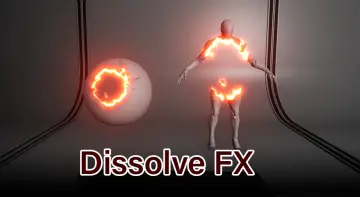
Linear dissolves require accurate orientation to match the geometry of the target asset. The Dissolve Teleport Effect allows users to select whether the dissolve progresses along the X, Y, or Z axis, giving direct control over the orientation of the transition wavefront. Shifting the dissolve axis allows an object to break apart vertically from bottom to top, horizontally from side to side, or along its depth profile depending on the dramatic needs of the scene.
In tandem with axis selection, dissolve direction control determines the specific forward or reverse path the effect follows across the mesh bounds. Because coordinate systems and origin points differ between art assets, the system includes pivot offset customization. Adjusting the pivot offset ensures that the dissolve sweep begins and concludes at the true edges of the object rather than being clipped or offset by an irregular origin point, making it adaptable to oddly proportioned assets.
Displacement, Noise Pattern Customization, and Glow Elements
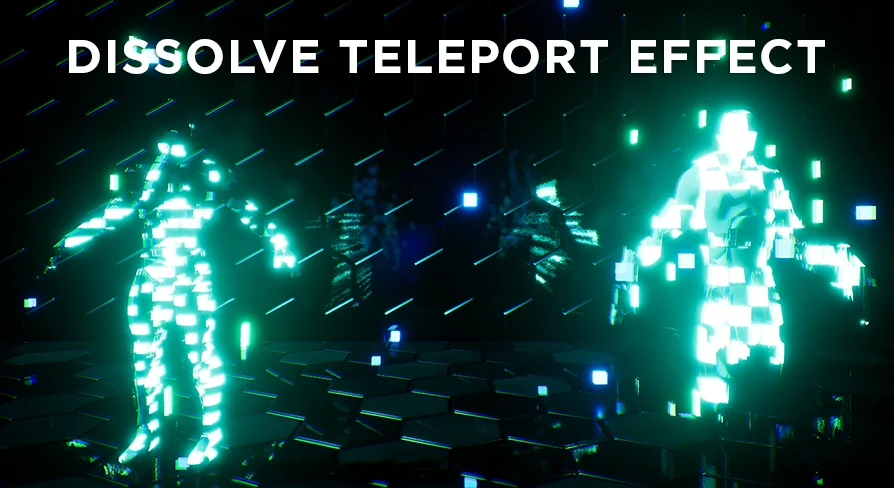
Visual variety in a dissolve transition depends heavily on the surface break-up and boundary definition. This system incorporates noise pattern customization, allowing developers to alter the textural breakdown of the vanishing boundary. Rather than a flat, uniform cut-off edge, different noise configurations yield distinct erosion patterns, ranging from fine particulate breakdown to broad, irregular patches.
Alongside the noise controls, fine-tuning options exist for both displacement and dissolve quantity. Displacement pushes vertices along mesh normals or designated vectors as the effect intensifies, giving physical dimension to the surface disruption before the geometry completely clears. To accentuate the edge where geometry is actively deconstructing, a switchable glow effect option can be enabled or disabled, introducing bright emissive energy across the transition boundary when higher visual impact is desired.
Driving the Dissolve Teleport Effect with Timelines and Scalar Parameters
Animation control in this system is driven by continuous mathematical inputs. The dissolve state is built to be manipulated through timelines or any external scalar parameter control. By feeding an animated curve from a blueprint timeline into the material function, developers can govern the exact pacing of the teleport sequence, executing rapid vanishing flashes, slow structural breakdowns, or staged multi-phase disintegrations.
Because the logic accepts standard scalar parameter feeds, the dissolve does not rely on a rigid internal animation loop. Blueprint events can ramp up values, hold them midway for charging states, or reverse them seamlessly when an entity materializes back into the world. This approach decouples the timing from the shader logic, giving technical designers full control over how game logic coordinates sound, particle emitters, and mesh visibility.
Universal Mesh Compatibility and Opacity Mask Overrides
The material functions operate across diverse geometry categories, maintaining universal compatibility with static meshes as well as animated skeletal meshes. Characters, environmental props, interactive items, and weapons can utilize the exact same dissolve logic without requiring separate architectural approaches for rigid versus skinned geometry.
A critical operational detail of the implementation is that these material functions override opacity mask values to execute the dissolve effect. Within masked or translucent material setups, the calculated transition boundary actively replaces default clipping thresholds to hide portions of the surface as the dissolve value advances. To verify these behaviors across multiple configurations, a dedicated demo scene and showroom are included, providing controlled environments to observe lighting, mesh interactions, and procedural transitions before deploying them across production levels.
 Transition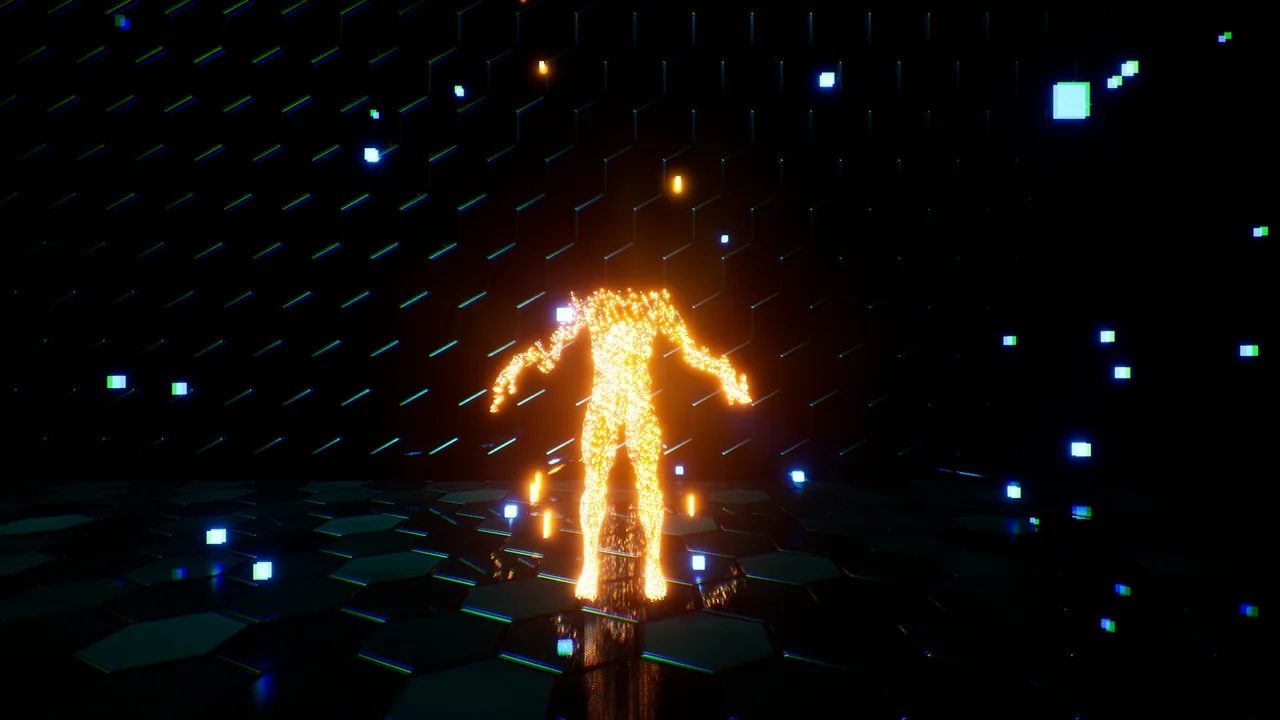
 Transition
 Transition
 Transition