"0341a2901a4ae9aa"{"id":"27497","slug":"classic-sport-car-01-classic-sport-car-cars-vintage-vehicle-vehicles","title":"Classic Sport Car 01 ( Classic Sport Car Cars Vintage Vehicle Vehicles )","category":"Cars \u0026 Trucks","engine":"5.0+","assetVersion":"Engine version: 5.0+","engineVersion":"","tag":"Cars \u0026 Trucks","accent":"blue","visual":"audio","summary":"Classic Sport Car 01 is built around a driveable classic vehicle setup with animated doors, separate meshes, and editable material instances. It fits levels, games, automotive presentations, and ArchViz scenes that need a realistic car with direct interaction.","platform":"Unreal Engine","publishedAt":"2026-04-26T06:12:02.000Z","updatedAt":"2026-04-26T06:12:03.000Z","sourceNotes":[],"fileContents":[],"compatibility":["Unreal Engine","Engine version: 5.0+"],"featuredImage":{"alt":"Classic Sport Car 01 ( Classic Sport Car Cars Vintage Vehicle Vehicles )","src":"https://3dcghub.com/wp-content/uploads/2026/04/f54c1386f4cd_6a7584be-ec42-4f48-96a0-9bcf33410019.webp"},"hasDownloadLink":true,"downloads":0,"terms":[{"taxonomy":"category","slug":"cars-and-trucks","name":"Cars \u0026 Trucks"},{"taxonomy":"post_tag","slug":"environment","name":"Environment"},{"taxonomy":"post_tag","slug":"materials","name":"Materials"},{"taxonomy":"post_tag","slug":"vehicles","name":"Vehicles"}],"galleryImages":[{"src":"https://3dcghub.com/wp-content/uploads/2026/04/fe4c0337503e_2e69d8d2-1c1f-4bf3-8b49-57011fc79fb0.webp","alt":"Classic Sport Car 01 ( Classic Sport Car Cars Vintage Vehicle Vehicles )"},{"src":"https://3dcghub.com/wp-content/uploads/2026/04/f7f97d01de0e_ebcff75c-7b3c-4bb9-86eb-e31f21aeeb37.webp","alt":"Classic Sport Car 01 ( Classic Sport Car Cars Vintage Vehicle Vehicles )"},{"src":"https://3dcghub.com/wp-content/uploads/2026/04/268300002f3e_d94c85b1-878e-44c2-9b8b-818cc1610f6c.webp","alt":"Classic Sport Car 01 ( Classic Sport Car Cars Vintage Vehicle Vehicles )"},{"src":"https://3dcghub.com/wp-content/uploads/2026/04/470fda9bab08_07c47c11-d239-42bd-bb3f-b9e3a21e81e0.webp","alt":"Classic Sport Car 01 ( Classic Sport Car Cars Vintage Vehicle Vehicles )"},{"src":"https://3dcghub.com/wp-content/uploads/2026/04/9477bf95af87_b9afcc6c-50e7-4595-9053-2d1b7731d6ec.webp","alt":"Classic Sport Car 01 ( Classic Sport Car Cars Vintage Vehicle Vehicles )"},{"src":"https://3dcghub.com/wp-content/uploads/2026/04/8159d3b054dc_0365b994-eb5b-4b88-a9de-286781679f6c.webp","alt":"Classic Sport Car 01 ( Classic Sport Car Cars Vintage Vehicle Vehicles )"},{"src":"https://3dcghub.com/wp-content/uploads/2026/04/1147d34021ee_af258646-8f84-40d0-be7c-bfff5161a3fb.webp","alt":"Classic Sport Car 01 ( Classic Sport Car Cars Vintage Vehicle Vehicles )"},{"src":"https://3dcghub.com/wp-content/uploads/2026/04/e6322265e82a_7aa6430c-46ca-46b5-9e52-e39957148358.webp","alt":"Classic Sport Car 01 ( Classic Sport Car Cars Vintage Vehicle Vehicles )"},{"src":"https://3dcghub.com/wp-content/uploads/2026/04/c3949759b8c3_02e34f46-d665-47ad-892a-aab5b0cb87bf.webp","alt":"Classic Sport Car 01 ( Classic Sport Car Cars Vintage Vehicle Vehicles )"},{"src":"https://3dcghub.com/wp-content/uploads/2026/04/ca423af7581c_5c2305ff-a902-43ac-97eb-a37e616c6116.webp","alt":"Classic Sport Car 01 ( Classic Sport Car Cars Vintage Vehicle Vehicles )"}],"accessPanel":{"kind":"resource","title":"Access this resource","eyebrow":"Free Download","message":"Log in or create a free account to start your download.","fileName":"Content.7z","safetyNote":"All resources are 100% manually reviewed to eliminate all risks.","actionLabel":"Download Free","resourceType":"Resource archive"},"contentHtml":"\u003ch2\u003eClassic Sport Car 01 in levels, games, automotive presentations, and ArchViz\u003c/h2\u003e\n\u003cp\u003eClassic Sport Car 01 is a classic vehicle that is meant to do more than sit in a scene as background dressing. It can be used in levels, games, automotive presentations, and ArchViz, and it is presented as both realistic and fully customizable. That combination makes it useful when a project needs a classic sport car that can hold attention visually while still supporting motion and interaction.\u003c/p\u003e\n\u003cp\u003eThe difference is noticeable in the way the car can shift between a parked display and an active driving sequence. In one setting, it can serve as a polished centerpiece. In another, it can take part in gameplay-style movement and still keep the same classic look. That range gives the vehicle a clear role in projects that need a classic car to remain readable in both static and moving scenes.\u003c/p\u003e\n\u003cp\u003eBecause the car is described as driveable and animated, it fits naturally into work where a vehicle needs to feel active rather than decorative. The setup is aimed at scenes where the car should respond, open, move, and present itself as a functional part of the environment instead of a fixed prop.\u003c/p\u003e \u003ch2\u003eOne blueprint, 14 separate meshes, and editable material instances\u003c/h2\u003e\n\u003cp\u003eThe vehicle comes as one blueprint and also as 14 separate meshes. Those two forms create different ways to approach the same car. The single blueprint keeps everything organized as one complete unit, which is useful when the goal is to place and drive the car as a finished whole. The separate meshes, on the other hand, give more direct control when a scene needs the parts handled individually.\u003c/p\u003e\n\u003cp\u003eThat split makes the car easier to adapt to different kinds of work. In a level, the vehicle can be treated as a prop that sits cleanly in the space. In a driving sequence, the blueprint keeps the car together as one system. If a project calls for a more customized arrangement, the separate meshes make that workflow possible without losing the identity of the vehicle.\u003c/p\u003e\n\u003cp\u003eMaterial instances are also part of the setup, with Roughness, Metallic, and Color parameters available for adjustment. Those settings allow the look of the car to be changed without replacing the entire vehicle setup. A cleaner showroom appearance and a more grounded scene treatment can both be managed through those exposed material controls.\u003c/p\u003e\n\u003cp\u003eThis matters in ArchViz as well, where the car may need to read as a finished classic vehicle while still fitting a specific visual direction. The material parameters give room for that kind of adjustment, while the separate parts and blueprint keep the car flexible enough for different presentation styles.\u003c/p\u003e \u003ch2\u003eDriving controls, camera switching, and the four door buttons\u003c/h2\u003e\n\u003cp\u003eThe driving setup includes camera switching while the car is being driven. That adds a practical layer to the experience because the vehicle is not limited to one fixed view. When the scene changes from display to motion, the camera system helps the car remain useful as part of active use rather than only as a static object.\u003c/p\u003e\n\u003cp\u003e\u003ch3\u003eQ, E, R, and F for the doors\u003c/h3\u003e\u003c/p\u003e\n\u003cp\u003eDoor controls are tied to four keyboard buttons, with one button for each door: Q, E, R, and F. Each door can be opened or closed through those direct controls, which gives the vehicle a more interactive feel. That detail is especially important in scenes where the doors should visibly respond instead of staying locked in place.\u003c/p\u003e\n\u003cp\u003eAnimated behavior is included as part of the car, and the vehicle is described as driveable and realistic. Those elements work together to make the classic sport car feel active in a straightforward way. It is not only a model to look at; it is set up to move, react, and participate in a scene.\u003c/p\u003e\n\u003cp\u003eFor projects that want a classic sport car with visible interaction points, the combination of driving, camera switching, and separate door controls gives the setup a focused purpose. The controls are simple, but they cover the parts of the vehicle that matter most when a car needs to function inside a level or presentation.\u003c/p\u003e \u003ch2\u003eRadio System, personal music playlist, and included documentation\u003c/h2\u003e\n\u003cp\u003eA Radio System is included, and it supports adding a personal music playlist while driving. That gives the car another layer of activity during use. Instead of acting only as a visual vehicle, it can also carry a simple audio element that follows the driving experience.\u003c/p\u003e\n\u003cp\u003eMusic can be switched on the radio during use, so the vehicle has a built-in way to connect motion with sound. This keeps the car feeling more complete in scenes that want a small but noticeable interactive feature. The radio does not replace the driving setup; it adds to it.\u003c/p\u003e\n\u003cp\u003eDocumentation for using the car is available, and a tutorial video is also referenced for the radio system. Those materials make the setup easier to approach when the goal is to understand how the controls and added systems work together. The car is also included in the Classic Cars Bundle, placing it alongside other classic vehicle content.\u003c/p\u003e\n\u003cp\u003eViewed as a whole, Classic Sport Car 01 is built for projects that want a classic vehicle with clear interaction points. Driving, camera switching, door controls, adjustable materials, and a radio system all sit inside the same package. That makes it suitable for levels, games, automotive presentations, and ArchViz scenes where a classic sport car needs to look polished while still doing real work inside the scene.\u003c/p\u003e\n\n\u003ch2\u003eMore From The Same Workflow\u003c/h2\u003e\n\u003cul\u003e\n\u003cli\u003e\u003ca href=\"https://3dcghub.com/arcade-ultimate-vehicles-pack-low-poly-cars/\" title=\"ARCADE: Ultimate Vehicles Pack – Low Poly Cars\"\u003eARCADE: Ultimate Vehicles Pack – Low Poly Cars\u003c/a\u003e\u003c/li\u003e\n\u003cli\u003e\u003ca href=\"https://3dcghub.com/advanced-road-materials/\" title=\"Advanced road materials\"\u003eAdvanced road materials\u003c/a\u003e\u003c/li\u003e\n\u003cli\u003e\u003ca href=\"https://3dcghub.com/cartoon-vehicles-full-pack-low-poly-cars-80-cars/\" title=\"Cartoon Vehicles Full Pack – Low Poly Cars (80 Cars)\"\u003eCartoon Vehicles Full Pack – Low Poly Cars (80 Cars)\u003c/a\u003e\u003c/li\u003e\n\u003cli\u003e\u003ca href=\"https://3dcghub.com/galaxy-materials-skybox-update/\" title=\"Galaxy Materials (Skybox Update)\"\u003eGalaxy Materials (Skybox Update)\u003c/a\u003e\u003c/li\u003e\n\u003cli\u003e\u003ca href=\"https://3dcghub.com/master-materials-and-layer-system-for-daz3d-imports/\" title=\"Master Materials and Layer System for Daz3D Imports\"\u003eMaster Materials and Layer System for Daz3D Imports\u003c/a\u003e\u003c/li\u003e\n\u003c/ul\u003e","contentTextLength":5682,"navigation":{"current":2256,"total":4017,"previous":{"id":"14305","slug":"object-distribution-tool-objectt-distributed-tooll-objecting-distributing","title":"Object Distribution Tool (Objectt Distributed Tooll Objecting Distributing)","category":"Engine Tools","platform":"Unreal Engine","updatedAt":"2026-04-26T06:48:51.000Z"},"next":{"id":"27483","slug":"city-sim-animation-pack","title":"CiTY SIM ANIMATION PACK","category":"Variety","platform":"Unreal Engine","updatedAt":"2026-04-26T06:01:52.000Z"}},"relatedResources":[{"id":"1000709","slug":"vehicles-vol-9-future-cars-low-poly","title":"Vehicles VOL.9- Future Cars (Low Poly)","category":"Cars \u0026 Trucks","engine":"5.3+","assetVersion":"","engineVersion":"Engine Version: 5.3+","tag":"Cars \u0026 Trucks","accent":"blue","visual":"mech","summary":"Seven futuristic low-poly car props with 4K textures, channel-packed maps, tintable paint, and Lumen support for Unreal Engine 5.0+.","platform":"Unreal Engine","publishedAt":"2026-07-24T02:11:02.648Z","updatedAt":"2026-10-21T04:23:37.954Z","sourceNotes":[],"fileContents":[],"compatibility":["Unreal Engine","Engine Version: 5.3+"],"featuredImage":{"alt":"Vehicles VOL.9- Future Cars (Low Poly)","src":"/wp-content/uploads/published/2026/07/1299c7959656-ce73ca95-e379-4b7d-9098-f38abd0ef20e-72885a4f92.webp"},"hasDownloadLink":true,"downloads":2},{"id":"1002048","slug":"hatchback-car-driveable-animated-realistic-hatchback-car-driveable-vehicle","title":"HatchBack Car Driveable / Animated / Realistic (HatchBack Car Driveable Vehicle)","category":"Cars \u0026 Trucks","engine":"5.0+","assetVersion":"","engineVersion":"Engine Version: 5.0+","tag":"Cars \u0026 Trucks","accent":"blue","visual":"mech","summary":"Driveable and customizable hatchback vehicle package featuring separated meshes, interactive door controls, customizable material parameters, and ULAT support.","platform":"Unreal Engine","publishedAt":"2026-10-26T15:04:27.811Z","updatedAt":"2026-10-26T15:04:27.811Z","sourceNotes":[],"fileContents":[],"compatibility":["Unreal Engine","Engine Version: 5.0+"],"featuredImage":{"alt":"HatchBack Car Driveable / Animated / Realistic (HatchBack Car Driveable Vehicle)","src":"/wp-content/uploads/published/2026/10/03471613c350-d50f04e7-569f-4720-8475-e7eee2d8e2e6-a82e58e275.webp"},"hasDownloadLink":true,"downloads":0},{"id":"1001752","slug":"procedural-vehicles-van","title":"Procedural Vehicles - Van","category":"Cars \u0026 Trucks","engine":"5.0+","assetVersion":"","engineVersion":"Engine Version: 5.0+","tag":"Cars \u0026 Trucks","accent":"blue","visual":"mech","summary":"Explore the Procedural Vehicles - Van blueprint system, featuring Chaos vehicle rigging, procedural foliage painting, and deep material wear controls.","platform":"Unreal Engine","publishedAt":"2026-10-20T02:57:23.692Z","updatedAt":"2026-10-20T02:57:23.692Z","sourceNotes":[],"fileContents":[],"compatibility":["Unreal Engine","Engine Version: 5.0+"],"featuredImage":{"alt":"Procedural Vehicles - Van","src":"/wp-content/uploads/published/2026/10/6a141eba4fc1-0a1dc9e9-b18c-47c4-9097-02baab3b6bf6-84e7f8a7da.webp"},"hasDownloadLink":true,"downloads":0}]}
Cars & Trucks
Classic Sport Car 01 ( Classic Sport Car Cars Vintage Vehicle Vehicles )
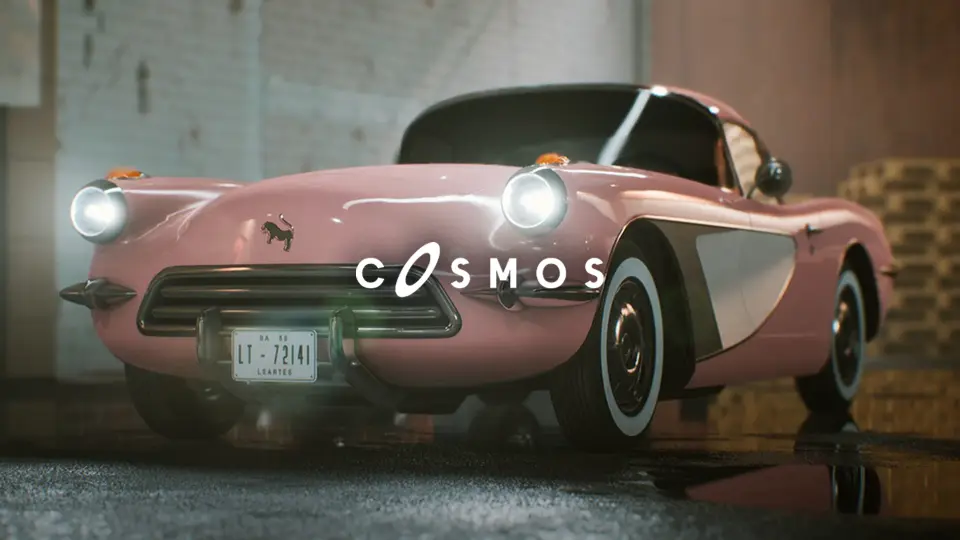
Classic Sport Car 01 is built around a driveable classic vehicle setup with animated doors, separate meshes, and editable material instances. It fits levels, games, automotive presentations, and ArchViz scenes that need a realistic car with direct interaction.
Classic Sport Car 01 in levels, games, automotive presentations, and ArchViz
Classic Sport Car 01 is a classic vehicle that is meant to do more than sit in a scene as background dressing. It can be used in levels, games, automotive presentations, and ArchViz, and it is presented as both realistic and fully customizable. That combination makes it useful when a project needs a classic sport car that can hold attention visually while still supporting motion and interaction.
The difference is noticeable in the way the car can shift between a parked display and an active driving sequence. In one setting, it can serve as a polished centerpiece. In another, it can take part in gameplay-style movement and still keep the same classic look. That range gives the vehicle a clear role in projects that need a classic car to remain readable in both static and moving scenes.
Because the car is described as driveable and animated, it fits naturally into work where a vehicle needs to feel active rather than decorative. The setup is aimed at scenes where the car should respond, open, move, and present itself as a functional part of the environment instead of a fixed prop.
One blueprint, 14 separate meshes, and editable material instances
The vehicle comes as one blueprint and also as 14 separate meshes. Those two forms create different ways to approach the same car. The single blueprint keeps everything organized as one complete unit, which is useful when the goal is to place and drive the car as a finished whole. The separate meshes, on the other hand, give more direct control when a scene needs the parts handled individually.
That split makes the car easier to adapt to different kinds of work. In a level, the vehicle can be treated as a prop that sits cleanly in the space. In a driving sequence, the blueprint keeps the car together as one system. If a project calls for a more customized arrangement, the separate meshes make that workflow possible without losing the identity of the vehicle.
Material instances are also part of the setup, with Roughness, Metallic, and Color parameters available for adjustment. Those settings allow the look of the car to be changed without replacing the entire vehicle setup. A cleaner showroom appearance and a more grounded scene treatment can both be managed through those exposed material controls.
This matters in ArchViz as well, where the car may need to read as a finished classic vehicle while still fitting a specific visual direction. The material parameters give room for that kind of adjustment, while the separate parts and blueprint keep the car flexible enough for different presentation styles.
Driving controls, camera switching, and the four door buttons
The driving setup includes camera switching while the car is being driven. That adds a practical layer to the experience because the vehicle is not limited to one fixed view. When the scene changes from display to motion, the camera system helps the car remain useful as part of active use rather than only as a static object.
Q, E, R, and F for the doors
Door controls are tied to four keyboard buttons, with one button for each door: Q, E, R, and F. Each door can be opened or closed through those direct controls, which gives the vehicle a more interactive feel. That detail is especially important in scenes where the doors should visibly respond instead of staying locked in place.
Animated behavior is included as part of the car, and the vehicle is described as driveable and realistic. Those elements work together to make the classic sport car feel active in a straightforward way. It is not only a model to look at; it is set up to move, react, and participate in a scene.
For projects that want a classic sport car with visible interaction points, the combination of driving, camera switching, and separate door controls gives the setup a focused purpose. The controls are simple, but they cover the parts of the vehicle that matter most when a car needs to function inside a level or presentation.
Radio System, personal music playlist, and included documentation
A Radio System is included, and it supports adding a personal music playlist while driving. That gives the car another layer of activity during use. Instead of acting only as a visual vehicle, it can also carry a simple audio element that follows the driving experience.
Music can be switched on the radio during use, so the vehicle has a built-in way to connect motion with sound. This keeps the car feeling more complete in scenes that want a small but noticeable interactive feature. The radio does not replace the driving setup; it adds to it.
Documentation for using the car is available, and a tutorial video is also referenced for the radio system. Those materials make the setup easier to approach when the goal is to understand how the controls and added systems work together. The car is also included in the Classic Cars Bundle, placing it alongside other classic vehicle content.
Viewed as a whole, Classic Sport Car 01 is built for projects that want a classic vehicle with clear interaction points. Driving, camera switching, door controls, adjustable materials, and a radio system all sit inside the same package. That makes it suitable for levels, games, automotive presentations, and ArchViz scenes where a classic sport car needs to look polished while still doing real work inside the scene.
 Cars & Trucks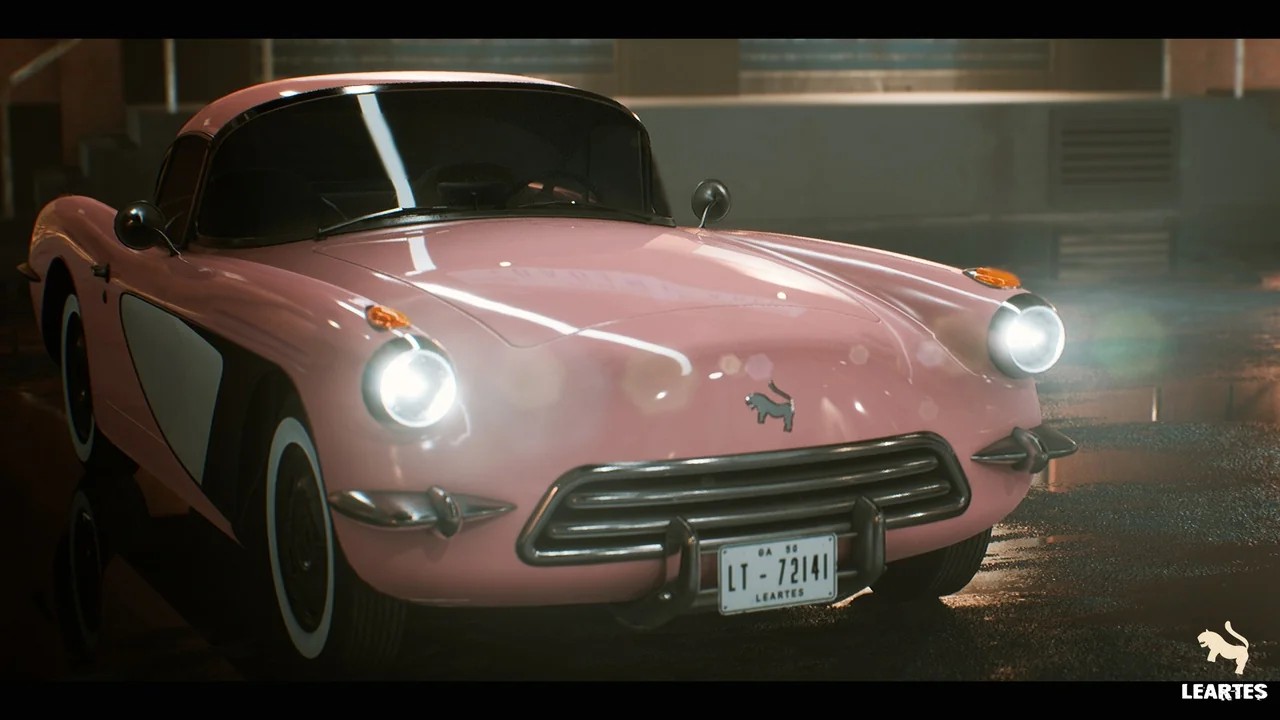
 Cars & Trucks
 Cars & Trucks
 Cars & Trucks