"6f9bd6df1f44a86f"{"id":"1001213","slug":"cartoon-water-shader","title":"Cartoon Water Shader","category":"Water","engine":"5.0+","assetVersion":"","engineVersion":"Engine Version: 5.0+","tag":"Water","accent":"blue","visual":"mech","summary":"Explore Cartoon Water Shader, featuring stylized water materials, river and waterfall tools, buoyancy, underwater effects, and tile solver systems.","platform":"Unreal Engine","indexPolicy":"index","publishedAt":"2026-09-19T08:51:37.588Z","updatedAt":"2026-09-19T08:51:37.588Z","sourceNotes":[],"fileContents":[],"compatibility":["Unreal Engine","Engine Version: 5.0+"],"featuredImage":{"alt":"Cartoon Water Shader","src":"/wp-content/uploads/published/2026/09/65dfc8ccd016-ae677613-d823-407e-8397-e6f92539e22a-1bb83d5d29.webp"},"hasDownloadLink":true,"downloads":1,"terms":[{"taxonomy":"category","slug":"water","name":"Water"}],"galleryImages":[{"src":"/wp-content/uploads/published/2026/09/4946cf97c326-9ae0f133-c635-4b67-a90d-8f0840eb7c7f-bcbbeb95d0.webp","alt":"Cartoon Water Shader"},{"src":"/wp-content/uploads/published/2026/09/1cea91708d30-c26cf34b-7f68-4657-9dc6-8035cc0dcb90-738e6db97f.webp","alt":"Cartoon Water Shader"},{"src":"/wp-content/uploads/published/2026/09/dccc78feb247-8438350a-c7a8-4ea7-a7de-77b0173a9a51-4606b9176b.webp","alt":"Cartoon Water Shader"}],"accessPanel":{"kind":"resource","title":"Download this resource","eyebrow":"Free Download","message":"Log in or create a free account to start your download.","fileName":"Content.7z","safetyNote":"Resources are manually reviewed before listing to improve quality and reduce obvious risks.","actionLabel":"Download Free","resourceType":"Resource archive"},"contentHtml":"\u003cp\u003eCartoon Water Shader supplies a stylized water material system accompanied by dedicated river tools and demo scenes. Engineered specifically for projects pursuing non-photorealistic art directions, the package pairs cleanly with Cartoon Cel Shader setups to deliver vibrant, responsive aquatic surfaces across oceans, lakes, rivers, and waterfalls.\u003c/p\u003e \u003ch2\u003eOcean and Lake Surfaces with the Tile Solver and Waterline System\u003c/h2\u003e \u003cp\u003eLarge open bodies of water introduce distinct rendering demands, particularly around tiling seams, horizon consistency, and the camera transition plane. The package addresses expansive lake and ocean setups through a dedicated Tile Solver alongside a purpose-built waterline system.\u003c/p\u003e \u003cp\u003eThe Tile Solver manages surface continuity across segmented grid spaces, ensuring procedural wave structures and stylized surface foam remain aligned without jarring seams. When the camera intersects the water plane, the waterline system computes the boundary between surface foam, ambient air, and submerged volume. This prevents abrupt visual artifacts when players swim or when the perspective cuts directly along the water plane. For ocean scenes, this dual setup balances wide viewing distances with coherent localized detail along coastlines and shoreline contours.\u003c/p\u003e \u003cp\u003eBecause the shader focuses on non-photorealistic presentation, the waterline edge cleanly defines the boundary where stylized surface colors meet underwater volumes. The visual result maintains graphic readability without relying on realistic light scattering formulas that might conflict with flat-shaded or cel-shaded assets.\u003c/p\u003e \u003ch2\u003eMulti-Colored Water and Waterfall Blueprints\u003c/h2\u003e \u003cp\u003eStylized environments frequently require distinct water types within the same scene, such as emerald swamps, crystal mountain rivers, subterranean lava or acid currents, and shimmering coastal bays. The shader system accommodates multi-body palettes directly through specialized blueprints tagged with the \u003ccode\u003e_UniqueColor\u003c/code\u003e Suffix.\u003c/p\u003e \u003cp\u003eBy deploying these \u003ccode\u003e_UniqueColor\u003c/code\u003e Blueprints, environment artists can place two or more differently colored bodies of water or descending waterfalls into a single level without parameter overlap. Each instance retains its designated base tint, foam coloring, and depth opacity settings independently.\u003c/p\u003e \u003cp\u003eThis separation extends into volume rendering. Earlier configurations encountered visual inconsistencies when multi-colored fog was evaluated during Play In Editor (PIE) testing sessions. Dedicated fixes ensure that localized atmospheric and depth fog retain their intended hues when running active simulation passes, allowing multi-biome maps to preserve visual isolation between pristine lakes and toxic pools.\u003c/p\u003e \u003ch2\u003eUnderwater Implementation and Custom Material Parameters\u003c/h2\u003e \u003cp\u003ePassing beneath the surface activates a dedicated underwater implementation built to sustain stylized art direction below the waterline. The internal parameter architecture gives developers explicit control over visual properties across different instances:\u003c/p\u003e \u003cul\u003e \u003cli\u003eIndependent water depth tint and underwater attenuation adjustments\u003c/li\u003e \u003cli\u003eVariable surface wave frequencies and displacement thresholds\u003c/li\u003e \u003cli\u003eFoam line density, shoreline feathering, and object intersection outlines\u003c/li\u003e \u003cli\u003eDirect integration settings calibrated for use with Cartoon Cel Shader aesthetics\u003c/li\u003e\n\u003c/ul\u003e \u003cp\u003eBecause distinct water masses can carry independent parameter sets, shallow ponds can feature soft, translucent surface depths with narrow edge foam, while heavy ocean expanses display dense crest lines and deep tint absorption. The underwater volume adopts these color coordinates, giving submerged gameplay spaces a tone that matches the external surface appearance.\u003c/p\u003e \u003ch2\u003eRiver Tool Behavior, Sailing Mechanics, and Buoyancy Handling\u003c/h2\u003e \u003cp\u003eBeyond static planes and gridded oceans, Cartoon Water Shader includes a spline-driven river tool built to trace winding streams, waterways, and vertical waterfall descents. While the surface shader easily conforms to varied topographies, mechanical behaviors require specific handling depending on river configuration.\u003c/p\u003e \u003cp\u003eBuoyancy systems and underwater interactions within the river setup currently function exclusively when the river spline is placed on a completely flat plane. Watercraft, buoys, and floating actors calculate their resting plane from this level surface. If a river drops along inclined slopes or meanders down stepped terraces, buoyancy simulation and submerged camera handling do not dynamically follow the descending grade. Additionally, the waterline boundary system developed for lakes and oceans is currently not supported along river surfaces.\u003c/p\u003e \u003cp\u003eDespite these topological constraints on sloped physics, the package directly supports sailing mechanics, boat interaction, and floating buoy setups on flat rivers, lakes, and open ocean expanses. Floating objects react to surface properties, providing stable behavior for navigable lakes and coastal sailing sequences. A major rework of the river tool is actively underway to broaden downstream functionality and dynamic terrain handling.\u003c/p\u003e \u003ch2\u003eFitting Stylized Aquatic Environments into Production\u003c/h2\u003e \u003cp\u003eCartoon Water Shader provides a cohesive foundation for projects structured through bold shapes and illustrated shading. The included demo scenes supply working references for immediate layout testing, showing how waterfalls, rivers, and open seas interact with landscape geometry and cel-shaded lighting configurations.\u003c/p\u003e \u003cp\u003eBy establishing distinct pipelines for gridded ocean sheets via the Tile Solver and customized streams through \u003ccode\u003e_UniqueColor\u003c/code\u003e Waterfall and river actors, the kit provides clear boundaries for environmental layout. Developers working within flat river layouts or expansive lake basins gain immediate access to underwater transitions, sailing-ready buoyancy physics, and fully customizable stylized water materials.\u003c/p\u003e\n\n\u003ch2\u003eRelated Resources Worth Checking\u003c/h2\u003e\n\u003cul\u003e\n\u003cli\u003e\u003ca href=\"https://3dcghub.com/moving-water-material-pack/\" rel=\"noopener noreferrer\"\u003eMoving Water Material Pack\u003c/a\u003e\u003c/li\u003e\n\u003cli\u003e\u003ca href=\"https://3dcghub.com/waterstamp-water-decals/\" rel=\"noopener noreferrer\"\u003eWaterstamp - Water Decals\u003c/a\u003e\u003c/li\u003e\n\u003cli\u003e\u003ca href=\"https://3dcghub.com/stylized-water/\" rel=\"noopener noreferrer\"\u003eStylized Water\u003c/a\u003e\u003c/li\u003e\n\u003cli\u003e\u003ca href=\"https://3dcghub.com/realistic-materials-vol-7-water-ice-25-materials/\" rel=\"noopener noreferrer\"\u003eRealistic Materials Vol. 7 - Water \u0026amp; Ice (25+ Materials)\u003c/a\u003e\u003c/li\u003e\n\u003cli\u003e\u003ca href=\"https://3dcghub.com/ultimate-water-shader-ue4-and-5/\" rel=\"noopener noreferrer\"\u003eUltimate Water Shader UE4 and 5\u003c/a\u003e\u003c/li\u003e\n\u003c/ul\u003e","contentTextLength":6003,"navigation":{"current":1133,"total":4218,"previous":{"id":"1001214","slug":"water-materials","title":"Water Materials","category":"Water","platform":"Unreal Engine","updatedAt":"2026-09-19T08:52:56.340Z"},"next":{"id":"1001212","slug":"tree-bark-collection","title":"Tree Bark Collection","category":"Nature \u0026 Terrain","platform":"Unreal Engine","updatedAt":"2026-09-19T08:48:13.068Z"}},"relatedResources":[{"id":"13027","slug":"moving-water-material-pack","title":"Moving Water Material Pack","category":"Water","engine":"5.0+","assetVersion":"Engine version: 5.0+","engineVersion":"4.27","tag":"Water","accent":"blue","visual":"luts","summary":"Enhance your real-time environments with the Moving Water Material Pack. This collection allows developers to customize liquid surfaces through a variety of adjustable parameters.","platform":"Unreal Engine","indexPolicy":"index","publishedAt":"2026-03-09T18:14:34.000Z","updatedAt":"2026-04-19T15:46:33.000Z","sourceNotes":[],"fileContents":[],"compatibility":["Unreal Engine","Engine version: 5.0+"],"featuredImage":{"alt":"Moving Water Material Pack","src":"https://3dcghub.com/wp-content/uploads/2026/03/33da5009-c31b-40b3-9efd-344e89e8974c.webp"},"hasDownloadLink":true,"downloads":0},{"id":"1000142","slug":"waterstamp-water-decals","title":"Waterstamp - Water Decals","category":"Water","engine":"4.26+,5.0+","assetVersion":"","engineVersion":"Engine Version: 4.26+,5.0+","tag":"Water","accent":"blue","visual":"mech","summary":"WaterStamp adds textures and shaders for decal-like detail on water, underwater terrain, and foam, with translucent mapping and UE5 updates.","platform":"Unreal Engine","indexPolicy":"index","publishedAt":"2026-06-12T16:55:21.280Z","updatedAt":"2026-06-12T16:55:21.280Z","sourceNotes":[],"fileContents":[],"compatibility":["Unreal Engine","Engine Version: 4.26+,5.0+"],"featuredImage":{"alt":"Waterstamp - Water Decals","src":"/wp-content/uploads/published/2026/06/168dfdb28437-252d0a00-9241-4200-b374-698feb3fef57-4c0fa39d8a.webp"},"hasDownloadLink":true,"downloads":1},{"id":"1001214","slug":"water-materials","title":"Water Materials","category":"Water","engine":"5.0+","assetVersion":"","engineVersion":"Engine Version: 5.0+","tag":"Water","accent":"blue","visual":"luts","summary":"A breakdown of the Water Materials collection for Unreal Engine, featuring 12 core materials, 8 lighter variations, and vertex paint controls.","platform":"Unreal Engine","indexPolicy":"index","publishedAt":"2026-09-19T08:52:56.340Z","updatedAt":"2026-09-19T08:52:56.340Z","sourceNotes":[],"fileContents":[],"compatibility":["Unreal Engine","Engine Version: 5.0+"],"featuredImage":{"alt":"Water Materials","src":"/wp-content/uploads/published/2026/09/1db7cdb9038c-ce6ac2e6-47aa-4af3-bbad-d40516237245-8ecc62b00e.webp"},"hasDownloadLink":true,"downloads":1}]}
Water
Cartoon Water Shader
Explore Cartoon Water Shader, featuring stylized water materials, river and waterfall tools, buoyancy, underwater effects, and tile solver systems.
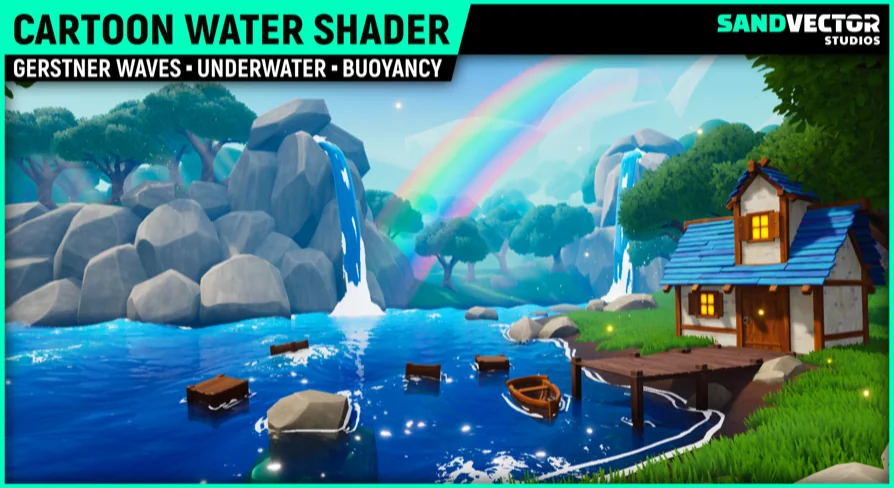
Cartoon Water Shader supplies a stylized water material system accompanied by dedicated river tools and demo scenes. Engineered specifically for projects pursuing non-photorealistic art directions, the package pairs cleanly with Cartoon Cel Shader setups to deliver vibrant, responsive aquatic surfaces across oceans, lakes, rivers, and waterfalls.
Ocean and Lake Surfaces with the Tile Solver and Waterline System
Large open bodies of water introduce distinct rendering demands, particularly around tiling seams, horizon consistency, and the camera transition plane. The package addresses expansive lake and ocean setups through a dedicated Tile Solver alongside a purpose-built waterline system.
The Tile Solver manages surface continuity across segmented grid spaces, ensuring procedural wave structures and stylized surface foam remain aligned without jarring seams. When the camera intersects the water plane, the waterline system computes the boundary between surface foam, ambient air, and submerged volume. This prevents abrupt visual artifacts when players swim or when the perspective cuts directly along the water plane. For ocean scenes, this dual setup balances wide viewing distances with coherent localized detail along coastlines and shoreline contours.
Because the shader focuses on non-photorealistic presentation, the waterline edge cleanly defines the boundary where stylized surface colors meet underwater volumes. The visual result maintains graphic readability without relying on realistic light scattering formulas that might conflict with flat-shaded or cel-shaded assets.
Multi-Colored Water and Waterfall Blueprints
Stylized environments frequently require distinct water types within the same scene, such as emerald swamps, crystal mountain rivers, subterranean lava or acid currents, and shimmering coastal bays. The shader system accommodates multi-body palettes directly through specialized blueprints tagged with the _UniqueColor Suffix.
By deploying these _UniqueColor Blueprints, environment artists can place two or more differently colored bodies of water or descending waterfalls into a single level without parameter overlap. Each instance retains its designated base tint, foam coloring, and depth opacity settings independently.
This separation extends into volume rendering. Earlier configurations encountered visual inconsistencies when multi-colored fog was evaluated during Play In Editor (PIE) testing sessions. Dedicated fixes ensure that localized atmospheric and depth fog retain their intended hues when running active simulation passes, allowing multi-biome maps to preserve visual isolation between pristine lakes and toxic pools.
Underwater Implementation and Custom Material Parameters
Passing beneath the surface activates a dedicated underwater implementation built to sustain stylized art direction below the waterline. The internal parameter architecture gives developers explicit control over visual properties across different instances:
Independent water depth tint and underwater attenuation adjustments
Variable surface wave frequencies and displacement thresholds
Foam line density, shoreline feathering, and object intersection outlines
Direct integration settings calibrated for use with Cartoon Cel Shader aesthetics
Because distinct water masses can carry independent parameter sets, shallow ponds can feature soft, translucent surface depths with narrow edge foam, while heavy ocean expanses display dense crest lines and deep tint absorption. The underwater volume adopts these color coordinates, giving submerged gameplay spaces a tone that matches the external surface appearance.
River Tool Behavior, Sailing Mechanics, and Buoyancy Handling
Beyond static planes and gridded oceans, Cartoon Water Shader includes a spline-driven river tool built to trace winding streams, waterways, and vertical waterfall descents. While the surface shader easily conforms to varied topographies, mechanical behaviors require specific handling depending on river configuration.
Buoyancy systems and underwater interactions within the river setup currently function exclusively when the river spline is placed on a completely flat plane. Watercraft, buoys, and floating actors calculate their resting plane from this level surface. If a river drops along inclined slopes or meanders down stepped terraces, buoyancy simulation and submerged camera handling do not dynamically follow the descending grade. Additionally, the waterline boundary system developed for lakes and oceans is currently not supported along river surfaces.
Despite these topological constraints on sloped physics, the package directly supports sailing mechanics, boat interaction, and floating buoy setups on flat rivers, lakes, and open ocean expanses. Floating objects react to surface properties, providing stable behavior for navigable lakes and coastal sailing sequences. A major rework of the river tool is actively underway to broaden downstream functionality and dynamic terrain handling.
Fitting Stylized Aquatic Environments into Production
Cartoon Water Shader provides a cohesive foundation for projects structured through bold shapes and illustrated shading. The included demo scenes supply working references for immediate layout testing, showing how waterfalls, rivers, and open seas interact with landscape geometry and cel-shaded lighting configurations.
By establishing distinct pipelines for gridded ocean sheets via the Tile Solver and customized streams through _UniqueColor Waterfall and river actors, the kit provides clear boundaries for environmental layout. Developers working within flat river layouts or expansive lake basins gain immediate access to underwater transitions, sailing-ready buoyancy physics, and fully customizable stylized water materials.
 Water
Water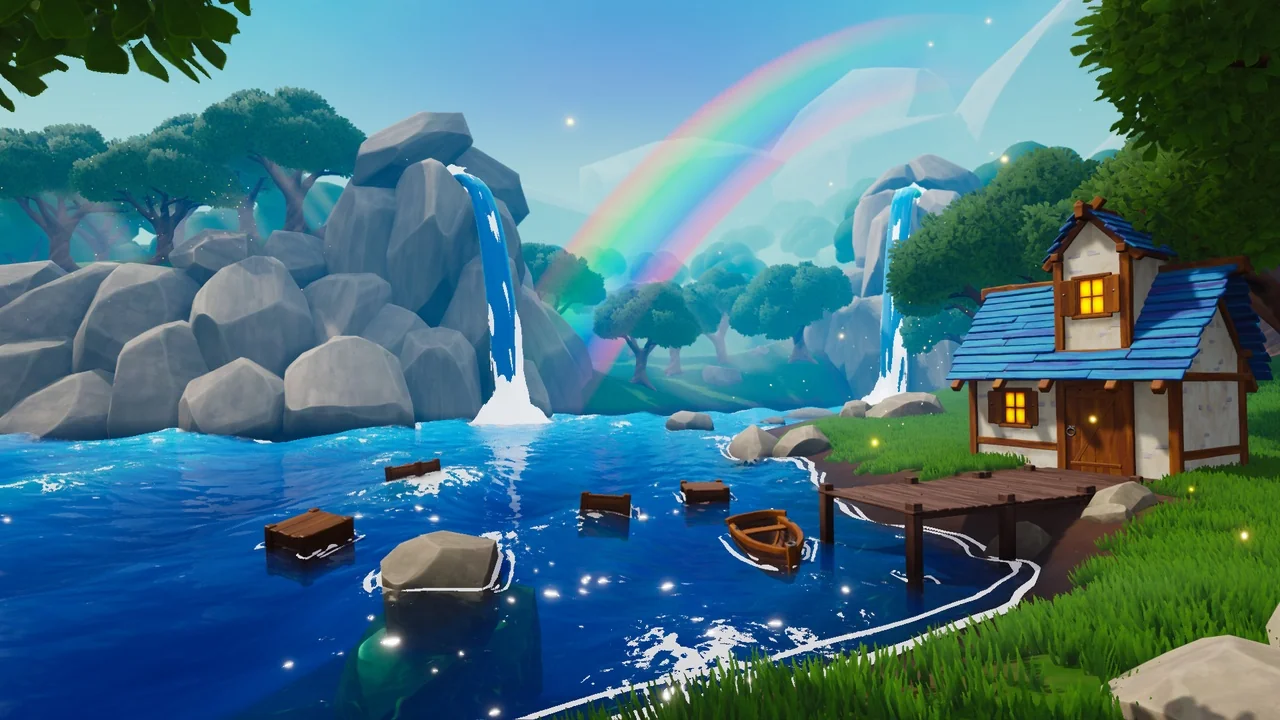
 Water
Water Water
Water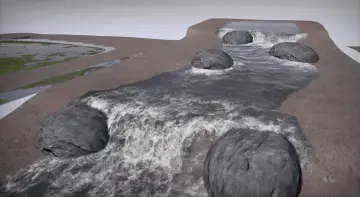 Water
Water