"b00678cacce53329"{"id":"1002777","slug":"camera-based-post-process-effect","title":"Camera based Post Process Effect","category":"Variety","engine":"4.15+,5.0+","assetVersion":"","engineVersion":"Engine Version: 4.15+,5.0+","tag":"Variety","accent":"blue","visual":"mech","summary":"Explore the mechanics of this camera-anchored post process effect, featuring vertex collapse functions and runtime Material Parameter Collection controls.","platform":"Unreal Engine","indexPolicy":"index","publishedAt":"2026-11-20T06:55:47.668Z","updatedAt":"2026-11-20T06:55:47.668Z","sourceNotes":[],"fileContents":[],"compatibility":["Unreal Engine","Engine Version: 4.15+,5.0+"],"featuredImage":{"alt":"Camera based Post Process Effect","src":"/wp-content/uploads/published/2026/11/5e5d91f86f08-7b7296fb-b171-468f-9046-5c363e0308d6-3ef09954d2.webp"},"fileSizeBytes":17261426,"hasDownloadLink":true,"downloads":0,"terms":[{"taxonomy":"category","slug":"variety-vfx","name":"Variety"}],"galleryImages":[{"src":"/wp-content/uploads/published/2026/11/2190ee4345fc-47a572be-5e34-4413-a862-2c39c9bd7995-320e9a549f.webp","alt":"Camera based Post Process Effect"},{"src":"/wp-content/uploads/published/2026/11/e14965eea07f-658e21d6-86fb-4023-a673-7fc320bee465-2f2fa3f594.webp","alt":"Camera based Post Process Effect"},{"src":"/wp-content/uploads/published/2026/11/08b92ca7e1e8-d4b92efb-6a29-4df6-9822-1618dc688927-27ee47d9d6.webp","alt":"Camera based Post Process Effect"},{"src":"/wp-content/uploads/published/2026/11/29eb668131ed-216a59d7-0367-4081-a248-1e6b5a14c2f5-46876ac6f9.webp","alt":"Camera based Post Process Effect"},{"src":"/wp-content/uploads/published/2026/11/f9e2dda0e53a-f2c845f7-dfe0-48e0-9415-62a80a01ac1c-8272706744.webp","alt":"Camera based Post Process Effect"}],"accessPanel":{"kind":"resource","title":"Get this resource","safetyNote":"Resources are manually reviewed before listing to improve quality and reduce obvious risks.","fileName":"Content.7z","resourceType":"Resource archive","versions":[]},"contentHtml":"\u003ch2\u003eAnchoring the Post Process Effect to Camera and World Space\u003c/h2\u003e\u003cp\u003eScreen-space materials frequently function as flat overlays detached from the surrounding scene geometry. This post process setup approaches rendering differently by reading spatial data directly from the scene, anchoring its visual calculations directly to the viewpoint of the viewer. When visual rendering adheres to the player camera location, the effect gives the sensation of adhering firmly to the viewing lens itself. Shifting the camera moves the boundary of the post-processing volume in immediate sync with the player's perspective, altering how scene elements enter and leave the active threshold.\u003c/p\u003e\u003cp\u003eWhile the baseline configuration locks the rendering logic to the primary camera position, the spatial anchor is not rigidly hardcoded to a single viewpoint. The calculation driving the origin point can be detached from the active camera component and bound to the world transform of any actor within the level. Redirecting the coordinate input grounds the center of the post-process volume at a pawn, a moving vehicle, or a dedicated target point, while the player watches the effect interact with surrounding objects from an independent vantage point.\u003c/p\u003e\u003cp\u003eThis spatial flexibility bridges the gap between purely subjective camera-lens interference and world-space environmental cues. Whether locked to the viewport or following an external character, the material tracks positional shifts continuously, projecting multi-color post-process outlines and shading across surfaces relative to the chosen reference point.\u003c/p\u003e\u003ch2\u003eDynamic Geometry Transformation Using the Vertex Material Function\u003c/h2\u003e\u003cp\u003eBeyond post-process filtering on the final rendered frame, the setup incorporates a dedicated Material Function that alters geometry at the vertex stage. Applying this function to standard scene materials grants real-time control over mesh vertex positions, allowing individual assets to dynamically collapse inward or expand outward to their original shapes. By displacing vertex coordinates between their resting positions and collapsed target points, the function bypasses traditional skeletal scaling or custom morph targets, handling the deformation entirely within the vertex shader.\u003c/p\u003e\u003cp\u003eWhen this vertex-manipulation function runs alongside the camera-driven post-process material, the two systems produce a unified visual result. The collapse and expansion of geometry interact directly with the post-process outline detection, yielding the illusion of objects assembling out of thin air or deconstructing into nothingness. Edge detection algorithms respond to the shifting silhouettes of the expanding surfaces, highlighting the borders of the mesh as vertices travel into place.\u003c/p\u003e\u003cp\u003eBecause the function acts on the vertex level, it can be patched into existing surface shaders across a range of prop and character meshes. It transforms rigid, static geometry into dynamically responsive targets that break down or form anew on demand, matching the timing of surrounding visual events.\u003c/p\u003e\u003ch2\u003eAdapting Camera Targets for Strategy and Virtual Reality\u003c/h2\u003e\u003cp\u003eDifferent game genres handle player viewpoints and coordinate tracking under distinct constraints. In a top-down or isometric perspective, such as a real-time strategy title, fixing an effect strictly to the rendering camera would wash out the entire battlefield or pin the visual treatment far above the playable surface. Reassigning the tracking center to a specific hero character allows the effect to manifest directly on the ground plane around the priority unit, establishing a clear visual zone that moves across the map independently of how the player pans the camera overhead.\u003c/p\u003e\u003cp\u003eThe system supports both standard flat-screen gameplay and virtual reality configurations. In virtual reality, head-mounted displays introduce continuous micro-movements, positional tracking, and wide stereoscopic viewing angles. Because the underlying post process leverages multi-color outline techniques, anchoring the effect directly to the VR camera produces a distinct sense of visual presence around the player's field of view, maintaining continuity across both eye buffers.\u003c/p\u003e\u003cp\u003eSwitching between non-VR desktop pipelines and VR environments requires no fundamental restructuring of the material's internal logic. The calculation simply ingests the active camera or target actor vectors provided by the project's tracking system, applying the visual styling uniformly regardless of the display hardware in use.\u003c/p\u003e\u003ch2\u003eRuntime Control with Material Parameter Collections\u003c/h2\u003e\u003cp\u003eManaging material parameters across multiple scene assets often creates complex blueprint hierarchies or demands expensive dynamic material instance management. This asset bypasses those bottlenecks by routing all core operational variables through a centralized Material Parameter Collection. Scalar and vector parameters defined inside the collection dictate the radius, intensity, transition states, and positional anchors used across both the post process material and the vertex manipulation functions.\u003c/p\u003e\u003cp\u003eRouting control through an MPC allows values to be updated globally from a single location without registering and updating individual mesh renderers:\u003c/p\u003e\u003cul\u003e\u003cli\u003eIn-editor tuning enables artists to adjust visual falloff, outline behavior, and expansion thresholds instantly while viewing live viewport updates.\u003c/li\u003e\u003cli\u003eRuntime updates executed through Visual Scripting Blueprints allow gameplay events—such as entering a specific zone or triggering an ability—to modulate parameters on the fly.\u003c/li\u003e\u003cli\u003eDirect manipulation via C++ provides performant control over parameters every tick, ensuring high-frequency updates without incurring unnecessary scripting overhead.\u003c/li\u003e\u003c/ul\u003e\u003cp\u003eBecause the vertex collapse function and the camera post process both listen to shared collection values, runtime logic can drive both systems through a single parameter update. A simple scalar timeline running in a gameplay blueprint can concurrently command a mesh to expand its vertices while the post-process material highlights the transitioning edges, keeping the entire sequence fully synchronized.\u003c/p\u003e\u003ch2\u003eIntegrating Multi-Color Outlines into the Scene Pipeline\u003c/h2\u003e\u003cp\u003eThe visual framework incorporates multi-color outline post-processing methods to distinguish geometry boundaries within the rendered scene. By sampling scene depth, custom depth, and normal buffers, the post-process pass identifies hard geometric transitions and applies distinct outline colorations according to user specifications. These contours emphasize the spatial boundaries established by the camera anchor, accentuating where the effect begins and ends relative to nearby surfaces.\u003c/p\u003e\u003cp\u003eThis outline pipeline directly benefits the dynamic deconstruction illusion. As the vertex function collapses a mesh inward, the shrinking geometry continues to generate accurate depth discrepancies against the surrounding world, allowing the outline pass to wrap tightly around the collapsing silhouette. The resulting visual feedback clearly indicates state changes on interactive objects, props, or active gameplay characters.\u003c/p\u003e\u003cp\u003eImplementing this asset provides teams with a self-contained framework for camera-relative visual processing and coordinated vertex animation. By connecting screen-space post-processing, outline edge detection, and shader-level vertex displacement through a central parameter architecture, the system offers an integrated method for dynamic object transitions, targeted gameplay focus, and immersive camera effects.\u003c/p\u003e\n\n\u003ch2\u003eExplore Similar Assets\u003c/h2\u003e\n\u003cul\u003e\n\u003cli\u003e\u003ca href=\"https://3dcghub.com/falling-leaves-vfx-pack/\" rel=\"noopener noreferrer\"\u003eFalling Leaves VFX Pack\u003c/a\u003e\u003c/li\u003e\n\u003cli\u003e\u003ca href=\"https://3dcghub.com/niagarastylizedfx_03/\" rel=\"noopener noreferrer\"\u003eNiagaraStylizedFX_03\u003c/a\u003e\u003c/li\u003e\n\u003cli\u003e\u003ca href=\"https://3dcghub.com/niagara-realistic-starter-vfx-pack/\" rel=\"noopener noreferrer\"\u003eNiagara Realistic Starter VFX Pack\u003c/a\u003e\u003c/li\u003e\n\u003cli\u003e\u003ca href=\"https://3dcghub.com/microscopic-organisms/\" rel=\"noopener noreferrer\"\u003eMicroscopic Organisms\u003c/a\u003e\u003c/li\u003e\n\u003cli\u003e\u003ca href=\"https://3dcghub.com/color-grade-50-luts/\" rel=\"noopener noreferrer\"\u003eColor Grade - 50 LUTs\u003c/a\u003e\u003c/li\u003e\n\u003c/ul\u003e","contentTextLength":7645,"navigation":{"current":103,"total":4797,"previous":{"id":"1002778","slug":"cartoony-impact-stylized-particle-simulation-1","title":"Cartoony Impact - Stylized Particle Simulation #1","category":"Variety","platform":"Unreal Engine","updatedAt":"2026-11-20T06:57:02.071Z"},"next":{"id":"1002776","slug":"bullet-vfx-pack","title":"Bullet VFX Pack","category":"Spells \u0026 Combat","platform":"Unreal Engine","updatedAt":"2026-11-20T06:55:03.926Z"}},"relatedResources":[{"id":"17090","slug":"falling-leaves-vfx-pack","title":"Falling Leaves VFX Pack","category":"Variety","engine":"4.26+,5.0+","assetVersion":"Engine version: 4.26+,5.0+","engineVersion":"4.26","tag":"Variety","accent":"blue","visual":"audio","summary":"The Falling Leaves VFX Pack provides a comprehensive set of nature-based particle effects. With 11 leaf types and multiple wind variations, it offers realistic movement for any project.","platform":"Unreal Engine","indexPolicy":"noindex","publishedAt":"2026-03-13T13:40:59.000Z","updatedAt":"2026-04-19T15:43:37.000Z","sourceNotes":[],"fileContents":[],"compatibility":["Unreal Engine","Engine version: 4.26+,5.0+"],"featuredImage":{"alt":"Falling Leaves VFX Pack","src":"https://3dcghub.com/wp-content/uploads/2026/03/7d254056-511c-401f-9eae-471f1182db0c.webp"},"fileSizeBytes":259962713,"hasDownloadLink":true,"downloads":3},{"id":"17343","slug":"niagarastylizedfx_03","title":"NiagaraStylizedFX_03","category":"Variety","engine":"4.26+,5.0+","assetVersion":"Engine version: 4.26+,5.0+","engineVersion":"4.26","tag":"Variety","accent":"blue","visual":"character","summary":"Discover NiagaraStylizedFX_03, a versatile collection of simple and highly utilized stylized visual effects. This third installment by the developer is designed for seamless integration into Niagara-based projects.","platform":"Unreal Engine","indexPolicy":"noindex","publishedAt":"2026-03-13T14:25:29.000Z","updatedAt":"2026-04-19T15:43:33.000Z","sourceNotes":[],"fileContents":[],"compatibility":["Unreal Engine","Engine version: 4.26+,5.0+"],"featuredImage":{"alt":"NiagaraStylizedFX_03","src":"https://3dcghub.com/wp-content/uploads/2026/03/9fae7009-343a-4319-90cf-b6d15988d30e.webp"},"fileSizeBytes":45360652,"hasDownloadLink":true,"downloads":2},{"id":"17212","slug":"microscopic-organisms","title":"Microscopic Organisms","category":"Variety","engine":"4.26+,5.0+","assetVersion":"Engine version: 4.26+,5.0+","engineVersion":"4.25","tag":"Variety","accent":"blue","visual":"luts","summary":"Enhance your projects with 20 of the most common real-life microorganisms. These Niagara-based particle systems provide realistic visual effects for scientific and biological scenes.","platform":"Unreal Engine","indexPolicy":"noindex","publishedAt":"2026-03-13T13:59:33.000Z","updatedAt":"2026-04-19T15:43:35.000Z","sourceNotes":[],"fileContents":[],"compatibility":["Unreal Engine","Engine version: 4.26+,5.0+"],"featuredImage":{"alt":"Microscopic Organisms","src":"https://3dcghub.com/wp-content/uploads/2026/03/9258ac9a-562b-4924-aa20-0161f9e5f53d.webp"},"fileSizeBytes":367342455,"hasDownloadLink":true,"downloads":0}]}
Resource screenshots
1 / 5
Join our channel
Follow 3DCGHUB on Telegram for new resource drops, migration updates, and community notices.
Resources are manually reviewed before listing to improve quality and reduce obvious risks.
No account required
Variety
Camera based Post Process Effect
Explore the mechanics of this camera-anchored post process effect, featuring vertex collapse functions and runtime Material Parameter Collection controls.
Anchoring the Post Process Effect to Camera and World Space
Screen-space materials frequently function as flat overlays detached from the surrounding scene geometry. This post process setup approaches rendering differently by reading spatial data directly from the scene, anchoring its visual calculations directly to the viewpoint of the viewer. When visual rendering adheres to the player camera location, the effect gives the sensation of adhering firmly to the viewing lens itself. Shifting the camera moves the boundary of the post-processing volume in immediate sync with the player's perspective, altering how scene elements enter and leave the active threshold.
While the baseline configuration locks the rendering logic to the primary camera position, the spatial anchor is not rigidly hardcoded to a single viewpoint. The calculation driving the origin point can be detached from the active camera component and bound to the world transform of any actor within the level. Redirecting the coordinate input grounds the center of the post-process volume at a pawn, a moving vehicle, or a dedicated target point, while the player watches the effect interact with surrounding objects from an independent vantage point.
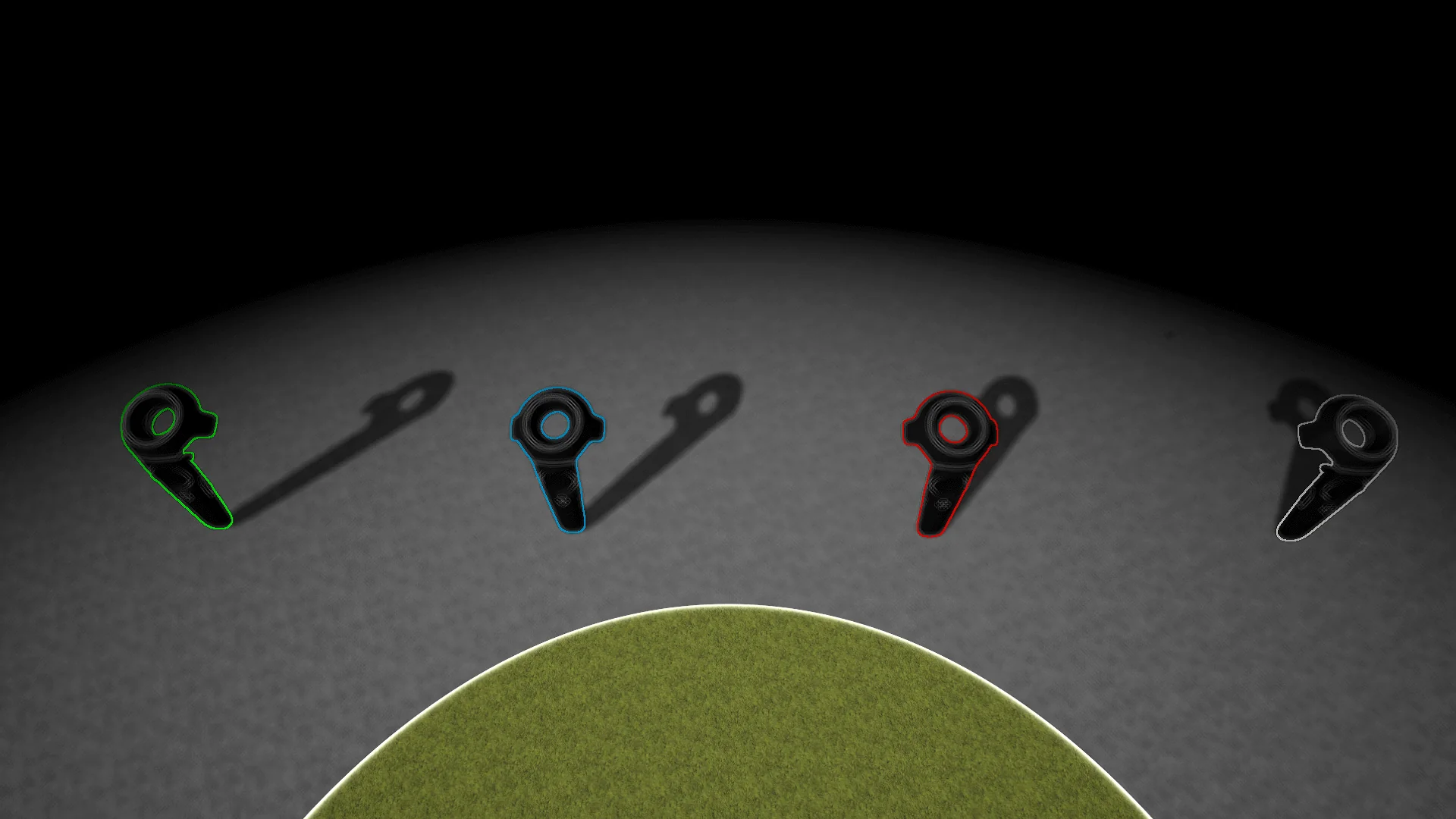
This spatial flexibility bridges the gap between purely subjective camera-lens interference and world-space environmental cues. Whether locked to the viewport or following an external character, the material tracks positional shifts continuously, projecting multi-color post-process outlines and shading across surfaces relative to the chosen reference point.
Dynamic Geometry Transformation Using the Vertex Material Function
Beyond post-process filtering on the final rendered frame, the setup incorporates a dedicated Material Function that alters geometry at the vertex stage. Applying this function to standard scene materials grants real-time control over mesh vertex positions, allowing individual assets to dynamically collapse inward or expand outward to their original shapes. By displacing vertex coordinates between their resting positions and collapsed target points, the function bypasses traditional skeletal scaling or custom morph targets, handling the deformation entirely within the vertex shader.
When this vertex-manipulation function runs alongside the camera-driven post-process material, the two systems produce a unified visual result. The collapse and expansion of geometry interact directly with the post-process outline detection, yielding the illusion of objects assembling out of thin air or deconstructing into nothingness. Edge detection algorithms respond to the shifting silhouettes of the expanding surfaces, highlighting the borders of the mesh as vertices travel into place.
Because the function acts on the vertex level, it can be patched into existing surface shaders across a range of prop and character meshes. It transforms rigid, static geometry into dynamically responsive targets that break down or form anew on demand, matching the timing of surrounding visual events.
Adapting Camera Targets for Strategy and Virtual Reality
Different game genres handle player viewpoints and coordinate tracking under distinct constraints. In a top-down or isometric perspective, such as a real-time strategy title, fixing an effect strictly to the rendering camera would wash out the entire battlefield or pin the visual treatment far above the playable surface. Reassigning the tracking center to a specific hero character allows the effect to manifest directly on the ground plane around the priority unit, establishing a clear visual zone that moves across the map independently of how the player pans the camera overhead.
The system supports both standard flat-screen gameplay and virtual reality configurations. In virtual reality, head-mounted displays introduce continuous micro-movements, positional tracking, and wide stereoscopic viewing angles. Because the underlying post process leverages multi-color outline techniques, anchoring the effect directly to the VR camera produces a distinct sense of visual presence around the player's field of view, maintaining continuity across both eye buffers.
Switching between non-VR desktop pipelines and VR environments requires no fundamental restructuring of the material's internal logic. The calculation simply ingests the active camera or target actor vectors provided by the project's tracking system, applying the visual styling uniformly regardless of the display hardware in use.
Runtime Control with Material Parameter Collections
Managing material parameters across multiple scene assets often creates complex blueprint hierarchies or demands expensive dynamic material instance management. This asset bypasses those bottlenecks by routing all core operational variables through a centralized Material Parameter Collection. Scalar and vector parameters defined inside the collection dictate the radius, intensity, transition states, and positional anchors used across both the post process material and the vertex manipulation functions.
Routing control through an MPC allows values to be updated globally from a single location without registering and updating individual mesh renderers:
In-editor tuning enables artists to adjust visual falloff, outline behavior, and expansion thresholds instantly while viewing live viewport updates.
Runtime updates executed through Visual Scripting Blueprints allow gameplay events—such as entering a specific zone or triggering an ability—to modulate parameters on the fly.
Direct manipulation via C++ provides performant control over parameters every tick, ensuring high-frequency updates without incurring unnecessary scripting overhead.
Because the vertex collapse function and the camera post process both listen to shared collection values, runtime logic can drive both systems through a single parameter update. A simple scalar timeline running in a gameplay blueprint can concurrently command a mesh to expand its vertices while the post-process material highlights the transitioning edges, keeping the entire sequence fully synchronized.
Integrating Multi-Color Outlines into the Scene Pipeline
The visual framework incorporates multi-color outline post-processing methods to distinguish geometry boundaries within the rendered scene. By sampling scene depth, custom depth, and normal buffers, the post-process pass identifies hard geometric transitions and applies distinct outline colorations according to user specifications. These contours emphasize the spatial boundaries established by the camera anchor, accentuating where the effect begins and ends relative to nearby surfaces.
This outline pipeline directly benefits the dynamic deconstruction illusion. As the vertex function collapses a mesh inward, the shrinking geometry continues to generate accurate depth discrepancies against the surrounding world, allowing the outline pass to wrap tightly around the collapsing silhouette. The resulting visual feedback clearly indicates state changes on interactive objects, props, or active gameplay characters.
Implementing this asset provides teams with a self-contained framework for camera-relative visual processing and coordinated vertex animation. By connecting screen-space post-processing, outline edge detection, and shader-level vertex displacement through a central parameter architecture, the system offers an integrated method for dynamic object transitions, targeted gameplay focus, and immersive camera effects.
 Variety
 Variety
 Variety