"c68a05d5e51405b3"{"id":"27038","slug":"apache-warrior-1","title":"Apache Warrior 1","category":"Characters \u0026 Creatures","engine":"5.0+","assetVersion":"Engine version: 5.0+","engineVersion":"","tag":"Characters","accent":"blue","visual":"character","summary":"Apache Warrior 1 combines an Epic Skeleton setup with 14 extra tail bones, 52 facial blendshapes, and modular mesh parts. Its material set and PBR textures give the character a direct path from assembly to rendering.","platform":"Unreal Engine","publishedAt":"2026-04-21T07:14:09.000Z","updatedAt":"2026-04-21T07:14:10.000Z","sourceNotes":[],"fileContents":[],"compatibility":["Unreal Engine","Engine version: 5.0+"],"featuredImage":{"alt":"Apache Warrior 1","src":"https://3dcghub.com/wp-content/uploads/2026/04/b4a6a7ad59ad_212004c9-3106-4a58-bf51-6ca664afc1b0.webp"},"hasDownloadLink":true,"downloads":0,"terms":[{"taxonomy":"category","slug":"characters-and-creatures","name":"Characters \u0026 Creatures"},{"taxonomy":"post_tag","slug":"characters","name":"Characters"},{"taxonomy":"post_tag","slug":"materials","name":"Materials"},{"taxonomy":"post_tag","slug":"textures","name":"Textures"}],"galleryImages":[{"src":"https://3dcghub.com/wp-content/uploads/2026/04/dbfd82ea87ea_04e01202-927d-42aa-899a-9e6531813869.webp","alt":"Apache Warrior 1"}],"accessPanel":{"kind":"resource","title":"Access this resource","eyebrow":"Free Download","message":"Log in or create a free account to start your download.","fileName":"Content.7z","safetyNote":"All resources are 100% manually reviewed to eliminate all risks.","actionLabel":"Download Free","resourceType":"Resource archive"},"contentHtml":"\u003cp\u003eApache Warrior 1 starts with a clear character workflow: an Epic Skeleton setup, 14 additional tail bones, 52 facial blendshapes whose naming matches ARKit, modular mesh parts, flexible instance materials, and four skin variations. Those elements give the character a practical setup for animation, facial work, and surface editing before any scene-specific adjustments are made.\u003c/p\u003e \u003ch2\u003eSkeleton structure and facial control\u003c/h2\u003e\n\u003cp\u003eThe rig is the first part that stands out. An Epic Skeleton foundation gives the character a familiar animation structure, while the extra 14 tail bones add another animated area in the hierarchy. That combination keeps the body setup more specific than a basic humanoid rig and makes the character ready for motion work that goes beyond a standard static model.\u003c/p\u003e\n\u003cp\u003eThe face is handled separately through 52 blendshapes. The naming matches ARKit, which keeps the facial control set organized in a way that is easy to read when the character moves into expression work. With blendshapes in place, the face has a dedicated animation path instead of depending on the body rig alone. That separation matters in practice because it allows the body and face to be handled as distinct parts of the same character setup.\u003c/p\u003e\n\u003cp\u003eNothing in that arrangement is vague or implied as an afterthought. The skeletal information, the tail bone count, and the facial blendshape count are all laid out explicitly, which makes the character straightforward to assess before it is placed into a production scene. The setup is already geared toward posing and animation rather than requiring a rebuild around those tasks.\u003c/p\u003e \u003ch2\u003eModular mesh parts and material control\u003c/h2\u003e\n\u003cp\u003eModular mesh parts give the character a more flexible structure than a single-piece model. Instead of treating the body as one fixed shell, the mesh is split into parts that can be handled individually. That is useful when the workflow needs focused adjustments to a section of the character, or when the model has to be assembled and managed in a more controlled way.\u003c/p\u003e\n\u003cp\u003eFlexible instance materials support that same kind of practical handling. The material setup is not locked into one look, so the surface can be adjusted through material instances rather than forcing a full material rebuild. For a character with multiple mesh parts, that gives the visual side of the asset the same kind of flexibility that the geometry already has.\u003c/p\u003e\n\u003cp\u003eThe pairing of modular geometry and instance-based materials is what makes the asset useful during setup. Mesh parts can be organized, isolated, or compared while the material layer remains adjustable. That keeps the character easier to manage during look development, especially when the aim is to refine the appearance without changing the underlying model structure.\u003c/p\u003e \u003ch2\u003eSkin variations and texture layout\u003c/h2\u003e\n\u003cp\u003eFour skin variations are included, giving the character more than one presentation option. That detail keeps the asset from being tied to a single visual result and makes it easier to place the character into different scenes or style decisions without changing the model itself.\u003c/p\u003e\n\u003cp\u003eThe texture set is built as PBR.tga files and is available in either 4096x4096 or 2048x2048 resolution. The maps are listed clearly:\u003c/p\u003e\n\u003cul\u003e \u003cli\u003eAlbedo\u003c/li\u003e \u003cli\u003eNormal (DirectX)\u003c/li\u003e \u003cli\u003eOcclusion + Roughness + Metallic\u003c/li\u003e\n\u003c/ul\u003e\n\u003cp\u003eThat texture layout keeps the rendering workflow direct. Albedo handles the base color, the normal map adds surface detail, and the combined occlusion, roughness, and metallic map groups the material response into a compact set. The DirectX normal format is specified as well, so the normal workflow is not left open to guesswork.\u003c/p\u003e\n\u003cp\u003eBecause the texture set is presented in two resolutions, the same asset can be evaluated at different texture sizes without changing the overall map structure. The character keeps the same map types in both cases, which makes the visual setup easier to track during production.\u003c/p\u003e \u003ch2\u003ePolycount and production fit\u003c/h2\u003e\n\u003cp\u003eThe polygon information gives a concrete sense of the character’s scale: 29,344 faces, 48,737 vertices, and 58,688 triangles. Those figures do not stand alone as numbers; they define how the model is shaped and how much geometry is being carried through the asset. That makes them useful when planning where the character belongs in a scene and how detailed the model will appear during close work.\u003c/p\u003e\n\u003cp\u003eThe mesh totals are especially relevant because the character is not a single undivided surface. With modular parts in the build, the polygon counts help frame the structure as something that can be organized and handled in pieces while still keeping the final body intact. The counts provide a clear baseline for the model’s size and help set expectations for how the character is managed through setup and rendering.\u003c/p\u003e\n\u003cp\u003eApache Warrior 1 stays focused on the elements that matter most for character implementation: a defined skeleton, a dedicated facial control set, modular mesh parts, adjustable materials, multiple skin variations, and a PBR texture package that is already structured around the listed maps. That makes the asset ready for assembly, animation, and surface work without adding unnecessary complexity to the workflow.\u003c/p\u003e\n\n\u003ch2\u003eExplore Similar Assets\u003c/h2\u003e\n\u003cul\u003e\n\u003cli\u003e\u003ca href=\"https://3dcghub.com/hospital-modular-building-props-and-characters/\" title=\"Hospital – modular building, props and characters\"\u003eHospital – modular building, props and characters\u003c/a\u003e\u003c/li\u003e\n\u003cli\u003e\u003ca href=\"https://3dcghub.com/low-poly-characters-customizable-modular-male-and-female/\" title=\"LOW POLY CHARACTERS CUSTOMIZABLE/MODULAR ( MALE AND FEMALE )\"\u003eLOW POLY CHARACTERS CUSTOMIZABLE/MODULAR ( MALE AND FEMALE )\u003c/a\u003e\u003c/li\u003e\n\u003cli\u003e\u003ca href=\"https://3dcghub.com/bozo-stylized-modular-characters-base-pack/\" title=\"BoZo: Stylized Modular Characters – Base Pack\"\u003eBoZo: Stylized Modular Characters – Base Pack\u003c/a\u003e\u003c/li\u003e\n\u003cli\u003e\u003ca href=\"https://3dcghub.com/rpg-fantasy-monster-bundle-6-4-rpg-fantasy-characters/\" title=\"RPG Fantasy Monster Bundle #6 – 4 RPG / Fantasy Characters\"\u003eRPG Fantasy Monster Bundle #6 – 4 RPG / Fantasy Characters\u003c/a\u003e\u003c/li\u003e\n\u003cli\u003e\u003ca href=\"https://3dcghub.com/rpg-fantasy-monster-bundle-2-4-characters-fantasy-rpg/\" title=\"RPG Fantasy Monster Bundle #2 – 4 Characters Fantasy RPG\"\u003eRPG Fantasy Monster Bundle #2 – 4 Characters Fantasy RPG\u003c/a\u003e\u003c/li\u003e\n\u003c/ul\u003e","contentTextLength":5462,"navigation":{"current":2128,"total":3860,"previous":{"id":"27051","slug":"asian-fire-stage-arena","title":"ASIAN - Fire Stage Arena","category":"Towns \u0026 Villages","platform":"Unreal Engine","updatedAt":"2026-04-21T08:14:33.000Z"},"next":{"id":"27034","slug":"medieval-village-slavic-huts-environment","title":"Medieval Village - Slavic Huts environment","category":"Medieval","platform":"Unreal Engine","updatedAt":"2026-04-21T06:37:36.000Z"}},"relatedResources":[{"id":"1001674","slug":"viking-warriors","title":"Viking Warriors","category":"Characters \u0026 Creatures","engine":"4.19+,5.0+","assetVersion":"","engineVersion":"Engine Version: 4.19+,5.0+","tag":"Characters","accent":"blue","visual":"character","summary":"Viking Warriors brings modular material customization, APEX cloth physics, combat weapons, and seamless Unreal Engine mannequin compatibility into real-time pro","platform":"Unreal Engine","publishedAt":"2026-10-13T15:22:48.715Z","updatedAt":"2026-10-13T15:22:48.715Z","sourceNotes":[],"fileContents":[],"compatibility":["Unreal Engine","Engine Version: 4.19+,5.0+"],"featuredImage":{"alt":"Viking Warriors","src":"/wp-content/uploads/published/2026/10/42eef3ea8f03-e62a40b7-e5d1-408b-80e1-bfb7b5904e73-740805dff2.webp"},"hasDownloadLink":true,"downloads":1},{"id":"1001658","slug":"samurai-warriors","title":"Samurai Warriors","category":"Characters \u0026 Creatures","engine":"4.19+,5.0+","assetVersion":"","engineVersion":"Engine Version: 4.19+,5.0+","tag":"Characters","accent":"blue","visual":"character","summary":"Integrate Samurai Warriors with UE mannequin compatibility, NvCloth solver cloth dynamics, and modular material controls for medieval combat projects.","platform":"Unreal Engine","publishedAt":"2026-10-13T08:34:57.969Z","updatedAt":"2026-10-13T08:34:57.969Z","sourceNotes":[],"fileContents":[],"compatibility":["Unreal Engine","Engine Version: 4.19+,5.0+"],"featuredImage":{"alt":"Samurai Warriors","src":"/wp-content/uploads/published/2026/10/86ea906ffa4f-d5fb222a-187f-4a65-9e5f-6bf524e306b5-605f393566.webp"},"hasDownloadLink":true,"downloads":0},{"id":"1001642","slug":"light-warrior","title":"Light Warrior","category":"Characters \u0026 Creatures","engine":"4.19+,5.0+","assetVersion":"","engineVersion":"Engine Version: 4.19+,5.0+","tag":"Characters","accent":"blue","visual":"character","summary":"Explore the Light Warrior character asset for Unreal Engine, featuring APEX cloth dynamics, advanced material customization, UE mannequin rigging, and weapons.","platform":"Unreal Engine","publishedAt":"2026-10-13T02:26:09.285Z","updatedAt":"2026-10-13T02:26:09.285Z","sourceNotes":[],"fileContents":[],"compatibility":["Unreal Engine","Engine Version: 4.19+,5.0+"],"featuredImage":{"alt":"Light Warrior","src":"/wp-content/uploads/published/2026/10/1961ac8c32cb-1891ca23-2a17-4068-81af-80cf504d4ba6-7b198e2c02.webp"},"hasDownloadLink":true,"downloads":0}]}
Characters
Apache Warrior 1
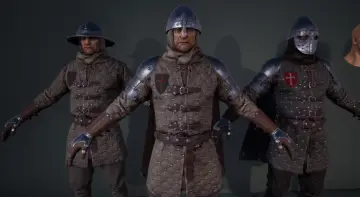
Apache Warrior 1 combines an Epic Skeleton setup with 14 extra tail bones, 52 facial blendshapes, and modular mesh parts. Its material set and PBR textures give the character a direct path from assembly to rendering.
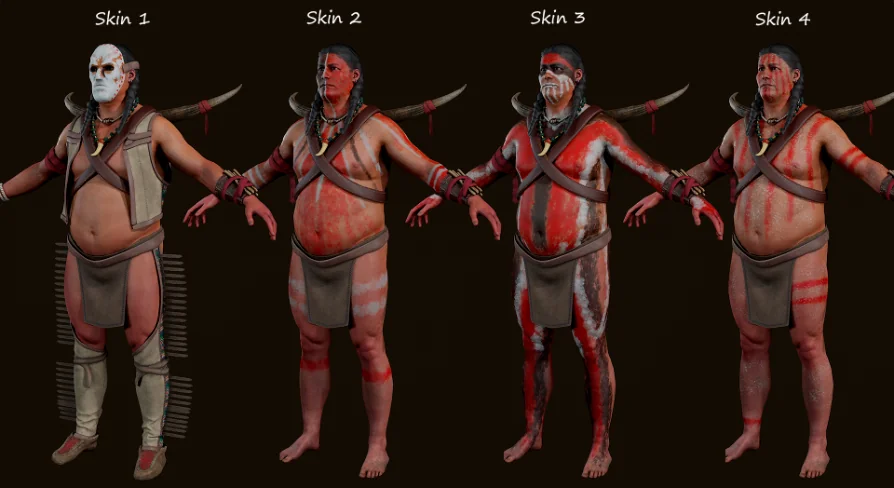
Apache Warrior 1 starts with a clear character workflow: an Epic Skeleton setup, 14 additional tail bones, 52 facial blendshapes whose naming matches ARKit, modular mesh parts, flexible instance materials, and four skin variations. Those elements give the character a practical setup for animation, facial work, and surface editing before any scene-specific adjustments are made.
Skeleton structure and facial control
The rig is the first part that stands out. An Epic Skeleton foundation gives the character a familiar animation structure, while the extra 14 tail bones add another animated area in the hierarchy. That combination keeps the body setup more specific than a basic humanoid rig and makes the character ready for motion work that goes beyond a standard static model.
The face is handled separately through 52 blendshapes. The naming matches ARKit, which keeps the facial control set organized in a way that is easy to read when the character moves into expression work. With blendshapes in place, the face has a dedicated animation path instead of depending on the body rig alone. That separation matters in practice because it allows the body and face to be handled as distinct parts of the same character setup.
Nothing in that arrangement is vague or implied as an afterthought. The skeletal information, the tail bone count, and the facial blendshape count are all laid out explicitly, which makes the character straightforward to assess before it is placed into a production scene. The setup is already geared toward posing and animation rather than requiring a rebuild around those tasks.
Modular mesh parts and material control
Modular mesh parts give the character a more flexible structure than a single-piece model. Instead of treating the body as one fixed shell, the mesh is split into parts that can be handled individually. That is useful when the workflow needs focused adjustments to a section of the character, or when the model has to be assembled and managed in a more controlled way.
Flexible instance materials support that same kind of practical handling. The material setup is not locked into one look, so the surface can be adjusted through material instances rather than forcing a full material rebuild. For a character with multiple mesh parts, that gives the visual side of the asset the same kind of flexibility that the geometry already has.
The pairing of modular geometry and instance-based materials is what makes the asset useful during setup. Mesh parts can be organized, isolated, or compared while the material layer remains adjustable. That keeps the character easier to manage during look development, especially when the aim is to refine the appearance without changing the underlying model structure.
Skin variations and texture layout
Four skin variations are included, giving the character more than one presentation option. That detail keeps the asset from being tied to a single visual result and makes it easier to place the character into different scenes or style decisions without changing the model itself.
The texture set is built as PBR.tga files and is available in either 4096x4096 or 2048x2048 resolution. The maps are listed clearly:
Albedo
Normal (DirectX)
Occlusion + Roughness + Metallic
That texture layout keeps the rendering workflow direct. Albedo handles the base color, the normal map adds surface detail, and the combined occlusion, roughness, and metallic map groups the material response into a compact set. The DirectX normal format is specified as well, so the normal workflow is not left open to guesswork.
Because the texture set is presented in two resolutions, the same asset can be evaluated at different texture sizes without changing the overall map structure. The character keeps the same map types in both cases, which makes the visual setup easier to track during production.
Polycount and production fit
The polygon information gives a concrete sense of the character’s scale: 29,344 faces, 48,737 vertices, and 58,688 triangles. Those figures do not stand alone as numbers; they define how the model is shaped and how much geometry is being carried through the asset. That makes them useful when planning where the character belongs in a scene and how detailed the model will appear during close work.
The mesh totals are especially relevant because the character is not a single undivided surface. With modular parts in the build, the polygon counts help frame the structure as something that can be organized and handled in pieces while still keeping the final body intact. The counts provide a clear baseline for the model’s size and help set expectations for how the character is managed through setup and rendering.
Apache Warrior 1 stays focused on the elements that matter most for character implementation: a defined skeleton, a dedicated facial control set, modular mesh parts, adjustable materials, multiple skin variations, and a PBR texture package that is already structured around the listed maps. That makes the asset ready for assembly, animation, and surface work without adding unnecessary complexity to the workflow.
 Characters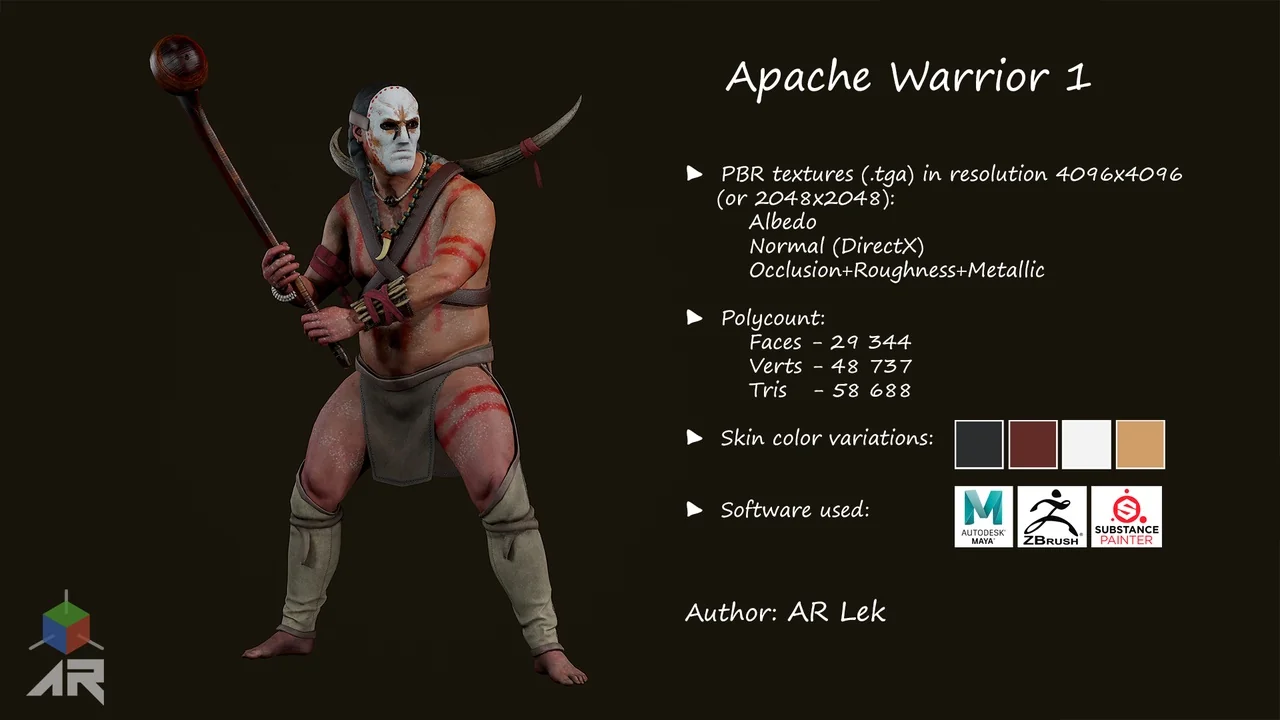
 Characters
 Characters
 Characters