"7aa4acc705f0d80b"{"id":"1001934","slug":"advanced-blueprint-jump-platform-jump-pad","title":"Advanced Blueprint - Jump Platform / Jump Pad","category":"Humans","engine":"4.26+,5.0+","assetVersion":"","engineVersion":"Engine Version: 4.26+,5.0+","tag":"Humans","accent":"blue","visual":"mech","summary":"A 100% Blueprint jump pad system featuring independent landing locations, automatic trajectory calculation, and multi-console multiplayer support.","platform":"Unreal Engine","publishedAt":"2026-10-24T11:11:56.951Z","updatedAt":"2026-10-24T11:11:56.951Z","sourceNotes":[],"fileContents":[],"compatibility":["Unreal Engine","Engine Version: 4.26+,5.0+"],"featuredImage":{"alt":"Advanced Blueprint - Jump Platform / Jump Pad","src":"/wp-content/uploads/published/2026/10/0752d01dc4ad-ed0f398f-35c2-4ab8-8c39-275f91c98d5b-8aa8cbd7e0.webp"},"hasDownloadLink":true,"downloads":0,"terms":[{"taxonomy":"category","slug":"humans","name":"Humans"}],"galleryImages":[{"src":"/wp-content/uploads/published/2026/10/dac98982483d-3cdcb0a4-e095-471f-830a-8b4ed0b86c80-d7180c75f7.webp","alt":"Advanced Blueprint - Jump Platform / Jump Pad"},{"src":"/wp-content/uploads/published/2026/10/11d36c6123fa-a05e1411-2158-46b2-a378-c9d1a4af0543-f9d55ffbaf.webp","alt":"Advanced Blueprint - Jump Platform / Jump Pad"},{"src":"/wp-content/uploads/published/2026/10/2daf8aa71eef-a616146c-1825-4629-a39c-46225a0109e0-8cce0f5107.webp","alt":"Advanced Blueprint - Jump Platform / Jump Pad"}],"accessPanel":{"kind":"resource","title":"Download this resource","eyebrow":"Free Download","message":"Log in or create a free account to start your download.","fileName":"Content.7z","safetyNote":"Resources are manually reviewed before listing to improve quality and reduce obvious risks.","actionLabel":"Download Free","resourceType":"Resource archive"},"contentHtml":"\u003cp\u003eWhen a character steps onto a jump platform, the launch mechanics must reliably carry the player to an exact destination without breaking during level revisions. In conventional setups, such as the legacy C++ jump pad found in Unreal Tournament, the launch base and the target coordinate are bound within a single Blueprint. Adjusting the launch base requires shifting an internal 3D gizmo, meaning any repositioning of the pad inherently drags the landing coordinate along with it. Separating the launch mechanism and the landing zone into two completely distinct Blueprints fundamentally changes that workflow, allowing level designers to position each endpoint on its own terms.\u003c/p\u003e \u003ch2\u003eSeparating Jump Pad and Landing Location into Independent Blueprints\u003c/h2\u003e\n\u003cp\u003eBy dividing the jump pad and the landing point into two standalone Blueprints, spatial dependencies between the launch base and the touchdown marker are eliminated. In older unified implementations, shifting a platform to clear a new piece of geometry or repositioning an arena obstacle meant manually re-aligning the target gizmo to prevent the player from hitting a wall or missing a ledge. With a dual-Blueprint architecture, moving the launch pad leaves the destination anchor intact in 3D space, and shifting the landing zone leaves the launch pad firmly rooted.\u003c/p\u003e\n\u003cp\u003eThis independent structure directly addresses the common friction points of whiteboxing and level iteration. Whether building vertical arenas for shooters or timing-sensitive obstacle courses for platformers, designers can duplicate landing nodes across distinct ledges and freely reassign connections. The decoupling provides a modular workflow where landing targets serve as modular scene anchors rather than locked sub-components of an individual launch pad actor.\u003c/p\u003e \u003ch2\u003eDynamic Trajectory Recalculation Across Variable Distances\u003c/h2\u003e\n\u003cp\u003eMoving either the platform or the landing target triggers an automatic recalculation of the jump trajectory. The visual scripting evaluates the distance between the two distinct actors and adjusts the velocity and arc necessary to bridge the gap. Because the underlying math accounts for shifting distances automatically, manual velocity tuning and trial-and-error trajectory testing are bypassed.\u003c/p\u003e\n\u003cp\u003eLevel geometry frequently changes during production. A platform might be raised by several meters, moved across an open courtyard, or angled around cover. Because the Blueprint monitors the relative spatial relationship between the launch pad and the assigned landing location, moving either object instantly updates the pathing. This dynamic recalculation ensures that player velocity and vertical lift scale appropriately to reach the target coordinates without requiring designers to recalculate launch vectors by hand.\u003c/p\u003e \u003ch2\u003eAssigning Targets via Actor Pickers and Dropdowns\u003c/h2\u003e\n\u003cp\u003eConnecting a jump platform to a destination actor takes place directly within the editor viewport and details panel. When a new landing zone is needed, designers drag a landing location Blueprint into the scene. From there, assigning that location to a corresponding jump pad requires only selecting the pad and choosing the target through an object picker or a standard drop-down menu.\u003c/p\u003e\n\u003cp\u003eThis assignment method allows rapid reconfiguration of aerial pathways. If an arena layout changes and a jump pad needs to send players to an upper sniper nest instead of a ground-level courtyard, the developer simply drops the new landing target into place and selects it from the jump pad interface. Multiple pads can point to distinct landing locations throughout an environment, and swapping paths during level testing requires no graph adjustments or internal parameter rewrites.\u003c/p\u003e \u003ch2\u003eMulti-Console, Multiplayer, and Single-Player Blueprint Execution\u003c/h2\u003e\n\u003cp\u003eThe system is built 100% in Blueprints, avoiding C++ dependencies while retaining full flexibility for modifications. This visual scripting foundation is configured to function seamlessly across both single-player campaigns and networked multiplayer environments. Player launches and mid-air trajectories synchronize reliably across clients without breaking authority checks or character movement states.\u003c/p\u003e\n\u003cp\u003eIn addition to networked multiplayer and single-player readiness, the tool is structured for multi-console support. Because it avoids proprietary code hooks and relies on native Blueprint logic, the system translates cleanly across target platforms. Developers can modify the launch behavior, add custom triggers, or hook into character animation blueprints without needing to recompile engine code or maintain platform-specific C++ branches.\u003c/p\u003e \u003ch2\u003eApplication in First-Person Shooters and Platformer Environments\u003c/h2\u003e\n\u003cp\u003eJump pads serve fundamentally different roles depending on camera perspective and gameplay pacing. In first-person shooters, rapid vertical elevation and predictable transit arcs allow players to clear contested lanes or contest high-ground positions while maintaining weapon aim. In third-person titles and precision platformers, jump pads test mid-air control, landing timing, and environmental routing.\u003c/p\u003e\n\u003cp\u003eBecause this system integrates directly with character movement setups and animation blueprints, it adapts easily to both first-person and third-person templates. Whether a project demands instant, high-speed launches across vast competitive shooter maps or precisely tuned arcs between floating platformer surfaces, the dual-Blueprint structure keeps level adjustments fast. Full documentation and a walkthrough video provide clear references for setup, integration, and modification across diverse game genres.\u003c/p\u003e\n\n\u003ch2\u003eMore From The Same Workflow\u003c/h2\u003e\n\u003cul\u003e\n\u003cli\u003e\u003ca href=\"https://3dcghub.com/melee-ai-fp-tp-two-hands/\" title=\"Melee+ (AI+FP/TP+Two Hands)\"\u003eMelee+ (AI+FP/TP+Two Hands)\u003c/a\u003e\u003c/li\u003e\n\u003cli\u003e\u003ca href=\"https://3dcghub.com/camo-sniper/\" title=\"Camo Sniper\"\u003eCamo Sniper\u003c/a\u003e\u003c/li\u003e\n\u003cli\u003e\u003ca href=\"https://3dcghub.com/amaya/\" title=\"Amaya\"\u003eAmaya\u003c/a\u003e\u003c/li\u003e\n\u003cli\u003e\u003ca href=\"https://3dcghub.com/first-person-story-adventure-template/\" title=\"First Person Story Adventure Template\"\u003eFirst Person Story Adventure Template\u003c/a\u003e\u003c/li\u003e\n\u003cli\u003e\u003ca href=\"https://3dcghub.com/pdf-viewer/\" title=\"PDF Viewer\"\u003ePDF Viewer\u003c/a\u003e\u003c/li\u003e\n\u003c/ul\u003e","contentTextLength":5709,"navigation":{"current":56,"total":3925,"previous":{"id":"1001935","slug":"advanced-bodycam-vhs-body-camera-component-with-video-effects","title":"Advanced BodyCam / VHS - Body Camera Component with Video Effects","category":"Gameplay Features","platform":"Unreal Engine","updatedAt":"2026-10-24T11:12:27.777Z"},"next":{"id":"1001933","slug":"advanced-battle-royale-template","title":"Advanced Battle Royale Template","category":"Shooter","platform":"Unreal Engine","updatedAt":"2026-10-24T11:11:26.550Z"}},"relatedResources":[{"id":"1001104","slug":"melee-ai-fp-tp-two-hands","title":"Melee+ (AI+FP/TP+Two Hands)","category":"Humans","engine":"4.27,5.0+","assetVersion":"","engineVersion":"Engine Version: 4.27,5.0+","tag":"Humans","accent":"blue","visual":"mech","summary":"Blueprint melee framework with any weapon in any hand, first/third-person mode, physical hit tracing, and AI combatants in one component.","platform":"Unreal Engine","publishedAt":"2026-09-07T05:37:02.505Z","updatedAt":"2026-09-07T05:37:02.505Z","sourceNotes":[],"fileContents":[],"compatibility":["Unreal Engine","Engine Version: 4.27,5.0+"],"featuredImage":{"alt":"Melee+ (AI+FP/TP+Two Hands)","src":"/wp-content/uploads/published/2026/09/95aab0609514-0da9baa9-edf9-478f-9dc5-f7fd3543196c-18d8ad0965.webp"},"hasDownloadLink":true,"downloads":0},{"id":"1000423","slug":"camo-sniper","title":"Camo Sniper","category":"Humans","engine":"4.26+,5.0+","assetVersion":"","engineVersion":"Engine Version: 4.26+,5.0+","tag":"Humans","accent":"blue","visual":"mech","summary":"A rigged sniper character with three camouflage variants, animation blueprint, and control rig for Unreal Engine shooter environments.","platform":"Unreal Engine","publishedAt":"2026-07-09T20:24:51.594Z","updatedAt":"2026-07-09T20:24:51.594Z","sourceNotes":[],"fileContents":[],"compatibility":["Unreal Engine","Engine Version: 4.26+,5.0+"],"featuredImage":{"alt":"Camo Sniper","src":"/wp-content/uploads/published/2026/07/7879520b7c0d-b76ac364-8da2-451d-99d1-0ecef6c2e369-6013704236.webp"},"hasDownloadLink":true,"downloads":1},{"id":"1000146","slug":"amaya","title":"Amaya","category":"Humans","engine":"4.26+,5.0+","assetVersion":"","engineVersion":"Engine Version: 4.26+,5.0+","tag":"Humans","accent":"blue","visual":"mech","summary":"A technical breakdown of the Amaya character model, detailing its Animation Blueprint integration, morph target facial controls, and pre-configured physics.","platform":"Unreal Engine","publishedAt":"2026-06-18T05:32:39.353Z","updatedAt":"2026-06-18T05:32:39.353Z","sourceNotes":[],"fileContents":[],"compatibility":["Unreal Engine","Engine Version: 4.26+,5.0+"],"featuredImage":{"alt":"Amaya","src":"/wp-content/uploads/published/2026/06/26fe8ddd942a-a1ade4cc-bf92-4c13-9f55-97b66929ddc7-6733753419.webp"},"hasDownloadLink":true,"downloads":1}]}
Humans
Advanced Blueprint - Jump Platform / Jump Pad
A 100% Blueprint jump pad system featuring independent landing locations, automatic trajectory calculation, and multi-console multiplayer support.
Category:Unreal Engine,HumansPlatform: Unreal EngineEngine Version: 4.26+,5.0+Published: Oct 24, 2026
Humans
Resource overview
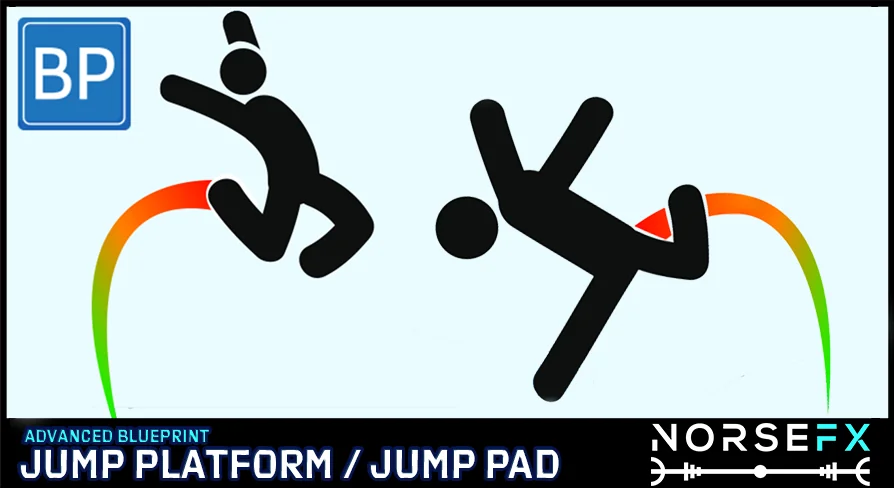
When a character steps onto a jump platform, the launch mechanics must reliably carry the player to an exact destination without breaking during level revisions. In conventional setups, such as the legacy C++ jump pad found in Unreal Tournament, the launch base and the target coordinate are bound within a single Blueprint. Adjusting the launch base requires shifting an internal 3D gizmo, meaning any repositioning of the pad inherently drags the landing coordinate along with it. Separating the launch mechanism and the landing zone into two completely distinct Blueprints fundamentally changes that workflow, allowing level designers to position each endpoint on its own terms.
Separating Jump Pad and Landing Location into Independent Blueprints
By dividing the jump pad and the landing point into two standalone Blueprints, spatial dependencies between the launch base and the touchdown marker are eliminated. In older unified implementations, shifting a platform to clear a new piece of geometry or repositioning an arena obstacle meant manually re-aligning the target gizmo to prevent the player from hitting a wall or missing a ledge. With a dual-Blueprint architecture, moving the launch pad leaves the destination anchor intact in 3D space, and shifting the landing zone leaves the launch pad firmly rooted.
This independent structure directly addresses the common friction points of whiteboxing and level iteration. Whether building vertical arenas for shooters or timing-sensitive obstacle courses for platformers, designers can duplicate landing nodes across distinct ledges and freely reassign connections. The decoupling provides a modular workflow where landing targets serve as modular scene anchors rather than locked sub-components of an individual launch pad actor.
Dynamic Trajectory Recalculation Across Variable Distances
Moving either the platform or the landing target triggers an automatic recalculation of the jump trajectory. The visual scripting evaluates the distance between the two distinct actors and adjusts the velocity and arc necessary to bridge the gap. Because the underlying math accounts for shifting distances automatically, manual velocity tuning and trial-and-error trajectory testing are bypassed.
Level geometry frequently changes during production. A platform might be raised by several meters, moved across an open courtyard, or angled around cover. Because the Blueprint monitors the relative spatial relationship between the launch pad and the assigned landing location, moving either object instantly updates the pathing. This dynamic recalculation ensures that player velocity and vertical lift scale appropriately to reach the target coordinates without requiring designers to recalculate launch vectors by hand.
Assigning Targets via Actor Pickers and Dropdowns
Connecting a jump platform to a destination actor takes place directly within the editor viewport and details panel. When a new landing zone is needed, designers drag a landing location Blueprint into the scene. From there, assigning that location to a corresponding jump pad requires only selecting the pad and choosing the target through an object picker or a standard drop-down menu.
This assignment method allows rapid reconfiguration of aerial pathways. If an arena layout changes and a jump pad needs to send players to an upper sniper nest instead of a ground-level courtyard, the developer simply drops the new landing target into place and selects it from the jump pad interface. Multiple pads can point to distinct landing locations throughout an environment, and swapping paths during level testing requires no graph adjustments or internal parameter rewrites.
Multi-Console, Multiplayer, and Single-Player Blueprint Execution
The system is built 100% in Blueprints, avoiding C++ dependencies while retaining full flexibility for modifications. This visual scripting foundation is configured to function seamlessly across both single-player campaigns and networked multiplayer environments. Player launches and mid-air trajectories synchronize reliably across clients without breaking authority checks or character movement states.
In addition to networked multiplayer and single-player readiness, the tool is structured for multi-console support. Because it avoids proprietary code hooks and relies on native Blueprint logic, the system translates cleanly across target platforms. Developers can modify the launch behavior, add custom triggers, or hook into character animation blueprints without needing to recompile engine code or maintain platform-specific C++ branches.
Application in First-Person Shooters and Platformer Environments
Jump pads serve fundamentally different roles depending on camera perspective and gameplay pacing. In first-person shooters, rapid vertical elevation and predictable transit arcs allow players to clear contested lanes or contest high-ground positions while maintaining weapon aim. In third-person titles and precision platformers, jump pads test mid-air control, landing timing, and environmental routing.
Because this system integrates directly with character movement setups and animation blueprints, it adapts easily to both first-person and third-person templates. Whether a project demands instant, high-speed launches across vast competitive shooter maps or precisely tuned arcs between floating platformer surfaces, the dual-Blueprint structure keeps level adjustments fast. Full documentation and a walkthrough video provide clear references for setup, integration, and modification across diverse game genres.
 Humans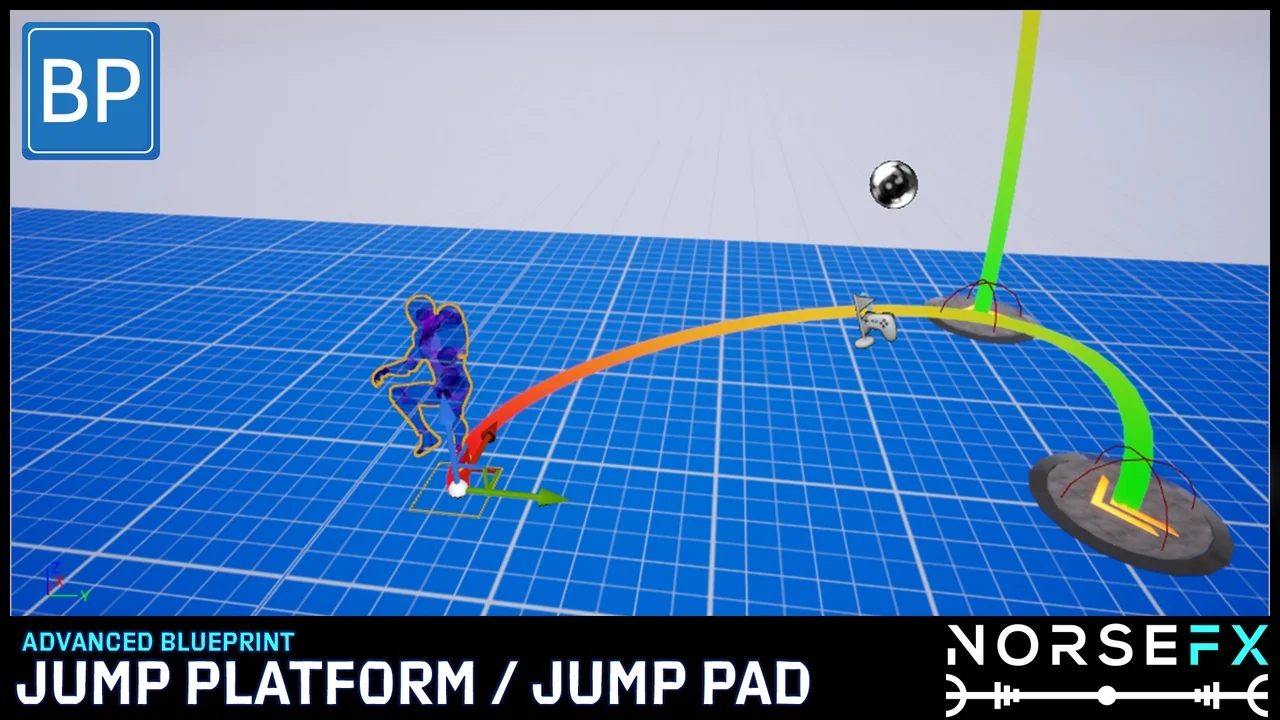
 Humans
 Humans
 Humans