"fa182e0cd0a6ea73"{"id":"1001785","slug":"advance-interactive-story","title":"Advance Interactive Story","category":"Gameplay Features","engine":"5.4 - 5.5","assetVersion":"Asset Version: 3.2","engineVersion":"Engine Version: 5.4 - 5.5","tag":"Gameplay Features","accent":"blue","visual":"mech","summary":"Explore Advance Interactive Story, featuring a custom graph editor, Level Sequencer QTE tracks, diverse interaction archetypes, and dynamic UI widgets.","platform":"Unreal Engine","publishedAt":"2026-10-21T07:39:02.745Z","updatedAt":"2026-10-21T07:39:02.745Z","sourceNotes":[],"fileContents":[],"compatibility":["Unreal Engine","Asset Version: 3.2","Engine Version: 5.4 - 5.5"],"featuredImage":{"alt":"Advance Interactive Story","src":"/wp-content/uploads/published/2026/10/3645516ec547-921aee0c-cce1-4fa4-939a-ae846687693b-e9e31d80cf.webp"},"hasDownloadLink":true,"downloads":0,"terms":[{"taxonomy":"category","slug":"gameplay-features-tools-and-plugins","name":"Gameplay Features"}],"galleryImages":[{"src":"/wp-content/uploads/published/2026/10/524ff266e1da-85c37235-2cd7-4b54-b9b8-13fabff0a8aa-2c38cbbb67.webp","alt":"Advance Interactive Story"},{"src":"/wp-content/uploads/published/2026/10/36f6be0633a8-713b9794-1485-4a78-9b61-5d895872ae0a-0430212c75.webp","alt":"Advance Interactive Story"},{"src":"/wp-content/uploads/published/2026/10/d6a22dbbee98-02e778c5-f497-418c-9940-86efdd9b2893-b67bd46fdf.webp","alt":"Advance Interactive Story"},{"src":"/wp-content/uploads/published/2026/10/6fe28c9f9adf-6386e1eb-08ad-456f-90ec-e4f1312eeee0-6839644cba.webp","alt":"Advance Interactive Story"},{"src":"/wp-content/uploads/published/2026/10/cb3afcadba70-96caac27-2b3b-4ba3-855d-f244ad038f42-9e44f3f2f7.webp","alt":"Advance Interactive Story"},{"src":"/wp-content/uploads/published/2026/10/7f09e3ebff9b-2f213559-4db5-41f6-827a-fd8f9189b775-f7dff3cad7.webp","alt":"Advance Interactive Story"},{"src":"/wp-content/uploads/published/2026/10/6cb6ddc69355-b27986a2-c5ad-413b-8b1c-48b28633c6ba-194e121606.webp","alt":"Advance Interactive Story"}],"accessPanel":{"kind":"resource","title":"Download this resource","eyebrow":"Free Download","message":"Log in or create a free account to start your download.","fileName":"Advance Interactive Story.7z","safetyNote":"Resources are manually reviewed before listing to improve quality and reduce obvious risks.","actionLabel":"Download Free","resourceType":"Resource archive"},"contentHtml":"\u003cp\u003eCinematic adventure titles, story-driven thrillers, and narrative set pieces often depend on precise player input to punctuate dramatic beats. When gameplay transitions into dynamic cutscenes or branching dialogue sequences, designers need structural tools that bridge logic flow with screen presentation. Advance Interactive Story addresses this production space by pairing visual node orchestration with direct timeline hooks, allowing narrative pacing to stay tightly aligned with player agency.\u003c/p\u003e \u003ch2\u003eStructuring Narrative Flow with the Custom Graph Editor and Story Triggers\u003c/h2\u003e\n\u003cp\u003eBranching adventures require clear top-down organization to keep diverging outcomes manageable. The central node structure in Advance Interactive Story relies on a Custom Graph Editor designed to map, arrange, and manage scene logic visually. Instead of scattering condition checks across detached scripts, developers can plot the flow of an encounter directly within a dedicated node canvas.\u003c/p\u003e\n\u003cp\u003eWorking alongside the graph editor, Story Triggers act as the execution bridges throughout a scene. These triggers fire narrative shifts, activate player prompts, and direct logic paths based on earlier choices or player performance. By placing Story Triggers at pivotal transition points, project teams maintain clear oversight of how one dramatic beat hands off control to the next. The node visualizer makes it possible to audit complex branches, trace logic chains, and track how specific failures or successes alter the ongoing path without losing track of broader scene progression.\u003c/p\u003e \u003ch2\u003eCinematic Precision via Custom QTE Tracks for Level Sequencer\u003c/h2\u003e\n\u003cp\u003eAligning interactive prompts to pre-rendered or real-time cinematic animation presents a persistent timeline challenge. When an action occurs on screen—such as dodging a falling beam or catching a ledge—the input window must align flawlessly with the character's keyframes. Advance Interactive Story provides Custom QTE Tracks built directly for Level Sequencer to solve this synchronization problem.\u003c/p\u003e\n\u003cp\u003eBy nesting interaction tracks directly within Level Sequencer, animators and designers can scrub through the cinematic timeline to position input windows down to the exact frame. A prompt can appear precisely as a fist is thrown, give the player an explicit window to react, and instantly route the sequencer to alternate shots or animations depending on whether the input succeeded or expired. This tight timeline binding eliminates loose guesswork and removes the disconnect that often happens when UI prompts run on disconnected timers separate from scene cinematics.\u003c/p\u003e \u003ch2\u003eInput Archetypes: Pacing from Deliberate Choices to Rapid Execution\u003c/h2\u003e\n\u003cp\u003eDifferent narrative situations demand completely different physical responses from the player. A tense conversation requires thoughtful pause, while a frantic escape demands rapid finger work. Advance Interactive Story covers this spectrum by grouping interactions into several distinct input profiles:\u003c/p\u003e\n\u003cul\u003e \u003cli\u003e\u003cstrong\u003eQuick Time Events:\u003c/strong\u003e Standard windowed prompts where a player must hit a designated button before time runs out.\u003c/li\u003e \u003cli\u003e\u003cstrong\u003eNo Time Events:\u003c/strong\u003e Decision points and prompts free of ticking clocks, ideal for deliberate story choices, dialogue decisions, or unhurried explorations.\u003c/li\u003e \u003cli\u003e\u003cstrong\u003eButton Hold Events:\u003c/strong\u003e Interactions requiring sustained input, useful for mechanical actions like prying open heavy doors, steadying breath, or charging up equipment.\u003c/li\u003e \u003cli\u003e\u003cstrong\u003eButton Mash Events:\u003c/strong\u003e High-energy sequences where players repeatedly tap an input to overcome resistance, power through physical struggles, or break free from grapples.\u003c/li\u003e \u003cli\u003e\u003cstrong\u003eCombo Events:\u003c/strong\u003e Structured multi-button sequences that require memorization or rapid pattern recognition to execute complex choreography.\u003c/li\u003e\n\u003c/ul\u003e\n\u003cp\u003eThis variety prevents narrative set pieces from feeling monotonous. By moving fluidly between sustained holds, rhythmic combos, and sudden single-button reactions, designers can match physical player engagement to the exact emotional tone of the scene.\u003c/p\u003e \u003ch2\u003eTension Mechanics with Aim \u0026 Shoot and Heartbeat Events\u003c/h2\u003e\n\u003cp\u003eBeyond traditional button-matching prompts, Advance Interactive Story includes specialized interaction models aimed at building sustained suspense. Two notable mechanics included in the framework are Aim \u0026 Shoot Events and Heartbeat Events.\u003c/p\u003e\n\u003cp\u003eAim \u0026 Shoot Events inject sudden action-oriented gameplay into cutscenes. Rather than simply pressing an icon when it flashes, the player must steer a target reticle and fire accurately within the allotted moment. This setup suits standoff sequences, desperate defensive shots, or precision interactions during chase scenes.\u003c/p\u003e\n\u003cp\u003eHeartbeat Events serve horror, stealth, and high-tension scenarios. These events simulate psychological strain, challenging the player to time inputs to an irregular pulse or keep steady during life-or-death hiding sequences. By transforming physiological tension into a tangible mechanic, developers can stretch out suspense during scenes where traditional combat inputs would break the mood.\u003c/p\u003e \u003ch2\u003eVisual Presentation with Highly Customizable QTE Widgets\u003c/h2\u003e\n\u003cp\u003eUser interface readability is critical during split-second interactions. Prompts must be instantly recognizable without obstructing key cinematic acting on screen. Advance Interactive Story includes Highly Customizable QTE Widgets, giving creators control over how prompts manifest visually across different game genres.\u003c/p\u003e\n\u003cp\u003eBecause the widgets can be adjusted to match disparate visual styles, teams can tailor button iconography, progress bars, countdown rings, and success or failure markers to fit their project aesthetic. A grim survival horror game can adopt subdued, minimal HUD cues, while a stylized action title can lean into bold, high-contrast indicators. Clear visual styling ensures that when an intense Button Mash or Combo Event begins, players focus entirely on the dramatic action rather than deciphering an unclear interface.\u003c/p\u003e \u003ch2\u003eImplementation Scenarios and Technical Compatibility\u003c/h2\u003e\n\u003cp\u003eThe system is purpose-built for interactive dramas, cinematic adventures, and narrative-driven action titles where storytelling takes center stage. In addition to standalone narrative projects, Advance Interactive Story is compatible with the Reactive Turn-Based RPG Template. This compatibility lets turn-based battle systems incorporate interactive quick time events, timed defenses, or dramatic story triggers directly into combat loops and boss cutscenes without rebuilding baseline logic.\u003c/p\u003e\n\u003cp\u003eSolo creators and cinematic design teams benefit most from this toolkit. By removing the need to build a custom graph editor from scratch or engineer custom sequencer tracks, the package frees developers to focus on scene direction, animation quality, and narrative branching.\u003c/p\u003e\n\n\u003ch2\u003eExplore Similar Assets\u003c/h2\u003e\n\u003cul\u003e\n\u003cli\u003e\u003ca href=\"https://3dcghub.com/story-framework-5-2-interactive-template/\" title=\"Story Framework 5.2 - Interactive Template\"\u003eStory Framework 5.2 - Interactive Template\u003c/a\u003e\u003c/li\u003e\n\u003cli\u003e\u003ca href=\"https://3dcghub.com/advanced-interact-foliage-replace-instances-with-interactive-actors-and-effects/\" title=\"Advanced Interact Foliage – Replace Instances with Interactive Actors \u0026amp; Effects\"\u003eAdvanced Interact Foliage – Replace Instances with Interactive Actors \u0026amp; Effects\u003c/a\u003e\u003c/li\u003e\n\u003cli\u003e\u003ca href=\"https://3dcghub.com/first-person-story-adventure-template/\" title=\"First Person Story Adventure Template\"\u003eFirst Person Story Adventure Template\u003c/a\u003e\u003c/li\u003e\n\u003cli\u003e\u003ca href=\"https://3dcghub.com/tile-based-minimap/\" title=\"Tile Based Minimap\"\u003eTile Based Minimap\u003c/a\u003e\u003c/li\u003e\n\u003cli\u003e\u003ca href=\"https://3dcghub.com/customizable-interaction-plugin/\" title=\"Customizable Interaction Plugin\"\u003eCustomizable Interaction Plugin\u003c/a\u003e\u003c/li\u003e\n\u003c/ul\u003e","contentTextLength":6919,"navigation":{"current":71,"total":3789,"previous":{"id":"1001786","slug":"advanced-survival-horror","title":"Advanced Survival Horror","category":"Action-Adventure","platform":"Unreal Engine","updatedAt":"2026-10-21T07:39:38.733Z"},"next":{"id":"1001784","slug":"2-5d-platformer-game-template","title":"2.5D Platformer Game Template","category":"Platformer","platform":"Unreal Engine","updatedAt":"2026-10-21T07:37:22.413Z"}},"relatedResources":[{"id":"11138","slug":"story-framework-5-2-interactive-template","title":"Story Framework 5.2 - Interactive Template","category":"Gameplay Features","engine":"5.5+","assetVersion":"Engine version: 5.5+","engineVersion":"Asset Version:3.1","tag":"Gameplay Features","accent":"blue","visual":"city","summary":"Kickstart your narrative project with the Story Framework 5.2 - Interactive Template for Unreal Engine 5. This comprehensive toolset features interaction systems, dialogue frameworks, and saving/loading capabilities.","platform":"Unreal Engine","publishedAt":"2026-03-03T17:00:04.000Z","updatedAt":"2026-04-19T15:48:15.000Z","sourceNotes":[],"fileContents":[],"compatibility":["Unreal Engine","Engine version: 5.5+","Asset Version: 3.1"],"featuredImage":{"alt":"Story Framework 5.2 - Interactive Template","src":"https://3dcghub.com/wp-content/uploads/2026/03/8af5b69f-ef2a-49cc-b74e-7cadca705f20.webp"},"hasDownloadLink":true,"downloads":8},{"id":"1000788","slug":"advanced-interact-foliage-replace-instances-with-interactive-actors-and-effects","title":"Advanced Interact Foliage – Replace Instances with Interactive Actors \u0026 Effects","category":"Gameplay Features","engine":"5.7","assetVersion":"Asset Version: 1.0.5","engineVersion":"Engine Version: 5.7","tag":"Gameplay Features","accent":"blue","visual":"mech","summary":"An Unreal Engine plugin that dynamically replaces foliage instances with interactive actors for harvesting, effects, and gameplay, then restores them seamlessly","platform":"Unreal Engine","publishedAt":"2026-07-30T12:27:45.556Z","updatedAt":"2026-07-30T12:27:45.556Z","sourceNotes":[],"fileContents":[],"compatibility":["Unreal Engine","Asset Version: 1.0.5","Engine Version: 5.7"],"featuredImage":{"alt":"Advanced Interact Foliage – Replace Instances with Interactive Actors \u0026 Effects","src":"/wp-content/uploads/published/2026/07/b6df20de3a69-821432a7-35ec-4e42-9126-fe5274ddde78-c0e9dc10c5.webp"},"hasDownloadLink":true,"downloads":0},{"id":"1001578","slug":"first-person-story-adventure-template","title":"First Person Story Adventure Template","category":"Humans","engine":"5.0+","assetVersion":"","engineVersion":"Engine Version: 5.0+","tag":"Humans","accent":"blue","visual":"mech","summary":"Build interactive walking simulators with the First Person Story Adventure Template, featuring master blueprints, journals, interactive drawers, and doors.","platform":"Unreal Engine","publishedAt":"2026-10-10T08:51:14.227Z","updatedAt":"2026-10-10T08:51:14.227Z","sourceNotes":[],"fileContents":[],"compatibility":["Unreal Engine","Engine Version: 5.0+"],"featuredImage":{"alt":"First Person Story Adventure Template","src":"/wp-content/uploads/published/2026/10/76b62200fed2-9a54eb3b-381c-412c-9ca5-c1f7e0c9ac92-0399520407.webp"},"hasDownloadLink":true,"downloads":0}]}
Gameplay Features
Advance Interactive Story
Explore Advance Interactive Story, featuring a custom graph editor, Level Sequencer QTE tracks, diverse interaction archetypes, and dynamic UI widgets.
Cinematic adventure titles, story-driven thrillers, and narrative set pieces often depend on precise player input to punctuate dramatic beats. When gameplay transitions into dynamic cutscenes or branching dialogue sequences, designers need structural tools that bridge logic flow with screen presentation. Advance Interactive Story addresses this production space by pairing visual node orchestration with direct timeline hooks, allowing narrative pacing to stay tightly aligned with player agency.
Structuring Narrative Flow with the Custom Graph Editor and Story Triggers
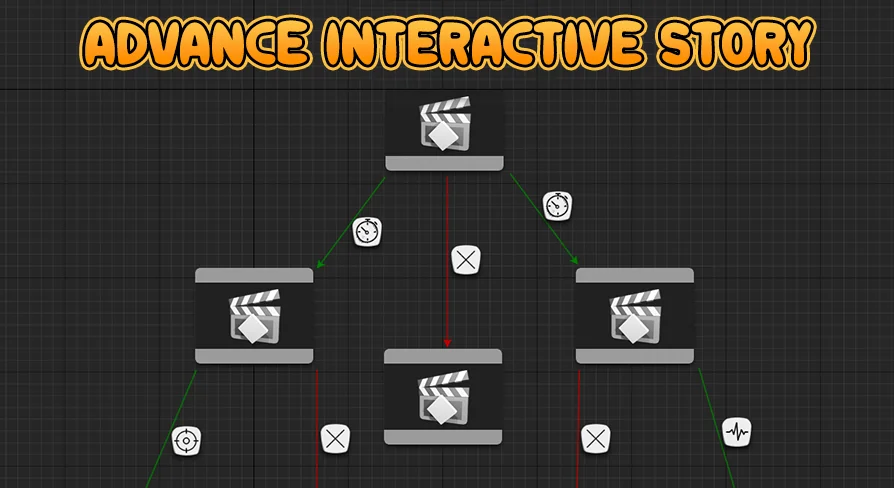
Branching adventures require clear top-down organization to keep diverging outcomes manageable. The central node structure in Advance Interactive Story relies on a Custom Graph Editor designed to map, arrange, and manage scene logic visually. Instead of scattering condition checks across detached scripts, developers can plot the flow of an encounter directly within a dedicated node canvas.
Working alongside the graph editor, Story Triggers act as the execution bridges throughout a scene. These triggers fire narrative shifts, activate player prompts, and direct logic paths based on earlier choices or player performance. By placing Story Triggers at pivotal transition points, project teams maintain clear oversight of how one dramatic beat hands off control to the next. The node visualizer makes it possible to audit complex branches, trace logic chains, and track how specific failures or successes alter the ongoing path without losing track of broader scene progression.
Cinematic Precision via Custom QTE Tracks for Level Sequencer
Aligning interactive prompts to pre-rendered or real-time cinematic animation presents a persistent timeline challenge. When an action occurs on screen—such as dodging a falling beam or catching a ledge—the input window must align flawlessly with the character's keyframes. Advance Interactive Story provides Custom QTE Tracks built directly for Level Sequencer to solve this synchronization problem.
By nesting interaction tracks directly within Level Sequencer, animators and designers can scrub through the cinematic timeline to position input windows down to the exact frame. A prompt can appear precisely as a fist is thrown, give the player an explicit window to react, and instantly route the sequencer to alternate shots or animations depending on whether the input succeeded or expired. This tight timeline binding eliminates loose guesswork and removes the disconnect that often happens when UI prompts run on disconnected timers separate from scene cinematics.
Input Archetypes: Pacing from Deliberate Choices to Rapid Execution
Different narrative situations demand completely different physical responses from the player. A tense conversation requires thoughtful pause, while a frantic escape demands rapid finger work. Advance Interactive Story covers this spectrum by grouping interactions into several distinct input profiles:
Quick Time Events: Standard windowed prompts where a player must hit a designated button before time runs out.
No Time Events: Decision points and prompts free of ticking clocks, ideal for deliberate story choices, dialogue decisions, or unhurried explorations.
Button Hold Events: Interactions requiring sustained input, useful for mechanical actions like prying open heavy doors, steadying breath, or charging up equipment.
Button Mash Events: High-energy sequences where players repeatedly tap an input to overcome resistance, power through physical struggles, or break free from grapples.
Combo Events: Structured multi-button sequences that require memorization or rapid pattern recognition to execute complex choreography.
This variety prevents narrative set pieces from feeling monotonous. By moving fluidly between sustained holds, rhythmic combos, and sudden single-button reactions, designers can match physical player engagement to the exact emotional tone of the scene.
Tension Mechanics with Aim & Shoot and Heartbeat Events
Beyond traditional button-matching prompts, Advance Interactive Story includes specialized interaction models aimed at building sustained suspense. Two notable mechanics included in the framework are Aim & Shoot Events and Heartbeat Events.
Aim & Shoot Events inject sudden action-oriented gameplay into cutscenes. Rather than simply pressing an icon when it flashes, the player must steer a target reticle and fire accurately within the allotted moment. This setup suits standoff sequences, desperate defensive shots, or precision interactions during chase scenes.
Heartbeat Events serve horror, stealth, and high-tension scenarios. These events simulate psychological strain, challenging the player to time inputs to an irregular pulse or keep steady during life-or-death hiding sequences. By transforming physiological tension into a tangible mechanic, developers can stretch out suspense during scenes where traditional combat inputs would break the mood.
Visual Presentation with Highly Customizable QTE Widgets
User interface readability is critical during split-second interactions. Prompts must be instantly recognizable without obstructing key cinematic acting on screen. Advance Interactive Story includes Highly Customizable QTE Widgets, giving creators control over how prompts manifest visually across different game genres.
Because the widgets can be adjusted to match disparate visual styles, teams can tailor button iconography, progress bars, countdown rings, and success or failure markers to fit their project aesthetic. A grim survival horror game can adopt subdued, minimal HUD cues, while a stylized action title can lean into bold, high-contrast indicators. Clear visual styling ensures that when an intense Button Mash or Combo Event begins, players focus entirely on the dramatic action rather than deciphering an unclear interface.
Implementation Scenarios and Technical Compatibility
The system is purpose-built for interactive dramas, cinematic adventures, and narrative-driven action titles where storytelling takes center stage. In addition to standalone narrative projects, Advance Interactive Story is compatible with the Reactive Turn-Based RPG Template. This compatibility lets turn-based battle systems incorporate interactive quick time events, timed defenses, or dramatic story triggers directly into combat loops and boss cutscenes without rebuilding baseline logic.
Solo creators and cinematic design teams benefit most from this toolkit. By removing the need to build a custom graph editor from scratch or engineer custom sequencer tracks, the package frees developers to focus on scene direction, animation quality, and narrative branching.
 Gameplay Features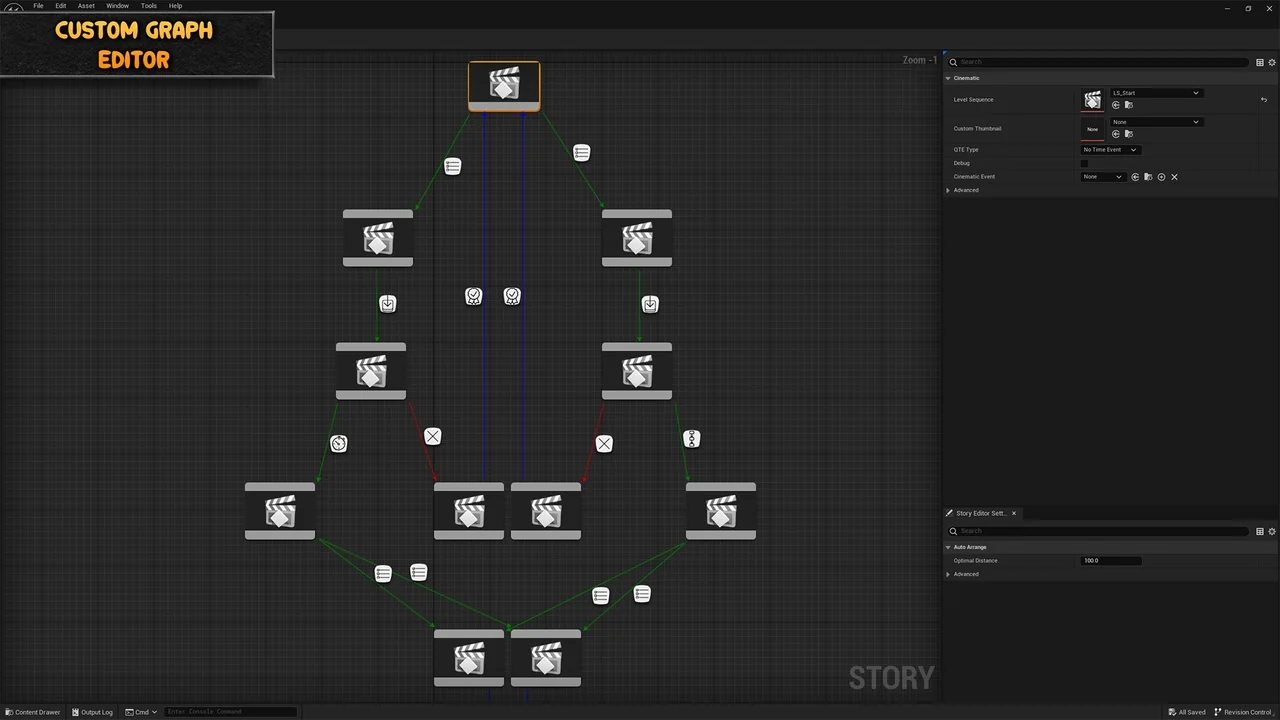
 Gameplay Features
 Gameplay Features
 Humans