"031373f479d9561a"{"id":"1000210","slug":"ui-umg-pack-clara","title":"UI (UMG) Pack - Clara","category":"Game Mechanics","engine":"5.0+","assetVersion":"","engineVersion":"Engine Version: 5.0+","tag":"Game Mechanics","accent":"blue","visual":"mech","summary":"A fully functional futuristic UMG interface package featuring 104 UI images and 11 example widgets, including leaderboards, 3D widgets, and store layouts.","platform":"Unreal Engine","publishedAt":"2026-06-25T17:07:23.481Z","updatedAt":"2026-06-25T17:07:23.481Z","sourceNotes":[],"fileContents":[],"compatibility":["Unreal Engine","Engine Version: 5.0+"],"featuredImage":{"alt":"UI (UMG) Pack - Clara","src":"/wp-content/uploads/published/2026/06/1bfe9418bad5-db249731-1083-49f5-86d9-ce188403dedd-166eeb1db5.webp"},"hasDownloadLink":true,"downloads":0,"terms":[{"taxonomy":"category","slug":"game-mechanics","name":"Game Mechanics"}],"galleryImages":[{"src":"/wp-content/uploads/published/2026/06/e950b62eb1ca-a33fa0da-87a7-4615-a4a5-28e4360dbfad-cfde26a761.webp","alt":"UI (UMG) Pack - Clara"},{"src":"/wp-content/uploads/published/2026/06/b4cba3f57895-ef29cb14-6db4-4249-b686-3108f18e995a-72d678aef0.webp","alt":"UI (UMG) Pack - Clara"},{"src":"/wp-content/uploads/published/2026/06/4f7658291f67-d902dc39-794f-4da2-bcd3-8f7d27711091-ff03186a65.webp","alt":"UI (UMG) Pack - Clara"},{"src":"/wp-content/uploads/published/2026/06/a338819afcf5-608a940f-0973-4343-8ba2-8472e83dd03c-d3fbca3ae9.webp","alt":"UI (UMG) Pack - Clara"},{"src":"/wp-content/uploads/published/2026/06/762e0477c3cf-0ffc393e-3a74-454c-81c0-2533d24e88a2-91f73b166d.webp","alt":"UI (UMG) Pack - Clara"},{"src":"/wp-content/uploads/published/2026/06/3e0a0287de6d-80c94b18-5eea-444f-bbfe-9b87383f09b9-1933df523d.webp","alt":"UI (UMG) Pack - Clara"},{"src":"/wp-content/uploads/published/2026/06/845ed9219911-1e5bb1ba-17a9-4189-8867-118d35ba9fa3-66319606fd.webp","alt":"UI (UMG) Pack - Clara"},{"src":"/wp-content/uploads/published/2026/06/8a7044ccae6d-f678959d-2f27-463c-a4fe-0ef14fedc559-2f247cfabc.webp","alt":"UI (UMG) Pack - Clara"},{"src":"/wp-content/uploads/published/2026/06/161e08966f7a-8eaaf286-f53c-48a8-a4fa-bdb06900f852-89279362bd.webp","alt":"UI (UMG) Pack - Clara"},{"src":"/wp-content/uploads/published/2026/06/b70cca7192f2-f4c1de46-e7e0-4b09-a307-0271e7ebbb73-d9a3ce7a99.webp","alt":"UI (UMG) Pack - Clara"}],"accessPanel":{"kind":"resource","title":"Download this resource","eyebrow":"Free Download","message":"Log in or create a free account to start your download.","fileName":"Content.7z","safetyNote":"Resources are manually reviewed before listing to improve quality and reduce obvious risks.","actionLabel":"Download Free","resourceType":"Resource archive"},"contentHtml":"\u003ch2\u003eConstructing a Clean, Futuristic GUI\u003c/h2\u003e\n\u003cp\u003eModern game development often requires interfaces that do not distract from the core experience while still delivering essential information. Projects aiming for a clean, futuristic aesthetic face the challenge of balancing visual design with clear user interaction. The UI (UMG) Pack - Clara provides a foundational toolkit for constructing these environments, supplying developers with a fully functional set of interface elements. Structured through a collection of over 104 distinct UI images, the package serves as a comprehensive graphical base. These images act as the raw building blocks for constructing custom Graphical User Interfaces (GUI) and Heads-Up Displays (HUD), ensuring that menus and on-screen elements maintain a consistent style across the entire project.\u003c/p\u003e\n\u003ch2\u003eImplementing the 11 Example Widgets\u003c/h2\u003e\n\u003cp\u003eRather than forcing developers to assemble every screen from scratch using only the raw image files, the pack accelerates implementation by including over 11 example widgets. These pre-constructed UMG layouts demonstrate how the individual UI images can be combined into complex, interactive screens. Because the package is fully functional and driven by underlying Blueprints and scripts, these examples are more than just static mockups. They contain the necessary logic framework to respond to user input, making them ready to be adapted into a playable game environment. Developers can dissect these example widgets to understand the intended design language or directly modify them to fit specific gameplay requirements.\u003c/p\u003e\n\u003ch2\u003eEstablishing Login and Subscribe Gateways\u003c/h2\u003e\n\u003cp\u003eFor titles operating within a live-service model or requiring user authentication before accessing online features, frontend menus are the first point of contact for the player. The pack addresses this specific project phase by including dedicated Login and Subscribe widgets. These layouts provide the necessary input fields, submission areas, and structural framing required for account creation and user verification screens. By utilizing these pre-built functional examples, developers can quickly establish the gateway to their multiplayer or online services, ensuring the player's first interaction with the game features the same clean, futuristic design as the primary HUD.\u003c/p\u003e\n\u003ch2\u003eStructuring Competitive Leader Boards\u003c/h2\u003e\n\u003cp\u003eOnce players are authenticated and engaging with the game, tracking performance and fostering competition often requires dedicated interface screens. The inclusion of a Leader Board widget supplies the necessary UMG structure to display player rankings, scores, and statistics. Implementing a leaderboard requires careful organization of rows, columns, and data formatting to ensure readability. The example widget provides a functioning layout that handles this data presentation, allowing developers to connect their own backend scoring systems to the pre-formatted UI elements, maintaining visual consistency while handling dynamic player data.\u003c/p\u003e\n\u003ch2\u003eDeveloping In-Game Commerce with Store Widgets\u003c/h2\u003e\n\u003cp\u003eIn-game economies, inventory management, and character progression systems rely heavily on clear, accessible storefronts. The package includes a Store widget designed to handle the presentation of purchasable items, upgrades, or unlockables. Designing a functional store interface involves managing item grids, price displays, selection highlights, and user prompts. The provided example widget tackles this structural challenge, offering a functional blueprint for commerce interfaces. Developers can adapt this layout to serve as an armory, a skill tree shop, or a currency storefront, utilizing the included futuristic UI images to frame the content cleanly.\u003c/p\u003e\n\u003ch2\u003eManaging Player Configuration via Setting Menus\u003c/h2\u003e\n\u003cp\u003eBeyond gameplay and commerce, player configuration is a mandatory component of any complete application. The Setting widget provides the foundational layout for options menus, allowing users to adjust their experience. While the specific options will vary by project, the provided UMG example establishes the structural hierarchy needed for categorized menus and user adjustments. This ensures that the system menus share the same polished aesthetic as the active gameplay HUD. Developers looking to customize the underlying scripts for these settings can reference the package's documentation and utilize the available Discord support for guidance during implementation.\u003c/p\u003e\n\u003ch2\u003eDelivering Contextual Feedback with Popups and Tool Tips\u003c/h2\u003e\n\u003cp\u003eEffective interface design often requires delivering information without permanently cluttering the screen. To support contextual user feedback, the package includes functional Tool Tip and Popup widgets. Tool tips are essential for explaining complex mechanics, detailing store items, or clarifying HUD icons when the user interacts with them. The popup widget serves as an interruptive element for crucial notifications, warnings, or action confirmations. Both elements utilize the underlying script and Blueprint functionality to appear and disappear dynamically based on user interaction, keeping the primary interface clean while remaining highly informative.\u003c/p\u003e\n\u003ch2\u003eIntegrating Diegetic Elements with 3D Widgets\u003c/h2\u003e\n\u003cp\u003eImmersive, futuristic projects frequently utilize diegetic interfaces—menus and displays that exist directly within the 3D game world rather than being overlaid on the camera lens. The pack supports this advanced implementation through its 3D Widget example. By leveraging the engine's capability to project UMG layouts onto 3D surfaces, developers can create interactive computer terminals, holographic displays, or in-world keypads. The clean aesthetic of the 104 UI images is particularly well-suited for these diegetic applications, allowing the interface to blend naturally into sci-fi or modern environments while retaining full script functionality.\u003c/p\u003e\n\n\u003ch2\u003eContinue Browsing Similar Packs\u003c/h2\u003e\n\u003cul\u003e\n\u003cli\u003e\u003ca href=\"https://3dcghub.com/race-system/\" title=\"Race System\"\u003eRace System\u003c/a\u003e\u003c/li\u003e\n\u003cli\u003e\u003ca href=\"https://3dcghub.com/scratch-card-lottery-system/\" title=\"Scratch Card Lottery System\"\u003eScratch Card Lottery System\u003c/a\u003e\u003c/li\u003e\n\u003cli\u003e\u003ca href=\"https://3dcghub.com/hqui-progress-bars/\" title=\"HQUI: Progress Bars\"\u003eHQUI: Progress Bars\u003c/a\u003e\u003c/li\u003e\n\u003cli\u003e\u003ca href=\"https://3dcghub.com/motionui/\" title=\"MotionUI\"\u003eMotionUI\u003c/a\u003e\u003c/li\u003e\n\u003cli\u003e\u003ca href=\"https://3dcghub.com/acf-u-ascent-combat-framework-ultimate-v4-c-complete-action-rpg-creator/\" title=\"(ACF U) Ascent Combat Framework Ultimate V4- C++ Complete Action RPG Creator\"\u003e(ACF U) Ascent Combat Framework Ultimate V4- C++ Complete Action RPG Creator\u003c/a\u003e\u003c/li\u003e\n\u003c/ul\u003e","contentTextLength":6019,"navigation":{"current":1139,"total":3223,"previous":{"id":"1000211","slug":"visual-arts-workshop-environment-paintings-sculptings-visual-workshop","title":"Visual Arts Workshop Environment/ Paintings Sculptings ( Visual Workshop )","category":"Interior","platform":"Unreal Engine","updatedAt":"2026-06-25T17:29:09.139Z"},"next":{"id":"1000209","slug":"modular-sci-fi-base-indoor-outdoor-moon-theme","title":"Modular Sci-Fi Base - Indoor Outdoor - Moon Theme","category":"Sci-Fi","platform":"Unreal Engine","updatedAt":"2026-06-24T15:13:26.573Z"}},"relatedResources":[{"id":"10436","slug":"race-system","title":"Race System","category":"Game Mechanics","engine":"5.4+","assetVersion":"Engine version: 5.4+","engineVersion":"5.0","tag":"Game Mechanics","accent":"blue","visual":"audio","summary":"The Race System provides a robust blueprint-based foundation for managing racing mechanics, including position tracking, lap timing, and shortcut prevention. It is compatible with any vehicle blueprint and supports up to 16 players.","platform":"Unreal Engine","publishedAt":"2026-03-03T15:21:57.000Z","updatedAt":"2026-04-19T15:50:02.000Z","sourceNotes":[],"fileContents":[],"compatibility":["Unreal Engine","Engine version: 5.4+"],"featuredImage":{"alt":"Race System","src":"https://3dcghub.com/wp-content/uploads/2026/03/ad4f0d31-e83b-4c39-b7d2-cacb0a97069c.webp"},"hasDownloadLink":true,"downloads":0},{"id":"10458","slug":"scratch-card-lottery-system","title":"Scratch Card Lottery System","category":"Game Mechanics","engine":"5.3+","assetVersion":"Engine version: 5.3+","engineVersion":"4.27","tag":"Game Mechanics","accent":"blue","visual":"character","summary":"Enhance your game with a fully functional Scratch Card Lottery System. This asset includes customizable win probabilities, interactive widgets, and high-quality audio for a complete player experience.","platform":"Unreal Engine","publishedAt":"2026-03-03T15:26:41.000Z","updatedAt":"2026-04-19T15:50:01.000Z","sourceNotes":[],"fileContents":[],"compatibility":["Unreal Engine","Engine version: 5.3+"],"featuredImage":{"alt":"Scratch Card Lottery System","src":"https://3dcghub.com/wp-content/uploads/2026/03/a76ac459-02f0-43a9-a82a-f1bd86f0981c.webp"},"hasDownloadLink":true,"downloads":0},{"id":"15480","slug":"hqui-progress-bars","title":"HQUI: Progress Bars","category":"Widgets \u0026 Controls","engine":"4.26+,5.0+","assetVersion":"Engine version: 4.26+,5.0+","engineVersion":"4.19","tag":"Widgets \u0026 Controls","accent":"blue","visual":"animation","summary":"HQUI: Progress Bars offers a robust set of highly customizable UMG components for developers. This pack features advanced settings, gradients, and automated interpolation to elevate your game's user interface.","platform":"Unreal Engine","publishedAt":"2026-03-12T09:09:48.000Z","updatedAt":"2026-04-19T15:44:46.000Z","sourceNotes":[],"fileContents":[],"compatibility":["Unreal Engine","Engine version: 4.26+,5.0+"],"featuredImage":{"alt":"HQUI: Progress Bars","src":"https://3dcghub.com/wp-content/uploads/2026/03/327a22db-0f44-410f-93b6-73bd636562cb.webp"},"hasDownloadLink":true,"downloads":2}]}
Game Mechanics
UI (UMG) Pack - Clara
A fully functional futuristic UMG interface package featuring 104 UI images and 11 example widgets, including leaderboards, 3D widgets, and store layouts.
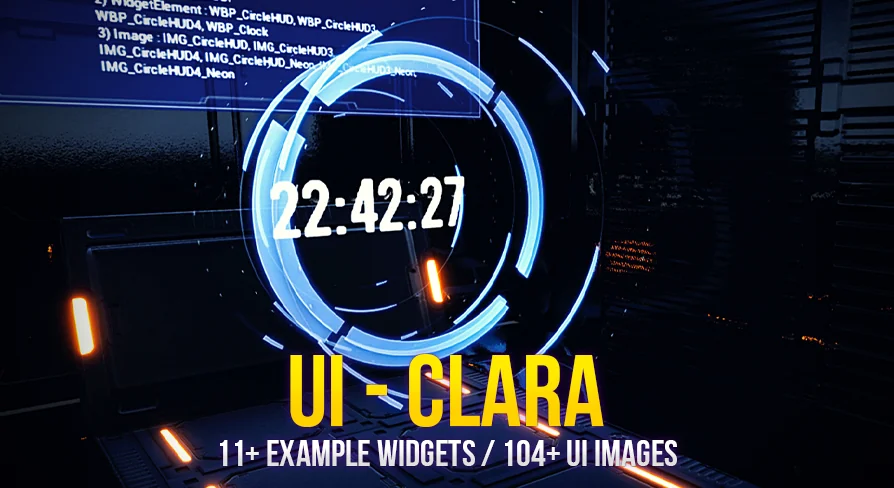
Modern game development often requires interfaces that do not distract from the core experience while still delivering essential information. Projects aiming for a clean, futuristic aesthetic face the challenge of balancing visual design with clear user interaction. The UI (UMG) Pack - Clara provides a foundational toolkit for constructing these environments, supplying developers with a fully functional set of interface elements. Structured through a collection of over 104 distinct UI images, the package serves as a comprehensive graphical base. These images act as the raw building blocks for constructing custom Graphical User Interfaces (GUI) and Heads-Up Displays (HUD), ensuring that menus and on-screen elements maintain a consistent style across the entire project.
Implementing the 11 Example Widgets
Rather than forcing developers to assemble every screen from scratch using only the raw image files, the pack accelerates implementation by including over 11 example widgets. These pre-constructed UMG layouts demonstrate how the individual UI images can be combined into complex, interactive screens. Because the package is fully functional and driven by underlying Blueprints and scripts, these examples are more than just static mockups. They contain the necessary logic framework to respond to user input, making them ready to be adapted into a playable game environment. Developers can dissect these example widgets to understand the intended design language or directly modify them to fit specific gameplay requirements.
Establishing Login and Subscribe Gateways
For titles operating within a live-service model or requiring user authentication before accessing online features, frontend menus are the first point of contact for the player. The pack addresses this specific project phase by including dedicated Login and Subscribe widgets. These layouts provide the necessary input fields, submission areas, and structural framing required for account creation and user verification screens. By utilizing these pre-built functional examples, developers can quickly establish the gateway to their multiplayer or online services, ensuring the player's first interaction with the game features the same clean, futuristic design as the primary HUD.
Structuring Competitive Leader Boards
Once players are authenticated and engaging with the game, tracking performance and fostering competition often requires dedicated interface screens. The inclusion of a Leader Board widget supplies the necessary UMG structure to display player rankings, scores, and statistics. Implementing a leaderboard requires careful organization of rows, columns, and data formatting to ensure readability. The example widget provides a functioning layout that handles this data presentation, allowing developers to connect their own backend scoring systems to the pre-formatted UI elements, maintaining visual consistency while handling dynamic player data.
Developing In-Game Commerce with Store Widgets
In-game economies, inventory management, and character progression systems rely heavily on clear, accessible storefronts. The package includes a Store widget designed to handle the presentation of purchasable items, upgrades, or unlockables. Designing a functional store interface involves managing item grids, price displays, selection highlights, and user prompts. The provided example widget tackles this structural challenge, offering a functional blueprint for commerce interfaces. Developers can adapt this layout to serve as an armory, a skill tree shop, or a currency storefront, utilizing the included futuristic UI images to frame the content cleanly.
Managing Player Configuration via Setting Menus
Beyond gameplay and commerce, player configuration is a mandatory component of any complete application. The Setting widget provides the foundational layout for options menus, allowing users to adjust their experience. While the specific options will vary by project, the provided UMG example establishes the structural hierarchy needed for categorized menus and user adjustments. This ensures that the system menus share the same polished aesthetic as the active gameplay HUD. Developers looking to customize the underlying scripts for these settings can reference the package's documentation and utilize the available Discord support for guidance during implementation.
Delivering Contextual Feedback with Popups and Tool Tips
Effective interface design often requires delivering information without permanently cluttering the screen. To support contextual user feedback, the package includes functional Tool Tip and Popup widgets. Tool tips are essential for explaining complex mechanics, detailing store items, or clarifying HUD icons when the user interacts with them. The popup widget serves as an interruptive element for crucial notifications, warnings, or action confirmations. Both elements utilize the underlying script and Blueprint functionality to appear and disappear dynamically based on user interaction, keeping the primary interface clean while remaining highly informative.
Integrating Diegetic Elements with 3D Widgets
Immersive, futuristic projects frequently utilize diegetic interfaces—menus and displays that exist directly within the 3D game world rather than being overlaid on the camera lens. The pack supports this advanced implementation through its 3D Widget example. By leveraging the engine's capability to project UMG layouts onto 3D surfaces, developers can create interactive computer terminals, holographic displays, or in-world keypads. The clean aesthetic of the 104 UI images is particularly well-suited for these diegetic applications, allowing the interface to blend naturally into sci-fi or modern environments while retaining full script functionality.
 Game Mechanics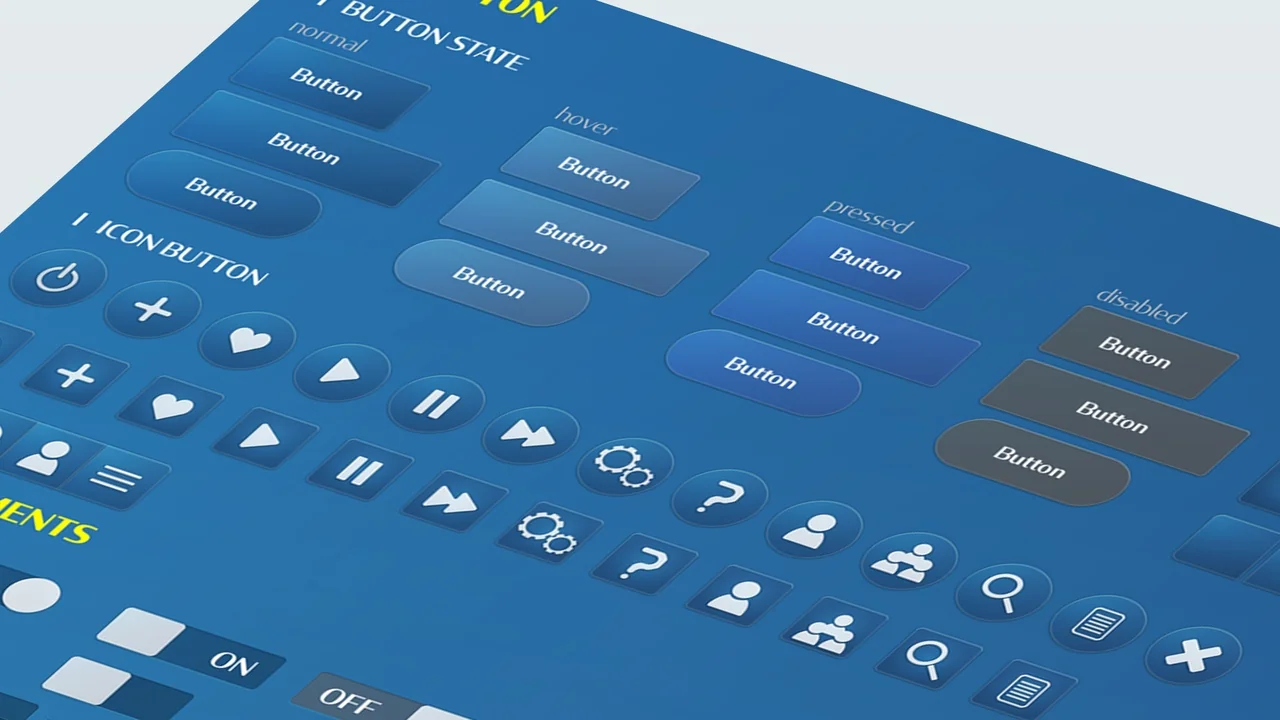
 Game Mechanics
 Game Mechanics
 Widgets & Controls