"7b46a695175d8694"{"id":"1000350","slug":"triangle-count-view-mode","title":"Triangle Count View Mode","category":"Engine Tools","engine":"5.7","assetVersion":"Asset Version: 1.0","engineVersion":"Engine Version: 5.7","tag":"Engine Tools","accent":"blue","visual":"mech","summary":"An Unreal Engine 5 editor plugin that visualizes geometry weight in the viewport by coloring meshes based on their LOD0 triangle count and providing live stats.","platform":"Unreal Engine","publishedAt":"2026-07-05T09:38:55.724Z","updatedAt":"2026-07-05T09:38:55.724Z","sourceNotes":[],"fileContents":[],"compatibility":["Unreal Engine","Asset Version: 1.0","Engine Version: 5.7"],"featuredImage":{"alt":"Triangle Count View Mode","src":"/wp-content/uploads/published/2026/07/6b5e4e85a086-b86b0fd6-ef58-4849-975a-e316f3c327c2-4c1b39bc58.webp"},"hasDownloadLink":true,"downloads":1,"terms":[{"taxonomy":"category","slug":"engine-tools-tools-and-plugins","name":"Engine Tools"}],"galleryImages":[{"src":"/wp-content/uploads/published/2026/07/8f7c0e677564-dd48375d-b038-434c-a939-d8afaeabfa60-622325d2e8.webp","alt":"Triangle Count View Mode"},{"src":"/wp-content/uploads/published/2026/07/13f35cd01678-32abded8-6bf9-43ea-943f-46984f59e538-5dae79b6f5.webp","alt":"Triangle Count View Mode"},{"src":"/wp-content/uploads/published/2026/07/7b24db2c2f45-b4777d28-6918-43f7-bb9f-8358e4a846c8-aca77a33d4.webp","alt":"Triangle Count View Mode"}],"accessPanel":{"kind":"resource","title":"Download this resource","eyebrow":"Free Download","message":"Log in or create a free account to start your download.","fileName":"Plugins.7z","safetyNote":"Resources are manually reviewed before listing to improve quality and reduce obvious risks.","actionLabel":"Download Free","resourceType":"Resource archive"},"contentHtml":"\u003cp\u003eThe Triangle Count View Mode operates as an Editor plugin for Unreal Engine 5, providing a direct visual representation of geometry weight across a project. Functioning similarly to the native Shader Complexity view mode, this diagnostic tool colors meshes directly within the viewport based on their LOD0 triangle count. By translating raw polygon data into immediate visual feedback, the system helps developers locate the heaviest meshes in a scene at a single glance. The plugin is built entirely as an editor-only utility, meaning it carries zero runtime impact and is completely excluded from packaged project builds.\u003c/p\u003e \u003ch2\u003ePost-Process and Custom Stencil Rendering\u003c/h2\u003e \u003cp\u003eTo overlay diagnostic colors without permanently altering project assets, the plugin utilizes a combination of post-processing and Custom Stencil rendering. Mesh materials are never modified during this viewport visualization process, ensuring the workflow remains entirely save-safe. Because many modern Unreal Engine projects rely heavily on custom depth and stencil buffers for gameplay features, the tool includes a configurable Custom Stencil range. By adjusting this range, technical artists can ensure the diagnostic overlay avoids any visual collisions with existing outline or highlight systems already active in the project.\u003c/p\u003e \u003cp\u003eProtecting project stability and preventing accidental data baking is a core part of the system's architecture. The script incorporates an auto-deactivate function that safely disables the view mode during critical editor transitions. The visualization automatically shuts down before a user initiates a Save operation, enters Play-in-Editor (PIE) mode, or closes the Unreal Engine editor entirely.\u003c/p\u003e \u003ch2\u003eAsset Compatibility and Per-Instance Counting\u003c/h2\u003e \u003cp\u003eThe visualization system evaluates a broad spectrum of asset types commonly utilized in modern pipelines. It natively supports standard Static Meshes and Skeletal Meshes, while also reading Nanite fallback proxies. For projects utilizing massive maps, the tool accurately processes World Partition external actors, ensuring that streamed assets are colored correctly when loaded into the editor viewport.\u003c/p\u003e \u003cp\u003eEvaluating dense environments requires specific handling for instanced geometry. The plugin performs per-instance counting for Foliage, Instanced Static Meshes (ISM), and Hierarchical Instanced Static Meshes (HISM). Rather than calculating an entire foliage cluster as a single merged block of data, the tool evaluates each individual instance. This precision allows level designers to pinpoint exact areas where instanced foliage might be exceeding optimization targets.\u003c/p\u003e \u003ch2\u003eColor Mapping and Interpolation Modes\u003c/h2\u003e \u003cp\u003eData readability is managed through per-mesh triangle count visualization driven by highly customizable color ranges. Users can define exactly how polygon density translates into viewport colors, tailoring the visual feedback to match specific project budgets. To handle different types of scene profiling, the tool provides three distinct interpolation modes:\u003c/p\u003e \u003cp\u003eThe Stepped interpolation mode breaks the triangle counts into discrete color bands, offering clear, separated categories for rapid asset auditing. The Smooth mode provides a continuous, fluid color gradient across the geometry, useful for identifying gradual increases in mesh density. When evaluating scenes with extreme variations in polygon counts—such as a highly detailed cinematic character standing next to low-resolution background props—the Smooth Log interpolation mode handles the wide dynamic range. This logarithmic scaling prevents massive outliers from skewing the color mapping of the entire scene.\u003c/p\u003e \u003ch2\u003eLive Viewport Statistics and the LOD0 Toggle\u003c/h2\u003e \u003cp\u003eAlongside the color overlays, the plugin generates an in-viewport legend that delivers continuous statistical feedback. This on-screen display updates in real-time to show the minimum, median, and maximum triangle counts currently being rendered by the diagnostic tool. Having live stats directly in the workspace eliminates the need to constantly open separate asset windows to verify polygon counts.\u003c/p\u003e \u003cp\u003eAccuracy is maintained through a dedicated Force LOD0 toggle. Standard viewport rendering often relies on distance-based Level of Detail (LOD) reductions, which can obscure the true baseline cost of an asset. Activating the Force LOD0 toggle bypasses these distance reductions, ensuring the displayed counts and colors reflect the absolute maximum geometry weight of the source meshes.\u003c/p\u003e \u003ch2\u003eCamera Radius Filter for High-Density Scenes\u003c/h2\u003e \u003cp\u003eAnalyzing geometry weight in massive open-world levels can strain editor performance if every single asset is calculated simultaneously. To maintain responsiveness, the plugin features a camera radius filter paired with an auto-follow mechanic. This targeted system restricts the triangle count visualization and calculations to a specific radius surrounding the user's camera.\u003c/p\u003e \u003cp\u003eAs the camera navigates through the environment, the analysis radius moves automatically alongside it. This localized evaluation method is specifically designed to support massive environments, allowing the tool to function smoothly even in complex scenes containing over one million actors.\u003c/p\u003e \u003ch2\u003eDiagnostics and Production Workflows\u003c/h2\u003e \u003cp\u003eThe combination of per-instance counting, live statistics, and localized radius filtering makes the plugin highly applicable across different stages of development. During early pre-production, it serves as a polygon budget diagnostic tool, helping technical directors establish and monitor geometry limits before mass asset generation begins. For world-building teams, the localized visualization streamlines foliage optimization in open worlds by immediately highlighting overly dense clusters of instanced meshes.\u003c/p\u003e \u003cp\u003eLead artists can utilize the distinct color mapping for reviewing assets delivered by outsource teams, quickly auditing scenes to ensure external models adhere to strict polycount specifications. The clear, color-coded viewport also functions as an educational visualization of mesh cost, assisting newer developers in understanding the spatial distribution of geometry weight within an active level. Tested for stability on Unreal Engine 5.7, the architecture is designed so that it should also build successfully on version 5.8.\u003c/p\u003e\n\n\u003ch2\u003eContinue Browsing Similar Packs\u003c/h2\u003e\n\u003cul\u003e\n\u003cli\u003e\u003ca href=\"https://3dcghub.com/shadersource-waterfall-tool-2/\" title=\"SHADERSOURCE - Waterfall Tool 2\"\u003eSHADERSOURCE - Waterfall Tool 2\u003c/a\u003e\u003c/li\u003e\n\u003cli\u003e\u003ca href=\"https://3dcghub.com/real-action-camera-pro-record-and-view-gameplay-moments/\" title=\"Real Action Camera PRO – Record and View Gameplay Moments\"\u003eReal Action Camera PRO – Record and View Gameplay Moments\u003c/a\u003e\u003c/li\u003e\n\u003cli\u003e\u003ca href=\"https://3dcghub.com/hyperloop/\" title=\"HyperLoop\"\u003eHyperLoop\u003c/a\u003e\u003c/li\u003e\n\u003cli\u003e\u003ca href=\"https://3dcghub.com/multi-window/\" title=\"Multi window\"\u003eMulti window\u003c/a\u003e\u003c/li\u003e\n\u003cli\u003e\u003ca href=\"https://3dcghub.com/able-ability-system/\" title=\"Able Ability System\"\u003eAble Ability System\u003c/a\u003e\u003c/li\u003e\n\u003c/ul\u003e","contentTextLength":6435,"navigation":{"current":1272,"total":3481,"previous":{"id":"27256","slug":"ultimate-engine-copilot-formerly-ultimate-blueprint-generator","title":"Ultimate Engine CoPilot (formerly Ultimate Blueprint Generator)","category":"Automations","platform":"Unreal Engine","updatedAt":"2026-07-05T09:41:32.225Z"},"next":{"id":"1000349","slug":"toony-tiny-zombies","title":"Toony Tiny Zombies","category":"Characters \u0026 Creatures","platform":"Unreal Engine","updatedAt":"2026-07-05T09:35:25.571Z"}},"relatedResources":[{"id":"14592","slug":"shadersource-waterfall-tool-2","title":"SHADERSOURCE - Waterfall Tool 2","category":"Engine Tools","engine":"5.2 - 5.7","assetVersion":"Asset Version: 1.0a - 1.0d","engineVersion":"Engine Version: 5.2 - 5.7","tag":"Engine Tools","accent":"blue","visual":"animation","summary":"The SHADERSOURCE - Waterfall Tool 2 introduces a specialized Editor Mode for generating realistic waterfalls through dynamic meshes and spline paths. This tool offers both Simple and Advanced modes to provide full control over fluid paths and VFX generation.","platform":"Unreal Engine","publishedAt":"2026-03-11T18:36:22.000Z","updatedAt":"2026-10-04T08:27:42.401Z","sourceNotes":[],"fileContents":[],"compatibility":["Unreal Engine","Asset Version: 1.0a - 1.0d","Engine Version: 5.2 - 5.7"],"featuredImage":{"alt":"SHADERSOURCE - Waterfall Tool 2","src":"https://3dcghub.com/wp-content/uploads/2026/03/79d82bd8-c7cf-4877-9519-16f36c4a03c4.webp"},"hasDownloadLink":true,"downloads":1},{"id":"1001096","slug":"gravity-scatter-tool","title":"Gravity Scatter Tool","category":"Engine Tools","engine":"5.3 - 5.8","assetVersion":"Asset Version: 1.0.0","engineVersion":"Engine Version: 5.3 - 5.8","tag":"Engine Tools","accent":"blue","visual":"mech","summary":"Gravity Scatter Tool is a UE5 physics-based scattering plugin with five Chaos-driven spawn modes, HISM conversion, culling, a brush system, and mesh library con","platform":"Unreal Engine","publishedAt":"2026-09-06T01:58:48.457Z","updatedAt":"2026-09-06T01:58:48.457Z","sourceNotes":[],"fileContents":[],"compatibility":["Unreal Engine","Asset Version: 1.0.0","Engine Version: 5.3 - 5.8"],"featuredImage":{"alt":"Gravity Scatter Tool","src":"/wp-content/uploads/published/2026/09/8fe8b336514b-6e9b81a9-eead-4197-8a63-67a08121ec2e-48db181646.webp"},"hasDownloadLink":true,"downloads":0},{"id":"1000676","slug":"shadersource-landscape-material-tool","title":"SHADERSOURCE - Landscape Material Tool","category":"Engine Tools","engine":"5.6","assetVersion":"Asset Version: 2.0","engineVersion":"Engine Version: 5.6","tag":"Engine Tools","accent":"blue","visual":"luts","summary":"SHADERSOURCE - Landscape Material Tool provides a full Editor Mode for creating and editing landscape layers and materials, with direct UI parameter control for","platform":"Unreal Engine","publishedAt":"2026-07-22T14:16:25.264Z","updatedAt":"2026-07-22T14:16:25.264Z","sourceNotes":[],"fileContents":[],"compatibility":["Unreal Engine","Asset Version: 2.0","Engine Version: 5.6"],"featuredImage":{"alt":"SHADERSOURCE - Landscape Material Tool","src":"/wp-content/uploads/published/2026/07/1cb0b8429d2e-e7cc05fc-804a-4317-b02a-85b0e6f220c9-3023837ac7.webp"},"hasDownloadLink":true,"downloads":0}]}
Engine Tools
Triangle Count View Mode
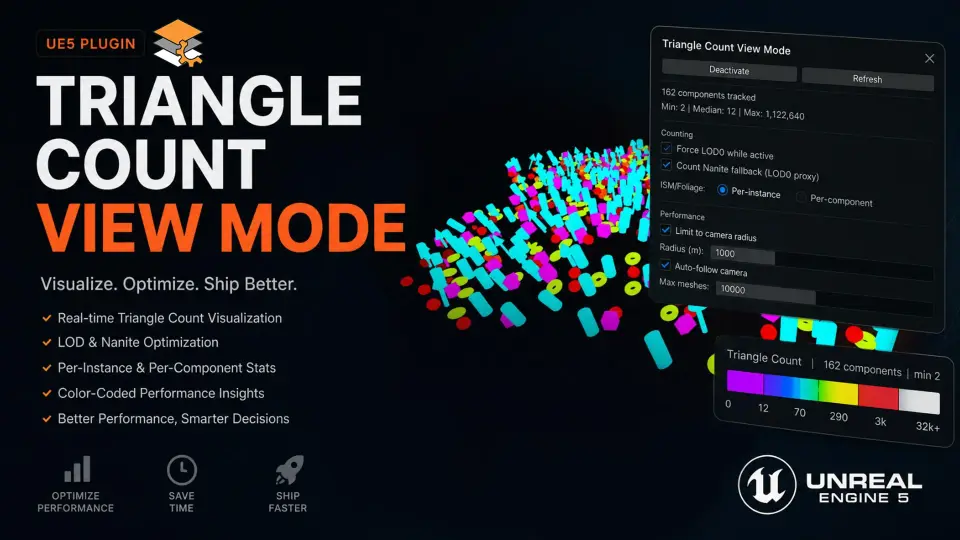
An Unreal Engine 5 editor plugin that visualizes geometry weight in the viewport by coloring meshes based on their LOD0 triangle count and providing live stats.
The Triangle Count View Mode operates as an Editor plugin for Unreal Engine 5, providing a direct visual representation of geometry weight across a project. Functioning similarly to the native Shader Complexity view mode, this diagnostic tool colors meshes directly within the viewport based on their LOD0 triangle count. By translating raw polygon data into immediate visual feedback, the system helps developers locate the heaviest meshes in a scene at a single glance. The plugin is built entirely as an editor-only utility, meaning it carries zero runtime impact and is completely excluded from packaged project builds.
Post-Process and Custom Stencil Rendering
To overlay diagnostic colors without permanently altering project assets, the plugin utilizes a combination of post-processing and Custom Stencil rendering. Mesh materials are never modified during this viewport visualization process, ensuring the workflow remains entirely save-safe. Because many modern Unreal Engine projects rely heavily on custom depth and stencil buffers for gameplay features, the tool includes a configurable Custom Stencil range. By adjusting this range, technical artists can ensure the diagnostic overlay avoids any visual collisions with existing outline or highlight systems already active in the project.
Protecting project stability and preventing accidental data baking is a core part of the system's architecture. The script incorporates an auto-deactivate function that safely disables the view mode during critical editor transitions. The visualization automatically shuts down before a user initiates a Save operation, enters Play-in-Editor (PIE) mode, or closes the Unreal Engine editor entirely.
Asset Compatibility and Per-Instance Counting
The visualization system evaluates a broad spectrum of asset types commonly utilized in modern pipelines. It natively supports standard Static Meshes and Skeletal Meshes, while also reading Nanite fallback proxies. For projects utilizing massive maps, the tool accurately processes World Partition external actors, ensuring that streamed assets are colored correctly when loaded into the editor viewport.
Evaluating dense environments requires specific handling for instanced geometry. The plugin performs per-instance counting for Foliage, Instanced Static Meshes (ISM), and Hierarchical Instanced Static Meshes (HISM). Rather than calculating an entire foliage cluster as a single merged block of data, the tool evaluates each individual instance. This precision allows level designers to pinpoint exact areas where instanced foliage might be exceeding optimization targets.
Color Mapping and Interpolation Modes
Data readability is managed through per-mesh triangle count visualization driven by highly customizable color ranges. Users can define exactly how polygon density translates into viewport colors, tailoring the visual feedback to match specific project budgets. To handle different types of scene profiling, the tool provides three distinct interpolation modes:
The Stepped interpolation mode breaks the triangle counts into discrete color bands, offering clear, separated categories for rapid asset auditing. The Smooth mode provides a continuous, fluid color gradient across the geometry, useful for identifying gradual increases in mesh density. When evaluating scenes with extreme variations in polygon counts—such as a highly detailed cinematic character standing next to low-resolution background props—the Smooth Log interpolation mode handles the wide dynamic range. This logarithmic scaling prevents massive outliers from skewing the color mapping of the entire scene.
Live Viewport Statistics and the LOD0 Toggle
Alongside the color overlays, the plugin generates an in-viewport legend that delivers continuous statistical feedback. This on-screen display updates in real-time to show the minimum, median, and maximum triangle counts currently being rendered by the diagnostic tool. Having live stats directly in the workspace eliminates the need to constantly open separate asset windows to verify polygon counts.
Accuracy is maintained through a dedicated Force LOD0 toggle. Standard viewport rendering often relies on distance-based Level of Detail (LOD) reductions, which can obscure the true baseline cost of an asset. Activating the Force LOD0 toggle bypasses these distance reductions, ensuring the displayed counts and colors reflect the absolute maximum geometry weight of the source meshes.
Camera Radius Filter for High-Density Scenes
Analyzing geometry weight in massive open-world levels can strain editor performance if every single asset is calculated simultaneously. To maintain responsiveness, the plugin features a camera radius filter paired with an auto-follow mechanic. This targeted system restricts the triangle count visualization and calculations to a specific radius surrounding the user's camera.
As the camera navigates through the environment, the analysis radius moves automatically alongside it. This localized evaluation method is specifically designed to support massive environments, allowing the tool to function smoothly even in complex scenes containing over one million actors.
Diagnostics and Production Workflows
The combination of per-instance counting, live statistics, and localized radius filtering makes the plugin highly applicable across different stages of development. During early pre-production, it serves as a polygon budget diagnostic tool, helping technical directors establish and monitor geometry limits before mass asset generation begins. For world-building teams, the localized visualization streamlines foliage optimization in open worlds by immediately highlighting overly dense clusters of instanced meshes.
Lead artists can utilize the distinct color mapping for reviewing assets delivered by outsource teams, quickly auditing scenes to ensure external models adhere to strict polycount specifications. The clear, color-coded viewport also functions as an educational visualization of mesh cost, assisting newer developers in understanding the spatial distribution of geometry weight within an active level. Tested for stability on Unreal Engine 5.7, the architecture is designed so that it should also build successfully on version 5.8.
 Engine Tools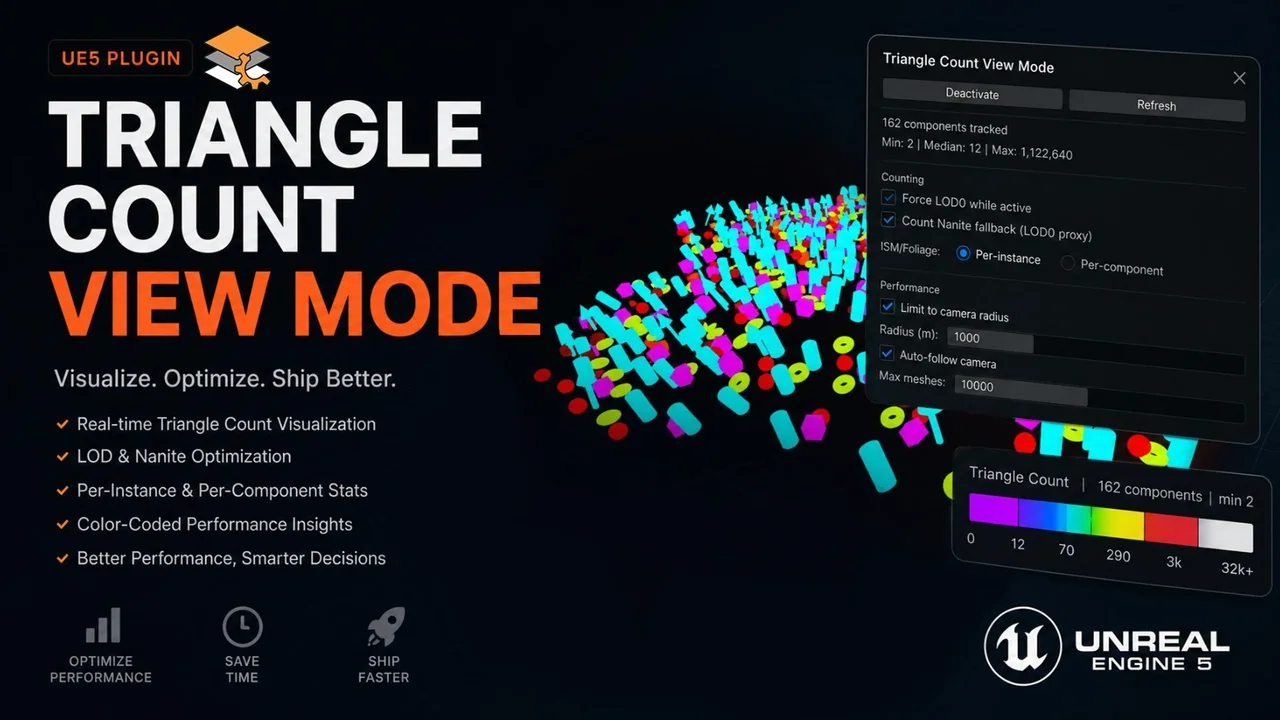
 Engine Tools
 Engine Tools
 Engine Tools