"1a0e4ac4dc71d030"{"id":"1000205","slug":"studio-lighting-kit-vol-3-dmx","title":"Studio Lighting Kit - Vol. 3 (DMX)","category":"Lighting","engine":"4.27,5.0+","assetVersion":"","engineVersion":"Engine Version: 4.27,5.0+","tag":"Lighting","accent":"blue","visual":"mech","summary":"A dynamic lighting library featuring PROLIGHTS-inspired fixtures, full ArtNET support, and DMX matrix integration for stage pre-visualization.","platform":"Unreal Engine","publishedAt":"2026-06-23T19:30:50.020Z","updatedAt":"2026-06-23T19:30:50.020Z","sourceNotes":[],"fileContents":[],"compatibility":["Unreal Engine","Engine Version: 4.27,5.0+"],"featuredImage":{"alt":"Studio Lighting Kit - Vol. 3 (DMX)","src":"/wp-content/uploads/published/2026/06/b989c25c9cd6-1682a4b6-fb59-4d2c-b88b-92d7c55d8847-21eea3d70e.webp"},"hasDownloadLink":true,"downloads":0,"terms":[{"taxonomy":"category","slug":"lighting","name":"Lighting"}],"galleryImages":[{"src":"/wp-content/uploads/published/2026/06/6fe2c15ddc22-1c1ec12a-5dc2-4dd3-aa07-276558d4dac4-b92ca4c4f0.webp","alt":"Studio Lighting Kit - Vol. 3 (DMX)"},{"src":"/wp-content/uploads/published/2026/06/b3db745308b9-c53c43bb-7279-414b-aa87-926a6de504da-1b7f2e39a6.webp","alt":"Studio Lighting Kit - Vol. 3 (DMX)"},{"src":"/wp-content/uploads/published/2026/06/bd12843c146d-3dcecc3f-bb2e-4a0f-9928-5a5ff0f43251-e7d8687b18.webp","alt":"Studio Lighting Kit - Vol. 3 (DMX)"},{"src":"/wp-content/uploads/published/2026/06/46fd649b2c9e-d3a2bb2f-fe03-4d49-9e27-468184d20e48-1465fab3ec.webp","alt":"Studio Lighting Kit - Vol. 3 (DMX)"},{"src":"/wp-content/uploads/published/2026/06/f57b31dec962-701bc872-be26-44b4-ba13-be5408eac4c7-2e058a68ad.webp","alt":"Studio Lighting Kit - Vol. 3 (DMX)"},{"src":"/wp-content/uploads/published/2026/06/3c20eec2da7e-ce0d8c34-d61d-4cbc-83bb-711a1d461555-8149998333.webp","alt":"Studio Lighting Kit - Vol. 3 (DMX)"},{"src":"/wp-content/uploads/published/2026/06/32c90672032f-5c3c137b-f83c-4116-ae9a-d402834aa975-14fc8430c1.webp","alt":"Studio Lighting Kit - Vol. 3 (DMX)"},{"src":"/wp-content/uploads/published/2026/06/c63aabc0a5b2-e020010b-b3a9-4ca0-8753-99648703ea97-475682cd61.webp","alt":"Studio Lighting Kit - Vol. 3 (DMX)"},{"src":"/wp-content/uploads/published/2026/06/94f10006b66d-ec6aa0b1-3a60-4e9e-909c-776f0ba319be-c4b903ccfd.webp","alt":"Studio Lighting Kit - Vol. 3 (DMX)"},{"src":"/wp-content/uploads/published/2026/06/42778355fd06-5c3fbf9d-7cd8-491d-8fd5-44c517205caa-951d96694a.webp","alt":"Studio Lighting Kit - Vol. 3 (DMX)"}],"accessPanel":{"kind":"resource","title":"Download this resource","eyebrow":"Free Download","message":"Log in or create a free account to start your download.","fileName":"Content.7z","safetyNote":"Resources are manually reviewed before listing to improve quality and reduce obvious risks.","actionLabel":"Download Free","resourceType":"Resource archive"},"contentHtml":"\u003ch2\u003eDesigning Virtual Stages and Realistic Studio Sets\u003c/h2\u003e\n\u003cp\u003eBuilding a virtual concert environment or a broadcast space requires highly accurate digital lighting to match real-world physical setups. The Studio Lighting Kit - Vol. 3 (DMX) provides a dynamic lighting library tailored specifically to help technical artists design and create stage and set pre-visualization environments. Virtual production projects rely on this level of accuracy to present stage designs effectively before physical construction begins. By utilizing this library, teams can create highly realistic studio sets that mirror the exact behavior of physical entertainment lighting, ensuring that the pre-visualization accurately reflects the final physical or virtual broadcast environment.\u003c/p\u003e \u003ch2\u003eArtNET Connectivity and DMX Protocol Control\u003c/h2\u003e\n\u003cp\u003eA core structural element of this dynamic lighting library is its ability to communicate directly with standard industry lighting protocols. The kit natively supports ArtNET to receive incoming DMX data. Because it utilizes standard ArtNET routing, it is possible to use any DMX lighting console or DMX programming software currently available on the market. This allows professional lighting designers to patch the digital fixtures into their existing physical desks just as they would a real-world stage rig. Once the network is established, all fixture parameters are fully controllable. This continuous control operates seamlessly across different engine states, allowing operators to manipulate parameters directly in the editor, while running in play mode, or when outputting across an nDisplay network for large-scale virtual production volumes.\u003c/p\u003e \u003ch2\u003ePROLIGHTS-Inspired Fixture Profiles and Channel Modes\u003c/h2\u003e\n\u003cp\u003eThe inventory provided in the kit consists of specific fixtures inspired by physical PROLIGHTS units. Each digital fixture is configured with precise DMX channel modes to match different programming requirements, ranging from simple intensity control to complex multi-channel arrays.\u003c/p\u003e\n\u003cp\u003eStarting with the smaller form-factor units, the Sunrise 2ip includes two lightweight profiles: a UNO 1-channel mode and a Basic 2-channel mode. The Sunrise 4 operates on a dedicated Mode 1 4-channel configuration. For applications requiring wider wash capabilities, the Arena Cob 4FC provides a highly flexible channel footprint. It can be patched using a minimal Halo 1-channel mode, a Halo 4-channel mode, a Standard (STD) 4-channel mode, or an Extended (EXT) 16-channel mode for maximum parameter access.\u003c/p\u003e\n\u003cp\u003eThe Solar series introduces pixel-segmented control. The Solar 27q is equipped with a Mode 1 5-channel profile alongside a more intricate 3-pixel 13-channel mode. The larger Solar 48q retains the Mode 1 5-channel base but expands the segmented control to a 4-pixel 17-channel mode.\u003c/p\u003e\n\u003cp\u003eFor high-intensity strobe and wash effects, the kit includes the Sunblast 3000, which features a Basic 4-channel setup and a dense 12-pixel 48-channel mode. The Sunbar 2000 linear fixture follows a similar patching structure, providing a Basic 4-channel mode and an extended 16-pixel 64-channel mode.\u003c/p\u003e\n\u003cp\u003eThe Lumipix series rounds out the batten lighting options. The Lumipix 8H includes a Mode 1 6-channel profile and an 8-pixel 48-channel mode. The Lumipix 16H maintains the Mode 1 6-channel base while doubling the mapping capabilities to a 16-pixel 96-channel mode. Finally, the Lumipix 12Q offers a Mode 1 4-channel option alongside a 12-pixel 48-channel mode.\u003c/p\u003e \u003ch2\u003eMatrix Integration and Pixel Mapping Workflows\u003c/h2\u003e\n\u003cp\u003eThe varied channel counts across the Solar, Sunblast, Sunbar, and Lumipix units highlight the availability of different DMX modes within the kit. Specifically, operators can choose between single pixel operation or dedicated Pixel to Pixel mode. These advanced configurations are specifically designed to work directly with the matrix fixture located in the engine's 'DMX Library'. By utilizing this matrix integration alongside the DMX Library, programmers can route complex generative data and video feeds across arrays of digital lights. This means that a virtual concert or a dynamic studio set can feature sweeping color gradients and intricate stroboscopic patterns that flow seamlessly from one Lumipix or Sunblast fixture to the next. The ability to switch between a unified single pixel response and a highly detailed Pixel to Pixel mode ensures that the digital fixtures can match the exact visual fidelity required to present sophisticated production designs.\u003c/p\u003e \u003ch2\u003eMandatory Engine Plugins for Virtual Production\u003c/h2\u003e\n\u003cp\u003eTo ensure that the ArtNET routing, pixel mapping, and stage rendering function correctly, the host project must be configured with a specific set of active plugins. The required plugin list covers both the media generation and the lighting control infrastructure. To handle the broader virtual production and sequencing pipeline, users must activate Takes, Composure, the MediaIOFramework, and nDisplay. For the network protocol and fixture profiles to operate, the DMXProtocol, DMXEngine, DMXFixtures, and DMXPixelMapping plugins must all be enabled. Without these eight specific plugins activated, the dynamic lighting library cannot interface with external DMX data or render correctly in a multi-display environment.\u003c/p\u003e \u003ch2\u003ePerformance Optimization During DMX Recording\u003c/h2\u003e\n\u003cp\u003eManaging system performance is a critical consideration when working with high-channel-count pixel grids and highly realistic studio lighting. Because these digital fixtures are computationally intensive, they can be very heavy on the system during the initial programming phase. To mitigate this, it is possible to hide the Lights Components entirely. Hiding these components is a vital optimization step to speed up the workflow while initially designing the physical layout of the stage or when actively recording DMX data from an external console. \u003c/p\u003e\n\u003cp\u003eDesigning a stage often requires moving dozens or hundreds of fixtures into precise positions, a task that benefits from a lightweight viewport. Similarly, when recording complex DMX sequences, maintaining a high frame rate ensures that the recorded data captures the exact timing of the lighting desk. The recommended workflow is to keep the heavy visual elements disabled during this placement and programming process. It is best to activate the Lights Components only once all the DMX data is completely recorded and the sequence is ready to render the final movie. This segmented approach ensures that the pre-visualization or virtual production setup remains highly responsive during the design phase, while still delivering highly realistic studio set lighting for the final broadcast output.\u003c/p\u003e\n\n\u003ch2\u003eContinue Browsing Similar Packs\u003c/h2\u003e\n\u003cul\u003e\n\u003cli\u003e\u003ca href=\"https://3dcghub.com/advanced-light-pack/\" title=\"Advanced Light Pack\"\u003eAdvanced Light Pack\u003c/a\u003e\u003c/li\u003e\n\u003cli\u003e\u003ca href=\"https://3dcghub.com/rd-lighting-kit/\" title=\"RD: Lighting Kit\"\u003eRD: Lighting Kit\u003c/a\u003e\u003c/li\u003e\n\u003cli\u003e\u003ca href=\"https://3dcghub.com/studio-lighting-kit-vol-4-dmx/\" title=\"Studio Lighting Kit - Vol. 4 (DMX)\"\u003eStudio Lighting Kit - Vol. 4 (DMX)\u003c/a\u003e\u003c/li\u003e\n\u003cli\u003e\u003ca href=\"https://3dcghub.com/scifi-base-kit-vol-1/\" title=\"SciFi Base Kit Vol 1\"\u003eSciFi Base Kit Vol 1\u003c/a\u003e\u003c/li\u003e\n\u003cli\u003e\u003ca href=\"https://3dcghub.com/modern-apartment-archinteriors-vol-9-scene-5/\" title=\"Modern Apartment - Archinteriors Vol 9 Scene 5\"\u003eModern Apartment - Archinteriors Vol 9 Scene 5\u003c/a\u003e\u003c/li\u003e\n\u003c/ul\u003e","contentTextLength":6803,"navigation":{"current":1097,"total":3200,"previous":{"id":"1000206","slug":"survivor-girl-1-modular","title":"Survivor Girl 1 (Modular)","category":"Humans","platform":"Unreal Engine","updatedAt":"2026-06-23T19:35:44.835Z"},"next":{"id":"1000204","slug":"stone-age-characters-pack","title":"Stone Age Characters Pack","category":"Characters \u0026 Creatures","platform":"Unreal Engine","updatedAt":"2026-06-23T19:25:17.021Z"}},"relatedResources":[{"id":"4725","slug":"modular-concert-stage","title":"Modular Concert Stage","category":"Musical","engine":"4.26+,5.0+","assetVersion":"Engine version: 4.26+,5.0+","engineVersion":"4.18","tag":"Musical","accent":"blue","visual":"audio","summary":"Build realistic live event environments in Unreal Engine. This modular concert stage kit features DMX support, animated lighting, and over 80 high-quality asset","platform":"Unreal Engine","publishedAt":"2026-02-13T09:27:41.000Z","updatedAt":"2026-04-19T15:57:05.000Z","sourceNotes":[],"fileContents":[],"compatibility":["Audio","Engine version: 4.26+,5.0+"],"featuredImage":{"alt":"Modular Concert Stage","src":"https://3dcghub.com/wp-content/uploads/2026/02/c4f9da14-8ecc-408c-b35b-de9b1ce8d4e4.webp"},"hasDownloadLink":true,"downloads":1},{"id":"10535","slug":"advanced-light-pack","title":"Advanced Light Pack","category":"Gameplay Features","engine":"4.27,5.0+","assetVersion":"Engine version: 4.27,5.0+","engineVersion":"4.20","tag":"Gameplay Features","accent":"blue","visual":"city","summary":"Enhance your 3D environments with the Advanced Light Pack, featuring 67 customizable blueprints and procedural tools. This resource includes studio setups, modular lights, and integrated animation systems.","platform":"Unreal Engine","publishedAt":"2026-03-03T15:35:18.000Z","updatedAt":"2026-04-19T15:50:00.000Z","sourceNotes":[],"fileContents":[],"compatibility":["Unreal Engine","Engine version: 4.27,5.0+"],"featuredImage":{"alt":"Advanced Light Pack","src":"https://3dcghub.com/wp-content/uploads/2026/03/cc80f405-effc-4ca9-bced-0f2aa8be97b4.webp"},"hasDownloadLink":true,"downloads":0},{"id":"1000664","slug":"replicated-interaction-kit-vol-1-switch-valve-chain-etc","title":"Replicated Interaction Kit Vol 1 (Switch, Valve, Chain etc.)","category":"Gameplay Features","engine":"5.1+","assetVersion":"","engineVersion":"Engine Version: 5.1+","tag":"Gameplay Features","accent":"blue","visual":"mech","summary":"A network-replicated interaction blueprint kit for Unreal Engine featuring switches, valves, and chains with multiplayer support, TPP/FPP integration, and custo","platform":"Unreal Engine","publishedAt":"2026-07-22T06:49:04.419Z","updatedAt":"2026-07-22T06:49:04.419Z","sourceNotes":[],"fileContents":[],"compatibility":["Unreal Engine","Engine Version: 5.1+"],"featuredImage":{"alt":"Replicated Interaction Kit Vol 1 (Switch, Valve, Chain etc.)","src":"/wp-content/uploads/published/2026/07/4a0398ea3371-dad15c4a-ea6d-4b44-9559-c441b78887dd-085fe54a93.webp"},"hasDownloadLink":true,"downloads":1}]}
Lighting
Studio Lighting Kit - Vol. 3 (DMX)
A dynamic lighting library featuring PROLIGHTS-inspired fixtures, full ArtNET support, and DMX matrix integration for stage pre-visualization.
Category:Unreal Engine, LightingPlatform: Unreal EngineEngine Version: 4.27,5.0+Published: Jun 23, 2026
Lighting
Resource overview
Designing Virtual Stages and Realistic Studio Sets
Building a virtual concert environment or a broadcast space requires highly accurate digital lighting to match real-world physical setups. The Studio Lighting Kit - Vol. 3 (DMX) provides a dynamic lighting library tailored specifically to help technical artists design and create stage and set pre-visualization environments. Virtual production projects rely on this level of accuracy to present stage designs effectively before physical construction begins. By utilizing this library, teams can create highly realistic studio sets that mirror the exact behavior of physical entertainment lighting, ensuring that the pre-visualization accurately reflects the final physical or virtual broadcast environment.
ArtNET Connectivity and DMX Protocol Control
A core structural element of this dynamic lighting library is its ability to communicate directly with standard industry lighting protocols. The kit natively supports ArtNET to receive incoming DMX data. Because it utilizes standard ArtNET routing, it is possible to use any DMX lighting console or DMX programming software currently available on the market. This allows professional lighting designers to patch the digital fixtures into their existing physical desks just as they would a real-world stage rig. Once the network is established, all fixture parameters are fully controllable. This continuous control operates seamlessly across different engine states, allowing operators to manipulate parameters directly in the editor, while running in play mode, or when outputting across an nDisplay network for large-scale virtual production volumes.
PROLIGHTS-Inspired Fixture Profiles and Channel Modes
The inventory provided in the kit consists of specific fixtures inspired by physical PROLIGHTS units. Each digital fixture is configured with precise DMX channel modes to match different programming requirements, ranging from simple intensity control to complex multi-channel arrays.
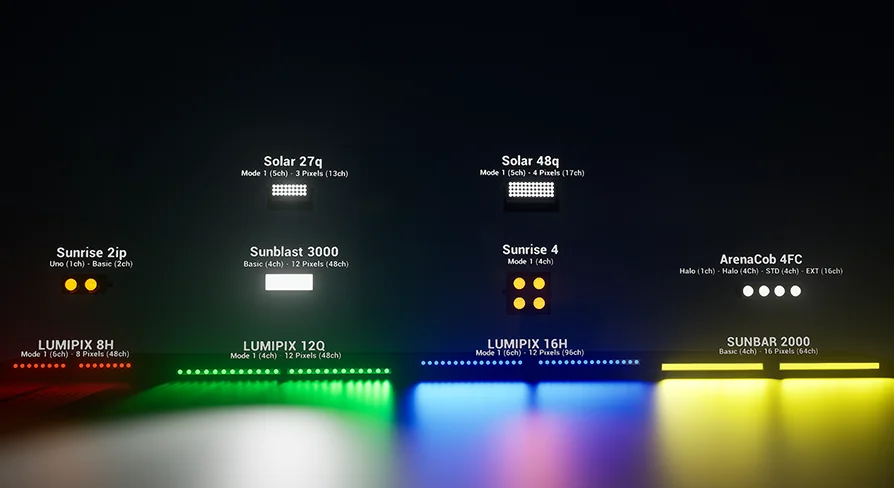
Starting with the smaller form-factor units, the Sunrise 2ip includes two lightweight profiles: a UNO 1-channel mode and a Basic 2-channel mode. The Sunrise 4 operates on a dedicated Mode 1 4-channel configuration. For applications requiring wider wash capabilities, the Arena Cob 4FC provides a highly flexible channel footprint. It can be patched using a minimal Halo 1-channel mode, a Halo 4-channel mode, a Standard (STD) 4-channel mode, or an Extended (EXT) 16-channel mode for maximum parameter access.
The Solar series introduces pixel-segmented control. The Solar 27q is equipped with a Mode 1 5-channel profile alongside a more intricate 3-pixel 13-channel mode. The larger Solar 48q retains the Mode 1 5-channel base but expands the segmented control to a 4-pixel 17-channel mode.
For high-intensity strobe and wash effects, the kit includes the Sunblast 3000, which features a Basic 4-channel setup and a dense 12-pixel 48-channel mode. The Sunbar 2000 linear fixture follows a similar patching structure, providing a Basic 4-channel mode and an extended 16-pixel 64-channel mode.
The Lumipix series rounds out the batten lighting options. The Lumipix 8H includes a Mode 1 6-channel profile and an 8-pixel 48-channel mode. The Lumipix 16H maintains the Mode 1 6-channel base while doubling the mapping capabilities to a 16-pixel 96-channel mode. Finally, the Lumipix 12Q offers a Mode 1 4-channel option alongside a 12-pixel 48-channel mode.
Matrix Integration and Pixel Mapping Workflows
The varied channel counts across the Solar, Sunblast, Sunbar, and Lumipix units highlight the availability of different DMX modes within the kit. Specifically, operators can choose between single pixel operation or dedicated Pixel to Pixel mode. These advanced configurations are specifically designed to work directly with the matrix fixture located in the engine's 'DMX Library'. By utilizing this matrix integration alongside the DMX Library, programmers can route complex generative data and video feeds across arrays of digital lights. This means that a virtual concert or a dynamic studio set can feature sweeping color gradients and intricate stroboscopic patterns that flow seamlessly from one Lumipix or Sunblast fixture to the next. The ability to switch between a unified single pixel response and a highly detailed Pixel to Pixel mode ensures that the digital fixtures can match the exact visual fidelity required to present sophisticated production designs.
Mandatory Engine Plugins for Virtual Production
To ensure that the ArtNET routing, pixel mapping, and stage rendering function correctly, the host project must be configured with a specific set of active plugins. The required plugin list covers both the media generation and the lighting control infrastructure. To handle the broader virtual production and sequencing pipeline, users must activate Takes, Composure, the MediaIOFramework, and nDisplay. For the network protocol and fixture profiles to operate, the DMXProtocol, DMXEngine, DMXFixtures, and DMXPixelMapping plugins must all be enabled. Without these eight specific plugins activated, the dynamic lighting library cannot interface with external DMX data or render correctly in a multi-display environment.
Performance Optimization During DMX Recording
Managing system performance is a critical consideration when working with high-channel-count pixel grids and highly realistic studio lighting. Because these digital fixtures are computationally intensive, they can be very heavy on the system during the initial programming phase. To mitigate this, it is possible to hide the Lights Components entirely. Hiding these components is a vital optimization step to speed up the workflow while initially designing the physical layout of the stage or when actively recording DMX data from an external console.
Designing a stage often requires moving dozens or hundreds of fixtures into precise positions, a task that benefits from a lightweight viewport. Similarly, when recording complex DMX sequences, maintaining a high frame rate ensures that the recorded data captures the exact timing of the lighting desk. The recommended workflow is to keep the heavy visual elements disabled during this placement and programming process. It is best to activate the Lights Components only once all the DMX data is completely recorded and the sequence is ready to render the final movie. This segmented approach ensures that the pre-visualization or virtual production setup remains highly responsive during the design phase, while still delivering highly realistic studio set lighting for the final broadcast output.
 Lighting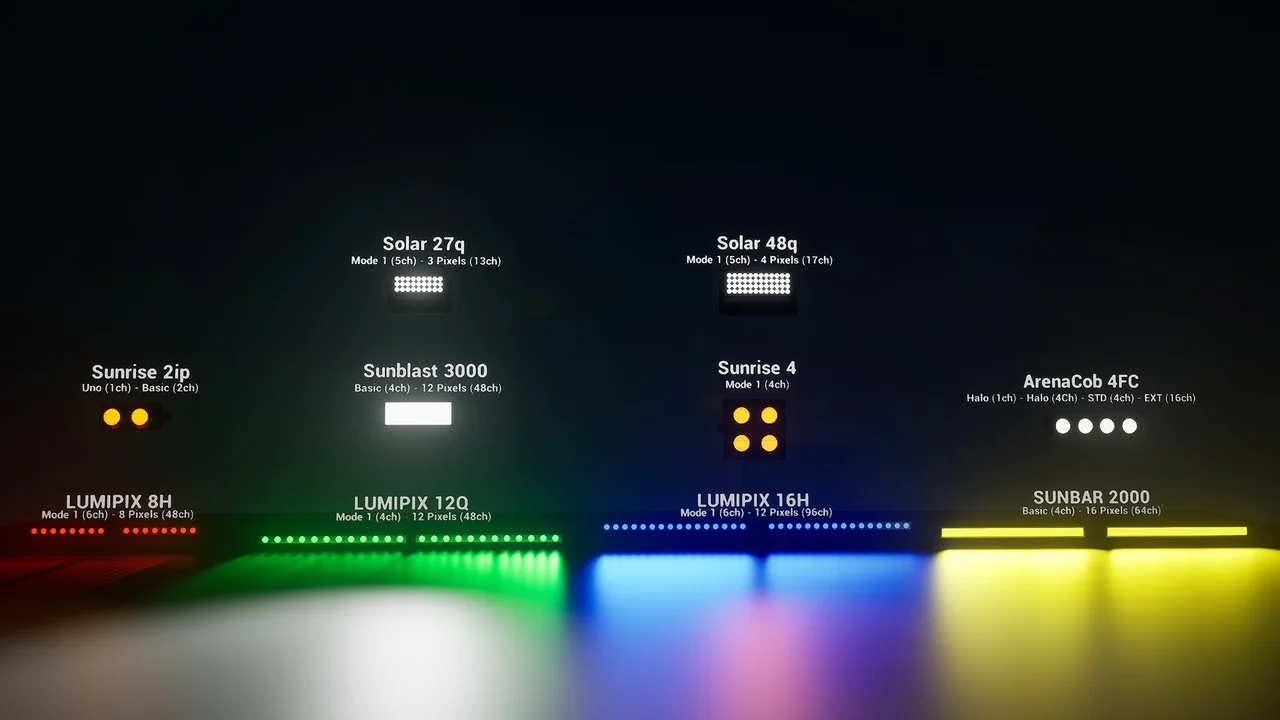
 Musical
 Gameplay Features
 Gameplay Features