"b00678cacce53329"{"id":"1002838","slug":"splash-damage-blood","title":"Splash Damage Blood","category":"Variety","engine":"4.16+,5.0+","assetVersion":"","engineVersion":"Engine Version: 4.16+,5.0+","tag":"Variety","accent":"blue","visual":"mech","summary":"Explore Splash Damage Blood for Unreal Engine, featuring procedural blood meshes, splat decals, Niagara support, and colorable effects for FPS and TPS games.","platform":"Unreal Engine","indexPolicy":"index","publishedAt":"2026-11-20T12:20:17.242Z","updatedAt":"2026-11-20T12:20:17.242Z","sourceNotes":[],"fileContents":[],"compatibility":["Unreal Engine","Engine Version: 4.16+,5.0+"],"featuredImage":{"alt":"Splash Damage Blood","src":"/wp-content/uploads/published/2026/11/540abe40cd38-507a14be-c121-4b3e-9974-45f0aa8bcb3f-cbb665acb2.webp"},"fileSizeBytes":57479840,"hasDownloadLink":true,"downloads":0,"terms":[{"taxonomy":"category","slug":"variety-vfx","name":"Variety"}],"galleryImages":[{"src":"/wp-content/uploads/published/2026/11/210633784539-392586f6-e533-459d-901e-e616332084dc-6fa527a6fb.webp","alt":"Splash Damage Blood"},{"src":"/wp-content/uploads/published/2026/11/541a079706b1-5e495601-cbbb-45a9-920f-639897998a9b-92fe92ac1a.webp","alt":"Splash Damage Blood"},{"src":"/wp-content/uploads/published/2026/11/dc3d699110de-907d36a2-8d18-407d-bb2b-778e9a917873-f40cf0ebdd.webp","alt":"Splash Damage Blood"},{"src":"/wp-content/uploads/published/2026/11/944cbf203ff1-ea0f7e35-24c6-4466-ba28-70e4cadeaef2-489fc5977c.webp","alt":"Splash Damage Blood"},{"src":"/wp-content/uploads/published/2026/11/4307c8e2a5dd-c479f467-471a-488c-889a-b588f25d9480-751a849f7e.webp","alt":"Splash Damage Blood"},{"src":"/wp-content/uploads/published/2026/11/189b0db54cae-e4781b82-378d-4c42-991d-547fa7a9d18e-c3248412be.webp","alt":"Splash Damage Blood"},{"src":"/wp-content/uploads/published/2026/11/3527f233e8f1-5de37e17-36b0-4401-8142-487412cc0d5a-25e7842bbd.webp","alt":"Splash Damage Blood"},{"src":"/wp-content/uploads/published/2026/11/2745d73b323b-1f31f564-6dee-43c2-a3ea-7f1b974169da-0f21fce83b.webp","alt":"Splash Damage Blood"},{"src":"/wp-content/uploads/published/2026/11/5e1525c8ffd1-c6fa6578-0b1f-4d2d-a1dd-d9c411934cb3-563f0cc2be.webp","alt":"Splash Damage Blood"}],"accessPanel":{"kind":"resource","title":"Get this resource","safetyNote":"Resources are manually reviewed before listing to improve quality and reduce obvious risks.","fileName":"Content.7z","resourceType":"Resource archive","versions":[]},"contentHtml":"\u003ch2\u003eStaging Combat Impacts with Splash Damage Visuals\u003c/h2\u003e\n\u003cp\u003eClose-quarters firefights in damp industrial corridors, chaotic melee skirmishes across ruined stone dungeons, and frantic encounters against grotesque monsters all depend on immediate visual feedback when hits land. High-velocity rounds or bladed weapons striking a target need to read instantly to give combat weight and visceral urgency. In fast-moving Unreal Engine action setups, conveying this physical interaction requires visual elements that bridge character models and the surrounding architecture without cluttering the screen or obscuring gameplay sightlines.\u003c/p\u003e\n\u003cp\u003eFirst-person and third-person perspectives place distinct demands on combat feedback. In a first-person shooter, projectile strikes often occur directly in front of the camera, demanding sharp silhouettes and volumetric presence so the reaction feels close and threatening. In a third-person shooter, the camera pulls back, requiring effects that retain clear definition against broad world geometry and busy backdrops. The visual assets in Splash Damage Blood are structured to serve both camera angles, providing clear physical cues that communicate hit confirmation, impact velocity, and environmental aftermath during combat encounters.\u003c/p\u003e \u003ch2\u003eProcedural Meshes and Splat Decals for Realistic Blood\u003c/h2\u003e\n\u003cp\u003eDynamic impact sequences rely on two complementary visual techniques: volumetric fluid geometry in mid-air and surface markings left on the environment. Splash Damage Blood combines procedurally generated blood meshes with splat decals to address both sides of an impact event. When a strike occurs, procedural meshes form the burst itself, capturing irregular shapes, droplets, and directional sheets of fluid that erupt outward from the point of contact. Because these geometries are generated procedurally, they introduce natural irregularity rather than repeating rigid, pre-baked fluid shapes that break immersion when witnessed dozens of times in a firefight.\u003c/p\u003e\n\u003cp\u003eOnce the initial burst travels through space, splat decals complete the sequence by projecting directly onto floors, walls, and surrounding cover props. These decals anchor the event into the game world, creating lasting evidence of combat that persists over time. Combining procedural three-dimensional shapes with surface-clinging decals ensures that impact feedback does not vanish without a trace once the initial burst clears. Instead, encounters leave behind a gritty trail of spatter patterns, reinforcing the atmosphere of intense, bloody combat across horror scenes and grim fantasy settings.\u003c/p\u003e \u003ch2\u003eCustomizing Splash Particle Combinations in Niagara\u003c/h2\u003e\n\u003cp\u003eThe package provides three core particle effects backed by a library of 18 different meshes, establishing a modular foundation that allows creators to mix, match, and construct fresh combinations. Rather than relying on a single static burst template, technical artists can swap the mesh components within the base effects to adjust spray angles, chunk sizes, and spatter density. This modular structure makes it possible to distinguish between different types of hit events, such as light glancing shots, heavy explosive trauma, or wide-cleaving melee strikes, using the same underlying technical framework.\u003c/p\u003e\n\u003cp\u003eNative Niagara support modernizes how these particle systems run inside Unreal Engine. Niagara provides fine-grained control over particle simulation parameters, enabling creators to govern fluid lifespan, velocity curves, and spatial dispersion with high precision. By combining Niagara particle logic with Blueprint implementation, developers can bind particle parameters directly to gameplay logic. A Blueprint can evaluate the exact angle of an incoming attack, trigger the appropriate Niagara effect, and deploy matching directional decals against adjacent collision surfaces in a single unified execution step.\u003c/p\u003e \u003ch2\u003eColorable Effects Across Fantasy and Horror Pipelines\u003c/h2\u003e\n\u003cp\u003eBlood effects frequently need to adapt beyond standard human biology. Sci-fi survival horror titles often feature extraterrestrial bioforms, corrupted androids, or mutated organisms that bleed black sludge, luminescent ichor, or acidic fluid. High-fantasy action projects routinely pit players against spectral entities, elemental beasts, and demonic forces requiring distinct color palettes to match their lore and damage properties. Splash Damage Blood incorporates colorable effects as an updated feature, allowing developers to shift tint and saturation values directly across the particle systems and decals.\u003c/p\u003e\n\u003cp\u003eBecause the effects are colorable, teams are not forced to author separate texture sets or create redundant material instances from scratch just to support non-human adversaries. A single setup can serve standard realistic human encounters in one combat encounter, switch to glowing green or corrosive yellow fluids for alien fauna in the next, and shift to deep purple or black residue for fantasy horrors. This flexibility keeps visual styling cohesive across an entire enemy roster while retaining the underlying procedural burst geometry and decal behaviors.\u003c/p\u003e \u003ch2\u003eDeploying Damage Effects Across Console and Desktop Targets\u003c/h2\u003e\n\u003cp\u003eHigh-frequency combat effects can rapidly tax hardware if geometry budgets and fill rates are not carefully managed. Intense shooter sequences often trigger dozens of splash events simultaneously as automatic gunfire, shotgun blasts, or area-of-effect explosives strike multiple targets in quick succession. Splash Damage Blood is specifically optimized for deployment across desktop and console hardware, balancing visual fidelity against computational overhead.\u003c/p\u003e\n\u003cp\u003eThe procedural meshes and particle setups are authored to maintain crisp visual definition without overwhelming particle counts or causing excessive overdraw on target platforms. For production teams balancing the strict performance envelopes of console certification alongside scalable PC configurations, having pre-optimized particle systems and decal interactions simplifies performance budgeting. The assets integrate cleanly into Unreal projects seeking visceral, responsive hit feedback without sacrificing framerate consistency during dense combat scenes.\u003c/p\u003e\n\n\u003ch2\u003eExplore Similar Assets\u003c/h2\u003e\n\u003cul\u003e\n\u003cli\u003e\u003ca href=\"https://3dcghub.com/blood/\" rel=\"noopener noreferrer\"\u003eBlood\u003c/a\u003e\u003c/li\u003e\n\u003cli\u003e\u003ca href=\"https://3dcghub.com/realistic-starter-vfx-pack-vol-2/\" rel=\"noopener noreferrer\"\u003eRealistic Starter VFX Pack Vol 2\u003c/a\u003e\u003c/li\u003e\n\u003cli\u003e\u003ca href=\"https://3dcghub.com/car-vfx/\" rel=\"noopener noreferrer\"\u003eCar VFX\u003c/a\u003e\u003c/li\u003e\n\u003cli\u003e\u003ca href=\"https://3dcghub.com/vehicle-dynamic-effect/\" rel=\"noopener noreferrer\"\u003eVehicle Dynamic Effect\u003c/a\u003e\u003c/li\u003e\n\u003cli\u003e\u003ca href=\"https://3dcghub.com/fx-blood-100-effects/\" rel=\"noopener noreferrer\"\u003eFX: Blood [100+ Effects]\u003c/a\u003e\u003c/li\u003e\n\u003c/ul\u003e","contentTextLength":6299,"navigation":{"current":42,"total":4797,"previous":{"id":"1002839","slug":"stylized-aoe-pack","title":"Stylized Aoe Pack","category":"Spells \u0026 Combat","platform":"Unreal Engine","updatedAt":"2026-11-20T12:21:33.820Z"},"next":{"id":"1002837","slug":"smokefirevfx","title":"SmokeFireVFX","category":"Fire \u0026 Explosions","platform":"Unreal Engine","updatedAt":"2026-11-20T12:19:17.679Z"}},"relatedResources":[{"id":"1001722","slug":"blood","title":"Blood","category":"Damage \u0026 Grunge","engine":"4.26+,5.0+","assetVersion":"","engineVersion":"Engine Version: 4.26+,5.0+","tag":"Damage \u0026 Grunge","accent":"blue","visual":"mech","summary":"Over 120 horror decals deliver 4K and 2K blood smears, demonic symbols, and text with a performance-first single-texture setup and Decal Blueprint control.","platform":"Unreal Engine","indexPolicy":"index","publishedAt":"2026-10-19T16:20:31.409Z","updatedAt":"2026-10-19T16:20:31.409Z","sourceNotes":[],"fileContents":[],"compatibility":["Unreal Engine","Engine Version: 4.26+,5.0+"],"featuredImage":{"alt":"Blood","src":"/wp-content/uploads/published/2026/10/c8e02bd2344b-ac47f0d8-8e82-4163-b6b7-d83fe1867fbb-065bd8a46c.webp"},"fileSizeBytes":38560365,"hasDownloadLink":true,"downloads":1},{"id":"1000963","slug":"realistic-starter-vfx-pack-vol-2","title":"Realistic Starter VFX Pack Vol 2","category":"Variety","engine":"5.0+","assetVersion":"","engineVersion":"Engine Version: 5.0+","tag":"Variety","accent":"blue","visual":"mech","summary":"56 unique VFX for early game prototyping: blood, fire, explosions, smoke, water, steam, and more. Includes 53 materials, 51 textures, and LODs.","platform":"Unreal Engine","indexPolicy":"index","publishedAt":"2026-08-15T11:13:19.886Z","updatedAt":"2026-08-15T11:13:19.886Z","sourceNotes":[],"fileContents":[],"compatibility":["Unreal Engine","Engine Version: 5.0+"],"featuredImage":{"alt":"Realistic Starter VFX Pack Vol 2","src":"/wp-content/uploads/published/2026/08/e95ba8c71930-14c6c241-c8ef-4397-a303-7175539f32e5-bc8b10c97f.webp"},"fileSizeBytes":104649146,"hasDownloadLink":true,"downloads":5},{"id":"1000035","slug":"car-vfx","title":"Car VFX","category":"Variety","engine":"5.0+","assetVersion":"","engineVersion":"5.0+","tag":"Variety","accent":"blue","visual":"mech","summary":"Car VFX collects 31 customizable effects with example setups for car crashes and stunts, covering damage, explosions, impacts, parts, smoke, and more.","platform":"Unreal Engine","indexPolicy":"index","publishedAt":"2026-05-21T10:13:16.908Z","updatedAt":"2026-05-21T10:13:16.908Z","sourceNotes":[],"fileContents":[],"compatibility":["Unreal Engine","Engine version: 5.0+"],"featuredImage":{"alt":"Car VFX","src":"/wp-content/uploads/published/2026/05/4d201b467366-9b6339a5-e68c-4669-9bde-91e528d1e1f1-abaa9dd8b6.webp"},"fileSizeBytes":277827021,"hasDownloadLink":true,"downloads":1}]}
Resource screenshots
1 / 9
Join our channel
Follow 3DCGHUB on Telegram for new resource drops, migration updates, and community notices.
Close-quarters firefights in damp industrial corridors, chaotic melee skirmishes across ruined stone dungeons, and frantic encounters against grotesque monsters all depend on immediate visual feedback when hits land. High-velocity rounds or bladed weapons striking a target need to read instantly to give combat weight and visceral urgency. In fast-moving Unreal Engine action setups, conveying this physical interaction requires visual elements that bridge character models and the surrounding architecture without cluttering the screen or obscuring gameplay sightlines.
First-person and third-person perspectives place distinct demands on combat feedback. In a first-person shooter, projectile strikes often occur directly in front of the camera, demanding sharp silhouettes and volumetric presence so the reaction feels close and threatening. In a third-person shooter, the camera pulls back, requiring effects that retain clear definition against broad world geometry and busy backdrops. The visual assets in Splash Damage Blood are structured to serve both camera angles, providing clear physical cues that communicate hit confirmation, impact velocity, and environmental aftermath during combat encounters.
Procedural Meshes and Splat Decals for Realistic Blood
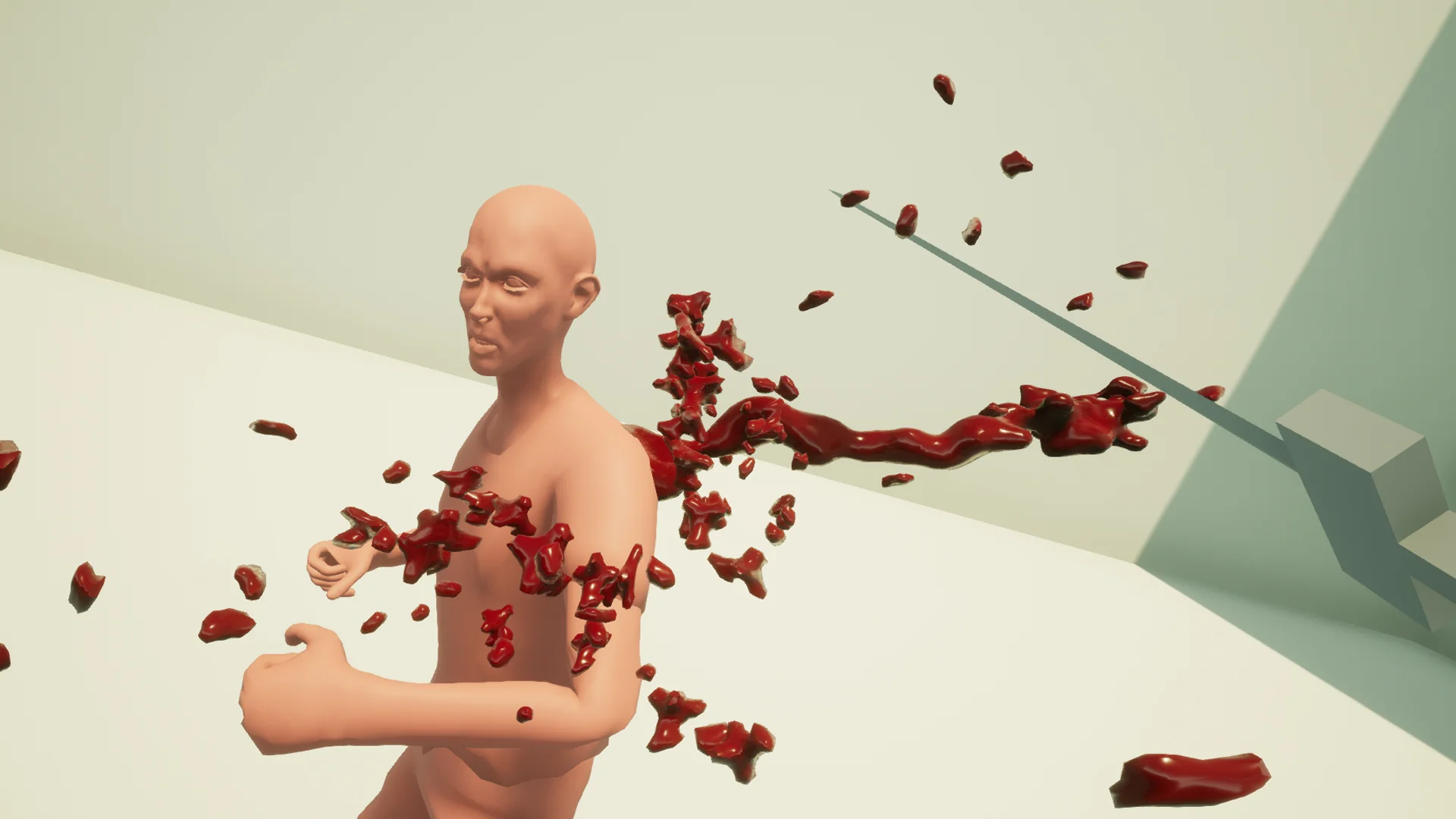
Dynamic impact sequences rely on two complementary visual techniques: volumetric fluid geometry in mid-air and surface markings left on the environment. Splash Damage Blood combines procedurally generated blood meshes with splat decals to address both sides of an impact event. When a strike occurs, procedural meshes form the burst itself, capturing irregular shapes, droplets, and directional sheets of fluid that erupt outward from the point of contact. Because these geometries are generated procedurally, they introduce natural irregularity rather than repeating rigid, pre-baked fluid shapes that break immersion when witnessed dozens of times in a firefight.
Once the initial burst travels through space, splat decals complete the sequence by projecting directly onto floors, walls, and surrounding cover props. These decals anchor the event into the game world, creating lasting evidence of combat that persists over time. Combining procedural three-dimensional shapes with surface-clinging decals ensures that impact feedback does not vanish without a trace once the initial burst clears. Instead, encounters leave behind a gritty trail of spatter patterns, reinforcing the atmosphere of intense, bloody combat across horror scenes and grim fantasy settings.
Customizing Splash Particle Combinations in Niagara
The package provides three core particle effects backed by a library of 18 different meshes, establishing a modular foundation that allows creators to mix, match, and construct fresh combinations. Rather than relying on a single static burst template, technical artists can swap the mesh components within the base effects to adjust spray angles, chunk sizes, and spatter density. This modular structure makes it possible to distinguish between different types of hit events, such as light glancing shots, heavy explosive trauma, or wide-cleaving melee strikes, using the same underlying technical framework.
Native Niagara support modernizes how these particle systems run inside Unreal Engine. Niagara provides fine-grained control over particle simulation parameters, enabling creators to govern fluid lifespan, velocity curves, and spatial dispersion with high precision. By combining Niagara particle logic with Blueprint implementation, developers can bind particle parameters directly to gameplay logic. A Blueprint can evaluate the exact angle of an incoming attack, trigger the appropriate Niagara effect, and deploy matching directional decals against adjacent collision surfaces in a single unified execution step.
Colorable Effects Across Fantasy and Horror Pipelines
Blood effects frequently need to adapt beyond standard human biology. Sci-fi survival horror titles often feature extraterrestrial bioforms, corrupted androids, or mutated organisms that bleed black sludge, luminescent ichor, or acidic fluid. High-fantasy action projects routinely pit players against spectral entities, elemental beasts, and demonic forces requiring distinct color palettes to match their lore and damage properties. Splash Damage Blood incorporates colorable effects as an updated feature, allowing developers to shift tint and saturation values directly across the particle systems and decals.
Because the effects are colorable, teams are not forced to author separate texture sets or create redundant material instances from scratch just to support non-human adversaries. A single setup can serve standard realistic human encounters in one combat encounter, switch to glowing green or corrosive yellow fluids for alien fauna in the next, and shift to deep purple or black residue for fantasy horrors. This flexibility keeps visual styling cohesive across an entire enemy roster while retaining the underlying procedural burst geometry and decal behaviors.
Deploying Damage Effects Across Console and Desktop Targets
High-frequency combat effects can rapidly tax hardware if geometry budgets and fill rates are not carefully managed. Intense shooter sequences often trigger dozens of splash events simultaneously as automatic gunfire, shotgun blasts, or area-of-effect explosives strike multiple targets in quick succession. Splash Damage Blood is specifically optimized for deployment across desktop and console hardware, balancing visual fidelity against computational overhead.
The procedural meshes and particle setups are authored to maintain crisp visual definition without overwhelming particle counts or causing excessive overdraw on target platforms. For production teams balancing the strict performance envelopes of console certification alongside scalable PC configurations, having pre-optimized particle systems and decal interactions simplifies performance budgeting. The assets integrate cleanly into Unreal projects seeking visceral, responsive hit feedback without sacrificing framerate consistency during dense combat scenes.
 Damage & Grunge
 Variety
 Variety