"a5ffaf404b9c2b7e"{"id":"1002643","slug":"skeleton-knight-modular","title":"Skeleton Knight Modular","category":"Humans","engine":"5.0+","assetVersion":"","engineVersion":"Engine Version: 5.0+","tag":"Humans","accent":"blue","visual":"mech","summary":"Technical setup guide and modular breakdown for Skeleton Knight Modular, covering retargeting settings, armor pieces, weapons, and material parameters.","platform":"Unreal Engine","indexPolicy":"index","publishedAt":"2026-11-15T06:31:36.477Z","updatedAt":"2026-11-15T06:31:36.477Z","sourceNotes":[],"fileContents":[],"compatibility":["Unreal Engine","Engine Version: 5.0+"],"featuredImage":{"alt":"Skeleton Knight Modular","src":"/wp-content/uploads/published/2026/11/8ca760aa14f0-f0e60300-b741-4879-b0d3-51b47cf447d2-4f3a136aeb.webp"},"hasDownloadLink":true,"downloads":0,"terms":[{"taxonomy":"category","slug":"humans","name":"Humans"}],"galleryImages":[{"src":"/wp-content/uploads/published/2026/11/b449b9154ab4-83e1c7c0-714a-4ade-9747-5e16f406c01c-2d3c8aa6cc.webp","alt":"Skeleton Knight Modular"},{"src":"/wp-content/uploads/published/2026/11/3e5f3c9b1ea2-9c64c8b2-de22-43fc-af31-096382582d53-3cad8d4ca7.webp","alt":"Skeleton Knight Modular"},{"src":"/wp-content/uploads/published/2026/11/81c084d02dcd-164effe5-b4c2-49ea-82a8-ea0154ae7909-c885c2f427.webp","alt":"Skeleton Knight Modular"},{"src":"/wp-content/uploads/published/2026/11/e48a655dce27-0ff7c06f-7bbb-4e1a-84d2-8d71ec6cc3b9-0be11edde4.webp","alt":"Skeleton Knight Modular"},{"src":"/wp-content/uploads/published/2026/11/a2bbd6624131-4308593d-c6d9-4f05-adad-e0e2430befd6-3e7026be85.webp","alt":"Skeleton Knight Modular"},{"src":"/wp-content/uploads/published/2026/11/40d70d7921cc-a685f53a-1d5c-4a71-a080-3d8e6dd59974-dba98af593.webp","alt":"Skeleton Knight Modular"},{"src":"/wp-content/uploads/published/2026/11/5c78fb5516f4-58e13616-f8f9-4413-adf6-43f154d979a1-2d155ac81d.webp","alt":"Skeleton Knight Modular"},{"src":"/wp-content/uploads/published/2026/11/8c29212924d7-00621401-99bd-4ba6-bf20-55d2655c5d33-677bb6b738.webp","alt":"Skeleton Knight Modular"},{"src":"/wp-content/uploads/published/2026/11/1147ac77e487-ddea3673-b151-44b8-85b2-cd4c79796894-ecacdf246b.webp","alt":"Skeleton Knight Modular"},{"src":"/wp-content/uploads/published/2026/11/f4f52bce3d3c-d770a67c-7800-4052-8883-6952f56edcd0-ee44ddd816.webp","alt":"Skeleton Knight Modular"}],"accessPanel":{"kind":"resource","title":"Get this resource","eyebrow":"Free resource","message":"Download this resource in your browser.","fileName":"Content.7z","safetyNote":"Resources are manually reviewed before listing to improve quality and reduce obvious risks.","actionLabel":"Get this resource","resourceType":"Resource archive","versions":[]},"contentHtml":"\u003ch2\u003eRigging Setup and Bone Retargeting for the Skeleton Knight\u003c/h2\u003e\u003cp\u003eWorking with the character rig requires addressing a specific bone adjustment made to preserve the rigid look of heavy plate. The rig features a modified spine hierarchy where spine_03 is translated upward relative to standard skeletal layouts. This upward placement is intentional; it keeps hard metallic chest armor from bending, folding, or stretching unnaturally during deep bends, twists, and torso rotations. Because standard humanoid animations assume default bone spacing, managing this shift requires explicit retargeting settings.\u003c/p\u003e\u003cp\u003eWhen configuring bone translation retargeting to transfer animations onto the skeletal mesh, specific joints must have their translation behavior set to Skeleton rather than Animation. This maintains the mesh author’s exact bone offsets and proportions, stopping animations from snapping spine_03 back to a generic position. You must set the retargeting option to Skeleton across the following critical bones:\u003c/p\u003e\u003cul\u003e\u003cli\u003eSpine_02\u003c/li\u003e\u003cli\u003eSpine_03\u003c/li\u003e\u003cli\u003eClavicle_l and clavicle_r\u003c/li\u003e\u003cli\u003eNeck and head\u003c/li\u003e\u003cli\u003eBall_l and ball_r\u003c/li\u003e\u003c/ul\u003e\u003cp\u003eBy enforcing the Skeleton setting on spine_02 and spine_03, the torso remains rigid, avoiding unsightly mesh deformation across cuirasses. Locking clavicle_l and clavicle_r preserves the correct orientation and offset for shoulder pads, preventing clipping during arm raises. Setting the head and neck to Skeleton prevents helmet misalignment relative to the cervical vertebrae. Finally, applying the setting to ball_l and ball_r ensures that the feet and modular boots remain planted accurately against ground collision without unwanted stretching at the toes.\u003c/p\u003e\u003ch2\u003eModular Armor Components and Compatibility Constraints\u003c/h2\u003e\u003cp\u003eThe asset package is structured around seven primary character configurations: a swordsman, an axe wielder, a broadsword warrior, a spearman, a crossbowman, a robber archetype, and a hammer fighter. Each set serves as a functional foundation, but the individual armor elements can be freely mixed and swapped to assemble distinct skeletal soldiers.\u003c/p\u003e\u003cp\u003eThe structural armor inventory includes:\u003c/p\u003e\u003cul\u003e\u003cli\u003e7 helmets\u003c/li\u003e\u003cli\u003e7 cuirasses\u003c/li\u003e\u003cli\u003e7 pairs of gloves\u003c/li\u003e\u003cli\u003e7 sets of pants\u003c/li\u003e\u003cli\u003e7 pairs of boots\u003c/li\u003e\u003c/ul\u003e\u003cp\u003eSupplementary layering is handled through secondary attachments designed to be parented or socketed across the frame. These modular add-ons include four balaclavas, one cloak, three knee pad variants, three elbow pad variants, and four distinct shoulder pad meshes. Combining these segments allows developers to construct everything from heavily armored royal guards to stripped-down, weathered raiders.\u003c/p\u003e\u003cp\u003eWhile the vast majority of modular components fit together seamlessly, specific layering restrictions must be observed during character assembly. Select helmet meshes do not fit over the balaclava pieces due to intersecting geometry, meaning the head covering must either be removed or matched only with helmets that provide sufficient internal clearance. Additionally, the cloak presents collision overlaps with certain bulky headgear, requiring character setups to omit either the high-profile hat or the exterior cloak to avoid clipping.\u003c/p\u003e\u003ch2\u003eEquipping Weapons and Defensive Shields on the Skeleton\u003c/h2\u003e\u003cp\u003eCombat roles are defined by an armory of dedicated fantasy medieval weaponry and shields. The available weapons span seven distinct implements tailored to the standard character archetypes:\u003c/p\u003e\u003cul\u003e\u003cli\u003eOne-handed sword\u003c/li\u003e\u003cli\u003eTwo-handed broadsword\u003c/li\u003e\u003cli\u003eBattleaxe\u003c/li\u003e\u003cli\u003eCrossbow\u003c/li\u003e\u003cli\u003eLong spear\u003c/li\u003e\u003cli\u003eClose-quarters dagger\u003c/li\u003e\u003cli\u003eHeavy war hammer\u003c/li\u003e\u003c/ul\u003e\u003cp\u003eRanged builds make direct use of the crossbow, while lighter rogue or robber configurations typically pair the dagger or axe with reduced armor coverage. Frontline infantry, such as the spearman or swordsman, can be configured with or without defensive gear using the included shield collection.\u003c/p\u003e\u003cp\u003eThe package contains six shields in total, divided into two distinct construction styles: two wooden shields and four metal shields. The wooden options offer a lighter, improvised appearance suited for irregular troops, skirmishers, or the robber preset. The four metallic shields feature heavier, crafted geometry that complements the polished plate cuirasses and heavy helmets of the frontline knight sets. Each shield attaches to standard forearm sockets, allowing fast swapping inside character blueprints.\u003c/p\u003e\u003ch2\u003eMaterial Customization and Fabric Simulation Workflows\u003c/h2\u003e\u003cp\u003eVisual diversity across uniform skeletal ranks is achieved through dynamic material parameters rather than baking distinct textures for every combination. The underlying shader setup provides exposed controls to adjust the primary colors of both cloth garments and metal plate. Shifting base colors allows you to divide enemy squads into opposing factions, assign unit ranks, or match existing environmental palettes.\u003c/p\u003e\u003cp\u003eA built-in dirt controller provides surface aging controls. Dirt can be dialed in or completely removed through the material settings, enabling transitions from clean, freshly maintained metalwork to soiled, mud-caked armor suitable for damp dungeons or battlefield trenches. This dirt mask applies across armor plates, pants, and boots, maintaining consistency across the entire character.\u003c/p\u003e\u003cp\u003eSecondary motion is integrated directly into the character meshes. Select torso pieces incorporate real-time fabric simulation, allowing loose tunics, tabards, and attached cloth elements to sway and react to character velocity and skeletal physics instead of remaining glued to rigid leg and hip geometry. When assembling modular pieces, combining simulated cloth torsos with the cloak requires verifying that physics collision hulls correctly separate the two layers to avoid cloth-on-cloth pass-through during rapid locomotion.\u003c/p\u003e\u003ch2\u003eAnimation Blueprint Implementation and Production Usage\u003c/h2\u003e\u003cp\u003eDeploying the assembled warriors into game logic relies on standard skeletal mesh component stacking and Animation Blueprints. Because all armor parts share the same base skeleton structure, modular pieces can use the master pose component approach or run synchronized leader-follower skeletal meshes. Using the shared bone hierarchy ensures that gloves, boots, cuirasses, and secondary protective pads follow underlying skeletal movement seamlessly.\u003c/p\u003e\u003cp\u003eWhen handling character instantiation in engine scripts or spawning blueprints, configure the default weapon attachments to designated hand sockets after the base armor mesh has initialized. Custom scripts can randomize or sequentially pick from the seven cuirasses, pants, helmets, and boots, check compatibility flags to prevent clashing cloak-and-helmet combinations, and apply randomized color and dirt vectors within the material instance parameters. With retargeting parameters properly fixed on spine_03 and the extremities, the resulting skeleton warriors are immediately ready to execute combat, traversal, and hit-reaction animation sets without post-process skin deformation bugs.\u003c/p\u003e\n\n\u003ch2\u003eExplore Similar Assets\u003c/h2\u003e\n\u003cul\u003e\n\u003cli\u003e\u003ca href=\"https://3dcghub.com/dragon-knight/\" rel=\"noopener noreferrer\"\u003eDragon Knight\u003c/a\u003e\u003c/li\u003e\n\u003cli\u003e\u003ca href=\"https://3dcghub.com/knight-vesuvius/\" rel=\"noopener noreferrer\"\u003eKnight Vesuvius\u003c/a\u003e\u003c/li\u003e\n\u003cli\u003e\u003ca href=\"https://3dcghub.com/dark-knight-male-and-female/\" rel=\"noopener noreferrer\"\u003eDark Knight - Male and Female\u003c/a\u003e\u003c/li\u003e\n\u003cli\u003e\u003ca href=\"https://3dcghub.com/amazon-female-warrior-native-knight-realistic-girl-mmorpg-stylized-character/\" rel=\"noopener noreferrer\"\u003eAmazon Female Warrior, Native Knight Realistic Girl MMORPG Stylized Character\u003c/a\u003e\u003c/li\u003e\n\u003cli\u003e\u003ca href=\"https://3dcghub.com/red-knight/\" rel=\"noopener noreferrer\"\u003eRed Knight\u003c/a\u003e\u003c/li\u003e\n\u003c/ul\u003e","contentTextLength":7037,"navigation":{"current":5,"total":4570,"previous":{"id":"1002644","slug":"survival-npc-sarah-sal-jacobs","title":"Survival NPC - Sarah \"Sal\" Jacobs","category":"Characters \u0026 Creatures","platform":"Unreal Engine","updatedAt":"2026-11-15T06:32:47.086Z"},"next":{"id":"1002642","slug":"sidewalk-debris-and-trash-cigarettes-masks-gum-cans","title":"Sidewalk Debris \u0026 Trash - Cigarettes, Masks, Gum, Cans","category":"Trashyard","platform":"Unreal Engine","updatedAt":"2026-11-15T06:29:55.844Z"}},"relatedResources":[{"id":"1002449","slug":"dragon-knight","title":"Dragon Knight","category":"Humans","engine":"5.1+","assetVersion":"","engineVersion":"Engine Version: 5.1+","tag":"Humans","accent":"blue","visual":"mech","summary":"Examine the Dragon Knight dark fantasy modular character, featuring UE4 and UE5 skeleton rigs, skeletal sword, cloth simulation, and Substance Painter files.","platform":"Unreal Engine","indexPolicy":"index","publishedAt":"2026-11-10T18:54:05.186Z","updatedAt":"2026-11-10T18:54:05.186Z","sourceNotes":[],"fileContents":[],"compatibility":["Unreal Engine","Engine Version: 5.1+"],"featuredImage":{"alt":"Dragon Knight","src":"/wp-content/uploads/published/2026/11/3053bf6cfb29-170eccde-f714-4f13-b09d-9db9fd7a3c86-1f6d3d03f9.webp"},"hasDownloadLink":true,"downloads":0},{"id":"1000306","slug":"knight-vesuvius","title":"Knight Vesuvius","category":"Humans","engine":"4.26+,5.0+","assetVersion":"","engineVersion":"Engine Version: 4.26+,5.0+","tag":"Humans","accent":"blue","visual":"mech","summary":"A technical breakdown of the Knight Vesuvius character model for Unreal Engine, detailing its fused and stripped meshes, PBR skins, and Epic Skeleton rig.","platform":"Unreal Engine","indexPolicy":"index","publishedAt":"2026-07-04T09:23:21.715Z","updatedAt":"2026-07-04T09:23:21.715Z","sourceNotes":[],"fileContents":[],"compatibility":["Unreal Engine","Engine Version: 4.26+,5.0+"],"featuredImage":{"alt":"Knight Vesuvius","src":"/wp-content/uploads/published/2026/07/de15c0697fea-f4bca91a-801b-4fc9-8a6b-ac05f98448aa-8be7d5514c.webp"},"hasDownloadLink":true,"downloads":0},{"id":"1002581","slug":"dark-knight-male-and-female","title":"Dark Knight - Male and Female","category":"Humans","engine":"5.0+","assetVersion":"","engineVersion":"Engine Version: 5.0+","tag":"Humans","accent":"blue","visual":"mech","summary":"Modular dark fantasy knight character package featuring male and female meshes, 52 animations, 4K PBR textures, and dual Unreal and Unity pipeline setups.","platform":"Unreal Engine","indexPolicy":"index","publishedAt":"2026-11-14T05:18:57.769Z","updatedAt":"2026-11-14T05:18:57.769Z","sourceNotes":[],"fileContents":[],"compatibility":["Unreal Engine","Engine Version: 5.0+"],"featuredImage":{"alt":"Dark Knight - Male and Female","src":"/wp-content/uploads/published/2026/11/2459250ff9f0-7fd29047-de21-46b2-b7b1-a5ca25daf4fe-6d8645ba44.webp"},"hasDownloadLink":true,"downloads":0}]}
Humans
Skeleton Knight Modular
Technical setup guide and modular breakdown for Skeleton Knight Modular, covering retargeting settings, armor pieces, weapons, and material parameters.
Category:Unreal Engine,HumansPlatform: Unreal EngineEngine Version: 5.0+Published: Nov 15, 2026
Humans
Resource overview
Rigging Setup and Bone Retargeting for the Skeleton Knight
Working with the character rig requires addressing a specific bone adjustment made to preserve the rigid look of heavy plate. The rig features a modified spine hierarchy where spine_03 is translated upward relative to standard skeletal layouts. This upward placement is intentional; it keeps hard metallic chest armor from bending, folding, or stretching unnaturally during deep bends, twists, and torso rotations. Because standard humanoid animations assume default bone spacing, managing this shift requires explicit retargeting settings.
When configuring bone translation retargeting to transfer animations onto the skeletal mesh, specific joints must have their translation behavior set to Skeleton rather than Animation. This maintains the mesh author’s exact bone offsets and proportions, stopping animations from snapping spine_03 back to a generic position. You must set the retargeting option to Skeleton across the following critical bones:
Spine_02
Spine_03
Clavicle_l and clavicle_r
Neck and head
Ball_l and ball_r
By enforcing the Skeleton setting on spine_02 and spine_03, the torso remains rigid, avoiding unsightly mesh deformation across cuirasses. Locking clavicle_l and clavicle_r preserves the correct orientation and offset for shoulder pads, preventing clipping during arm raises. Setting the head and neck to Skeleton prevents helmet misalignment relative to the cervical vertebrae. Finally, applying the setting to ball_l and ball_r ensures that the feet and modular boots remain planted accurately against ground collision without unwanted stretching at the toes.
Modular Armor Components and Compatibility Constraints
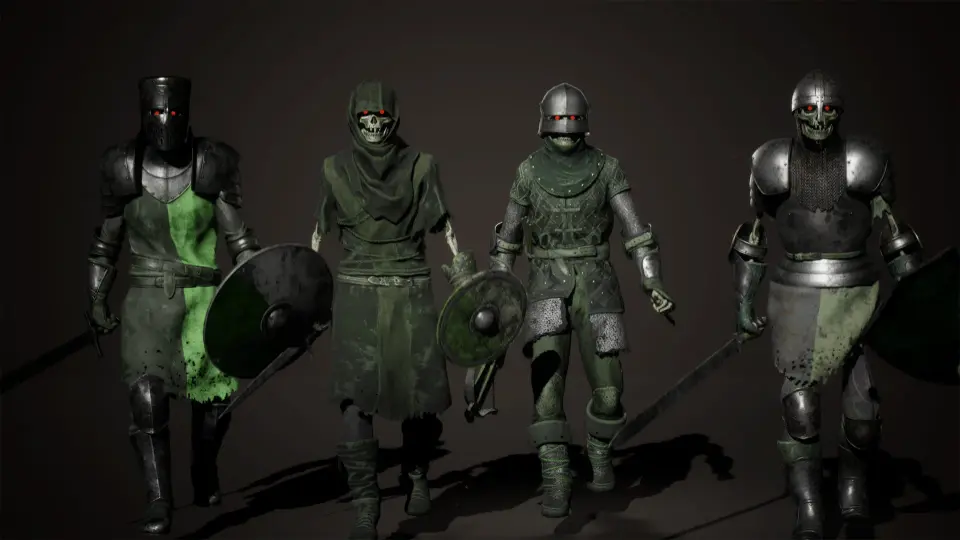
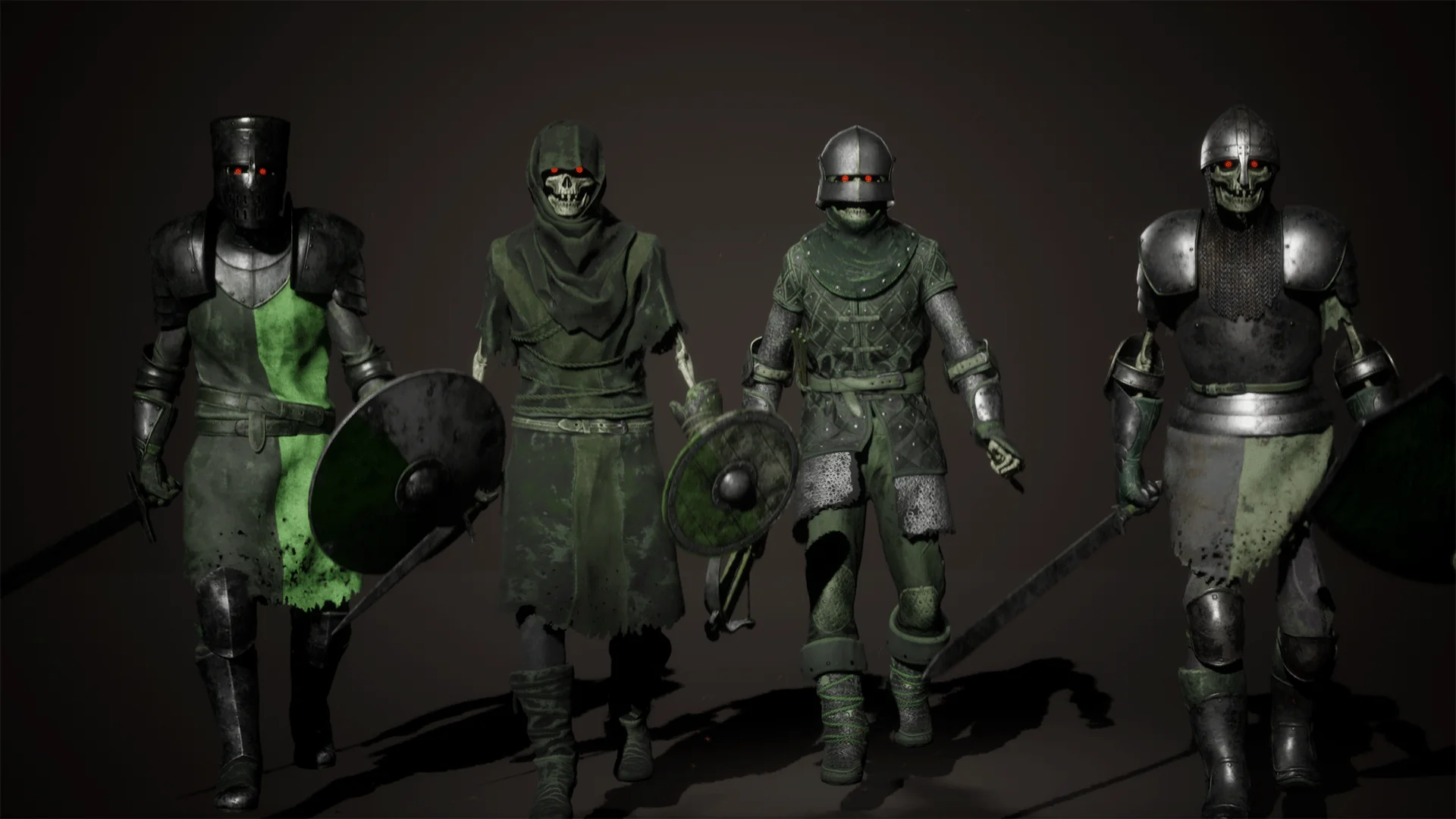
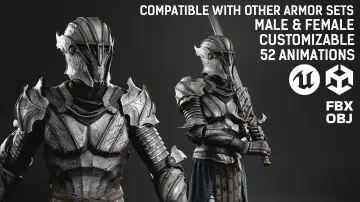
The asset package is structured around seven primary character configurations: a swordsman, an axe wielder, a broadsword warrior, a spearman, a crossbowman, a robber archetype, and a hammer fighter. Each set serves as a functional foundation, but the individual armor elements can be freely mixed and swapped to assemble distinct skeletal soldiers.
The structural armor inventory includes:
7 helmets
7 cuirasses
7 pairs of gloves
7 sets of pants
7 pairs of boots
Supplementary layering is handled through secondary attachments designed to be parented or socketed across the frame. These modular add-ons include four balaclavas, one cloak, three knee pad variants, three elbow pad variants, and four distinct shoulder pad meshes. Combining these segments allows developers to construct everything from heavily armored royal guards to stripped-down, weathered raiders.
While the vast majority of modular components fit together seamlessly, specific layering restrictions must be observed during character assembly. Select helmet meshes do not fit over the balaclava pieces due to intersecting geometry, meaning the head covering must either be removed or matched only with helmets that provide sufficient internal clearance. Additionally, the cloak presents collision overlaps with certain bulky headgear, requiring character setups to omit either the high-profile hat or the exterior cloak to avoid clipping.
Equipping Weapons and Defensive Shields on the Skeleton
Combat roles are defined by an armory of dedicated fantasy medieval weaponry and shields. The available weapons span seven distinct implements tailored to the standard character archetypes:
One-handed sword
Two-handed broadsword
Battleaxe
Crossbow
Long spear
Close-quarters dagger
Heavy war hammer
Ranged builds make direct use of the crossbow, while lighter rogue or robber configurations typically pair the dagger or axe with reduced armor coverage. Frontline infantry, such as the spearman or swordsman, can be configured with or without defensive gear using the included shield collection.
The package contains six shields in total, divided into two distinct construction styles: two wooden shields and four metal shields. The wooden options offer a lighter, improvised appearance suited for irregular troops, skirmishers, or the robber preset. The four metallic shields feature heavier, crafted geometry that complements the polished plate cuirasses and heavy helmets of the frontline knight sets. Each shield attaches to standard forearm sockets, allowing fast swapping inside character blueprints.
Material Customization and Fabric Simulation Workflows
Visual diversity across uniform skeletal ranks is achieved through dynamic material parameters rather than baking distinct textures for every combination. The underlying shader setup provides exposed controls to adjust the primary colors of both cloth garments and metal plate. Shifting base colors allows you to divide enemy squads into opposing factions, assign unit ranks, or match existing environmental palettes.
A built-in dirt controller provides surface aging controls. Dirt can be dialed in or completely removed through the material settings, enabling transitions from clean, freshly maintained metalwork to soiled, mud-caked armor suitable for damp dungeons or battlefield trenches. This dirt mask applies across armor plates, pants, and boots, maintaining consistency across the entire character.
Secondary motion is integrated directly into the character meshes. Select torso pieces incorporate real-time fabric simulation, allowing loose tunics, tabards, and attached cloth elements to sway and react to character velocity and skeletal physics instead of remaining glued to rigid leg and hip geometry. When assembling modular pieces, combining simulated cloth torsos with the cloak requires verifying that physics collision hulls correctly separate the two layers to avoid cloth-on-cloth pass-through during rapid locomotion.
Animation Blueprint Implementation and Production Usage
Deploying the assembled warriors into game logic relies on standard skeletal mesh component stacking and Animation Blueprints. Because all armor parts share the same base skeleton structure, modular pieces can use the master pose component approach or run synchronized leader-follower skeletal meshes. Using the shared bone hierarchy ensures that gloves, boots, cuirasses, and secondary protective pads follow underlying skeletal movement seamlessly.
When handling character instantiation in engine scripts or spawning blueprints, configure the default weapon attachments to designated hand sockets after the base armor mesh has initialized. Custom scripts can randomize or sequentially pick from the seven cuirasses, pants, helmets, and boots, check compatibility flags to prevent clashing cloak-and-helmet combinations, and apply randomized color and dirt vectors within the material instance parameters. With retargeting parameters properly fixed on spine_03 and the extremities, the resulting skeleton warriors are immediately ready to execute combat, traversal, and hit-reaction animation sets without post-process skin deformation bugs.
 Humans
 Humans
 Humans
 Humans