"0341a2901a4ae9aa"{"id":"15359","slug":"simplecharts","title":"SimpleCharts","category":"Procedural Systems","engine":"4.25 - 4.27,5.0 - 5.3","assetVersion":"Engine version: 4.25 - 4.27,5.0 - 5.3","engineVersion":"5.1","tag":"Procedural Systems","accent":"blue","visual":"character","summary":"SimpleCharts provides a streamlined solution for developers needing to integrate dynamic charts into their projects using UMG or Blueprints. This plugin leverages Echarts for high-quality visualization and supports multiple platforms.","platform":"Unreal Engine","publishedAt":"2026-03-12T08:47:34.000Z","updatedAt":"2026-04-19T15:44:48.000Z","sourceNotes":[],"fileContents":[],"compatibility":["Unreal Engine","Engine version: 4.25 - 4.27,5.0 - 5.3"],"featuredImage":{"alt":"SimpleCharts","src":"https://3dcghub.com/wp-content/uploads/2026/03/104a4c93-6ff6-445d-aad2-9588af9254de.webp"},"hasDownloadLink":true,"downloads":2,"terms":[{"taxonomy":"category","slug":"procedural-systems-tools-and-plugins","name":"Procedural Systems"},{"taxonomy":"post_tag","slug":"blueprint","name":"Blueprint"},{"taxonomy":"post_tag","slug":"blueprint-data-visualization","name":"Blueprint Data Visualization"},{"taxonomy":"post_tag","slug":"plugins","name":"Plugins"},{"taxonomy":"post_tag","slug":"simplecharts","name":"Simplecharts"},{"taxonomy":"post_tag","slug":"umg-charts","name":"UMG Charts"},{"taxonomy":"post_tag","slug":"unreal-engine-5","name":"Unreal Engine 5"}],"galleryImages":[{"src":"https://3dcghub.com/wp-content/uploads/2026/03/6bf63568b2a6_31ba53b4-b93d-495e-bb2f-b2dce326cb6a.webp","alt":"SimpleCharts"},{"src":"https://3dcghub.com/wp-content/uploads/2026/03/942e6a37ab40_949e37c9-f59a-4596-bf2a-1efba65f5d86.webp","alt":"SimpleCharts"},{"src":"https://3dcghub.com/wp-content/uploads/2026/03/1af24134b886_a3c2f2b3-63a6-4b57-8777-d358e85fb83a.webp","alt":"SimpleCharts"},{"src":"https://3dcghub.com/wp-content/uploads/2026/03/eb5acf56686e_10d55ac0-f556-4af9-bd6b-33b6ce9ba2fb.webp","alt":"SimpleCharts"},{"src":"https://3dcghub.com/wp-content/uploads/2026/03/0871e324d2f8_19887753-b86e-4d9f-a3fe-7ccae62b0208.webp","alt":"SimpleCharts"},{"src":"https://3dcghub.com/wp-content/uploads/2026/03/403cca6f5a20_0fdf99a9-068e-4ffe-bcaa-b761533387af.webp","alt":"SimpleCharts"},{"src":"https://3dcghub.com/wp-content/uploads/2026/03/d59dc7e61e22_52ffe73b-f0e1-48bc-b286-3eedc5e576b6.webp","alt":"SimpleCharts"}],"accessPanel":{"kind":"resource","title":"Access this resource","eyebrow":"Free Download","message":"Log in or create a free account to start your download.","fileName":"SimpleCharts 4.25-5.3.7z","safetyNote":"All resources are 100% manually reviewed to eliminate all risks.","actionLabel":"Download Free","resourceType":"Resource archive"},"contentHtml":"\u003ch2\u003eStreamlined Data Visualization with SimpleCharts\u003c/h2\u003e\n\u003cp\u003eSimpleCharts offers a user-friendly approach to data visualization within your development environment. This plugin is designed to help developers create clear and informative charts without complex setups. By focusing on ease of use, the developer has ensured that the tool remains accessible for various project types. Consequently, you can integrate visual data representation into your application with minimal effort.\u003c/p\u003e\n\n\u003ch2\u003eFlexible Integration via UMG and Blueprints\u003c/h2\u003e\n\u003cp\u003eOne of the primary benefits of using SimpleCharts is its flexible workflow. You can choose to use the plugin completely through UMG, which allows for a visual and intuitive design process. This integration ensures that your charts fit seamlessly within your existing user interface. Furthermore, the plugin supports Blueprints for those who require more dynamic functionality.\u003c/p\u003e\n\n\u003cp\u003eUsing Blueprints, you can update your charts at runtime. This feature is essential for projects that display real-time data or require frequent updates based on user interaction. Therefore, the plugin provides a robust solution for both static and interactive data displays. The creator has optimized these systems to work efficiently within the standard engine framework.\u003c/p\u003e\n\n\u003ch2\u003eAdvanced Web Browser Support and IME Integration\u003c/h2\u003e\n\u003cp\u003eThe SimpleCharts plugin has evolved to meet modern development needs. Initially, it faced limitations with web browser integration. However, it now supports nearly 4.27 compatibility with WebBrowser. This update allows for a more integrated experience when dealing with web-based content alongside your native UI elements.\u003c/p\u003e\n\n\u003cp\u003eFor developers who require specific web functionality, the plugin provides a dedicated control called ChartWebBrowser. This control is designed to be exactly the same as the official function. Additionally, it includes support for the Input Method Editor (IME). This means you can use IME input within the browser control, which is a significant advantage for global applications requiring complex character entry.\u003c/p\u003e\n\n\u003ch2\u003ePowered by Echarts for Quality Output\u003c/h2\u003e\n\u003cp\u003eThe charts generated by this plugin are based on the Echarts library. This foundation ensures that the visual output is both professional and reliable. By leveraging this technology, SimpleCharts can produce high-quality visualizations that are easy to read and interpret. The developer chose this base to provide a solid engine for all charting requirements.\u003c/p\u003e\n\n\u003ch2\u003eCross-Platform Performance and Testing\u003c/h2\u003e\n\u003cp\u003eCompatibility is a vital factor for any development resource. SimpleCharts has been tested on several key platforms to ensure stability. At present, the creator has verified its performance on the win64 platform and the Android platform. These tests confirm that the plugin functions correctly on both desktop and mobile environments.\u003c/p\u003e\n\n\u003cp\u003eWhile these are the currently tested platforms, the developer believes that other platforms should also be supported. This makes SimpleCharts a versatile choice for cross-platform development. Whether you are building for Windows or mobile devices, the plugin offers a consistent experience across different hardware.\u003c/p\u003e\n\n\u003ch2\u003eBest Fit\u003c/h2\u003e\n\u003cp\u003eThe clearest takeaway is that SimpleCharts provides an efficient and powerful way to handle data visualization. With its dual support for UMG and Blueprints, it caters to different development styles. The inclusion of specialized browser controls and IME support further enhances its utility. If you need a reliable charting solution for win64 or Android, this plugin offers the necessary tools to succeed.\u003c/p\u003e\n\n\u003ch2\u003eRelated Resources Worth Checking\u003c/h2\u003e\n\u003cul\u003e\n\u003cli\u003e\u003ca href=\"https://3dcghub.com/rodinbridge-unreal-engine-add-on/\" title=\"RodinBridge – Unreal Engine Add-on\"\u003eRodinBridge – Unreal Engine Add-on\u003c/a\u003e\u003c/li\u003e\n\u003cli\u003e\u003ca href=\"https://3dcghub.com/extile-plus-ultimate-non-tiling-material-toolkit-for-unreal-engine-environments/\" title=\"EXTILE PLUS -Ultimate Non-Tiling Material Toolkit for Unreal Engine Environments\"\u003eEXTILE PLUS -Ultimate Non-Tiling Material Toolkit for Unreal Engine Environments\u003c/a\u003e\u003c/li\u003e\n\u003cli\u003e\u003ca href=\"https://3dcghub.com/ultimate-template-unrealengine-2d-dialogue-inventory-system-save/\" title=\"ULTIMATE Template UnrealEngine || 2D + Dialogue + Inventory system + Save | |\"\u003eULTIMATE Template UnrealEngine || 2D + Dialogue + Inventory system + Save | |\u003c/a\u003e\u003c/li\u003e\n\u003cli\u003e\u003ca href=\"https://3dcghub.com/altermesh-geometry-nodes-in-unreal/\" title=\"AlterMesh – Geometry Nodes in Unreal\"\u003eAlterMesh – Geometry Nodes in Unreal\u003c/a\u003e\u003c/li\u003e\n\u003cli\u003e\u003ca href=\"https://3dcghub.com/zxing-for-unreal/\" title=\"ZXing For Unreal\"\u003eZXing For Unreal\u003c/a\u003e\u003c/li\u003e\n\u003c/ul\u003e","contentTextLength":3873,"navigation":{"current":3443,"total":4017,"previous":{"id":"15372","slug":"terracrust-procedural-landscape","title":"Terracrust: Procedural Landscape","category":"Procedural Systems","platform":"Unreal Engine","updatedAt":"2026-04-19T15:44:48.000Z"},"next":{"id":"15434","slug":"cyberpunk-rpg-ui","title":"Cyberpunk RPG UI","category":"UI Kits / HUDs","platform":"Unreal Engine","updatedAt":"2026-04-19T15:44:47.000Z"}},"relatedResources":[{"id":"15285","slug":"landscaping","title":"Landscaping","category":"Procedural Systems","engine":"4.26 - 5.6","assetVersion":"Asset Version: 4.3 - 7.25","engineVersion":"Engine version: 4.26 - 5.6","tag":"Procedural Systems","accent":"blue","visual":"luts","summary":"Streamline your terrain creation process with Landscaping, a tool designed to import GIS data directly into Unreal Engine. Transform DTMs and satellite imagery into high-fidelity landscapes without external preparation.","platform":"Unreal Engine","publishedAt":"2026-03-12T08:29:46.000Z","updatedAt":"2026-09-30T05:04:36.509Z","sourceNotes":[],"fileContents":[],"compatibility":["Unreal Engine","Asset Version: 4.3 - 7.25","Engine version: 4.26 - 5.6"],"featuredImage":{"alt":"Landscaping","src":"https://3dcghub.com/wp-content/uploads/2026/03/9f060901-3780-434e-948f-d12892bf7327.webp"},"hasDownloadLink":true,"downloads":3},{"id":"15379","slug":"vector-flow-field-2d","title":"Vector Flow Field 2D","category":"Procedural Systems","engine":"5. 0 - 5.3","assetVersion":"Engine version: 5. 0 - 5.3","engineVersion":"5.0","tag":"Procedural Systems","accent":"blue","visual":"luts","summary":"Visualize complex vector data with Vector Flow Field 2D. This GPU-powered plugin renders one million particles at 60fps for high-performance flow field effects.","platform":"Unreal Engine","publishedAt":"2026-03-12T08:49:59.000Z","updatedAt":"2026-04-19T15:44:48.000Z","sourceNotes":[],"fileContents":[],"compatibility":["Unreal Engine","Engine version: 5. 0 - 5.3"],"featuredImage":{"alt":"Vector Flow Field 2D","src":"https://3dcghub.com/wp-content/uploads/2026/03/0fb84e83-6772-4c38-8b07-ca8ee0c63bba.webp"},"hasDownloadLink":true,"downloads":0},{"id":"15291","slug":"physical-rope","title":"Physical Rope","category":"Procedural Systems","engine":"5.3","assetVersion":"Engine version: 5.3","engineVersion":"Asset Version:2.0","tag":"Procedural Systems","accent":"blue","visual":"city","summary":"Physical Rope provides a realistic, physically collidable, and simulatable solution for game development. This Blueprint-based asset allows for advanced interactions with environmental objects.","platform":"Unreal Engine","publishedAt":"2026-03-12T08:31:31.000Z","updatedAt":"2026-04-19T15:44:51.000Z","sourceNotes":[],"fileContents":[],"compatibility":["Unreal Engine","Engine version: 5.3","Asset Version: 2.0"],"featuredImage":{"alt":"Physical Rope","src":"https://3dcghub.com/wp-content/uploads/2026/03/354e56ff-3064-4abd-ae86-5393e1075bef.webp"},"hasDownloadLink":true,"downloads":0}]}
Procedural Systems
SimpleCharts
SimpleCharts provides a streamlined solution for developers needing to integrate dynamic charts into their projects using UMG or Blueprints. This plugin leverages Echarts for high-quality visualization and supports multiple platforms.
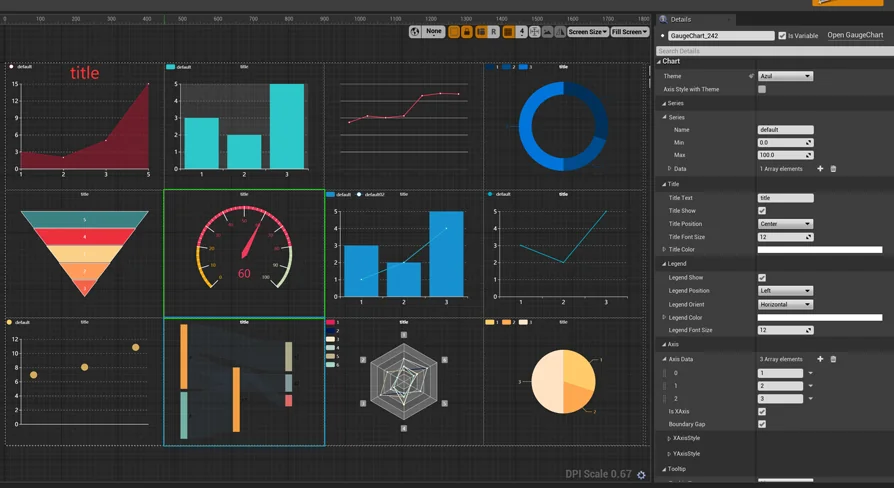
SimpleCharts offers a user-friendly approach to data visualization within your development environment. This plugin is designed to help developers create clear and informative charts without complex setups. By focusing on ease of use, the developer has ensured that the tool remains accessible for various project types. Consequently, you can integrate visual data representation into your application with minimal effort.
Flexible Integration via UMG and Blueprints
One of the primary benefits of using SimpleCharts is its flexible workflow. You can choose to use the plugin completely through UMG, which allows for a visual and intuitive design process. This integration ensures that your charts fit seamlessly within your existing user interface. Furthermore, the plugin supports Blueprints for those who require more dynamic functionality.
Using Blueprints, you can update your charts at runtime. This feature is essential for projects that display real-time data or require frequent updates based on user interaction. Therefore, the plugin provides a robust solution for both static and interactive data displays. The creator has optimized these systems to work efficiently within the standard engine framework.
Advanced Web Browser Support and IME Integration
The SimpleCharts plugin has evolved to meet modern development needs. Initially, it faced limitations with web browser integration. However, it now supports nearly 4.27 compatibility with WebBrowser. This update allows for a more integrated experience when dealing with web-based content alongside your native UI elements.
For developers who require specific web functionality, the plugin provides a dedicated control called ChartWebBrowser. This control is designed to be exactly the same as the official function. Additionally, it includes support for the Input Method Editor (IME). This means you can use IME input within the browser control, which is a significant advantage for global applications requiring complex character entry.
Powered by Echarts for Quality Output
The charts generated by this plugin are based on the Echarts library. This foundation ensures that the visual output is both professional and reliable. By leveraging this technology, SimpleCharts can produce high-quality visualizations that are easy to read and interpret. The developer chose this base to provide a solid engine for all charting requirements.
Cross-Platform Performance and Testing
Compatibility is a vital factor for any development resource. SimpleCharts has been tested on several key platforms to ensure stability. At present, the creator has verified its performance on the win64 platform and the Android platform. These tests confirm that the plugin functions correctly on both desktop and mobile environments.
While these are the currently tested platforms, the developer believes that other platforms should also be supported. This makes SimpleCharts a versatile choice for cross-platform development. Whether you are building for Windows or mobile devices, the plugin offers a consistent experience across different hardware.
Best Fit
The clearest takeaway is that SimpleCharts provides an efficient and powerful way to handle data visualization. With its dual support for UMG and Blueprints, it caters to different development styles. The inclusion of specialized browser controls and IME support further enhances its utility. If you need a reliable charting solution for win64 or Android, this plugin offers the necessary tools to succeed.
 Procedural Systems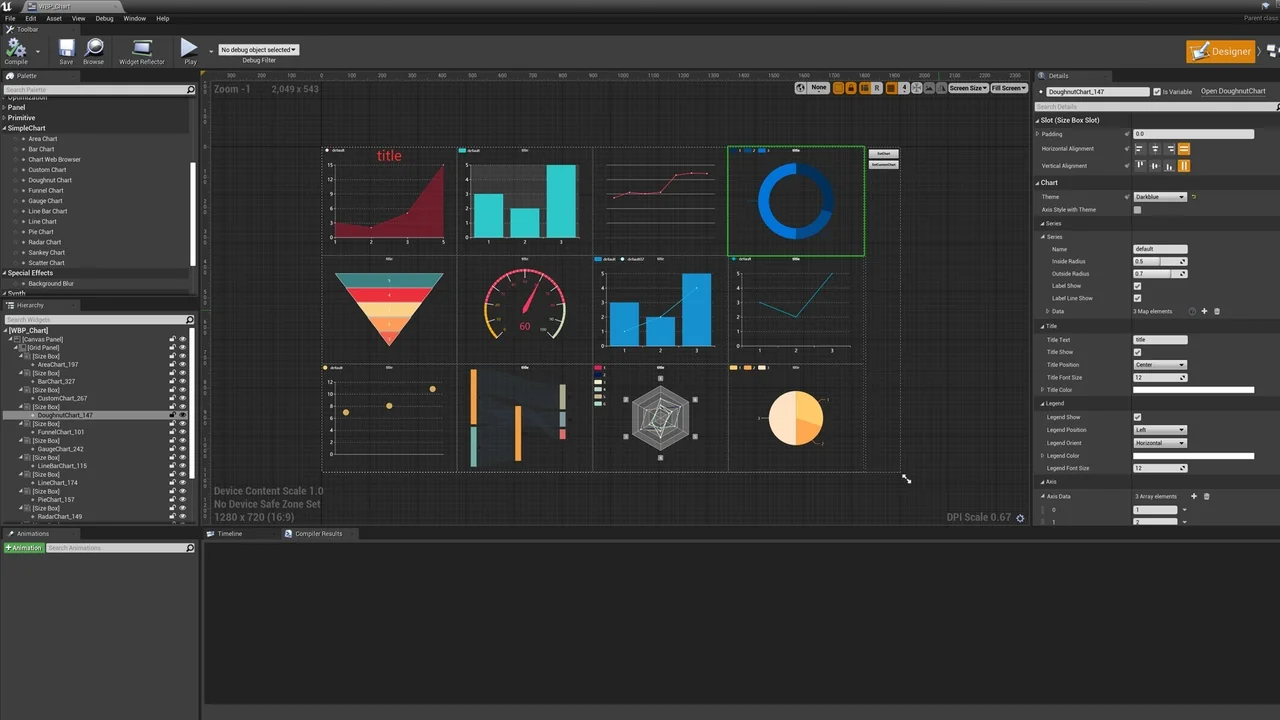
 Procedural Systems
 Procedural Systems
 Procedural Systems