"efaa631e936fd3ee"{"id":"1002202","slug":"simple-radial-scan","title":"Simple Radial Scan","category":"Gameplay Features","engine":"4.26+,5.0+","assetVersion":"","engineVersion":"Engine Version: 4.26+,5.0+","tag":"Gameplay Features","accent":"blue","visual":"mech","summary":"Explore Simple Radial Scan, a modular Blueprint tool featuring 5 scanner effects and 4 target highlight types for detecting objects, enemies, and NPCs.","platform":"Unreal Engine","publishedAt":"2026-10-29T14:46:05.933Z","updatedAt":"2026-10-29T14:46:05.933Z","sourceNotes":[],"fileContents":[],"compatibility":["Unreal Engine","Engine Version: 4.26+,5.0+"],"featuredImage":{"alt":"Simple Radial Scan","src":"/wp-content/uploads/published/2026/10/1a9ee8fca66d-5c5388a3-136c-4b11-89c9-65cfebcab13a-0b8c44eff9.webp"},"hasDownloadLink":true,"downloads":0,"terms":[{"taxonomy":"category","slug":"gameplay-features","name":"Gameplay Features"}],"galleryImages":[{"src":"/wp-content/uploads/published/2026/10/58964d7b53ee-e09711d5-1238-4d54-a0b5-5dd1f8115137-37685fbb3f.webp","alt":"Simple Radial Scan"},{"src":"/wp-content/uploads/published/2026/10/d5c6b472a54f-03fcee48-0d74-41e4-b893-97c7d8a920b2-af9feb7134.webp","alt":"Simple Radial Scan"},{"src":"/wp-content/uploads/published/2026/10/9dd8a773f33f-b320cfea-aea0-4c02-93eb-9c30bd319f78-2e66cba758.webp","alt":"Simple Radial Scan"},{"src":"/wp-content/uploads/published/2026/10/699bd522805b-86cd80a2-aa58-43a7-b500-ba2a6cdd4b59-cbb33c3d91.webp","alt":"Simple Radial Scan"},{"src":"/wp-content/uploads/published/2026/10/1878491fd159-e0aabca2-d8b1-4b1b-aeb5-a5e3adb5cbf3-95c29ffdf3.webp","alt":"Simple Radial Scan"},{"src":"/wp-content/uploads/published/2026/10/d3ab2f8318dc-c28f8d71-9c91-40f7-99ce-772695027c28-5d6ed8a5fd.webp","alt":"Simple Radial Scan"},{"src":"/wp-content/uploads/published/2026/10/bb390c03cedc-1698cc69-08b0-40a8-ae12-eb52d2c19b12-2afe59c735.webp","alt":"Simple Radial Scan"},{"src":"/wp-content/uploads/published/2026/10/07891206b1bc-0bdc652e-9fb7-4cbe-b64e-7be4fd6b0c53-2abee75d8d.webp","alt":"Simple Radial Scan"}],"accessPanel":{"kind":"resource","title":"Download this resource","eyebrow":"Free Download","message":"Log in or create a free account to start your download.","fileName":"Simple Radial Scan.7z","safetyNote":"Resources are manually reviewed before listing to improve quality and reduce obvious risks.","actionLabel":"Download Free","resourceType":"Resource archive"},"contentHtml":"\u003cp\u003eStealth infiltrations, survival exploration, and tactical encounters often hinge on spatial awareness. When characters traverse obscure environments, murky corridors, or sprawling terrain, giving the player a way to survey their surroundings changes how they engage with hazards and points of interest. Simple Radial Scan addresses this core gameplay loop by offering a system that pings the surrounding space to reveal objects, enemies, and NPCs up to a chosen distance.\u003c/p\u003e \u003cp\u003eRather than locking detection behind a static, one-size-fits-all pulse, the system provides practical tools for both scanning the environment and visually communicating what is found. The detection mechanism relies on an expanding radial perimeter, giving players immediate feedback about their environment while keeping developers in complete control over scan range, target definitions, and on-screen visuals.\u003c/p\u003e \u003ch2\u003eDetecting Objects, Enemies, and NPCs at Controlled Distances\u003c/h2\u003e \u003cp\u003eAt the center of any scanning mechanic is the relationship between range and visibility. Simple Radial Scan is built to discover three foundational categories of game entities: interactive objects, hostile enemies, and neutral or friendly NPCs. Setting a desired distance limits the scan perimeter, ensuring players cannot trivially uncover the entire map in a single pass unless intended by design.\u003c/p\u003e \u003cp\u003eIn practice, range constraints allow level designers to pace discoveries. A short-range scan suits tight interior spaces, encouraging careful room-by-room searches where players check for hidden loot containers, security devices, or lurking threats around corners. Expanding that radius fits open-world survival or reconnaissance setups, where tracking patrol routes or flagging scattered materials across wider terrain takes precedence.\u003c/p\u003e \u003cp\u003eBecause the scanner isolates targets according to distance, encounters can be tuned around anticipation. Players can ping the area to evaluate enemy counts behind obstacles, locate essential quest NPCs in crowded environments, or uncover scavengeable equipment without breaking exploration flow.\u003c/p\u003e \u003ch2\u003eConfiguring the Five Scanner Effects and Custom Visuals\u003c/h2\u003e \u003cp\u003eVisual feedback defines how a scanner feels in play. A high-tech sci-fi ping demands clean, precise wave rings, while an organic pulse or magical detection wave requires a different visual presentation. Simple Radial Scan includes five distinct scanner effects right out of the box, offering ready-made visual signatures for the pulse wave itself.\u003c/p\u003e \u003cp\u003eBeyond the five pre-built scanner effects, the asset supports deeper customization through parameter adjustments. Developers can modify the look of the wave by tweaking exposed parameters, altering how the boundary expands, fades, or interacts visually with the game space. This flexibility makes it straightforward to adapt the effect to diverse aesthetic goals.\u003c/p\u003e \u003cp\u003eCreating custom variations does not require rebuilding the scanning logic from scratch. By adjusting existing settings, the wave can shift between subtle, fast-moving ripples and dense, pronounced energy rings that command the player's full attention during high-intensity sequences.\u003c/p\u003e \u003ch2\u003eDifferentiating Targets with Four Highlight Types\u003c/h2\u003e \u003cp\u003eFinding a target is only the first half of a detection system; interpreting what was found is equally vital. When a scan wave passes over an actor, immediate visual distinction prevents confusion. Simple Radial Scan includes four highlight types to categorize illuminated entities.\u003c/p\u003e \u003cp\u003eHaving multiple highlight variations allows clear visual hierarchy directly inside the scene:\u003c/p\u003e\n\u003cul\u003e \u003cli\u003eDifferentiating dangerous enemies from harmless non-player characters to prevent accidental engagements.\u003c/li\u003e \u003cli\u003eIsolating inanimate objects and item pickups from moving targets so players know where to scavenge.\u003c/li\u003e \u003cli\u003eColor-coding or stylizing specific objectives so critical mission markers stand out against standard props.\u003c/li\u003e \u003cli\u003eEstablishing tiered threat levels or specialized interactions using distinct visual states.\u003c/li\u003e\n\u003c/ul\u003e \u003cp\u003eIf a project requires additional visual categories beyond the four standard highlight types, the system allows more to be introduced easily. Developers can expand the selection to accommodate custom gameplay states, such as quest-specific targets, damaged environmental elements, or structural weak points.\u003c/p\u003e \u003ch2\u003eBlueprint Component Architecture and Child Actor Integration\u003c/h2\u003e \u003cp\u003eA primary consideration when selecting gameplay systems is how easily they fit into existing character rigs and level assets. Simple Radial Scan uses an accessible, modular architecture centered entirely around Blueprints.\u003c/p\u003e \u003cp\u003eThe scanner itself is structured as a Blueprint that can be added as a child actor. This design choice makes attaching the scanner to moving characters, vehicles, or stationary security installations straightforward. Because it functions as an actor child, integrating the pulse emitter does not require rewriting core player character logic or untangling complex inheritance trees.\u003c/p\u003e \u003cp\u003eTarget interaction is handled with equal modularity. The package provides a dedicated Blueprint component that attaches directly to any actor intended to react to the scan. Rather than hardcoding detection rules into the scanner itself, this component specifies exactly which highlight type should be performed on that individual actor. Attaching the component to an enemy blueprint, for instance, marks it to display a threat highlight, while placing it on an item chest triggers an object-specific highlight.\u003c/p\u003e \u003cp\u003eThis separation between the scanner actor and the target component keeps project files clean. New props, hostile units, and interactive elements can be made scanner-aware simply by adding the component and selecting the desired highlight response. Developers can consult the included documentation to confirm setup instructions and streamline component configuration across their actor library.\u003c/p\u003e \u003ch2\u003eProjects and Teams That Benefit Most\u003c/h2\u003e \u003cp\u003eSimple Radial Scan is particularly valuable for developers who need reliable detection mechanics without committing extensive programming hours to custom spatial queries and highlight shaders. Solo creators and small development teams working on stealth titles, detective investigation games, sci-fi exploration, or dungeon crawlers can drop the scanner into place as an actor child, distribute the Blueprint component across their target assets, and immediately obtain functioning radar-style gameplay.\u003c/p\u003e \u003cp\u003eBecause the asset balances ready-to-use presets—such as the five wave effects and four highlight styles—with accessible parameter tweaking, it serves equally well for rapid prototyping and fully produced gameplay loops. Teams seeking a functional, Blueprint-native scanning tool that cleanly separates emission from target response will find a practical, scalable foundation here.\u003c/p\u003e\n\n\u003ch2\u003eExplore Similar Assets\u003c/h2\u003e\n\u003cul\u003e\n\u003cli\u003e\u003ca href=\"https://3dcghub.com/radial-scan-fx/\" title=\"Radial Scan FX\"\u003eRadial Scan FX\u003c/a\u003e\u003c/li\u003e\n\u003cli\u003e\u003ca href=\"https://3dcghub.com/advanced-scope/\" title=\"Advanced Scope\"\u003eAdvanced Scope\u003c/a\u003e\u003c/li\u003e\n\u003cli\u003e\u003ca href=\"https://3dcghub.com/cinematic-duel-system/\" title=\"Cinematic Duel System\"\u003eCinematic Duel System\u003c/a\u003e\u003c/li\u003e\n\u003cli\u003e\u003ca href=\"https://3dcghub.com/inventory-and-stat-system/\" title=\"Inventory and Stat System\"\u003eInventory and Stat System\u003c/a\u003e\u003c/li\u003e\n\u003cli\u003e\u003ca href=\"https://3dcghub.com/3d-tilemap-simple-helper/\" title=\"3D Tilemap - Simple Helper\"\u003e3D Tilemap - Simple Helper\u003c/a\u003e\u003c/li\u003e\n\u003c/ul\u003e","contentTextLength":6891,"navigation":{"current":83,"total":4209,"previous":{"id":"1002203","slug":"small-boat-anim-set","title":"Small Boat Anim Set","category":"Gestures","platform":"Unreal Engine","updatedAt":"2026-10-29T14:46:41.373Z"},"next":{"id":"1002201","slug":"simple-crosshairs-pack","title":"Simple Crosshairs Pack","category":"UI Kits / HUDs","platform":"Unreal Engine","updatedAt":"2026-10-29T14:45:04.719Z"}},"relatedResources":[{"id":"1002163","slug":"radial-scan-fx","title":"Radial Scan FX","category":"Shaders","engine":"4.26+,5.0+","assetVersion":"","engineVersion":"Engine Version: 4.26+,5.0+","tag":"Shaders","accent":"blue","visual":"mech","summary":"Explore Radial Scan FX, a deferred decal scanning ring shader and Blueprint system for creating stylized radar waves, highlights, and game mechanics.","platform":"Unreal Engine","publishedAt":"2026-10-29T10:06:40.826Z","updatedAt":"2026-10-29T10:06:40.826Z","sourceNotes":[],"fileContents":[],"compatibility":["Unreal Engine","Engine Version: 4.26+,5.0+"],"featuredImage":{"alt":"Radial Scan FX","src":"/wp-content/uploads/published/2026/10/181dc30eab4f-dceaeb46-6faa-443c-a199-22723c634e68-2d72e0850e.webp"},"hasDownloadLink":true,"downloads":0},{"id":"10542","slug":"advanced-scope","title":"Advanced Scope","category":"Gameplay Features","engine":"4.26+,5.0+","assetVersion":"Engine version: 4.26+,5.0+","engineVersion":"4.25","tag":"Gameplay Features","accent":"blue","visual":"mech","summary":"Enhance your project with the Advanced Scope, a specialized resource designed for shooters and simulations. This blueprint-based system comes with comprehensive support and documentation for a safe and simple integration.","platform":"Unreal Engine","publishedAt":"2026-03-03T15:37:18.000Z","updatedAt":"2026-04-19T15:50:00.000Z","sourceNotes":[],"fileContents":[],"compatibility":["Unreal Engine","Engine version: 4.26+,5.0+"],"featuredImage":{"alt":"Advanced Scope","src":"https://3dcghub.com/wp-content/uploads/2026/03/e4f8f7c9-c605-4945-8483-957326679f90.webp"},"hasDownloadLink":true,"downloads":2},{"id":"10641","slug":"cinematic-duel-system","title":"Cinematic Duel System","category":"Gameplay Features","engine":"4.26+,5.0+","assetVersion":"Engine version: 4.26+,5.0+","engineVersion":"4.26","tag":"Gameplay Features","accent":"blue","visual":"luts","summary":"The Cinematic Duel System provides a simple yet powerful way to implement dramatic combat encounters. Developers can enable time-freezing mechanics by adding a single blueprint to their level.","platform":"Unreal Engine","publishedAt":"2026-03-03T15:53:44.000Z","updatedAt":"2026-04-19T15:49:58.000Z","sourceNotes":[],"fileContents":[],"compatibility":["Unreal Engine","Engine version: 4.26+,5.0+"],"featuredImage":{"alt":"Cinematic Duel System","src":"https://3dcghub.com/wp-content/uploads/2026/03/158ce170-a82e-4c17-9cf9-9b96fcfd76bb.webp"},"hasDownloadLink":true,"downloads":0}]}
Gameplay Features
Simple Radial Scan
Explore Simple Radial Scan, a modular Blueprint tool featuring 5 scanner effects and 4 target highlight types for detecting objects, enemies, and NPCs.
Stealth infiltrations, survival exploration, and tactical encounters often hinge on spatial awareness. When characters traverse obscure environments, murky corridors, or sprawling terrain, giving the player a way to survey their surroundings changes how they engage with hazards and points of interest. Simple Radial Scan addresses this core gameplay loop by offering a system that pings the surrounding space to reveal objects, enemies, and NPCs up to a chosen distance.
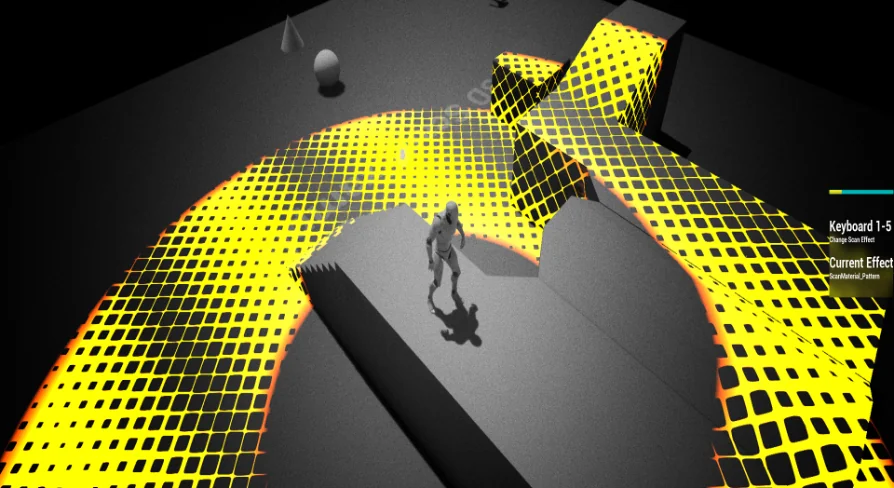
Rather than locking detection behind a static, one-size-fits-all pulse, the system provides practical tools for both scanning the environment and visually communicating what is found. The detection mechanism relies on an expanding radial perimeter, giving players immediate feedback about their environment while keeping developers in complete control over scan range, target definitions, and on-screen visuals.
Detecting Objects, Enemies, and NPCs at Controlled Distances
At the center of any scanning mechanic is the relationship between range and visibility. Simple Radial Scan is built to discover three foundational categories of game entities: interactive objects, hostile enemies, and neutral or friendly NPCs. Setting a desired distance limits the scan perimeter, ensuring players cannot trivially uncover the entire map in a single pass unless intended by design.
In practice, range constraints allow level designers to pace discoveries. A short-range scan suits tight interior spaces, encouraging careful room-by-room searches where players check for hidden loot containers, security devices, or lurking threats around corners. Expanding that radius fits open-world survival or reconnaissance setups, where tracking patrol routes or flagging scattered materials across wider terrain takes precedence.
Because the scanner isolates targets according to distance, encounters can be tuned around anticipation. Players can ping the area to evaluate enemy counts behind obstacles, locate essential quest NPCs in crowded environments, or uncover scavengeable equipment without breaking exploration flow.
Configuring the Five Scanner Effects and Custom Visuals
Visual feedback defines how a scanner feels in play. A high-tech sci-fi ping demands clean, precise wave rings, while an organic pulse or magical detection wave requires a different visual presentation. Simple Radial Scan includes five distinct scanner effects right out of the box, offering ready-made visual signatures for the pulse wave itself.
Beyond the five pre-built scanner effects, the asset supports deeper customization through parameter adjustments. Developers can modify the look of the wave by tweaking exposed parameters, altering how the boundary expands, fades, or interacts visually with the game space. This flexibility makes it straightforward to adapt the effect to diverse aesthetic goals.
Creating custom variations does not require rebuilding the scanning logic from scratch. By adjusting existing settings, the wave can shift between subtle, fast-moving ripples and dense, pronounced energy rings that command the player's full attention during high-intensity sequences.
Differentiating Targets with Four Highlight Types
Finding a target is only the first half of a detection system; interpreting what was found is equally vital. When a scan wave passes over an actor, immediate visual distinction prevents confusion. Simple Radial Scan includes four highlight types to categorize illuminated entities.
Having multiple highlight variations allows clear visual hierarchy directly inside the scene:
Differentiating dangerous enemies from harmless non-player characters to prevent accidental engagements.
Isolating inanimate objects and item pickups from moving targets so players know where to scavenge.
Color-coding or stylizing specific objectives so critical mission markers stand out against standard props.
Establishing tiered threat levels or specialized interactions using distinct visual states.
If a project requires additional visual categories beyond the four standard highlight types, the system allows more to be introduced easily. Developers can expand the selection to accommodate custom gameplay states, such as quest-specific targets, damaged environmental elements, or structural weak points.
Blueprint Component Architecture and Child Actor Integration
A primary consideration when selecting gameplay systems is how easily they fit into existing character rigs and level assets. Simple Radial Scan uses an accessible, modular architecture centered entirely around Blueprints.
The scanner itself is structured as a Blueprint that can be added as a child actor. This design choice makes attaching the scanner to moving characters, vehicles, or stationary security installations straightforward. Because it functions as an actor child, integrating the pulse emitter does not require rewriting core player character logic or untangling complex inheritance trees.
Target interaction is handled with equal modularity. The package provides a dedicated Blueprint component that attaches directly to any actor intended to react to the scan. Rather than hardcoding detection rules into the scanner itself, this component specifies exactly which highlight type should be performed on that individual actor. Attaching the component to an enemy blueprint, for instance, marks it to display a threat highlight, while placing it on an item chest triggers an object-specific highlight.
This separation between the scanner actor and the target component keeps project files clean. New props, hostile units, and interactive elements can be made scanner-aware simply by adding the component and selecting the desired highlight response. Developers can consult the included documentation to confirm setup instructions and streamline component configuration across their actor library.
Projects and Teams That Benefit Most
Simple Radial Scan is particularly valuable for developers who need reliable detection mechanics without committing extensive programming hours to custom spatial queries and highlight shaders. Solo creators and small development teams working on stealth titles, detective investigation games, sci-fi exploration, or dungeon crawlers can drop the scanner into place as an actor child, distribute the Blueprint component across their target assets, and immediately obtain functioning radar-style gameplay.
Because the asset balances ready-to-use presets—such as the five wave effects and four highlight styles—with accessible parameter tweaking, it serves equally well for rapid prototyping and fully produced gameplay loops. Teams seeking a functional, Blueprint-native scanning tool that cleanly separates emission from target response will find a practical, scalable foundation here.
 Gameplay Features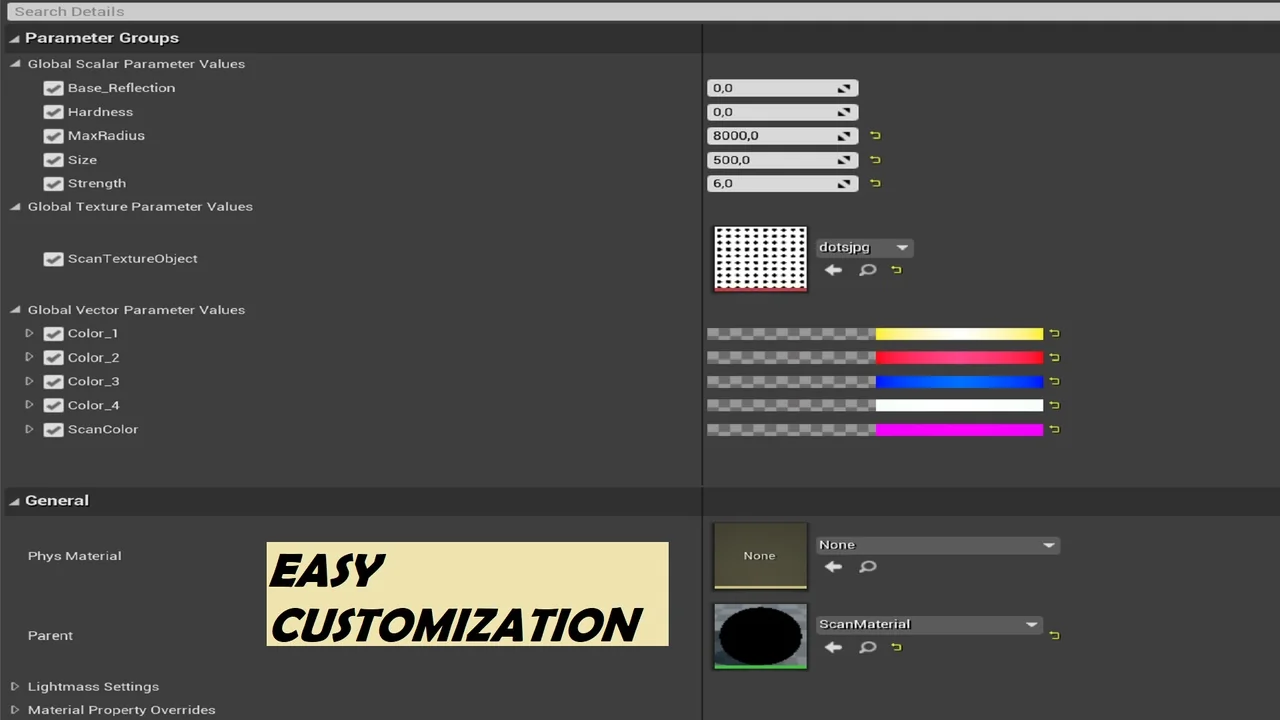
 Shaders
 Gameplay Features
 Gameplay Features