"efaa631e936fd3ee"{"id":"1002201","slug":"simple-crosshairs-pack","title":"Simple Crosshairs Pack","category":"UI Kits / HUDs","engine":"5.4+","assetVersion":"","engineVersion":"Engine Version: 5.4+","tag":"UI Kits / HUDs","accent":"blue","visual":"mech","summary":"Examine the Simple Crosshairs Pack, featuring 40 unique crosshairs, 19 special variants, and high-quality PNGs ready for Unreal Engine shooter projects.","platform":"Unreal Engine","publishedAt":"2026-10-29T14:45:04.719Z","updatedAt":"2026-10-29T14:45:04.719Z","sourceNotes":[],"fileContents":[],"compatibility":["Unreal Engine","Engine Version: 5.4+"],"featuredImage":{"alt":"Simple Crosshairs Pack","src":"/wp-content/uploads/published/2026/10/f7ba7541eddf-050a1c66-6afd-455d-a966-7e4116ac74cb-f9d8d75dcb.webp"},"hasDownloadLink":true,"downloads":0,"terms":[{"taxonomy":"category","slug":"ui-kits-huds","name":"UI Kits / HUDs"}],"galleryImages":[{"src":"/wp-content/uploads/published/2026/10/d10cce5459de-46b0b108-4c11-4e87-bd6a-b4ca1c7c0624-c7b385d519.webp","alt":"Simple Crosshairs Pack"},{"src":"/wp-content/uploads/published/2026/10/388546b2c957-80f128ef-cdc0-4d18-90f9-c82b47565157-d593b60a08.webp","alt":"Simple Crosshairs Pack"},{"src":"/wp-content/uploads/published/2026/10/e3e71163e5e8-1189a5e4-fcea-4ead-b007-7edcafb6c4bc-13d9af25a6.webp","alt":"Simple Crosshairs Pack"}],"accessPanel":{"kind":"resource","title":"Download this resource","eyebrow":"Free Download","message":"Log in or create a free account to start your download.","fileName":"Content.7z","safetyNote":"Resources are manually reviewed before listing to improve quality and reduce obvious risks.","actionLabel":"Download Free","resourceType":"Resource archive"},"contentHtml":"\u003cp\u003eDark interior corridors filled with relentless zombie waves, sprawling outdoor battlegrounds, and tight tactical corridors all share a common user interface demand: an aiming point that tells the player exactly where their shot will land. In high-stakes combat encounters, whether hip-firing a shotgun at point-blank range or lining up deliberate fire in a tactical simulation, the reticle is the central anchor of player interaction. The Simple Crosshairs Pack steps directly into this space, providing a focused visual toolkit designed to maintain player immersion while delivering clear, immediate feedback on target alignment.\u003c/p\u003e \u003ch2\u003eTargeting Demands in First-Person and Third-Person Shooters\u003c/h2\u003e \u003cp\u003eShooter titles operate across diverse camera perspectives, pacing styles, and environmental palettes. A first-person shooter naturally places the crosshair dead center against complex, shifting backgrounds, where wall textures, particle effects, and shifting lighting can quickly wash out delicate user interface elements. Third-person shooters introduce character models, shoulder offsets, and wider perspective shifts, creating an environment where the reticle must communicate direction without pulling unnecessary visual attention away from the surrounding space.\u003c/p\u003e \u003cp\u003eStriking the correct balance between visibility and aesthetic restraint is critical. If a crosshair is overly thick or aggressively styled, it disrupts environmental immersion and occludes critical visual data, such as distant enemy movement or incoming threats. Conversely, a reticle that lacks structural contrast or sharp edge definition will disappear completely against bright muzzle flashes, sunny exteriors, or dense zombie swarms. The Simple Crosshairs Pack addresses this balance by pairing crisp geometric shapes with practical color palettes, ensuring players retain aiming precision across both fast-paced action games and deliberate tactical shooters.\u003c/p\u003e \u003ch2\u003eThe Architecture of the Simple Crosshairs Pack: 40 Base Reticles and 19 Special Variations\u003c/h2\u003e \u003cp\u003eThe collection provides 40 unique crosshair designs accompanied by 19 special crosshairs. This structure provides direct versatility across multifaceted weapon loadouts. Different firearms require distinct visual profiles to reflect their firing behaviors and handling characteristics. A tight, minimal crosshair suits precision rifles and semi-automatic sidearms, while broader, segmented circles or bracketed designs match the wider spread cones associated with shotguns and heavy suppression weapons.\u003c/p\u003e \u003cp\u003eColor variations across red, green, and white are supplied to handle a broad range of backdrop environments:\u003c/p\u003e\n\u003cul\u003e \u003cli\u003e\u003cstrong\u003eRed crosshair variations:\u003c/strong\u003e Deliver immediate visual impact, standing out sharply against muted, industrial, or outdoor foliage palettes while reinforcing high-intensity combat engagement.\u003c/li\u003e \u003cli\u003e\u003cstrong\u003eGreen crosshair variations:\u003c/strong\u003e Draw on classic night-vision and tactical heads-up display conventions, offering high contrast against dark, urban, or underground survival settings.\u003c/li\u003e \u003cli\u003e\u003cstrong\u003eWhite crosshair variations:\u003c/strong\u003e Provide a clean, neutral baseline that integrates smoothly into minimalist or contemporary interface styles without cluttering the screen.\u003c/li\u003e\n\u003c/ul\u003e \u003cp\u003eBeyond the primary 40 unique designs, the 19 special crosshairs supply distinct options for uncommon weapon archetypes, alternative firing modes, or specialized in-game mechanics. Whether assigned to heavy ordnance, charged shots, or unique combat gear, these specialized designs expand the functional range of a shooter HUD without forcing developers to build specialized visual markers from scratch.\u003c/p\u003e \u003ch2\u003eHigh-Quality PNG Integration and Customization in Unreal Engine\u003c/h2\u003e \u003cp\u003eDelivered as high-quality PNG files, the assets inside the Simple Crosshairs Pack are structured for direct implementation into Unreal Engine user interface workflows. Because the files are provided in a universal image format, bringing them into the engine requires minimal setup. Developers can import the PNG textures directly into Unreal Engine content directories, convert them into slate brushes, and embed them within UMG (Unreal Motion Graphics) HUD widgets with very little friction.\u003c/p\u003e \u003cp\u003eThe clean format also facilitates straightforward customization. Within Unreal Engine widget blueprints and interface materials, developers can modulate transparency, adjust scaling dynamically based on player movement states, or swap color channels on the fly. The pack is also designed with compatibility for the Modern Crosshair Pack, allowing teams to mix, match, and expand their HUD reticle libraries without jarring stylistic discrepancies.\u003c/p\u003e \u003ch2\u003eMatching Weapon Classes and Zombie Combat Scenarios\u003c/h2\u003e \u003cp\u003eIn zombie survival titles, combat encounters frequently alternate between claustrophobic hallway defense and frenetic retreats. When wielding a shotgun against advancing hordes, a player relies on a broader reticle boundary that visually matches the pellet dispersion. The Simple Crosshairs Pack accommodates these specific weapon mechanics, offering shapes that fit spread-based weapons, rapid-fire automatic weapons, and singular precision platforms.\u003c/p\u003e \u003cp\u003eBy supplying dedicated shapes that align with varied ballistic mechanics, developers can map specific designs to individual inventory slots. A shotgun can trigger a wider circular reticle, a tactical carbine can display a quartered crosshair, and secondary weapons can switch to a minimal dot or chevron. This visual differentiation communicates weapon handling characteristics instantly, reinforcing core gameplay mechanics without requiring extra explanatory text on the player's screen.\u003c/p\u003e \u003ch2\u003eImplementation Scope and Project Fit\u003c/h2\u003e \u003cp\u003eThe Simple Crosshairs Pack is tailored specifically for developers building FPS, TPS, or hybrid action shooters who need ready-to-use targeting solutions. Its pre-rendered color sets and varied geometric layouts make it particularly useful for teams looking to bypass the time sink of drawing, aligning, and testing custom HUD crosshair textures. The inclusion of 40 unique base designs, 19 special crosshairs, and high-quality PNG files provides a direct, comprehensive aiming solution that is immediately ready for Unreal Engine projects.\u003c/p\u003e\n\n\u003ch2\u003eExplore Similar Assets\u003c/h2\u003e\n\u003cul\u003e\n\u003cli\u003e\u003ca href=\"https://3dcghub.com/gui-simple-round-2/\" title=\"GUI - Simple Round\"\u003eGUI - Simple Round\u003c/a\u003e\u003c/li\u003e\n\u003cli\u003e\u003ca href=\"https://3dcghub.com/menu-system-pro-by-moonville/\" title=\"Menu System Pro by Moonville\"\u003eMenu System Pro by Moonville\u003c/a\u003e\u003c/li\u003e\n\u003cli\u003e\u003ca href=\"https://3dcghub.com/scifi-modern-flat-themed-gui-ui-kit-6-themes-psd-ai-sources/\" title=\"Scifi / Modern flat themed GUI / UI kit - 6 themes + PSD, AI sources\"\u003eScifi / Modern flat themed GUI / UI kit - 6 themes + PSD, AI sources\u003c/a\u003e\u003c/li\u003e\n\u003cli\u003e\u003ca href=\"https://3dcghub.com/4k-full-fantasy-gui-ui-524-png-186-widget-blueprints/\" title=\"4k Full Fantasy GUI / UI + 524 png + 186 widget blueprints\"\u003e4k Full Fantasy GUI / UI + 524 png + 186 widget blueprints\u003c/a\u003e\u003c/li\u003e\n\u003cli\u003e\u003ca href=\"https://3dcghub.com/dark-gui-ui-main-menu-pro-kit-complete-solution-psd-sources/\" title=\"Dark GUI / UI / Main Menu Pro KIT - complete solution + psd sources\"\u003eDark GUI / UI / Main Menu Pro KIT - complete solution + psd sources\u003c/a\u003e\u003c/li\u003e\n\u003c/ul\u003e","contentTextLength":6406,"navigation":{"current":84,"total":4209,"previous":{"id":"1002202","slug":"simple-radial-scan","title":"Simple Radial Scan","category":"Gameplay Features","platform":"Unreal Engine","updatedAt":"2026-10-29T14:46:05.933Z"},"next":{"id":"1002200","slug":"simple-capture-the-flag","title":"Simple Capture The Flag","category":"Network \u0026 Multiplayer","platform":"Unreal Engine","updatedAt":"2026-10-29T14:44:10.264Z"}},"relatedResources":[{"id":"1000190","slug":"gui-simple-round-2","title":"GUI - Simple Round","category":"UI Kits / HUDs","engine":"4.26+,5.0+","assetVersion":"","engineVersion":"Engine Version: 4.26+,5.0+","tag":"UI Kits / HUDs","accent":"blue","visual":"mech","summary":"GUI - Simple Round is a UI graphics pack with 1280x800 artwork, 467 PNG sources, 288 button icons, and 13 PSD files for menu and HUD production.","platform":"Unreal Engine","publishedAt":"2026-06-22T16:07:55.150Z","updatedAt":"2026-06-22T16:07:55.150Z","sourceNotes":[],"fileContents":[],"compatibility":["Unreal Engine","Engine Version: 4.26+,5.0+"],"featuredImage":{"alt":"GUI - Simple Round","src":"/wp-content/uploads/published/2026/06/ee6bec8b27c7-27292e13-678b-4e0d-9dac-0be0580c5e54-0c44dcf7b5.webp"},"hasDownloadLink":true,"downloads":0},{"id":"1001614","slug":"menu-system-pro-by-moonville","title":"Menu System Pro by Moonville","category":"UI Kits / HUDs","engine":"5.4+","assetVersion":"","engineVersion":"Engine Version: 5.4+","tag":"UI Kits / HUDs","accent":"blue","visual":"mech","summary":"Menu System Pro by Moonville provides Common UI support, Enhanced Input rebinding, modular settings, and multiplayer server menus in Unreal Engine.","platform":"Unreal Engine","publishedAt":"2026-10-11T01:43:28.810Z","updatedAt":"2026-10-11T01:43:28.810Z","sourceNotes":[],"fileContents":[],"compatibility":["Unreal Engine","Engine Version: 5.4+"],"featuredImage":{"alt":"Menu System Pro by Moonville","src":"/wp-content/uploads/published/2026/10/01bc0f1e2ce3-606b5d6f-2eb9-4b02-a3c3-d6c337be04bc-f5eaea47b3.webp"},"hasDownloadLink":true,"downloads":1},{"id":"1001553","slug":"scifi-modern-flat-themed-gui-ui-kit-6-themes-psd-ai-sources","title":"Scifi / Modern flat themed GUI / UI kit - 6 themes + PSD, AI sources","category":"UI Kits / HUDs","engine":"5.0+","assetVersion":"","engineVersion":"Engine Version: 5.0+","tag":"UI Kits / HUDs","accent":"blue","visual":"mech","summary":"Explore the Scifi / Modern flat themed GUI / UI kit featuring 189 widgets, 6 color themes, 774 PNGs, and editable PSD and AI source files for Full HD and 4K.","platform":"Unreal Engine","publishedAt":"2026-10-10T03:40:56.893Z","updatedAt":"2026-10-10T03:40:56.893Z","sourceNotes":[],"fileContents":[],"compatibility":["Unreal Engine","Engine Version: 5.0+"],"featuredImage":{"alt":"Scifi / Modern flat themed GUI / UI kit - 6 themes + PSD, AI sources","src":"/wp-content/uploads/published/2026/10/267f3e5bd827-17ade339-63f9-4b6f-8cc9-05d849bc5a23-33840fe872.webp"},"hasDownloadLink":true,"downloads":1}]}
UI Kits / HUDs
Simple Crosshairs Pack
Examine the Simple Crosshairs Pack, featuring 40 unique crosshairs, 19 special variants, and high-quality PNGs ready for Unreal Engine shooter projects.
Dark interior corridors filled with relentless zombie waves, sprawling outdoor battlegrounds, and tight tactical corridors all share a common user interface demand: an aiming point that tells the player exactly where their shot will land. In high-stakes combat encounters, whether hip-firing a shotgun at point-blank range or lining up deliberate fire in a tactical simulation, the reticle is the central anchor of player interaction. The Simple Crosshairs Pack steps directly into this space, providing a focused visual toolkit designed to maintain player immersion while delivering clear, immediate feedback on target alignment.
Targeting Demands in First-Person and Third-Person Shooters
Shooter titles operate across diverse camera perspectives, pacing styles, and environmental palettes. A first-person shooter naturally places the crosshair dead center against complex, shifting backgrounds, where wall textures, particle effects, and shifting lighting can quickly wash out delicate user interface elements. Third-person shooters introduce character models, shoulder offsets, and wider perspective shifts, creating an environment where the reticle must communicate direction without pulling unnecessary visual attention away from the surrounding space.
Striking the correct balance between visibility and aesthetic restraint is critical. If a crosshair is overly thick or aggressively styled, it disrupts environmental immersion and occludes critical visual data, such as distant enemy movement or incoming threats. Conversely, a reticle that lacks structural contrast or sharp edge definition will disappear completely against bright muzzle flashes, sunny exteriors, or dense zombie swarms. The Simple Crosshairs Pack addresses this balance by pairing crisp geometric shapes with practical color palettes, ensuring players retain aiming precision across both fast-paced action games and deliberate tactical shooters.
The Architecture of the Simple Crosshairs Pack: 40 Base Reticles and 19 Special Variations
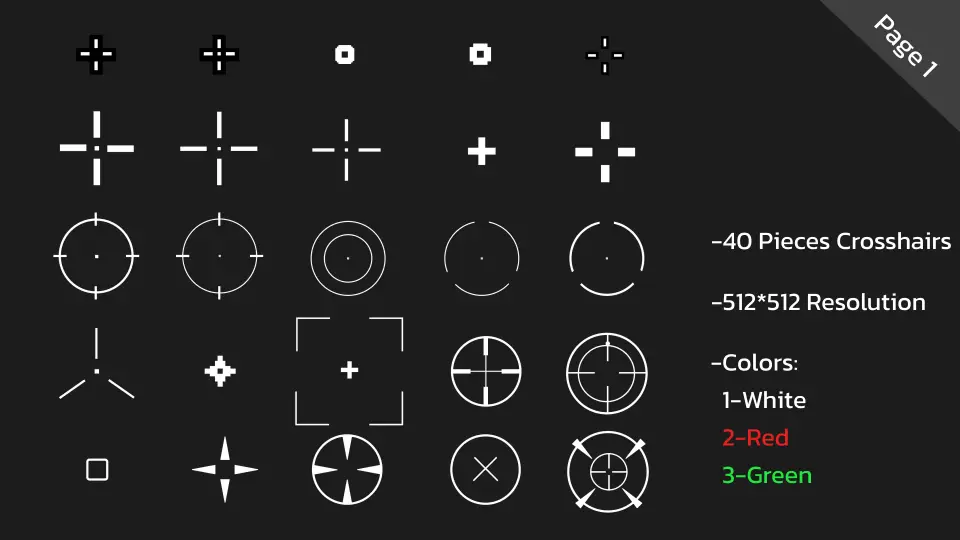
The collection provides 40 unique crosshair designs accompanied by 19 special crosshairs. This structure provides direct versatility across multifaceted weapon loadouts. Different firearms require distinct visual profiles to reflect their firing behaviors and handling characteristics. A tight, minimal crosshair suits precision rifles and semi-automatic sidearms, while broader, segmented circles or bracketed designs match the wider spread cones associated with shotguns and heavy suppression weapons.
Color variations across red, green, and white are supplied to handle a broad range of backdrop environments:
Red crosshair variations: Deliver immediate visual impact, standing out sharply against muted, industrial, or outdoor foliage palettes while reinforcing high-intensity combat engagement.
Green crosshair variations: Draw on classic night-vision and tactical heads-up display conventions, offering high contrast against dark, urban, or underground survival settings.
White crosshair variations: Provide a clean, neutral baseline that integrates smoothly into minimalist or contemporary interface styles without cluttering the screen.
Beyond the primary 40 unique designs, the 19 special crosshairs supply distinct options for uncommon weapon archetypes, alternative firing modes, or specialized in-game mechanics. Whether assigned to heavy ordnance, charged shots, or unique combat gear, these specialized designs expand the functional range of a shooter HUD without forcing developers to build specialized visual markers from scratch.
High-Quality PNG Integration and Customization in Unreal Engine
Delivered as high-quality PNG files, the assets inside the Simple Crosshairs Pack are structured for direct implementation into Unreal Engine user interface workflows. Because the files are provided in a universal image format, bringing them into the engine requires minimal setup. Developers can import the PNG textures directly into Unreal Engine content directories, convert them into slate brushes, and embed them within UMG (Unreal Motion Graphics) HUD widgets with very little friction.
The clean format also facilitates straightforward customization. Within Unreal Engine widget blueprints and interface materials, developers can modulate transparency, adjust scaling dynamically based on player movement states, or swap color channels on the fly. The pack is also designed with compatibility for the Modern Crosshair Pack, allowing teams to mix, match, and expand their HUD reticle libraries without jarring stylistic discrepancies.
Matching Weapon Classes and Zombie Combat Scenarios
In zombie survival titles, combat encounters frequently alternate between claustrophobic hallway defense and frenetic retreats. When wielding a shotgun against advancing hordes, a player relies on a broader reticle boundary that visually matches the pellet dispersion. The Simple Crosshairs Pack accommodates these specific weapon mechanics, offering shapes that fit spread-based weapons, rapid-fire automatic weapons, and singular precision platforms.
By supplying dedicated shapes that align with varied ballistic mechanics, developers can map specific designs to individual inventory slots. A shotgun can trigger a wider circular reticle, a tactical carbine can display a quartered crosshair, and secondary weapons can switch to a minimal dot or chevron. This visual differentiation communicates weapon handling characteristics instantly, reinforcing core gameplay mechanics without requiring extra explanatory text on the player's screen.
Implementation Scope and Project Fit
The Simple Crosshairs Pack is tailored specifically for developers building FPS, TPS, or hybrid action shooters who need ready-to-use targeting solutions. Its pre-rendered color sets and varied geometric layouts make it particularly useful for teams looking to bypass the time sink of drawing, aligning, and testing custom HUD crosshair textures. The inclusion of 40 unique base designs, 19 special crosshairs, and high-quality PNG files provides a direct, comprehensive aiming solution that is immediately ready for Unreal Engine projects.
 UI Kits / HUDs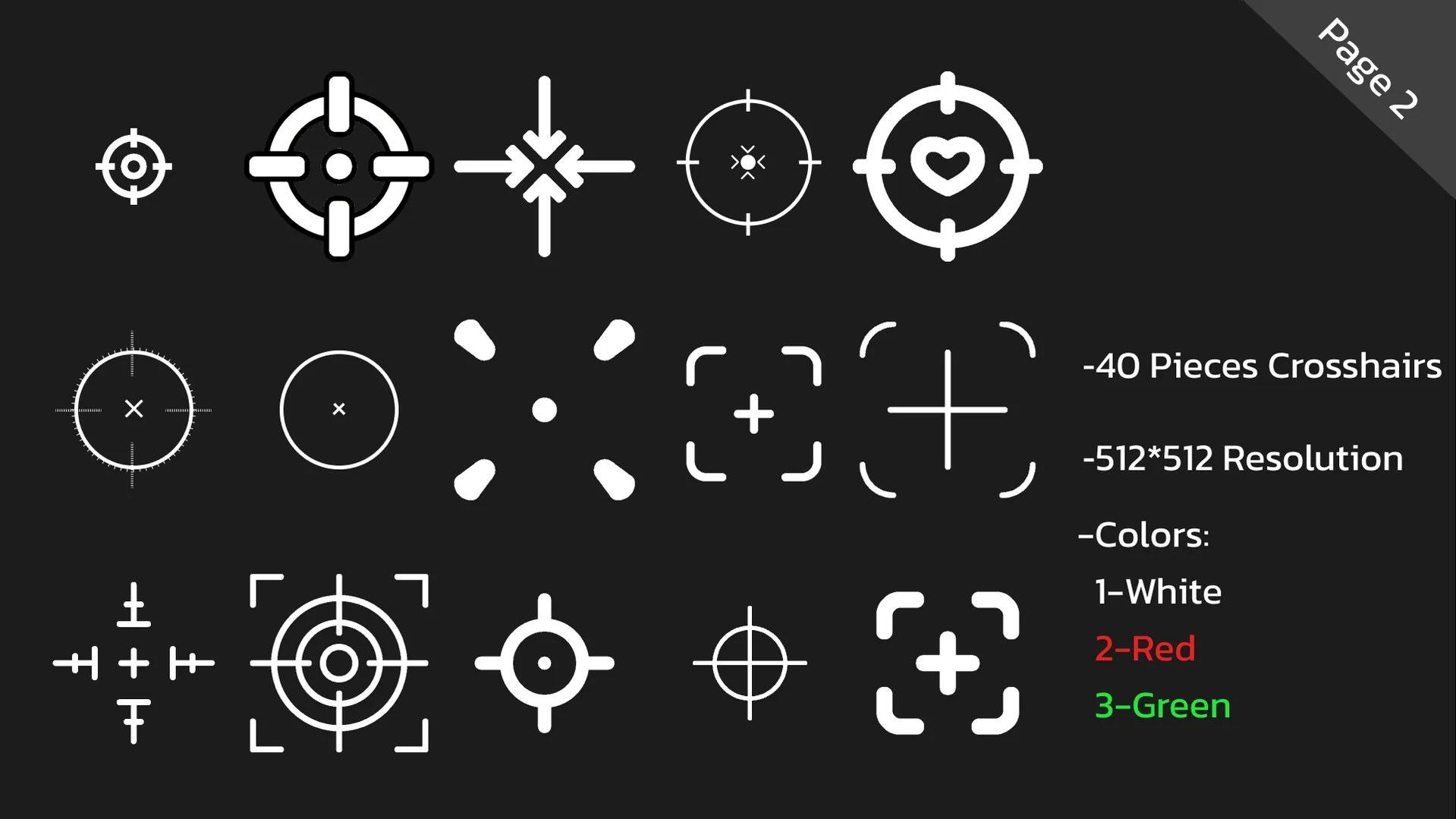
 UI Kits / HUDs
 UI Kits / HUDs
 UI Kits / HUDs