"efaa631e936fd3ee"{"id":"1002280","slug":"shadersource-waterfall-tool","title":"SHADERSOURCE - Waterfall Tool","category":"Procedural Systems","engine":"5.0+","assetVersion":"","engineVersion":"Engine Version: 5.0+","tag":"Procedural Systems","accent":"blue","visual":"mech","summary":"Build realistic falling water using the spline-based SHADERSOURCE Waterfall Tool, featuring automatic ground detection, dynamic materials, and particle LODs.","platform":"Unreal Engine","publishedAt":"2026-10-29T16:37:55.038Z","updatedAt":"2026-10-29T16:37:55.038Z","sourceNotes":[],"fileContents":[],"compatibility":["Unreal Engine","Engine Version: 5.0+"],"featuredImage":{"alt":"SHADERSOURCE - Waterfall Tool","src":"/wp-content/uploads/published/2026/10/273bb32eccb1-78ab8345-caa7-4b04-a0e9-523f0eb69651-cdad2f3789.webp"},"hasDownloadLink":true,"downloads":0,"terms":[{"taxonomy":"category","slug":"procedural-systems","name":"Procedural Systems"}],"galleryImages":[{"src":"/wp-content/uploads/published/2026/10/98b3feec9d60-e7b5fbfb-5e76-4968-a740-ebb5a80265d9-95ca73ffa4.webp","alt":"SHADERSOURCE - Waterfall Tool"},{"src":"/wp-content/uploads/published/2026/10/1691c34f0ecb-18cfbebb-8c18-41e9-bca8-96cf0f6a4428-85040a7932.webp","alt":"SHADERSOURCE - Waterfall Tool"},{"src":"/wp-content/uploads/published/2026/10/9941d3218ef8-77dfe2fe-18f0-492b-abc9-254494967a22-d7218d305c.webp","alt":"SHADERSOURCE - Waterfall Tool"},{"src":"/wp-content/uploads/published/2026/10/11c71bcfd680-e1072228-9b71-43ff-b4b1-9cc3c54f597a-9434d209c0.webp","alt":"SHADERSOURCE - Waterfall Tool"},{"src":"/wp-content/uploads/published/2026/10/4fa0ed5955cc-fb0e9b65-9b4d-42a1-812a-8b90bf7eb435-e727ba40e9.webp","alt":"SHADERSOURCE - Waterfall Tool"},{"src":"/wp-content/uploads/published/2026/10/e7dc8d2ac260-7327d9ef-310b-4621-b82b-2cbc98b6cd06-7412256042.webp","alt":"SHADERSOURCE - Waterfall Tool"},{"src":"/wp-content/uploads/published/2026/10/81419284aa0e-5a882a52-4000-4c66-aff3-d729f5b82ef1-c5771eec62.webp","alt":"SHADERSOURCE - Waterfall Tool"},{"src":"/wp-content/uploads/published/2026/10/1b657156f097-b917b238-0447-4f4a-a055-e0c62da418c7-e9a21044fe.webp","alt":"SHADERSOURCE - Waterfall Tool"},{"src":"/wp-content/uploads/published/2026/10/4eda201a23cc-a09b62ce-3126-476a-b277-9e331339a2b8-d41c867e6a.webp","alt":"SHADERSOURCE - Waterfall Tool"}],"accessPanel":{"kind":"resource","title":"Download this resource","eyebrow":"Free Download","message":"Log in or create a free account to start your download.","fileName":"Content.7z","safetyNote":"Resources are manually reviewed before listing to improve quality and reduce obvious risks.","actionLabel":"Download Free","resourceType":"Resource archive"},"contentHtml":"\u003ch2\u003eSpline-Based Waterfall Tool Layout and Ground Detection\u003c/h2\u003e\u003cp\u003ePositioning vertical water drops against irregular cliffs presents constant alignment challenges during level layout. Drops must conform to rocky shelves, break cleanly over ledges, and strike river basins without clipping or leaving unnatural gaps. The spline-based SHADERSOURCE Waterfall Tool tackles this spatial hurdle by allowing level designers to draw water trajectories directly across environment geometry.\u003c/p\u003e\u003cp\u003eUsing a spline as the underlying guide structure transforms waterfall placement into a procedural drawing task. Designers can manipulate spline points along vertical drops, step-like cliff faces, and winding ravines to establish the exact path of descending water. Working alongside the spline curves, the tool features automatic ground detection. Instead of demanding manual micro-adjustments at the base to ensure water meshes contact terrain surfaces accurately, the system identifies ground coordinates automatically. This capability locks the lower landing areas of the fall directly to uneven topography, stone outcrops, and riverbed basins, cutting down setup iteration time across complex natural environments.\u003c/p\u003e\u003ch2\u003eDynamic Material Object Detection for Realistic Water Collisions\u003c/h2\u003e\u003cp\u003eWater rarely drops through empty space without striking obstacles along the way. Protruding boulders, stone outcroppings, and sheer rock walls constantly interrupt the descent of a torrent, demanding visible interaction where geometry intersects the flow.\u003c/p\u003e\u003cp\u003eTo handle these physical interactions without requiring hand-painted contact masks, the tool incorporates Dynamic Material Object Detection. When environment props, stone surfaces, or level geometry break into the path of the water spline, the material detects these obstacles dynamically. This detection allows the water shader to produce reactive visual transitions around solid objects, simulating turbulence and white water disturbance right where stone breaks the current. By reading nearby collision objects directly, the system maintains consistent visual contact whether an asset is shifted during a level redesign or kept static in a final layout.\u003c/p\u003e\u003ch2\u003eAdjusting Material Settings Directly from the Details Panel\u003c/h2\u003e\u003cp\u003eFine-tuning water aesthetics often bogs down when artists are forced to jump back and forth between deep shader networks and the viewport. The Waterfall Tool eliminates this friction by exposing its core material settings straight inside the editor details panel for immediate access.\u003c/p\u003e\u003cp\u003eWithin the details panel, artists can adjust primary visual parameters to match specific lighting setups, biomes, or river types:\u003c/p\u003e\u003cul\u003e\u003cli\u003e\u003cstrong\u003eFlow Speed:\u003c/strong\u003e Regulate how fast the water surface cascades along the spline curve, whether producing a slow, gentle trickle or an aggressive mountain torrent.\u003c/li\u003e\u003cli\u003e\u003cstrong\u003eColor:\u003c/strong\u003e Modify base water tones to represent clear alpine streams, deep jungle cascades, or murky runoff without altering the underlying master shader.\u003c/li\u003e\u003cli\u003e\u003cstrong\u003eBrightness:\u003c/strong\u003e Control the luminance and light transmission of the water surface, helping the white churning areas stand out against dark canyon walls or blend into brightly lit open landscapes.\u003c/li\u003e\u003cli\u003e\u003cstrong\u003eSurface Controls:\u003c/strong\u003e Refine additional exposed shader properties to balance transparency, foam visibility, and surface definition directly in context.\u003c/li\u003e\u003c/ul\u003e\u003cp\u003eExposing these properties directly in the details panel ensures environment artists can make real-time creative decisions while observing their scene lighting, nearby foliage, and stone textures simultaneously.\u003c/p\u003e\u003ch2\u003eParticle Effects and LOD Optimization for Performance\u003c/h2\u003e\u003cp\u003eA waterfall structure relies heavily on secondary particle motion to convey scale, mass, and energy. Striking the water surface at high velocities naturally generates mist, spray, and frothing white water that cannot be solved through surface materials alone.\u003c/p\u003e\u003cp\u003eThe tool pairs its water mesh and dynamic material system with dedicated particle effects designed to simulate splashing foam and ambient spray at impact points. Because dense particle systems can introduce heavy rendering overhead across large landscape vistas, all particle effects integrated into the tool feature built-in levels of detail (LODs). As the camera pulls back across a map, particle density, simulation complexity, and sprite counts scale down systematically based on distance. This LOD implementation preserves frame rates in expansive open maps containing multiple cascading streams without sacrificing close-up fidelity when players approach the river edge.\u003c/p\u003e\u003ch2\u003eFitting Waterfalls into Connected River Workflows\u003c/h2\u003e\u003cp\u003eIsolated waterfalls rarely exist on their own; they are typically part of larger hydrological systems that transition from upper mountain channels down into broader floodplains. The Waterfall Tool functions cleanly within this broader ecological hierarchy, establishing high-detail drops between upper drainage zones and lower river networks.\u003c/p\u003e\u003cp\u003eIn environments that also utilize related systems such as the Branching River Tool, the Waterfall Tool provides the vertical transit points that connect separated horizontal water planes. An upper creek bed can flow toward a sheer precipice, transition into the spline-driven cascade, and resume as a wide stony riverbed down below. The shared emphasis on exposed details panel parameters, procedural spline handling, and stone-level object detection allows environment creators to maintain consistent water styling, brightness, and flow velocity across an entire interconnected watershed.\u003c/p\u003e\n\n\u003ch2\u003eContinue Browsing Similar Packs\u003c/h2\u003e\n\u003cul\u003e\n\u003cli\u003e\u003ca href=\"https://3dcghub.com/shadersource-procedural-water-foliage-tool/\" title=\"SHADERSOURCE - Procedural Water Foliage Tool\"\u003eSHADERSOURCE - Procedural Water Foliage Tool\u003c/a\u003e\u003c/li\u003e\n\u003cli\u003e\u003ca href=\"https://3dcghub.com/easy-rain/\" title=\"Easy Rain\"\u003eEasy Rain\u003c/a\u003e\u003c/li\u003e\n\u003cli\u003e\u003ca href=\"https://3dcghub.com/ultimate-river-tool/\" title=\"Ultimate River Tool\"\u003eUltimate River Tool\u003c/a\u003e\u003c/li\u003e\n\u003cli\u003e\u003ca href=\"https://3dcghub.com/fluid-flux/\" title=\"Fluid Flux\"\u003eFluid Flux\u003c/a\u003e\u003c/li\u003e\n\u003cli\u003e\u003ca href=\"https://3dcghub.com/shadersource-waterfall-tool-2/\" title=\"SHADERSOURCE - Waterfall Tool 2\"\u003eSHADERSOURCE - Waterfall Tool 2\u003c/a\u003e\u003c/li\u003e\n\u003c/ul\u003e","contentTextLength":5626,"navigation":{"current":5,"total":4209,"previous":{"id":"1002281","slug":"stylized-vfx-fire","title":"Stylized VFX - Fire","category":"Fire \u0026 Explosions","platform":"Unreal Engine","updatedAt":"2026-10-29T16:40:51.715Z"},"next":{"id":"1002279","slug":"samurai","title":"SAMURAI","category":"Characters \u0026 Creatures","platform":"Unreal Engine","updatedAt":"2026-10-29T16:37:21.426Z"}},"relatedResources":[{"id":"11554","slug":"shadersource-procedural-water-foliage-tool","title":"SHADERSOURCE - Procedural Water Foliage Tool","category":"Procedural Systems","engine":"4.27,5.0+","assetVersion":"Engine version: 4.27,5.0+","engineVersion":"4.19","tag":"Procedural Systems","accent":"blue","visual":"character","summary":"Streamline your environment design with the SHADERSOURCE - Procedural Water Foliage Tool. This asset pack provides automated blueprints and PBR materials for realistic aquatic scenes.","platform":"Unreal Engine","publishedAt":"2026-03-05T17:47:13.000Z","updatedAt":"2026-04-19T15:48:10.000Z","sourceNotes":[],"fileContents":[],"compatibility":["Unreal Engine","Engine version: 4.27,5.0+"],"featuredImage":{"alt":"SHADERSOURCE - Procedural Water Foliage Tool","src":"https://3dcghub.com/wp-content/uploads/2026/03/942d40d2-4f9c-4d28-bb9a-6eca0ba332ae.webp"},"hasDownloadLink":true,"downloads":0},{"id":"11369","slug":"easy-rain","title":"Easy Rain","category":"Procedural Systems","engine":"5.4+","assetVersion":"Engine version: 5.4+","engineVersion":"5.3","tag":"Procedural Systems","accent":"blue","visual":"luts","summary":"Easy Rain is a comprehensive Blueprint system that harnesses Niagara particles to create photorealistic weather effects. From light drizzles to stormy summer downpours, this tool offers high performance and deep customization for artists.","platform":"Unreal Engine","publishedAt":"2026-03-05T17:09:01.000Z","updatedAt":"2026-04-19T15:48:13.000Z","sourceNotes":[],"fileContents":[],"compatibility":["Unreal Engine","Engine version: 5.4+"],"featuredImage":{"alt":"Easy Rain","src":"https://3dcghub.com/wp-content/uploads/2026/03/fbfa88dc-7eef-45e3-867c-fad1aa6421d1.webp"},"hasDownloadLink":true,"downloads":5},{"id":"11595","slug":"ultimate-river-tool","title":"Ultimate River Tool","category":"Procedural Systems","engine":"4.26+,5.0+","assetVersion":"Engine version: 4.26+,5.0+","engineVersion":"4.16","tag":"Procedural Systems","accent":"blue","visual":"audio","summary":"The Ultimate River Tool is a powerful component for Unreal Engine 4 designed to simplify the creation of realistic rivers. It features automatic flow-map UV warping and includes a variety of high-resolution forest assets.","platform":"Unreal Engine","publishedAt":"2026-03-05T17:56:24.000Z","updatedAt":"2026-04-19T15:48:09.000Z","sourceNotes":[],"fileContents":[],"compatibility":["Unreal Engine","Engine version: 4.26+,5.0+"],"featuredImage":{"alt":"Ultimate River Tool","src":"https://3dcghub.com/wp-content/uploads/2026/03/69683c65-339f-4f0a-b404-5892c0ef8924.webp"},"hasDownloadLink":true,"downloads":1}]}
Procedural Systems
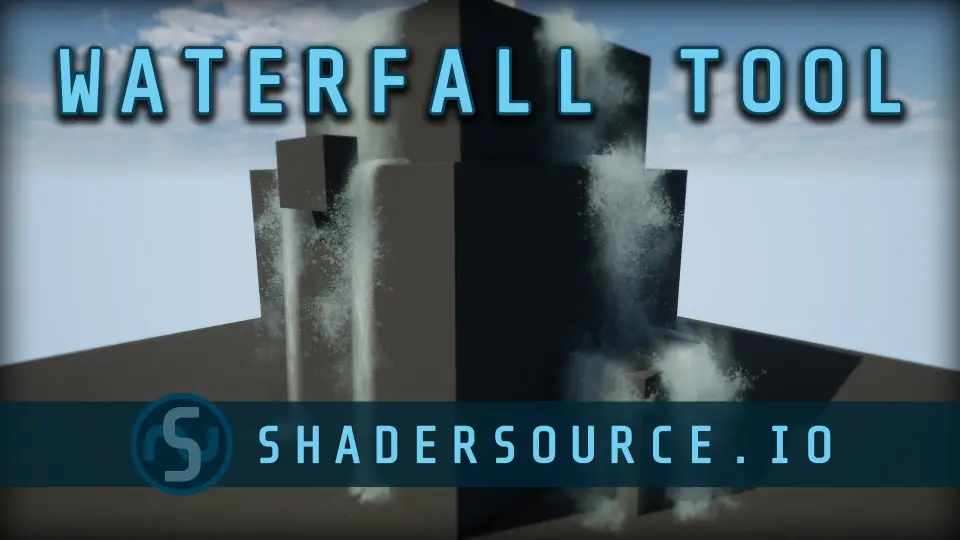
SHADERSOURCE - Waterfall Tool
Build realistic falling water using the spline-based SHADERSOURCE Waterfall Tool, featuring automatic ground detection, dynamic materials, and particle LODs.
Spline-Based Waterfall Tool Layout and Ground Detection
Positioning vertical water drops against irregular cliffs presents constant alignment challenges during level layout. Drops must conform to rocky shelves, break cleanly over ledges, and strike river basins without clipping or leaving unnatural gaps. The spline-based SHADERSOURCE Waterfall Tool tackles this spatial hurdle by allowing level designers to draw water trajectories directly across environment geometry.
Using a spline as the underlying guide structure transforms waterfall placement into a procedural drawing task. Designers can manipulate spline points along vertical drops, step-like cliff faces, and winding ravines to establish the exact path of descending water. Working alongside the spline curves, the tool features automatic ground detection. Instead of demanding manual micro-adjustments at the base to ensure water meshes contact terrain surfaces accurately, the system identifies ground coordinates automatically. This capability locks the lower landing areas of the fall directly to uneven topography, stone outcrops, and riverbed basins, cutting down setup iteration time across complex natural environments.
Dynamic Material Object Detection for Realistic Water Collisions
Water rarely drops through empty space without striking obstacles along the way. Protruding boulders, stone outcroppings, and sheer rock walls constantly interrupt the descent of a torrent, demanding visible interaction where geometry intersects the flow.
To handle these physical interactions without requiring hand-painted contact masks, the tool incorporates Dynamic Material Object Detection. When environment props, stone surfaces, or level geometry break into the path of the water spline, the material detects these obstacles dynamically. This detection allows the water shader to produce reactive visual transitions around solid objects, simulating turbulence and white water disturbance right where stone breaks the current. By reading nearby collision objects directly, the system maintains consistent visual contact whether an asset is shifted during a level redesign or kept static in a final layout.
Adjusting Material Settings Directly from the Details Panel
Fine-tuning water aesthetics often bogs down when artists are forced to jump back and forth between deep shader networks and the viewport. The Waterfall Tool eliminates this friction by exposing its core material settings straight inside the editor details panel for immediate access.
Within the details panel, artists can adjust primary visual parameters to match specific lighting setups, biomes, or river types:
Flow Speed: Regulate how fast the water surface cascades along the spline curve, whether producing a slow, gentle trickle or an aggressive mountain torrent.
Color: Modify base water tones to represent clear alpine streams, deep jungle cascades, or murky runoff without altering the underlying master shader.
Brightness: Control the luminance and light transmission of the water surface, helping the white churning areas stand out against dark canyon walls or blend into brightly lit open landscapes.
Surface Controls: Refine additional exposed shader properties to balance transparency, foam visibility, and surface definition directly in context.
Exposing these properties directly in the details panel ensures environment artists can make real-time creative decisions while observing their scene lighting, nearby foliage, and stone textures simultaneously.
Particle Effects and LOD Optimization for Performance
A waterfall structure relies heavily on secondary particle motion to convey scale, mass, and energy. Striking the water surface at high velocities naturally generates mist, spray, and frothing white water that cannot be solved through surface materials alone.
The tool pairs its water mesh and dynamic material system with dedicated particle effects designed to simulate splashing foam and ambient spray at impact points. Because dense particle systems can introduce heavy rendering overhead across large landscape vistas, all particle effects integrated into the tool feature built-in levels of detail (LODs). As the camera pulls back across a map, particle density, simulation complexity, and sprite counts scale down systematically based on distance. This LOD implementation preserves frame rates in expansive open maps containing multiple cascading streams without sacrificing close-up fidelity when players approach the river edge.
Fitting Waterfalls into Connected River Workflows
Isolated waterfalls rarely exist on their own; they are typically part of larger hydrological systems that transition from upper mountain channels down into broader floodplains. The Waterfall Tool functions cleanly within this broader ecological hierarchy, establishing high-detail drops between upper drainage zones and lower river networks.
In environments that also utilize related systems such as the Branching River Tool, the Waterfall Tool provides the vertical transit points that connect separated horizontal water planes. An upper creek bed can flow toward a sheer precipice, transition into the spline-driven cascade, and resume as a wide stony riverbed down below. The shared emphasis on exposed details panel parameters, procedural spline handling, and stone-level object detection allows environment creators to maintain consistent water styling, brightness, and flow velocity across an entire interconnected watershed.
 Procedural Systems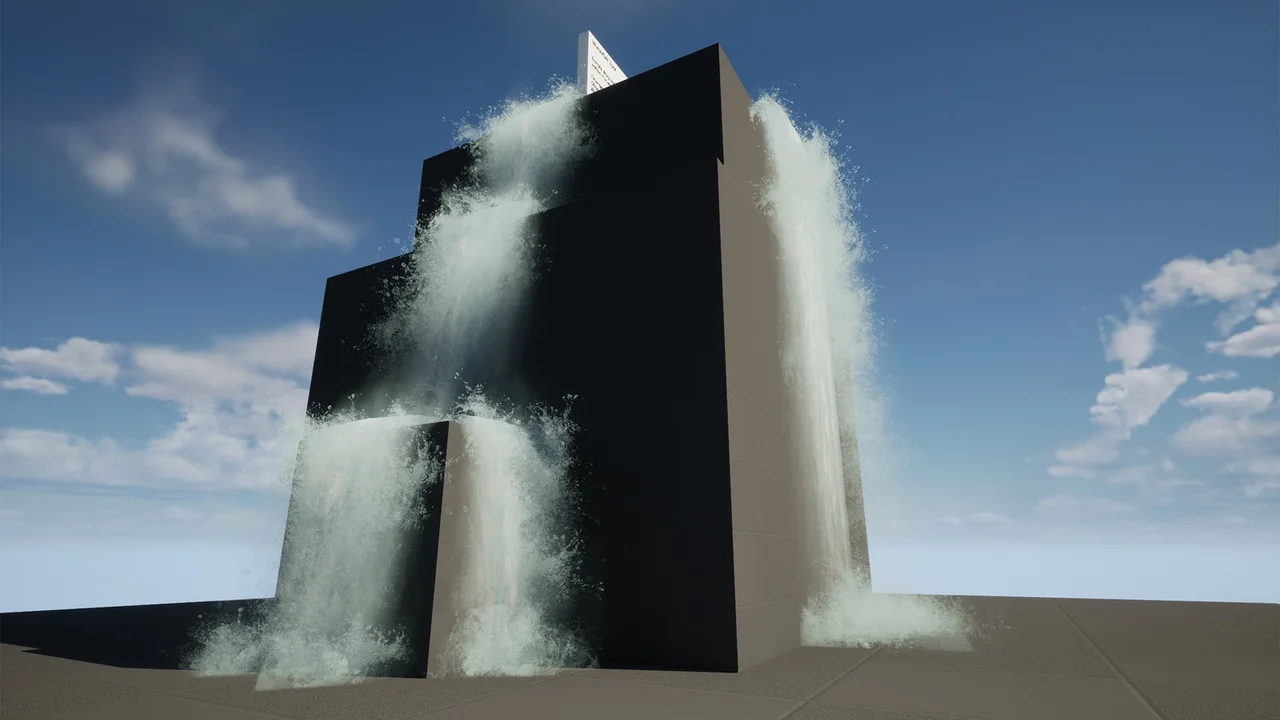
 Procedural Systems
 Procedural Systems
 Procedural Systems