"6f9bd6df1f44a86f"{"id":"1001184","slug":"semi-permanent-blood-droplets","title":"Semi-Permanent Blood Droplets","category":"Liquid","engine":"5.0+","assetVersion":"","engineVersion":"Engine Version: 5.0+","tag":"Liquid","accent":"blue","visual":"mech","summary":"Configure Semi-Permanent Blood Droplets in Unreal Engine using Niagara instanced mesh decals, CPU surface normals, and GPU distance field collisions.","platform":"Unreal Engine","indexPolicy":"index","publishedAt":"2026-09-17T06:32:56.595Z","updatedAt":"2026-09-17T06:32:56.595Z","sourceNotes":[],"fileContents":[],"compatibility":["Unreal Engine","Engine Version: 5.0+"],"featuredImage":{"alt":"Semi-Permanent Blood Droplets","src":"/wp-content/uploads/published/2026/09/40fc17e94d63-03acfe1a-80b2-4b10-8472-9a8b35314535-454bf86bde.webp"},"hasDownloadLink":true,"downloads":2,"terms":[{"taxonomy":"category","slug":"liquid","name":"Liquid"}],"galleryImages":[{"src":"/wp-content/uploads/published/2026/09/2ed61b734eb6-9a4ac607-258e-429a-acac-b87269409063-bfa4ee8f93.webp","alt":"Semi-Permanent Blood Droplets"},{"src":"/wp-content/uploads/published/2026/09/2935031bc061-2bc8a087-a2c8-4657-a1ee-c0c893699dfb-81bddcc324.webp","alt":"Semi-Permanent Blood Droplets"},{"src":"/wp-content/uploads/published/2026/09/90cf0dde9742-589b2302-ca28-4e20-99bf-c20626e3c63e-53edf8890f.webp","alt":"Semi-Permanent Blood Droplets"},{"src":"/wp-content/uploads/published/2026/09/0b9d9f11e7e8-377c8fc8-dd56-496b-97a4-16fa31fe9ae2-9dfaff59f3.webp","alt":"Semi-Permanent Blood Droplets"},{"src":"/wp-content/uploads/published/2026/09/f1b0906a5e17-b89bf21b-bef9-4b90-acbf-78e66b4aea78-25571086a4.webp","alt":"Semi-Permanent Blood Droplets"},{"src":"/wp-content/uploads/published/2026/09/27be298eda89-e3234e41-2b7f-4da7-b74c-a3c237477ed1-ea7a92220a.webp","alt":"Semi-Permanent Blood Droplets"},{"src":"/wp-content/uploads/published/2026/09/b81ee315ccbb-a33ffe1c-f793-447e-ac08-54d6cc68a2bb-9f004ecb54.webp","alt":"Semi-Permanent Blood Droplets"},{"src":"/wp-content/uploads/published/2026/09/7656db671c81-81ca1d28-31cc-4683-a9fe-9179dffc2019-09e18f3ede.webp","alt":"Semi-Permanent Blood Droplets"},{"src":"/wp-content/uploads/published/2026/09/2488db1934a5-7552206d-4d3c-4bdd-88ce-ac8192d3d375-ce51be1c1b.webp","alt":"Semi-Permanent Blood Droplets"},{"src":"/wp-content/uploads/published/2026/09/0f1b3d5dd7de-944ad3cf-b44f-4761-9239-75aa713a5069-d2d5138316.webp","alt":"Semi-Permanent Blood Droplets"}],"accessPanel":{"kind":"resource","title":"Download this resource","eyebrow":"Free Download","message":"Log in or create a free account to start your download.","fileName":"Content.7z","safetyNote":"Resources are manually reviewed before listing to improve quality and reduce obvious risks.","actionLabel":"Download Free","resourceType":"Resource archive"},"contentHtml":"\u003cp\u003eIntegrating persistent gore effects requires a clean separation between particle movement and surface projection. Semi-Permanent Blood Droplets approaches this by combining Niagara particle simulation with instanced mesh decals. Instead of despawning combat residue after a few seconds, the system allows hundreds of thousands of droplet decals to stay fixed on surfaces indefinitely, giving firefights and melee encounters an enduring physical trace.\u003c/p\u003e\u003ch2\u003eCollision Filtering and Niagara User Parameters\u003c/h2\u003e\u003cp\u003eProper collision setup is the initial requirement when placing the droplets into a project. If decals appear to float in mid-air or stick to unwanted geometry, the project has missing collision channel assignments. The Niagara system does not automatically guess which physical surfaces to hit; it depends on an explicit collision channel declared within your project settings.\u003c/p\u003e\u003cp\u003eOnce a dedicated collision layer is created, it must be mapped inside the Niagara System by configuring the corresponding User Parameter. Assigning this parameter ensures that airborne droplets pass cleanly through enemy hitboxes, weapon colliders, and player capsules before stamping decals onto valid level geometry. Without aligning the system's User Parameter to your custom channel, droplet particles either fail to register impact or collide prematurely against the characters who generated them.\u003c/p\u003e\u003ch2\u003eCPU Angle-Based Normals Versus GPU Distance Field Particles\u003c/h2\u003e\u003cp\u003eDroplet projection behaves differently depending on whether the emitter runs on the CPU or the GPU. The CPU emitters utilize custom Niagara module scripts to evaluate the exact surface normal at the point of collision. This normal calculation allows droplets to adhere cleanly across uneven surfaces, curved geometry, and perpendicular walls rather than flattening exclusively against horizontal floors. CPU simulation functions reliably over long distances and demands minimal environmental prerequisites to deliver precise alignment.\u003c/p\u003e\u003cp\u003eThe GPU particle variant introduces additional movement behaviors, including surface streaking, but relies entirely on global distance fields for collision detection. For GPU droplets to land and streak properly, the project must have distance fields enabled, and the global distance field visualizer should be checked to confirm sufficient mesh resolution throughout the environment. GPU particles are constrained to impact angles under 90 degrees due to how collision validation is calculated. Because of these structural limitations, GPU streaking particles are best deployed in close-quarters indoor environments, while CPU particles serve as the robust option for broader, long-range combat spaces.\u003c/p\u003e\u003ch2\u003eBlueprint Architecture in BP_Droplets and Debug Previewing\u003c/h2\u003e\u003cp\u003eSpawning large volumes of persistent decals can easily introduce hitching if reference structures are not managed carefully. The primary spawner actor, \u003ccode\u003eBP_Droplets\u003c/code\u003e, relies on asynchronous loading via soft references to manage particle system selection. This design reduced the blueprint reference overhead from 300 megabytes down to 300 kilobytes, eliminating the initial loading hitch commonly seen when initializing emitters during active gameplay.\u003c/p\u003e\u003cp\u003eBounding box behavior also impacts early simulation performance. Rather than using unbounded space, all particle systems enforce explicit bounding volumes set between -1000 and +1000 on the X, Y, and Z axes. This boundary keeps Niagara from consuming calculation cycles on infinite space during the initial frame of impact.\u003c/p\u003e\u003cp\u003eThe standard \u003ccode\u003eBP_Droplets\u003c/code\u003e Actor exposes 14 direct parameters, granting immediate control over droplet spread, frequency, and spawn behavior without requiring internal graph modifications. To support live visual iteration without bloating production memory, a dedicated editor tool is located in \u003ccode\u003eBlueprints-\u0026gt;Debug\u003c/code\u003e. This debug actor runs on a Construction Script, allowing developers to test parameter adjustments directly inside the editor viewport before saving adjustments to gameplay prefabs.\u003c/p\u003e\u003ch2\u003eDynamic Droplet Aging, Emissive Materials, and Blood Pools\u003c/h2\u003e\u003cp\u003eStatic blood textures quickly look artificial when left on the ground across an extended session. The material system supports dynamic parameters driven directly by the particle's age, transforming the physical state of the droplet as time elapses:\u003c/p\u003e\u003cul\u003e\u003cli\u003e\u003cstrong\u003eAge-Based Roughness:\u003c/strong\u003e Fresh droplets spawn with low roughness, producing a wet, specular sheen. As the decal remains on the surface, the roughness parameter shifts upward, rendering the material dry, dull, and crusted.\u003c/li\u003e\u003cli\u003e\u003cstrong\u003eParticle-Driven Color:\u003c/strong\u003e Base colors can be modulated through material instances, utilizing custom noise and normal maps rather than relying on flat particle color inputs.\u003c/li\u003e\u003cli\u003e\u003cstrong\u003eFading Emissive Controls:\u003c/strong\u003e Emissive strength can be dialed down over the life of a droplet. This parameter enables the creation of alternate liquid types, such as cooling volcanic lava or dissolving alien acid.\u003c/li\u003e\u003c/ul\u003e\u003cp\u003eThese dynamic material switches can be toggled independently within custom material instances to fit stylistic needs. For close-up splatters, refined albedo noise tiling and updated normal maps preserve high-frequency liquid edges when viewed at ground level.\u003c/p\u003e\u003ch2\u003eDamage Attachment, Pooling Logic, and Engine Compatibility\u003c/h2\u003e\u003cp\u003eGameplay integration is demonstrated in the included \u003ccode\u003eDemoMap_AIExample\u003c/code\u003e Level, which provides functional examples for damage handling and environmental blood distribution. The sample enemy character, \u003ccode\u003eBP_EnemyExample\u003c/code\u003e, charges the player, registers projectile hits from a modified first-person weapon, and triggers impact emitters bound directly to character skeletal bones. When a fatal blow lands, the enemy executes a line-trace straight down toward the floor, finding the world hit location and surface normal to spawn a permanent blood pool decal directly beneath the body.\u003c/p\u003e\u003cp\u003eTracking wounded targets through an arena is a natural extension of this setup. Because droplets can be configured to drip continuously from moving skeletal sockets onto floor geometry, players can use blood trails to locate fleeing or wounded opponents.\u003c/p\u003e\u003cp\u003eThe package remains maintained and fully functional within Unreal Engine 5, as well as integrating smoothly alongside modular character assets like the Zombies - Modular Four Pack. For virtual reality projects, deployments require Unreal Engine 4.26 or later; earlier engine revisions such as 4.24 and 4.25 suffer from an engine-level stereoscopic rendering defect (UE-78764) that disrupts Niagara particle alignment in VR headsets. Beyond that specific VR platform caveat, the combination of lightweight CPU impact calculation and soft-referenced blueprint management provides a reliable framework for persistent scene gore.\u003c/p\u003e\n\n\u003ch2\u003eRelated Resources Worth Checking\u003c/h2\u003e\n\u003cul\u003e\n\u003cli\u003e\u003ca href=\"https://3dcghub.com/animated-blood-decals-realistic/\" rel=\"noopener noreferrer\"\u003eAnimated Blood Decals - Realistic\u003c/a\u003e\u003c/li\u003e\n\u003cli\u003e\u003ca href=\"https://3dcghub.com/stylized-soap-bubble-vfx-niagara-system-for-unreal-engine-5/\" rel=\"noopener noreferrer\"\u003eStylized Soap Bubble VFX – Niagara System for Unreal Engine 5\u003c/a\u003e\u003c/li\u003e\n\u003cli\u003e\u003ca href=\"https://3dcghub.com/vdb-waterfall-river-pack/\" rel=\"noopener noreferrer\"\u003eVDB Waterfall \u0026amp; River Pack\u003c/a\u003e\u003c/li\u003e\n\u003cli\u003e\u003ca href=\"https://3dcghub.com/magic-orb-vfx-and-material/\" rel=\"noopener noreferrer\"\u003eMagic Orb VFX and Material\u003c/a\u003e\u003c/li\u003e\n\u003cli\u003e\u003ca href=\"https://3dcghub.com/slime-and-puke-fx/\" rel=\"noopener noreferrer\"\u003eSlime \u0026amp; Puke FX\u003c/a\u003e\u003c/li\u003e\n\u003c/ul\u003e","contentTextLength":6903,"navigation":{"current":1162,"total":4218,"previous":{"id":"1001185","slug":"advanced-glass-material-pack","title":"Advanced Glass Material Pack","category":"Shaders","platform":"Unreal Engine","updatedAt":"2026-09-17T06:34:49.942Z"},"next":{"id":"1001183","slug":"m5-vfx-vol2-fire-and-flames-niagara","title":"M5 VFX Vol2. Fire and Flames(Niagara)","category":"Fire \u0026 Explosions","platform":"Unreal Engine","updatedAt":"2026-09-17T06:18:36.967Z"}},"relatedResources":[{"id":"13412","slug":"animated-blood-decals-realistic","title":"Animated Blood Decals - Realistic","category":"Tools, Objects \u0026 Decor","engine":"4.26+,5.0+","assetVersion":"Engine version: 4.26+,5.0+","engineVersion":"4.19","tag":"Tools","accent":"blue","visual":"animation","summary":"Enhance your project with 15 realistic animated blood decals. This pack includes blood pools, droplets, and splatters driven by a custom blueprint actor for maximum visual impact.","platform":"Unreal Engine","indexPolicy":"index","publishedAt":"2026-03-10T17:00:08.000Z","updatedAt":"2026-04-19T15:46:28.000Z","sourceNotes":[],"fileContents":[],"compatibility":["Unreal Engine","Engine version: 4.26+,5.0+"],"featuredImage":{"alt":"Animated Blood Decals - Realistic","src":"https://3dcghub.com/wp-content/uploads/2026/03/040c39f6-0f53-4d49-af7d-60add91e8fe0.webp"},"hasDownloadLink":true,"downloads":1},{"id":"1000346","slug":"stylized-soap-bubble-vfx-niagara-system-for-unreal-engine-5","title":"Stylized Soap Bubble VFX – Niagara System for Unreal Engine 5","category":"Liquid","engine":"5.0+","assetVersion":"","engineVersion":"Engine Version: 5.0+","tag":"Liquid","accent":"blue","visual":"mech","summary":"A highly optimized, Niagara-based stylized soap bubble VFX for Unreal Engine 5, featuring customizable color and intensity for shields, projectiles, and UI.","platform":"Unreal Engine","indexPolicy":"index","publishedAt":"2026-07-05T09:03:42.320Z","updatedAt":"2026-07-05T09:03:42.320Z","sourceNotes":[],"fileContents":[],"compatibility":["Unreal Engine","Engine Version: 5.0+"],"featuredImage":{"alt":"Stylized Soap Bubble VFX – Niagara System for Unreal Engine 5","src":"/wp-content/uploads/published/2026/07/8b685431d33d-65bfc839-62c1-43c2-8af4-9af013c66173-7ef8431a3d.webp"},"hasDownloadLink":true,"downloads":0},{"id":"15684","slug":"magic-orb-vfx-and-material","title":"Magic Orb VFX and Material","category":"Liquid","engine":"5.2+","assetVersion":"Engine version: 5.2+","engineVersion":"5.2","tag":"Liquid","accent":"blue","visual":"luts","summary":"Enhance your game with Magic Orb VFX and Material, a collection of 12 unique visual effects featuring 3D orbs, elemental potions, and optimized UI elements.","platform":"Unreal Engine","indexPolicy":"index","publishedAt":"2026-03-12T12:55:03.000Z","updatedAt":"2026-04-19T15:44:42.000Z","sourceNotes":[],"fileContents":[],"compatibility":["Unreal Engine","Engine version: 5.2+"],"featuredImage":{"alt":"Magic Orb VFX and Material","src":"https://3dcghub.com/wp-content/uploads/2026/03/2c56b231-6c11-4f85-abf8-93ae1f265c78.webp"},"hasDownloadLink":true,"downloads":1}]}
Liquid
Semi-Permanent Blood Droplets
Configure Semi-Permanent Blood Droplets in Unreal Engine using Niagara instanced mesh decals, CPU surface normals, and GPU distance field collisions.
Integrating persistent gore effects requires a clean separation between particle movement and surface projection. Semi-Permanent Blood Droplets approaches this by combining Niagara particle simulation with instanced mesh decals. Instead of despawning combat residue after a few seconds, the system allows hundreds of thousands of droplet decals to stay fixed on surfaces indefinitely, giving firefights and melee encounters an enduring physical trace.
Collision Filtering and Niagara User Parameters
Proper collision setup is the initial requirement when placing the droplets into a project. If decals appear to float in mid-air or stick to unwanted geometry, the project has missing collision channel assignments. The Niagara system does not automatically guess which physical surfaces to hit; it depends on an explicit collision channel declared within your project settings.
Once a dedicated collision layer is created, it must be mapped inside the Niagara System by configuring the corresponding User Parameter. Assigning this parameter ensures that airborne droplets pass cleanly through enemy hitboxes, weapon colliders, and player capsules before stamping decals onto valid level geometry. Without aligning the system's User Parameter to your custom channel, droplet particles either fail to register impact or collide prematurely against the characters who generated them.
CPU Angle-Based Normals Versus GPU Distance Field Particles
Droplet projection behaves differently depending on whether the emitter runs on the CPU or the GPU. The CPU emitters utilize custom Niagara module scripts to evaluate the exact surface normal at the point of collision. This normal calculation allows droplets to adhere cleanly across uneven surfaces, curved geometry, and perpendicular walls rather than flattening exclusively against horizontal floors. CPU simulation functions reliably over long distances and demands minimal environmental prerequisites to deliver precise alignment.
The GPU particle variant introduces additional movement behaviors, including surface streaking, but relies entirely on global distance fields for collision detection. For GPU droplets to land and streak properly, the project must have distance fields enabled, and the global distance field visualizer should be checked to confirm sufficient mesh resolution throughout the environment. GPU particles are constrained to impact angles under 90 degrees due to how collision validation is calculated. Because of these structural limitations, GPU streaking particles are best deployed in close-quarters indoor environments, while CPU particles serve as the robust option for broader, long-range combat spaces.
Blueprint Architecture in BP_Droplets and Debug Previewing
Spawning large volumes of persistent decals can easily introduce hitching if reference structures are not managed carefully. The primary spawner actor, BP_Droplets, relies on asynchronous loading via soft references to manage particle system selection. This design reduced the blueprint reference overhead from 300 megabytes down to 300 kilobytes, eliminating the initial loading hitch commonly seen when initializing emitters during active gameplay.
Bounding box behavior also impacts early simulation performance. Rather than using unbounded space, all particle systems enforce explicit bounding volumes set between -1000 and +1000 on the X, Y, and Z axes. This boundary keeps Niagara from consuming calculation cycles on infinite space during the initial frame of impact.
The standard BP_Droplets Actor exposes 14 direct parameters, granting immediate control over droplet spread, frequency, and spawn behavior without requiring internal graph modifications. To support live visual iteration without bloating production memory, a dedicated editor tool is located in Blueprints->Debug. This debug actor runs on a Construction Script, allowing developers to test parameter adjustments directly inside the editor viewport before saving adjustments to gameplay prefabs.
Dynamic Droplet Aging, Emissive Materials, and Blood Pools
Static blood textures quickly look artificial when left on the ground across an extended session. The material system supports dynamic parameters driven directly by the particle's age, transforming the physical state of the droplet as time elapses:
Age-Based Roughness: Fresh droplets spawn with low roughness, producing a wet, specular sheen. As the decal remains on the surface, the roughness parameter shifts upward, rendering the material dry, dull, and crusted.
Particle-Driven Color: Base colors can be modulated through material instances, utilizing custom noise and normal maps rather than relying on flat particle color inputs.
Fading Emissive Controls: Emissive strength can be dialed down over the life of a droplet. This parameter enables the creation of alternate liquid types, such as cooling volcanic lava or dissolving alien acid.
These dynamic material switches can be toggled independently within custom material instances to fit stylistic needs. For close-up splatters, refined albedo noise tiling and updated normal maps preserve high-frequency liquid edges when viewed at ground level.
Damage Attachment, Pooling Logic, and Engine Compatibility
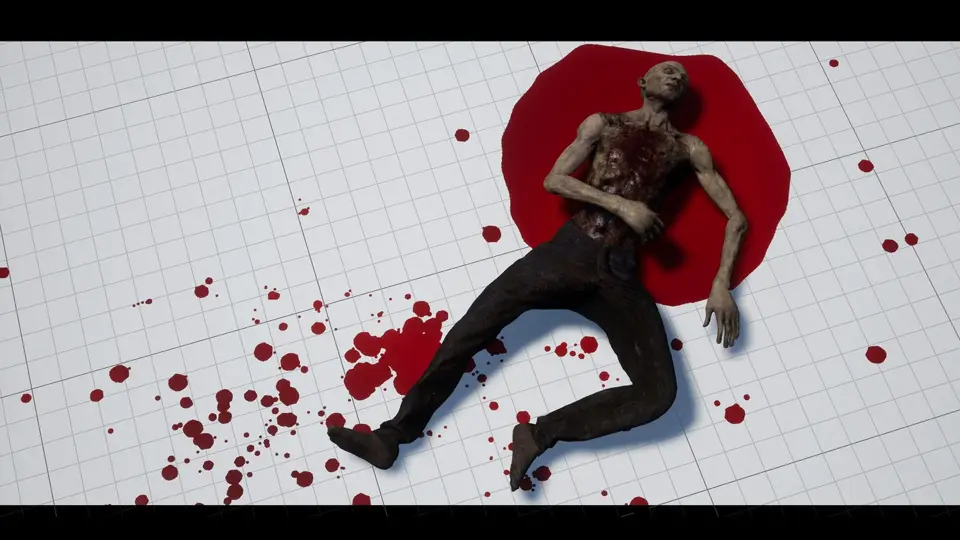
Gameplay integration is demonstrated in the included DemoMap_AIExample Level, which provides functional examples for damage handling and environmental blood distribution. The sample enemy character, BP_EnemyExample, charges the player, registers projectile hits from a modified first-person weapon, and triggers impact emitters bound directly to character skeletal bones. When a fatal blow lands, the enemy executes a line-trace straight down toward the floor, finding the world hit location and surface normal to spawn a permanent blood pool decal directly beneath the body.
Tracking wounded targets through an arena is a natural extension of this setup. Because droplets can be configured to drip continuously from moving skeletal sockets onto floor geometry, players can use blood trails to locate fleeing or wounded opponents.
The package remains maintained and fully functional within Unreal Engine 5, as well as integrating smoothly alongside modular character assets like the Zombies - Modular Four Pack. For virtual reality projects, deployments require Unreal Engine 4.26 or later; earlier engine revisions such as 4.24 and 4.25 suffer from an engine-level stereoscopic rendering defect (UE-78764) that disrupts Niagara particle alignment in VR headsets. Beyond that specific VR platform caveat, the combination of lightweight CPU impact calculation and soft-referenced blueprint management provides a reliable framework for persistent scene gore.
 Liquid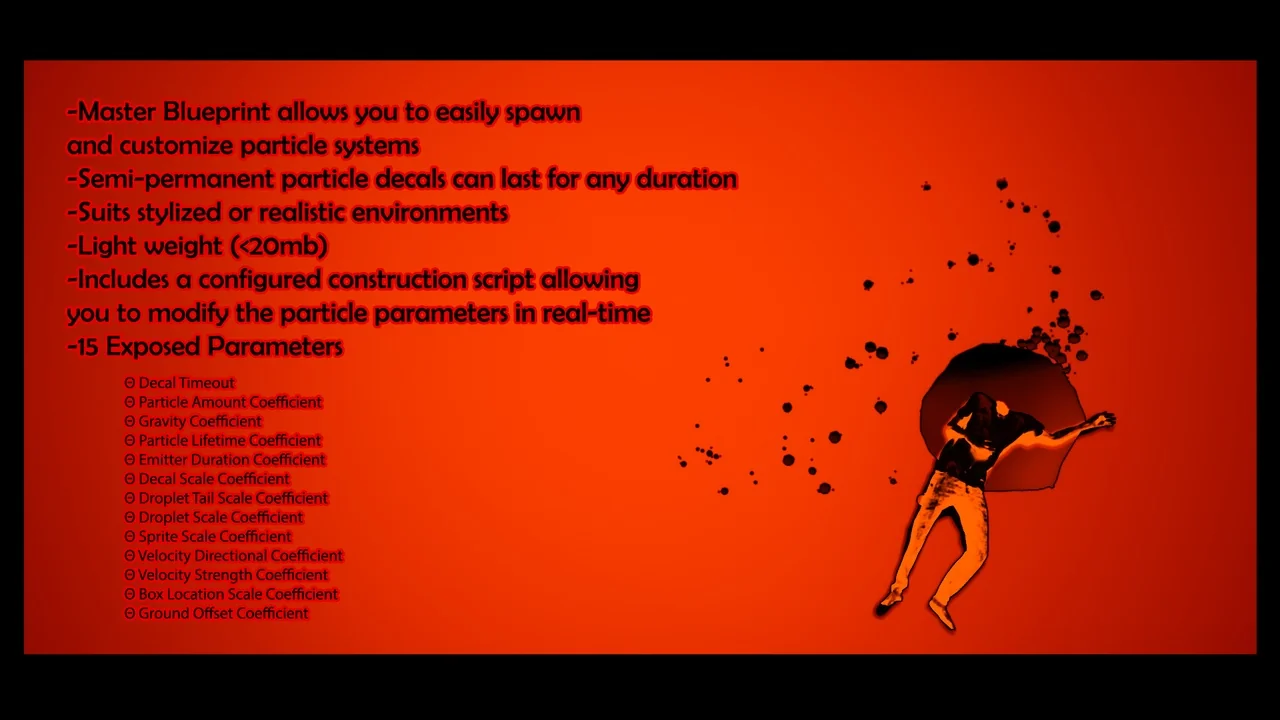
 Tools
Tools Liquid
 Liquid