"6f9bd6df1f44a86f"{"id":"1000868","slug":"post-process-shader-world-effect","title":"Post Process Shader - World Effect","category":"Shaders","engine":"5.0+","assetVersion":"","engineVersion":"Engine Version: 5.0+","tag":"Shaders","accent":"blue","visual":"mech","summary":"A post-processing shader for Unreal Engine 5 that creates atmospheric and eerie visuals—fog, glow, distortion, color filters—with fully adjustable parameters an","platform":"Unreal Engine","indexPolicy":"index","publishedAt":"2026-08-05T06:52:48.407Z","updatedAt":"2026-08-05T06:52:48.407Z","sourceNotes":[],"fileContents":[],"compatibility":["Unreal Engine","Engine Version: 5.0+"],"featuredImage":{"alt":"Post Process Shader - World Effect","src":"/wp-content/uploads/published/2026/08/74d3c34c609f-04e864c3-4d40-4a94-a958-896d7bdc2d3a-f95815c78c.webp"},"hasDownloadLink":true,"downloads":0,"terms":[{"taxonomy":"category","slug":"shaders","name":"Shaders"}],"galleryImages":[{"src":"/wp-content/uploads/published/2026/08/c037417f37e1-779347c7-acb8-45c4-86ff-a02345d833aa-3e188f2a8a.webp","alt":"Post Process Shader - World Effect"},{"src":"/wp-content/uploads/published/2026/08/52a1c5007df6-c8f55aba-391b-436c-9e0e-b6a8988f387b-44605e5e96.webp","alt":"Post Process Shader - World Effect"},{"src":"/wp-content/uploads/published/2026/08/f5ebb953df85-da17f1e4-d758-4395-9b60-79fe910ceaae-56f6067411.webp","alt":"Post Process Shader - World Effect"},{"src":"/wp-content/uploads/published/2026/08/89d492517203-72037aca-2a39-490c-b1d4-42c23f5f21bf-3cac8e1561.webp","alt":"Post Process Shader - World Effect"},{"src":"/wp-content/uploads/published/2026/08/3197c0d7e663-9d66490f-809b-4f84-b0a5-f5fd600434a6-bf60a8d64e.webp","alt":"Post Process Shader - World Effect"},{"src":"/wp-content/uploads/published/2026/08/7d77b771bae6-80165c49-0bd5-46c9-8a9d-a0382e6d775f-94ba43d79b.webp","alt":"Post Process Shader - World Effect"},{"src":"/wp-content/uploads/published/2026/08/8e474a071a84-beb554b4-9691-4d45-b0c1-7d5f8969176c-cb15c1f546.webp","alt":"Post Process Shader - World Effect"},{"src":"/wp-content/uploads/published/2026/08/d0456571fbe1-eff9d80e-ece5-4ae6-92d1-ea3fc951a867-b68228a568.webp","alt":"Post Process Shader - World Effect"},{"src":"/wp-content/uploads/published/2026/08/8a1bfcea7ec8-68ebcb53-8806-4cf5-be6d-f4c8e4e6fbce-7673e7530f.webp","alt":"Post Process Shader - World Effect"},{"src":"/wp-content/uploads/published/2026/08/05f7cadbf31d-d82aec95-ddc3-4259-aacb-7312c83c2a3a-dd97d5e3d0.webp","alt":"Post Process Shader - World Effect"}],"accessPanel":{"kind":"resource","title":"Download this resource","eyebrow":"Free Download","message":"Log in or create a free account to start your download.","fileName":"Content.7z","safetyNote":"Resources are manually reviewed before listing to improve quality and reduce obvious risks.","actionLabel":"Download Free","resourceType":"Resource archive"},"contentHtml":"\u003cp\u003eUnreal Engine 5 (UE5) scenes rarely need another prop or light to feel different. The faster route is often a Post-Process Material, and \u003cem\u003ePost Process Shader - World Effect\u003c/em\u003e is 1 made for that exact job. It's a Post-Process Shader meant to help developers create atmospheric and eerie environments—places that feel ghostly, cursed, or hostile. With 1 single effect applied to the camera's output, a familiar Level can become a ghostly realm, a stretch of war fog, or a hellish landscape.\u003c/p\u003e\n\n\u003cp\u003eWhat makes the shader useful is that it doesn't demand a specific genre setup. It works across fantasy, horror, science fiction, and surreal worlds, and it's designed to make scenes more immersive and memorable.\u003c/p\u003e\n\n\u003ch2\u003eFog, Glow, Distortion, and Color Filters in 1 Pass\u003c/h2\u003e\n\n\u003cp\u003eThe shader's range of effects covers the visual cues that immediately communicate a mood. Fog adds depth and mystery. Distortion swerves the way surfaces and objects are read by the camera. Color filters shift the entire palette, and glow wraps highlights in a cinematic halo. The listing groups these together as a wide range of effects, suggesting that the shader doesn't rely on 1 single trick but stacks several Post-Process behaviors into 1 Material.\u003c/p\u003e\n\n\u003cp\u003eFor a developer, that means 1 Post-Process Material can replace multiple stacked nodes or plugins. It's not just a simple color grade; it's a full environmental overlay. The effect can be tuned so the same Material works for a subtle haze in a fantasy meadow or a heavy, almost painful distortion in an alien landscape.\u003c/p\u003e\n\n\u003ch2\u003eAdjusting Parameters Without Relighting the Whole Scene\u003c/h2\u003e\n\n\u003cp\u003eFull customization is 1 of the stated strengths. The user controls \u003ccode\u003eColor\u003c/code\u003e, \u003ccode\u003eIntensity\u003c/code\u003e, \u003ccode\u003eAnimation Speed\u003c/code\u003e, and other parameters directly. That makes it easy to test variations in real time without touching the Level's lighting or geometry. You don't have to wait for a bake or a new build to see if a scene reads better with a stronger glow or a slower fog drift.\u003c/p\u003e\n\n\u003cp\u003eThe shader's ease of use matters for small teams and solo developers. Even beginners can set it up quickly. The phrase 'even a complete beginner will be able to create their own effect' is honest about the learning curve: adjust the values until the frame looks right. That's a low barrier to entry for a tool that usually sits deep in Visual Effects (VFX) work.\u003c/p\u003e\n\n\u003ch2\u003e10 Materials and the Process of Creating an Instance\u003c/h2\u003e\n\n\u003cp\u003eThe package ships with 10 Materials created specifically to showcase the shader's capabilities. They act as a visual menu of what the effect can do. The demo video shows them in action and also walks through the process of creating a new Material Instance. A Material Instance, in Unreal Engine's Material System, is a modified copy that inherits the shader's logic while letting the user change exposed parameters without altering the Master Material.\u003c/p\u003e\n\n\u003cp\u003eFor a beginner, the 10 Materials are the fastest learning path. Instead of starting from a blank Material Graph, you pick a preset that's close to your intended look, then tweak values such as \u003ccode\u003eIntensity\u003c/code\u003e, \u003ccode\u003eColor\u003c/code\u003e, or \u003ccode\u003eAnimation Speed\u003c/code\u003e. For an experienced developer, the same presets serve as a quick library to drop into a project and adjust on the spot.\u003c/p\u003e\n\n\u003ch2\u003eWhere the Shader Fits in Different Genres\u003c/h2\u003e\n\n\u003cp\u003eThe shader's versatility is built into its range of effects. In fantasy worlds, it can add magical atmospheres or mystical fog. Horror projects can use it for ghostly realms and cursed locations. Science fiction scenes can get alien landscapes or post-apocalyptic wastelands. Surreal worlds can go full psychedelic with unusual Visual Effects (VFX). That breadth means the same asset can serve a studio working on multiple projects, or an individual artist experimenting across styles.\u003c/p\u003e\n\n\u003cp\u003eBecause the shader works through Unreal Engine's Post-Process Pipeline, it's suitable for real-time rendering. Performance optimization notes that it works without straining the system. That's a practical advantage for interactive projects where frame rate matters, not just for Cinematics that get rendered offline.\u003c/p\u003e\n\n\u003cp\u003e\u003cem\u003ePost Process Shader - World Effect\u003c/em\u003e sits at the point where a developer already has a scene and needs a fast way to make it memorable. The 10 included Materials give a starting point, the exposed parameters give control, and the performance focus keeps it usable in real-time builds. For any project that asks 'what if this world felt like a ghost story, a war zone, or a hellish landscape?' the shader provides an immediate answer.\u003c/p\u003e\n\n\u003ch2\u003eMore From The Same Workflow\u003c/h2\u003e\n\u003cul\u003e\n\u003cli\u003e\u003ca href=\"https://3dcghub.com/post-process-shader-scan-effect/\" rel=\"noopener noreferrer\"\u003ePost Process Shader - Scan Effect\u003c/a\u003e\u003c/li\u003e\n\u003cli\u003e\u003ca href=\"https://3dcghub.com/post-process-pro-pack/\" rel=\"noopener noreferrer\"\u003ePost Process Pro Pack\u003c/a\u003e\u003c/li\u003e\n\u003cli\u003e\u003ca href=\"https://3dcghub.com/dissolution-vfx-pack-using-niagara/\" rel=\"noopener noreferrer\"\u003eDissolution VFX Pack using Niagara\u003c/a\u003e\u003c/li\u003e\n\u003cli\u003e\u003ca href=\"https://3dcghub.com/wall-fx-pack/\" rel=\"noopener noreferrer\"\u003eWall FX pack\u003c/a\u003e\u003c/li\u003e\n\u003cli\u003e\u003ca href=\"https://3dcghub.com/cube-vfx/\" rel=\"noopener noreferrer\"\u003eCube VFX\u003c/a\u003e\u003c/li\u003e\n\u003c/ul\u003e","contentTextLength":4582,"navigation":{"current":1496,"total":4218,"previous":{"id":"1000869","slug":"powerful-fighter-pack-can-be-used-with-my-sword-pack","title":"Powerful Fighter Pack(Can be used with my Sword Pack)","category":"Combat","platform":"Unreal Engine","updatedAt":"2026-08-05T06:58:01.030Z"},"next":{"id":"1000867","slug":"post-process-shader-scan-effect","title":"Post Process Shader - Scan Effect","category":"Shaders","platform":"Unreal Engine","updatedAt":"2026-08-05T06:50:02.101Z"}},"relatedResources":[{"id":"1001590","slug":"art-of-shader-advanced-distortion","title":"Art of Shader - Advanced Distortion","category":"Shaders","engine":"5.1+","assetVersion":"","engineVersion":"Engine Version: 5.1+","tag":"Shaders","accent":"blue","visual":"mech","summary":"Configure, blend, and localize custom post process distortion shaders in Unreal Engine with fine-tuned noise, color, and strength controls.","platform":"Unreal Engine","indexPolicy":"index","publishedAt":"2026-10-10T16:10:36.328Z","updatedAt":"2026-10-10T16:10:36.328Z","sourceNotes":[],"fileContents":[],"compatibility":["Unreal Engine","Engine Version: 5.1+"],"featuredImage":{"alt":"Art of Shader - Advanced Distortion","src":"/wp-content/uploads/published/2026/10/f700cb0f25b0-7516c7c7-267a-4e8d-a0f1-b65c294c9161-4a2581dc6e.webp"},"hasDownloadLink":true,"downloads":0},{"id":"1000867","slug":"post-process-shader-scan-effect","title":"Post Process Shader - Scan Effect","category":"Shaders","engine":"5.0+","assetVersion":"","engineVersion":"Engine Version: 5.0+","tag":"Shaders","accent":"blue","visual":"mech","summary":"A UE5 post-process shader that creates glowing scan outlines on object edges and surfaces, with full color, thickness, and glow control. Works in any lighting.","platform":"Unreal Engine","indexPolicy":"index","publishedAt":"2026-08-05T06:50:02.101Z","updatedAt":"2026-08-05T06:50:02.101Z","sourceNotes":[],"fileContents":[],"compatibility":["Unreal Engine","Engine Version: 5.0+"],"featuredImage":{"alt":"Post Process Shader - Scan Effect","src":"/wp-content/uploads/published/2026/08/9d1030c573cf-ea53a9c9-7dac-4928-b85c-12f5e688203a-4ac07b0456.webp"},"hasDownloadLink":true,"downloads":1},{"id":"1001000","slug":"lens-and-film-post-process","title":"Lens and Film Post Process","category":"Shaders","engine":"5.1+","assetVersion":"","engineVersion":"Engine Version: 5.1+","tag":"Shaders","accent":"blue","visual":"mech","summary":"Customizable post-processing effect for blur, lens distortion, chromatic aberration, film grain, light leaks, and more. Includes disk blur types and cinematic r","platform":"Unreal Engine","indexPolicy":"index","publishedAt":"2026-08-20T09:55:15.932Z","updatedAt":"2026-08-20T09:55:15.932Z","sourceNotes":[],"fileContents":[],"compatibility":["Unreal Engine","Engine Version: 5.1+"],"featuredImage":{"alt":"Lens and Film Post Process","src":"/wp-content/uploads/published/2026/08/9f516287e615-b76a2f41-7419-402c-9096-7d1b7d173679-78137b7b8c.webp"},"hasDownloadLink":true,"downloads":0}]}
Shaders
Post Process Shader - World Effect
A post-processing shader for Unreal Engine 5 that creates atmospheric and eerie visuals—fog, glow, distortion, color filters—with fully adjustable parameters an
Category:Unreal Engine,ShadersPlatform: Unreal EngineEngine Version: 5.0+Published: Aug 5, 2026
Shaders
Resource overview
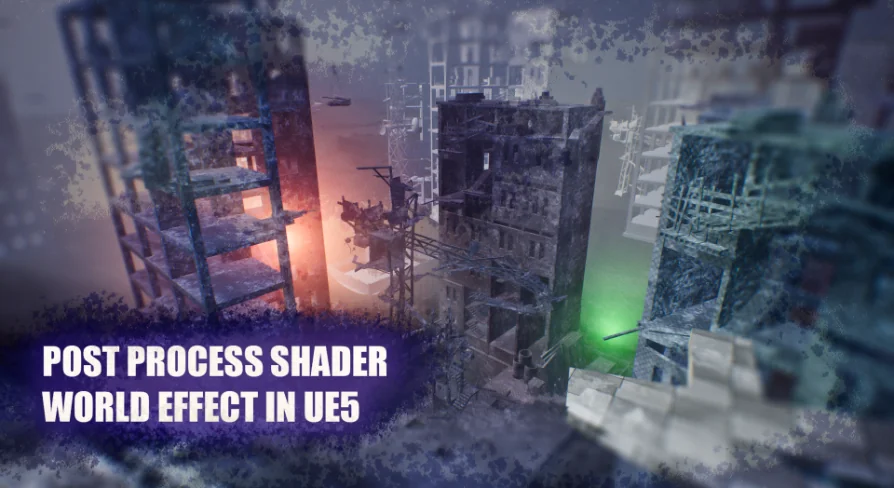
Unreal Engine 5 (UE5) scenes rarely need another prop or light to feel different. The faster route is often a Post-Process Material, and Post Process Shader - World Effect is 1 made for that exact job. It's a Post-Process Shader meant to help developers create atmospheric and eerie environments—places that feel ghostly, cursed, or hostile. With 1 single effect applied to the camera's output, a familiar Level can become a ghostly realm, a stretch of war fog, or a hellish landscape.
What makes the shader useful is that it doesn't demand a specific genre setup. It works across fantasy, horror, science fiction, and surreal worlds, and it's designed to make scenes more immersive and memorable.
Fog, Glow, Distortion, and Color Filters in 1 Pass
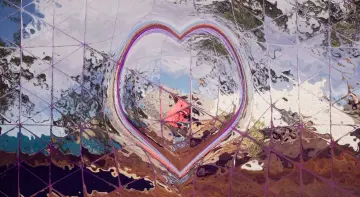
The shader's range of effects covers the visual cues that immediately communicate a mood. Fog adds depth and mystery. Distortion swerves the way surfaces and objects are read by the camera. Color filters shift the entire palette, and glow wraps highlights in a cinematic halo. The listing groups these together as a wide range of effects, suggesting that the shader doesn't rely on 1 single trick but stacks several Post-Process behaviors into 1 Material.
For a developer, that means 1 Post-Process Material can replace multiple stacked nodes or plugins. It's not just a simple color grade; it's a full environmental overlay. The effect can be tuned so the same Material works for a subtle haze in a fantasy meadow or a heavy, almost painful distortion in an alien landscape.
Adjusting Parameters Without Relighting the Whole Scene
Full customization is 1 of the stated strengths. The user controls Color, Intensity, Animation Speed, and other parameters directly. That makes it easy to test variations in real time without touching the Level's lighting or geometry. You don't have to wait for a bake or a new build to see if a scene reads better with a stronger glow or a slower fog drift.
The shader's ease of use matters for small teams and solo developers. Even beginners can set it up quickly. The phrase 'even a complete beginner will be able to create their own effect' is honest about the learning curve: adjust the values until the frame looks right. That's a low barrier to entry for a tool that usually sits deep in Visual Effects (VFX) work.
10 Materials and the Process of Creating an Instance
The package ships with 10 Materials created specifically to showcase the shader's capabilities. They act as a visual menu of what the effect can do. The demo video shows them in action and also walks through the process of creating a new Material Instance. A Material Instance, in Unreal Engine's Material System, is a modified copy that inherits the shader's logic while letting the user change exposed parameters without altering the Master Material.
For a beginner, the 10 Materials are the fastest learning path. Instead of starting from a blank Material Graph, you pick a preset that's close to your intended look, then tweak values such as Intensity, Color, or Animation Speed. For an experienced developer, the same presets serve as a quick library to drop into a project and adjust on the spot.
Where the Shader Fits in Different Genres
The shader's versatility is built into its range of effects. In fantasy worlds, it can add magical atmospheres or mystical fog. Horror projects can use it for ghostly realms and cursed locations. Science fiction scenes can get alien landscapes or post-apocalyptic wastelands. Surreal worlds can go full psychedelic with unusual Visual Effects (VFX). That breadth means the same asset can serve a studio working on multiple projects, or an individual artist experimenting across styles.
Because the shader works through Unreal Engine's Post-Process Pipeline, it's suitable for real-time rendering. Performance optimization notes that it works without straining the system. That's a practical advantage for interactive projects where frame rate matters, not just for Cinematics that get rendered offline.
Post Process Shader - World Effect sits at the point where a developer already has a scene and needs a fast way to make it memorable. The 10 included Materials give a starting point, the exposed parameters give control, and the performance focus keeps it usable in real-time builds. For any project that asks 'what if this world felt like a ghost story, a war zone, or a hellish landscape?' the shader provides an immediate answer.
 Shaders
 Shaders
 Shaders
 Shaders