"6d62578bf08f81bd"{"id":"1002142","slug":"pigman","title":"Pigman","category":"Characters \u0026 Creatures","engine":"4.24+,5.0+","assetVersion":"","engineVersion":"Engine Version: 4.24+,5.0+","tag":"Characters","accent":"blue","visual":"character","summary":"Technical breakdown of the Pigman modular character, featuring UE4 Mannequin retargeting, 52 ARKit blendshapes, virtual textures, and PBR material setup.","platform":"Unreal Engine","publishedAt":"2026-10-29T09:47:50.343Z","updatedAt":"2026-10-29T09:47:50.343Z","sourceNotes":[],"fileContents":[],"compatibility":["Unreal Engine","Engine Version: 4.24+,5.0+"],"featuredImage":{"alt":"Pigman","src":"/wp-content/uploads/published/2026/10/526e179b8293-5028f7a1-e442-4e0e-b0c1-73eb7cb388d1-cc4d2bf918.webp"},"hasDownloadLink":true,"downloads":1,"terms":[{"taxonomy":"category","slug":"characters-and-creatures","name":"Characters \u0026 Creatures"}],"galleryImages":[{"src":"/wp-content/uploads/published/2026/10/24458f578590-c04a50db-82e1-4470-862d-7226d5d48281-bcc6fb888f.webp","alt":"Pigman"},{"src":"/wp-content/uploads/published/2026/10/a23c8af68662-736f8988-a08d-41da-911b-fc14565a5797-8e6284b667.webp","alt":"Pigman"},{"src":"/wp-content/uploads/published/2026/10/d93d8fb03507-a1c8b49b-4773-4f18-89dc-aa00f1ecc1b3-fe6ac38782.webp","alt":"Pigman"},{"src":"/wp-content/uploads/published/2026/10/5c1483e8c6be-fed0428e-3698-4b14-a85d-deef71331e44-ff147553f9.webp","alt":"Pigman"},{"src":"/wp-content/uploads/published/2026/10/e2ad643f54b1-de8acf32-bd2d-4bd6-a08b-8ff4914744be-908c0109fc.webp","alt":"Pigman"},{"src":"/wp-content/uploads/published/2026/10/06cfe4c0944b-26724089-f174-46db-a3f4-0cf50f117c1d-3bddce922e.webp","alt":"Pigman"},{"src":"/wp-content/uploads/published/2026/10/075eb75bae17-c0027526-9c26-466a-b915-082408c1d4a9-246ca56fb7.webp","alt":"Pigman"},{"src":"/wp-content/uploads/published/2026/10/6dc4150e8c8a-5a90b31f-2466-426f-95ca-bad8cfe7fa9f-212b82c73f.webp","alt":"Pigman"},{"src":"/wp-content/uploads/published/2026/10/ea380983b377-4e5f1ab7-8687-46e8-b782-199829c64785-a4f5db9e97.webp","alt":"Pigman"}],"accessPanel":{"kind":"resource","title":"Download this resource","eyebrow":"Free Download","message":"Log in or create a free account to start your download.","fileName":"Content.7z","safetyNote":"Resources are manually reviewed before listing to improve quality and reduce obvious risks.","actionLabel":"Download Free","resourceType":"Resource archive"},"contentHtml":"\u003ch2\u003eProject Configuration and Virtual Texture Setup\u003c/h2\u003e\n\u003cp\u003eIntegrating the Pigman character into an existing project begins with project-level rendering settings. Because the main body texture set utilizes a UDIM layout across two texture tiles, enabling Virtual Texture Support in the project settings is essential to avoid texture streaming or rendering artifacts. Once virtual texturing is active, the engine parses the tiled layout cleanly across the multi-tile body mesh.\u003c/p\u003e\n\u003cp\u003eThe asset package focuses strictly on art and animation assets rather than runtime scripting. It provides skeletal meshes, physics assets, textures, material instances, and animation sequences. There are no proprietary Blueprints, character controllers, or gameplay code bundled into the package, keeping project directories clean of unneeded scripting dependencies and leaving movement mechanics entirely to the host project.\u003c/p\u003e \u003ch2\u003eEpic Skeleton Alignment and Extra Physics Bones\u003c/h2\u003e\n\u003cp\u003eThe core deformation structure is built directly around the standard UE4 Mannequin bone hierarchy. Because the main hierarchy remains untouched, standard humanoid animations can be retargeted directly onto the Pigman model. However, because the base pose authored for the character differs slightly from the standard Epic Skeleton reference pose, adjusting bone rotations or setting a matching retarget pose ensures cleaner retargeting results across limbs and shoulders.\u003c/p\u003e\n\u003cp\u003eAuthoring for the rig was completed inside Maya without proprietary plugins, providing a standard humanoid bone hierarchy that operates without external control rig dependencies. In addition to standard humanoid limbs and spine bones, several dedicated joint chains exist to drive secondary movement and dynamic simulations:\u003c/p\u003e\n\u003cul\u003e \u003cli\u003eIndependent eye bones for directional gaze\u003c/li\u003e \u003cli\u003eUpper and lower eyelid joints\u003c/li\u003e \u003cli\u003eArticulated jaw and tongue bones for precise oral deformation\u003c/li\u003e \u003cli\u003eA dedicated belly bone to support dynamic secondary motion through character physics\u003c/li\u003e\n\u003c/ul\u003e\n\u003cp\u003ePhysics assets are configured to leverage these additional bone chains, allowing elements such as the belly to react dynamically to character velocity and impacts. The character rig has been validated across various humanoid animation assets, and basic movement sequences are included directly in the asset folder for immediate verification.\u003c/p\u003e \u003ch2\u003eARKit Blendshapes and Facial Performance Capture\u003c/h2\u003e\n\u003cp\u003eDetailed facial articulation is driven through 52 Apple ARKit morph targets. These blendshapes are calibrated to work directly with facial motion capture workflows, including real-time streaming tools like Live Link Face. The shapes reproduce full facial movement across the brows, cheeks, snout, jaw, and mouth region, matching standard facial tracking naming conventions.\u003c/p\u003e\n\u003cp\u003eThis tracking readiness accommodates live production needs beyond standard offline cinematics. The blendshape setup functions cleanly within pipelines utilizing LiveLinkFace, FaceWare, general facial mocap, VTuber avatar streaming setups, VRChat configurations, and MMD conversions. Combined with the articulated tongue and jaw joints, the facial mesh delivers expressive dialogue, roaring, and horror vocalizations without tearing across complex facial folds.\u003c/p\u003e \u003ch2\u003eModular Skeletal Presets, Hat, and Cleaver Geometry\u003c/h2\u003e\n\u003cp\u003eThe character is authored with modularity in mind. Meshes are split into discrete components that integrate directly with Master Pose Component or Leader Pose Component workflows in engine, allowing developers to show, hide, or swap clothing and body elements without desynchronizing skeletal deformation. Complete pre-assembled skeletal presets are also provided for direct placement in levels or AI spawning pipelines.\u003c/p\u003e\n\u003cp\u003eThe geometry is distributed across specialized props and modular clothing pieces:\u003c/p\u003e\n\u003cul\u003e \u003cli\u003e\u003cstrong\u003ePigman Base Character:\u003c/strong\u003e 23,889 faces, 44,394 triangles, and 22,603 vertices\u003c/li\u003e \u003cli\u003e\u003cstrong\u003eCleaver Weapon:\u003c/strong\u003e 1,280 faces, 2,362 triangles, and 1,531 vertices\u003c/li\u003e \u003cli\u003e\u003cstrong\u003eAccessories (Update 1.1):\u003c/strong\u003e Modular hat, cigarette prop, and dedicated preset configurations\u003c/li\u003e\n\u003c/ul\u003e\n\u003cp\u003eThe separate butcher cleaver provides an immediate weapon prop that complements the overall aesthetic, while accessories like the hat and cigarette offer visual variation across different character encounters.\u003c/p\u003e \u003ch2\u003ePBR Texture Sets, Material ID Masks, and Eye Variations\u003c/h2\u003e\n\u003cp\u003eSurfacing adheres to a standard PBR metallic and roughness workflow, with textures supplied at up to 4K resolution. Packed RGB channels combine ambient occlusion, roughness, and metallic data to minimize texture sample counts in shaders. Channels include BaseColour, Normal, MatID, Opacity, and Emissive maps across distinct texture sets dedicated to the body, jaw, eyes, jacket, pants, boots, and cleaver.\u003c/p\u003e\n\u003cp\u003eTo support visual customization across enemy variants, the package includes dedicated Material ID maps for all texture sets. These masks isolate individual surface segments of the base maps. Combined with desaturated grey texture passes and exposed parameters inside the included Material Instances, artists can alter fabric colors, leather tones, or skin tints without authoring external texture files. If project memory constraints require optimization, textures can be downscaled to 1024x1024 or lower while maintaining surface fidelity.\u003c/p\u003e\n\u003cp\u003eEye customization is handled through three distinct variations that change the visual style of the creature:\u003c/p\u003e\n\u003cul\u003e \u003cli\u003e\u003cstrong\u003eDemon:\u003c/strong\u003e Highly stylized, aggressive eye styling\u003c/li\u003e \u003cli\u003e\u003cstrong\u003eBlack/Emissive:\u003c/strong\u003e High-contrast, glowing horror presentation\u003c/li\u003e \u003cli\u003e\u003cstrong\u003eEpic/Humanoid:\u003c/strong\u003e Shader-driven standard biological eye setup\u003c/li\u003e\n\u003c/ul\u003e \u003ch2\u003eProduction Integration Considerations\u003c/h2\u003e\n\u003cp\u003eBecause the package provides purely skeletal meshes, textures, materials, and motion assets, integrating Pigman into an existing title requires mapping the skeletal mesh to an active character blueprint. Retargeting verification should account for the base pose offset against the UE4 Mannequin to prevent clipping around the broad shoulders and torso. Demonstration maps visible in preview media are excluded from the project files, meaning environment dressing, collision boundaries, and custom lighting must be set up within the host project's native scenes.\u003c/p\u003e\n\n\u003ch2\u003eExplore Similar Assets\u003c/h2\u003e\n\u003cul\u003e\n\u003cli\u003e\u003ca href=\"https://3dcghub.com/cyberpunk-sniper-girl/\" title=\"Cyberpunk Sniper Girl\"\u003eCyberpunk Sniper Girl\u003c/a\u003e\u003c/li\u003e\n\u003cli\u003e\u003ca href=\"https://3dcghub.com/cyberpunk-girl-2/\" title=\"Cyberpunk Girl\"\u003eCyberpunk Girl\u003c/a\u003e\u003c/li\u003e\n\u003cli\u003e\u003ca href=\"https://3dcghub.com/flying-monster/\" title=\"Flying Monster\"\u003eFlying Monster\u003c/a\u003e\u003c/li\u003e\n\u003cli\u003e\u003ca href=\"https://3dcghub.com/clown-man/\" title=\"Clown Man\"\u003eClown Man\u003c/a\u003e\u003c/li\u003e\n\u003cli\u003e\u003ca href=\"https://3dcghub.com/german-soldier-wwii/\" title=\"German Soldier WWII\"\u003eGerman Soldier WWII\u003c/a\u003e\u003c/li\u003e\n\u003c/ul\u003e","contentTextLength":6162,"navigation":{"current":113,"total":4180,"previous":{"id":"1002143","slug":"play-services-goodies","title":"Play Services Goodies","category":"Engine Tools","platform":"Unreal Engine","updatedAt":"2026-10-29T09:48:26.940Z"},"next":{"id":"1002141","slug":"physics-based-destructible-vehicle-trailer","title":"Physics-Based Destructible Vehicle Trailer","category":"Cars \u0026 Trucks","platform":"Unreal Engine","updatedAt":"2026-10-29T09:47:10.086Z"}},"relatedResources":[{"id":"1001605","slug":"cyberpunk-sniper-girl","title":"Cyberpunk Sniper Girl","category":"Characters \u0026 Creatures","engine":"4.26+,5.0+","assetVersion":"","engineVersion":"Engine Version: 4.26+,5.0+","tag":"Characters","accent":"blue","visual":"character","summary":"Cyberpunk Sniper Girl character breakdown covering 4 body shapes, Epic Skeleton rigging, 10 4K PBR texture sets, and Apple ARKit facial blendshapes.","platform":"Unreal Engine","publishedAt":"2026-10-10T16:29:58.108Z","updatedAt":"2026-10-10T16:29:58.108Z","sourceNotes":[],"fileContents":[],"compatibility":["Unreal Engine","Engine Version: 4.26+,5.0+"],"featuredImage":{"alt":"Cyberpunk Sniper Girl","src":"/wp-content/uploads/published/2026/10/506286d4db2b-22acae93-9939-48b9-8849-2410b63ab75c-7980f17e44.webp"},"hasDownloadLink":true,"downloads":1},{"id":"1001783","slug":"cyberpunk-girl-2","title":"Cyberpunk Girl","category":"Characters \u0026 Creatures","engine":"4.26+,5.0+","assetVersion":"","engineVersion":"Engine Version: 4.26+,5.0+","tag":"Characters","accent":"blue","visual":"character","summary":"Technical overview of the Cyberpunk Girl 3D character, detailing its Epic Skeleton rig, Apple ARKit blendshapes, 4K PBR textures, and mesh variations.","platform":"Unreal Engine","publishedAt":"2026-10-20T17:46:27.000Z","updatedAt":"2026-10-20T17:46:27.000Z","sourceNotes":[],"fileContents":[],"compatibility":["Unreal Engine","Engine Version: 4.26+,5.0+"],"featuredImage":{"alt":"Cyberpunk Girl","src":"/wp-content/uploads/published/2026/10/298bc2cc371a-338b8166-7482-4cf9-8984-a54b506c5509-1439389051.webp"},"hasDownloadLink":true,"downloads":0},{"id":"1001881","slug":"flying-monster","title":"Flying Monster","category":"Characters \u0026 Creatures","engine":"4.16+,5.0+","assetVersion":"","engineVersion":"Engine Version: 4.16+,5.0+","tag":"Characters","accent":"blue","visual":"character","summary":"A technical breakdown of the Flying Monster 3D model, detailing its 20 custom animations, articulated wing and tail rig, 4K PBR textures, and engine setup.","platform":"Unreal Engine","publishedAt":"2026-10-22T11:21:21.822Z","updatedAt":"2026-10-22T11:21:21.822Z","sourceNotes":[],"fileContents":[],"compatibility":["Unreal Engine","Engine Version: 4.16+,5.0+"],"featuredImage":{"alt":"Flying Monster","src":"/wp-content/uploads/published/2026/10/3bf1d0dd8142-af29d240-15a1-4bdb-be5e-163e18173dd7-8c05f00877.webp"},"hasDownloadLink":true,"downloads":0}]}
Characters
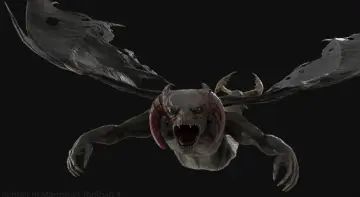
Pigman
Technical breakdown of the Pigman modular character, featuring UE4 Mannequin retargeting, 52 ARKit blendshapes, virtual textures, and PBR material setup.
Integrating the Pigman character into an existing project begins with project-level rendering settings. Because the main body texture set utilizes a UDIM layout across two texture tiles, enabling Virtual Texture Support in the project settings is essential to avoid texture streaming or rendering artifacts. Once virtual texturing is active, the engine parses the tiled layout cleanly across the multi-tile body mesh.
The asset package focuses strictly on art and animation assets rather than runtime scripting. It provides skeletal meshes, physics assets, textures, material instances, and animation sequences. There are no proprietary Blueprints, character controllers, or gameplay code bundled into the package, keeping project directories clean of unneeded scripting dependencies and leaving movement mechanics entirely to the host project.
Epic Skeleton Alignment and Extra Physics Bones
The core deformation structure is built directly around the standard UE4 Mannequin bone hierarchy. Because the main hierarchy remains untouched, standard humanoid animations can be retargeted directly onto the Pigman model. However, because the base pose authored for the character differs slightly from the standard Epic Skeleton reference pose, adjusting bone rotations or setting a matching retarget pose ensures cleaner retargeting results across limbs and shoulders.
Authoring for the rig was completed inside Maya without proprietary plugins, providing a standard humanoid bone hierarchy that operates without external control rig dependencies. In addition to standard humanoid limbs and spine bones, several dedicated joint chains exist to drive secondary movement and dynamic simulations:
Independent eye bones for directional gaze
Upper and lower eyelid joints
Articulated jaw and tongue bones for precise oral deformation
A dedicated belly bone to support dynamic secondary motion through character physics
Physics assets are configured to leverage these additional bone chains, allowing elements such as the belly to react dynamically to character velocity and impacts. The character rig has been validated across various humanoid animation assets, and basic movement sequences are included directly in the asset folder for immediate verification.
ARKit Blendshapes and Facial Performance Capture
Detailed facial articulation is driven through 52 Apple ARKit morph targets. These blendshapes are calibrated to work directly with facial motion capture workflows, including real-time streaming tools like Live Link Face. The shapes reproduce full facial movement across the brows, cheeks, snout, jaw, and mouth region, matching standard facial tracking naming conventions.
This tracking readiness accommodates live production needs beyond standard offline cinematics. The blendshape setup functions cleanly within pipelines utilizing LiveLinkFace, FaceWare, general facial mocap, VTuber avatar streaming setups, VRChat configurations, and MMD conversions. Combined with the articulated tongue and jaw joints, the facial mesh delivers expressive dialogue, roaring, and horror vocalizations without tearing across complex facial folds.
Modular Skeletal Presets, Hat, and Cleaver Geometry
The character is authored with modularity in mind. Meshes are split into discrete components that integrate directly with Master Pose Component or Leader Pose Component workflows in engine, allowing developers to show, hide, or swap clothing and body elements without desynchronizing skeletal deformation. Complete pre-assembled skeletal presets are also provided for direct placement in levels or AI spawning pipelines.
The geometry is distributed across specialized props and modular clothing pieces:
Pigman Base Character: 23,889 faces, 44,394 triangles, and 22,603 vertices
Cleaver Weapon: 1,280 faces, 2,362 triangles, and 1,531 vertices
Accessories (Update 1.1): Modular hat, cigarette prop, and dedicated preset configurations
The separate butcher cleaver provides an immediate weapon prop that complements the overall aesthetic, while accessories like the hat and cigarette offer visual variation across different character encounters.
PBR Texture Sets, Material ID Masks, and Eye Variations
Surfacing adheres to a standard PBR metallic and roughness workflow, with textures supplied at up to 4K resolution. Packed RGB channels combine ambient occlusion, roughness, and metallic data to minimize texture sample counts in shaders. Channels include BaseColour, Normal, MatID, Opacity, and Emissive maps across distinct texture sets dedicated to the body, jaw, eyes, jacket, pants, boots, and cleaver.
To support visual customization across enemy variants, the package includes dedicated Material ID maps for all texture sets. These masks isolate individual surface segments of the base maps. Combined with desaturated grey texture passes and exposed parameters inside the included Material Instances, artists can alter fabric colors, leather tones, or skin tints without authoring external texture files. If project memory constraints require optimization, textures can be downscaled to 1024x1024 or lower while maintaining surface fidelity.
Eye customization is handled through three distinct variations that change the visual style of the creature:
Epic/Humanoid: Shader-driven standard biological eye setup
Production Integration Considerations
Because the package provides purely skeletal meshes, textures, materials, and motion assets, integrating Pigman into an existing title requires mapping the skeletal mesh to an active character blueprint. Retargeting verification should account for the base pose offset against the UE4 Mannequin to prevent clipping around the broad shoulders and torso. Demonstration maps visible in preview media are excluded from the project files, meaning environment dressing, collision boundaries, and custom lighting must be set up within the host project's native scenes.
 Characters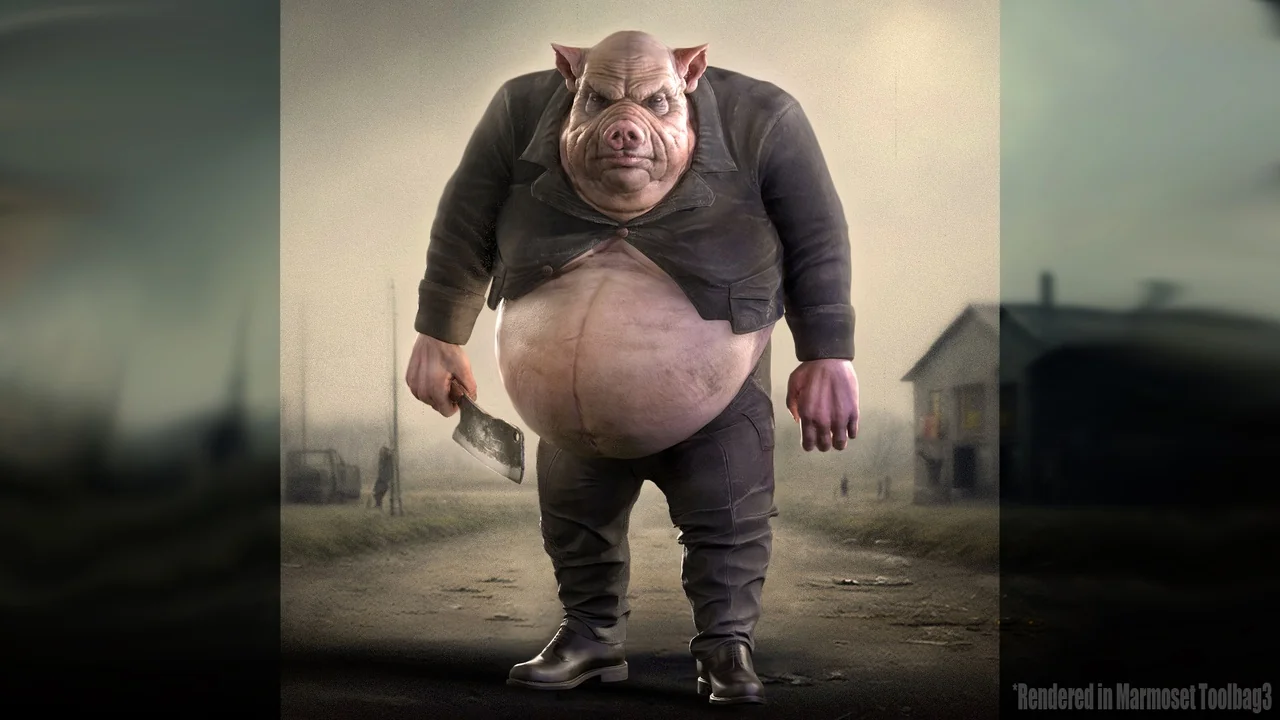
 Characters
 Characters
 Characters