"a19e0535960bd083"{"id":"1002040","slug":"german-soldier-wwii","title":"German Soldier WWII","category":"Characters \u0026 Creatures","engine":"4.26+,5.0+","assetVersion":"","engineVersion":"Engine Version: 4.26+,5.0+","tag":"Characters","accent":"blue","visual":"character","summary":"Explore the German Soldier WWII character asset, featuring standard UE mannequin rigging, customizable camouflage materials, and full PBR texture sets.","platform":"Unreal Engine","publishedAt":"2026-10-26T14:22:08.764Z","updatedAt":"2026-10-26T14:22:08.764Z","sourceNotes":[],"fileContents":[],"compatibility":["Unreal Engine","Engine Version: 4.26+,5.0+"],"featuredImage":{"alt":"German Soldier WWII","src":"/wp-content/uploads/published/2026/10/ef549c4de90c-7506682f-e445-427d-a90f-9300d7328716-5c6da2ebf9.webp"},"hasDownloadLink":true,"downloads":0,"terms":[{"taxonomy":"category","slug":"characters-and-creatures","name":"Characters \u0026 Creatures"}],"galleryImages":[{"src":"/wp-content/uploads/published/2026/10/661aaae58dbd-c27cf194-b1cc-44eb-a5fd-5ec6b108db0e-3c064a0897.webp","alt":"German Soldier WWII"},{"src":"/wp-content/uploads/published/2026/10/5517ae9866f9-8504648d-6f0c-48f2-98f2-3efcf2607b98-dc36d6d8d0.webp","alt":"German Soldier WWII"},{"src":"/wp-content/uploads/published/2026/10/48d804af207f-e0fc824e-8630-4aa2-9cb5-583c2a56428c-a57c7d5f4f.webp","alt":"German Soldier WWII"},{"src":"/wp-content/uploads/published/2026/10/8c490b9a7e52-865c2ea8-7eca-41d8-8166-9189b77caf1e-a954da0481.webp","alt":"German Soldier WWII"},{"src":"/wp-content/uploads/published/2026/10/7fcd65e3ab6e-72acce89-6dc1-420f-bd93-814ac2d33ba2-f91c86a50d.webp","alt":"German Soldier WWII"},{"src":"/wp-content/uploads/published/2026/10/3756741a4e85-d26860a7-bf79-4631-be3a-c65ecff69143-6d5986c96e.webp","alt":"German Soldier WWII"},{"src":"/wp-content/uploads/published/2026/10/556d8481895f-084af04e-6ed2-483f-b1e3-ac75e8604697-a121f6f2aa.webp","alt":"German Soldier WWII"},{"src":"/wp-content/uploads/published/2026/10/b0762f5ac844-abf456de-3c2c-49f9-9c7a-299a1225d3e0-c5f97fa91e.webp","alt":"German Soldier WWII"}],"accessPanel":{"kind":"resource","title":"Download this resource","eyebrow":"Free Download","message":"Log in or create a free account to start your download.","fileName":"Content.7z","safetyNote":"Resources are manually reviewed before listing to improve quality and reduce obvious risks.","actionLabel":"Download Free","resourceType":"Resource archive"},"contentHtml":"\u003cp\u003eViewing a character model directly in the viewport reveals how its geometry handles rapid shifts in camera proximity. The German Soldier WWII asset is structured to hold clean silhouettes at distant vantage points while retaining surface fidelity when the camera pulls in tight. Rather than confining the model to background filler or strictly front-and-center hero use, the underlying geometry balances close-up observation with the performance demands of mid-range and long-distance views.\u003c/p\u003e \u003ch2\u003eCamera Placement and Geometry for Player and NPC Roles\u003c/h2\u003e\n\u003cp\u003eCharacter models in tactical titles often encounter varying perspective demands. A player character seen from a third-person chase camera requires consistent edge flow along the shoulders, back, and helmet, where visual scrutiny remains constant throughout movement loops. Conversely, an adversary appearing in a first-person shooter must present crisp surface details across chest webbing, uniform folds, and facial framing during tight room clearances or aim-down-sights engagements.\u003c/p\u003e \u003cp\u003eThis model addresses both requirements by calibrating its geometry to work across third-person perspectives and first-person combat setups. When deployed as an enemy or non-player character, the silhouette remains recognizable at extended sightlines across open terrain or trench networks. As combat distances close, the edge density prevents conspicuous faceting, allowing developers to populate encounters with hostile combatants without swapping to an entirely different close-quarters asset.\u003c/p\u003e \u003ch2\u003eStandard UE Mannequin Rigging and Animation Support\u003c/h2\u003e\n\u003cp\u003eIntegrating a humanoid character into an existing project pipeline often hinges on skeletal compatibility. The German Soldier WWII model shares the standard Unreal Engine mannequin skeleton, removing the friction of manual bone remapping or custom socket alignment. Because the skeletal hierarchy matches this baseline, any locomotion sets, combat cycles, or weapon-handling assets configured for the default mannequin can be assigned directly to the mesh.\u003c/p\u003e \u003cp\u003eThis shared hierarchy makes immediate use of standard marketplace motion packs, including the free Animation Starter Pack provided by Epic Games. Turn-in-place sequences, crouch walks, prone crawls, and sprint transitions apply cleanly to the rig. For teams building specialized interaction logic, the inclusion of an Animation Blueprint setup provides an established structure to drive state machines, blend spaces, and procedural aiming offsets right out of the box.\u003c/p\u003e \u003ch2\u003eCamouflage Customization and Team Color Systems\u003c/h2\u003e\n\u003cp\u003eUniform variety is essential when populating squads, patrols, or entire battlefield sectors. The character incorporates an advanced material system configured to accept user-defined inputs, allowing creators to assign custom camouflage textures without modifying the underlying UV layouts. Adding alternate camouflage patterns changes the unit’s operational theater from muddy European woodland to arid or seasonal environments in a few clicks.\u003c/p\u003e \u003cp\u003eBeyond historical military patterns, the material controls allow color adjustments across specific uniform components. This functionality facilitates instant visual differentiation between fireteams or opposing multiplayer factions. Adjusting individual accent colors provides clean team identification in competitive game modes without breaking uniform coherence. The flexibility of this material architecture also supports alternative history concepts, where non-standard color palettes and speculative camouflage schemes define fictional combat units.\u003c/p\u003e \u003ch2\u003ePBR Texture Sets and Surface Definition\u003c/h2\u003e\n\u003cp\u003eLighting response across the character relies on dedicated physically based rendering (PBR) workflows. The asset supplies high-detail texture sets that capture the varied tactile qualities of wartime military gear, differentiating woven cloth from stamped metal and treated leather. Every texture set included with the character provides four essential channels:\u003c/p\u003e \u003cul\u003e \u003cli\u003e\u003cstrong\u003eDiffuse (Albedo):\u003c/strong\u003e Captures true surface coloration and fabric tinting free of baked-in directional lighting or artificial shadows.\u003c/li\u003e \u003cli\u003e\u003cstrong\u003eRoughness:\u003c/strong\u003e Dictates micro-surface variation, ensuring wool uniforms scatter light softly while worn metal buckles and polished leather elements catch sharp specular reflections.\u003c/li\u003e \u003cli\u003e\u003cstrong\u003eMetalness:\u003c/strong\u003e Defines metallic properties accurately across clasps, buttons, helmet shells, and field equipment.\u003c/li\u003e \u003cli\u003e\u003cstrong\u003eNormal map:\u003c/strong\u003e Supplies fine surface relief, rendering cloth seams, pocket flaps, and heavy folds cleanly under moving light sources.\u003c/li\u003e\n\u003c/ul\u003e \u003cp\u003eBecause the material structure follows calibrated PBR values, the model behaves predictably across differing environment lighting scenarios, from harsh midday sun to overcast conditions and dark interior bunkers.\u003c/p\u003e \u003ch2\u003eDeployment Across Realistic and Speculative Projects\u003c/h2\u003e\n\u003cp\u003eWhile modeled after historical mid-twentieth-century infantry, the combination of modular material parameters and mannequin skeletal alignment gives the asset utility outside rigid reenactments. Projects rooted in traditional WWII skirmishes can deploy the asset as standard frontline infantry or opposing patrol units, leaning on the base texturing and accurate silhouette.\u003c/p\u003e \u003cp\u003eAlternatively, narrative projects exploring alternate timelines or stylized tactical combat can leverage the custom texture slots to integrate non-historical camouflage, faction emblems, and revised color schemes. The ability to pivot between realistic historical accuracy and speculative warfare makes the German Soldier WWII asset an adaptable baseline for prototyping, core enemy rosters, and player-driven combat scenarios.\u003c/p\u003e\n\n\u003ch2\u003eRelated Resources Worth Checking\u003c/h2\u003e\n\u003cul\u003e\n\u003cli\u003e\u003ca href=\"https://3dcghub.com/sci-fi-space-soldier-female/\" title=\"Sci Fi Space Soldier Female\"\u003eSci Fi Space Soldier Female\u003c/a\u003e\u003c/li\u003e\n\u003cli\u003e\u003ca href=\"https://3dcghub.com/modular-soldier-opb-full/\" title=\"Modular Soldier OPB Full\"\u003eModular Soldier OPB Full\u003c/a\u003e\u003c/li\u003e\n\u003cli\u003e\u003ca href=\"https://3dcghub.com/special-forces-ski-fi-soldier/\" title=\"Special forces ski-fi soldier\"\u003eSpecial forces ski-fi soldier\u003c/a\u003e\u003c/li\u003e\n\u003cli\u003e\u003ca href=\"https://3dcghub.com/sci-fi-elite-trooper/\" title=\"SCI FI: ELITE TROOPER\"\u003eSCI FI: ELITE TROOPER\u003c/a\u003e\u003c/li\u003e\n\u003cli\u003e\u003ca href=\"https://3dcghub.com/character-military-bandit-2/\" title=\"Character Military Bandit 2\"\u003eCharacter Military Bandit 2\u003c/a\u003e\u003c/li\u003e\n\u003c/ul\u003e","contentTextLength":5742,"navigation":{"current":51,"total":4026,"previous":{"id":"1002041","slug":"ghosts-in-the-dark","title":"Ghosts in The Dark","category":"Creatures \u0026 Monsters","platform":"Unreal Engine","updatedAt":"2026-10-26T14:23:13.713Z"},"next":{"id":"1002039","slug":"generic-npc-anim-pack","title":"Generic NPC Anim Pack","category":"Variety","platform":"Unreal Engine","updatedAt":"2026-10-26T14:21:19.385Z"}},"relatedResources":[{"id":"1001659","slug":"sci-fi-space-soldier-female","title":"Sci Fi Space Soldier Female","category":"Characters \u0026 Creatures","engine":"4.16+,5.0+","assetVersion":"","engineVersion":"Engine Version: 4.16+,5.0+","tag":"Characters","accent":"blue","visual":"character","summary":"Sci Fi Space Soldier Female features 2 model versions, 2 LOD levels at 29K and 10K triangles, Epic skeleton rigging, and customizable multi-tone materials.","platform":"Unreal Engine","publishedAt":"2026-10-13T14:48:21.104Z","updatedAt":"2026-10-13T14:48:21.104Z","sourceNotes":[],"fileContents":[],"compatibility":["Unreal Engine","Engine Version: 4.16+,5.0+"],"featuredImage":{"alt":"Sci Fi Space Soldier Female","src":"/wp-content/uploads/published/2026/10/c9df1964c209-c1a5eaa9-4d71-4521-b647-674811bda59b-9cb1722b78.webp"},"hasDownloadLink":true,"downloads":1},{"id":"1001167","slug":"modular-soldier-opb-full","title":"Modular Soldier OPB Full","category":"Characters \u0026 Creatures","engine":"4.27,5.0+","assetVersion":"","engineVersion":"Engine Version: 4.27,5.0+","tag":"Characters","accent":"blue","visual":"character","summary":"Examine the Modular Soldier OPB Full pack, featuring UE4 and MetaHuman skeletons, 17 skeletal meshes, 4K textures, Lyra support, and mobile LOD scaling.","platform":"Unreal Engine","publishedAt":"2026-09-16T15:17:15.509Z","updatedAt":"2026-09-16T15:17:15.509Z","sourceNotes":[],"fileContents":[],"compatibility":["Unreal Engine","Engine Version: 4.27,5.0+"],"featuredImage":{"alt":"Modular Soldier OPB Full","src":"/wp-content/uploads/published/2026/09/ea2ebd97c5f3-6fd23319-3d68-435c-a7cb-60a62bd850ca-000d21f799.webp"},"hasDownloadLink":true,"downloads":4},{"id":"1000887","slug":"special-forces-ski-fi-soldier","title":"Special forces ski-fi soldier","category":"Characters \u0026 Creatures","engine":"4.26+,5.0+","assetVersion":"","engineVersion":"Engine Version: 4.26+,5.0+","tag":"Characters","accent":"blue","visual":"character","summary":"Low-poly sci-fi special forces soldier with respirator, rigged and skinned for Mannequin, includes auto rifle and baton, scalable 4K–1K textures.","platform":"Unreal Engine","publishedAt":"2026-08-05T18:03:28.977Z","updatedAt":"2026-08-05T18:03:28.977Z","sourceNotes":[],"fileContents":[],"compatibility":["Unreal Engine","Engine Version: 4.26+,5.0+"],"featuredImage":{"alt":"Special forces ski-fi soldier","src":"/wp-content/uploads/published/2026/08/8c9441f8d0d4-6bc53af4-1679-467b-8856-52c5905a0e67-9459541a09.webp"},"hasDownloadLink":true,"downloads":5}]}
Characters
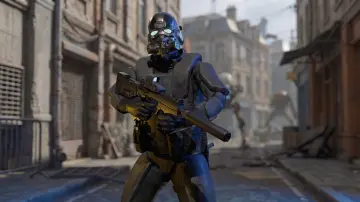
German Soldier WWII
Explore the German Soldier WWII character asset, featuring standard UE mannequin rigging, customizable camouflage materials, and full PBR texture sets.
Viewing a character model directly in the viewport reveals how its geometry handles rapid shifts in camera proximity. The German Soldier WWII asset is structured to hold clean silhouettes at distant vantage points while retaining surface fidelity when the camera pulls in tight. Rather than confining the model to background filler or strictly front-and-center hero use, the underlying geometry balances close-up observation with the performance demands of mid-range and long-distance views.
Camera Placement and Geometry for Player and NPC Roles
Character models in tactical titles often encounter varying perspective demands. A player character seen from a third-person chase camera requires consistent edge flow along the shoulders, back, and helmet, where visual scrutiny remains constant throughout movement loops. Conversely, an adversary appearing in a first-person shooter must present crisp surface details across chest webbing, uniform folds, and facial framing during tight room clearances or aim-down-sights engagements.
This model addresses both requirements by calibrating its geometry to work across third-person perspectives and first-person combat setups. When deployed as an enemy or non-player character, the silhouette remains recognizable at extended sightlines across open terrain or trench networks. As combat distances close, the edge density prevents conspicuous faceting, allowing developers to populate encounters with hostile combatants without swapping to an entirely different close-quarters asset.
Standard UE Mannequin Rigging and Animation Support
Integrating a humanoid character into an existing project pipeline often hinges on skeletal compatibility. The German Soldier WWII model shares the standard Unreal Engine mannequin skeleton, removing the friction of manual bone remapping or custom socket alignment. Because the skeletal hierarchy matches this baseline, any locomotion sets, combat cycles, or weapon-handling assets configured for the default mannequin can be assigned directly to the mesh.
This shared hierarchy makes immediate use of standard marketplace motion packs, including the free Animation Starter Pack provided by Epic Games. Turn-in-place sequences, crouch walks, prone crawls, and sprint transitions apply cleanly to the rig. For teams building specialized interaction logic, the inclusion of an Animation Blueprint setup provides an established structure to drive state machines, blend spaces, and procedural aiming offsets right out of the box.
Camouflage Customization and Team Color Systems
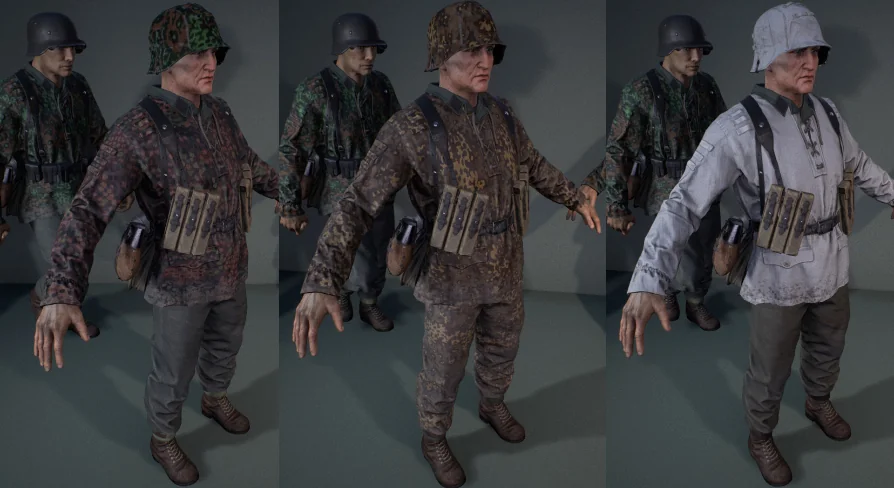
Uniform variety is essential when populating squads, patrols, or entire battlefield sectors. The character incorporates an advanced material system configured to accept user-defined inputs, allowing creators to assign custom camouflage textures without modifying the underlying UV layouts. Adding alternate camouflage patterns changes the unit’s operational theater from muddy European woodland to arid or seasonal environments in a few clicks.
Beyond historical military patterns, the material controls allow color adjustments across specific uniform components. This functionality facilitates instant visual differentiation between fireteams or opposing multiplayer factions. Adjusting individual accent colors provides clean team identification in competitive game modes without breaking uniform coherence. The flexibility of this material architecture also supports alternative history concepts, where non-standard color palettes and speculative camouflage schemes define fictional combat units.
PBR Texture Sets and Surface Definition
Lighting response across the character relies on dedicated physically based rendering (PBR) workflows. The asset supplies high-detail texture sets that capture the varied tactile qualities of wartime military gear, differentiating woven cloth from stamped metal and treated leather. Every texture set included with the character provides four essential channels:
Diffuse (Albedo): Captures true surface coloration and fabric tinting free of baked-in directional lighting or artificial shadows.
Roughness: Dictates micro-surface variation, ensuring wool uniforms scatter light softly while worn metal buckles and polished leather elements catch sharp specular reflections.
Metalness: Defines metallic properties accurately across clasps, buttons, helmet shells, and field equipment.
Normal map: Supplies fine surface relief, rendering cloth seams, pocket flaps, and heavy folds cleanly under moving light sources.
Because the material structure follows calibrated PBR values, the model behaves predictably across differing environment lighting scenarios, from harsh midday sun to overcast conditions and dark interior bunkers.
Deployment Across Realistic and Speculative Projects
While modeled after historical mid-twentieth-century infantry, the combination of modular material parameters and mannequin skeletal alignment gives the asset utility outside rigid reenactments. Projects rooted in traditional WWII skirmishes can deploy the asset as standard frontline infantry or opposing patrol units, leaning on the base texturing and accurate silhouette.
Alternatively, narrative projects exploring alternate timelines or stylized tactical combat can leverage the custom texture slots to integrate non-historical camouflage, faction emblems, and revised color schemes. The ability to pivot between realistic historical accuracy and speculative warfare makes the German Soldier WWII asset an adaptable baseline for prototyping, core enemy rosters, and player-driven combat scenarios.
 Characters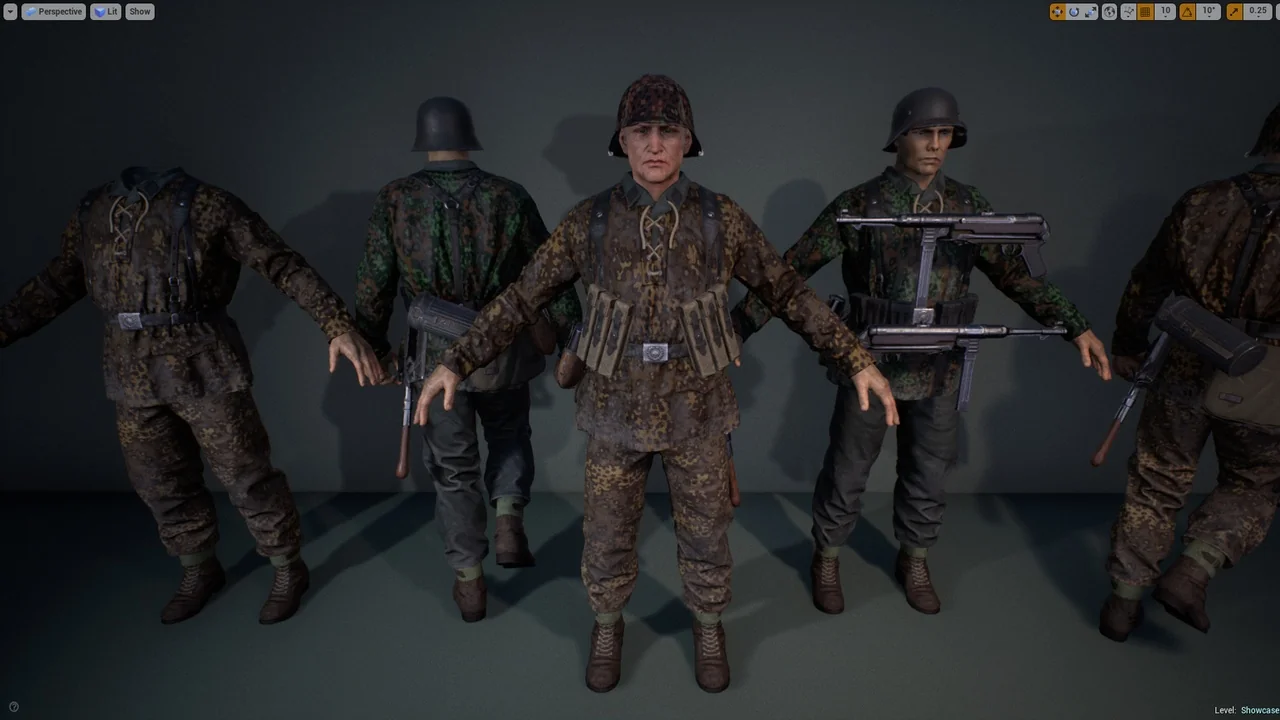
 Characters
 Characters
 Characters