"5da73d49ff33a5b1"{"id":"1002393","slug":"novice-girl","title":"Novice Girl","category":"Characters \u0026 Creatures","engine":"4.19+,5.0+","assetVersion":"","engineVersion":"Engine Version: 4.19+,5.0+","tag":"Characters","accent":"blue","visual":"character","summary":"Explore the Novice Girl modular 3D character featuring Epic Skeleton retargeting, 4K PBR textures, custom secondary bones, and facial blendshapes.","platform":"Unreal Engine","indexPolicy":"index","publishedAt":"2026-11-10T04:18:53.597Z","updatedAt":"2026-11-10T04:18:53.597Z","sourceNotes":[],"fileContents":[],"compatibility":["Unreal Engine","Engine Version: 4.19+,5.0+"],"featuredImage":{"alt":"Novice Girl","src":"/wp-content/uploads/published/2026/11/e8273e779ef8-dcc4dcfd-4b9c-4e05-8d40-f18cadfc206b-6adc7cfe28.webp"},"hasDownloadLink":true,"downloads":0,"terms":[{"taxonomy":"category","slug":"characters-and-creatures","name":"Characters \u0026 Creatures"}],"galleryImages":[{"src":"/wp-content/uploads/published/2026/11/6c5bfa90f44d-f234c351-b83d-4dd1-ba1d-5a100fb58fb8-235bef9a19.webp","alt":"Novice Girl"},{"src":"/wp-content/uploads/published/2026/11/f560a3741b53-fd5baa71-d548-4425-935b-987ace8a1a47-133b3d55cf.webp","alt":"Novice Girl"},{"src":"/wp-content/uploads/published/2026/11/e82b55beade2-e86a5de4-8457-48bd-9765-14c1c62106f7-cd96fd6bcf.webp","alt":"Novice Girl"},{"src":"/wp-content/uploads/published/2026/11/ffdd413db809-0bb3f520-26c1-42ef-9f01-1badc245485b-efb8a761d4.webp","alt":"Novice Girl"},{"src":"/wp-content/uploads/published/2026/11/66f9ec38f918-1b8e3243-133f-4d7d-89e8-213d0946e16c-30aee75e08.webp","alt":"Novice Girl"},{"src":"/wp-content/uploads/published/2026/11/e6bbb8eaeb5c-b9772c51-051e-49d9-bbb2-500e15f3a460-7acdd4d0de.webp","alt":"Novice Girl"},{"src":"/wp-content/uploads/published/2026/11/c8543bf04e55-d9a92df8-1af5-4eb8-987b-d42957facf01-8b23a3c61f.webp","alt":"Novice Girl"},{"src":"/wp-content/uploads/published/2026/11/809075006211-dc427d8c-13cb-4393-87ee-5e097854fcc1-fa66f0490d.webp","alt":"Novice Girl"},{"src":"/wp-content/uploads/published/2026/11/c6809e4a84c8-75b89502-a332-4c02-b2ed-fd3c9503f986-59913b4bab.webp","alt":"Novice Girl"},{"src":"/wp-content/uploads/published/2026/11/2953b503c87e-caa8d3ef-3709-466d-aec0-a4cfa394c07c-9569ee2929.webp","alt":"Novice Girl"}],"accessPanel":{"kind":"resource","title":"Get this resource","eyebrow":"Free resource","message":"Download this resource in your browser.","fileName":"Content.7z","safetyNote":"Resources are manually reviewed before listing to improve quality and reduce obvious risks.","actionLabel":"Get this resource","resourceType":"Resource archive","versions":[]},"contentHtml":"\u003ch2\u003eDeploying Stylized Warrior Characters in Action Pipelines\u003c/h2\u003e\u003cp\u003eThird-person role-playing games, fantasy MMORPGs, and stylized arena brawlers rely heavily on clean character assets that can immediately adopt standard humanoid movement sets. The Novice Girl character operates in this space as a modular female warrior suited for combat sequences, enemy encounters, and quest dialogue. Pairing naturally with stylized enemy packs, such as stylized zombie assets, the character fills common archetypes ranging from an entry-level adventurer to a customized protagonist.\u003c/p\u003e\u003cp\u003eBecause the character is constructed around a real-time production workflow, the underlying asset structure supports direct integration into dynamic gameplay scenarios. Third-person cameras require smooth silhouette retention at close distances, while crowd-heavy MMORPG combat requires sensible mesh density. The balance here favors optimized rendering while keeping enough geometric resolution to support fast-paced animation and camera cutaways.\u003c/p\u003e\u003ch2\u003eSkeletal Hierarchy and Bone Additions for Novice Girl\u003c/h2\u003e\u003cp\u003eUnderpinning the character is a rig constructed upon the Unreal Engine 4 Mannequin skeletal hierarchy. Adhering to the standard Epic Skeleton allows straightforward retargeting of existing animation libraries, humanoid movement assets, locomotion blends, and combat packages without manual bone remapping across core limbs. The base spine, neck, arms, and legs match familiar humanoid proportions for instant engine retargeting.\u003c/p\u003e\u003cp\u003eBeyond standard human anatomy, the rig contains custom secondary bones designed to animate free-hanging elements. The eye structure includes individual control points labeled \u003ccode\u003eEye_l\u003c/code\u003e And \u003ccode\u003eEye_r\u003c/code\u003e, allowing direct orientation control independent of broader head movement. For hair simulation, the asset splits dynamic sections into individual articulation chains. Seven separate bones—designated \u003ccode\u003eBangs_01\u003c/code\u003e Through \u003ccode\u003eBangs_07\u003c/code\u003e—control the front fringe, giving animators fine control over hair bounce across the forehead. The back hair is articulated through eight sequential chain bones spanning \u003ccode\u003ePonyTail_01\u003c/code\u003e To \u003ccode\u003ePonyTail_08\u003c/code\u003e.\u003c/p\u003e\u003cp\u003eGarment movement follows a similar technical approach. Eight individual cloth bones, named \u003ccode\u003eCloth_01\u003c/code\u003e Through \u003ccode\u003eCloth_08\u003c/code\u003e, are built directly into the skeleton. With Unreal Engine 4 and Unreal Engine 5 physics enabled, these dedicated hair and cloth joints can be hooked into dynamic physics assets or rigid body simulations. This setup prevents garments and hairstyles from appearing rigid during sprints, jumps, dodges, or heavy weapon swings, yielding natural secondary motion driven entirely by engine physics.\u003c/p\u003e\u003ch2\u003eFacial Blendshapes for Live Streaming and Dialogue Systems\u003c/h2\u003e\u003cp\u003eStory-driven projects and real-time interactive streams require expressive facial feedback that simple bone rigs struggle to supply. The asset incorporates morph targets and blendshapes sculpted directly into the facial geometry. These shapes provide standard expressive configurations for cinematic conversations, gameplay alerts, and cutscene reactions.\u003c/p\u003e\u003cp\u003eThe morph target setup is specifically prepared to drive conversation animations and live facial motion capture. Developers running real-time VTuber broadcasting setups, interactive live streams, or automated dialogue engines can drive the character's facial performance through capture cameras and blendshape input nodes. Combined with the independent \u003ccode\u003eEye_l\u003c/code\u003e And \u003ccode\u003eEye_r\u003c/code\u003e Skeletal controls, facial tracking systems can maintain eye contact and natural blinking while the lips, cheeks, and brow respond cleanly to dialogue audio or motion capture feeds.\u003c/p\u003e\u003ch2\u003eModular Geometry and Polygon Budgets of the Novice Girl Model\u003c/h2\u003e\u003cp\u003eMesh optimization is balanced around performance efficiency at LOD 0. The complete Novice Girl character mesh is built from 28,883 triangles, 15,437 vertices, and 14,843 faces. This density maintains curved silhouettes on limbs, hair strands, and garments without overwhelming real-time vertex processors during multi-character combat or intensive visual effects rendering.\u003c/p\u003e\u003cp\u003eThe accompanying weapon uses a dedicated LOD 0 budget, comprising 1,926 triangles, 1,049 vertices, and 1,028 faces. Separating the weapon from the base character geometry keeps hand sockets clean and allows simple detachment, sheathing, or inventory swaps during active gameplay routines.\u003c/p\u003e\u003cp\u003eModularity extends through the character mesh itself. The model is completely modular, enabling developers to hide, isolate, add, or strip away component parts according to game state requirements. Stripping away accessories or toggling individual clothing parts facilitates visual gear progression systems, allowing a character to transition from basic introductory attire into layered warrior equipment without requiring entirely distinct skeletal meshes.\u003c/p\u003e\u003ch2\u003eMaterial Customization and 4K Texture Architecture\u003c/h2\u003e\u003cp\u003eSurfacing is handled entirely through a standard PBR metallic and roughness workflow, ensuring consistent lighting responses across Unreal Engine deferred and forward render paths. Surface detail is delivered across six distinct texture sets:\u003c/p\u003e\u003cul\u003e\u003cli\u003eBody\u003c/li\u003e\u003cli\u003eEyes\u003c/li\u003e\u003cli\u003eTeeth\u003c/li\u003e\u003cli\u003eHair\u003c/li\u003e\u003cli\u003eClothes\u003c/li\u003e\u003cli\u003eWeapon\u003c/li\u003e\u003c/ul\u003e\u003cp\u003eEach set is supplied with 4K resolution texture maps, encompassing normal, metallic, roughness, albedo, height, and matID channels. Separating the elements into distinct texture sets avoids visual compromise; dental geometry and eyes retain dedicated UV space rather than sharing low-resolution clusters with the torso or limbs.\u003c/p\u003e\u003cp\u003eCustomization workflows rely heavily on the inclusion of matID masks and Material Instances. Rather than requiring external image editing software to generate character variations, team members can adjust color assignments for the eyes, hair, clothing pieces, and weapon surfaces directly in the engine viewport. Shifting team colors, differentiating enemy tiers, or giving players hair and outfit customization options is handled in real time via scalar and vector parameters exposed within the Material Instances.\u003c/p\u003e\u003ch2\u003eIntegration Constraints and Technical Scope\u003c/h2\u003e\u003cp\u003eWhen planning implementation, technical directors should note that the package is strictly an art, skeletal, and material asset. The package contains no Blueprints. Developers are responsible for setting up their own Animation Blueprints, character movement controllers, state machines, interaction logic, and input handling.\u003c/p\u003e\u003cp\u003eFor developers who already maintain a character controller pipeline, this absence of pre-packaged Blueprint scripts ensures a clean project environment free from unwanted dependencies or conflicting game logic. The humanoid bone structure links smoothly to standard retargeting nodes, the physics assets interface directly with Unreal Engine 4 and 5 ragdoll systems, and the modular geometry slots cleanly into custom inventory components.\u003c/p\u003e\n\n\u003ch2\u003eContinue Browsing Similar Packs\u003c/h2\u003e\n\u003cul\u003e\n\u003cli\u003e\u003ca href=\"https://3dcghub.com/cyberpunk-sniper-girl/\" rel=\"noopener noreferrer\"\u003eCyberpunk Sniper Girl\u003c/a\u003e\u003c/li\u003e\n\u003cli\u003e\u003ca href=\"https://3dcghub.com/samantha-cyberpunk-girl/\" rel=\"noopener noreferrer\"\u003eSamantha - Cyberpunk girl\u003c/a\u003e\u003c/li\u003e\n\u003cli\u003e\u003ca href=\"https://3dcghub.com/forest-druid-girl/\" rel=\"noopener noreferrer\"\u003eForest Druid Girl\u003c/a\u003e\u003c/li\u003e\n\u003cli\u003e\u003ca href=\"https://3dcghub.com/cyberpunk-girl-2/\" rel=\"noopener noreferrer\"\u003eCyberpunk Girl\u003c/a\u003e\u003c/li\u003e\n\u003cli\u003e\u003ca href=\"https://3dcghub.com/ciber-girl/\" rel=\"noopener noreferrer\"\u003eCiber Girl\u003c/a\u003e\u003c/li\u003e\n\u003c/ul\u003e","contentTextLength":6877,"navigation":{"current":27,"total":4340,"previous":{"id":"1002394","slug":"nun-girl-modular","title":"Nun Girl Modular","category":"Humans","platform":"Unreal Engine","updatedAt":"2026-11-10T04:21:06.414Z"},"next":{"id":"1002392","slug":"medieval-girl","title":"Medieval Girl","category":"Humans","platform":"Unreal Engine","updatedAt":"2026-11-10T04:17:58.165Z"}},"relatedResources":[{"id":"1001605","slug":"cyberpunk-sniper-girl","title":"Cyberpunk Sniper Girl","category":"Characters \u0026 Creatures","engine":"4.26+,5.0+","assetVersion":"","engineVersion":"Engine Version: 4.26+,5.0+","tag":"Characters","accent":"blue","visual":"character","summary":"Cyberpunk Sniper Girl character breakdown covering 4 body shapes, Epic Skeleton rigging, 10 4K PBR texture sets, and Apple ARKit facial blendshapes.","platform":"Unreal Engine","indexPolicy":"index","publishedAt":"2026-10-10T16:29:58.108Z","updatedAt":"2026-10-10T16:29:58.108Z","sourceNotes":[],"fileContents":[],"compatibility":["Unreal Engine","Engine Version: 4.26+,5.0+"],"featuredImage":{"alt":"Cyberpunk Sniper Girl","src":"/wp-content/uploads/published/2026/10/506286d4db2b-22acae93-9939-48b9-8849-2410b63ab75c-7980f17e44.webp"},"hasDownloadLink":true,"downloads":1},{"id":"1002185","slug":"samantha-cyberpunk-girl","title":"Samantha - Cyberpunk girl","category":"Characters \u0026 Creatures","engine":"4.22+,5.0+","assetVersion":"","engineVersion":"Engine Version: 4.22+,5.0+","tag":"Characters","accent":"blue","visual":"character","summary":"Integrate Samantha - Cyberpunk girl with single mesh geometry, 5 texture sets, socketed hair physics, and Undead Prisoners Pack compatibility.","platform":"Unreal Engine","indexPolicy":"index","publishedAt":"2026-10-29T14:26:36.100Z","updatedAt":"2026-10-29T14:26:36.100Z","sourceNotes":[],"fileContents":[],"compatibility":["Unreal Engine","Engine Version: 4.22+,5.0+"],"featuredImage":{"alt":"Samantha - Cyberpunk girl","src":"/wp-content/uploads/published/2026/10/81f7b6daaaa0-98828ec8-c6de-40c2-b9f1-8e79ad1227d0-7b6a58a401.webp"},"hasDownloadLink":true,"downloads":0},{"id":"1002030","slug":"forest-druid-girl","title":"Forest Druid Girl","category":"Characters \u0026 Creatures","engine":"4.25+,5.0+","assetVersion":"","engineVersion":"Engine Version: 4.25+,5.0+","tag":"Characters","accent":"blue","visual":"character","summary":"Technical overview of Forest Druid Girl, featuring dual rigged body shapes, Epic Skeleton support, 9 PBR 4K texture sets, and material customization.","platform":"Unreal Engine","indexPolicy":"index","publishedAt":"2026-10-26T13:33:04.443Z","updatedAt":"2026-10-26T13:33:04.443Z","sourceNotes":[],"fileContents":[],"compatibility":["Unreal Engine","Engine Version: 4.25+,5.0+"],"featuredImage":{"alt":"Forest Druid Girl","src":"/wp-content/uploads/published/2026/10/0956b92a091d-c4130ad6-e1ad-496e-824a-f12d432c94df-bc0f375af0.webp"},"hasDownloadLink":true,"downloads":0}]}
Characters
Novice Girl
Explore the Novice Girl modular 3D character featuring Epic Skeleton retargeting, 4K PBR textures, custom secondary bones, and facial blendshapes.
Deploying Stylized Warrior Characters in Action Pipelines
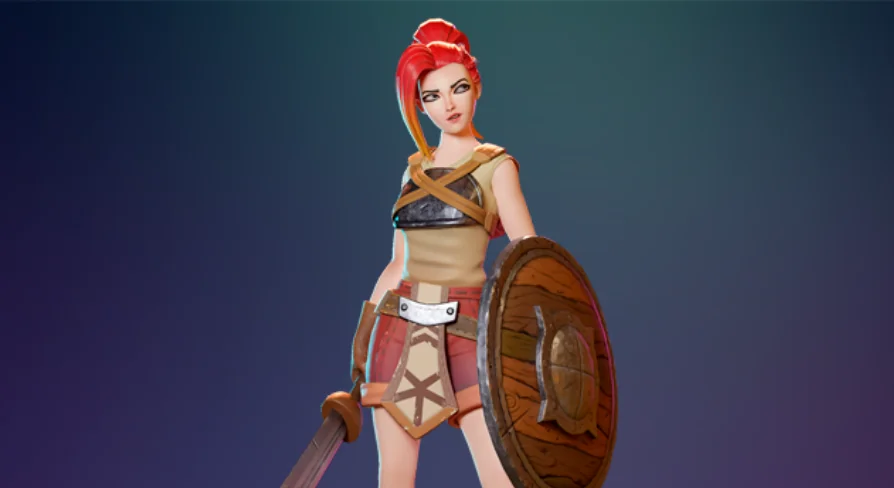
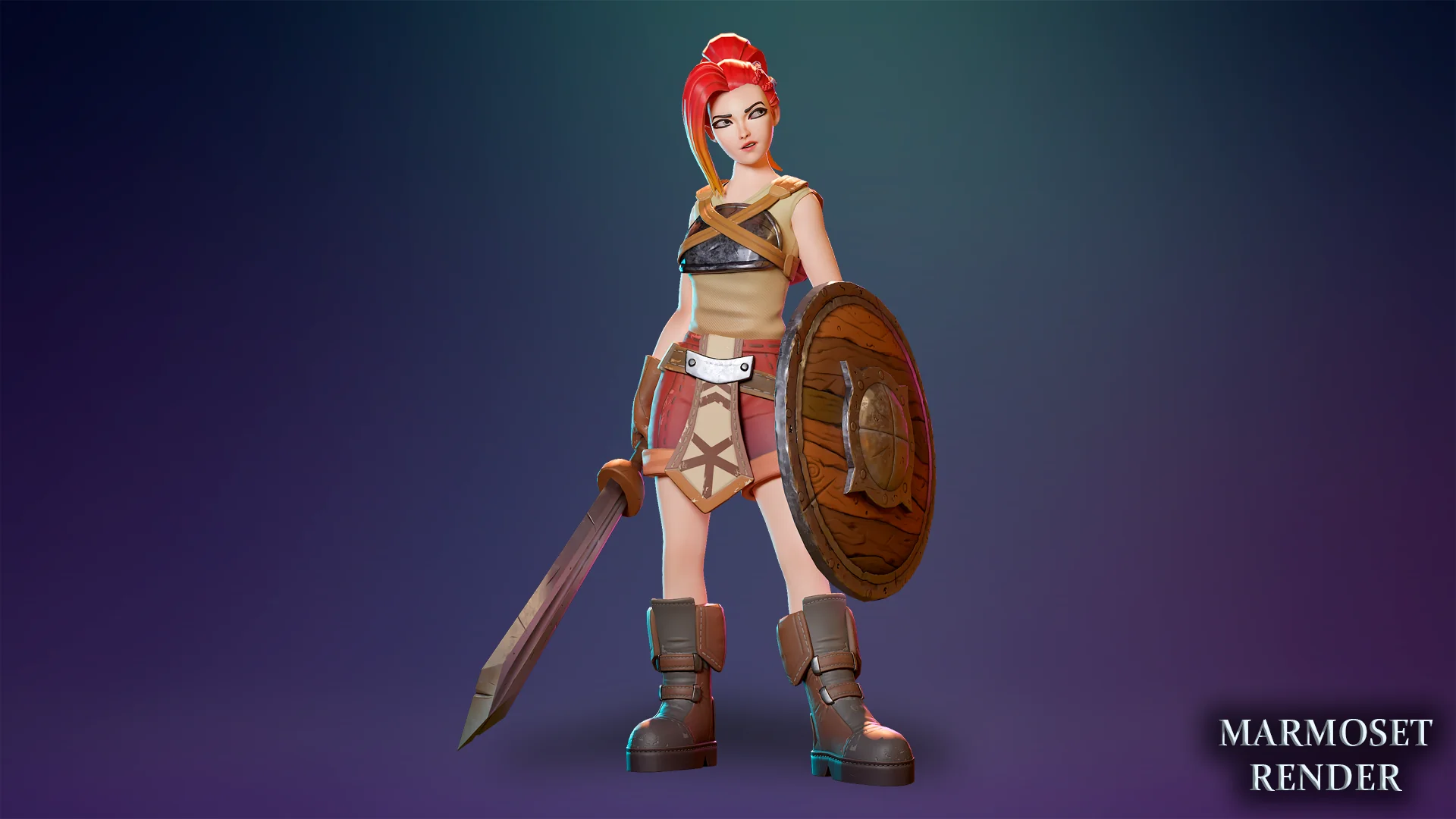
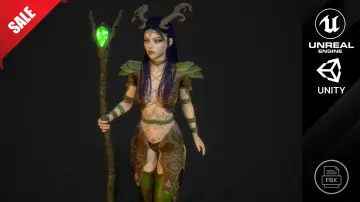
Third-person role-playing games, fantasy MMORPGs, and stylized arena brawlers rely heavily on clean character assets that can immediately adopt standard humanoid movement sets. The Novice Girl character operates in this space as a modular female warrior suited for combat sequences, enemy encounters, and quest dialogue. Pairing naturally with stylized enemy packs, such as stylized zombie assets, the character fills common archetypes ranging from an entry-level adventurer to a customized protagonist.
Because the character is constructed around a real-time production workflow, the underlying asset structure supports direct integration into dynamic gameplay scenarios. Third-person cameras require smooth silhouette retention at close distances, while crowd-heavy MMORPG combat requires sensible mesh density. The balance here favors optimized rendering while keeping enough geometric resolution to support fast-paced animation and camera cutaways.
Skeletal Hierarchy and Bone Additions for Novice Girl
Underpinning the character is a rig constructed upon the Unreal Engine 4 Mannequin skeletal hierarchy. Adhering to the standard Epic Skeleton allows straightforward retargeting of existing animation libraries, humanoid movement assets, locomotion blends, and combat packages without manual bone remapping across core limbs. The base spine, neck, arms, and legs match familiar humanoid proportions for instant engine retargeting.
Beyond standard human anatomy, the rig contains custom secondary bones designed to animate free-hanging elements. The eye structure includes individual control points labeled Eye_l And Eye_r, allowing direct orientation control independent of broader head movement. For hair simulation, the asset splits dynamic sections into individual articulation chains. Seven separate bones—designated Bangs_01 Through Bangs_07—control the front fringe, giving animators fine control over hair bounce across the forehead. The back hair is articulated through eight sequential chain bones spanning PonyTail_01 To PonyTail_08.
Garment movement follows a similar technical approach. Eight individual cloth bones, named Cloth_01 Through Cloth_08, are built directly into the skeleton. With Unreal Engine 4 and Unreal Engine 5 physics enabled, these dedicated hair and cloth joints can be hooked into dynamic physics assets or rigid body simulations. This setup prevents garments and hairstyles from appearing rigid during sprints, jumps, dodges, or heavy weapon swings, yielding natural secondary motion driven entirely by engine physics.
Facial Blendshapes for Live Streaming and Dialogue Systems
Story-driven projects and real-time interactive streams require expressive facial feedback that simple bone rigs struggle to supply. The asset incorporates morph targets and blendshapes sculpted directly into the facial geometry. These shapes provide standard expressive configurations for cinematic conversations, gameplay alerts, and cutscene reactions.
The morph target setup is specifically prepared to drive conversation animations and live facial motion capture. Developers running real-time VTuber broadcasting setups, interactive live streams, or automated dialogue engines can drive the character's facial performance through capture cameras and blendshape input nodes. Combined with the independent Eye_l And Eye_r Skeletal controls, facial tracking systems can maintain eye contact and natural blinking while the lips, cheeks, and brow respond cleanly to dialogue audio or motion capture feeds.
Modular Geometry and Polygon Budgets of the Novice Girl Model
Mesh optimization is balanced around performance efficiency at LOD 0. The complete Novice Girl character mesh is built from 28,883 triangles, 15,437 vertices, and 14,843 faces. This density maintains curved silhouettes on limbs, hair strands, and garments without overwhelming real-time vertex processors during multi-character combat or intensive visual effects rendering.
The accompanying weapon uses a dedicated LOD 0 budget, comprising 1,926 triangles, 1,049 vertices, and 1,028 faces. Separating the weapon from the base character geometry keeps hand sockets clean and allows simple detachment, sheathing, or inventory swaps during active gameplay routines.
Modularity extends through the character mesh itself. The model is completely modular, enabling developers to hide, isolate, add, or strip away component parts according to game state requirements. Stripping away accessories or toggling individual clothing parts facilitates visual gear progression systems, allowing a character to transition from basic introductory attire into layered warrior equipment without requiring entirely distinct skeletal meshes.
Material Customization and 4K Texture Architecture
Surfacing is handled entirely through a standard PBR metallic and roughness workflow, ensuring consistent lighting responses across Unreal Engine deferred and forward render paths. Surface detail is delivered across six distinct texture sets:
Body
Eyes
Teeth
Hair
Clothes
Weapon
Each set is supplied with 4K resolution texture maps, encompassing normal, metallic, roughness, albedo, height, and matID channels. Separating the elements into distinct texture sets avoids visual compromise; dental geometry and eyes retain dedicated UV space rather than sharing low-resolution clusters with the torso or limbs.
Customization workflows rely heavily on the inclusion of matID masks and Material Instances. Rather than requiring external image editing software to generate character variations, team members can adjust color assignments for the eyes, hair, clothing pieces, and weapon surfaces directly in the engine viewport. Shifting team colors, differentiating enemy tiers, or giving players hair and outfit customization options is handled in real time via scalar and vector parameters exposed within the Material Instances.
Integration Constraints and Technical Scope
When planning implementation, technical directors should note that the package is strictly an art, skeletal, and material asset. The package contains no Blueprints. Developers are responsible for setting up their own Animation Blueprints, character movement controllers, state machines, interaction logic, and input handling.
For developers who already maintain a character controller pipeline, this absence of pre-packaged Blueprint scripts ensures a clean project environment free from unwanted dependencies or conflicting game logic. The humanoid bone structure links smoothly to standard retargeting nodes, the physics assets interface directly with Unreal Engine 4 and 5 ragdoll systems, and the modular geometry slots cleanly into custom inventory components.
 Characters
 Characters
 Characters
 Characters