"95fdaf16012263fa"{"id":"1002329","slug":"modular-wood-pack","title":"Modular Wood Pack","category":"Furniture \u0026 Fixtures","engine":"4.25+,5.0+","assetVersion":"","engineVersion":"Engine Version: 4.25+,5.0+","tag":"Furniture","accent":"blue","visual":"mech","summary":"Modular Wood Pack builds varied wooden meshes, blueprints, constructions, and material instances in Unreal Engine with shared materials and 4096 textures.","platform":"Unreal Engine","indexPolicy":"index","publishedAt":"2026-11-06T06:34:28.335Z","updatedAt":"2026-11-06T06:34:28.335Z","sourceNotes":[],"fileContents":[],"compatibility":["Unreal Engine","Engine Version: 4.25+,5.0+"],"featuredImage":{"alt":"Modular Wood Pack","src":"/wp-content/uploads/published/2026/11/4a29419ce0dc-704aa531-892c-49bf-b1ba-5f33440e607e-6d113c1983.webp"},"hasDownloadLink":true,"downloads":0,"terms":[{"taxonomy":"category","slug":"furniture-and-fixtures","name":"Furniture \u0026 Fixtures"}],"galleryImages":[{"src":"/wp-content/uploads/published/2026/11/6a60322dafbd-b5bf8a57-536c-448c-a08b-7bf920dd2a4f-1ccc76886b.webp","alt":"Modular Wood Pack"},{"src":"/wp-content/uploads/published/2026/11/b6a185abcdc1-991d3f5b-2cc9-41fe-9af2-563a7ba5b10d-e96befe0fc.webp","alt":"Modular Wood Pack"},{"src":"/wp-content/uploads/published/2026/11/cbc1c5d41c03-f96e26fe-f316-437a-9c30-36c4bcce36f3-6ba9b84871.webp","alt":"Modular Wood Pack"},{"src":"/wp-content/uploads/published/2026/11/1e746c13a4ee-9b847957-7c80-4f3c-b7f0-603215cad784-3dfa9b961e.webp","alt":"Modular Wood Pack"},{"src":"/wp-content/uploads/published/2026/11/4f13f463ca9c-0c37e23d-d214-497a-a355-a80cab756aa4-db05bf2e88.webp","alt":"Modular Wood Pack"},{"src":"/wp-content/uploads/published/2026/11/e922461b9e9a-d72f7d80-aa10-4b8d-a47b-15f51cfde79e-70ba5fbbe5.webp","alt":"Modular Wood Pack"},{"src":"/wp-content/uploads/published/2026/11/f7427ca8c6d3-c63620ef-4e5b-4bc7-bd33-d9b16016eb58-b4ed7e476a.webp","alt":"Modular Wood Pack"},{"src":"/wp-content/uploads/published/2026/11/3ce03b766c23-d884ab4b-4404-4500-b157-4a68dc5725d3-eb3fbe29b4.webp","alt":"Modular Wood Pack"},{"src":"/wp-content/uploads/published/2026/11/0cf4fdadb59d-d4833bcb-df82-43a7-a318-d9743476de77-0ac37c007e.webp","alt":"Modular Wood Pack"}],"accessPanel":{"kind":"resource","title":"Get this resource","eyebrow":"Free resource","message":"3DCGHUB is the service provider for this listing. Access is fulfilled through the official publisher channel.","fileName":"Modular Wood Pack.7z","safetyNote":"Resources are manually reviewed before listing to improve quality and reduce obvious risks.","actionLabel":"Get this resource","resourceType":"Resource archive","versions":[]},"contentHtml":"\u003cp\u003eModular Wood Pack begins with a shared material decision: every mesh in the set uses the same material. That single assignment is what makes wood pieces swappable at any time. A scene can move from one mesh to another without introducing a separate material for each object. The set is made to create a big variety of wood meshes and materials in a fast, highly modular way, and the current texture pass is 4096x4096 across all textures.\u003c/p\u003e \u003ch2\u003eShared material workflow in Modular Wood Pack\u003c/h2\u003e\n\u003cp\u003eBecause the material is common to all meshes, it stays constant while the meshes provide variation. Swapping a wood mesh does not require a new material setup; the replacement still points to the shared material. This is the practical center of the pack. It lets the set cover many wood forms without splitting into unrelated material assets.\u003c/p\u003e\n\u003cp\u003eA few example material instances demonstrate the versatility of that setup. They are examples of what the material side can do, sitting alongside the shared material rather than replacing it. The material remains the tie between meshes, and the instances show the range available from the same starting point.\u003c/p\u003e\n\u003cp\u003eA brief documentation overview accompanies the pack. It gives a short explanation of the set, which is appropriate for a resource structured through one shared material and a set of assembled examples.\u003c/p\u003e \u003ch2\u003eBlueprints, constructions, and example material instances\u003c/h2\u003e\n\u003cp\u003eThe pack already contains some assembled blueprints and constructions built with those blueprints. These are assembled examples in the pack, not only loose modular pieces. A scene builder can see the pieces combined into larger wood constructions and work from those arrangements.\u003c/p\u003e\n\u003cp\u003eThe blueprints and constructions also show the modular method in a concrete form. Instead of starting from individual meshes alone, an artist can begin with an assembled construction and swap the wood pieces to fit a scene. Because all meshes share the material, those changes do not force a material break. The same logic applies when moving between a small furniture arrangement and a larger built structure.\u003c/p\u003e\n\u003cp\u003eThe example material instances belong to the same system. They demonstrate how the material can vary while the mesh set remains modular. A few instances are enough to show that the pack is not locked to one surface treatment, and they give a material reference for scenes that need a different wood look.\u003c/p\u003e \u003ch2\u003eFurniture, bridge, cabin, and trench cover labels\u003c/h2\u003e\n\u003cp\u003eThe categories attached to Modular Wood Pack span furniture, bridge, house, cover, medieval, pallet, construction, building, wooden, wood, trench, and cabin. Those labels describe the kinds of wood structures and props the set is built to cover. Furniture points to interior dressing; bridge, house, and cabin point to larger built forms; pallet and construction point to utilitarian wood objects; trench and cover point to cover-oriented scene elements. Medieval gives the set a period-facing context, while wooden and wood identify the material family that ties the categories together.\u003c/p\u003e\n\u003cp\u003eThose categories make the pack useful for a scene that needs more than one kind of wood object. A cabin exterior can sit near a bridge; a house interior can use furniture; a construction area can use pallets; a trench line can use cover pieces. The modular claim is what connects those uses: the same mesh-and-material system can be rearranged across the categories rather than rebuilt for each one.\u003c/p\u003e \u003ch2\u003eUnreal Engine assets, maps, and materials at 4096\u003c/h2\u003e\n\u003cp\u003eThe project includes all assets, maps, and materials created in Unreal Engine. The pack therefore carries the maps and materials alongside the meshes, not only the visible wood pieces. Each asset was created for realistic AAA quality visuals, style, and budget. The texture update applies across all textures at 4096x4096, so the texture resolution is consistent as meshes are swapped.\u003c/p\u003e\n\u003cp\u003eThat consistency supports the way the pack is meant to be used: move between wood meshes quickly, keep the material constant, and rely on the assembled examples when a scene needs a larger construction. The maps and materials are part of that same Unreal Engine project, so the wood set arrives as a complete asset group rather than a handful of isolated meshes.\u003c/p\u003e \u003ch2\u003eModular SciFi Station compatibility\u003c/h2\u003e\n\u003cp\u003eThe pack is compatible with Modular SciFi Station. For a project that already uses that kit, the wood set can be considered alongside it rather than as an isolated library. Compatibility does not change the pack's material rule: the wood meshes still share one material and can still be swapped. It adds another context in which the modular wood pieces can be planned, whether the scene is primarily wood construction or a mix that includes the sci-fi station set.\u003c/p\u003e \u003cp\u003eTo put Modular Wood Pack into use, begin with one of the assembled blueprints or constructions, then swap in the wood meshes that match the scene's category—furniture, bridge, cabin, pallet, or cover. Keep the shared material as the constant and use the example material instances to explore the material range. With all textures at 4096x4096 and the asset, map, and material set created in Unreal Engine, the pack works as a modular wood library with assembled examples and material demonstrations.\u003c/p\u003e\n\n\u003ch2\u003eExplore Similar Assets\u003c/h2\u003e\n\u003cul\u003e\n\u003cli\u003e\u003ca href=\"https://3dcghub.com/wood-assets-kit/\" rel=\"noopener noreferrer\"\u003eWood Assets Kit\u003c/a\u003e\u003c/li\u003e\n\u003cli\u003e\u003ca href=\"https://3dcghub.com/victorian-furniture-living-room/\" rel=\"noopener noreferrer\"\u003eVictorian Furniture - Living Room\u003c/a\u003e\u003c/li\u003e\n\u003cli\u003e\u003ca href=\"https://3dcghub.com/stylized-interior-set/\" rel=\"noopener noreferrer\"\u003eStylized Interior Set\u003c/a\u003e\u003c/li\u003e\n\u003cli\u003e\u003ca href=\"https://3dcghub.com/abandoned-post-apoc-apartment-props/\" rel=\"noopener noreferrer\"\u003eAbandoned Post Apoc Apartment Props\u003c/a\u003e\u003c/li\u003e\n\u003cli\u003e\u003ca href=\"https://3dcghub.com/12-burning-wood-materials-animated/\" rel=\"noopener noreferrer\"\u003e12 Burning Wood Materials Animated\u003c/a\u003e\u003c/li\u003e\n\u003c/ul\u003e","contentTextLength":5398,"navigation":{"current":39,"total":4291,"previous":{"id":"1002330","slug":"multiplayer-starter-pack","title":"Multiplayer Starter Pack","category":"Network \u0026 Multiplayer","platform":"Unreal Engine","updatedAt":"2026-11-06T06:35:10.726Z"},"next":{"id":"1002328","slug":"mobile-swipe-solution-for-android-and-ios","title":"Mobile Swipe Solution for Android and iOS","category":"Gameplay Features","platform":"Unreal Engine","updatedAt":"2026-11-06T06:33:26.197Z"}},"relatedResources":[{"id":"1001920","slug":"wood-assets-kit","title":"Wood Assets Kit","category":"Furniture \u0026 Fixtures","engine":"4.25+,5.0+","assetVersion":"","engineVersion":"Engine Version: 4.25+,5.0+","tag":"Furniture","accent":"blue","visual":"mech","summary":"Explore the Wood Assets Kit, featuring modular wooden fences, benches, tables, barrels, and Nordic-inspired props for medieval and rural game environments.","platform":"Unreal Engine","indexPolicy":"index","publishedAt":"2026-10-22T11:56:18.370Z","updatedAt":"2026-10-22T11:56:18.370Z","sourceNotes":[],"fileContents":[],"compatibility":["Unreal Engine","Engine Version: 4.25+,5.0+"],"featuredImage":{"alt":"Wood Assets Kit","src":"/wp-content/uploads/published/2026/10/fea3108d6c74-c381d253-e782-4a27-88e9-0ad514c80c61-6631ce54bd.webp"},"hasDownloadLink":true,"downloads":0},{"id":"1001568","slug":"victorian-furniture-living-room","title":"Victorian Furniture - Living Room","category":"Furniture \u0026 Fixtures","engine":"4.22+,5.0+","assetVersion":"","engineVersion":"Engine Version: 4.22+,5.0+","tag":"Furniture","accent":"blue","visual":"mech","summary":"Create authentic period interiors with Victorian Furniture - Living Room, featuring low-poly optimized models, 4K PBR textures, and a presentation scene.","platform":"Unreal Engine","indexPolicy":"index","publishedAt":"2026-10-10T04:02:23.566Z","updatedAt":"2026-10-10T04:02:23.566Z","sourceNotes":[],"fileContents":[],"compatibility":["Unreal Engine","Engine Version: 4.22+,5.0+"],"featuredImage":{"alt":"Victorian Furniture - Living Room","src":"/wp-content/uploads/published/2026/10/6455d49d6b03-29b5c27e-5244-4178-aff9-ef0aaa6e97bd-dfcbac4a43.webp"},"hasDownloadLink":true,"downloads":1},{"id":"1000891","slug":"stylized-interior-set","title":"Stylized Interior Set","category":"Furniture \u0026 Fixtures","engine":"4.26+,5.0+","assetVersion":"","engineVersion":"Engine Version: 4.26+,5.0+","tag":"Furniture","accent":"blue","visual":"mech","summary":"Explore the Stylized Interior Set: low-poly furniture with polygons from 28 to 11,854, 15 wallpapers, and 2 floor materials for building crime scene interiors.","platform":"Unreal Engine","indexPolicy":"index","publishedAt":"2026-08-06T04:33:10.678Z","updatedAt":"2026-08-06T04:33:10.678Z","sourceNotes":[],"fileContents":[],"compatibility":["Unreal Engine","Engine Version: 4.26+,5.0+"],"featuredImage":{"alt":"Stylized Interior Set","src":"/wp-content/uploads/published/2026/08/01a41ca3334d-87e23b54-9ecd-47c5-b71f-2c8eeae4cf9d-a73de38858.webp"},"hasDownloadLink":true,"downloads":0}]}
Furniture
Modular Wood Pack
Modular Wood Pack builds varied wooden meshes, blueprints, constructions, and material instances in Unreal Engine with shared materials and 4096 textures.
Modular Wood Pack begins with a shared material decision: every mesh in the set uses the same material. That single assignment is what makes wood pieces swappable at any time. A scene can move from one mesh to another without introducing a separate material for each object. The set is made to create a big variety of wood meshes and materials in a fast, highly modular way, and the current texture pass is 4096x4096 across all textures.
Shared material workflow in Modular Wood Pack
Because the material is common to all meshes, it stays constant while the meshes provide variation. Swapping a wood mesh does not require a new material setup; the replacement still points to the shared material. This is the practical center of the pack. It lets the set cover many wood forms without splitting into unrelated material assets.
A few example material instances demonstrate the versatility of that setup. They are examples of what the material side can do, sitting alongside the shared material rather than replacing it. The material remains the tie between meshes, and the instances show the range available from the same starting point.
A brief documentation overview accompanies the pack. It gives a short explanation of the set, which is appropriate for a resource structured through one shared material and a set of assembled examples.
Blueprints, constructions, and example material instances
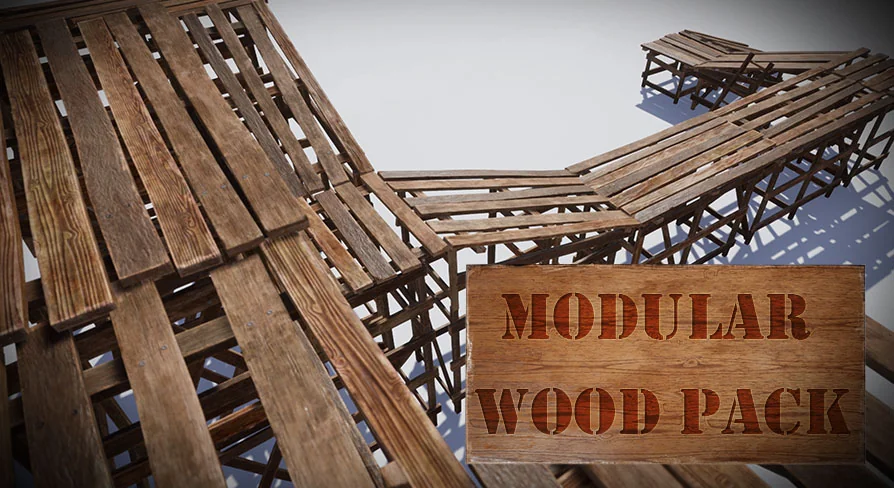
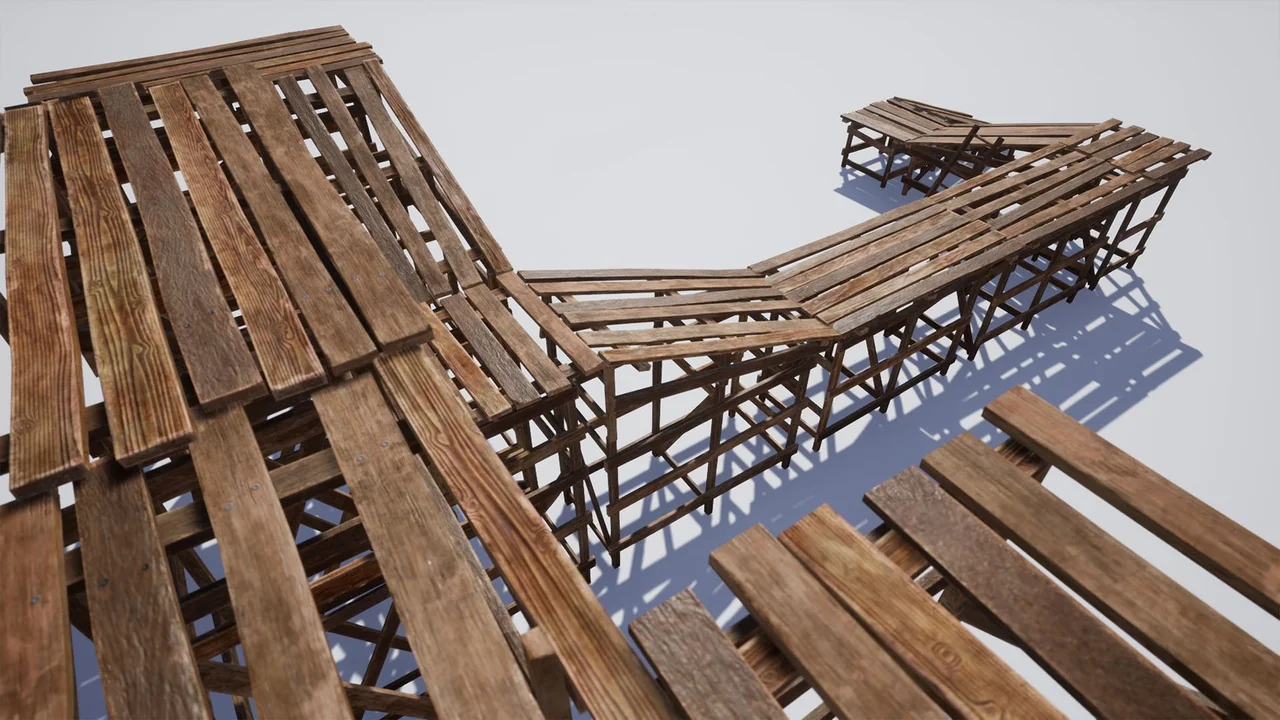
The pack already contains some assembled blueprints and constructions built with those blueprints. These are assembled examples in the pack, not only loose modular pieces. A scene builder can see the pieces combined into larger wood constructions and work from those arrangements.
The blueprints and constructions also show the modular method in a concrete form. Instead of starting from individual meshes alone, an artist can begin with an assembled construction and swap the wood pieces to fit a scene. Because all meshes share the material, those changes do not force a material break. The same logic applies when moving between a small furniture arrangement and a larger built structure.
The example material instances belong to the same system. They demonstrate how the material can vary while the mesh set remains modular. A few instances are enough to show that the pack is not locked to one surface treatment, and they give a material reference for scenes that need a different wood look.
Furniture, bridge, cabin, and trench cover labels
The categories attached to Modular Wood Pack span furniture, bridge, house, cover, medieval, pallet, construction, building, wooden, wood, trench, and cabin. Those labels describe the kinds of wood structures and props the set is built to cover. Furniture points to interior dressing; bridge, house, and cabin point to larger built forms; pallet and construction point to utilitarian wood objects; trench and cover point to cover-oriented scene elements. Medieval gives the set a period-facing context, while wooden and wood identify the material family that ties the categories together.
Those categories make the pack useful for a scene that needs more than one kind of wood object. A cabin exterior can sit near a bridge; a house interior can use furniture; a construction area can use pallets; a trench line can use cover pieces. The modular claim is what connects those uses: the same mesh-and-material system can be rearranged across the categories rather than rebuilt for each one.
Unreal Engine assets, maps, and materials at 4096
The project includes all assets, maps, and materials created in Unreal Engine. The pack therefore carries the maps and materials alongside the meshes, not only the visible wood pieces. Each asset was created for realistic AAA quality visuals, style, and budget. The texture update applies across all textures at 4096x4096, so the texture resolution is consistent as meshes are swapped.
That consistency supports the way the pack is meant to be used: move between wood meshes quickly, keep the material constant, and rely on the assembled examples when a scene needs a larger construction. The maps and materials are part of that same Unreal Engine project, so the wood set arrives as a complete asset group rather than a handful of isolated meshes.
Modular SciFi Station compatibility
The pack is compatible with Modular SciFi Station. For a project that already uses that kit, the wood set can be considered alongside it rather than as an isolated library. Compatibility does not change the pack's material rule: the wood meshes still share one material and can still be swapped. It adds another context in which the modular wood pieces can be planned, whether the scene is primarily wood construction or a mix that includes the sci-fi station set.
To put Modular Wood Pack into use, begin with one of the assembled blueprints or constructions, then swap in the wood meshes that match the scene's category—furniture, bridge, cabin, pallet, or cover. Keep the shared material as the constant and use the example material instances to explore the material range. With all textures at 4096x4096 and the asset, map, and material set created in Unreal Engine, the pack works as a modular wood library with assembled examples and material demonstrations.
 Furniture
 Furniture
 Furniture
 Furniture