"b00678cacce53329"{"id":"1002813","slug":"modular-impactfx","title":"Modular ImpactFX","category":"Spells \u0026 Combat","engine":"4.16+,5.0+","assetVersion":"","engineVersion":"Engine Version: 4.16+,5.0+","tag":"Spells \u0026 Combat","accent":"blue","visual":"mech","summary":"An in-depth look at Modular ImpactFX, an Unreal Engine Cascade toolkit featuring 500 stylized impact effects, clean master materials, and 30 showcase setups.","platform":"Unreal Engine","indexPolicy":"index","publishedAt":"2026-11-20T07:48:57.821Z","updatedAt":"2026-11-20T07:48:57.821Z","sourceNotes":[],"fileContents":[],"compatibility":["Unreal Engine","Engine Version: 4.16+,5.0+"],"featuredImage":{"alt":"Modular ImpactFX","src":"/wp-content/uploads/published/2026/11/32621386a41f-147dd622-c4da-43f6-b8d6-3b834a5918c3-c5a4b5cd61.webp"},"fileSizeBytes":93193682,"hasDownloadLink":true,"downloads":0,"terms":[{"taxonomy":"category","slug":"spells-and-combat","name":"Spells \u0026 Combat"}],"galleryImages":[{"src":"/wp-content/uploads/published/2026/11/51cfdcabf4a6-6a427cbd-5723-41cb-b17d-b18d5c666a96-2af1035f94.webp","alt":"Modular ImpactFX"},{"src":"/wp-content/uploads/published/2026/11/8f8ae8d6e520-d09c44b4-742e-4008-816c-bcde28205bf0-dd2010b26c.webp","alt":"Modular ImpactFX"},{"src":"/wp-content/uploads/published/2026/11/674f1146a397-c39dc7dc-7bf5-470c-88a8-705aa095fcd3-aa150addfa.webp","alt":"Modular ImpactFX"},{"src":"/wp-content/uploads/published/2026/11/c28f0eaf1562-dee79f8e-0e55-4b96-b11e-0d40594aeecc-7174e0e71f.webp","alt":"Modular ImpactFX"},{"src":"/wp-content/uploads/published/2026/11/e301c5f68776-9c041032-492d-401e-951a-3e0e52f3975a-5711cf3b60.webp","alt":"Modular ImpactFX"},{"src":"/wp-content/uploads/published/2026/11/539f3a447527-c5208364-7104-48da-b696-851b4ab94110-76f6ff15af.webp","alt":"Modular ImpactFX"},{"src":"/wp-content/uploads/published/2026/11/3f3d3ba83bc3-4f6e9cb4-6f46-4a78-9f6c-61092a346527-a562b98f60.webp","alt":"Modular ImpactFX"},{"src":"/wp-content/uploads/published/2026/11/aee87099b8a3-29df67cf-c303-4795-af38-039c1679f287-aeee70ed0a.webp","alt":"Modular ImpactFX"},{"src":"/wp-content/uploads/published/2026/11/a90ea26d9dce-a0750fc2-ea5e-4bee-b573-49548b3ca3b8-7a5230acaa.webp","alt":"Modular ImpactFX"},{"src":"/wp-content/uploads/published/2026/11/49b3d42a1c32-203e9bef-879d-4c77-a1c6-ae1e8c2cc7e5-cf643341bd.webp","alt":"Modular ImpactFX"}],"accessPanel":{"kind":"resource","title":"Get this resource","safetyNote":"Resources are manually reviewed before listing to improve quality and reduce obvious risks.","fileName":"Content.7z","resourceType":"Resource archive","versions":[]},"contentHtml":"\u003ch2\u003eCascade Implementation and Runtime Architecture\u003c/h2\u003e\u003cp\u003eIntegrating visual effects into an active Unreal Engine production requires clear structural boundaries in the emitter stack. Modular ImpactFX deploys inside Unreal Engine's Cascade particle system rather than Niagara. While a Niagara update is planned for release at a later date, the native Cascade implementation provides immediate, established compatibility for pipelines reliant on classic particle setups.\u003c/p\u003e\u003cp\u003eA critical consideration when adopting large visual effect libraries is runtime performance across varying draw distances. The particle emitters within this package feature clean Cascade configurations paired with basic Levels of Detail (LODs) already established out of the box. Pre-configured LOD structures eliminate the need to manually build distance-culling layers or emission step-downs for each individual emitter. Artists opening these systems encounter systematically organized module stacks, reducing the overhead typically associated with parsing unfamiliar emitter hierarchies.\u003c/p\u003e\u003cp\u003eBecause the foundation relies on Cascade's classic architecture, particle lifetimes, distribution curves, and spawn parameters are presented in standardized emitter layouts. Technical artists can immediately inspect how initial velocity, size over life, and color modules correspond directly with underlying material behaviors without navigating unfamiliar custom script nodes.\u003c/p\u003e\u003ch2\u003eMaterial Instance Control Across Modular ImpactFX\u003c/h2\u003e\u003cp\u003eMaterial network organization often dictates how quickly an art team can adapt a third-party asset into an existing artistic direction. Modular ImpactFX avoids the convoluted, tangled node webs that frequently hamper asset modification by providing clean, legible master materials. The master graphs are structured so that shading logic, coordinate mapping, and parameter outputs are distinctly partitioned, allowing artists to add custom math, alter blending pathways, or append rendering passes without destabilizing the core material logic.\u003c/p\u003e\u003cp\u003eSurface rendering and color adaptation occur primarily through material instances derived from these master networks. The instances expose extensive parameter controls, granting direct influence over the visual outcome of an effect without triggering lengthy shader re-compilations. Through these instanced controls, artists can fine-tune properties such as emissive values, tint balance, mask contrast, and edge sharpness to harmonize with custom art bibles.\u003c/p\u003e\u003cp\u003eThis instanced workflow bridges the gap between raw particle simulation and stylized rendering. Rather than locking the user into a predetermined look, the clean parameter separation allows teams to shift an effect from vibrant, high-saturation arcade visuals to softer, painterly aesthetics with targeted parameter shifts.\u003c/p\u003e\u003ch2\u003eDriving the Dynamic Module for Modular ImpactFX Behaviors\u003c/h2\u003e\u003cp\u003eThe true flexibility of the toolkit stems from the interaction between Cascade's Dynamic Module and the underlying material instances. In standard particle setups, effects are often frozen to a static texture sequence or fixed opacity curves. Here, the dynamic parameter module acts as a runtime bridge, passing data calculated within the particle emitter directly into scalar and vector inputs within the material graph.\u003c/p\u003e\u003cp\u003eBy binding emitter curves to dynamic material parameters, a single material instance can produce dozens of distinct visual iterations. An artist can drive alpha erosion, dissolve borders, rim lighting intensity, or UV distortion rates over the normalized lifespan of a particle. Adjusting the dynamic module within Cascade changes how the material interprets time, allowing sudden, sharp burst cutoffs or gradual, smoldering falloffs.\u003c/p\u003e\u003cp\u003eThis integration forms the basis of the package's modularity. Because the dynamic module decouples the visual behavior from hardcoded texture data, technical artists can reconfigure how an impact develops across its active frames. Tweaking a single distribution curve inside Cascade transforms a sharp kinetic puncture into an expanding shockwave or a soft energy bloom without requiring new material assets.\u003c/p\u003e\u003ch2\u003eNavigating the 500 Effects and Example Configurations\u003c/h2\u003e\u003cp\u003eModular ImpactFX contains 500 distinct effects built to address a wide spectrum of gameplay feedback, collisions, and environmental interactions. Covering everything from localized weapon hits to sweeping explosion bursts, the sheer volume of assets provides immediate coverage for extensive combat and physics systems. Rather than delivering completely isolated, non-interchangeable assets, the library is constructed so elements can be cross-pollinated across different particle systems.\u003c/p\u003e\u003cp\u003eTo guide artists through this extensive library, the package includes 30 concrete example setups that demonstrate practical combinations of the core modules. These 30 examples function as functional blueprints, illustrating how individual emitters—such as core flashes, sparks, radial rings, trailing smoke, and debris bursts—layer together into a cohesive visual sequence. Studying these examples reveals how timing offsets, scale variations, and parameter curves cooperate to create punchy, readable impact states.\u003c/p\u003e\u003cp\u003eProduction teams can leverage these 30 examples as starting templates. By deconstructing the layering choices made in the examples, artists can isolate which components deliver impact weight and which contribute secondary environmental readability, quickly assembling custom configurations for project-specific gameplay events.\u003c/p\u003e\u003ch2\u003eExtending the Stylized Pipeline and Asset Maintenance\u003c/h2\u003e\u003cp\u003eBeyond its prefabricated contents, Modular ImpactFX is architected as an expandable toolbox intended to sustain a project across multiple development milestones. Stylized projects frequently mandate proprietary texture motifs, specific shape languages, or unique brushwork. The package is built explicitly to ingest user-authored textures, allowing teams to swap default shapes with bespoke hand-painted masks, noise textures, and alpha cutouts.\u003c/p\u003e\u003cp\u003eWhen an artist introduces custom texture inputs into the established material instances, the existing dynamic parameter setups and Cascade modules adapt naturally to the new source art. This capability ensures that the toolset does not become obsolete as a game's visual identity matures; instead, the core logic continues to serve as the functional framework while custom art dictates the surface styling.\u003c/p\u003e\u003cp\u003eLong-term project deployment is further supported by an extensive video tutorial playlist and a dedicated support thread. These resources walk developers through the creation of supplemental content, guiding the process of adding new instances, authoring compatible textures, and expanding the master material logic. For studios seeking a sustainable, highly editable foundation for stylized impacts, the combination of readable architectures, comprehensive base assets, and modular expandability provides a cohesive, long-lasting framework for combat visual effects.\u003c/p\u003e\n\n\u003ch2\u003eMore From The Same Workflow\u003c/h2\u003e\n\u003cul\u003e\n\u003cli\u003e\u003ca href=\"https://3dcghub.com/stylized-vfx-lightning/\" rel=\"noopener noreferrer\"\u003eStylized VFX - Lightning\u003c/a\u003e\u003c/li\u003e\n\u003cli\u003e\u003ca href=\"https://3dcghub.com/niagara-muzzle-flash-and-ejection-vfx-muzzle-flash-gun-vfx-bullet-vfx/\" rel=\"noopener noreferrer\"\u003eNiagara Muzzle Flash \u0026amp; Ejection VFX (Muzzle Flash, Gun VFX, Bullet VFX)\u003c/a\u003e\u003c/li\u003e\n\u003cli\u003e\u003ca href=\"https://3dcghub.com/niagara-toon-projectiles-2/\" rel=\"noopener noreferrer\"\u003eNiagara Toon Projectiles 2\u003c/a\u003e\u003c/li\u003e\n\u003cli\u003e\u003ca href=\"https://3dcghub.com/map-track-markers-vfx/\" rel=\"noopener noreferrer\"\u003eMap Track Markers VFX\u003c/a\u003e\u003c/li\u003e\n\u003cli\u003e\u003ca href=\"https://3dcghub.com/magic-fire-spells-with-sounds/\" rel=\"noopener noreferrer\"\u003eMagic Fire Spells with Sounds\u003c/a\u003e\u003c/li\u003e\n\u003c/ul\u003e","contentTextLength":7202,"navigation":{"current":67,"total":4797,"previous":{"id":"1002814","slug":"modular-magic-circles","title":"Modular Magic Circles","category":"Spells \u0026 Combat","platform":"Unreal Engine","updatedAt":"2026-11-20T07:49:33.103Z"},"next":{"id":"1002812","slug":"mixed-vfx-pack-3-niagara","title":"Mixed Vfx Pack 3 (Niagara)","category":"Variety","platform":"Unreal Engine","updatedAt":"2026-11-20T07:42:22.831Z"}},"relatedResources":[{"id":"1002282","slug":"stylized-vfx-lightning","title":"Stylized VFX - Lightning","category":"Spells \u0026 Combat","engine":"4.26+,5.0+","assetVersion":"","engineVersion":"Engine Version: 4.26+,5.0+","tag":"Spells \u0026 Combat","accent":"blue","visual":"mech","summary":"Explore 70 unique stylized lightning VFX built with optimized Sub UV materials for rapid drag-and-drop scene staging and electric combat gameplay.","platform":"Unreal Engine","indexPolicy":"index","publishedAt":"2026-10-29T16:58:48.449Z","updatedAt":"2026-10-29T16:58:48.449Z","sourceNotes":[],"fileContents":[],"compatibility":["Unreal Engine","Engine Version: 4.26+,5.0+"],"featuredImage":{"alt":"Stylized VFX - Lightning","src":"/wp-content/uploads/published/2026/10/619a1b1e94e4-6f0ab4a7-5e66-4219-a0bd-6f1369979f8d-60a39083c1.webp"},"fileSizeBytes":9856152,"hasDownloadLink":true,"downloads":3},{"id":"1002131","slug":"niagara-muzzle-flash-and-ejection-vfx-muzzle-flash-gun-vfx-bullet-vfx","title":"Niagara Muzzle Flash \u0026 Ejection VFX (Muzzle Flash, Gun VFX, Bullet VFX)","category":"Spells \u0026 Combat","engine":"4.25+,5.0+","assetVersion":"","engineVersion":"Engine Version: 4.25+,5.0+","tag":"Spells \u0026 Combat","accent":"blue","visual":"mech","summary":"Explore Niagara Muzzle Flash \u0026 Ejection VFX, featuring 17 particle systems across 5 weapon classes with realistic muzzle flashes and bullet shell ejections.","platform":"Unreal Engine","indexPolicy":"index","publishedAt":"2026-10-29T09:12:22.074Z","updatedAt":"2026-10-29T09:12:22.074Z","sourceNotes":[],"fileContents":[],"compatibility":["Unreal Engine","Engine Version: 4.25+,5.0+"],"featuredImage":{"alt":"Niagara Muzzle Flash \u0026 Ejection VFX (Muzzle Flash, Gun VFX, Bullet VFX)","src":"/wp-content/uploads/published/2026/10/31a727bcc5b7-e1a79014-146f-40db-a58b-c05ead407923-cec126815f.webp"},"fileSizeBytes":232616178,"hasDownloadLink":true,"downloads":3},{"id":"1001542","slug":"niagara-toon-projectiles-2","title":"Niagara Toon Projectiles 2","category":"Spells \u0026 Combat","engine":"4.27+,5.0+","assetVersion":"","engineVersion":"Engine Version: 4.27+,5.0+","tag":"Spells \u0026 Combat","accent":"blue","visual":"mech","summary":"A close look at Niagara Toon Projectiles 2, featuring 15 stylized projectiles, paired hit and flash effects, distance spawning, and child blueprints.","platform":"Unreal Engine","indexPolicy":"index","publishedAt":"2026-10-09T17:35:04.454Z","updatedAt":"2026-10-09T17:35:04.454Z","sourceNotes":[],"fileContents":[],"compatibility":["Unreal Engine","Engine Version: 4.27+,5.0+"],"featuredImage":{"alt":"Niagara Toon Projectiles 2","src":"/wp-content/uploads/published/2026/10/ad84b8acd4a4-a2f1f772-720f-4ee9-9458-9f0a74d9748a-8844d17f77.webp"},"fileSizeBytes":84582552,"hasDownloadLink":true,"downloads":5}]}
Resource screenshots
1 / 10
Join our channel
Follow 3DCGHUB on Telegram for new resource drops, migration updates, and community notices.
Integrating visual effects into an active Unreal Engine production requires clear structural boundaries in the emitter stack. Modular ImpactFX deploys inside Unreal Engine's Cascade particle system rather than Niagara. While a Niagara update is planned for release at a later date, the native Cascade implementation provides immediate, established compatibility for pipelines reliant on classic particle setups.
A critical consideration when adopting large visual effect libraries is runtime performance across varying draw distances. The particle emitters within this package feature clean Cascade configurations paired with basic Levels of Detail (LODs) already established out of the box. Pre-configured LOD structures eliminate the need to manually build distance-culling layers or emission step-downs for each individual emitter. Artists opening these systems encounter systematically organized module stacks, reducing the overhead typically associated with parsing unfamiliar emitter hierarchies.
Because the foundation relies on Cascade's classic architecture, particle lifetimes, distribution curves, and spawn parameters are presented in standardized emitter layouts. Technical artists can immediately inspect how initial velocity, size over life, and color modules correspond directly with underlying material behaviors without navigating unfamiliar custom script nodes.
Material Instance Control Across Modular ImpactFX
Material network organization often dictates how quickly an art team can adapt a third-party asset into an existing artistic direction. Modular ImpactFX avoids the convoluted, tangled node webs that frequently hamper asset modification by providing clean, legible master materials. The master graphs are structured so that shading logic, coordinate mapping, and parameter outputs are distinctly partitioned, allowing artists to add custom math, alter blending pathways, or append rendering passes without destabilizing the core material logic.
Surface rendering and color adaptation occur primarily through material instances derived from these master networks. The instances expose extensive parameter controls, granting direct influence over the visual outcome of an effect without triggering lengthy shader re-compilations. Through these instanced controls, artists can fine-tune properties such as emissive values, tint balance, mask contrast, and edge sharpness to harmonize with custom art bibles.
This instanced workflow bridges the gap between raw particle simulation and stylized rendering. Rather than locking the user into a predetermined look, the clean parameter separation allows teams to shift an effect from vibrant, high-saturation arcade visuals to softer, painterly aesthetics with targeted parameter shifts.
Driving the Dynamic Module for Modular ImpactFX Behaviors
The true flexibility of the toolkit stems from the interaction between Cascade's Dynamic Module and the underlying material instances. In standard particle setups, effects are often frozen to a static texture sequence or fixed opacity curves. Here, the dynamic parameter module acts as a runtime bridge, passing data calculated within the particle emitter directly into scalar and vector inputs within the material graph.
By binding emitter curves to dynamic material parameters, a single material instance can produce dozens of distinct visual iterations. An artist can drive alpha erosion, dissolve borders, rim lighting intensity, or UV distortion rates over the normalized lifespan of a particle. Adjusting the dynamic module within Cascade changes how the material interprets time, allowing sudden, sharp burst cutoffs or gradual, smoldering falloffs.
This integration forms the basis of the package's modularity. Because the dynamic module decouples the visual behavior from hardcoded texture data, technical artists can reconfigure how an impact develops across its active frames. Tweaking a single distribution curve inside Cascade transforms a sharp kinetic puncture into an expanding shockwave or a soft energy bloom without requiring new material assets.
Navigating the 500 Effects and Example Configurations
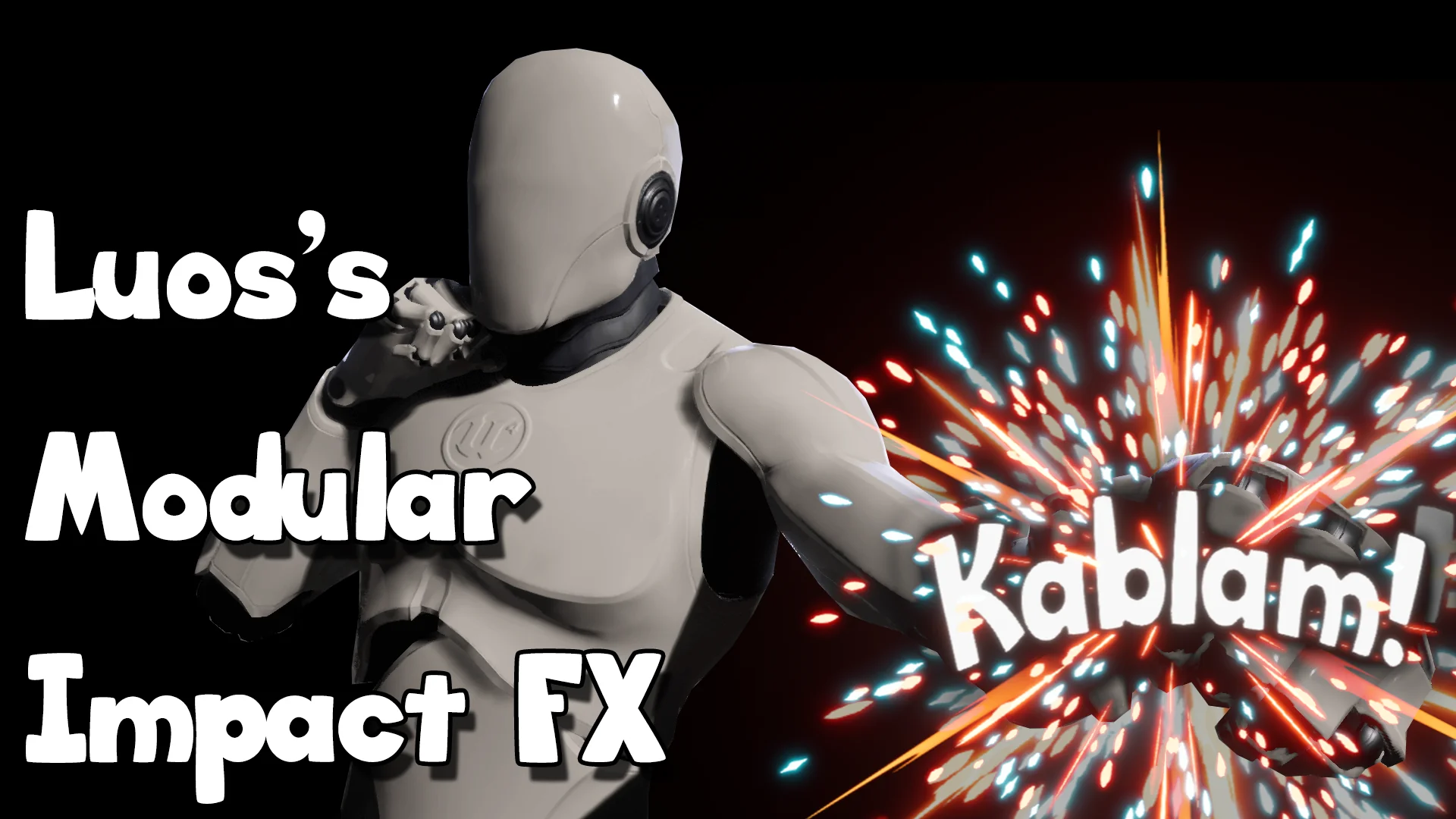
Modular ImpactFX contains 500 distinct effects built to address a wide spectrum of gameplay feedback, collisions, and environmental interactions. Covering everything from localized weapon hits to sweeping explosion bursts, the sheer volume of assets provides immediate coverage for extensive combat and physics systems. Rather than delivering completely isolated, non-interchangeable assets, the library is constructed so elements can be cross-pollinated across different particle systems.
To guide artists through this extensive library, the package includes 30 concrete example setups that demonstrate practical combinations of the core modules. These 30 examples function as functional blueprints, illustrating how individual emitters—such as core flashes, sparks, radial rings, trailing smoke, and debris bursts—layer together into a cohesive visual sequence. Studying these examples reveals how timing offsets, scale variations, and parameter curves cooperate to create punchy, readable impact states.
Production teams can leverage these 30 examples as starting templates. By deconstructing the layering choices made in the examples, artists can isolate which components deliver impact weight and which contribute secondary environmental readability, quickly assembling custom configurations for project-specific gameplay events.
Extending the Stylized Pipeline and Asset Maintenance
Beyond its prefabricated contents, Modular ImpactFX is architected as an expandable toolbox intended to sustain a project across multiple development milestones. Stylized projects frequently mandate proprietary texture motifs, specific shape languages, or unique brushwork. The package is built explicitly to ingest user-authored textures, allowing teams to swap default shapes with bespoke hand-painted masks, noise textures, and alpha cutouts.
When an artist introduces custom texture inputs into the established material instances, the existing dynamic parameter setups and Cascade modules adapt naturally to the new source art. This capability ensures that the toolset does not become obsolete as a game's visual identity matures; instead, the core logic continues to serve as the functional framework while custom art dictates the surface styling.
Long-term project deployment is further supported by an extensive video tutorial playlist and a dedicated support thread. These resources walk developers through the creation of supplemental content, guiding the process of adding new instances, authoring compatible textures, and expanding the master material logic. For studios seeking a sustainable, highly editable foundation for stylized impacts, the combination of readable architectures, comprehensive base assets, and modular expandability provides a cohesive, long-lasting framework for combat visual effects.
 Spells & Combat
 Spells & Combat
 Spells & Combat