"c14ff6bd758dadb1"{"id":"1000528","slug":"modern-home-archinteriors-vol-1-scene-4","title":"Modern Home - Archinteriors Vol 1 Scene 4","category":"Interior","engine":"4.26+,5.0+","assetVersion":"","engineVersion":"Engine Version: 4.26+,5.0+","tag":"Interior","accent":"blue","visual":"mech","summary":"A modern apartment interior scene for Unreal Engine featuring raytraced reflections, GPU-baked lightmaps, animated cinema cameras, and optimized Archviz props.","platform":"Unreal Engine","publishedAt":"2026-07-14T16:48:36.604Z","updatedAt":"2026-07-14T16:48:36.604Z","sourceNotes":[],"fileContents":[],"compatibility":["Unreal Engine","Engine Version: 4.26+,5.0+"],"featuredImage":{"alt":"Modern Home - Archinteriors Vol 1 Scene 4","src":"/wp-content/uploads/published/2026/07/6ab63f9b14b7-36f3458f-b8d5-4bd5-aa54-b2099f142bb0-f6acf12ad6.webp"},"hasDownloadLink":true,"downloads":0,"terms":[{"taxonomy":"category","slug":"interior","name":"Interior"}],"galleryImages":[{"src":"/wp-content/uploads/published/2026/07/49de8fca1eb0-a5b9b9d7-d012-4b19-bea9-e9205b6a8566-970fa8120e.webp","alt":"Modern Home - Archinteriors Vol 1 Scene 4"},{"src":"/wp-content/uploads/published/2026/07/91300e83bf77-718bdb70-609f-4e5c-a606-b31d8bc9f01c-e28d6ae538.webp","alt":"Modern Home - Archinteriors Vol 1 Scene 4"},{"src":"/wp-content/uploads/published/2026/07/0f3c9ffb1111-bc81f482-04ed-4253-81d9-f15853e43bfe-702b4bdddb.webp","alt":"Modern Home - Archinteriors Vol 1 Scene 4"},{"src":"/wp-content/uploads/published/2026/07/82025d55398e-563c2846-45fd-4658-a761-83c9799320a6-66be5430cb.webp","alt":"Modern Home - Archinteriors Vol 1 Scene 4"},{"src":"/wp-content/uploads/published/2026/07/c3564965038a-11c21d22-4a13-4db8-8f9a-cfe7df57bb22-dc0aeaf816.webp","alt":"Modern Home - Archinteriors Vol 1 Scene 4"},{"src":"/wp-content/uploads/published/2026/07/eb6bdec1130a-f15c5f22-f28c-4d97-88b6-d229fcec17b2-ebf3f2a85f.webp","alt":"Modern Home - Archinteriors Vol 1 Scene 4"},{"src":"/wp-content/uploads/published/2026/07/78e9088fe347-ac889317-29cf-4a51-bc81-cd7a7c328c58-eb8dca8ad3.webp","alt":"Modern Home - Archinteriors Vol 1 Scene 4"},{"src":"/wp-content/uploads/published/2026/07/11d63ff7293d-99b762d0-87e9-4b1a-b36c-b0f5c2270e87-f69bc5fa38.webp","alt":"Modern Home - Archinteriors Vol 1 Scene 4"},{"src":"/wp-content/uploads/published/2026/07/e3c4b976786f-8c494753-8c2c-430e-955a-d771cd971381-b053991013.webp","alt":"Modern Home - Archinteriors Vol 1 Scene 4"},{"src":"/wp-content/uploads/published/2026/07/131df42e637c-16b88c56-1741-4c80-80cb-ecefd493030f-a53b1b0228.webp","alt":"Modern Home - Archinteriors Vol 1 Scene 4"}],"accessPanel":{"kind":"resource","title":"Download this resource","eyebrow":"Free Download","message":"Log in or create a free account to start your download.","fileName":"Content.7z","safetyNote":"Resources are manually reviewed before listing to improve quality and reduce obvious risks.","actionLabel":"Download Free","resourceType":"Resource archive"},"contentHtml":"\u003cp\u003eSetting up a modern apartment interior that holds up under close inspection requires reliable light baking, optimized geometry, and materials that respond convincingly to changing perspectives. \u003cstrong\u003eModern Home - Archinteriors Vol 1 Scene 4\u003c/strong\u003e Addresses this by providing a fully equipped Unreal Engine environment with raytracing enabled, GPU-baked lightmaps, and an updated prop library tailored to architectural visualization.\u003c/p\u003e\u003ch2\u003eApartment Setup and Camera Navigation\u003c/h2\u003e\u003cp\u003eThe package provides a complete modern apartment scene, complete with furniture, a staircase, a bedroom, a living room, and a kitchen. To facilitate framing and movement, the scene includes ten animated cinema cameras. An FPP (First Person Perspective) module is also included, allowing users to move freely through each space to inspect details and lighting from any angle.\u003c/p\u003e\u003cp\u003eThis scene is compatible with both Unreal Engine 4 and 5. Specifically, it supports engine versions 4.27, 5.0 through 5.1, and 5.4. The environment is designed to take advantage of RTX graphics cards, utilizing raytracing to produce high-quality reflections throughout the space.\u003c/p\u003e\u003ch2\u003eLighting Fallbacks and GPU Hardware Optimization\u003c/h2\u003e\u003cp\u003eAll lightmaps in the scene are baked using a new GPU baker. For users with RTX graphics cards, raytracing is enabled by default to deliver the best reflection quality. If an RTX card is not available, the raytracing can be easily turned off. The scene relies on baked lighting and captured reflections in this mode, which still maintain a high visual standard.\u003c/p\u003e\u003cp\u003ePerformance tuning is a core part of the scene's setup. The environment was optimized for a 2080 Ti GPU. Users with less powerful hardware can achieve playable frames by reducing reflection bounces in the Post Process Volume settings or by using the non-RTX version of the scene. Installing Nvidia DLSS is recommended to gain additional performance headroom.\u003c/p\u003e\u003ch2\u003eMaterial Improvements and Surface Detailing\u003c/h2\u003e\u003cp\u003eThe materials in this scene have been rebuilt to support surface degradation and micro-detail. New and improved base materials allow users to add dirt directly into the roughness channel, providing localized wear. Materials also feature normal detail maps that enhance the realism of surface imperfections, adding tactile granularity to floors and walls.\u003c/p\u003e\u003cp\u003eLight interaction on metal surfaces has been upgraded. Metal objects now include a thin film effect, which improves the realism of light bouncing across their surfaces. This effect adds subtle iridescence and depth to metallic props such as chandeliers, chairs, and industrial elements.\u003c/p\u003e\u003ch2\u003eTexture Replacements and Geometry Refinements\u003c/h2\u003e\u003cp\u003eMany textures in the apartment have been replaced with higher resolution versions, while others have been completely remade to meet modern visual standards. The geometry of existing objects has also been improved to optimize their behavior within Unreal Engine. This ensures that complex props like the spiral staircase, sofas, and bookcases maintain performance without sacrificing structural detail.\u003c/p\u003e\u003cp\u003eBeyond optimizing existing elements, new props have been added to better suit the environment. This includes custom shaders applied to elements across the living room, kitchen, and bedroom. The tags associated with the scene indicate a heavy focus on elements like books, tables, lamps, and wood materials, reflecting a balanced modern and industrial architectural style.\u003c/p\u003e\u003ch2\u003eWhere This Archinteriors Scene Fits in Production\u003c/h2\u003e\u003cp\u003eThis scene originates from Archinteriors for UE vol. 1 Remastered. It serves as a ready-to-render location for architectural walkthroughs, real-time presentations, and lighting studies.\u003c/p\u003e\u003cp\u003eDevelopers and visualization artists who need a fully lit, modern apartment interior with pre-configured camera sequences will benefit most from this package. The built-in fallbacks for non-RTX hardware and the inclusion of detailed, dirt-capable materials make it a practical starting point for both high-end renders and optimized real-time exploration.\u003c/p\u003e\n\n\u003ch2\u003eMore From The Same Workflow\u003c/h2\u003e\n\u003cul\u003e\n\u003cli\u003e\u003ca href=\"https://3dcghub.com/modern-office-environment-modern-office-environment-modern-office-3d-office/\" title=\"Modern Office Environment ( Modern Office Environment Modern Office 3D Office )\"\u003eModern Office Environment ( Modern Office Environment Modern Office 3D Office )\u003c/a\u003e\u003c/li\u003e\n\u003cli\u003e\u003ca href=\"https://3dcghub.com/parkway-home-modern-family-house-with-stylish-interior-environment/\" title=\"Parkway Home – Modern Family House with Stylish Interior Environment\"\u003eParkway Home – Modern Family House with Stylish Interior Environment\u003c/a\u003e\u003c/li\u003e\n\u003cli\u003e\u003ca href=\"https://3dcghub.com/virtual-studios-vol-1-scene-1/\" title=\"Virtual Studios Vol 1 Scene 1\"\u003eVirtual Studios Vol 1 Scene 1\u003c/a\u003e\u003c/li\u003e\n\u003cli\u003e\u003ca href=\"https://3dcghub.com/modern-home-house-interior-with-22-original-modern-paintings-painting/\" title=\"Modern Home / House Interior with 22 Original Modern Paintings ( Painting )\"\u003eModern Home / House Interior with 22 Original Modern Paintings ( Painting )\u003c/a\u003e\u003c/li\u003e\n\u003cli\u003e\u003ca href=\"https://3dcghub.com/modern-apartment-archinteriors-vol-9-scene-5/\" title=\"Modern Apartment - Archinteriors Vol 9 Scene 5\"\u003eModern Apartment - Archinteriors Vol 9 Scene 5\u003c/a\u003e\u003c/li\u003e\n\u003c/ul\u003e","contentTextLength":4310,"navigation":{"current":1334,"total":3719,"previous":{"id":"1000529","slug":"modern-modular-office","title":"Modern Modular Office","category":"Interior","platform":"Unreal Engine","updatedAt":"2026-07-14T16:51:54.078Z"},"next":{"id":"1000527","slug":"military-training-facility","title":"Military Training Facility","category":"Military / Warzone","platform":"Unreal Engine","updatedAt":"2026-07-14T16:40:56.294Z"}},"relatedResources":[{"id":"1001059","slug":"modern-office-environment-modern-office-environment-modern-office-3d-office-2","title":"Modern Office Environment ( Modern Office Environment Modern Office 3D Office )","category":"Interior","engine":"4.26+,5.0+","assetVersion":"","engineVersion":"Engine Version: 4.26+,5.0+","tag":"Interior","accent":"blue","visual":"city","summary":"A 110-motif office environment pack for game-ready levels and virtual production, with a preassembled scene and the Ultimate Level Art Tool included.","platform":"Unreal Engine","publishedAt":"2026-08-30T15:00:21.323Z","updatedAt":"2026-08-30T15:00:21.323Z","sourceNotes":[],"fileContents":[],"compatibility":["Unreal Engine","Engine Version: 4.26+,5.0+"],"featuredImage":{"alt":"Modern Office Environment ( Modern Office Environment Modern Office 3D Office )","src":"/wp-content/uploads/published/2026/08/3af471ecca17-ebbcd251-68b1-4993-bac2-9afdcfd49232-50bfb92917.webp"},"hasDownloadLink":true,"downloads":2},{"id":"1000544","slug":"office-interior-archinteriors-vol-1-scene-5","title":"Office Interior - Archinteriors Vol 1 Scene 5","category":"Interior","engine":"4.27,5.0+","assetVersion":"","engineVersion":"Engine Version: 4.27,5.0+","tag":"Interior","accent":"blue","visual":"mech","summary":"Modern office interior scene for Unreal Engine 4.27 and 5.0 featuring RTX raytracing, baked lightmaps, animated cinema cameras, and improved PBR materials.","platform":"Unreal Engine","publishedAt":"2026-07-15T03:59:42.434Z","updatedAt":"2026-07-15T03:59:42.434Z","sourceNotes":[],"fileContents":[],"compatibility":["Unreal Engine","Engine Version: 4.27,5.0+"],"featuredImage":{"alt":"Office Interior - Archinteriors Vol 1 Scene 5","src":"/wp-content/uploads/published/2026/07/660529cf3a61-48dd8f44-522d-4b13-83d0-deb33c85958f-2a3e37f19a.webp"},"hasDownloadLink":true,"downloads":1},{"id":"1000543","slug":"office-interior-archinteriors-vol-1-scene-3","title":"Office Interior - Archinteriors Vol 1 Scene 3","category":"Interior","engine":"4.27,5.0+","assetVersion":"","engineVersion":"Engine Version: 4.27,5.0+","tag":"Interior","accent":"blue","visual":"mech","summary":"A modern office interior scene for Unreal Engine 4.27 and 5.0–5.1 with raytraced reflections, baked lightmaps, animated cinema cameras, and PBR materials with d","platform":"Unreal Engine","publishedAt":"2026-07-15T03:54:10.400Z","updatedAt":"2026-07-15T03:54:10.400Z","sourceNotes":[],"fileContents":[],"compatibility":["Unreal Engine","Engine Version: 4.27,5.0+"],"featuredImage":{"alt":"Office Interior - Archinteriors Vol 1 Scene 3","src":"/wp-content/uploads/published/2026/07/083e091ba01b-73b073f7-ef09-4d62-a281-1675f82403ba-03134ea3ef.webp"},"hasDownloadLink":true,"downloads":1}]}
Interior
Modern Home - Archinteriors Vol 1 Scene 4
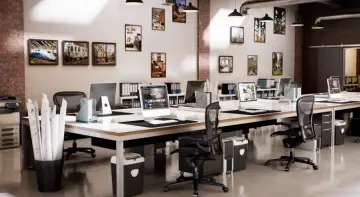
A modern apartment interior scene for Unreal Engine featuring raytraced reflections, GPU-baked lightmaps, animated cinema cameras, and optimized Archviz props.
Setting up a modern apartment interior that holds up under close inspection requires reliable light baking, optimized geometry, and materials that respond convincingly to changing perspectives. Modern Home - Archinteriors Vol 1 Scene 4 Addresses this by providing a fully equipped Unreal Engine environment with raytracing enabled, GPU-baked lightmaps, and an updated prop library tailored to architectural visualization.
Apartment Setup and Camera Navigation
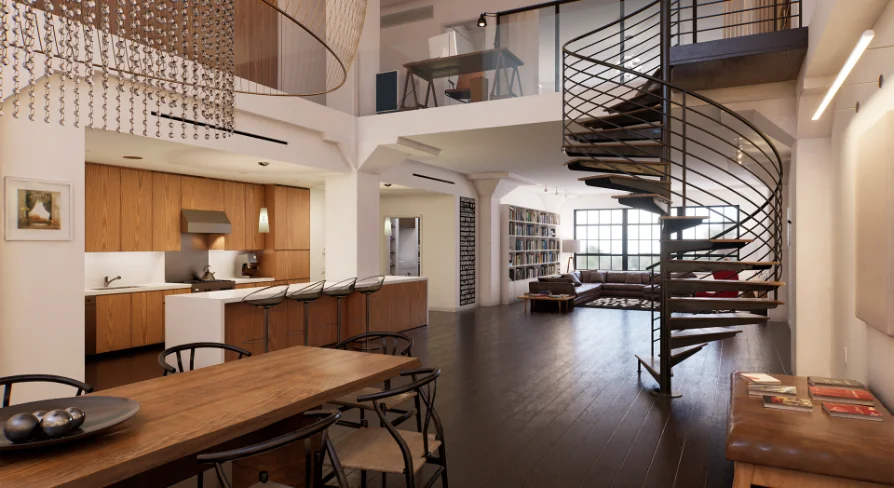
The package provides a complete modern apartment scene, complete with furniture, a staircase, a bedroom, a living room, and a kitchen. To facilitate framing and movement, the scene includes ten animated cinema cameras. An FPP (First Person Perspective) module is also included, allowing users to move freely through each space to inspect details and lighting from any angle.
This scene is compatible with both Unreal Engine 4 and 5. Specifically, it supports engine versions 4.27, 5.0 through 5.1, and 5.4. The environment is designed to take advantage of RTX graphics cards, utilizing raytracing to produce high-quality reflections throughout the space.
Lighting Fallbacks and GPU Hardware Optimization
All lightmaps in the scene are baked using a new GPU baker. For users with RTX graphics cards, raytracing is enabled by default to deliver the best reflection quality. If an RTX card is not available, the raytracing can be easily turned off. The scene relies on baked lighting and captured reflections in this mode, which still maintain a high visual standard.
Performance tuning is a core part of the scene's setup. The environment was optimized for a 2080 Ti GPU. Users with less powerful hardware can achieve playable frames by reducing reflection bounces in the Post Process Volume settings or by using the non-RTX version of the scene. Installing Nvidia DLSS is recommended to gain additional performance headroom.
Material Improvements and Surface Detailing
The materials in this scene have been rebuilt to support surface degradation and micro-detail. New and improved base materials allow users to add dirt directly into the roughness channel, providing localized wear. Materials also feature normal detail maps that enhance the realism of surface imperfections, adding tactile granularity to floors and walls.
Light interaction on metal surfaces has been upgraded. Metal objects now include a thin film effect, which improves the realism of light bouncing across their surfaces. This effect adds subtle iridescence and depth to metallic props such as chandeliers, chairs, and industrial elements.
Texture Replacements and Geometry Refinements
Many textures in the apartment have been replaced with higher resolution versions, while others have been completely remade to meet modern visual standards. The geometry of existing objects has also been improved to optimize their behavior within Unreal Engine. This ensures that complex props like the spiral staircase, sofas, and bookcases maintain performance without sacrificing structural detail.
Beyond optimizing existing elements, new props have been added to better suit the environment. This includes custom shaders applied to elements across the living room, kitchen, and bedroom. The tags associated with the scene indicate a heavy focus on elements like books, tables, lamps, and wood materials, reflecting a balanced modern and industrial architectural style.
Where This Archinteriors Scene Fits in Production
This scene originates from Archinteriors for UE vol. 1 Remastered. It serves as a ready-to-render location for architectural walkthroughs, real-time presentations, and lighting studies.
Developers and visualization artists who need a fully lit, modern apartment interior with pre-configured camera sequences will benefit most from this package. The built-in fallbacks for non-RTX hardware and the inclusion of detailed, dirt-capable materials make it a practical starting point for both high-end renders and optimized real-time exploration.
 Interior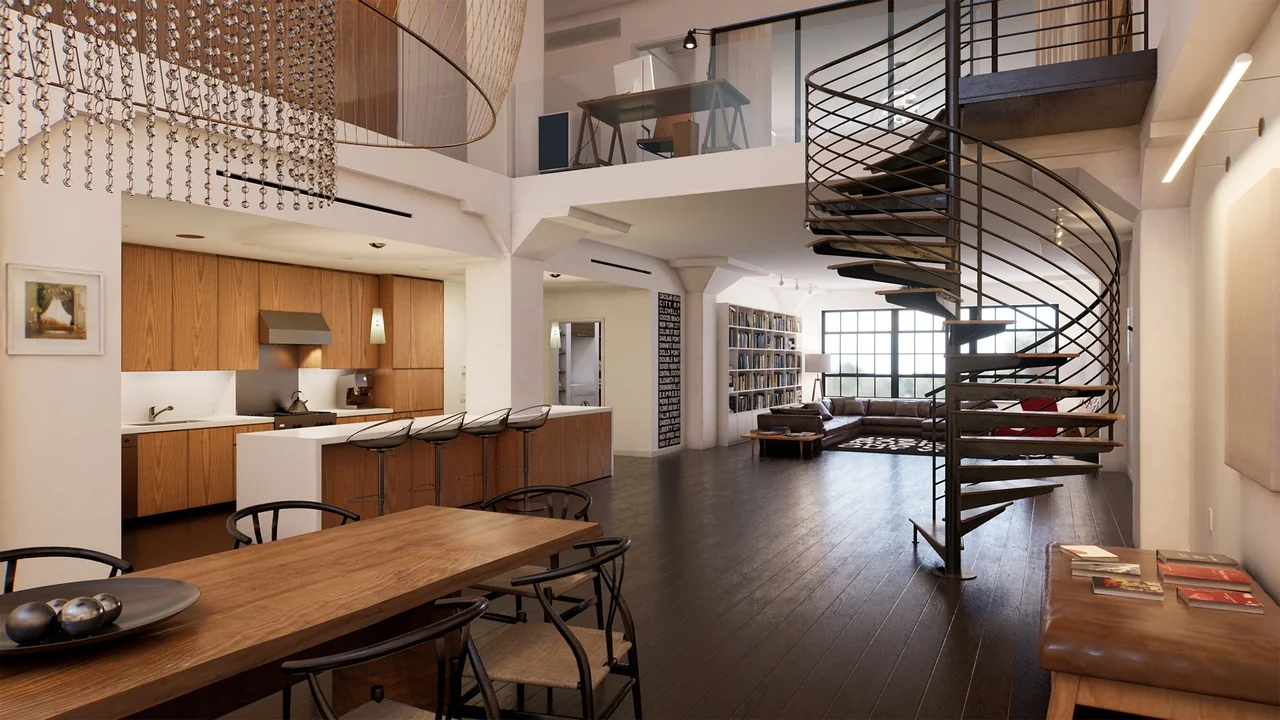
 Interior
 Interior
 Interior