"059e11fbf316ed56"{"id":"1001293","slug":"melee-weapon-aura-vfx-energy-auras-and-glowing-effects-for-melee-weapons","title":"Melee Weapon Aura VFX – Energy Auras \u0026 Glowing Effects for Melee Weapons","category":"Spells \u0026 Combat","engine":"5.0+","assetVersion":"","engineVersion":"Engine Version: 5.0+","tag":"Spells \u0026 Combat","accent":"blue","visual":"mech","summary":"Enhance Unreal Engine 5 melee combat with Niagara-driven energy auras, elemental glows, and distortion effects tailored for cold weapons.","platform":"Unreal Engine","publishedAt":"2026-10-01T16:43:48.677Z","updatedAt":"2026-10-01T16:43:48.677Z","sourceNotes":[],"fileContents":[],"compatibility":["Unreal Engine","Engine Version: 5.0+"],"featuredImage":{"alt":"Melee Weapon Aura VFX – Energy Auras \u0026 Glowing Effects for Melee Weapons","src":"/wp-content/uploads/published/2026/10/ff97012dec38-7d118f1b-5ad5-4b7f-8526-cc07e6c99ce1-5668bd1ee8.webp"},"hasDownloadLink":true,"downloads":0,"terms":[{"taxonomy":"category","slug":"spells-and-combat","name":"Spells \u0026 Combat"}],"galleryImages":[{"src":"/wp-content/uploads/published/2026/10/e42d7b575760-9dd351ed-1c0e-4b02-98fe-57b559ab9f2a-e9ecd9b450.webp","alt":"Melee Weapon Aura VFX – Energy Auras \u0026 Glowing Effects for Melee Weapons"},{"src":"/wp-content/uploads/published/2026/10/16f3c10e98d4-3eca3012-2f88-4c38-900d-5cdd6c070c40-c9de7678ab.webp","alt":"Melee Weapon Aura VFX – Energy Auras \u0026 Glowing Effects for Melee Weapons"},{"src":"/wp-content/uploads/published/2026/10/e04acaa2112e-efb523b5-f56f-47cb-baba-96dca825a6a8-ea0b81494b.webp","alt":"Melee Weapon Aura VFX – Energy Auras \u0026 Glowing Effects for Melee Weapons"},{"src":"/wp-content/uploads/published/2026/10/b172db5ec628-7f9a417c-8986-4336-bc5e-ceb5eb5d6abb-4cbd906faf.webp","alt":"Melee Weapon Aura VFX – Energy Auras \u0026 Glowing Effects for Melee Weapons"},{"src":"/wp-content/uploads/published/2026/10/7841e56bb32f-7fb49b54-9450-482e-9f9d-70f208a09124-8d90481d81.webp","alt":"Melee Weapon Aura VFX – Energy Auras \u0026 Glowing Effects for Melee Weapons"},{"src":"/wp-content/uploads/published/2026/10/9209a787e4a0-386bf70a-d604-48e9-bb3b-a63ca12f6c4b-dd45b36a4f.webp","alt":"Melee Weapon Aura VFX – Energy Auras \u0026 Glowing Effects for Melee Weapons"},{"src":"/wp-content/uploads/published/2026/10/3e943ed2e261-fe55d135-63d3-4acd-8c7b-fb5031899648-1fb75955c9.webp","alt":"Melee Weapon Aura VFX – Energy Auras \u0026 Glowing Effects for Melee Weapons"},{"src":"/wp-content/uploads/published/2026/10/5effb1103f8b-f8a7da0a-2a08-4e20-ab6f-62813f3a65f8-9d92c55236.webp","alt":"Melee Weapon Aura VFX – Energy Auras \u0026 Glowing Effects for Melee Weapons"},{"src":"/wp-content/uploads/published/2026/10/38f872a16cd8-2d1ecc2f-7cdc-428e-ba83-367986393559-05bd35f4cf.webp","alt":"Melee Weapon Aura VFX – Energy Auras \u0026 Glowing Effects for Melee Weapons"},{"src":"/wp-content/uploads/published/2026/10/88c8056d1414-275c8617-1c83-426a-b7ca-cf38830d4731-91ba40c257.webp","alt":"Melee Weapon Aura VFX – Energy Auras \u0026 Glowing Effects for Melee Weapons"}],"accessPanel":{"kind":"resource","title":"Download this resource","eyebrow":"Free Download","message":"Log in or create a free account to start your download.","fileName":"Content.7z","safetyNote":"Resources are manually reviewed before listing to improve quality and reduce obvious risks.","actionLabel":"Download Free","resourceType":"Resource archive"},"contentHtml":"\u003cp\u003eA sword edge that begins to hum with radiant energy provides immediate visual feedback before an attack even lands. Whether signaling a critical strike, an elemental enchantment, or the presence of a high-tier enemy, surface-bound auras transform basic cold weapons into clear communicators of combat intent. Melee Weapon Aura VFX targets this layer of visual design in Unreal Engine 5, applying animated glows, noise-driven distortion, and trailing energy to blades, axes, spears, and daggers without relying on heavy geometry-based particle simulations.\u003c/p\u003e \u003ch2\u003eShading Foundations: Advanced Overlay Shader Mechanics and Niagara Integration\u003c/h2\u003e\n\u003cp\u003eAt the core of the package is a streamlined version of the Advanced Overlay Shader. Rather than requiring developers to rebuild complex master materials for every weapon asset, the shader operates as an overlay layer that projects dynamic textures and procedural distortion across the weapon surface. This lightweight implementation keeps real-time rendering overhead minimal, allowing multiple combatants to wield active, illuminated weapons simultaneously without degrading frame rates in performance-critical combat scenarios.\u003c/p\u003e\n\u003cp\u003eAnimation logic and visual parameter modulation interface directly with Unreal Engine 5's Niagara system. This pairing enables seamless parameter transitions, allowing particle-style behavior to align with weapon movement, velocity, and socket attachments. Developers can alter primary visual properties on the fly, adjusting core tint, noise scale, distortion intensity, and overall animation speed to match the pacing of combat animations. Over 60 pre-configured examples are provided out of the box, demonstrating varying styles from tight magical sheaths to wide, unstable fields of energy.\u003c/p\u003e \u003ch2\u003eTranslating Combat States into Dynamic Energy Trails and Glowing Cues\u003c/h2\u003e\n\u003cp\u003eIn fast-paced genres like action RPGs, hack-and-slash titles, and fighting games, visual readability determines whether an encounter feels fair and responsive. Weapon auras serve as communicative tools rather than mere decorative layers. The toolkit allows teams to establish clear visual hierarchies across combat encounters:\u003c/p\u003e\n\u003cul\u003e \u003cli\u003e\u003cstrong\u003eCombo and Escalation Feedback:\u003c/strong\u003e Attack chains can alter the aura's characteristics as a combo progresses. Shifting color gradients, accelerating distortion noise, or increasing luminescence can indicate that a sequence is reaching a finishing strike or building toward an unblockable threshold.\u003c/li\u003e \u003cli\u003e\u003cstrong\u003eAttack Charging and Critical Strikes:\u003c/strong\u003e Auras can swell or sharpen while a player or enemy holds a heavy attack, giving opponents a readable window to dodge, parry, or interrupt.\u003c/li\u003e \u003cli\u003e\u003cstrong\u003eElemental Enfeeblement and Enchantments:\u003c/strong\u003e The system easily represents distinct physical and mystical affinities. Deep oranges and flickers denote fire, sharp cool cyan gradients evoke ice, and erratic, high-frequency distortion mimics crackling lightning.\u003c/li\u003e \u003cli\u003e\u003cstrong\u003eElite and Boss Weapon Identification:\u003c/strong\u003e Highlighting special or legendary equipment with unique energy signatures immediately distinguishes elite combatants from standard fodder on crowded battlefields.\u003c/li\u003e\n\u003c/ul\u003e \u003ch2\u003eContextual Gameplay Triggers, Cutscenes, and Multiplayer Personalization\u003c/h2\u003e\n\u003cp\u003eBecause the aura parameters react dynamically in real time, their implementation extends beyond basic continuous loops. In cinematic cutscenes and scripted finisher sequences, weapon glows can ramp dramatically during dramatic pauses, drawing the camera's focus to the point of impact before subsiding as the strike resolves.\u003c/p\u003e\n\u003cp\u003eEnvironmental reactivity offers another design avenue. Weapons can be configured to flare up when entering designated magical zones, passing through dimensional boundaries, or interacting with portal systems, including compatibility with setups like the Advanced Portals System VFX. When a character draws near an arcane trigger or steps through an active portal, the shader can adjust its brightness or transition its color profile to mirror the surrounding magical environment.\u003c/p\u003e\n\u003cp\u003eFor cooperative or competitive multiplayer titles, the flexibility of the shader parameters supports player-driven weapon customization. Players can adjust weapon glow colors, pulse intensity, and distortion rates to personalize their loadouts while preserving a unified visual style across different weapon classes.\u003c/p\u003e \u003ch2\u003eUV Mapping Considerations and Asset Preparation in Blender\u003c/h2\u003e\n\u003cp\u003eBecause the visual behavior of the aura shader relies heavily on surface coordinates, the underlying model's UV mapping directly dictates how the energy moves along the weapon. The directional flow of noise, the alignment of edge glows, and the uniformity of distortion all reference the UV layout of the mesh.\u003c/p\u003e\n\u003cp\u003eCommercial or production-ready weapon meshes typically feature clean, continuous UV unwraps, which ensure that trails and auras wrap smoothly around hilts, crossguards, and blades without abrupt seams. However, when working with unoptimized or free models, inconsistent UV projections can cause the energy overlay to stretch, pinch, or flow in unintended directions. In these cases, generating clean, aligned UV islands in Blender—orienting the blade coordinates linearly along the texture axis—ensures that the procedural noise travels naturally from the crossguard to the tip of the weapon.\u003c/p\u003e \u003ch2\u003eFitting Into the Broader Real-Time Combat Pipeline\u003c/h2\u003e\n\u003cp\u003eMelee Weapon Aura VFX occupies a specific functional niche within the wider combat VFX ecosystem. While dynamic slash meshes handle the sweeping arcs left behind during swings, and projectile effects cover ranged engagements, surface auras maintain visual interest during idle stances, parries, windups, and recoveries. Combining surface-hugging glowing effects with specialized weapon trails, projectile impacts, or vortex shaders provides developers with a modular toolset to build complete, cohesive combat feedback systems across every weapon class in an Unreal Engine 5 project.\u003c/p\u003e\n\n\u003ch2\u003eContinue Browsing Similar Packs\u003c/h2\u003e\n\u003cul\u003e\n\u003cli\u003e\u003ca href=\"https://3dcghub.com/mega-magic-vfx-bundle/\" title=\"Mega Magic VFX Bundle\"\u003eMega Magic VFX Bundle\u003c/a\u003e\u003c/li\u003e\n\u003cli\u003e\u003ca href=\"https://3dcghub.com/blink-and-dash-vfx/\" title=\"Blink and Dash VFX\"\u003eBlink and Dash VFX\u003c/a\u003e\u003c/li\u003e\n\u003cli\u003e\u003ca href=\"https://3dcghub.com/realistic-gun-vfx-muzzle-flash-bullet-impact-ejections-gun-vfx-vfx/\" title=\"Realistic Gun VFX (Muzzle Flash, Bullet Impact, Ejections, Gun VFX, VFX)\"\u003eRealistic Gun VFX (Muzzle Flash, Bullet Impact, Ejections, Gun VFX, VFX)\u003c/a\u003e\u003c/li\u003e\n\u003cli\u003e\u003ca href=\"https://3dcghub.com/magic-kit-02/\" title=\"Magic Kit 02\"\u003eMagic Kit 02\u003c/a\u003e\u003c/li\u003e\n\u003cli\u003e\u003ca href=\"https://3dcghub.com/realistic-blood-vfx-niagara-blood-effects-blood-vfx-blood-blood-vfx/\" title=\"Realistic Blood VFX (Niagara Blood Effects, Blood VFX, Blood, Blood VFX)\"\u003eRealistic Blood VFX (Niagara Blood Effects, Blood VFX, Blood, Blood VFX)\u003c/a\u003e\u003c/li\u003e\n\u003c/ul\u003e","contentTextLength":6110,"navigation":{"current":4,"total":3238,"previous":{"id":"1001294","slug":"mixed-magic-spell-vfx-pack","title":"Mixed Magic - Spell VFX Pack","category":"Spells \u0026 Combat","platform":"Unreal Engine","updatedAt":"2026-10-01T16:45:14.765Z"},"next":{"id":"1001292","slug":"comic-book-cutscene","title":"Comic Book Cutscene","category":"Widgets \u0026 Controls","platform":"Unreal Engine","updatedAt":"2026-10-01T15:14:47.270Z"}},"relatedResources":[{"id":"1001189","slug":"mega-magic-vfx-bundle","title":"Mega Magic VFX Bundle","category":"Spells \u0026 Combat","engine":"5.0+","assetVersion":"","engineVersion":"Engine Version: 5.0+","tag":"Spells \u0026 Combat","accent":"blue","visual":"mech","summary":"Explore the Mega Magic VFX Bundle featuring 61 unique stylized visual effects, covering magic auras, defensive shields, and explosive attack spells.","platform":"Unreal Engine","publishedAt":"2026-09-17T06:44:28.385Z","updatedAt":"2026-09-17T06:44:28.385Z","sourceNotes":[],"fileContents":[],"compatibility":["Unreal Engine","Engine Version: 5.0+"],"featuredImage":{"alt":"Mega Magic VFX Bundle","src":"/wp-content/uploads/published/2026/09/01c1ab5194a0-31a84eec-fb18-455f-9cf4-27bc9436ceee-e5479c5fe0.webp"},"hasDownloadLink":true,"downloads":3},{"id":"1001294","slug":"mixed-magic-spell-vfx-pack","title":"Mixed Magic - Spell VFX Pack","category":"Spells \u0026 Combat","engine":"5.0+","assetVersion":"","engineVersion":"Engine Version: 5.0+","tag":"Spells \u0026 Combat","accent":"blue","visual":"mech","summary":"Mixed Magic - Spell VFX Pack supplies 26 elemental spells across fire, dark, water, lightning, and ice, featuring optimized Niagara effects and modular setups.","platform":"Unreal Engine","publishedAt":"2026-10-01T16:45:14.765Z","updatedAt":"2026-10-01T16:45:14.765Z","sourceNotes":[],"fileContents":[],"compatibility":["Unreal Engine","Engine Version: 5.0+"],"featuredImage":{"alt":"Mixed Magic - Spell VFX Pack","src":"/wp-content/uploads/published/2026/10/ef0800e3666d-b2bcf8aa-d8f2-463e-ac03-e36462e93277-64b5a9843e.webp"},"hasDownloadLink":true,"downloads":0},{"id":"1001188","slug":"blink-and-dash-vfx","title":"Blink and Dash VFX","category":"Spells \u0026 Combat","engine":"5.0+","assetVersion":"","engineVersion":"Engine Version: 5.0+","tag":"Spells \u0026 Combat","accent":"blue","visual":"mech","summary":"Explore mesh-based Niagara teleportation and movement effects in Blink and Dash VFX, featuring camera FOV Blueprint macros and Hack And Slash FX compatibility.","platform":"Unreal Engine","publishedAt":"2026-09-17T06:42:29.643Z","updatedAt":"2026-09-17T06:42:29.643Z","sourceNotes":[],"fileContents":[],"compatibility":["Unreal Engine","Engine Version: 5.0+"],"featuredImage":{"alt":"Blink and Dash VFX","src":"/wp-content/uploads/published/2026/09/dffb4ab1bf8c-00274fcc-2e4a-42d2-b0ec-de2d7c3ed9a2-f0fc96a53b.webp"},"hasDownloadLink":true,"downloads":0}]}
Spells & Combat
Melee Weapon Aura VFX – Energy Auras & Glowing Effects for Melee Weapons
Enhance Unreal Engine 5 melee combat with Niagara-driven energy auras, elemental glows, and distortion effects tailored for cold weapons.
A sword edge that begins to hum with radiant energy provides immediate visual feedback before an attack even lands. Whether signaling a critical strike, an elemental enchantment, or the presence of a high-tier enemy, surface-bound auras transform basic cold weapons into clear communicators of combat intent. Melee Weapon Aura VFX targets this layer of visual design in Unreal Engine 5, applying animated glows, noise-driven distortion, and trailing energy to blades, axes, spears, and daggers without relying on heavy geometry-based particle simulations.
Shading Foundations: Advanced Overlay Shader Mechanics and Niagara Integration
At the core of the package is a streamlined version of the Advanced Overlay Shader. Rather than requiring developers to rebuild complex master materials for every weapon asset, the shader operates as an overlay layer that projects dynamic textures and procedural distortion across the weapon surface. This lightweight implementation keeps real-time rendering overhead minimal, allowing multiple combatants to wield active, illuminated weapons simultaneously without degrading frame rates in performance-critical combat scenarios.
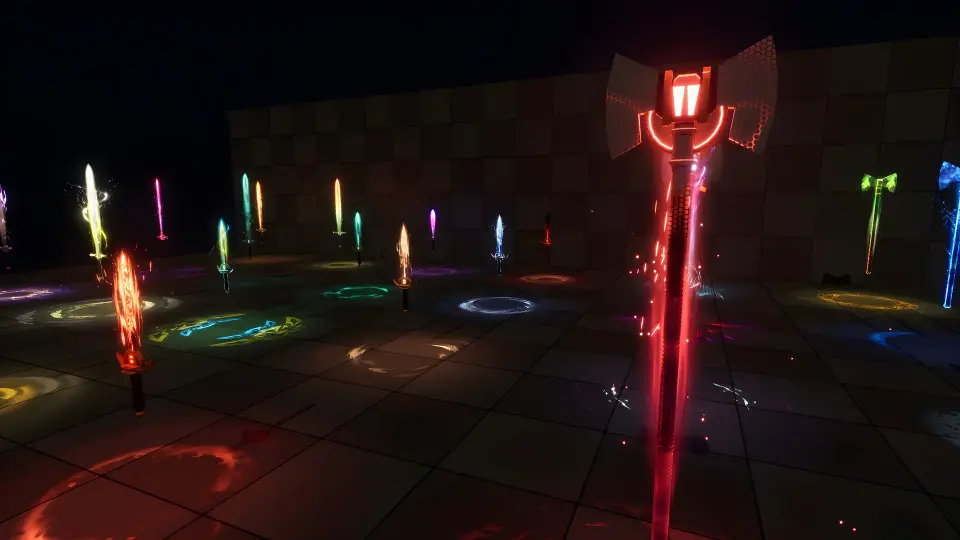
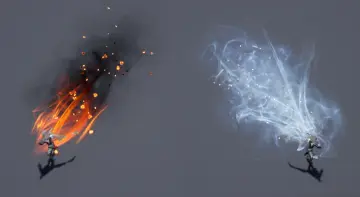
Animation logic and visual parameter modulation interface directly with Unreal Engine 5's Niagara system. This pairing enables seamless parameter transitions, allowing particle-style behavior to align with weapon movement, velocity, and socket attachments. Developers can alter primary visual properties on the fly, adjusting core tint, noise scale, distortion intensity, and overall animation speed to match the pacing of combat animations. Over 60 pre-configured examples are provided out of the box, demonstrating varying styles from tight magical sheaths to wide, unstable fields of energy.
Translating Combat States into Dynamic Energy Trails and Glowing Cues
In fast-paced genres like action RPGs, hack-and-slash titles, and fighting games, visual readability determines whether an encounter feels fair and responsive. Weapon auras serve as communicative tools rather than mere decorative layers. The toolkit allows teams to establish clear visual hierarchies across combat encounters:
Combo and Escalation Feedback: Attack chains can alter the aura's characteristics as a combo progresses. Shifting color gradients, accelerating distortion noise, or increasing luminescence can indicate that a sequence is reaching a finishing strike or building toward an unblockable threshold.
Attack Charging and Critical Strikes: Auras can swell or sharpen while a player or enemy holds a heavy attack, giving opponents a readable window to dodge, parry, or interrupt.
Elemental Enfeeblement and Enchantments: The system easily represents distinct physical and mystical affinities. Deep oranges and flickers denote fire, sharp cool cyan gradients evoke ice, and erratic, high-frequency distortion mimics crackling lightning.
Elite and Boss Weapon Identification: Highlighting special or legendary equipment with unique energy signatures immediately distinguishes elite combatants from standard fodder on crowded battlefields.
Contextual Gameplay Triggers, Cutscenes, and Multiplayer Personalization
Because the aura parameters react dynamically in real time, their implementation extends beyond basic continuous loops. In cinematic cutscenes and scripted finisher sequences, weapon glows can ramp dramatically during dramatic pauses, drawing the camera's focus to the point of impact before subsiding as the strike resolves.
Environmental reactivity offers another design avenue. Weapons can be configured to flare up when entering designated magical zones, passing through dimensional boundaries, or interacting with portal systems, including compatibility with setups like the Advanced Portals System VFX. When a character draws near an arcane trigger or steps through an active portal, the shader can adjust its brightness or transition its color profile to mirror the surrounding magical environment.
For cooperative or competitive multiplayer titles, the flexibility of the shader parameters supports player-driven weapon customization. Players can adjust weapon glow colors, pulse intensity, and distortion rates to personalize their loadouts while preserving a unified visual style across different weapon classes.
UV Mapping Considerations and Asset Preparation in Blender
Because the visual behavior of the aura shader relies heavily on surface coordinates, the underlying model's UV mapping directly dictates how the energy moves along the weapon. The directional flow of noise, the alignment of edge glows, and the uniformity of distortion all reference the UV layout of the mesh.
Commercial or production-ready weapon meshes typically feature clean, continuous UV unwraps, which ensure that trails and auras wrap smoothly around hilts, crossguards, and blades without abrupt seams. However, when working with unoptimized or free models, inconsistent UV projections can cause the energy overlay to stretch, pinch, or flow in unintended directions. In these cases, generating clean, aligned UV islands in Blender—orienting the blade coordinates linearly along the texture axis—ensures that the procedural noise travels naturally from the crossguard to the tip of the weapon.
Fitting Into the Broader Real-Time Combat Pipeline
Melee Weapon Aura VFX occupies a specific functional niche within the wider combat VFX ecosystem. While dynamic slash meshes handle the sweeping arcs left behind during swings, and projectile effects cover ranged engagements, surface auras maintain visual interest during idle stances, parries, windups, and recoveries. Combining surface-hugging glowing effects with specialized weapon trails, projectile impacts, or vortex shaders provides developers with a modular toolset to build complete, cohesive combat feedback systems across every weapon class in an Unreal Engine 5 project.
 Spells & Combat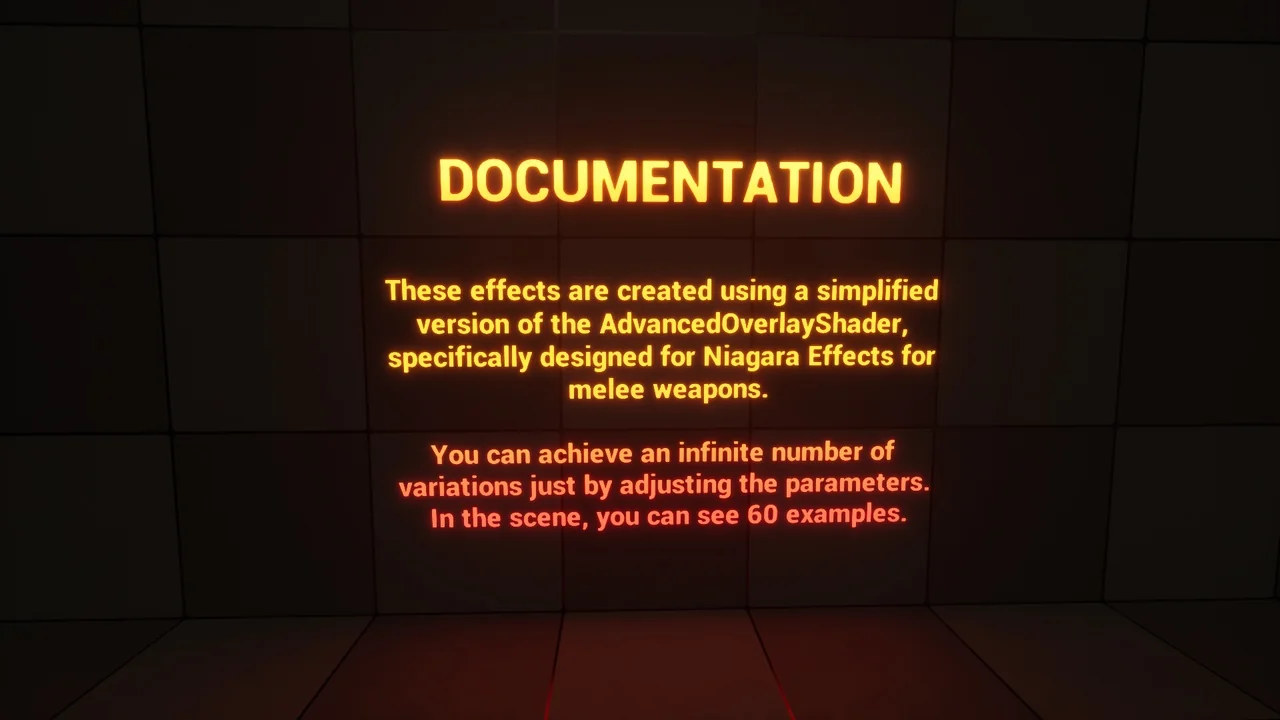
 Spells & Combat
 Spells & Combat
 Spells & Combat