"1f00f67f9253451b"{"id":"1000951","slug":"medhue-parrot","title":"Medhue Parrot","category":"Birds","engine":"4.26+,5.0+","assetVersion":"","engineVersion":"Engine Version: 4.26+,5.0+","tag":"Birds","accent":"blue","visual":"mech","summary":"A 3,279-triangle Macaw parrot for Unreal Engine with PBR textures, 34 animations, and a drop-in AI system using Parrot_NPC, Parrot_Blueprint, and more.","platform":"Unreal Engine","publishedAt":"2026-08-14T05:21:18.505Z","updatedAt":"2026-08-14T05:21:18.505Z","sourceNotes":[],"fileContents":[],"compatibility":["Unreal Engine","Engine Version: 4.26+,5.0+"],"featuredImage":{"alt":"Medhue Parrot","src":"/wp-content/uploads/published/2026/08/0f82efba6954-72553a02-7195-4786-b274-eb7d7edfcad0-a88cb632c3.webp"},"hasDownloadLink":true,"downloads":0,"terms":[{"taxonomy":"category","slug":"birds","name":"Birds"}],"galleryImages":[{"src":"/wp-content/uploads/published/2026/08/e6b44e141cac-6284f26d-6d25-4867-95a4-456c407583d7-7a9d4e9e7f.webp","alt":"Medhue Parrot"},{"src":"/wp-content/uploads/published/2026/08/73cfb11a0deb-c0f4b652-8a27-488f-b3fb-c090abcf3e33-6dbbd0d892.webp","alt":"Medhue Parrot"},{"src":"/wp-content/uploads/published/2026/08/d4cca1972709-1d3f44e2-f204-490d-a816-436d7477f54d-34587bb9c7.webp","alt":"Medhue Parrot"},{"src":"/wp-content/uploads/published/2026/08/6c0008a3b178-0ec1c846-c6b1-4314-94ac-13897d081388-f258ad0e05.webp","alt":"Medhue Parrot"},{"src":"/wp-content/uploads/published/2026/08/3166fb91e4dd-b4c6be5f-eba4-4e8f-b060-360a1c401d87-c19446ecfb.webp","alt":"Medhue Parrot"},{"src":"/wp-content/uploads/published/2026/08/55b2d472adc6-c5af2fa6-80f6-41f8-9267-2361bd7eca3a-07965ab1f8.webp","alt":"Medhue Parrot"},{"src":"/wp-content/uploads/published/2026/08/b1086fa3d103-4e54e59c-be74-4627-8099-51abcff19e32-63a1dfe3bb.webp","alt":"Medhue Parrot"},{"src":"/wp-content/uploads/published/2026/08/8b30221259cd-23f80444-b4ca-4750-84d1-28d49bf340ed-d0f01eeca9.webp","alt":"Medhue Parrot"},{"src":"/wp-content/uploads/published/2026/08/b81b20a40e8b-b1bd0b4b-f446-40f2-896d-71ad293c8a64-6162237e1d.webp","alt":"Medhue Parrot"}],"accessPanel":{"kind":"resource","title":"Download this resource","eyebrow":"Free Download","message":"Log in or create a free account to start your download.","fileName":"Content.7z","safetyNote":"Resources are manually reviewed before listing to improve quality and reduce obvious risks.","actionLabel":"Download Free","resourceType":"Resource archive"},"contentHtml":"\u003cp\u003eThe \u003cem\u003eMedhue Parrot\u003c/em\u003e is a 3D Macaw parrot for Unreal Engine that combines a compact 3,279-Triangle model with Physically Based Rendering (PBR) Textures and a set of 34 animations. Alongside the animated bird, the package includes a basic Artificial Intelligence (AI) system built from several named \u003ccode\u003eBlueprint\u003c/code\u003e and \u003ccode\u003eAI\u003c/code\u003e components, so developers can drop a functioning parrot into a Level without writing behavior from scratch.\u003c/p\u003e\n\n\u003ch2\u003eModeling Efficiency and Visual Readiness\u003c/h2\u003e\n\n\u003cp\u003eAt 3,279 Triangles, the \u003cem\u003eMedhue Parrot\u003c/em\u003e is an efficiently modeled bird. The geometry stays light enough to be used in multiple places within a scene, while the \u003ccode\u003ePBR\u003c/code\u003e Textures give the Macaw a realistic, colorful surface. Tags for the asset point to a \u003cem\u003etropical\u003c/em\u003e and \u003cem\u003esubtropical\u003c/em\u003e look, with a red-feather palette that matches the classic Macaw appearance. The included texture workflow supports the kind of grounded lighting that \u003ccode\u003ePBR\u003c/code\u003e expects, making the parrot blend into environments that use similar physically based rendering standards.\u003c/p\u003e\n\n\u003cp\u003eBecause the model is rigged and animated, the Triangle Count is not just for visual presentation. The Rig supports the animation system and the \u003ccode\u003eAI\u003c/code\u003e-driven movement, meaning the same efficient Mesh can be put into flying, perched, or talking states while keeping the vertex cost predictable.\u003c/p\u003e\n\n\u003ch2\u003eThe 34-Animation Set for Gameplay\u003c/h2\u003e\n\n\u003cp\u003eMost of the animations you might need in a game are included, as the asset description states. That range is based on typical parrot behavior: the tag list includes \u003cem\u003eflying\u003c/em\u003e, \u003cem\u003etalking\u003c/em\u003e, and general animated movement. For a game bird, these are the core actions. The animations are driven through the \u003ccode\u003eParrot_AnimBlueprint\u003c/code\u003e, which connects the animation states to the \u003ccode\u003eAI\u003c/code\u003e and the main \u003ccode\u003eParrot_Blueprint\u003c/code\u003e.\u003c/p\u003e\n\n\u003cp\u003eHaving 34 animations under 1 Rig means the \u003cem\u003eMedhue Parrot\u003c/em\u003e can serve as a wild member of a tropical scene, a pet that follows a player, or part of a pirate-themed environment. The animation set is likely to cover the transition between ground and air, along with the sort of head and wing motion that makes a macaw feel alive. Because the exact animation names are not listed, the general coverage of flight and talking can be considered the practical foundation of the set.\u003c/p\u003e\n\n\u003ch2\u003eParrot \u003ccode\u003eAI System\u003c/code\u003e Components and Structure\u003c/h2\u003e\n\n\u003cp\u003eThe included \u003ccode\u003eAI System\u003c/code\u003e is intentionally basic, but it is structured around 5 distinct assets: \u003ccode\u003eParrot_Blueprint\u003c/code\u003e, \u003ccode\u003eParrot_AnimBlueprint\u003c/code\u003e, \u003ccode\u003eParrot_AI\u003c/code\u003e, \u003ccode\u003eParrot_Enum\u003c/code\u003e, and \u003ccode\u003eParrot_NPC\u003c/code\u003e. These components work together to provide a functional starting point for Unreal Engine projects.\u003c/p\u003e\n\n\u003cul\u003e\n \u003cli\u003e\u003ccode\u003eParrot_Blueprint\u003c/code\u003e acts as the main \u003ccode\u003eActor\u003c/code\u003e or controller for the parrot.\u003c/li\u003e\n \u003cli\u003e\u003ccode\u003eParrot_AnimBlueprint\u003c/code\u003e manages the \u003ccode\u003eAnimation State Machine\u003c/code\u003e and blends between the 34 animations.\u003c/li\u003e\n \u003cli\u003e\u003ccode\u003eParrot_AI\u003c/code\u003e provides the artificial intelligence behavior, likely handling movement and state switching.\u003c/li\u003e\n \u003cli\u003e\u003ccode\u003eParrot_Enum\u003c/code\u003e defines the various states or modes the parrot can be in.\u003c/li\u003e\n \u003cli\u003e\u003ccode\u003eParrot_NPC\u003c/code\u003e is the spawnable Non-Player Character (NPC) that you place into a Level.\u003c/li\u003e\n\u003c/ul\u003e\n\n\u003cp\u003eThis structure keeps the \u003ccode\u003eAI\u003c/code\u003e logic separated from the visual animation logic. For a developer who wants to customize the behavior, the \u003ccode\u003eEnum\u003c/code\u003e and the \u003ccode\u003eAI\u003c/code\u003e component can be extended without changing the \u003ccode\u003eAnimation Blueprint\u003c/code\u003e. For a quick prototype, the default setup is enough to get the parrot moving and reacting.\u003c/p\u003e\n\n\u003ch2\u003eDrop-In Setup with \u003ccode\u003eParrot_NPC\u003c/code\u003e and a \u003ccode\u003eNavmesh\u003c/code\u003e\u003c/h2\u003e\n\n\u003cp\u003eThe intended workflow is straightforward: drag the \u003ccode\u003eParrot_NPC\u003c/code\u003e into your Map, add a \u003ccode\u003eNavmesh\u003c/code\u003e, and the parrot is ready to go. No extra \u003ccode\u003eBlueprint\u003c/code\u003e wiring is needed for the basic behavior. That makes the \u003cem\u003eMedhue Parrot\u003c/em\u003e useful for level blocking, animation previews, or non-final game builds.\u003c/p\u003e\n\n\u003cp\u003eBecause the \u003ccode\u003eAI System\u003c/code\u003e relies on a \u003ccode\u003eNavmesh\u003c/code\u003e, the parrot can navigate the walkable areas of the Level. This is a standard Unreal Engine \u003ccode\u003eAI\u003c/code\u003e setup, but it is packaged here with the parrot's own \u003ccode\u003eAI Controller\u003c/code\u003e and \u003ccode\u003eAnimation Blueprint\u003c/code\u003e. That leaves a parrot that can move within the \u003ccode\u003eNavmesh\u003c/code\u003e bounds and switch between its animations based on the current \u003ccode\u003eAI\u003c/code\u003e state.\u003c/p\u003e\n\n\u003cp\u003eThe asset description is clear that the \u003ccode\u003eAI\u003c/code\u003e cannot cover every custom need. It is meant to help you design your own \u003ccode\u003eAI\u003c/code\u003e or quickly use for prototyping or envisioning your world. That phrasing defines the boundary: the parrot gives you a working foundation, not a complete behavioral solution.\u003c/p\u003e\n\n\u003ch2\u003eFinding a Place for the \u003cem\u003eMedhue Parrot\u003c/em\u003e in Your Project\u003c/h2\u003e\n\n\u003cp\u003eTags such as \u003cem\u003epirate\u003c/em\u003e, \u003cem\u003ebeach\u003c/em\u003e, \u003cem\u003evacation\u003c/em\u003e, \u003cem\u003etropical\u003c/em\u003e, \u003cem\u003esubtropical\u003c/em\u003e, and \u003cem\u003epet\u003c/em\u003e suggest the parrot is built for worlds where colorful birds add personality. A pirate ship deck, a tropical village market, a beach resort, or a jungle outpost are all natural settings. The low Triangle Count and 34 animations allow the parrot to be used as a background animal or as a close-up companion, depending on the production stage.\u003c/p\u003e\n\n\u003cp\u003eFor designers who need to envision a wildlife-heavy scene, the drag-and-drop \u003ccode\u003eAI\u003c/code\u003e means the parrot can populate a space instantly. For teams developing a game where parrots are central, the same assets provide a template for a more custom \u003ccode\u003eAI System\u003c/code\u003e. The included \u003ccode\u003eBlueprint\u003c/code\u003e and \u003ccode\u003eEnum\u003c/code\u003e structure give developers a clear place to attach new behavior while keeping the original animation set intact.\u003c/p\u003e\n\n\u003cp\u003eThe \u003cem\u003eMedhue Parrot\u003c/em\u003e is ultimately a practical package. It pairs a Low-Poly Macaw model with \u003ccode\u003ePBR\u003c/code\u003e Material support and a robust animation count, then wraps it in an \u003ccode\u003eAI System\u003c/code\u003e that works directly in Unreal Engine with minimal setup. Whether you are prototyping a tropical world, adding a pirate mascot, or building your own bird \u003ccode\u003eAI\u003c/code\u003e from a solid base, the parrot is ready to be dropped into the Map.\u003c/p\u003e\n\n\u003ch2\u003eContinue Browsing Similar Packs\u003c/h2\u003e\n\u003cul\u003e\n\u003cli\u003e\u003ca href=\"https://3dcghub.com/medhue-black-mamba-snake/\" title=\"Medhue Black Mamba Snake\"\u003eMedhue Black Mamba Snake\u003c/a\u003e\u003c/li\u003e\n\u003cli\u003e\u003ca href=\"https://3dcghub.com/animalia-bald-and-golden-eagle/\" title=\"Animalia - Bald and Golden Eagle\"\u003eAnimalia - Bald and Golden Eagle\u003c/a\u003e\u003c/li\u003e\n\u003cli\u003e\u003ca href=\"https://3dcghub.com/low-poly-bird-mallard-duck/\" title=\"Low Poly Bird: Mallard Duck\"\u003eLow Poly Bird: Mallard Duck\u003c/a\u003e\u003c/li\u003e\n\u003cli\u003e\u003ca href=\"https://3dcghub.com/vulture/\" title=\"Vulture\"\u003eVulture\u003c/a\u003e\u003c/li\u003e\n\u003cli\u003e\u003ca href=\"https://3dcghub.com/redshank/\" title=\"Redshank\"\u003eRedshank\u003c/a\u003e\u003c/li\u003e\n\u003c/ul\u003e","contentTextLength":5608,"navigation":{"current":377,"total":3222,"previous":{"id":"1000952","slug":"medhue-tiger","title":"Medhue Tiger","category":"Mammals","platform":"Unreal Engine","updatedAt":"2026-08-14T05:25:02.958Z"},"next":{"id":"1000950","slug":"medhue-black-mamba-snake","title":"Medhue Black Mamba Snake","category":"Other","platform":"Unreal Engine","updatedAt":"2026-08-14T05:09:46.364Z"}},"relatedResources":[{"id":"1000952","slug":"medhue-tiger","title":"Medhue Tiger","category":"Mammals","engine":"4.26+,5.0+","assetVersion":"","engineVersion":"Engine Version: 4.26+,5.0+","tag":"Mammals","accent":"blue","visual":"mech","summary":"Medhue Tiger is a low-poly 3D tiger with PBR textures, 28 animations, a drag-and-drop AI system, and an Unreal 5.6 Control Rig IK for uneven ground.","platform":"Unreal Engine","publishedAt":"2026-08-14T05:25:02.958Z","updatedAt":"2026-08-14T05:25:02.958Z","sourceNotes":[],"fileContents":[],"compatibility":["Unreal Engine","Engine Version: 4.26+,5.0+"],"featuredImage":{"alt":"Medhue Tiger","src":"/wp-content/uploads/published/2026/08/c044197a217b-f6fc2c94-014b-483a-ba87-36fa71e70819-2b0e38a7c4.webp"},"hasDownloadLink":true,"downloads":0},{"id":"1000950","slug":"medhue-black-mamba-snake","title":"Medhue Black Mamba Snake","category":"Other","engine":"4.26+,5.0+","assetVersion":"","engineVersion":"Engine Version: 4.26+,5.0+","tag":"Other","accent":"blue","visual":"mech","summary":"A low-poly 3D Black Mamba snake for Unreal Engine with PBR textures, 20 animations, and a drag-and-drop AI system that works with a Navmesh and Blueprint setup.","platform":"Unreal Engine","publishedAt":"2026-08-14T05:09:46.364Z","updatedAt":"2026-08-14T05:09:46.364Z","sourceNotes":[],"fileContents":[],"compatibility":["Unreal Engine","Engine Version: 4.26+,5.0+"],"featuredImage":{"alt":"Medhue Black Mamba Snake","src":"/wp-content/uploads/published/2026/08/463413aa6684-8e4e3213-f023-4f21-8132-aeea907cca2d-024c63120e.webp"},"hasDownloadLink":true,"downloads":0},{"id":"1524","slug":"animalia-bald-and-golden-eagle","title":"Animalia - Bald and Golden Eagle","category":"Characters \u0026 Creatures","engine":"4.26+5.0+","assetVersion":"Engine version: 4.26+5.0+","engineVersion":"4.20","tag":"Characters","accent":"blue","visual":"character","summary":"Enhance your projects with hyper-realistic Bald and Golden Eagle 3D models. Features 4K textures, 60fps animations, and full rigging for Unreal Engine.","platform":"Unreal Engine","publishedAt":"2026-02-06T18:49:59.000Z","updatedAt":"2026-04-19T15:58:09.000Z","sourceNotes":[],"fileContents":[],"compatibility":["Unreal Engine","Engine version: 4.26+5.0+"],"featuredImage":{"alt":"Animalia - Bald and Golden Eagle","src":"https://3dcghub.com/wp-content/uploads/2026/02/f3ecfbe6-43b2-4c2d-b5d7-eb2ff298929e.webp"},"hasDownloadLink":true,"downloads":2}]}
Birds
Medhue Parrot
A 3,279-triangle Macaw parrot for Unreal Engine with PBR textures, 34 animations, and a drop-in AI system using Parrot_NPC, Parrot_Blueprint, and more.
Category:Unreal Engine,BirdsPlatform: Unreal EngineEngine Version: 4.26+,5.0+Published: Aug 14, 2026
Birds
Resource overview
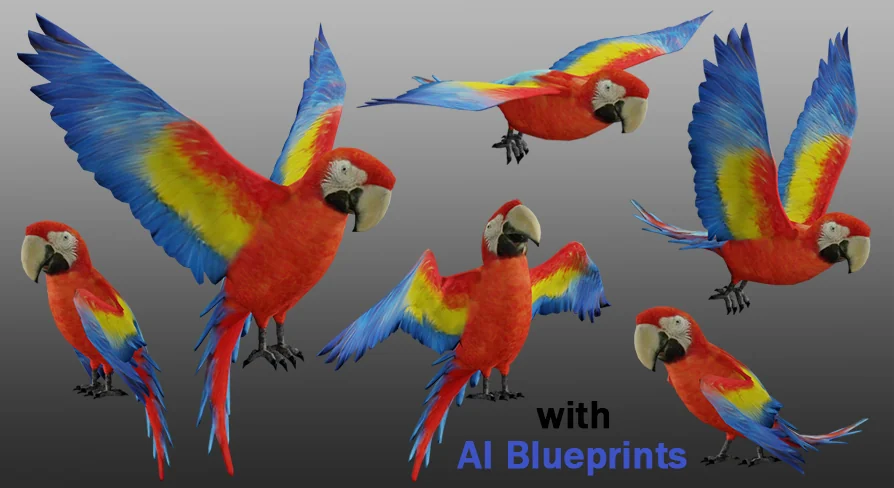
The Medhue Parrot is a 3D Macaw parrot for Unreal Engine that combines a compact 3,279-Triangle model with Physically Based Rendering (PBR) Textures and a set of 34 animations. Alongside the animated bird, the package includes a basic Artificial Intelligence (AI) system built from several named Blueprint and AI components, so developers can drop a functioning parrot into a Level without writing behavior from scratch.
Modeling Efficiency and Visual Readiness
At 3,279 Triangles, the Medhue Parrot is an efficiently modeled bird. The geometry stays light enough to be used in multiple places within a scene, while the PBR Textures give the Macaw a realistic, colorful surface. Tags for the asset point to a tropical and subtropical look, with a red-feather palette that matches the classic Macaw appearance. The included texture workflow supports the kind of grounded lighting that PBR expects, making the parrot blend into environments that use similar physically based rendering standards.
Because the model is rigged and animated, the Triangle Count is not just for visual presentation. The Rig supports the animation system and the AI-driven movement, meaning the same efficient Mesh can be put into flying, perched, or talking states while keeping the vertex cost predictable.
The 34-Animation Set for Gameplay
Most of the animations you might need in a game are included, as the asset description states. That range is based on typical parrot behavior: the tag list includes flying, talking, and general animated movement. For a game bird, these are the core actions. The animations are driven through the Parrot_AnimBlueprint, which connects the animation states to the AI and the main Parrot_Blueprint.
Having 34 animations under 1 Rig means the Medhue Parrot can serve as a wild member of a tropical scene, a pet that follows a player, or part of a pirate-themed environment. The animation set is likely to cover the transition between ground and air, along with the sort of head and wing motion that makes a macaw feel alive. Because the exact animation names are not listed, the general coverage of flight and talking can be considered the practical foundation of the set.
Parrot AI System Components and Structure
The included AI System is intentionally basic, but it is structured around 5 distinct assets: Parrot_Blueprint, Parrot_AnimBlueprint, Parrot_AI, Parrot_Enum, and Parrot_NPC. These components work together to provide a functional starting point for Unreal Engine projects.
Parrot_Blueprint acts as the main Actor or controller for the parrot.
Parrot_AnimBlueprint manages the Animation State Machine and blends between the 34 animations.
Parrot_AI provides the artificial intelligence behavior, likely handling movement and state switching.
Parrot_Enum defines the various states or modes the parrot can be in.
Parrot_NPC is the spawnable Non-Player Character (NPC) that you place into a Level.
This structure keeps the AI logic separated from the visual animation logic. For a developer who wants to customize the behavior, the Enum and the AI component can be extended without changing the Animation Blueprint. For a quick prototype, the default setup is enough to get the parrot moving and reacting.
Drop-In Setup with Parrot_NPC and a Navmesh
The intended workflow is straightforward: drag the Parrot_NPC into your Map, add a Navmesh, and the parrot is ready to go. No extra Blueprint wiring is needed for the basic behavior. That makes the Medhue Parrot useful for level blocking, animation previews, or non-final game builds.
Because the AI System relies on a Navmesh, the parrot can navigate the walkable areas of the Level. This is a standard Unreal Engine AI setup, but it is packaged here with the parrot's own AI Controller and Animation Blueprint. That leaves a parrot that can move within the Navmesh bounds and switch between its animations based on the current AI state.
The asset description is clear that the AI cannot cover every custom need. It is meant to help you design your own AI or quickly use for prototyping or envisioning your world. That phrasing defines the boundary: the parrot gives you a working foundation, not a complete behavioral solution.
Finding a Place for the Medhue Parrot in Your Project
Tags such as pirate, beach, vacation, tropical, subtropical, and pet suggest the parrot is built for worlds where colorful birds add personality. A pirate ship deck, a tropical village market, a beach resort, or a jungle outpost are all natural settings. The low Triangle Count and 34 animations allow the parrot to be used as a background animal or as a close-up companion, depending on the production stage.
For designers who need to envision a wildlife-heavy scene, the drag-and-drop AI means the parrot can populate a space instantly. For teams developing a game where parrots are central, the same assets provide a template for a more custom AI System. The included Blueprint and Enum structure give developers a clear place to attach new behavior while keeping the original animation set intact.
The Medhue Parrot is ultimately a practical package. It pairs a Low-Poly Macaw model with PBR Material support and a robust animation count, then wraps it in an AI System that works directly in Unreal Engine with minimal setup. Whether you are prototyping a tropical world, adding a pirate mascot, or building your own bird AI from a solid base, the parrot is ready to be dropped into the Map.
 Birds
Birds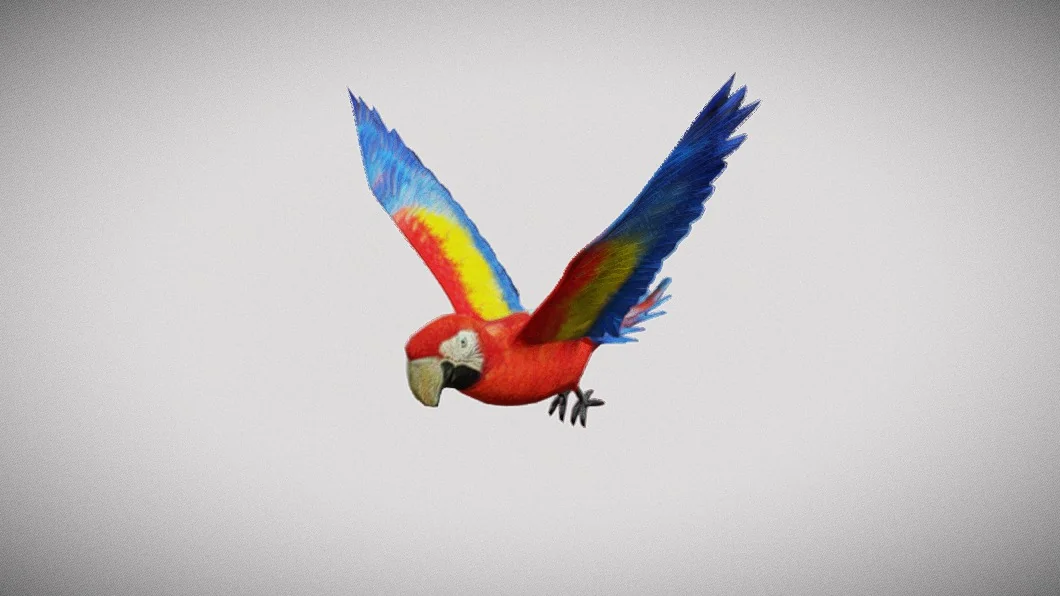
 Mammals
 Other
Other Characters