"a7cfa646d0d8ae55"{"id":"28348","slug":"landscaping-vines-1-2","title":"Landscaping Vines 1","category":"Climber","engine":"5.1+","assetVersion":"Engine version: 5.1+","engineVersion":"5.1","tag":"Climber","accent":"blue","visual":"audio","summary":"Landscaping Vines 1 focuses on vine foliage for architectural spaces where static plants can feel lifeless in motion. The pack combines natural animated movement, editable PBR materials, Nanite support, and a wall-friendly foliage setup for Unreal Engine.","platform":"Unreal Engine","publishedAt":"2026-05-07T10:00:10.000Z","updatedAt":"2026-05-07T10:00:11.000Z","sourceNotes":[],"fileContents":[],"compatibility":["Unreal Engine","Engine version: 5.1+"],"featuredImage":{"alt":"Landscaping Vines 1","src":"https://3dcghub.com/wp-content/uploads/2026/05/a3b2ec0de050_1285d676-b444-48c2-8c88-7b48b412589e.webp"},"hasDownloadLink":true,"downloads":0,"terms":[{"taxonomy":"category","slug":"climber","name":"Climber"},{"taxonomy":"post_tag","slug":"animation","name":"Animation"},{"taxonomy":"post_tag","slug":"environment","name":"Environment"},{"taxonomy":"post_tag","slug":"unreal-engine-5","name":"Unreal Engine 5"}],"galleryImages":[{"src":"https://3dcghub.com/wp-content/uploads/2026/05/7922ad1760ad_24f20806-bf02-4f00-9c38-a28fd0fe5753.webp","alt":"Landscaping Vines 1"},{"src":"https://3dcghub.com/wp-content/uploads/2026/05/106b0b59b60c_75f99bca-8652-46e7-a682-253b13977c57.webp","alt":"Landscaping Vines 1"},{"src":"https://3dcghub.com/wp-content/uploads/2026/05/4cc86dbe9880_d778918c-b66a-406a-b03d-b37e330b0959.webp","alt":"Landscaping Vines 1"},{"src":"https://3dcghub.com/wp-content/uploads/2026/05/c474f6cbeddc_09036d42-7c60-42f2-bb65-c0a70f01cbb0.webp","alt":"Landscaping Vines 1"},{"src":"https://3dcghub.com/wp-content/uploads/2026/05/e2ca879e6606_0516905f-6daf-45f7-a747-1705b6b3d698.webp","alt":"Landscaping Vines 1"},{"src":"https://3dcghub.com/wp-content/uploads/2026/05/3dc0263c9e38_f67614e6-bde0-4399-bb04-2d84712838ed.webp","alt":"Landscaping Vines 1"},{"src":"https://3dcghub.com/wp-content/uploads/2026/05/6f26363f92c0_93f826f7-b312-4c76-93e7-e2ee4a70ac53.webp","alt":"Landscaping Vines 1"},{"src":"https://3dcghub.com/wp-content/uploads/2026/05/483ee2e3a1f5_d1ae118d-ece3-4d24-851b-9281504feef2.webp","alt":"Landscaping Vines 1"},{"src":"https://3dcghub.com/wp-content/uploads/2026/05/12c11012e103_a2079932-51d2-4827-a759-9c539bc1698a.webp","alt":"Landscaping Vines 1"},{"src":"https://3dcghub.com/wp-content/uploads/2026/05/5fdaa8e92f5b_3b0b5eba-08dd-46e5-8277-7cb89d222dde.webp","alt":"Landscaping Vines 1"}],"accessPanel":{"kind":"resource","title":"Access this resource","eyebrow":"Free Download","message":"Log in or create a free account to start your download.","fileName":"Content.7z","safetyNote":"All resources are 100% manually reviewed to eliminate all risks.","actionLabel":"Download Free","resourceType":"Resource archive"},"contentHtml":"\u003cp\u003eArchitectural renders can get away with still plants, but animated walkthroughs, cinematics, and virtual tours expose every rigid branch and frozen leaf. Landscaping Vines 1 targets that problem with a plant pack meant to bring more life into built spaces, especially where climbing vegetation needs to sit against walls and facades without looking stiff.\u003c/p\u003e\u003cp\u003eThe package centers on vines that can be added one by one or placed in groups. That flexibility matters in production: sometimes a wall only needs a narrow strip of growth to break up a hard surface, while other scenes need heavier coverage to soften an exterior. Rather than treating the foliage as background dressing only for static shots, this set leans into movement and scene interaction.\u003c/p\u003e\u003ch2\u003eLandscaping Vines 1 in animated architectural scenes\u003c/h2\u003e\u003cp\u003eThe main appeal here is not just that the plants fill space, but that they are set up to avoid the unnatural look common in moving scenes. The foliage uses a hierarchy selection process across each leaf, branch, and trunk, with the stated goal of producing motion that feels natural and fluid. For environments viewed in motion, that distinction is central. A wall covered in vines can either add atmosphere or immediately reveal itself as artificial when the camera moves past it.\u003c/p\u003e\u003cp\u003eThis makes the pack a practical fit for architectural presentations where greenery is expected to behave convincingly. Exterior walls, backyard views, garden-facing facades, and industrial or residential architectural spaces all benefit from vegetation that does more than sit still. The emphasis stays on realism and performance at the same time, so the vines are not treated as throwaway detail. Small imperfections are part of the look, which helps push the assets away from an overly clean or synthetic finish.\u003c/p\u003e\u003ch2\u003ePivot Painter 2.0 keeps vines moving naturally\u003c/h2\u003e\u003cp\u003eMovement is handled through Pivot Painter 2.0. That is the core system behind the pack’s animated behavior, and it is presented as the reason the foliage can maintain fluid motion while using a minimum of resources. In a production workflow, that places the pack in a useful middle ground: the plants are not only trying to look realistic in close views, they are also intended to stay efficient enough for broader environment use.\u003c/p\u003e\u003cp\u003eThe visual side supports that same balance. The assets are modeled and textured for realism and performance, with editable PBR materials that can be customized. That gives artists room to adjust the look without rebuilding the asset from scratch. In practical terms, editable materials are often what let foliage sit more comfortably inside an established scene palette. A vine used on a sunlit modern facade may need a different surface response than one placed in a shaded courtyard or on a weathered wall, and the included material editability supports that kind of adjustment.\u003c/p\u003e\u003cp\u003eAll assets are provided separately, which makes them easier to handle as modular dressing elements. Instead of treating the set as a single prearranged mass, artists can place individual pieces where coverage is needed and group them where denser growth makes more sense. That modular structure also helps when scene layout changes late in production and foliage needs to be redistributed rather than replaced.\u003c/p\u003e\u003ch2\u003ePainting Landscaping Vines 1 on walls in Foliage Mode\u003c/h2\u003e\u003cp\u003eOne of the clearest workflow advantages in Landscaping Vines 1 is the wall-painting setup. When using the Static Mesh Foliage assets as foliage, they can be dragged directly into Foliage Mode and are already configured with parameters that allow painting on walls. For artists dressing vertical surfaces, that removes setup friction and makes the pack immediately useful in facade work.\u003c/p\u003e\u003cp\u003eThere is one important restriction in that workflow: the Placement section should not be adjusted. The Painting section can be tweaked as needed, but the placement settings are already tuned for the intended use. That tells you where the package expects customization to happen and where it does not.\u003c/p\u003e\u003cp\u003eIf the assets are added as simple Static Meshes instead of foliage, painting on walls will not work by default. The fix is straightforward inside Foliage Mode’s Placement section:\u003c/p\u003e\u003cul\u003e\u003cli\u003eUncheck Random Yaw\u003c/li\u003e\u003cli\u003eSet Ground Slope Angle to 180\u003c/li\u003e\u003c/ul\u003e\u003cp\u003eThat setup note gives the pack a clearer place in a real environment workflow. It is not just a collection of vines to scatter manually; it is a foliage toolset with a specific vertical-surface use case already accounted for. For projects that rely on fast facade dressing, that matters more than a generic vegetation pack with no attention to wall placement.\u003c/p\u003e\u003ch2\u003eNanite, Lumen, and the demo map setup\u003c/h2\u003e\u003cp\u003eLandscaping Vines 1 supports Nanite for Unreal Engine 5.0 and above, and it also supports Lumen for Unreal Engine 5.0 and above. The Nanite support is presented as part of the pack’s effort to avoid sacrificing quality or performance. In scenes where foliage needs to hold up visually without becoming a bottleneck, that support is a significant part of where the resource fits.\u003c/p\u003e\u003cp\u003eLumen support also places the pack comfortably inside modern Unreal Engine architectural visualization and real-time scene work. Since the vines are intended for spaces that benefit from realism, having them sit within a Lumen-capable workflow aligns with the package’s broader focus on believable presentation rather than simple decorative fill.\u003c/p\u003e\u003cp\u003eThere is one project setup note attached to the demo map: the SunPosition plugin is enabled for the demo map to function correctly. That is a small but useful production detail, especially for anyone opening the scene as a reference point for placement or presentation. Another boundary is also clearly defined: the buildings shown in the promotional imagery are not part of the product and serve only as demonstration context.\u003c/p\u003e\u003cp\u003eFor teams or solo artists working on Unreal Engine architectural scenes, Landscaping Vines 1 fits best when the goal is to add wall-friendly vegetation that reads well in motion, not just in still frames. Its strongest use is in projects where vines need natural movement, editable materials, and a foliage workflow that is already prepared for vertical painting.\u003c/p\u003e\n\n\u003ch2\u003eExplore Similar Assets\u003c/h2\u003e\n\u003cul\u003e\n\u003cli\u003e\u003ca href=\"https://3dcghub.com/military-animation-pack-i-unarmed/\" title=\"Military Animation Pack I (Unarmed)\"\u003eMilitary Animation Pack I (Unarmed)\u003c/a\u003e\u003c/li\u003e\n\u003cli\u003e\u003ca href=\"https://3dcghub.com/mixamo-animation-retargeting-2/\" title=\"Mixamo Animation Retargeting 2\"\u003eMixamo Animation Retargeting 2\u003c/a\u003e\u003c/li\u003e\n\u003cli\u003e\u003ca href=\"https://3dcghub.com/r-tune-vehicle-physics-2-0-vehicle-system-for-games-animation/\" title=\"R-Tune Vehicle Physics 2.0 – Vehicle System for Games \u0026amp;amp; Animation\"\u003eR-Tune Vehicle Physics 2.0 – Vehicle System for Games \u0026amp; Animation\u003c/a\u003e\u003c/li\u003e\n\u003c/ul\u003e","contentTextLength":6354,"navigation":{"current":1297,"total":3167,"previous":{"id":"28356","slug":"ledge-animation-set","title":"Ledge Animation Set","category":"Locomotion / Gaits","platform":"Unreal Engine","updatedAt":"2026-05-07T10:03:32.000Z"},"next":{"id":"28335","slug":"l-chinesewarrior","title":"L: ChineseWarrior","category":"Characters \u0026 Creatures","platform":"Unreal Engine","updatedAt":"2026-05-07T09:49:19.000Z"}},"relatedResources":[{"id":"15225","slug":"crazy-ivy-realistic-ivy-generator-vine-plugin-grow-procedural-plants-in-editor","title":"Crazy Ivy Realistic Ivy Generator Vine Plugin - Grow Procedural Plants in Editor","category":"Procedural Systems","engine":"5.0 - 5.4","assetVersion":"Engine version: 5.0 - 5.4","engineVersion":"4.27","tag":"Procedural Systems","accent":"blue","visual":"animation","summary":"Crazy Ivy is a powerful procedural tool designed to grow realistic ivy directly within your editor. By automatically detecting static meshes, this plugin allows for the creation of unique, optimized vegetation systems.","platform":"Unreal Engine","publishedAt":"2026-03-12T08:22:47.000Z","updatedAt":"2026-04-19T15:44:52.000Z","sourceNotes":[],"fileContents":[],"compatibility":["Unreal Engine","Engine version: 5.0 - 5.4"],"featuredImage":{"alt":"Crazy Ivy Realistic Ivy Generator Vine Plugin - Grow Procedural Plants in Editor","src":"https://3dcghub.com/wp-content/uploads/2026/03/82ad95ba-cc8c-422c-b4cc-dff51937564d.webp"},"hasDownloadLink":true,"downloads":0},{"id":"1331","slug":"landscaping-vines-1","title":"Livingroom Vol. 1 by Unimodels","category":"Buildings \u0026 Architecture","engine":"5.1+","assetVersion":"Engine version: 5.1+","engineVersion":"5.1","tag":"Buildings","accent":"blue","visual":"city","summary":"Enhance your architectural projects with realistic landscaping vines. Features Pivot Painter 2.0 and Nanite support for lifelike movement and performance.","platform":"Unreal Engine","publishedAt":"2026-02-06T17:52:33.000Z","updatedAt":"2026-04-19T15:58:11.000Z","sourceNotes":[],"fileContents":[],"compatibility":["Unreal Engine","Engine version: 5.1+"],"featuredImage":{"alt":"Livingroom Vol. 1 by Unimodels","src":"https://3dcghub.com/wp-content/uploads/2026/02/0cc2c22c-2820-4719-a7f9-fc8bf151a5e9.png"},"hasDownloadLink":true,"downloads":0},{"id":"1000999","slug":"landscaping-small-trees-1","title":"Landscaping Small Trees 1","category":"Trees","engine":"5.1+","assetVersion":"","engineVersion":"Engine Version: 5.1+","tag":"Trees","accent":"blue","visual":"mech","summary":"Landscaping Small Trees 1 uses Pivot Painter 2.0 for natural movement and Nanite for detailed geometry, with editable PBR materials and Unreal Engine 5.0+ suppo","platform":"Unreal Engine","publishedAt":"2026-08-19T16:12:52.291Z","updatedAt":"2026-08-19T16:12:52.291Z","sourceNotes":[],"fileContents":[],"compatibility":["Unreal Engine","Engine Version: 5.1+"],"featuredImage":{"alt":"Landscaping Small Trees 1","src":"/wp-content/uploads/published/2026/08/0fe73543c779-ec1d14ee-4e9f-40fa-81ed-9e692d0837c9-a4cd999d22.webp"},"hasDownloadLink":true,"downloads":0}]}
Climber
Landscaping Vines 1
Landscaping Vines 1 focuses on vine foliage for architectural spaces where static plants can feel lifeless in motion. The pack combines natural animated movement, editable PBR materials, Nanite support, and a wall-friendly foliage setup for Unreal Engine.
Category:Unreal Engine, ClimberPlatform: Unreal EngineEngine version: 5.1+Published: May 7, 2026
Climber
Resource overview
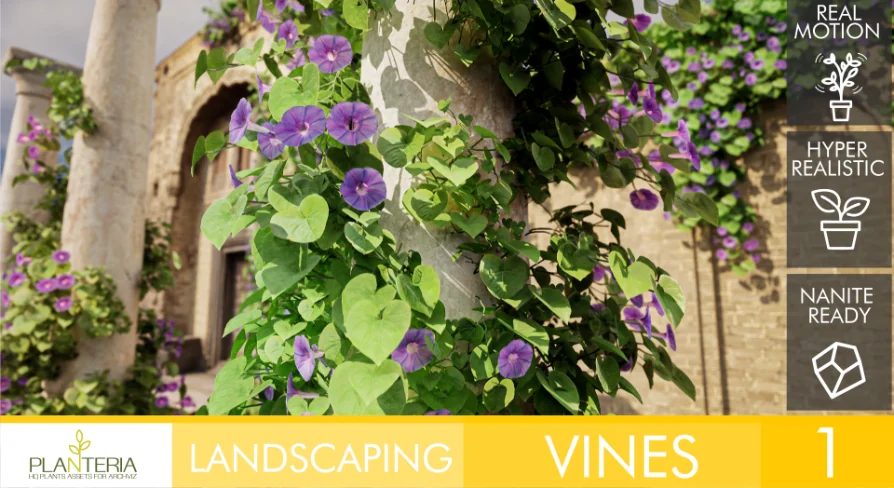
Architectural renders can get away with still plants, but animated walkthroughs, cinematics, and virtual tours expose every rigid branch and frozen leaf. Landscaping Vines 1 targets that problem with a plant pack meant to bring more life into built spaces, especially where climbing vegetation needs to sit against walls and facades without looking stiff.
The package centers on vines that can be added one by one or placed in groups. That flexibility matters in production: sometimes a wall only needs a narrow strip of growth to break up a hard surface, while other scenes need heavier coverage to soften an exterior. Rather than treating the foliage as background dressing only for static shots, this set leans into movement and scene interaction.
Landscaping Vines 1 in animated architectural scenes
The main appeal here is not just that the plants fill space, but that they are set up to avoid the unnatural look common in moving scenes. The foliage uses a hierarchy selection process across each leaf, branch, and trunk, with the stated goal of producing motion that feels natural and fluid. For environments viewed in motion, that distinction is central. A wall covered in vines can either add atmosphere or immediately reveal itself as artificial when the camera moves past it.
This makes the pack a practical fit for architectural presentations where greenery is expected to behave convincingly. Exterior walls, backyard views, garden-facing facades, and industrial or residential architectural spaces all benefit from vegetation that does more than sit still. The emphasis stays on realism and performance at the same time, so the vines are not treated as throwaway detail. Small imperfections are part of the look, which helps push the assets away from an overly clean or synthetic finish.
Pivot Painter 2.0 keeps vines moving naturally
Movement is handled through Pivot Painter 2.0. That is the core system behind the pack’s animated behavior, and it is presented as the reason the foliage can maintain fluid motion while using a minimum of resources. In a production workflow, that places the pack in a useful middle ground: the plants are not only trying to look realistic in close views, they are also intended to stay efficient enough for broader environment use.
The visual side supports that same balance. The assets are modeled and textured for realism and performance, with editable PBR materials that can be customized. That gives artists room to adjust the look without rebuilding the asset from scratch. In practical terms, editable materials are often what let foliage sit more comfortably inside an established scene palette. A vine used on a sunlit modern facade may need a different surface response than one placed in a shaded courtyard or on a weathered wall, and the included material editability supports that kind of adjustment.
All assets are provided separately, which makes them easier to handle as modular dressing elements. Instead of treating the set as a single prearranged mass, artists can place individual pieces where coverage is needed and group them where denser growth makes more sense. That modular structure also helps when scene layout changes late in production and foliage needs to be redistributed rather than replaced.
Painting Landscaping Vines 1 on walls in Foliage Mode
One of the clearest workflow advantages in Landscaping Vines 1 is the wall-painting setup. When using the Static Mesh Foliage assets as foliage, they can be dragged directly into Foliage Mode and are already configured with parameters that allow painting on walls. For artists dressing vertical surfaces, that removes setup friction and makes the pack immediately useful in facade work.
There is one important restriction in that workflow: the Placement section should not be adjusted. The Painting section can be tweaked as needed, but the placement settings are already tuned for the intended use. That tells you where the package expects customization to happen and where it does not.
If the assets are added as simple Static Meshes instead of foliage, painting on walls will not work by default. The fix is straightforward inside Foliage Mode’s Placement section:
Uncheck Random Yaw
Set Ground Slope Angle to 180
That setup note gives the pack a clearer place in a real environment workflow. It is not just a collection of vines to scatter manually; it is a foliage toolset with a specific vertical-surface use case already accounted for. For projects that rely on fast facade dressing, that matters more than a generic vegetation pack with no attention to wall placement.
Nanite, Lumen, and the demo map setup
Landscaping Vines 1 supports Nanite for Unreal Engine 5.0 and above, and it also supports Lumen for Unreal Engine 5.0 and above. The Nanite support is presented as part of the pack’s effort to avoid sacrificing quality or performance. In scenes where foliage needs to hold up visually without becoming a bottleneck, that support is a significant part of where the resource fits.
Lumen support also places the pack comfortably inside modern Unreal Engine architectural visualization and real-time scene work. Since the vines are intended for spaces that benefit from realism, having them sit within a Lumen-capable workflow aligns with the package’s broader focus on believable presentation rather than simple decorative fill.
There is one project setup note attached to the demo map: the SunPosition plugin is enabled for the demo map to function correctly. That is a small but useful production detail, especially for anyone opening the scene as a reference point for placement or presentation. Another boundary is also clearly defined: the buildings shown in the promotional imagery are not part of the product and serve only as demonstration context.
For teams or solo artists working on Unreal Engine architectural scenes, Landscaping Vines 1 fits best when the goal is to add wall-friendly vegetation that reads well in motion, not just in still frames. Its strongest use is in projects where vines need natural movement, editable materials, and a foliage workflow that is already prepared for vertical painting.
 Climber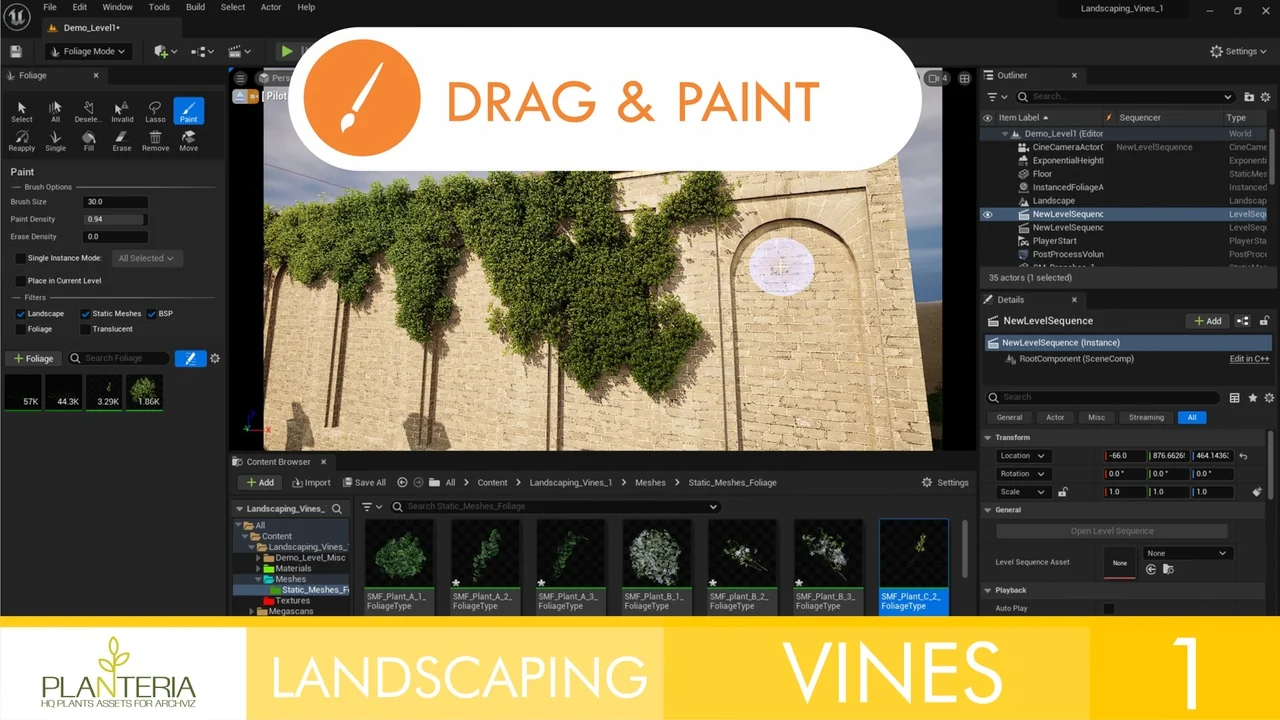
 Procedural Systems
 Buildings
 Trees
Trees